reset TOYOTA COROLLA 2010 10.G Owners Manual
[x] Cancel search | Manufacturer: TOYOTA, Model Year: 2010, Model line: COROLLA, Model: TOYOTA COROLLA 2010 10.GPages: 476, PDF Size: 9.5 MB
Page 10 of 476
10
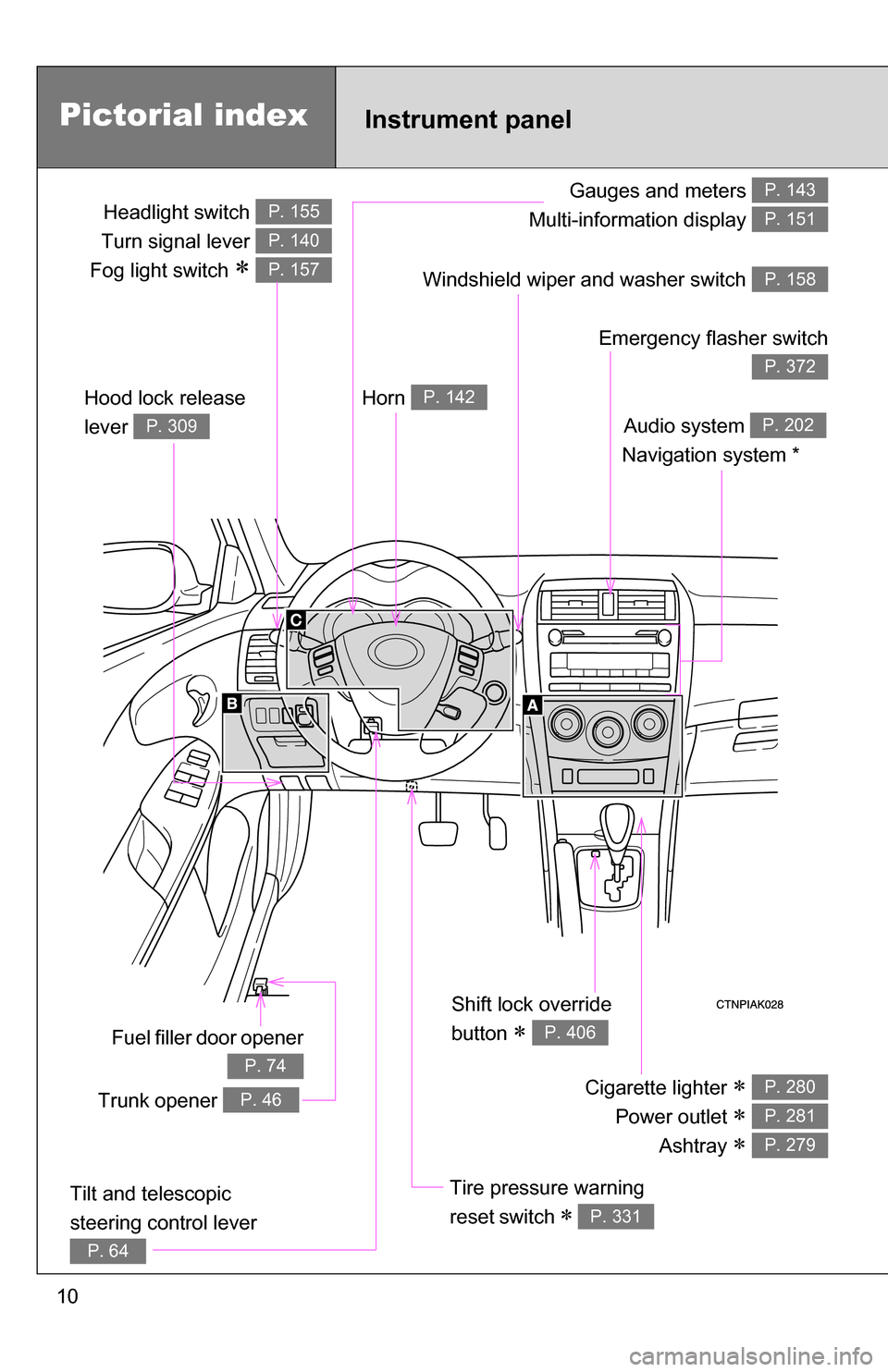
Gauges and meters
Multi-information display P. 143
P. 151
Tilt and telescopic
steering control lever
P. 64
Pictorial index
Trunk opener P. 46
Headlight switch
Turn signal lever
Fog light switch
P. 155
P. 140
P. 157
Instrument panel
Audio system
Navigation system *P. 202
Windshield wiper and washer switch P. 158
Hood lock release
lever
P. 309
Fuel filler door opener
P. 74
Emergency flasher switch
P. 372
Shift lock override
button
P. 406
Cigarette lighter
Power outlet
Ashtray
P. 280
P. 281
P. 279
Tire pressure warning
reset switch
P. 331
Horn P. 142
Page 44 of 476
44 1-2. Opening, closing and locking the doors and trunk
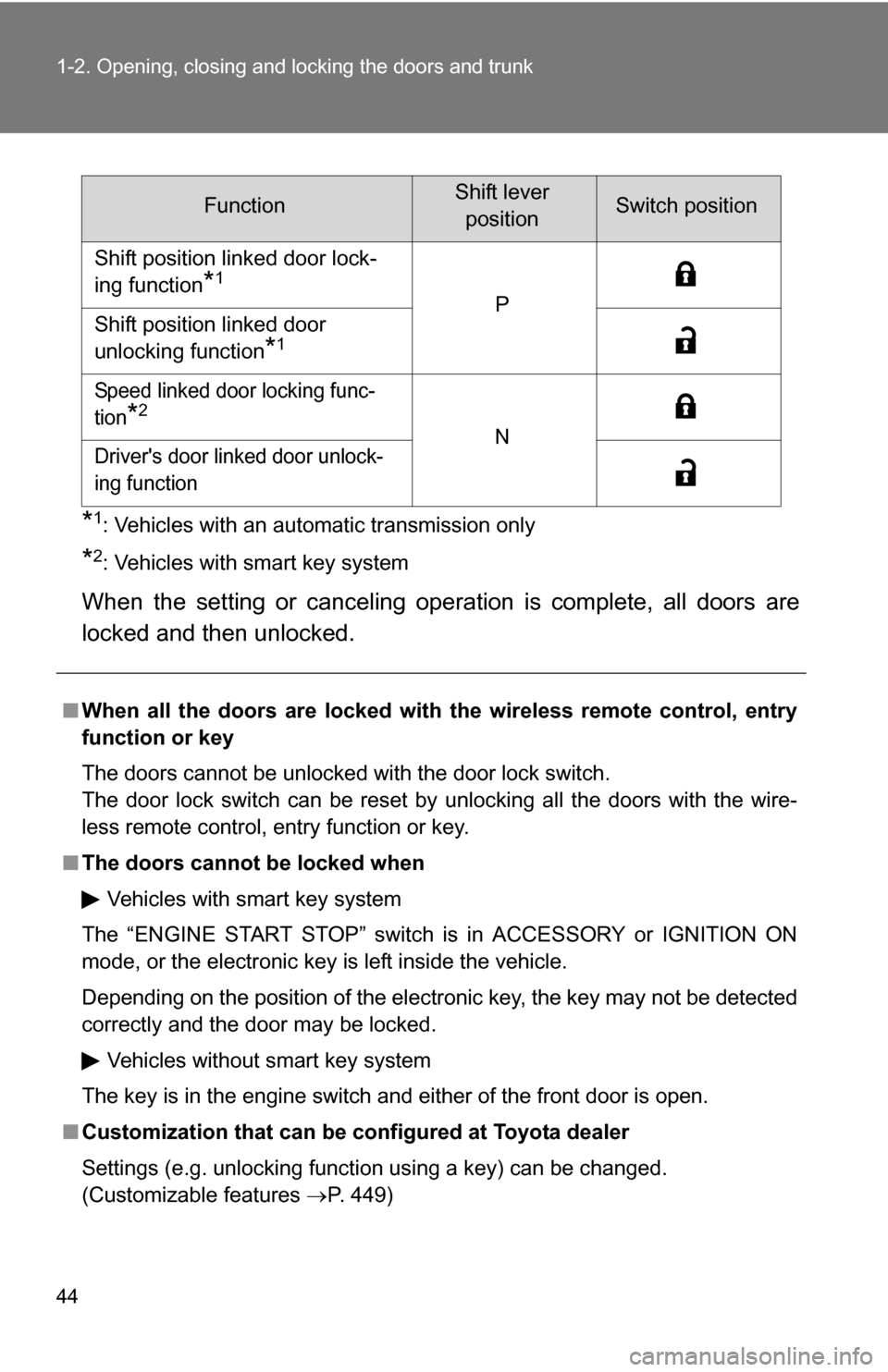
*1: Vehicles with an automatic transmission only
*2: Vehicles with smart key system
When the setting or canceling operation is complete, all doors are
locked and then unlocked.
FunctionShift leverpositionSwitch position
Shift position linked door lock-
ing function
*1
P
Shift position linked door
unlocking function
*1
Speed linked door locking func-
tion
*2
N
Driver's door linked door unlock-
ing function
■ When all the doors are locked with the wireless remote control, entry
function or key
The doors cannot be unlocked with the door lock switch.
The door lock switch can be reset by unlocking all the doors with the wire-
less remote control, entry function or key.
■ The doors cannot be locked when
Vehicles with smart key system
The “ENGINE START STOP” switch is in ACCESSORY or IGNITION ON
mode, or the electronic key is left inside the vehicle.
Depending on the position of the electronic key, the key may not be detected
correctly and the door may be locked. Vehicles without smart key system
The key is in the engine switch and either of the front door is open.
■ Customization that can be co nfigured at Toyota dealer
Settings (e.g. unlocking function using a key) can be changed.
(Customizable features P. 449)
Page 144 of 476
144 2-2. Instrument cluster
Odometer/trip meter/instrument panel light control and trip meter
reset button
Switches between odometer and trip meter displays. Pressing and
holding the button will reset the trip meter when the trip meter is being
displayed.
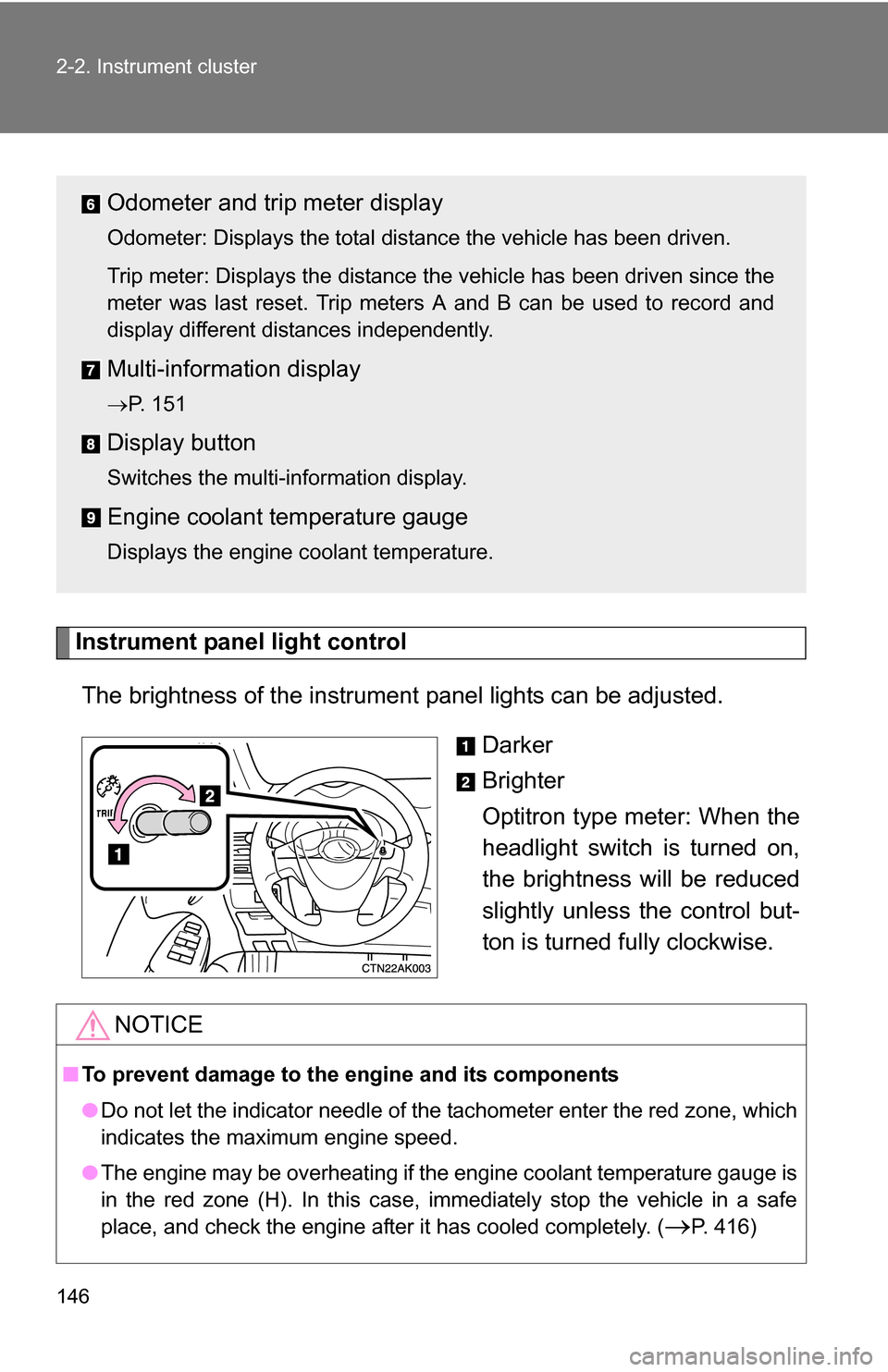
To adjust the brightness of the instrument panel light, turn the button.
( P. 146)
Odometer and trip meter display
Odometer: Displays the total distance the vehicle has been driven.
Trip meter: Displays the distance the vehicle has been driven since the
meter was last reset. Trip meters A and B can be used to record and
display different distances independently.
Multi-informat ion display
P. 151
Display button
Switches the multi-information display.
Engine coolant temperature gauge
Displays the engine coolant temperature.
Page 145 of 476
145
2-2. Instrument cluster
2
When driving
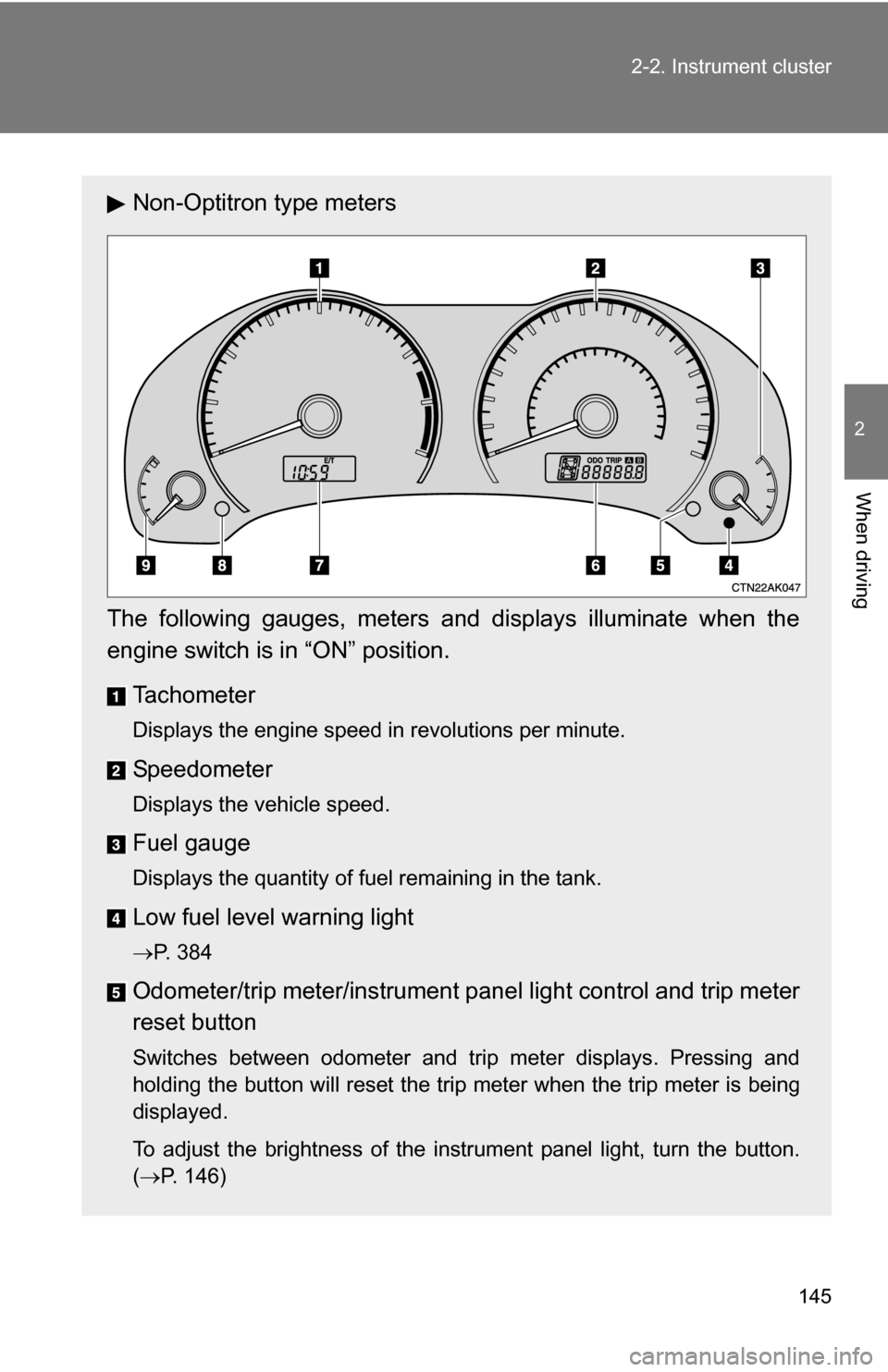
Non-Optitron type meters
The following gauges, meters and displays illuminate when the
engine switch is in “ON” position.
Tachometer
Displays the engine speed in revolutions per minute.
Speedometer
Displays the vehicle speed.
Fuel gauge
Displays the quantity of fuel remaining in the tank.
Low fuel level warning light
P. 384
Odometer/trip meter/instrument p anel light control and trip meter
reset button
Switches between odometer and trip meter displays. Pressing and
holding the button will reset the trip meter when the trip meter is being
displayed.
To adjust the brightness of the instrument panel light, turn the button.
( P. 146)
Page 146 of 476
146 2-2. Instrument cluster
Instrument panel light controlThe brightness of the instrument panel lights can be adjusted.
Darker
Brighter
Optitron type meter: When the
headlight switch is turned on,
the brightness will be reduced
slightly unless the control but-
ton is turned fully clockwise.
Odometer and trip meter display
Odometer: Displays the total distance the vehicle has been driven.
Trip meter: Displays the distance the vehicle has been driven since the
meter was last reset. Trip meters A and B can be used to record and
display different distances independently.
Multi-informat ion display
P. 151
Display button
Switches the multi-information display.
Engine coolant temperature gauge
Displays the engine coolant temperature.
NOTICE
■To prevent damage to the engine and its components
●Do not let the indicator needle of the tachometer enter the red zone, which
indicates the maximum engine speed.
● The engine may be overheating if the engine coolant temperature gauge is
in the red zone (H). In this case, immediately stop the vehicle in a safe
place, and check the engine after it has cooled completely. (
P. 416)
Page 152 of 476
152 2-2. Instrument cluster
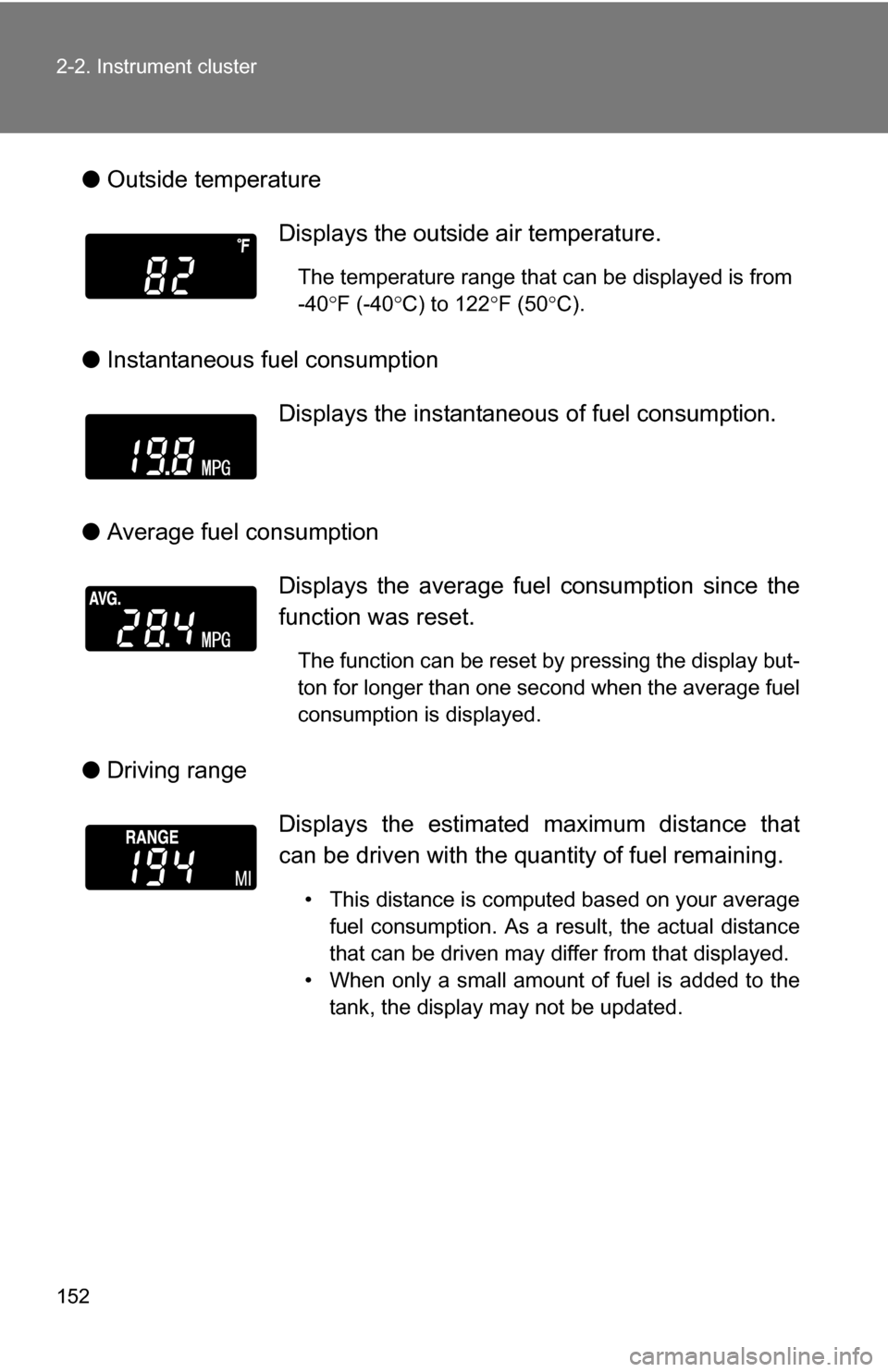
●Outside temperature
● Instantaneous fuel consumption
● Average fuel consumption
● Driving range Displays the outside air temperature.
The temperature range that can be displayed is from
-40
F (-40 C) to 122 F (50 C).
Displays the instantaneous of fuel consumption.
Displays the average fuel consumption since the
function was reset.
The function can be reset by pressing the display but-
ton for longer than one second when the average fuel
consumption is displayed.
Displays the estimated maximum distance that
can be driven with the quantity of fuel remaining.
• This distance is computed based on your average fuel consumption. As a result, the actual distance
that can be driven may differ from that displayed.
• When only a small amount of fuel is added to the tank, the display may not be updated.
Page 153 of 476
153
2-2. Instrument cluster
2
When driving
●
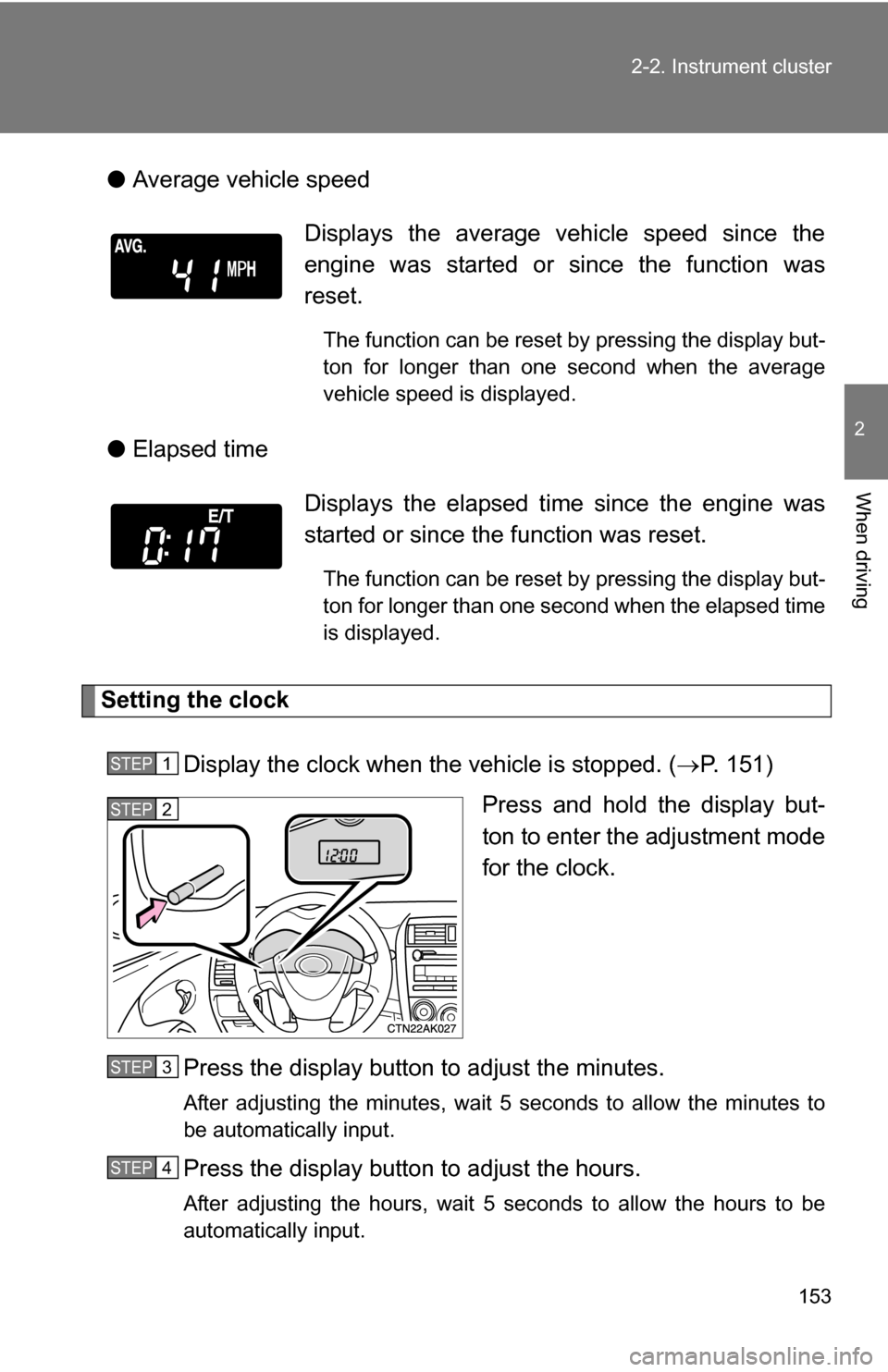
Average vehicle speed
● Elapsed time
Setting the clock
Display the clock when the vehicle is stopped. ( P. 151)
Press and hold the display but-
ton to enter the adjustment mode
for the clock.
Press the display button to adjust the minutes.
After adjusting the minutes, wait 5 seconds to allow the minutes to
be automatically input.
Press the display button to adjust the hours.
After adjusting the hours, wait 5 seconds to allow the hours to be
automatically input.
Displays the average vehicle speed since the
engine was started or since the function was
reset.
The function can be reset by pressing the display but-
ton for longer than one second when the average
vehicle speed is displayed.
Displays the elapsed ti me since the engine was
started or since the function was reset.
The function can be reset by pressing the display but-
ton for longer than one second when the elapsed time
is displayed.
STEP 1
STEP 2
STEP 3
STEP 4
Page 154 of 476
154 2-2. Instrument cluster
■When disconnecting and reco nnecting battery terminals
The following information data will be reset.
● Clock
● Average fuel consumption
● Driving range
● Average vehicle speed
● Elapsed time
■ Display
In the following situations, the correct outside temperature may not be dis-
played, or the display may take longer than normal to change.
●When stopped, or driving at low speeds (less than 12 mph [20 km/h])
● When the outside temperature has changed suddenly (at the entrance/
exit of a garage, tunnel, etc.)
NOTICE
■The multi-information disp lay at low temperatures
Allow the interior of the vehicle to warm up before using the liquid crystal
information display. At extremely low temperatures, the information display
monitor may respond slowly, and display changes may be delayed.
Page 162 of 476
162 2-4. Using other driving systems
■Accelerating
The vehicle can be accelerated normally. After acceleration, the set speed
resumes.
■ Automatic cruise control cancellation
The set speed is automatically canceled in any of the following situations.
●Actual vehicle speed falls more than 10 mph (16 km/h) below the preset
vehicle speed.
At this time, the memorized set speed is not retained.
● Actual vehicle speed is below 25 mph (40 km/h).
● VSC is activated.
■ If the cruise control indicator light flashes
Press the “ON-OFF” button once to deactivate the system, and then press
the button again to reactivate the system.
If the cruise control speed cannot be set or if the cruise control cancels
immediately after being activated, there may be a malfunction in the cruise
control system. Contact your Toyota dealer and have your Toyota inspected.
CAUTION
■To avoid operating the cruise control by mistake
Keep the “ON-OFF” button off when not in use.
■ Situations unsuitable for cruise control
Do not use cruise control in any of the following situations.
Doing so may result in control of the vehicle being lost and could cause an
accident resulting in death or serious injury.
●In heavy traffic
● On roads with sharp bends
● On winding roads
● On slippery roads, such as those covered with rain, ice or snow
● On steep hills
● When your vehicle is towing a trailer
Page 205 of 476
205
3-2. Using the audio system
3
Interior features
Using the radio
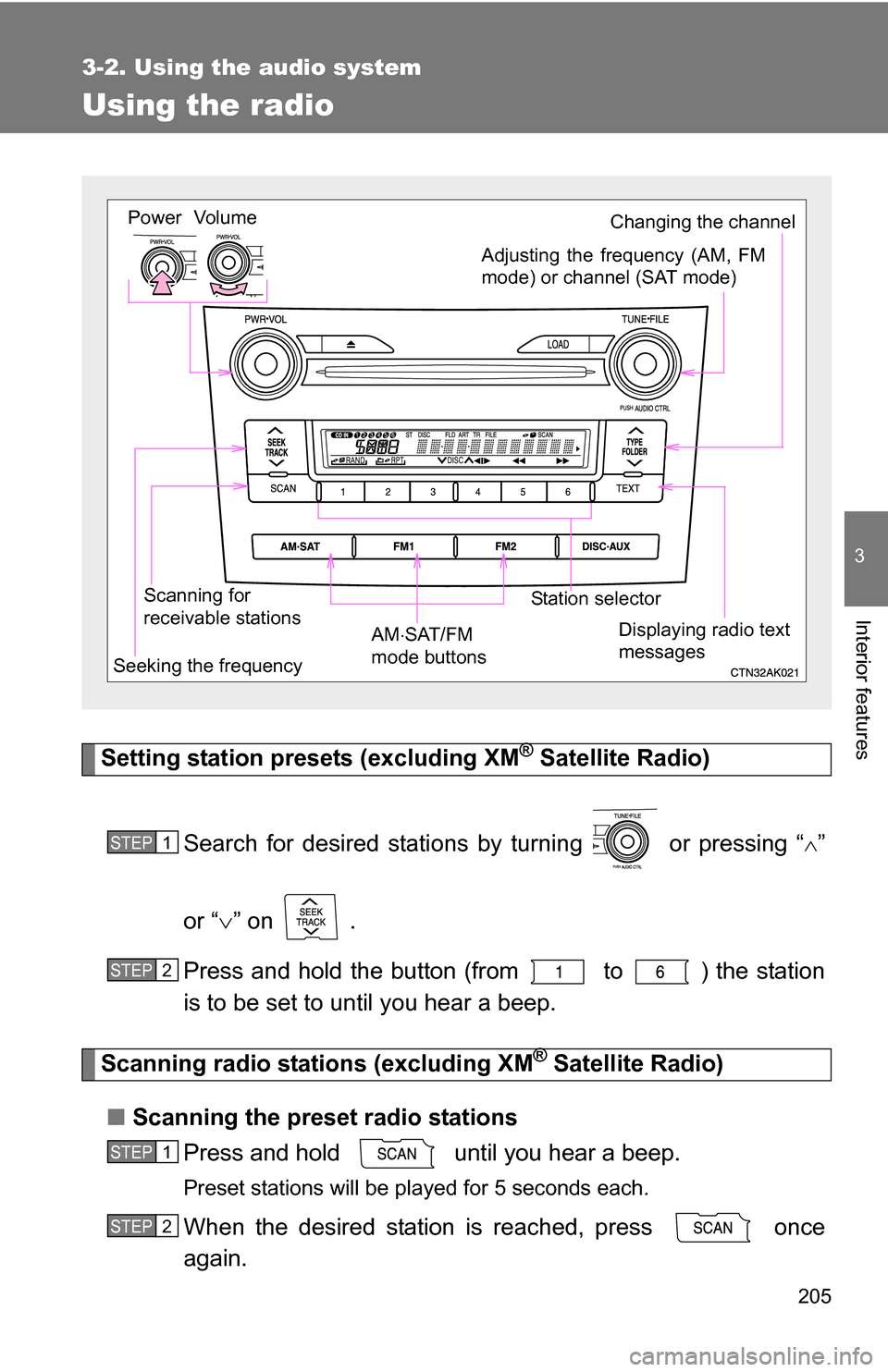
Setting station presets (excluding XM® Satellite Radio)
Search for desired stations by turning or pressing “
”
or “ ” on .
Press and hold the button (from to ) the station
is to be set to until you hear a beep.
Scanning radio stations (excluding XM® Satellite Radio)
■ Scanning the preset radio stations
Press and hold until you hear a beep.
Preset stations will be played for 5 seconds each.
When the desired station is reached, press once
again.
Vol um e
Scanning for
receivable stations Station selector
Seeking the frequency Adjusting the frequency (AM, FM
mode) or channel (SAT mode)
AM SAT/FM
mode buttonsPower
Displaying radio text
messages
Changing the channel
STEP 1
STEP 2
STEP 1
STEP 2