CD player TOYOTA COROLLA 2012 10.G User Guide
[x] Cancel search | Manufacturer: TOYOTA, Model Year: 2012, Model line: COROLLA, Model: TOYOTA COROLLA 2012 10.GPages: 529, PDF Size: 8.07 MB
Page 240 of 529
240 3-2. Using the audio system
■Error messages
“ERROR” (type B): This indicates a problem either in the CD or inside the
player.
“CD CHECK”: The CD may be dirty, damaged or inserted up-side down.
“WAIT” or “PLEASE WAIT”: Operation has stopped due to a high tempera- ture inside the player. Wait for a while and then
press or . If the CD still
cannot be played back, contact your Toyota
dealer.
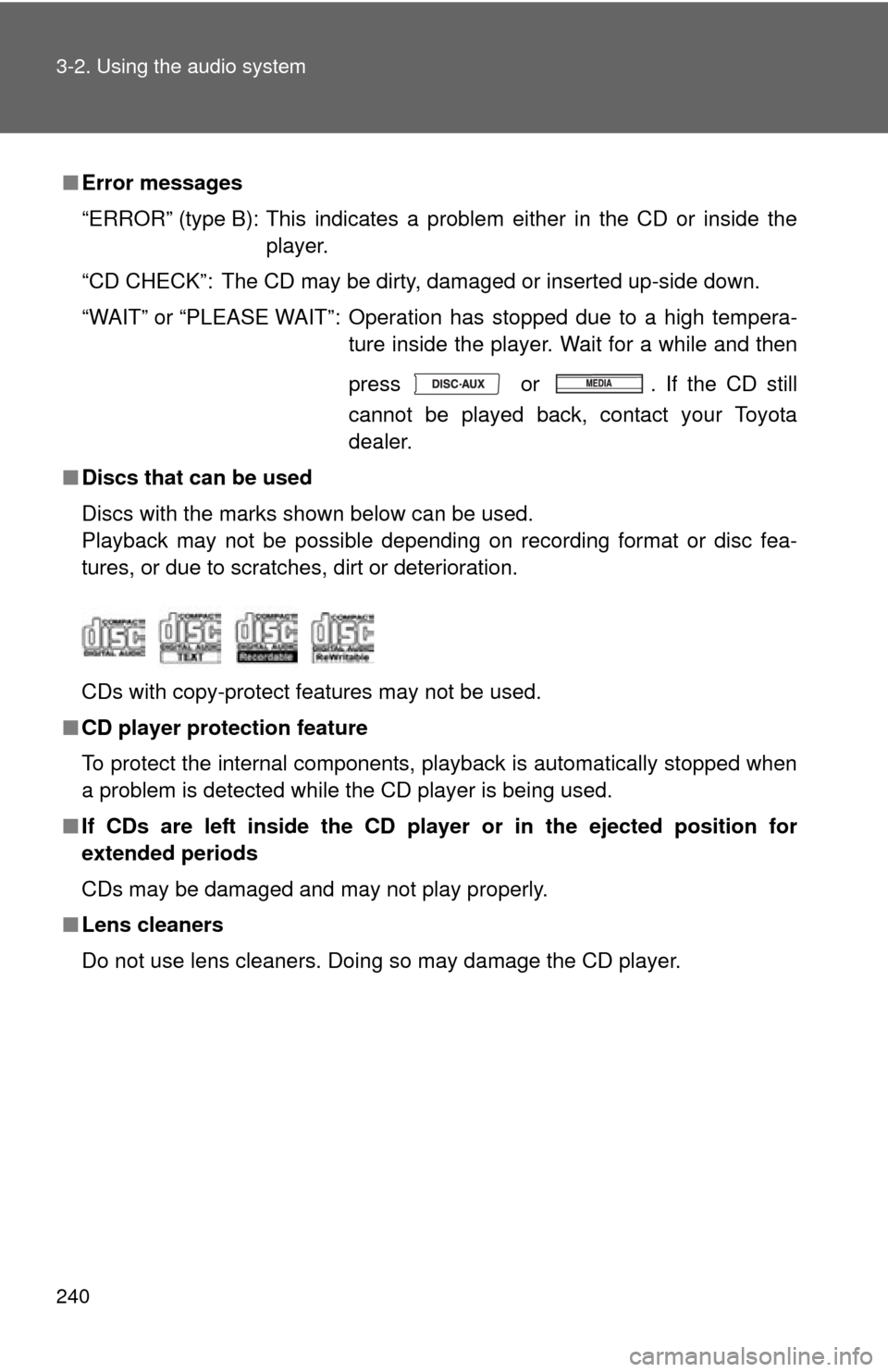
■ Discs that can be used
Discs with the marks shown below can be used.
Playback may not be possible depending on recording format or disc fea-
tures, or due to scratches, dirt or deterioration.
CDs with copy-protect features may not be used.
■ CD player protection feature
To protect the internal components, playback is automatically stopped when
a problem is detected while the CD player is being used.
■ If CDs are left inside the CD player or in the ejected position for
extended periods
CDs may be damaged and may not play properly.
■ Lens cleaners
Do not use lens cleaners. Doing so may damage the CD player.
Page 241 of 529
241
3-2. Using the audio system
3
Interior features
NOTICE
■
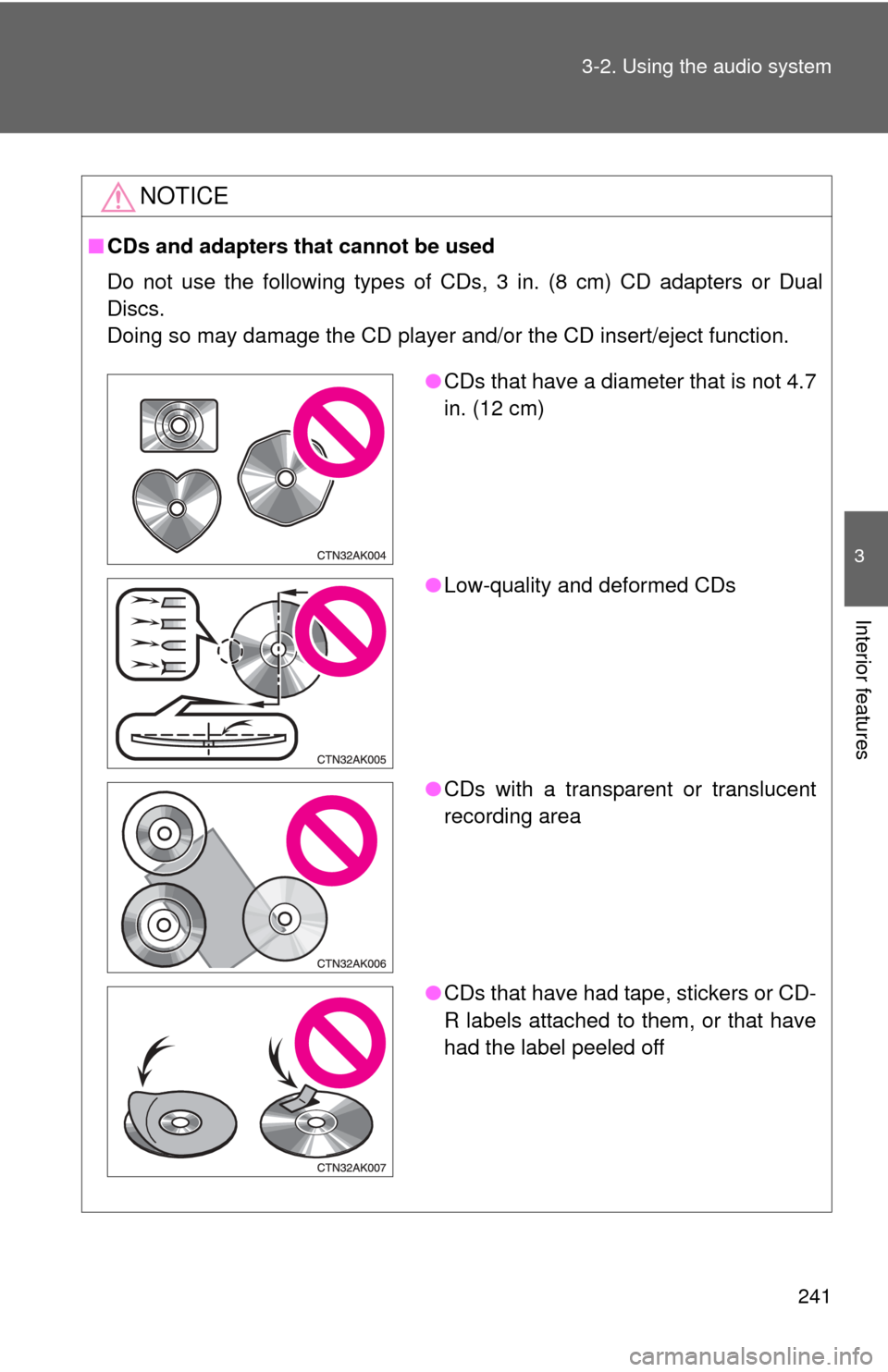
CDs and adapters that cannot be used
Do not use the following types of CDs, 3 in. (8 cm) CD adapters or Dual
Discs.
Doing so may damage the CD player and/or the CD insert/eject function.
●CDs that have a diameter that is not 4.7
in. (12 cm)
● Low-quality and deformed CDs
● CDs with a transparent or translucent
recording area
● CDs that have had tape, stickers or CD-
R labels attached to them, or that have
had the label peeled off
Page 242 of 529

242 3-2. Using the audio system
NOTICE
■CD player precautions
Failure to follow the precautions below may result in serious damage to the
CDs or the player itself.
●Do not insert anything other than CDs into the CD slot.
● Do not apply oil to the CD player.
● Store CDs away from direct sunlight.
● Never try to disassemble any part of the CD player.
Page 248 of 529
248 3-2. Using the audio system
■Display
P. 239
■ Error messages
“CD CHECK”: This indicates a problem either in the CD or inside the player.
The CD may be dirty, damaged or inserted up-side down.
“NO MUSIC” (type A): This indicates that MP3/WMA files are not included in the CD.
“WAIT” or “PLEASE WAIT” (type A): Operation has stopped due to a high temperature inside the player. Wait for
a while and then press .
Contact your Toyota dealer if the CD
still cannot be played.
“ERROR” (type B): This indicates a problem either in the CD or inside the player.
“NO SUPPORT” (type B):This indi cates that MP3/WMA files are not
included in the CD.
■ Discs that can be used
P. 240
■ CD player protection feature
P. 240
■ If CDs are left inside the CD player or in the ejected position for
extended periods
P. 240
■ Lens cleaners
P. 240
Page 251 of 529
251
3-2. Using the audio system
3
Interior features
●
Extensions
If the file extensions .mp3 and .wma are used for files other than MP3 and
WMA files, they will be mistakenly recognized and played as MP3 and
WMA files. This may result in large amounts of interference and damage
to the speakers.
● Playback
• To play MP3 file with steady sound quality, we recommend a fixed bit
rate of at least 128 kbps and a sampling frequency of 44.1 kHz.
• CD-R or CD-RW playback may not be possible in some instances, depending on the characteristics of the disc.
• There is a wide variety of freeware and other encoding software for MP3 and WMA files on the market, and depending on the status of the
encoding and the file format, poor sound quality or noise at the start of
playback may result. In some cases, playback may not be possible at
all.
• When files other than MP3 or WMA files are recorded on a disc, it may take more time to recognize the disc and in some cases, playback may
not be possible at all.
• Microsoft, Windows, and Windows Media are the registered trade- marks of Microsoft Corporation in the U.S. and other countries.
NOTICE
■ CDs and adapters that cannot be used
P. 241
■ CD player precautions
P. 242
Page 268 of 529

268 3-2. Using the audio system
NOTICE
■To prevent damage to USB memory
●Do not leave USB memory in the vehicle. The temperature inside the vehi-
cle may become high, resulting in damage to the player.
● Do not push down on or apply unnecessary pressure to the USB memory
while it is connected as this may damage the USB memory or its terminal.
● Do not insert foreign objects into the port as this may damage the USB
memory or its terminal.
Page 279 of 529
279
3
Interior features
3-3. Using the Bluetooth® audio system
Bluetooth® audio/phone
■Conditions affecting operation
The Bluetooth
® audio/phone may not operate normally in the following situa-
tions:
● The portable player does not support Bluetooth
®
●The cellular phone is located outside the service area
● The Bluetooth
® device is switched off
● The Bluetooth
® device has a low battery
● The Bluetooth
® device is not connected to the system
● The Bluetooth
® device is behind the seat or in the glove box or console
box, or metal material covers or touches the device
■ Bluetooth® audio
The Bluetooth
® audio system enables yo u to enjoy music played
on a portable digital audio player (portable player) from the vehi-
cle speakers via wireless communication.
This audio system supports Bluetooth
®, a wireless data system
capable of playing portable audi o music without cables. If your
portable player does not support Bluetooth
®, the Bluetooth®
audio system will not function.
■ Bluetooth
® phone (hands-free phone system)
This system supports Bluetooth
®, which allows you to make or
receive calls without using cables to connect a cellular phone
and the system, and without operating the cellular phone.
: If equipped
Page 280 of 529
280 3-3. Using the Bluetooth
® audio system
■When transferring ownership of the vehicle
Be sure to initialize the system to prevent personal data from being improp-
erly accessed. ( P. 300)
■ About Bluetooth
®
■Compatible models
●Bluetooth
® specifications:
Ver. 1.1, or higher (recommended: Ver. 2.1 + EDR or higher)
● Following Profiles:
• A2DP (Advanced Audio Distribution Prof ile) Ver. 1.0, or higher (recom-
mended: Ver. 1.2 or higher)
• AVRCP (Audio/Video Remote Control Profile) Ver. 1.0 or higher (rec- ommended: Ver. 1.3 or higher)
Portable players must correspond to the above specifications in order to be
connected to the Bluetooth
® audio system. However, please note that some
functions may be limited depending on the type of portable player.
● Cellular phone
• HFP (Hands Free Profile) Ver. 1.0 or higher (recommended: Ver. 1.5)
• OPP (Object Push Profile) Ver. 1.1
• PBAP (Phone Book Access Profile) Ver. 1.0
CAUTION
■Caution while driving
●Do not use a cellular phone.
● Do not connect Bluetooth
® device or operate the controls.
Bluetooth is a registered trademark of
Bluetooth SIG. Inc.
Page 284 of 529
284 3-3. Using the Bluetooth
® audio system
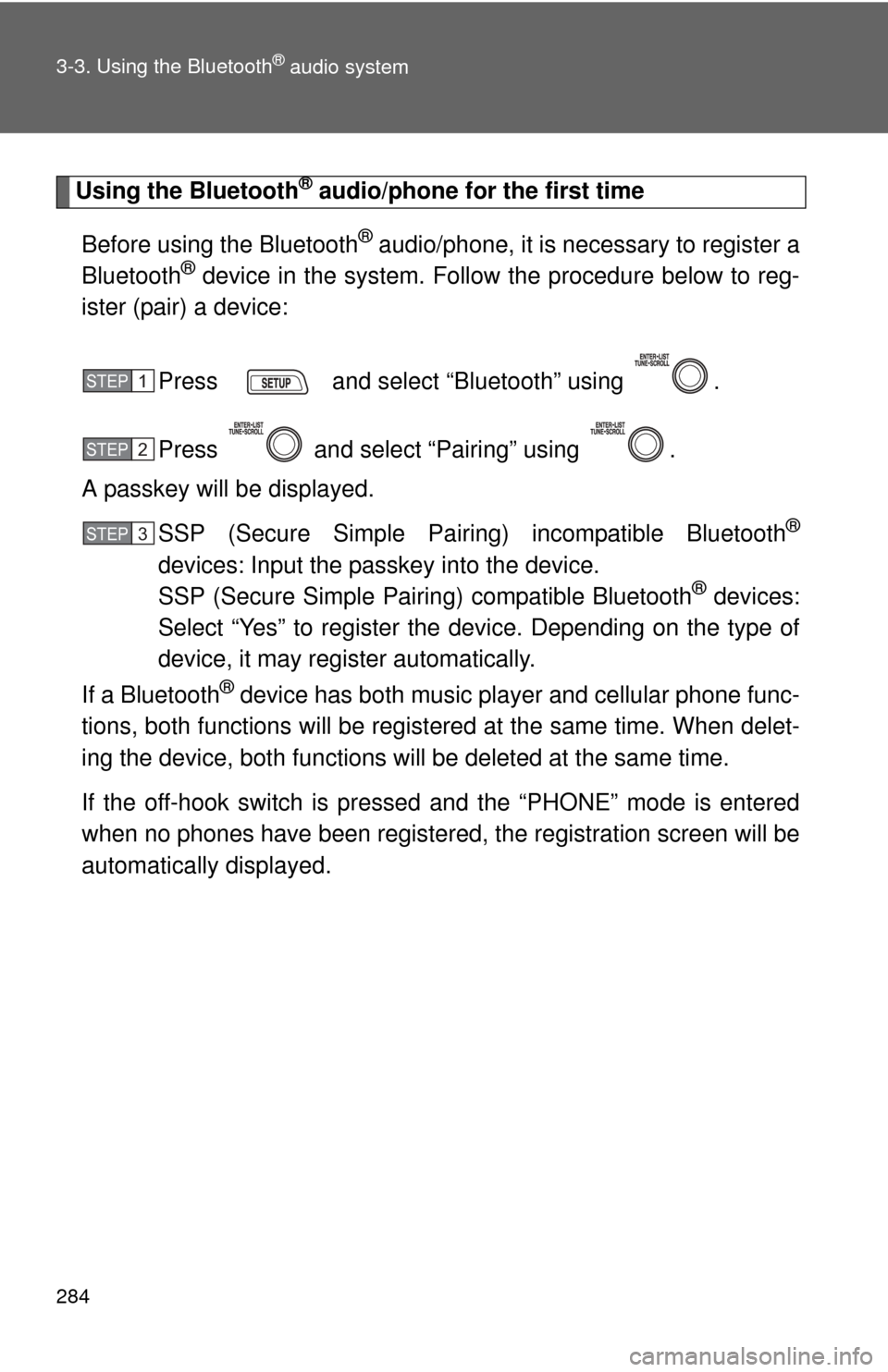
Using the Bluetooth® audio/phone for the first time
Before using the Bluetooth
® audio/phone, it is nec essary to register a
Bluetooth® device in the system. Follow the procedure below to reg-
ister (pair) a device:
Press and select “Bluetooth” using .
Press and select “Pairing” using .
A passkey will be displayed.
SSP (Secure Simple Pairing) incompatible Bluetooth
®
devices: Input the passkey into the device.
SSP (Secure Simple Pairing) compatible Bluetooth® devices:
Select “Yes” to register the device. Depending on the type of
device, it may register automatically.
If a Bluetooth
® device has both music player and cellular phone func-
tions, both functions will be regist ered at the same time. When delet-
ing the device, both f unctions will be deleted at the same time.
If the off-hook switch is pressed and the “PHONE” mode is entered
when no phones have been registered, the re gistration screen will be
automatically displayed.
STEP 1
STEP 2
STEP 3
Page 285 of 529
285
3-3. Using the Bluetooth
® audio system
3
Interior features
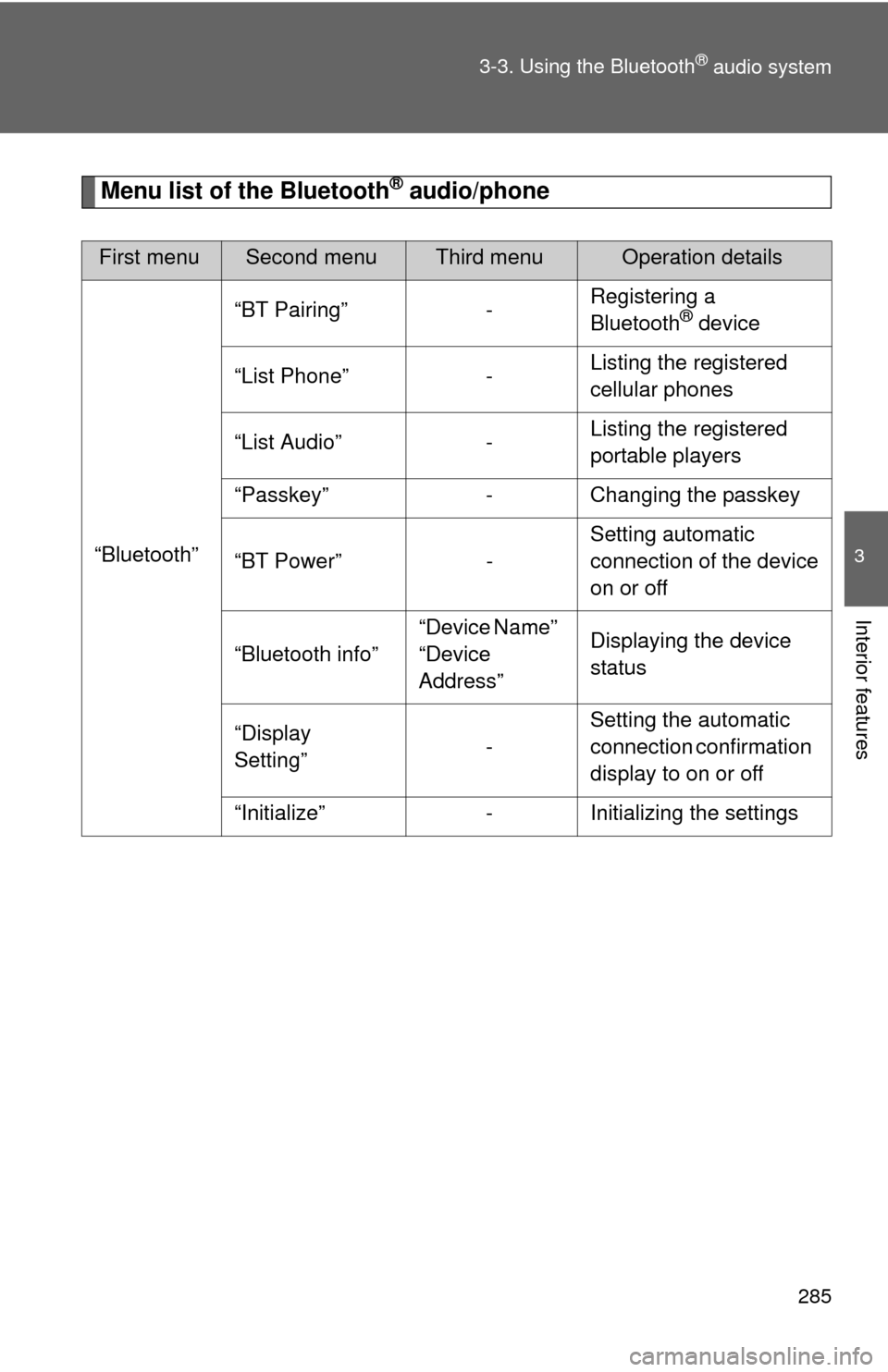
Menu list of the Bluetooth® audio/phone
First menuSecond menuThird menuOperation details
“Bluetooth” “BT Pairing” -
Registering a
Bluetooth
® device
“List Phone” - Listing the registered
cellular phones
“List Audio” - Listing the registered
portable players
“Passkey” - Changing the passkey
“BT Power” - Setting automatic
connection of the device
on or off
“Bluetooth info” “Device Name”
“Device
Address”Displaying the device
status
“Display
Setting” -Setting the automatic
connection confirmation
display to on or off
“Initialize” - Initializing the settings