audio TOYOTA COROLLA 2012 10.G Manual Online
[x] Cancel search | Manufacturer: TOYOTA, Model Year: 2012, Model line: COROLLA, Model: TOYOTA COROLLA 2012 10.GPages: 529, PDF Size: 8.07 MB
Page 288 of 529
288 3-3. Using the Bluetooth
® audio system
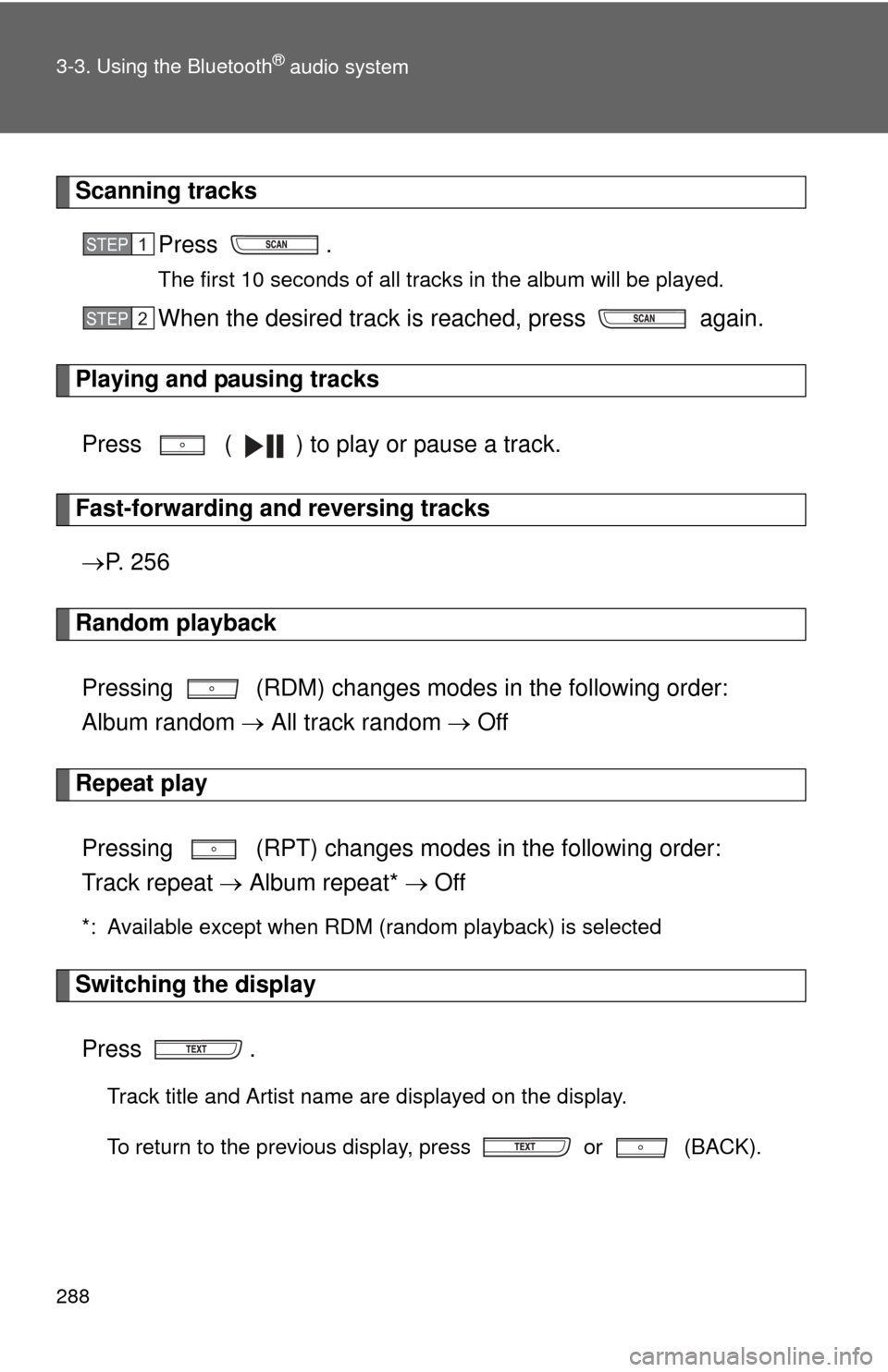
Scanning tracksPress .
The first 10 seconds of all tracks in the album will be played.
When the desired track is reached, press again.
Playing and pausing tracks
Press ( ) to play or pause a track.
Fast-forwarding and reversing tracks P. 2 5 6
Random playback
Pressing (RDM) changes mode s in the following order:
Album random All track random Off
Repeat play
Pressing (RPT) changes modes in the following order:
Track repeat Album repeat* Off
*: Available except when RDM (random playback) is selected
Switching the display
Press .
Track title and Artist name are displayed on the display.
To return to the previous display, press or (BACK).
STEP 1
STEP 2
Page 289 of 529
289
3-3. Using the Bluetooth
® audio system
3
Interior features
■
Bluetooth® audio system functions
Depending on the portable player that is connected to the system, certain
functions may not be available.
Page 295 of 529
295
3-4. Using the hands-free phone system (for cellular phone)
3
Interior features
Using the “SET UP” menu (“Bluetooth” menu)
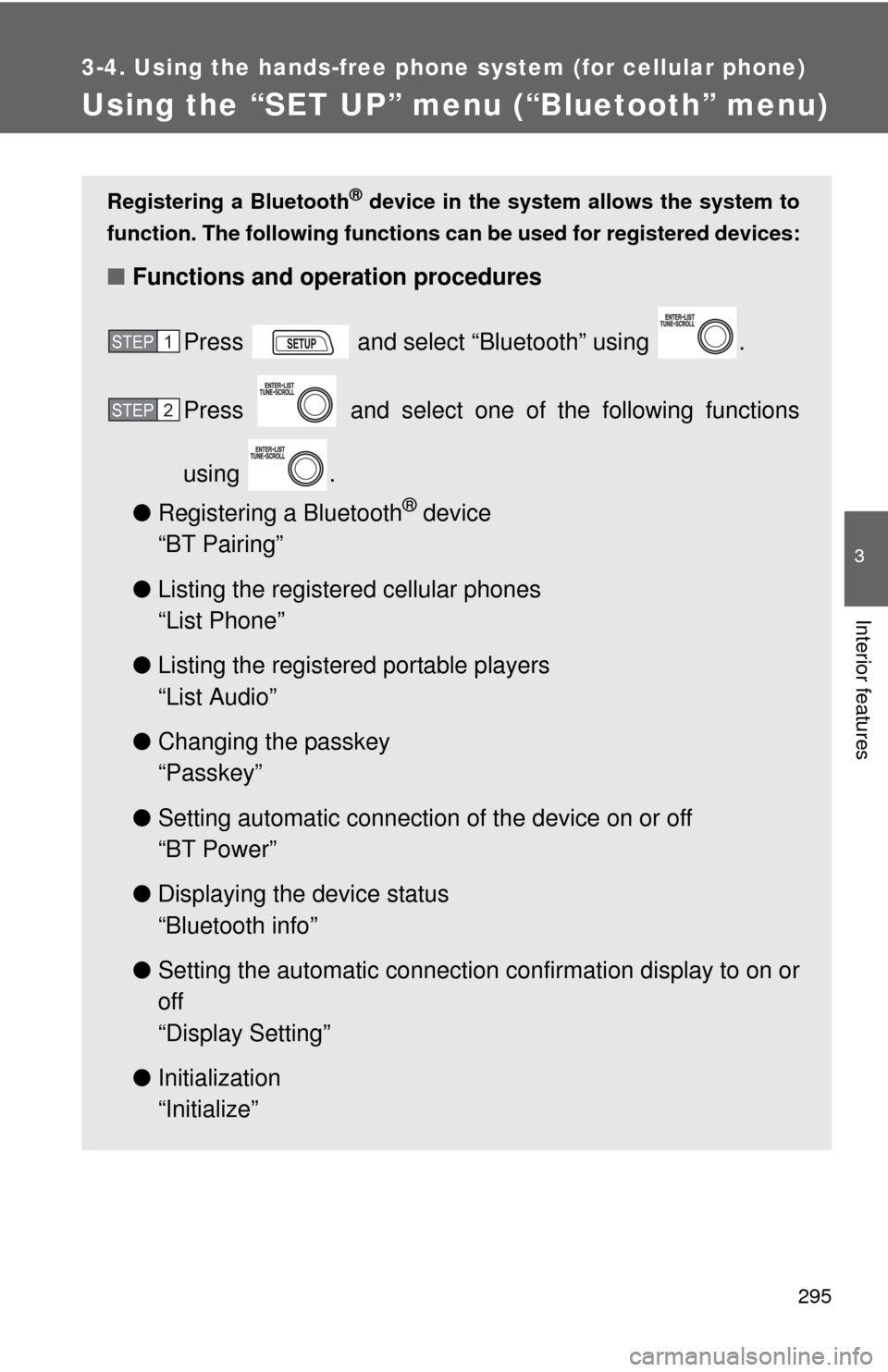
Registering a Bluetooth® device in the system allows the system to
function. The following functions can be used for registered devices:
■Functions and operation procedures
Press and select “Bluetooth” using .
Press and select one of the following functions
using .
● Registering a Bluetooth
® device
“BT Pairing”
● Listing the registered cellular phones
“List Phone”
● Listing the registered portable players
“List Audio”
● Changing the passkey
“Passkey”
● Setting automatic connection of the device on or off
“BT Power”
● Displaying the device status
“Bluetooth info”
● Setting the automatic connection confirmation display to on or
off
“Display Setting”
● Initialization
“Initialize”
STEP 1
STEP 2
Page 296 of 529
296 3-4. Using the hands-free phone system (for cellular phone)
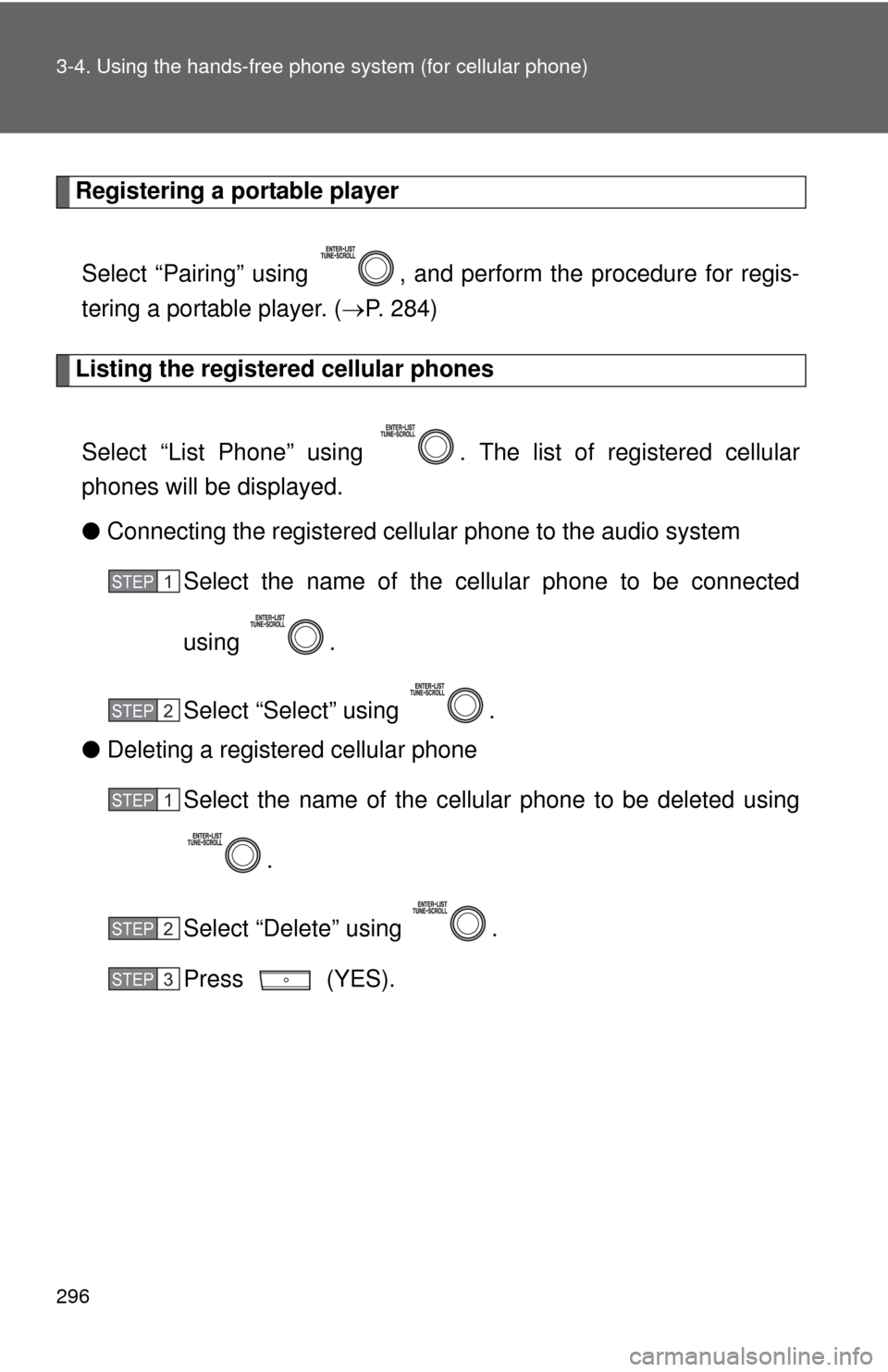
Registering a portable player
Select “Pairing” using , and perform the procedure for regis-
tering a portable player. ( P. 284)
Listing the registered cellular phones
Select “List Phone” using . The list of registered cellular
phones will be displayed.
● Connecting the registered cellular phone to the audio system
Select the name of the cellular phone to be connected
using .
Select “Select” using .
● Deleting a registered cellular phone
Select the name of the cellular phone to be deleted using
.
Select “Delete” using .
Press (YES).
STEP 1
STEP 2
STEP 1
STEP 2
STEP 3
Page 297 of 529
297
3-4. Using the hand
s-free phone system (for cellular phone)
3
Interior features
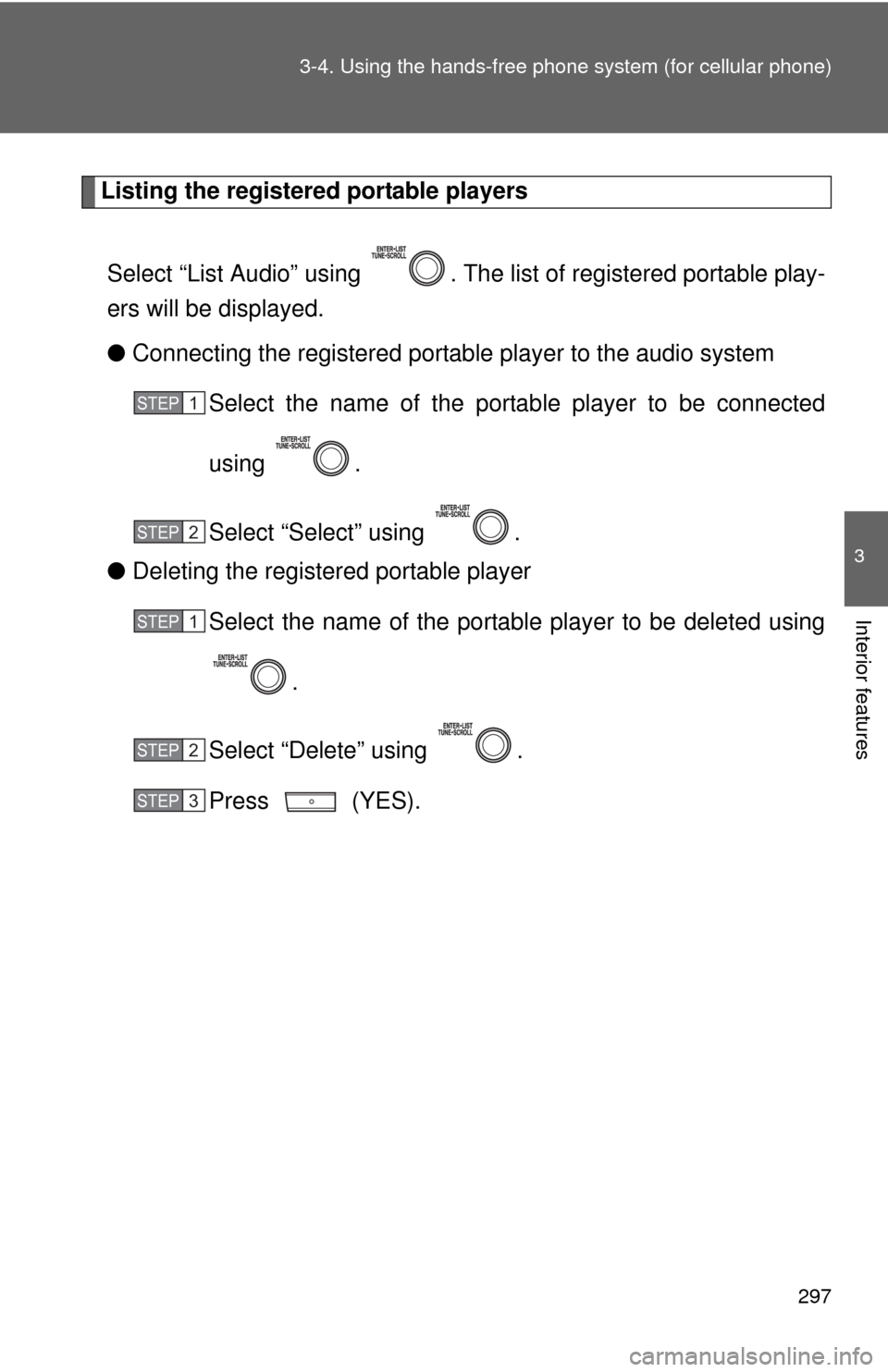
Listing the registered portable players
Select “List Audio” using . The list of registered portable play-
ers will be displayed.
● Connecting the registered portable player to the audio system
Select the name of the portab le player to be connected
using .
Select “Select” using .
● Deleting the registered portable player
Select the name of the portable player to be deleted using
.
Select “Delete” using .
Press (YES).
STEP 1
STEP 2
STEP 1
STEP 2
STEP 3
Page 338 of 529
338 4-1. Maintenance and care
NOTICE
■Cleaning detergents
●Do not use organic substances such as benzene or gasoline, acidic or
alkaline solutions, dye, bleach or other detergent. Doing so may discolor
the vehicle interior or cause streaks or damage to painted surfaces.
● Do not use polish wax or polish cleaner. The instrument panel's or other
interior part's painted surface may be damaged.
■ Preventing damage to leather surfaces
Observe the following precautions to avoid damage to and deterioration o\
f
leather surfaces.
●Remove any dust or dirt on leather surfaces immediately.
● Do not expose the vehicle to direct sunlight for extended periods of time.
Park the vehicle in the shade, especially during summer.
● Do not place items made of vinyl, plastic, or that contain wax, on the
upholstery, as they may stick to the leather surface if the vehicle interior
heats up significantly.
■ Water on the floor
Do not wash the vehicle floor with water.
Vehicle systems such as the audio system may be damaged if water comes
into contact with electrical components under the floor of the vehicle, and
may also cause the body to rust.
■ Cleaning the inside of the rear window
●Do not use glass cleaner to clean the rear window, as this may cause
damage to the rear window defogger heater wires or antenna. Use a cloth
dampened with lukewarm water to gently wipe the window clean. Wipe the
window in strokes running parallel to the heater wires or antenna.
● Be careful not to scratch or damage the heater wires or antenna.
Page 394 of 529
394 4-3. Do-it-yourself maintenance
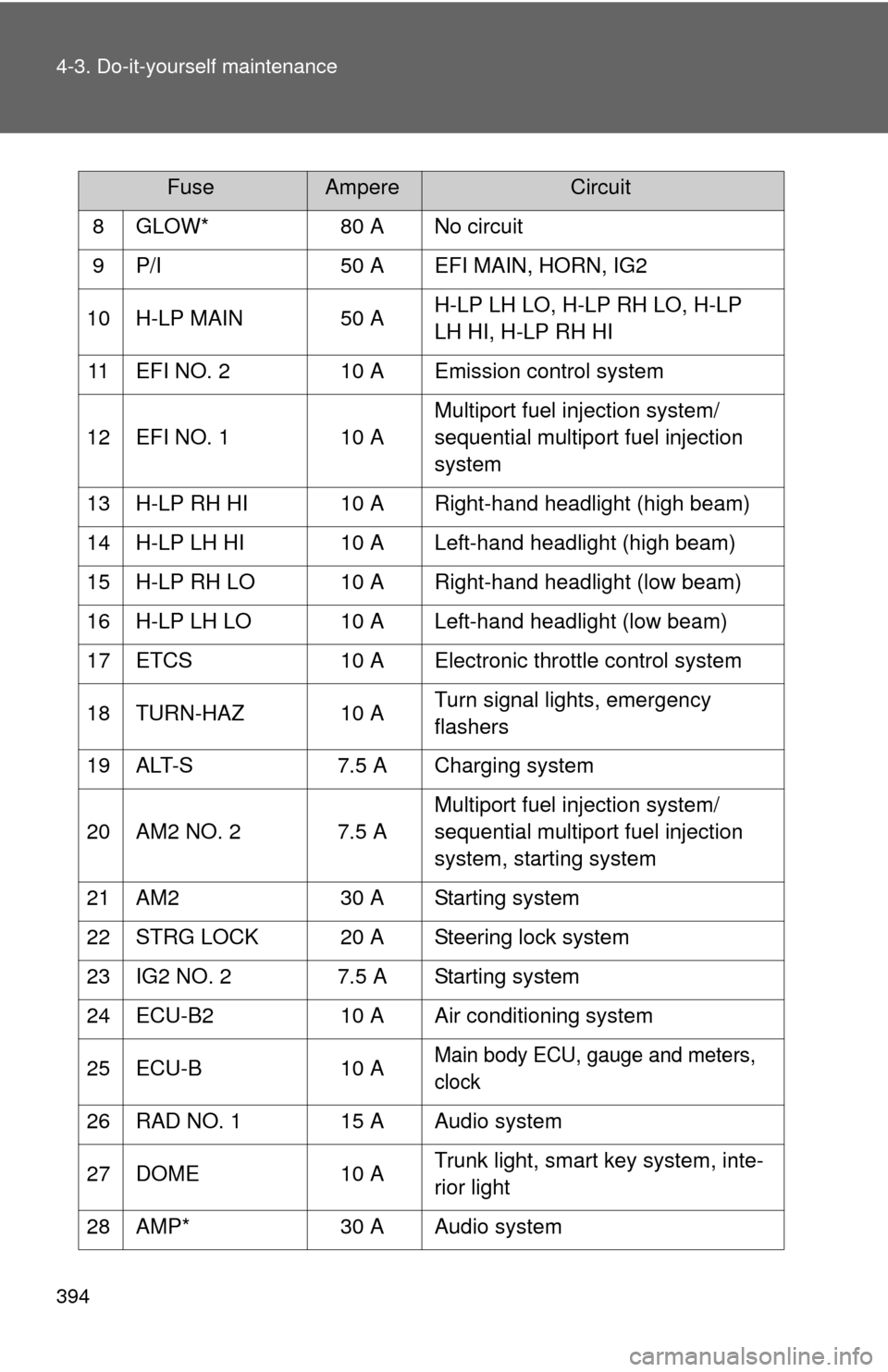
8 GLOW*80 A No circuit
9 P/I 50 A EFI MAIN, HORN, IG2
10 H-LP MAIN 50 A H-LP LH LO, H-LP RH LO, H-LP
LH HI, H-LP RH HI
11 EFI NO. 2 10 A Emission control system
12 EFI NO. 1 10 AMultiport fuel injection system/
sequential multiport fuel injection
system
13 H-LP RH HI 10 A Right-hand headlight (high beam)
14 H-LP LH HI 10 A Left-hand headlight (high beam)
15 H-LP RH LO 10 A Right-hand headlight (low beam)
16 H-LP LH LO 10 A Left-hand headlight (low beam)
17 ETCS 10 A Electronic throttle control system
18 TURN-HAZ 10 A Turn signal lights, emergency
flashers
19 ALT-S 7.5 A Charging system
20 AM2 NO. 2 7.5 A Multiport fuel injection system/
sequential multiport fuel injection
system, starting system
21 AM2 30 A Starting system
22 STRG LOCK 20 A Steering lock system
23 IG2 NO. 2 7.5 A Starting system
24 ECU-B2 10 A Air conditioning system
25 ECU-B 10 A
Main body ECU, gauge and meters,
clock
26 RAD NO. 1 15 A Audio system
27 DOME 10 A Trunk light, smart key system, inte-
rior light
28 AMP* 30 A Audio system
FuseAmpereCircuit
Page 396 of 529
396 4-3. Do-it-yourself maintenance
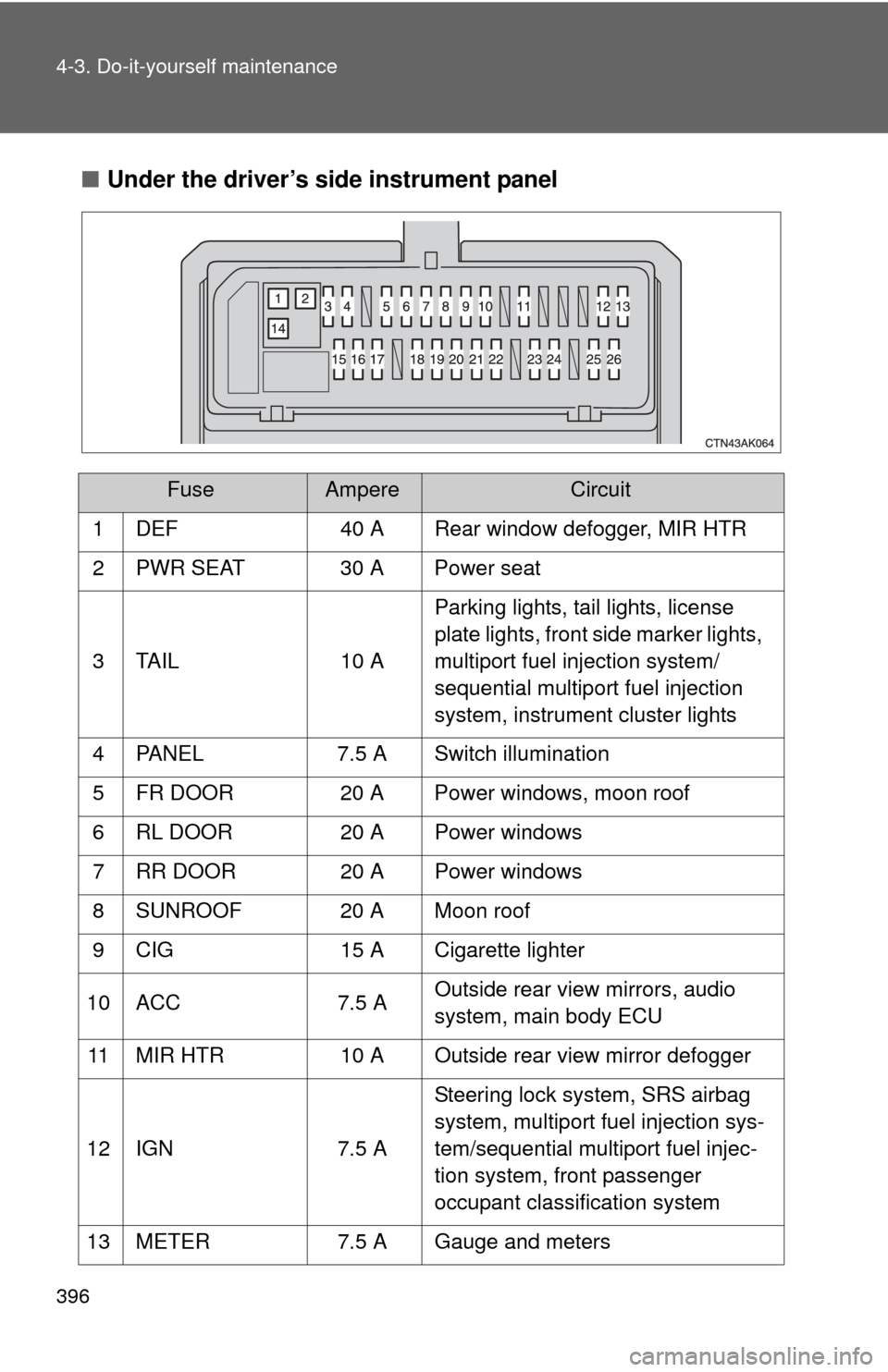
■Under the driver’s side instrument panel
FuseAmpereCircuit
1 DEF 40 A Rear window defogger, MIR HTR
2 PWR SEAT 30 A Power seat
3 TAIL 10 A Parking lights, tail lights, license
plate lights, front side marker lights,
multiport fuel injection system/
sequential multiport fuel injection
system, instrument cluster lights
4 PANEL 7.5 A Switch illumination
5 FR DOOR 20 A Power windows, moon roof
6 RL DOOR 20 A Power windows
7 RR DOOR 20 A Power windows
8 SUNROOF 20 A Moon roof
9 CIG 15 A Cigarette lighter
10 ACC 7.5 A Outside rear view mirrors, audio
system, main body ECU
11 MIR HTR 10 A Outside rear view mirror defogger
12 IGN 7.5 A Steering lock system, SRS airbag
system, multiport fuel injection sys-
tem/sequential multiport fuel injec-
tion system, front passenger
occupant classification system
13 METER 7.5 A Gauge and meters
Page 453 of 529
5
When trouble arises
453
5-2. Steps to take in an emergency
■
Avoiding a discharged battery
●Turn off the headlights and the audio system while the engine is turned
off.
● Turn off any unnecessary electrical components when the vehicle is run-
ning at a low speed for an extended period, such as in heavy traffic, etc.
■ Charging the battery
The electricity stored in the battery will discharge gradually even when the
vehicle is not in use, due to natural discharge and the draining effects of cer-
tain electrical appliances. If the vehicle is left for a long time, the battery may
discharge, and the engine may be unable to start. (The battery recharges
automatically during driving.)
Maintain the engine speed of the second vehicle, and turn
the engine switch to the “ON” position, then start the vehi-
cle's engine.
Once the vehicle’s engine has started, remove the jumper
cables in the exact reverse order in which they were con-
nected.
Once the engine starts, have the vehicle checked at your Toyota
dealer as soon as possible.STEP 3
STEP 4
Page 514 of 529

514
Alphabetical index
Alphabetical index
A/C ..................................... 206, 212
ABS ........................................... 173
Air conditioning filter............... 383
Air conditioning systemAir conditioning filter .............. 383
Automatic air conditioning system ................................ 206
Manual air conditioning system ................................ 212
Airbags
Airbag operating conditions.....89
Airbag precautions for your child ......................................93
Airbag warning light............... 421
Curtain shield airbag operating conditions..............90
Curtain shield airbag precautions ...........................93
Front passenger occupant
classification system .............98
General airbag precautions .....93
Locations of airbags ................86
Modification and disposal of airbags ..................................97
Proper driving posture .......84, 93
Side airbag operating
conditions..............................90
Side airbag precautions ..........93
SRS airbags ............................86
Antenna..................................... 234
Anti-lock brake system............ 173
Ashtray...................................... 323
Audio input ............................... 273 Audio system
Antenna................................. 234
Audio input ............................ 273
AUX port ............................... 273
CD player/changer ................ 236
iPod ....................................... 252
MP3/WMA disc ..................... 243
Optimal use ........................... 269
Portable music player ........... 273
Radio..................................... 232
Steering wheel audio switch.................................. 275
Type ...................................... 220
USB memory......................... 261
Automatic air conditioning system .................................... 206
Automatic transmission Automatic transmission ......... 139
If the shift lever cannot be shifted from P ..................... 446
S mode.................................. 142
AUX port ................................... 273
Auxiliary boxes ........................ 317A