rear door TOYOTA COROLLA 2013 11.G Owners Manual
[x] Cancel search | Manufacturer: TOYOTA, Model Year: 2013, Model line: COROLLA, Model: TOYOTA COROLLA 2013 11.GPages: 532, PDF Size: 8.55 MB
Page 2 of 532

TABLE OF CONTENTSIndex
2
1-1. Key informationKeys ..................................... 22
1-2. Opening, closing and locking the doors and
trunk
Smart key system................. 25
Wireless remote control ....... 36
Doors.................................... 41
Trunk .................................... 47
1-3. Adjustable components (seats, mirrors,
steering wheel)
Front seats ........................... 51
Rear seats ............................ 54
Head restraints ..................... 56
Seat belts ............................. 58
Steering wheel ..................... 66
Anti-glare inside rear view mirror .................................. 67
Outside rear view mirrors ..... 69
1-4. Opening and closing the windows and moon roof
Power windows .................... 71
Moon roof ............................. 73
1-5. Refueling Opening the fuel tank cap .... 77 1-6. Theft deterrent system
Engine immobilizer system ................................ 81
1-7. Safety information Correct driving posture ......... 84
SRS airbags ......................... 86
Front passenger occupant classification system ........... 98
Child restraint systems ....... 103
Installing child restraints ..... 107
2-1. Driving procedures Driving the vehicle .............. 120
Engine (ignition) switch (vehicles with smart key
system) ............................. 131
Engine (ignition) switch (vehicles without smart
key system) ...................... 135
Automatic transmission ...... 139
Manual transmission........... 145
Turn signal lever ................. 146
Parking brake ..................... 147
Horn .................................... 148
2-2. Instrument cluster Gauges and meters ............ 149
Indicators and warning lights ................................. 152
Multi-information display ..... 156
1Before driving
2When driving
Page 7 of 532
7
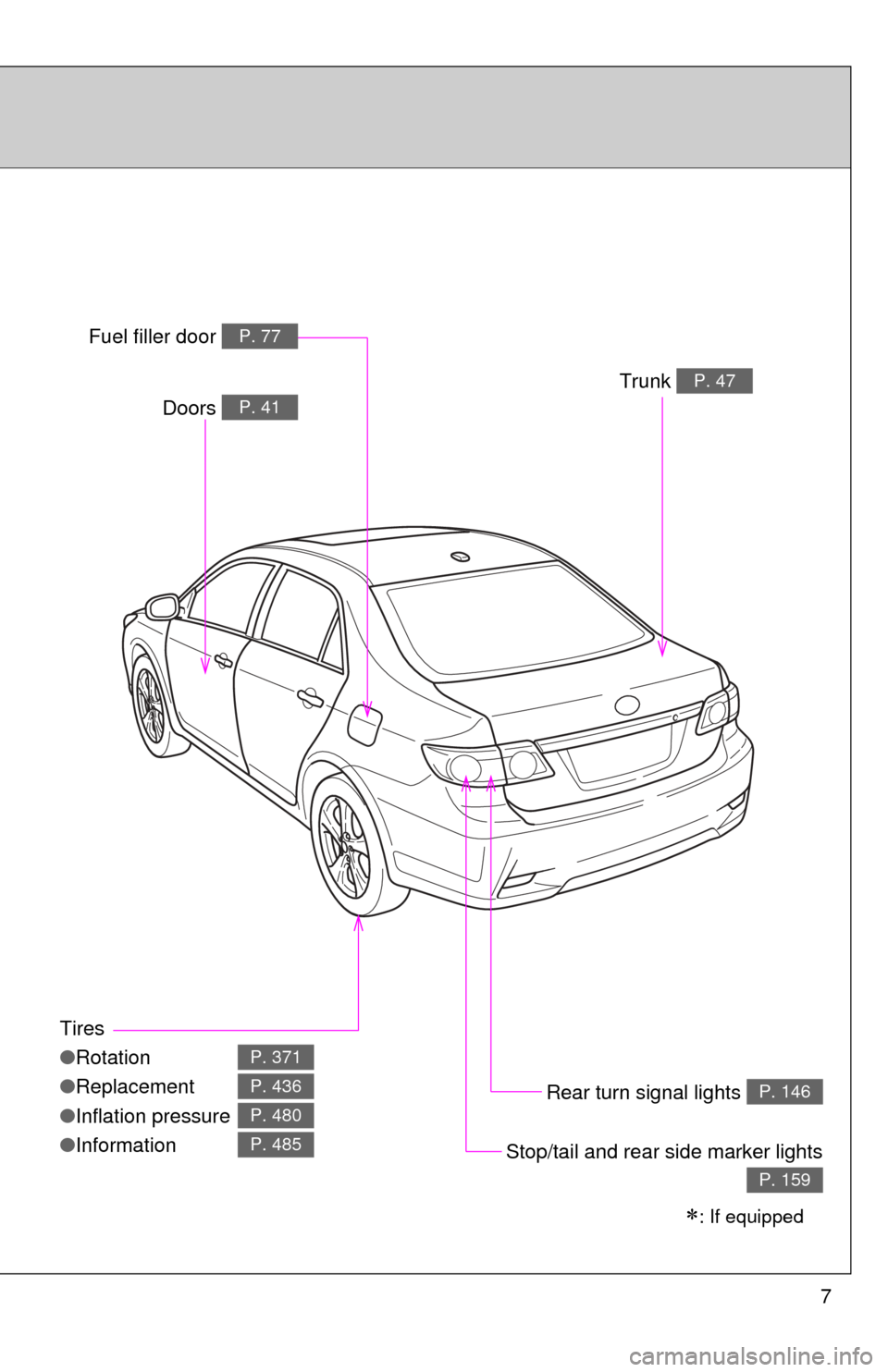
Tires
●Rotation
● Replacement
● Inflation pressure
● Information
P. 371
P. 436
P. 480
P. 485
Trunk P. 47
Rear turn signal lights P. 146
Stop/tail and rear side marker lights
P. 159
: If equipped
Doors P. 41
Fuel filler door P. 77
Page 9 of 532
9
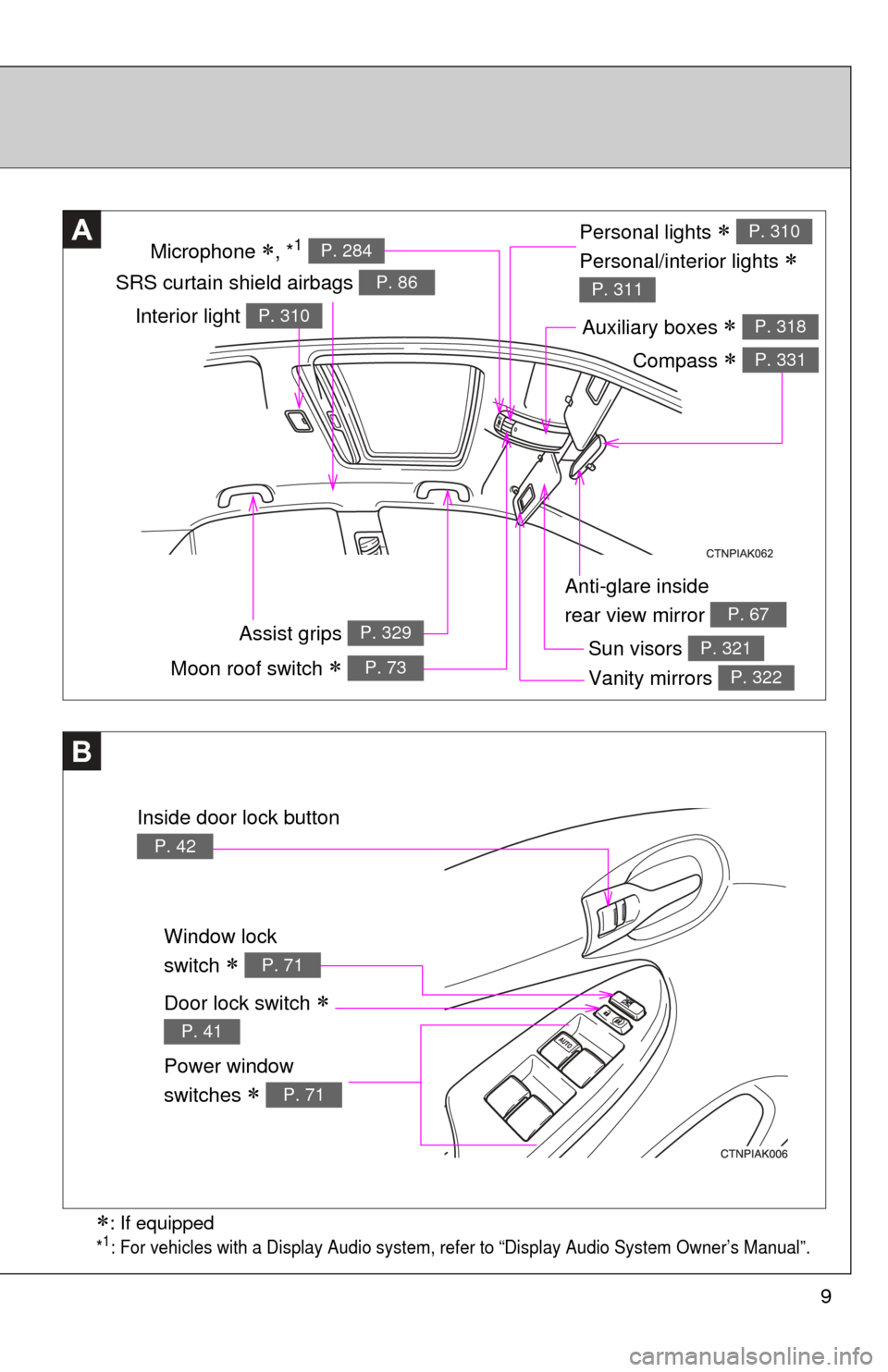
Anti-glare inside
rear view mirror
P. 67
Personal lights
Personal/interior lights
P. 310
P. 311SRS curtain shield airbags P. 86
A
Sun visors P. 321
Vanity mirrors P. 322
Auxiliary boxes P. 318
Window lock
switch
P. 71
Power window
switches
P. 71
B
Door lock switch
P. 41
Moon roof switch P. 73
Inside door lock button
P. 42
: If equipped
*1: For vehicles with a Display Audio system, refer to “Display Audio System Owner’s Manual”.
Interior light P. 310
Assist grips P. 329
Microphone , *1 P. 284
Compass P. 331
Page 21 of 532
Before driving1
21
1-1. Key informationKeys ................................... 22
1-2. Opening, closing and locking the doors and
trunk
Smart key system .............. 25
Wireless remote control ..... 36
Doors ................................. 41
Trunk .................................. 47
1-3. Adjustable components (seats, mirrors,
steering wheel)
Front seats ......................... 51
Rear seats.......................... 54
Head restraints................... 56
Seat belts ........................... 58
Steering wheel ................... 66
Anti-glare inside rear view mirror ....................... 67
Outside rear view mirrors.............................. 69 1-4. Opening and closing the
windows and moon roof
Power windows .................. 71
Moon roof ........................... 73
1-5. Refueling Opening the fuel tank cap ................................... 77
1-6. Theft deterrent system Engine immobilizer system ............................. 81
1-7. Safety information Correct driving posture....... 84
SRS airbags ....................... 86
Front passenger occupant classification system ........ 98
Child restraint systems..... 103
Installing child restraints ........................ 107
Page 29 of 532

29
1-2. Opening, closing and locking the doors and trunk
1
Before driving
■
Operation signals
A buzzer sounds and the emergency flashers flash to indicate that the doors
have been locked/unlocked. (Locked: Once; Unlocked: Twice)
■ Conditions affecting operation
The smart key system uses weak radio waves. In the following situations,
the communication between the electronic key and the vehicle may be
affected, preventing the smart key system and wireless remote control from
operating properly. (Ways of coping: P. 452)
● When the electronic key battery is depleted
● Near a TV tower, electric power plant, gas station, radio station, large dis-
play, airport or other facility that generates strong radio waves or electri-
cal noise
● When carrying a portable radio, ce llular phone, cordless phone or other
wireless communication devices
● When the electronic key is in contact with, or is covered by the following
metallic objects
• Cards to which aluminum foil is attached
• Cigarette boxes that have aluminum foil inside
• Metallic wallets or bags
• Coins
• Hand warmers made of metal
• Media such as CDs and DVDs
● When multiple electronic keys are in the vicinity
● When carrying or using the electronic key together with the following
devices that emit radio waves
• Another vehicle's electronic key or a wireless key that emits radio
waves
• Personal computers or personal digital assistants (PDAs)
• Digital audio players
• Portable game systems
● If window tint with a metallic content or metallic objects are attached to
the rear window
Page 31 of 532

31
1-2. Opening, closing and locking the doors and trunk
1
Before driving
■
Electronic key battery depletion
●The standard battery life is 1 to 2 years.
● The battery becomes depleted even if the electronic key is not used
because the key always receives radio waves. If the smart key system or
the wireless remote control function does not operate, or the detection
area becomes smaller, the battery may be depleted. Replace the battery
when necessary. ( P. 388)
● If the battery becomes low, an alarm will sound in the cabin when the
engine stops. ( P. 32)
● To avoid serious deterioration, do not leave the electronic key within 3 ft.
(1 m) of the following electrical appliances that produce a magnetic field:
•TVs
• Personal computers
• Recharging cellular phones or cordless phones
• Table lamps
■ To operate the system properly
Make sure to carry the electronic key when operating the system. Do not get
the electronic key too close to the vehicle when operating the system from
the outside of the vehicle.
Depending on the position and holding condition of the electronic key, the
key may not be detected correctly and the system may not operate properly.
(The alarm may go off accidentally, or the door lock prevention may not func-
tion.)
■ Note for the smart key system
●Even when the electronic key is within the effective range (detection
areas), the system may not operate properly in the following cases.
• The electronic key is too close to the window or outside door handle,
near the ground, or in a high place when the doors are locked or
unlocked.
• The electronic key is near the ground or in a high place, or too close to the rear bumper center when the trunk is unlocked.
• The electronic key is on the instrument panel, package tray, floor, or in the auxiliary box of the driver's side instrument panel or glove box
when the engine is started or “ENGINE START STOP” switch modes
are changed.
Page 38 of 532

38 1-2. Opening, closing and locking the doors and trunk
■Key battery depletion
Vehicles with smart key system
P. 3 1
Vehicles without smart key system
If the wireless remote control function does not operate, the battery may be
depleted. Replace the battery when necessary. ( P. 389)
■ Security feature
If a door is not opened within approximately 60 seconds after the vehicle is
unlocked, the security feature automatically locks the vehicle again.
■ When the electronic key battery is fully depleted (vehicles with smart
key system)
P. 388
■ Conditions affecting operation
Vehicles with smart key system
P. 2 9
Vehicles without smart key system
The wireless remote control function may not operate normally in the follow-
ing situations.
● Near a TV tower, radio station, electr ic power plant, airport or other facil-
ity that generates strong radio waves
● When carrying a portable radio, cell ular phone or other wireless commu-
nication devices
● When multiple wireless keys are in the vicinity
● When the wireless key has come into contact with, or is covered by, a
metallic object
● When a wireless key (that emits radio waves) is being used nearby
● When the wireless key has been left near an electrical appliance such as
a personal computer
● When the wireless key battery is depleted
● If window tint with a metallic content or metallic objects are attached to
the rear window
Page 42 of 532
42 1-2. Opening, closing and locking the doors and trunk
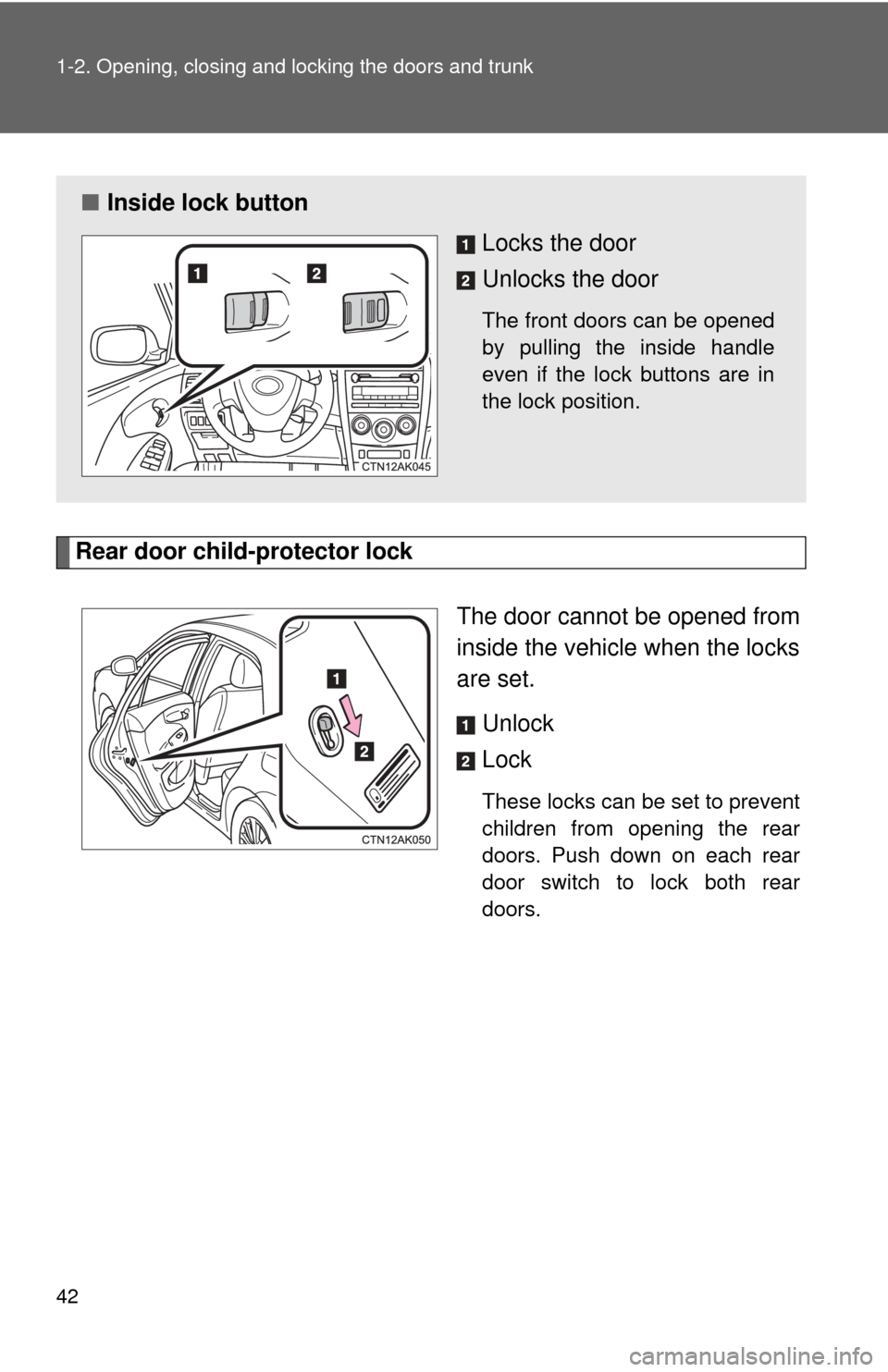
Rear door child-protector lockThe door cannot be opened from
inside the vehicle when the locks
are set. Unlock
Lock
These locks can be set to prevent
children from opening the rear
doors. Push down on each rear
door switch to lock both rear
doors.
■Inside lock button
Locks the door
Unlocks the door
The front doors can be opened
by pulling the inside handle
even if the lock buttons are in
the lock position.
Page 46 of 532

46 1-2. Opening, closing and locking the doors and trunk
CAUTION
■To prevent an accident
Observe the following precautions while driving the vehicle.
Failing to do so may result in a door opening and an occupant falling out,
resulting in death or serious injury.
●Always use a seat belt.
● Always lock the doors.
● Ensure that all doors are properly closed.
● Do not pull the inside handle of the doors while driving.
The doors may be opened and the passengers are thrown out of the vehi-
cle and it may result in serious injury or death.
Be especially careful for the front doors, as the doors may be opened even
if the inside lock buttons are in locked position.
● Set the rear door child protector locks when children are seated in the rear
seat.
Page 92 of 532
92 1-7. Safety information
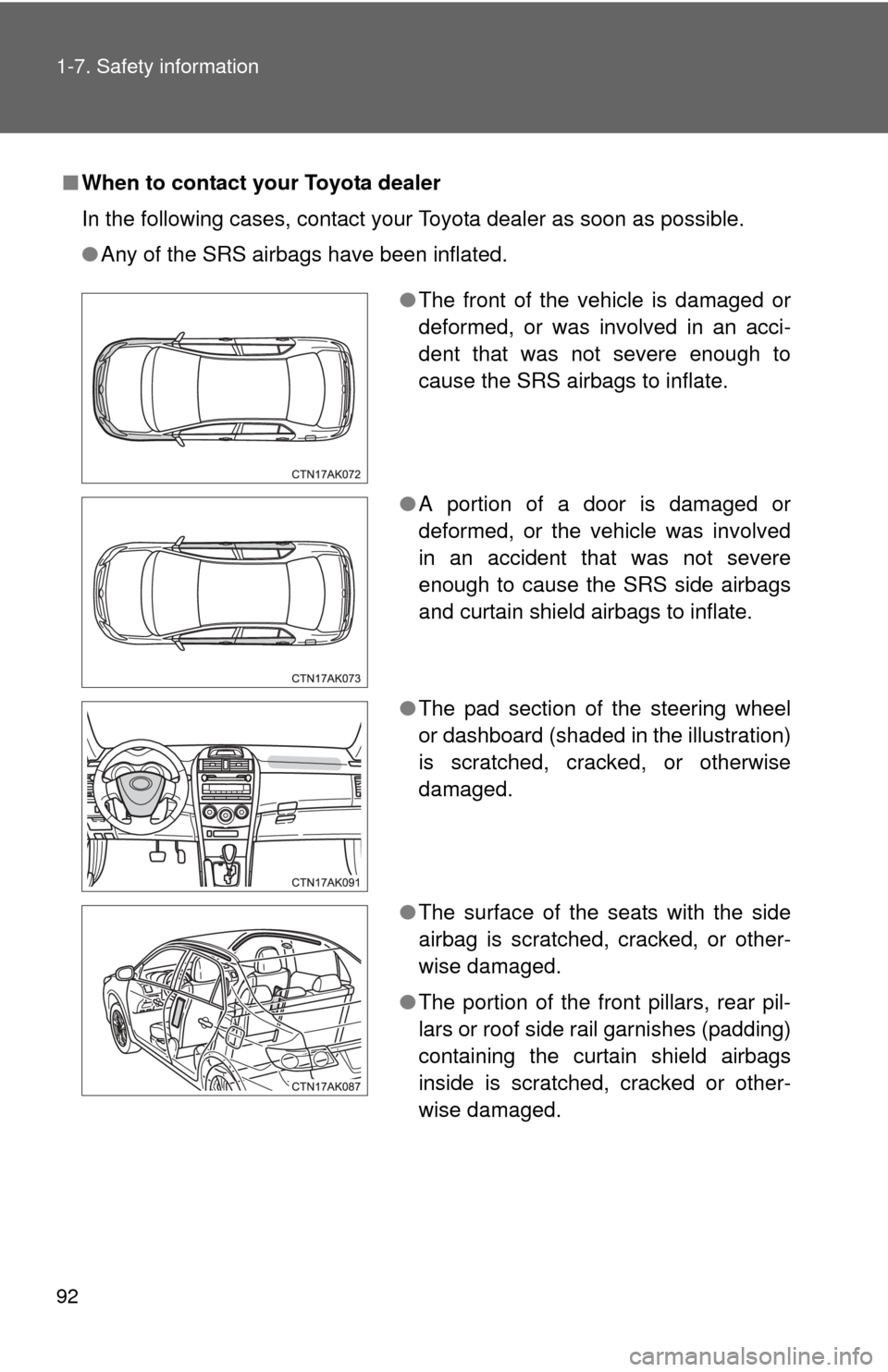
■When to contact your Toyota dealer
In the following cases, contact your Toyota dealer as soon as possible.
●Any of the SRS airbags have been inflated.
●The front of the vehicle is damaged or
deformed, or was involved in an acci-
dent that was not severe enough to
cause the SRS airbags to inflate.
● A portion of a door is damaged or
deformed, or the vehicle was involved
in an accident that was not severe
enough to cause the SRS side airbags
and curtain shield airbags to inflate.
● The pad section of the steering wheel
or dashboard (shaded in the illustration)
is scratched, cracked, or otherwise
damaged.
● The surface of the seats with the side
airbag is scratched, cracked, or other-
wise damaged.
● The portion of the front pillars, rear pil-
lars or roof side rail garnishes (padding)
containing the curtain shield airbags
inside is scratched, cracked or other-
wise damaged.