navigation system TOYOTA COROLLA 2014 11.G Owners Manual
[x] Cancel search | Manufacturer: TOYOTA, Model Year: 2014, Model line: COROLLA, Model: TOYOTA COROLLA 2014 11.GPages: 612, PDF Size: 12.58 MB
Page 7 of 612
7
1
9 8 6 5
4
3
2
COROLLA_TMMMS_TMMC_U (OM12F00U)
10
7
9-1. Specifications
Maintenance data
(fuel, oil level, etc.) .......... 544
Fuel information ................ 554
Tire information ................. 557
9-2. Customization
Customizable features ...... 570
9-3. Items to initialize
Items to initialize................ 577
Reporting safety defects
for U.S. owners ........................ 580
Seat belt instructions
for Canadian owners
(in French) ............................... 581
SRS airbag instructions
for Canadian owners
(in French) ............................... 583What to do if...
(Troubleshooting) ..................... 594
Alphabetical index ...................... 600
9Vehicle specifications
10For owners
Index
For vehicles with a navigation system, refer to the “Navigation Sys-
tem Owner’s Manual” for information regarding the navigation sys-
tem.
Page 17 of 612
17Pictorial index
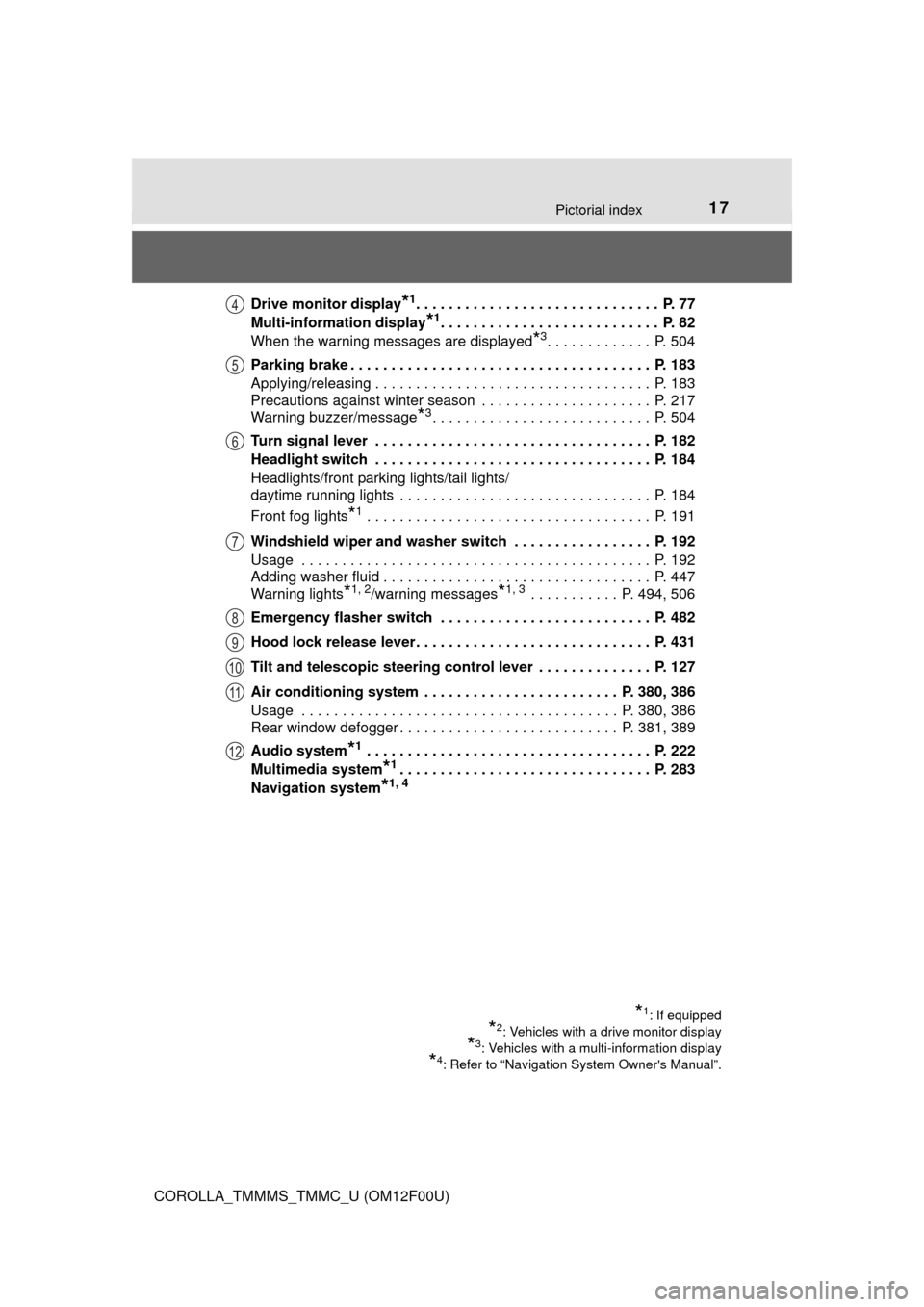
COROLLA_TMMMS_TMMC_U (OM12F00U)Drive monitor display
*1. . . . . . . . . . . . . . . . . . . . . . . . . . . . . . P. 77
Multi-information display
*1. . . . . . . . . . . . . . . . . . . . . . . . . . . P. 82
When the warning messages are displayed
*3. . . . . . . . . . . . . P. 504
Parking brake . . . . . . . . . . . . . . . . . . . . . . . . . . . . . . . . . . . . . P. 183
Applying/releasing . . . . . . . . . . . . . . . . . . . . . . . . . . . . . . . . . . P. 183
Precautions against winter season . . . . . . . . . . . . . . . . . . . . . P. 217
Warning buzzer/message
*3. . . . . . . . . . . . . . . . . . . . . . . . . . . P. 504
Turn signal lever . . . . . . . . . . . . . . . . . . . . . . . . . . . . . . . . . . P. 182
Headlight switch . . . . . . . . . . . . . . . . . . . . . . . . . . . . . . . . . . P. 184
Headlights/front parking lights/tail lights/
daytime running lights . . . . . . . . . . . . . . . . . . . . . . . . . . . . . . . P. 184
Front fog lights
*1 . . . . . . . . . . . . . . . . . . . . . . . . . . . . . . . . . . . P. 191
Windshield wiper and washer switch . . . . . . . . . . . . . . . . . P. 192
Usage . . . . . . . . . . . . . . . . . . . . . . . . . . . . . . . . . . . . . . . . . . . P. 192
Adding washer fluid . . . . . . . . . . . . . . . . . . . . . . . . . . . . . . . . . P. 447
Warning lights
*1, 2/warning messages*1, 3 . . . . . . . . . . . P. 494, 506
Emergency flasher switch . . . . . . . . . . . . . . . . . . . . . . . . . . P. 482
Hood lock release lever. . . . . . . . . . . . . . . . . . . . . . . . . . . . . P. 431
Tilt and telescopic steering control lever . . . . . . . . . . . . . . P. 127
Air conditioning system . . . . . . . . . . . . . . . . . . . . . . . . P. 380, 386
Usage . . . . . . . . . . . . . . . . . . . . . . . . . . . . . . . . . . . . . . . P. 380, 386
Rear window defogger . . . . . . . . . . . . . . . . . . . . . . . . . . . P. 381, 389
Audio system
*1 . . . . . . . . . . . . . . . . . . . . . . . . . . . . . . . . . . . P. 222
Multimedia system
*1. . . . . . . . . . . . . . . . . . . . . . . . . . . . . . . P. 283
Navigation system
*1, 4
*1: If equipped
*2: Vehicles with a drive monitor display
*3: Vehicles with a multi-information display
*4: Refer to “Navigation System Owner's Manual”.
4
5
6
7
8
9
10
11
12
Page 222 of 612
222
COROLLA_TMMMS_TMMC_U (OM12F00U)
5-1. Basic Operations
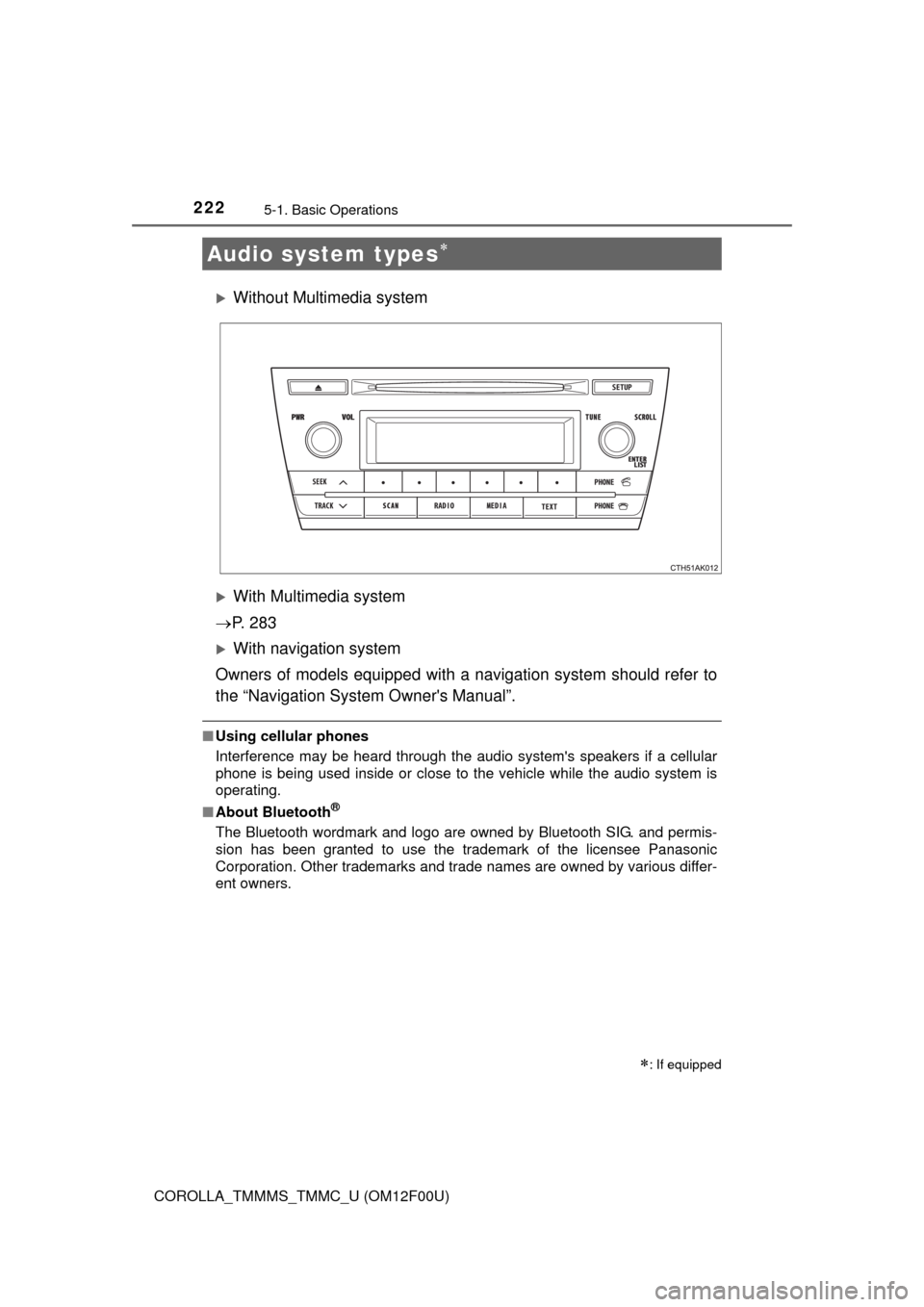
Without Multimedia system
With Multimedia system
P. 2 8 3
With navigation system
Owners of models equipped with a navigation system should refer to
the “Navigation System Owner's Manual”.
■Using cellular phones
Interference may be heard through the audio system's speakers if a cellular
phone is being used inside or close to the vehicle while the audio system is
operating.
■About Bluetooth
®
The Bluetooth wordmark and logo are owned by Bluetooth SIG. and permis-
sion has been granted to use the trademark of the licensee Panasonic
Corporation. Other trademarks and trade names are owned by various differ-
ent owners.
Audio system types
: If equipped
Page 226 of 612
2265-1. Basic Operations
COROLLA_TMMMS_TMMC_U (OM12F00U)
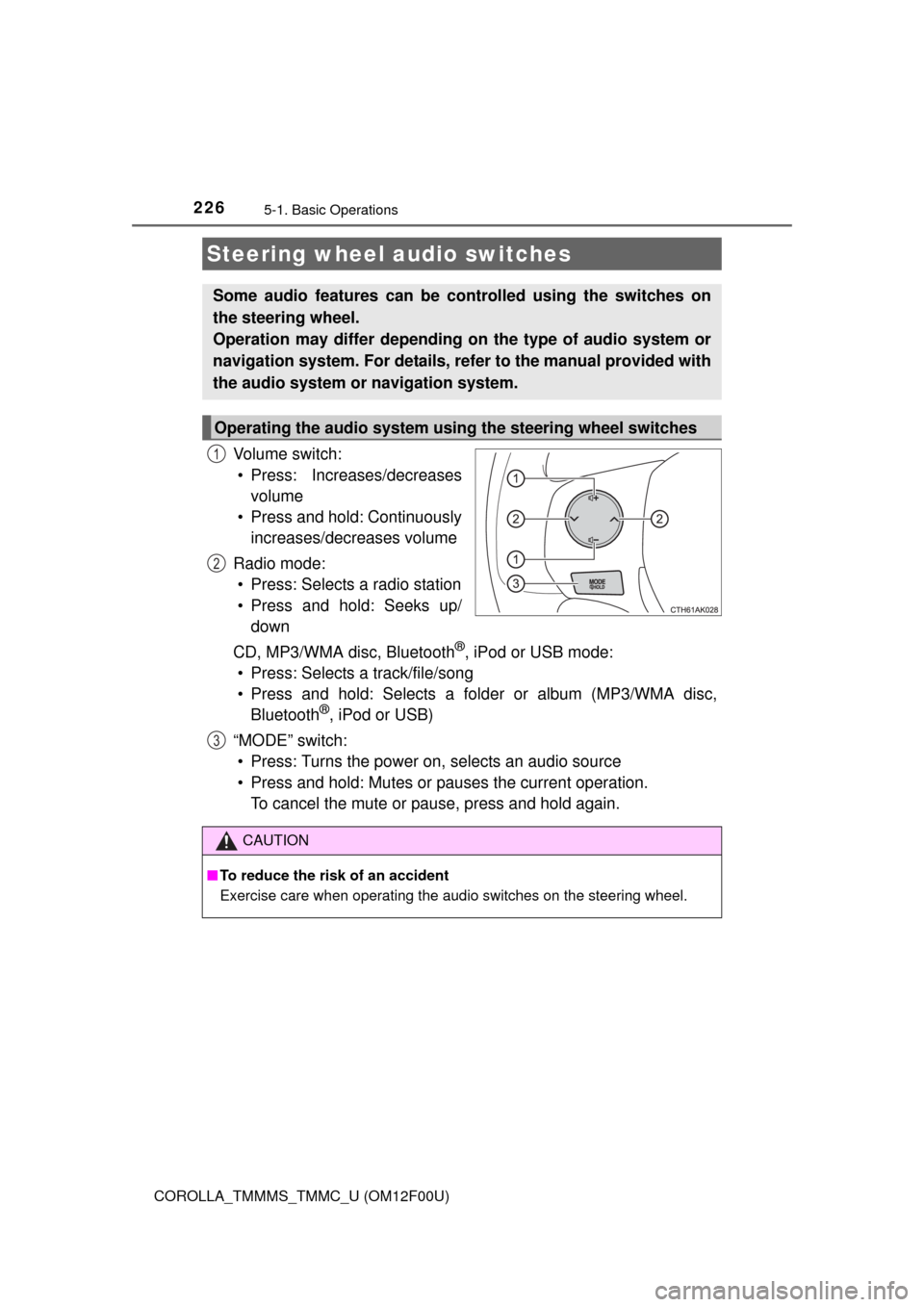
Vo l u m e s w i t c h :
• Press: Increases/decreases
volume
• Press and hold: Continuously
increases/decreases volume
Radio mode:
• Press: Selects a radio station
• Press and hold: Seeks up/
down
CD, MP3/WMA disc, Bluetooth
®, iPod or USB mode:
• Press: Selects a track/file/song
• Press and hold: Selects a folder or album (MP3/WMA disc,
Bluetooth
®, iPod or USB)
“MODE” switch:
• Press: Turns the power on, selects an audio source
• Press and hold: Mutes or pauses the current operation.
To cancel the mute or pause, press and hold again.
Steering wheel audio switches
Some audio features can be controlled using the switches on
the steering wheel.
Operation may differ depending on the type of audio system or
navigation system. For details, refer to the manual provided with
the audio system or navigation system.
Operating the audio system using the steering wheel switches
1
2
3
CAUTION
■To reduce the risk of an accident
Exercise care when operating the audio switches on the steering wheel.
Page 285 of 612
2855-11. Basic Operations (Multimedia system)
5
Interior features
COROLLA_TMMMS_TMMC_U (OM12F00U)
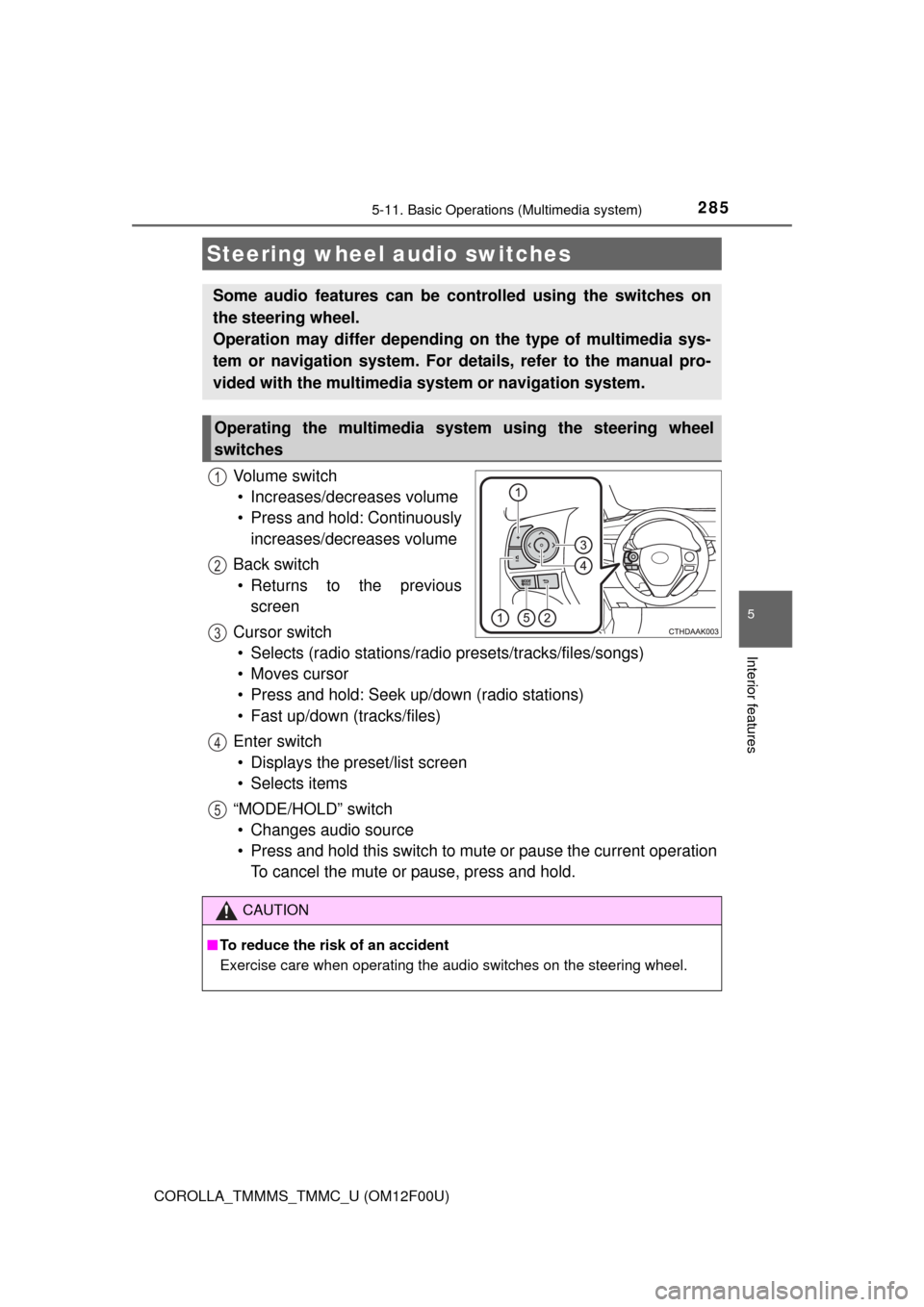
Vo l u m e s w i t c h
• Increases/decreases volume
• Press and hold: Continuously
increases/decreases volume
Back switch
• Returns to the previous
screen
Cursor switch
• Selects (radio stations/radio presets/tracks/files/songs)
• Moves cursor
• Press and hold: Seek up/down (radio stations)
• Fast up/down (tracks/files)
Enter switch
• Displays the preset/list screen
• Selects items
“MODE/HOLD” switch
• Changes audio source
• Press and hold this switch to mute or pause the current operation
To cancel the mute or pause, press and hold.
Steering wheel audio switches
Some audio features can be controlled using the switches on
the steering wheel.
Operation may differ depending on the type of multimedia sys-
tem or navigation system. For details, refer to the manual pro-
vided with the multimedia system or navigation system.
Operating the multimedia system using the steering wheel
switches
1
12
3
4
5
CAUTION
■To reduce the risk of an accident
Exercise care when operating the audio switches on the steering wheel.
Page 350 of 612

3505-19. Bluetooth® phone (Multimedia system)
COROLLA_TMMMS_TMMC_U (OM12F00U)
■Receiving a message
●Depending on the cellular phone used for receiving messages, or its regis-
tration status with the navigation system, some information may not be dis-
played.
●The pop up screen is separately available for incoming e-mail and SMS/
MMS messages under the following conditions:
E-mail:
• “Incoming E-mail Display” is set to “Full Screen”. (P. 365)
• “E-mail Notification Popup” is set to on. (P. 365)
SMS/MMS:
• “Incoming SMS/MMS Display” is set to “Full screen”. (P. 365)
• “SMS/MMS Notification Popup” is set to on. (P. 365)
Page 524 of 612

5248-2. Steps to take in an emergency
COROLLA_TMMMS_TMMC_U (OM12F00U)
CAUTION
■When using the compact spare tire
●Remember that the compact spare tire provided is specifically
designed for use with your vehicle. Do not use your compact spare tire
on another vehicle.
●Do not use more than one compact spare tires simultaneously.
●Replace the compact spare tire with a standard tire as soon as possi-
ble.
●Avoid sudden acceleration, abrupt steering, sudden braking and shift-
ing operations that cause sudden engine braking.
■When the compact spare tire is attached
The vehicle speed may not be correctly detected, and the following sys-
tems may not operate correctly:
■Speed limit when using the compact spare tire
Do not drive at speeds in excess of 50 mph (80 km/h) when a compact
spare tire is installed on the vehicle.
The compact spare tire is not designed for driving at high speeds. Fail-
ure to observe this precaution may lead to an accident causing death or
serious injury.
■After using the tools and jack
Before driving, make sure all the tools and jack are securely in place in
their storage location to reduce the possibility of personal injury during a
collision or sudden braking.
• ABS & Brake assist
• VSC
•TRAC
• Cruise control (if equipped)• EPS
• Rear view monitor system (if
equipped)
• Navigation system (if equipped)
Page 570 of 612
570
COROLLA_TMMMS_TMMC_U (OM12F00U)
9-2. Customization
■Changing by using the navigation system
Press the “APPS” button.
Select “Setup” on the “Apps” screen and select “Vehicle”.
Various setting can be changed. Refer to the list of settings that can
be changed for details.
■Changing by using the multimedia system
P. 2 8 9
■Changing by using the door lock switch
P. 1 0 3
Customizable features
Your vehicle includes a variety of electronic features that can be
personalized to suit your preferences. Programming these pref-
erences requires specialized equipment and may be performed
by your Toyota dealer.
Customizing vehicle features
1
2
Page 571 of 612
5719-2. Customization
9
Vehicle specifications
COROLLA_TMMMS_TMMC_U (OM12F00U)
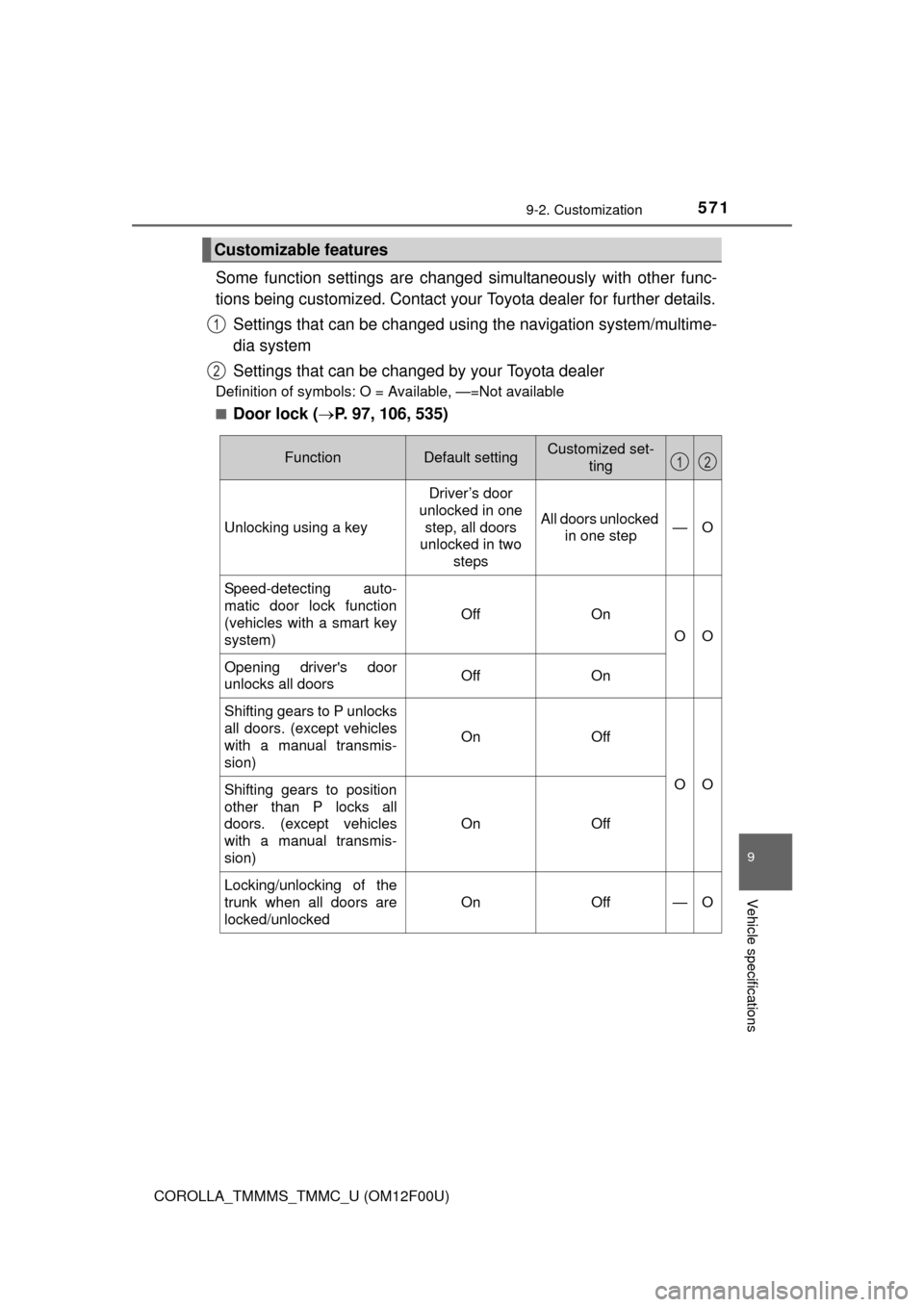
Some function settings are changed simultaneously with other func-
tions being customized. Contact your Toyota dealer for further details.
Settings that can be changed using the navigation system/multime-
dia system
Settings that can be changed by your Toyota dealer
Definition of symbols: O = Available, —=Not available
■
Door lock (P. 97, 106, 535)
Customizable features
1
2
FunctionDefault settingCustomized set-
ting
Unlocking using a key
Driver’s door
unlocked in one
step, all doors
unlocked in two
steps
All doors unlocked
in one step—O
Speed-detecting auto-
matic door lock function
(vehicles with a smart key
system)
OffOn
OO
Opening driver's door
unlocks all doorsOffOn
Shifting gears to P unlocks
all doors. (except vehicles
with a manual transmis-
sion)
OnOff
OOShifting gears to position
other than P locks all
doors. (except vehicles
with a manual transmis-
sion)
OnOff
Locking/unlocking of the
trunk when all doors are
locked/unlocked
OnOff—O
12
Page 576 of 612
5769-2. Customization
COROLLA_TMMMS_TMMC_U (OM12F00U)
■Vehicle customization
When the doors remain closed after unlocking the doors and the timer acti-
vated automatic door lock function activates, signals will be generated in
accordance with the operational signal (Emergency flashers) function set-
tings.
■When customizing using the navigation system
Stop the vehicle in a safe place, apply the parking brake, and shift the shift
lever to P (automatic transmission or continuously variable transmission) or N
(manual transmission). Also, to prevent battery discharge, leave the engine
running while customizing the features.
CAUTION
■During customization
As the engine needs to be running during customization, ensure that the
vehicle is parked in a place with adequate ventilation. In a closed area such
as a garage, exhaust gases including harmful carbon monoxide (CO) may
collect and enter the vehicle. This may lead to death or a serious health
hazard.
NOTICE
■During customization
To prevent battery discharge, ensure that the engine is running while cus-
tomizing features.