TOYOTA COROLLA 2015 11.G Navigation Manual
Manufacturer: TOYOTA, Model Year: 2015, Model line: COROLLA, Model: TOYOTA COROLLA 2015 11.GPages: 292, PDF Size: 3.95 MB
Page 121 of 292
121
6. TIPS FOR OPERATING THE AUDIO SYSTEM
COROLLA_13CY_Navi_U
AUDIO SYSTEM
3
The player is compatible with VBR (Vari-
able Bit Rate).
When playing back files recorded as VBR
(Variable Bit Rate) files, the play time will
not be correctly displayed if the fast for-
ward or reverse operations are used.
It is not possible to check folders that do
not include MP3/WMA/AAC files.
MP3/WMA/AAC files in folders up to 8 lev-
els deep can be played. However, the
start of playback may be delayed when
using discs containing numerous levels of
folders. For this reason, we recommend
creating discs with no more than 2 levels
of folders.
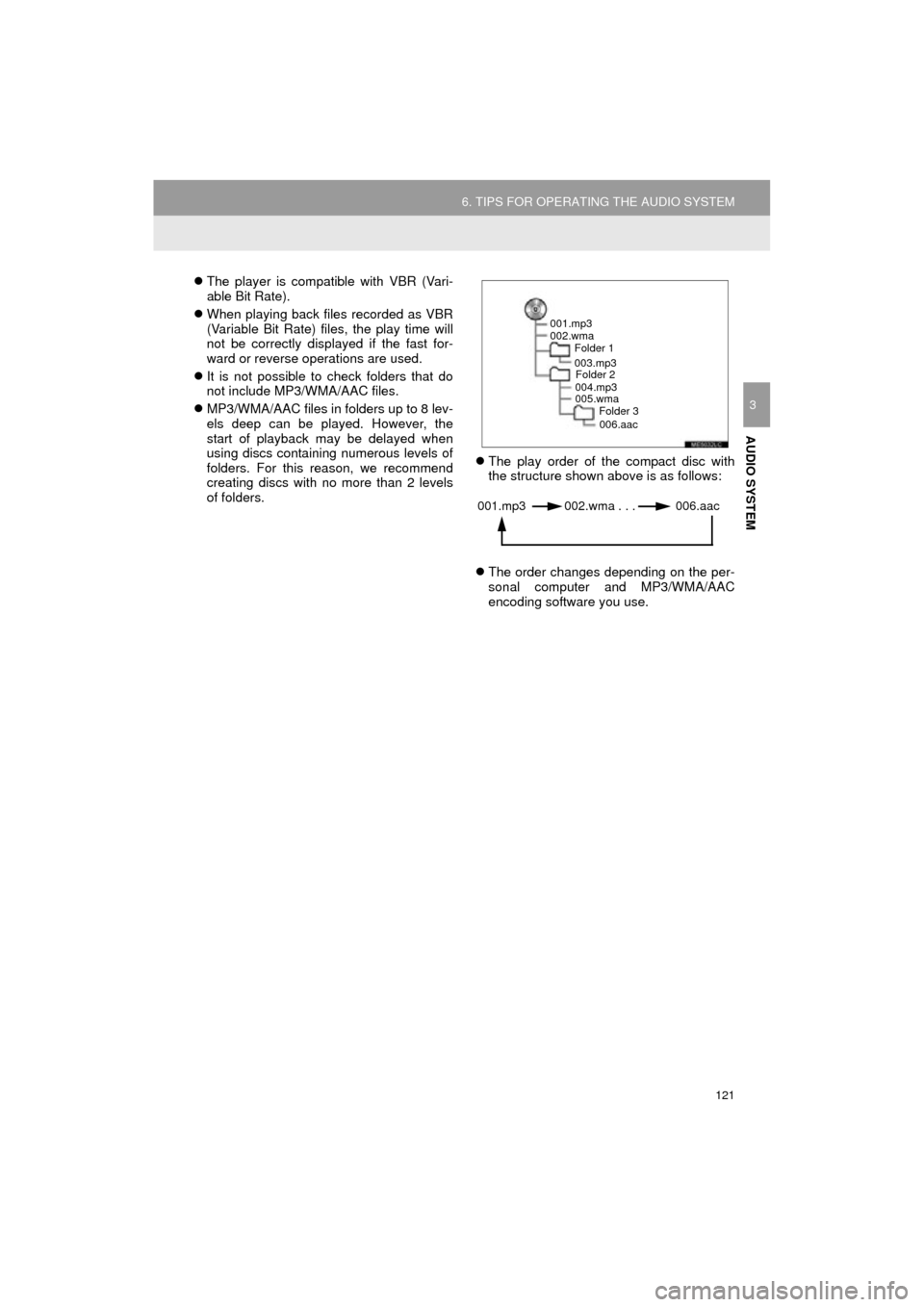
The play order of the compact disc with
the structure shown above is as follows:
The order changes depending on the per-
sonal computer and MP3/WMA/AAC
encoding software you use.
001.mp3
002.wma
Folder 1
003.mp3Folder 2
004.mp3
005.wma Folder 3
006.aac
001.mp3 002.wma . . . 006.aac
Page 122 of 292
122
6. TIPS FOR OPERATING THE AUDIO SYSTEM
COROLLA_13CY_Navi_U
This is a general term that describes the
process of writing data on-demand to CD-
R, etc., in the same way that data is writ-
ten to floppy or hard discs.
This is a method of embedding track-
related information in an MP3 file. This
embedded information can include the
track number, track title, the artist’s name,
the album title, the music genre, the year
of production, comments, cover art and
other data. The contents can be freely
edited using software with ID3 tag editing
functions. Although the tags are restricted
to a number of characters, the information
can be viewed when the track is played
back.
WMA files can contain a WMA tag that is
used in the same way as an ID3 tag. WMA
tags carry information such as track title
and artist name.
This is the international standard for the
formatting of CD-ROM folders and files.
For the ISO 9660 format, there are 2 lev-
els of regulations.
Level 1: The file name is in 8.3 format (8
character file names, with a 3 character
file extension. File names must be com-
posed of one-byte capital letters and num-
bers. The “_” symbol may also be
included.)
Level 2: The file name can have up to 31
characters (including the separation mark
“.” and file extension). Each folder must
contain fewer than 8 hierarchies.
Playlists created using “WINAMP” soft-
ware have a playlist file extension (.m3u).
MP3 is an audio compression standard
determined by a working group (MPEG) of
the ISO (International Standard Organiza-
tion). MP3 compresses audio data to
about 1/10 the size of that on conventional
discs.
WMA (Windows Media Audio) is an audio
compression format developed by
Microsoft
®. It compresses files into a size
smaller than that of MP3 files. The decod-
ing formats for WMA files are Ver. 7, 8 and
9.
This product is protected by certain intel-
lectual property rights of Microsoft Corpo-
ration and third parties. Use or distribution
of such technology outside of this product
is prohibited without a license from
Microsoft or an authorized Microsoft sub-
sidiary and third parties.
AAC is short for Advanced Audio Coding
and refers to an audio compression tech-
nology standard used with MPEG2 and
MPEG4.
TERMS
PACKET WRITE
ID3 TAG
WMA TAG
ISO 9660 FORMAT
m3u
MP3
WMA
AAC
Page 123 of 292
123
6. TIPS FOR OPERATING THE AUDIO SYSTEM
COROLLA_13CY_Navi_U
AUDIO SYSTEM
3
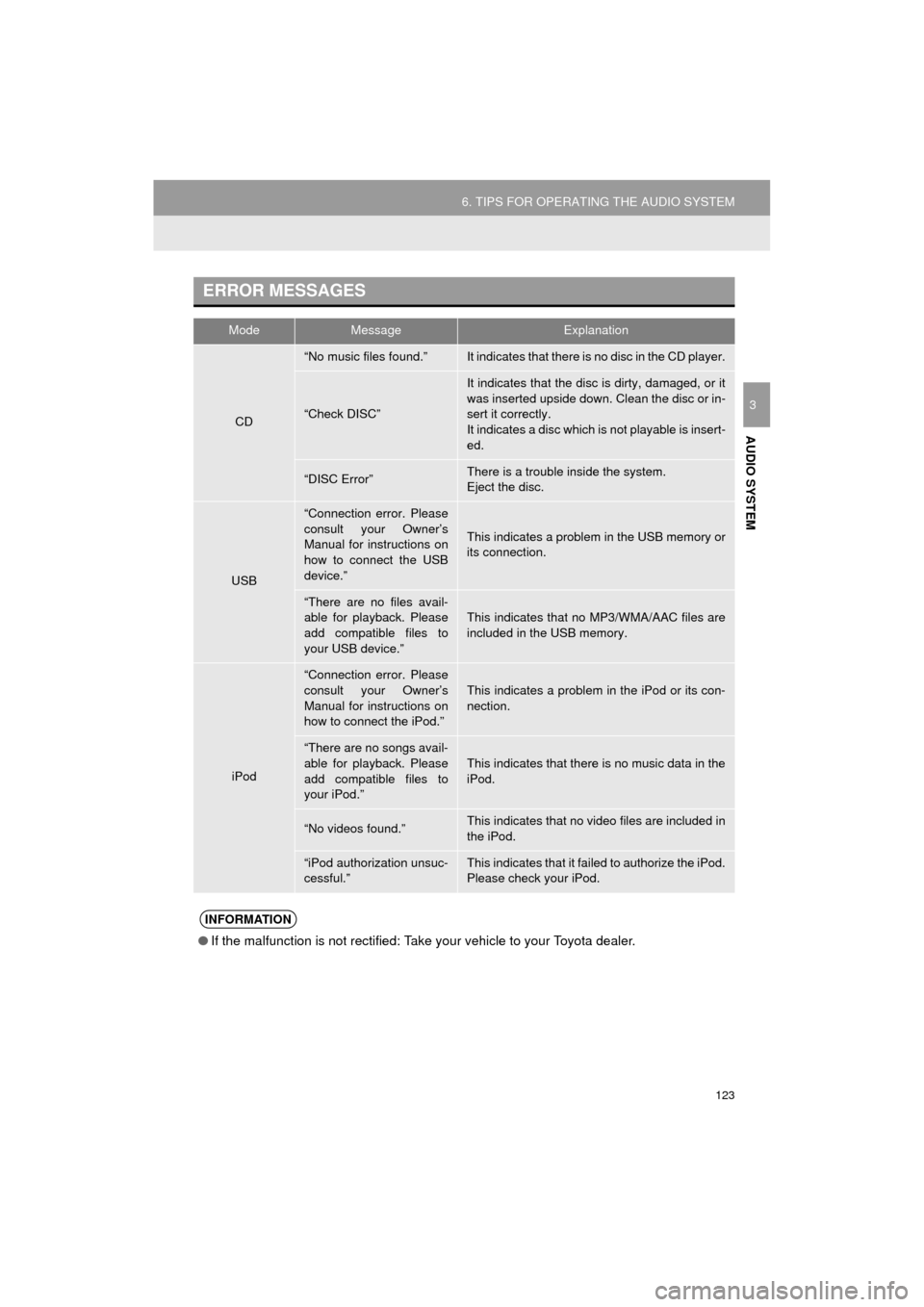
ERROR MESSAGES
ModeMessageExplanation
CD
“No music files found.”It indicates that there is no disc in the CD player.
“Check DISC”
It indicates that the disc is dirty, damaged, or it
was inserted upside down. Clean the disc or in-
sert it correctly.
It indicates a disc which is not playable is insert-
ed.
“DISC Error”There is a trouble inside the system.
Eject the disc.
USB
“Connection error. Please
consult your Owner’s
Manual for instructions on
how to connect the USB
device.”
This indicates a problem in the USB memory or
its connection.
“There are no files avail-
able for playback. Please
add compatible files to
your USB device.”This indicates that no MP3/WMA/AAC files are
included in the USB memory.
iPod
“Connection error. Please
consult your Owner’s
Manual for instructions on
how to connect the iPod.”
This indicates a problem in the iPod or its con-
nection.
“There are no songs avail-
able for playback. Please
add compatible files to
your iPod.”
This indicates that there is no music data in the
iPod.
“No videos found.”This indicates that no video files are included in
the iPod.
“iPod authorization unsuc-
cessful.”This indicates that it failed to authorize the iPod.
Please check your iPod.
INFORMATION
● If the malfunction is not rectified: Take your vehicle to your Toyota dealer.
Page 124 of 292

124
6. TIPS FOR OPERATING THE AUDIO SYSTEM
COROLLA_13CY_Navi_U
Page 125 of 292
4
125
COROLLA_13CY_Navi_U
5
6
7
8
9
1
2
3
4
1. VOICE COMMAND SYSTEM ...... 126
USING THE VOICE COMMAND
SYSTEM ............................................ 126
VOICE COMMAND SYSTEM OPERATION ..................................... 127
2. CASUAL SPEECH RECOGNIZATION..................... 132
3. COMMAND LIST ......................... 133
1VOICE COMMAND SYSTEM
OPERATION
VOICE COMMAND SYSTEM
Page 126 of 292
126
COROLLA_13CY_Navi_U
1. VOICE COMMAND SYSTEM OPERATION
1. VOICE COMMAND SYSTEM
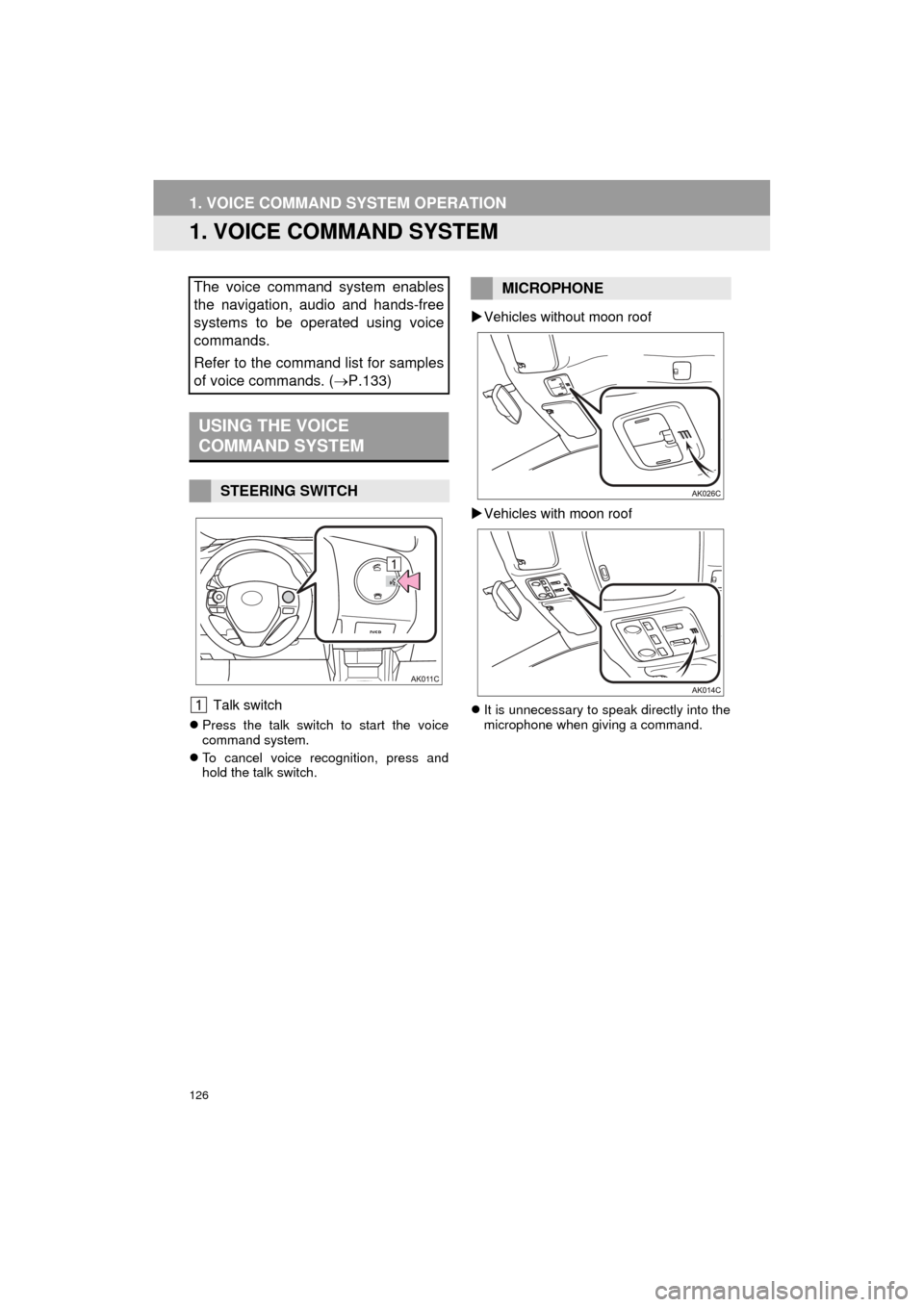
Talk switch
Press the talk switch to start the voice
command system.
To cancel voice recognition, press and
hold the talk switch.
Vehicles without moon roof
Vehicles with moon roof
It is unnecessary to speak directly into the
microphone when giving a command.
The voice command system enables
the navigation, audio and hands-free
systems to be operated using voice
commands.
Refer to the command list for samples
of voice commands. ( P.133)
USING THE VOICE
COMMAND SYSTEM
STEERING SWITCH
MICROPHONE
Page 127 of 292
127
1. VOICE COMMAND SYSTEM OPERATION
COROLLA_13CY_Navi_U
VOICE COMMAND SYSTEM
41Press the talk switch.
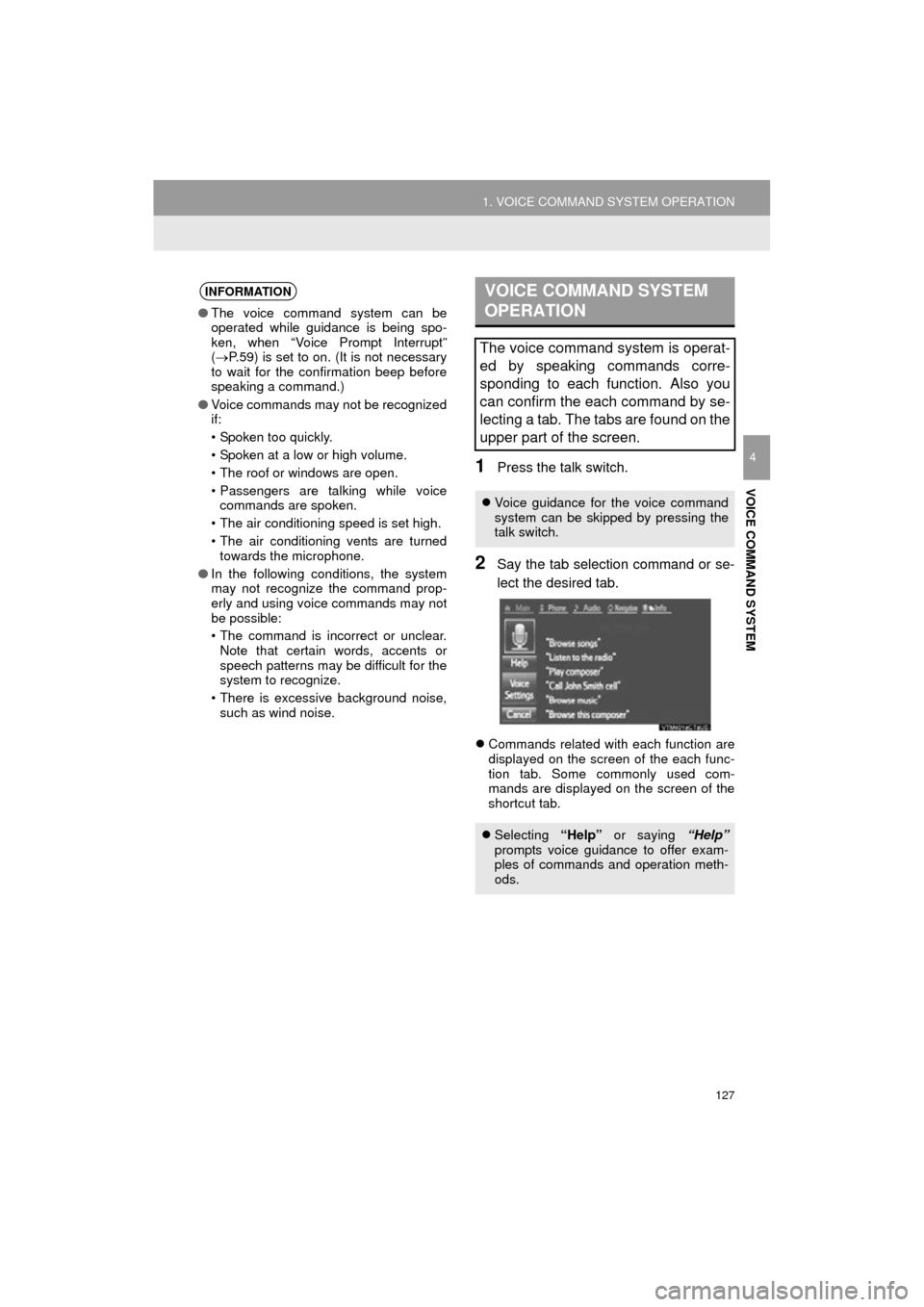
2Say the tab selection command or se-
lect the desired tab.
Commands related with each function are
displayed on the screen of the each func-
tion tab. Some commonly used com-
mands are displayed on the screen of the
shortcut tab.
INFORMATION
● The voice command system can be
operated while guidance is being spo-
ken, when “Voice Prompt Interrupt”
( P.59) is set to on. (It is not necessary
to wait for the confirmation beep before
speaking a command.)
● Voice commands may not be recognized
if:
• Spoken too quickly.
• Spoken at a low or high volume.
• The roof or windows are open.
• Passengers are talking while voice
commands are spoken.
• The air conditioning speed is set high.
• The air conditioning vents are turned towards the microphone.
● In the following conditions, the system
may not recognize the command prop-
erly and using voice commands may not
be possible:
• The command is incorrect or unclear.
Note that certain words, accents or
speech patterns may be difficult for the
system to recognize.
• There is excessive background noise, such as wind noise.
VOICE COMMAND SYSTEM
OPERATION
The voice command system is operat-
ed by speaking commands corre-
sponding to each function. Also you
can confirm the each command by se-
lecting a tab. The tabs are found on the
upper part of the screen.
Voice guidance for the voice command
system can be skipped by pressing the
talk switch.
Selecting “Help” or saying “Help”
prompts voice guidance to offer exam-
ples of commands and operation meth-
ods.
Page 128 of 292
128
1. VOICE COMMAND SYSTEM OPERATION
COROLLA_13CY_Navi_U
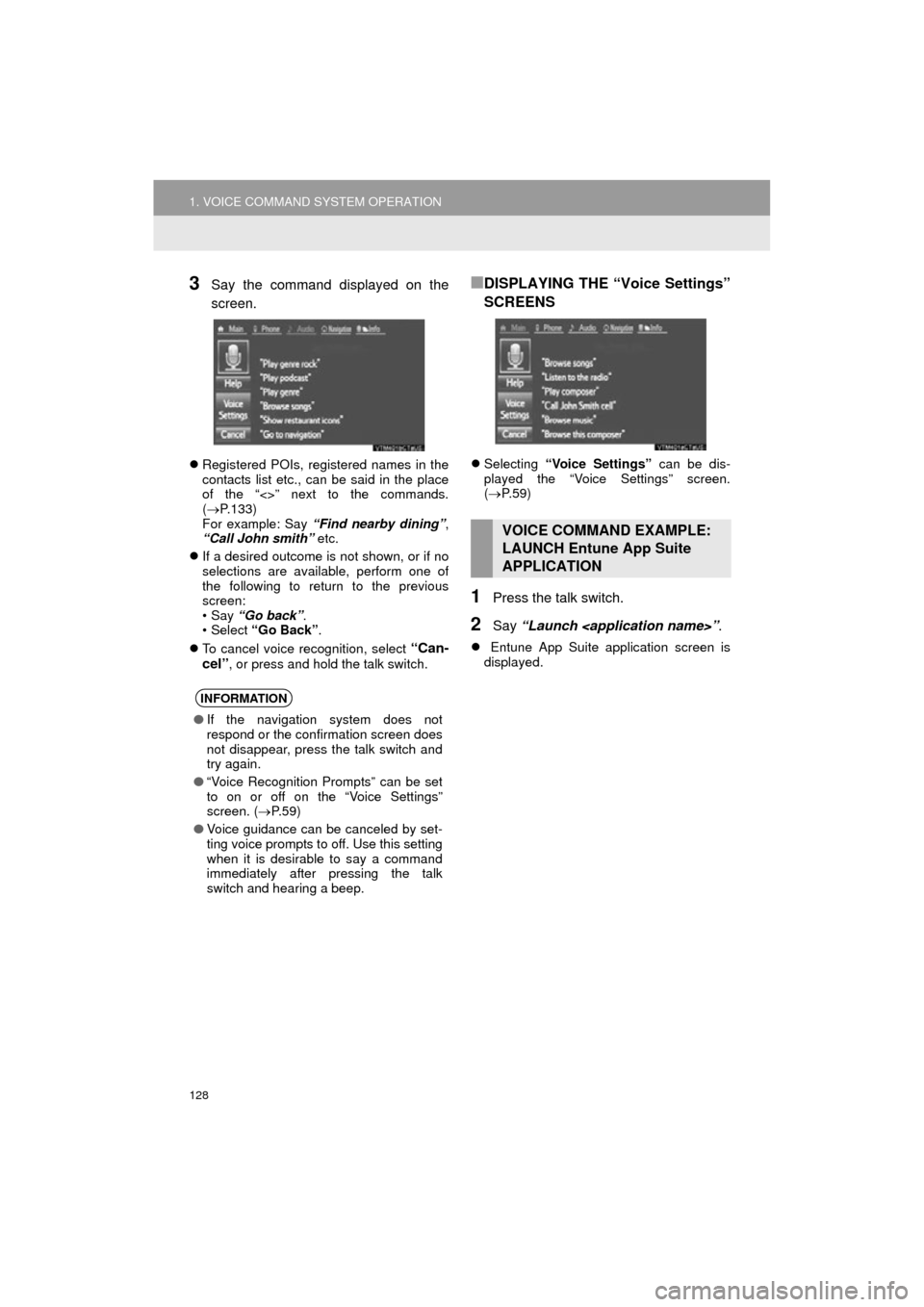
3Say the command displayed on the
screen.
Registered POIs, registered names in the
contacts list etc., can be said in the place
of the “<>” next to the commands.
( P.133)
For example: Say “Find nearby dining” ,
“Call John smith” etc.
If a desired outcome is not shown, or if no
selections are available, perform one of
the following to return to the previous
screen:
•Say “Go back” .
•Select “Go Back” .
To cancel voice recognition, select
“Can-
cel”
, or press and hold the talk switch.
■DISPLAYING THE “Voice Settings”
SCREENS
Selecting “Voice Settings” can be dis-
played the “Voice Settings” screen.
( P. 5 9 )
1Press the talk switch.
2Say “Launch
Entune App Suite application screen is
displayed.
INFORMATION
●If the navigation system does not
respond or the confirmation screen does
not disappear, press the talk switch and
try again.
● “Voice Recognition Prompts” can be set
to on or off on the “Voice Settings”
screen. ( P.59)
● Voice guidance can be canceled by set-
ting voice prompts to off. Use this setting
when it is desirable to say a command
immediately after pressing the talk
switch and hearing a beep.
VOICE COMMAND EXAMPLE:
LAUNCH Entune App Suite
APPLICATION
Page 129 of 292
129
1. VOICE COMMAND SYSTEM OPERATION
COROLLA_13CY_Navi_U
VOICE COMMAND SYSTEM
4
1Press the talk switch.
2Say “Enter an address” .
3Say “
A confirmation screen will be displayed
showing the recognition results. If multiple
matching items are found, a selection
screen will be displayed. Say “
Some areas cannot be recognized by the
voice recognition system.
4Say “Go directly” .
After this, follow the voice guidance and
search for a destination route by voice
command operation.
VOICE COMMAND EXAMPLE:
PERFORMING A DESTINATION
SEARCH BY ADDRESS
(ENGLISH ONLY)
For information regarding the state/
province setting to perform a destination
search by address: P. 2 11
INFORMATION
● The voice command recognition is
designed to recognize the main body of
the official street name.
For example: if the official street name is
“East Main Street”, the voice command
recognition will recognize
“Main”.
● Say the desired number, cardinal direc-
tion etc. in the place of the “<>”.
For example: Say “West 555”.
●Inputting the house number can be
skipped.
● Even if the state set using voice recogni-
tion is different from the set state in the
“Address” screen (which was set when a
destination was set manually), the set
state in the “Address” screen will not
change. ( P.212)
● The house number voice recognition
conditions are outlined below:
• Numerals: 10 digits or less
• Numerals and cardinal direction or a
hyphen and numerals: A total of 9
digits or less (Do not say “and”.)
• Cardinal direction or a hyphen and numerals: A total of 9 digits or less
(Do not say “and”.)
• Numerals are recognized as single digits only.
• The cardinal direction and hyphens are only recognized once.
• The following cardinal directions can be recognized: North, East, West and
South.
Page 130 of 292

130
1. VOICE COMMAND SYSTEM OPERATION
COROLLA_13CY_Navi_U
1Press the talk switch.
2Say “Play song
A confirmation screen will be displayed
showing the recognition results. If multiple
matching items are found, a selection
screen will be displayed. Say “
The system starts playing music and the
song lists are displayed.
1Press the talk switch.
2Say “Call
A confirmation screen will be displayed
showing the recognition results. If multiple
matching items are found, a selection
screen will be displayed. Say “
VOICE COMMAND EXAMPLE:
SEARCH FOR A SONG
INFORMATION
●The Gracenote database is only com-
patible with the USB or iPod mode.
● A USB memory or iPod must be con-
nected to enable track searching and
playback. ( P.94, 98)
● When a USB memory or iPod is con-
nected, recognition data is created so
tracks can be searched using voice
commands.
● Recognition data is updated under the
following conditions:
• When the USB memory or iPod data
has changed.
• When the voice recognition language
is changed. ( P. 5 4 )
● While the recognition data is being cre-
ated or being updated, a track search
cannot be performed using a voice com-
mand.
VOICE COMMAND EXAMPLE:
CALL NAME
INFORMATION
●In the same manner as it is displayed on
the screen, “Call
say the name, or the name and type of
phone, of a contact.
For example: “Call a contact” , “John
Smith” or “Call a contact” , “Mary
Davis” , “Mobile”
● There are 4 types of phones: Home,
Mobile, Office and Other.
● Short or abbreviated names in the con-
tacts list may not be recognized. Change
names in the contacts list to full names.
● Sometimes a voice recognition result
confirmation screen will be displayed.
After confirming the result, say “Yes” or
“No” .
● When the system recognizes multiple
names from the contacts list, a name
candidate list will be displayed on the
screen. If the desired name is not dis-
played on the top of the screen, say or
select the number of the name from the
candidate list (number 1 and number 2)
to select a name from the candidate list.
● When a contact has multiple phone
numbers registered in the contacts list, a
candidate list will be displayed. If the
desired phone number is not displayed
on the top of the screen, say or select
the number of the desired phone num-
ber from the candidate list (number 1
and number 2) to select a phone number
from the candidate list.