display TOYOTA COROLLA 2015 11.G Navigation Manual
[x] Cancel search | Manufacturer: TOYOTA, Model Year: 2015, Model line: COROLLA, Model: TOYOTA COROLLA 2015 11.GPages: 292, PDF Size: 3.95 MB
Page 27 of 292
27
3. NAVIGATION OPERATION
COROLLA_13CY_Navi_U
QUICK GUIDE
1
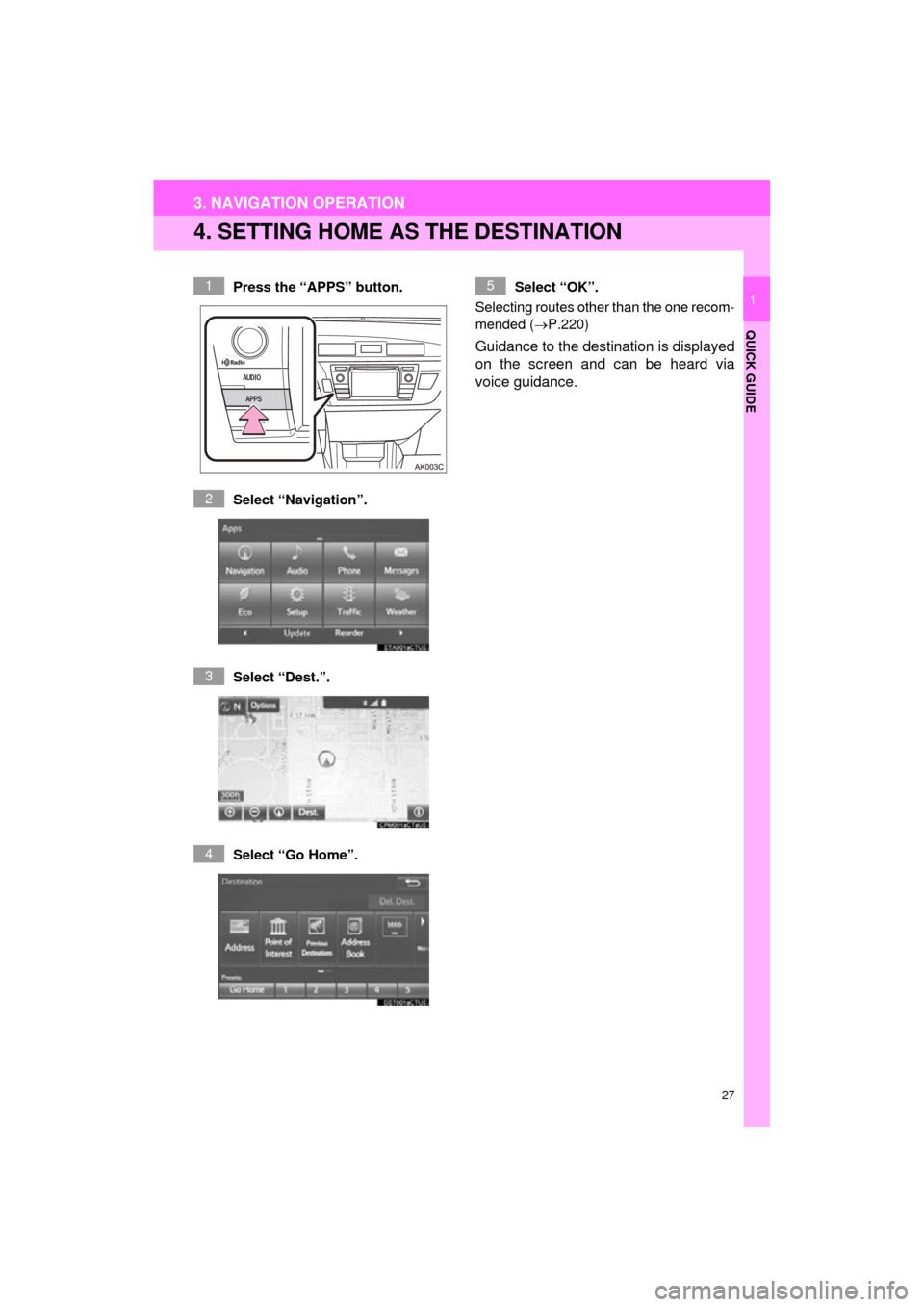
4. SETTING HOME AS THE DESTINATION
Press the “APPS” button.
Select “Navigation”.
Select “Dest.”.
Select “Go Home”. Select “OK”.
Selecting routes other than the one recom-
mended ( P.220)
Guidance to the destination is displayed
on the screen and can be heard via
voice guidance.
1
2
3
4
5
Page 28 of 292
28
COROLLA_13CY_Navi_U
4. FUNCTION INDEX
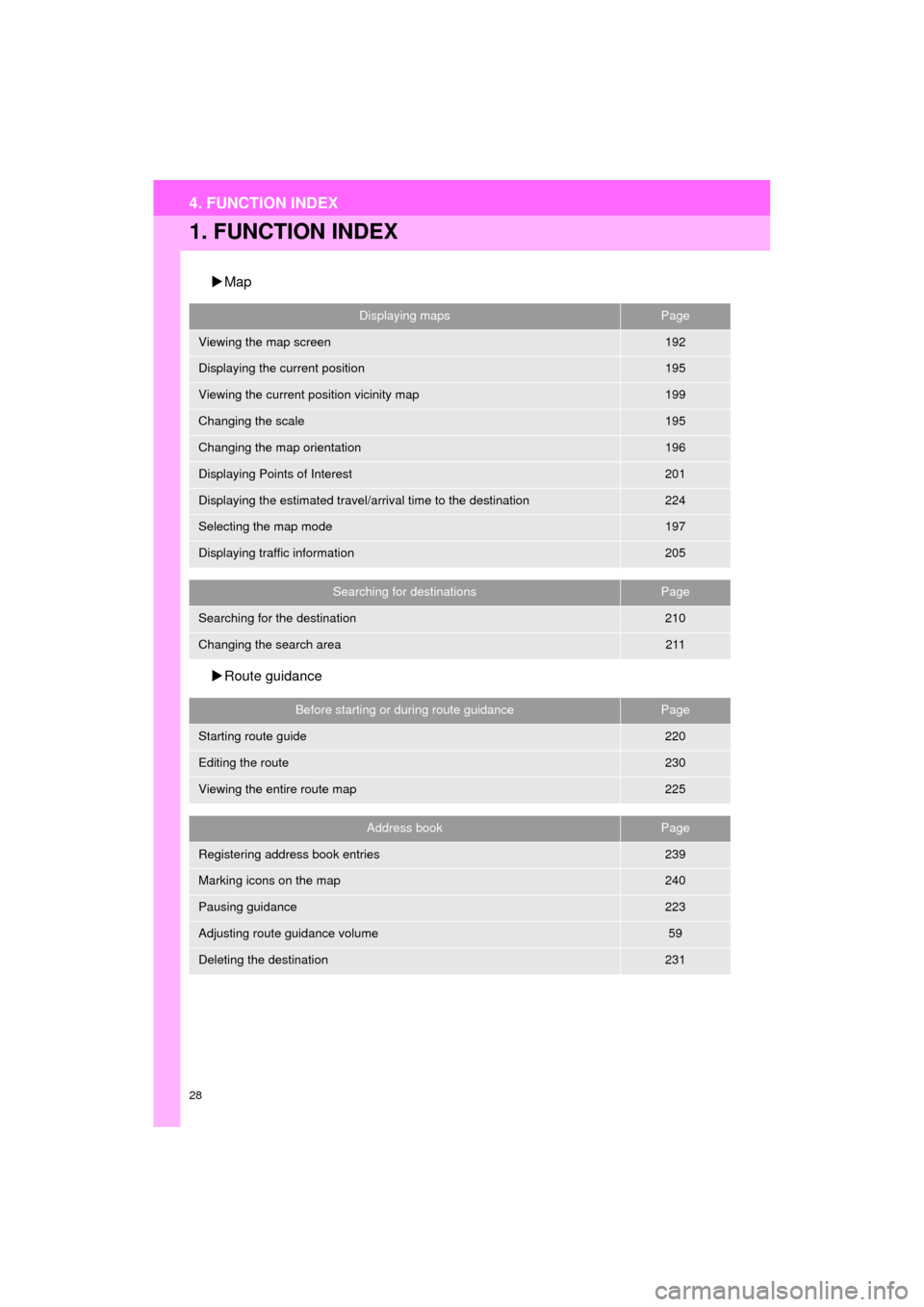
1. FUNCTION INDEX
Map
Route guidance
Displaying mapsPage
Viewing the map screen192
Displaying the current position195
Viewing the current position vicinity map199
Changing the scale195
Changing the map orientation196
Displaying Points of Interest201
Displaying the estimated travel/arrival time to the destination224
Selecting the map mode197
Displaying traffic information205
Searching for destinationsPage
Searching for the destination210
Changing the search area211
Before starting or during route guidancePage
Starting route guide220
Editing the route230
Viewing the entire route map225
Address bookPage
Registering address book entries239
Marking icons on the map240
Pausing guidance223
Adjusting route guidance volume59
Deleting the destination231
Page 29 of 292
29
4. FUNCTION INDEX
QUICK GUIDE
COROLLA_13CY_Navi_U
1
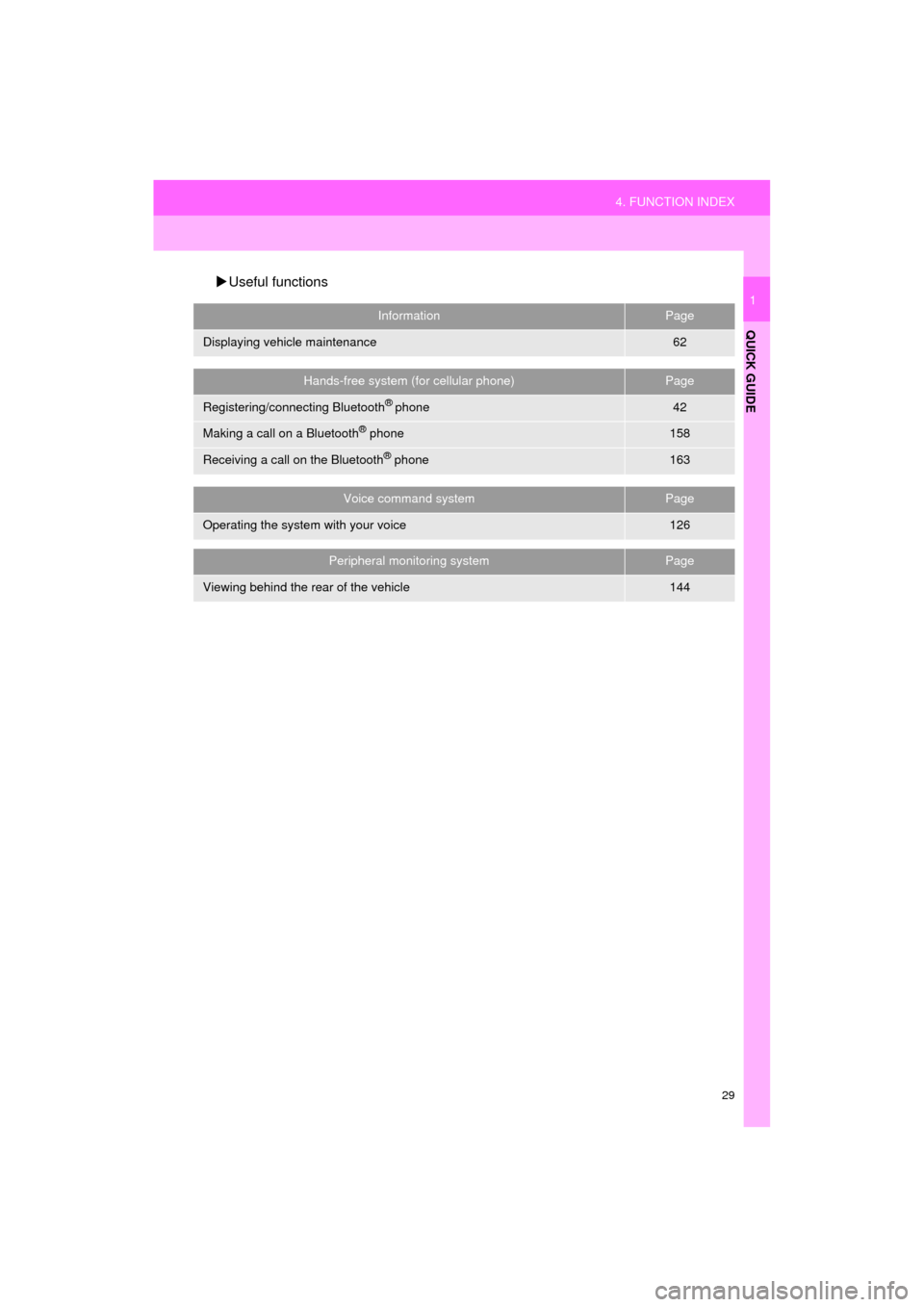
Useful functions
InformationPage
Displaying vehicle maintenance62
Hands-free system (for cellular phone)Page
Registering/connecting Bluetooth® phone42
Making a call on a Bluetooth® phone158
Receiving a call on the Bluetooth® phone163
Voice command systemPage
Operating the system with your voice126
Peripheral monitoring systemPage
Viewing behind the rear of the vehicle144
Page 32 of 292
32
COROLLA_13CY_Navi_U
1. BASIC INFORMATION BEFORE OPERATION
1. INITIAL SCREEN
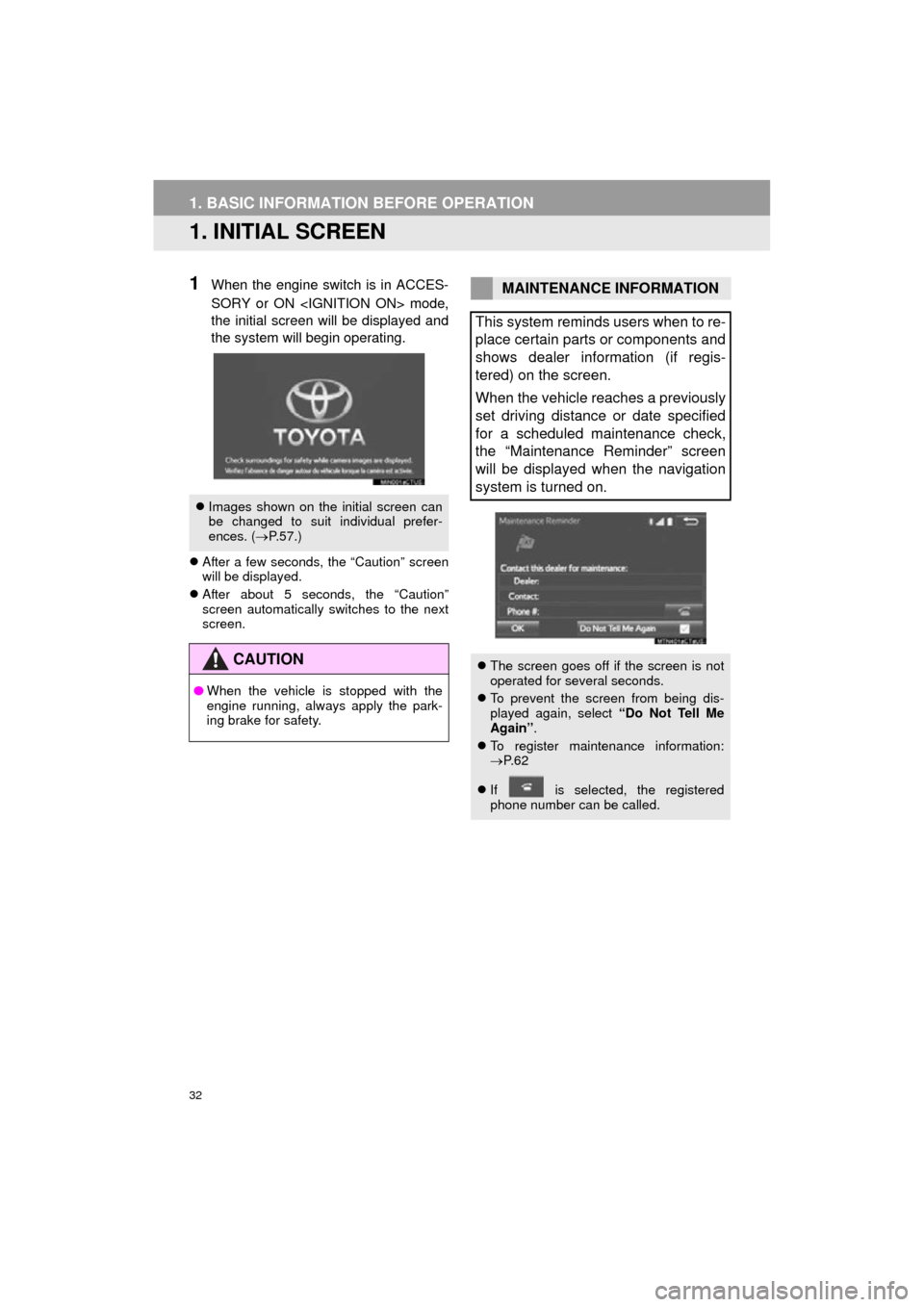
1When the engine switch is in ACCES-
SORY or ON
the initial screen will be displayed and
the system will begin operating.
After a few seconds, the “Caution” screen
will be displayed.
After about 5 seconds, the “Caution”
screen automatically switches to the next
screen.
Images shown on the initial screen can
be changed to suit individual prefer-
ences. ( P.57.)
CAUTION
● When the vehicle is stopped with the
engine running, always apply the park-
ing brake for safety.
MAINTENANCE INFORMATION
This system reminds users when to re-
place certain parts or components and
shows dealer information (if regis-
tered) on the screen.
When the vehicle reaches a previously
set driving distance or date specified
for a scheduled maintenance check,
the “Maintenance Reminder” screen
will be displayed when the navigation
system is turned on.
The screen goes off if the screen is not
operated for several seconds.
To prevent the screen from being dis-
played again, select “Do Not Tell Me
Again” .
To register maintenance information:
P. 6 2
If is selected, the registered
phone number can be called.
Page 35 of 292
35
1. BASIC INFORMATION BEFORE OPERATION
COROLLA_13CY_Navi_U
BASIC FUNCTION
2
3. TOUCH SCREEN OPERATION
This system is operated mainly by the
buttons on the screen. (Referred to as
screen buttons in this manual.)
When a screen button is touched, a
beep sounds. (To set the beep sound,
see page 54.)
NOTICE
● To prevent damaging the screen, lightly
touch the screen buttons with your fin-
ger.
● Do not use objects other than your finger
to touch the screen.
● Wipe off fingerprints using a glass clean-
ing cloth. Do not use chemical cleaners
to clean the screen, as they may dam-
age the touch screen.
INFORMATION
●If the system does not respond to touch-
ing a screen button, move your finger
away from the screen and then touch it
again.
● Dimmed screen buttons cannot be oper-
ated.
● The displayed image may become
darker and moving images may be
slightly distorted when the screen is
cold.
● In extremely cold conditions, the map
may not be displayed and the data input
by a user may be deleted. Also, the
screen buttons may be harder than
usual to depress.
● When you look at the screen through
polarized material such as polarized
sunglasses, the screen may be dark and
hard to see. If so, look at the screen
from different angles, adjust the screen
settings on the “Display Settings” screen
or take off your sunglasses.
Page 36 of 292
36
1. BASIC INFORMATION BEFORE OPERATION
COROLLA_13CY_Navi_U
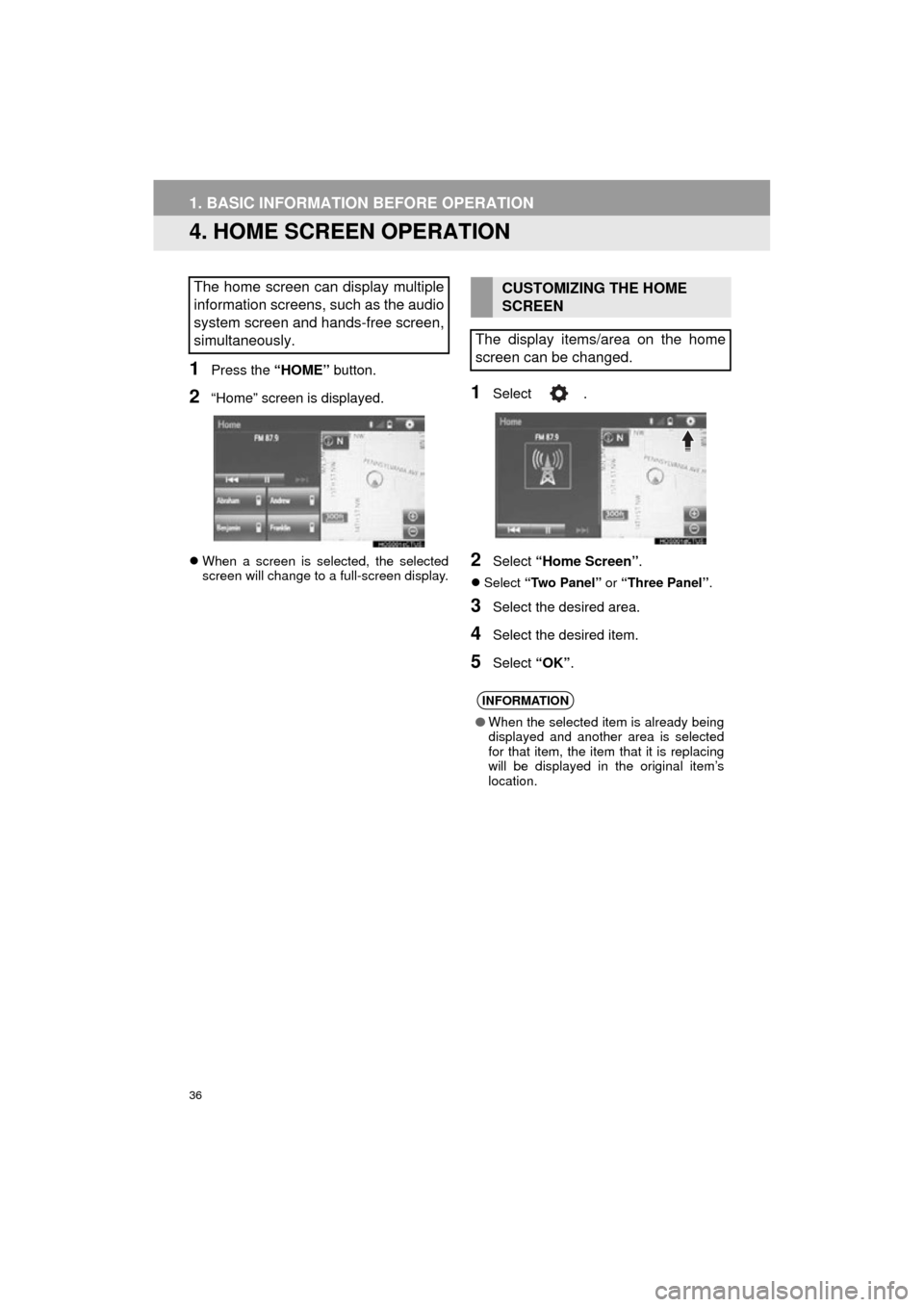
4. HOME SCREEN OPERATION
1Press the “HOME” button.
2“Home” screen is displayed.
When a screen is selected, the selected
screen will change to a full-screen display.
1Select .
2Select “Home Screen” .
Select “Two Panel” or “Three Panel” .
3Select the desired area.
4Select the desired item.
5Select “OK”.
The home screen can display multiple
information screens, such as the audio
system screen and hands-free screen,
simultaneously. CUSTOMIZING THE HOME
SCREEN
The display items/area on the home
screen can be changed.
INFORMATION
● When the selected item is already being
displayed and another area is selected
for that item, the item that it is replacing
will be displayed in the original item’s
location.
Page 37 of 292
37
1. BASIC INFORMATION BEFORE OPERATION
COROLLA_13CY_Navi_U
BASIC FUNCTION
2
5. ENTERING LETTERS AND NUMBERS/LIST SCREEN OPERATION
On certain letter entry screens, letters can
be entered in upper or lower case.
: Select to enter in lower case.
: Select to enter in upper case.
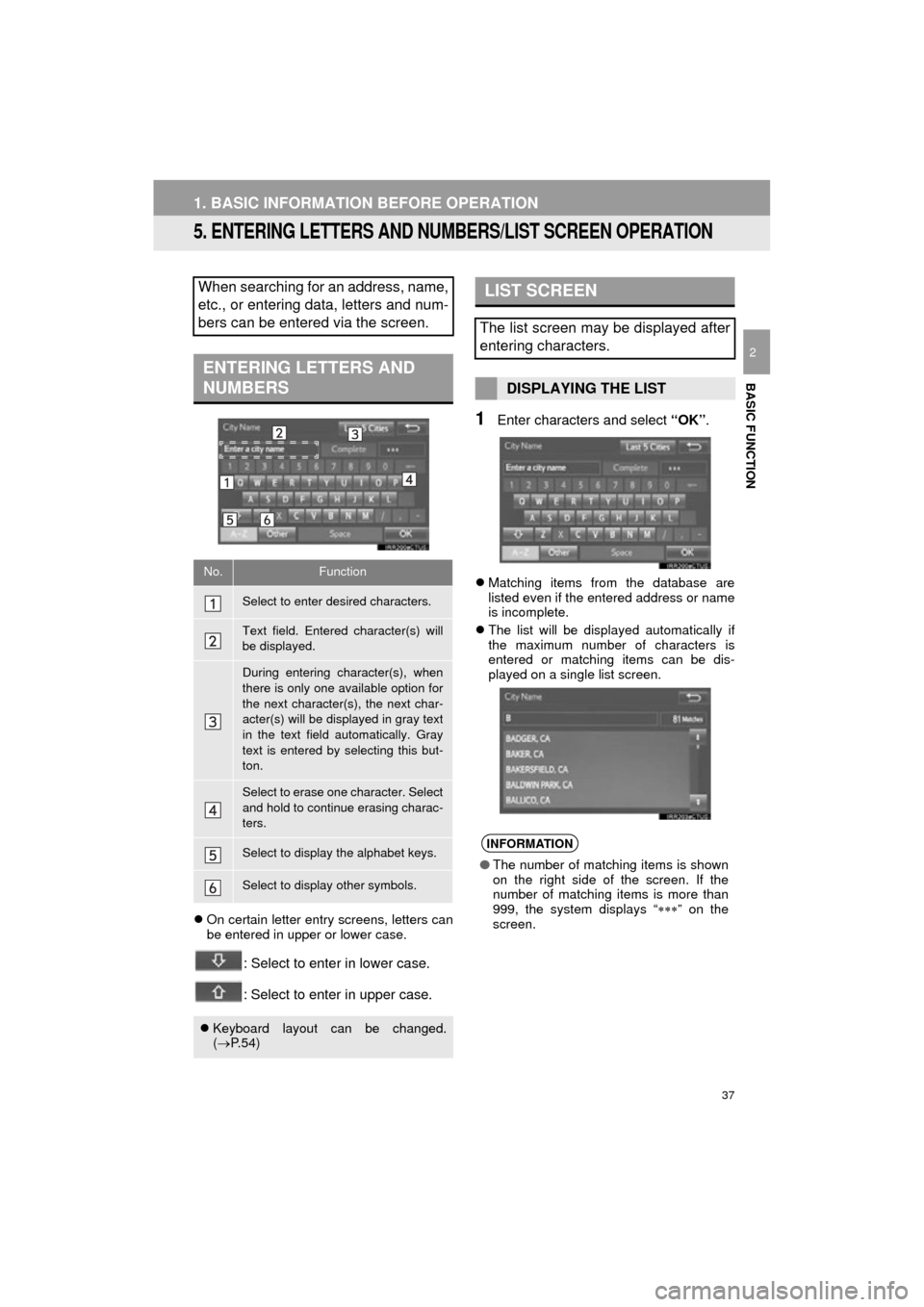
1Enter characters and select “OK”.
Matching items from the database are
listed even if the entered address or name
is incomplete.
The list will be displayed automatically if
the maximum number of characters is
entered or matching items can be dis-
played on a single list screen.
When searching for an address, name,
etc., or entering data, letters and num-
bers can be entered via the screen.
ENTERING LETTERS AND
NUMBERS
No.Function
Select to enter desired characters.
Text field. Entered character(s) will
be displayed.
During entering character(s), when
there is only one available option for
the next character(s), the next char-
acter(s) will be displayed in gray text
in the text field automatically. Gray
text is entered by selecting this but-
ton.
Select to erase one character. Select
and hold to continue erasing charac-
ters.
Select to display the alphabet keys.
Select to display other symbols.
Keyboard layout can be changed.
( P. 5 4 )
LIST SCREEN
The list screen may be displayed after
entering characters.
DISPLAYING THE LIST
INFORMATION
● The number of matching items is shown
on the right side of the screen. If the
number of matching items is more than
999, the system displays “ ” on the
screen.
Page 38 of 292
38
1. BASIC INFORMATION BEFORE OPERATION
COROLLA_13CY_Navi_U
■SELECTING ALL ITEMS
1Select “Select All”.
“Unselect All” : Unselect all items in the
list.
Some lists contain “Select All” . If “Se-
lect All” is selected, it is possible to
select all items.
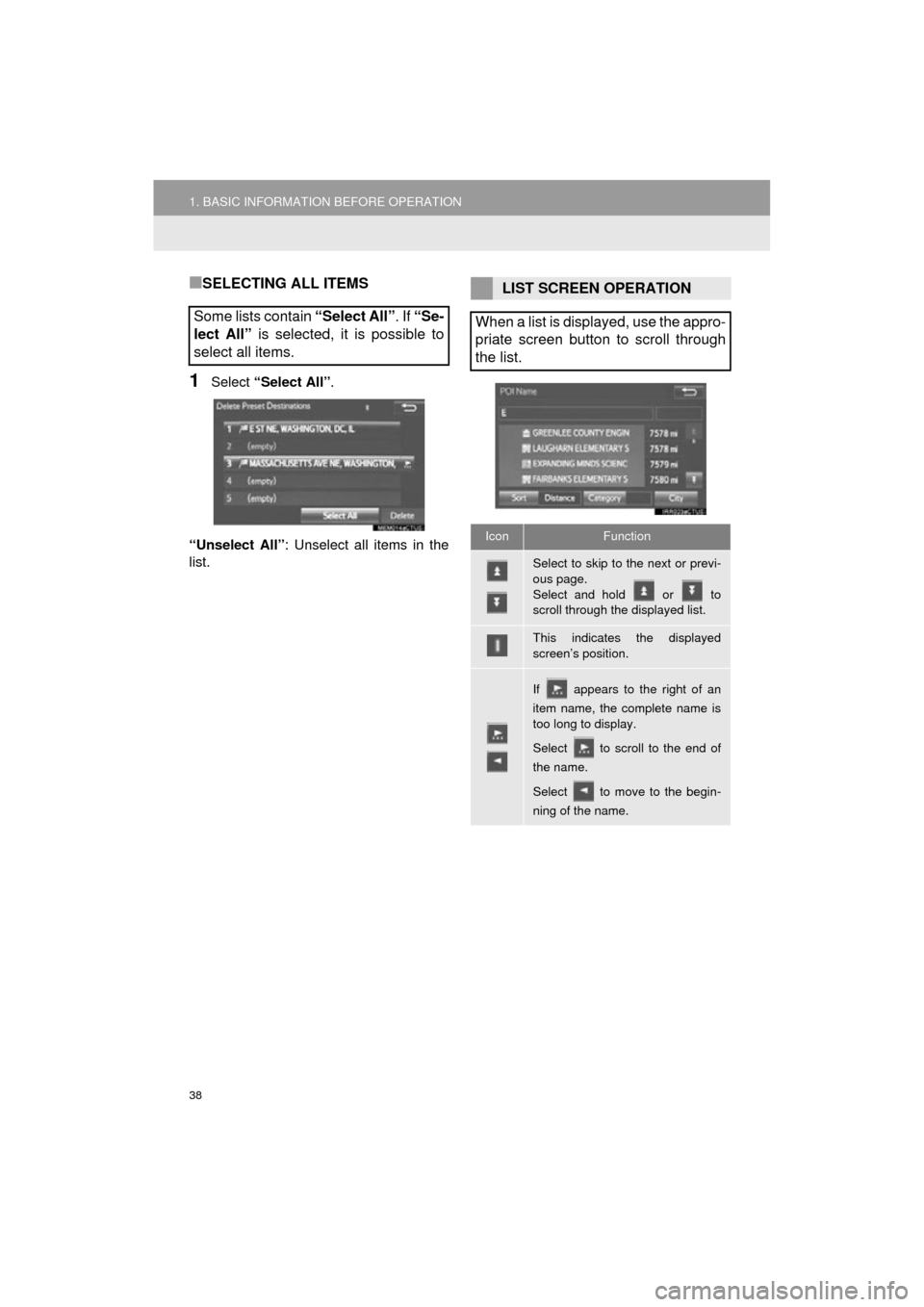
LIST SCREEN OPERATION
When a list is displayed, use the appro-
priate screen button to scroll through
the list.
IconFunction
Select to skip to the next or previ-
ous page.
Select and hold or to
scroll through the displayed list.
This indicates the displayed
screen’s position.
If appears to the right of an
item name, the complete name is
too long to display.
Select to scroll to the end of
the name.
Select to move to the begin-
ning of the name.
Page 39 of 292
39
1. BASIC INFORMATION BEFORE OPERATION
BASIC FUNCTION
COROLLA_13CY_Navi_U
2
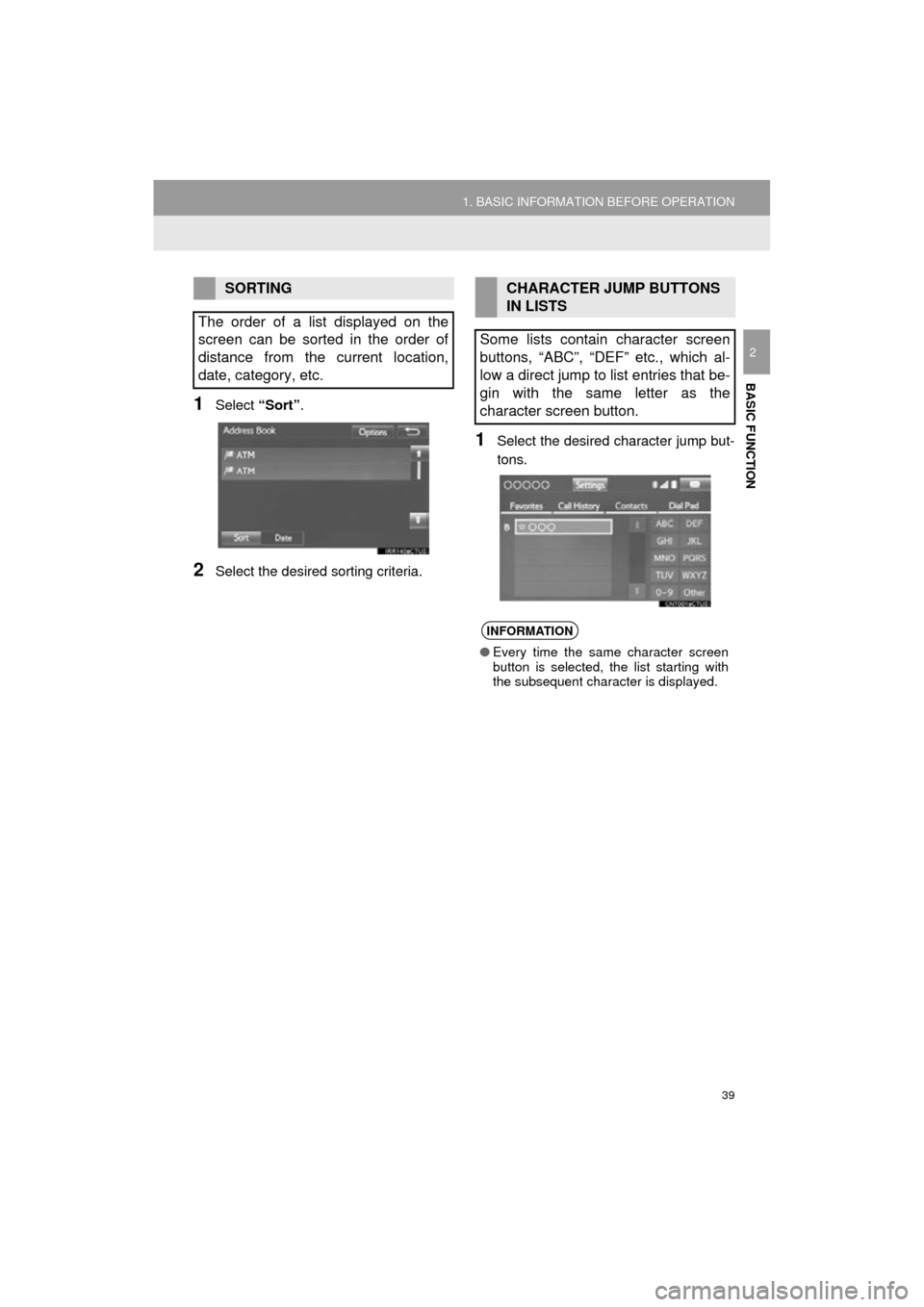
1Select “Sort”.
2Select the desired sorting criteria.
1Select the desired character jump but-
tons.
SORTING
The order of a list displayed on the
screen can be sorted in the order of
distance from the current location,
date, category, etc.CHARACTER JUMP BUTTONS
IN LISTS
Some lists contain character screen
buttons, “ABC”, “DEF” etc., which al-
low a direct jump to list entries that be-
gin with the same letter as the
character screen button.
INFORMATION
● Every time the same character screen
button is selected, the list starting with
the subsequent character is displayed.
Page 40 of 292
40
1. BASIC INFORMATION BEFORE OPERATION
COROLLA_13CY_Navi_U
6. SCREEN ADJUSTMENT
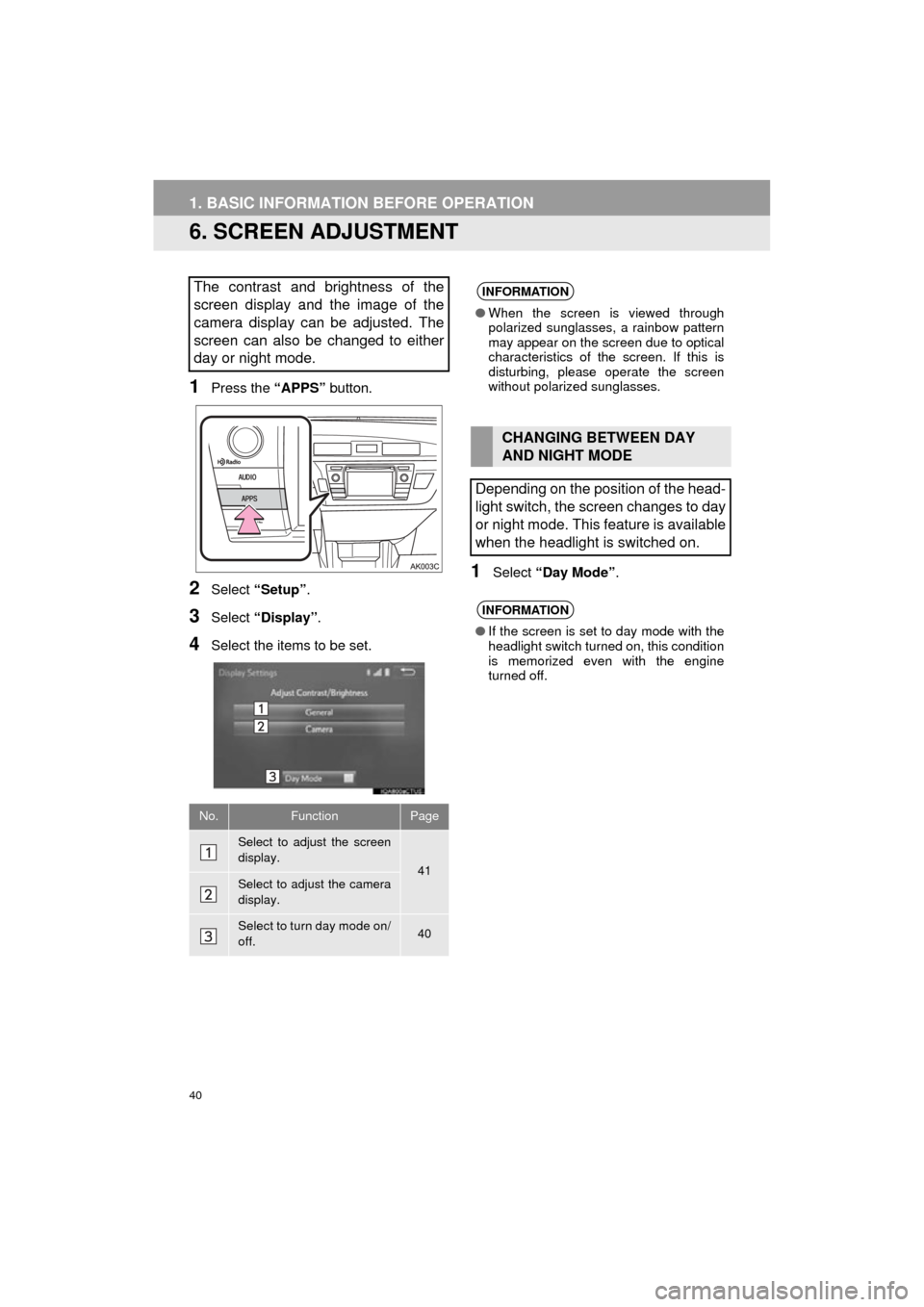
1Press the “APPS” button.
2Select “Setup” .
3Select “Display” .
4Select the items to be set.
1Select “Day Mode” .
The contrast and brightness of the
screen display and the image of the
camera display can be adjusted. The
screen can also be changed to either
day or night mode.
No.FunctionPage
Select to adjust the screen
display.
41Select to adjust the camera
display.
Select to turn day mode on/
off.40
INFORMATION
●When the screen is viewed through
polarized sunglasses, a rainbow pattern
may appear on the screen due to optical
characteristics of the screen. If this is
disturbing, please operate the screen
without polarized sunglasses.
CHANGING BETWEEN DAY
AND NIGHT MODE
Depending on the position of the head-
light switch, the screen changes to day
or night mode. This feature is available
when the headlight is switched on.
INFORMATION
● If the screen is set to day mode with the
headlight switch turned on, this condition
is memorized even with the engine
turned off.