phone TOYOTA COROLLA 2015 11.G Navigation Manual
[x] Cancel search | Manufacturer: TOYOTA, Model Year: 2015, Model line: COROLLA, Model: TOYOTA COROLLA 2015 11.GPages: 292, PDF Size: 3.95 MB
Page 261 of 292
261
1. Entune App Suite OVERVIEW
COROLLA_13CY_Navi_U
Entune App Suite
9
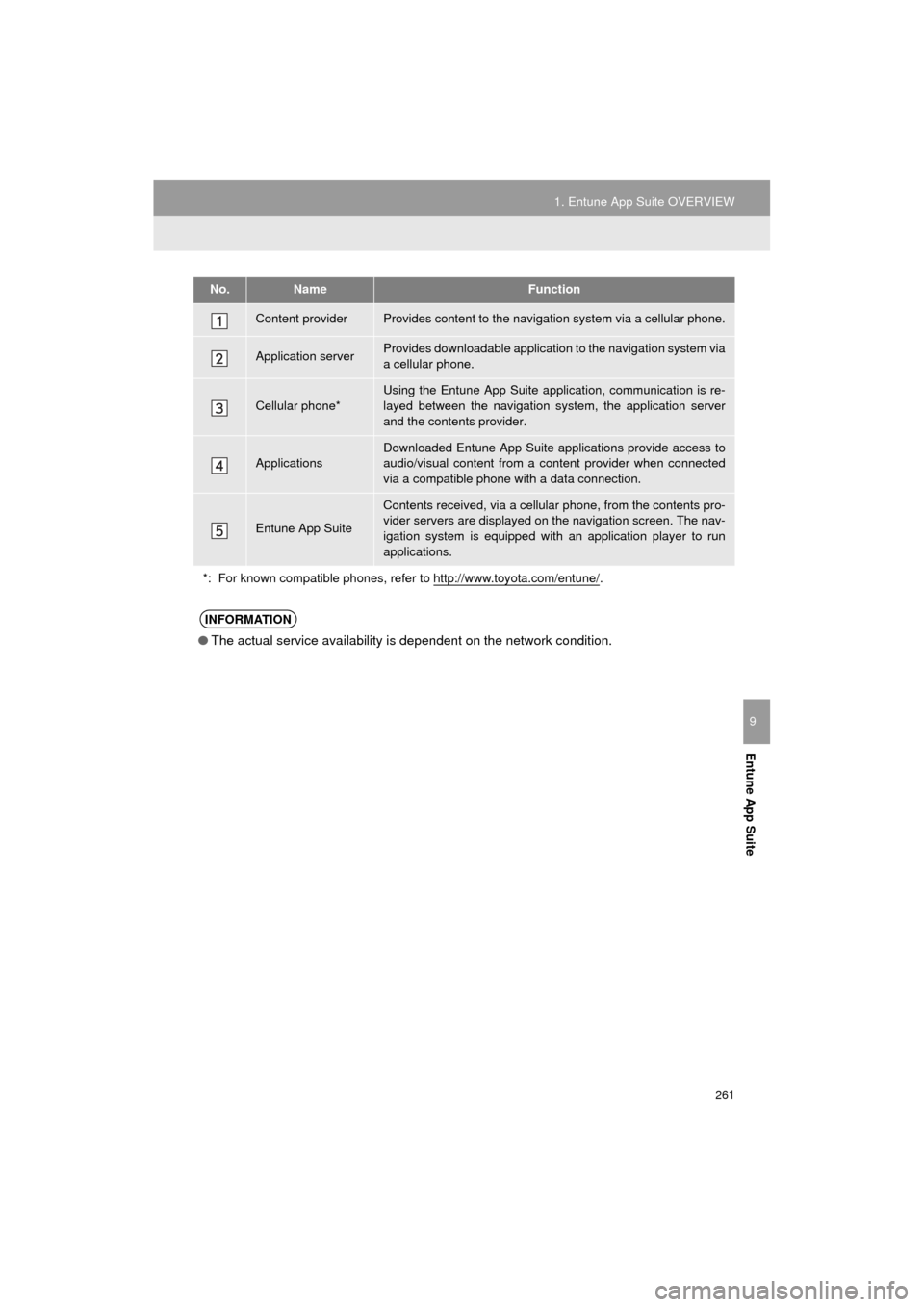
No.NameFunction
Content providerProvides content to the navigation system via a cellular phone.
Application serverProvides downloadable application to the navigation system via
a cellular phone.
Cellular phone*
Using the Entune App Suite application, communication is re-
layed between the navigation system, the application server
and the contents provider.
Applications
Downloaded Entune App Suite applications provide access to
audio/visual content from a c ontent provider when connected
via a compatible phone with a data connection.
Entune App Suite
Contents received, via a cellular phone, from the contents pro-
vider servers are displayed on the navigation screen. The nav-
igation system is equipped with an application player to run
applications.
*: For known compatible phones, refer to http://www.toyota.com/entune/
.
INFORMATION
● The actual service availability is dependent on the network condition.
Page 262 of 292
262
1. Entune App Suite OVERVIEW
COROLLA_13CY_Navi_U
User registration is required to start using
the Entune App Suite service.
Entune App Suite does not require an acti-
vation fee or monthly recurring fees.
Services requiring a separate contract can
also be used.*
*: For details, refer to http://
www.toyota.com/entune/ or call 1-800-
331-4331.
Entune App Suite is available in the con-
tiguous United States, D. C. and Alaska.
The following personal data can be
deleted from the navigation system and
returned to their default settings:
• Downloaded applications
• Downloaded application content
BEFORE USING THE
FUNCTION
SUBSCRIPTION
AVAILABILITY OF SERVICE
INFORMATION
●When using Entune App Suite, depend-
ing on the details of your cellular phone
contract, data usage fees may apply.
Confirm data usage fees before using
this service.
● In this section, the required actions to
activate applications, connect a cellular
phone to the navigation system and reg-
istration steps for Entune App Suite are
explained. For details regarding Entune
App Suite operations and each of the
applications, refer to http://
www.toyota.com/entune/.
● The actual service availability is depen-
dent on the network condition.
INITIALIZING PERSONAL
DATA
The personal data used in applications
can be removed from the navigation
system. ( P.58)
INFORMATION
●Once initialized, data will be erased from
the navigation system. Pay close atten-
tion when initializing the data.
Page 263 of 292
263
1. Entune App Suite OVERVIEW
COROLLA_13CY_Navi_U
Entune App Suite
9
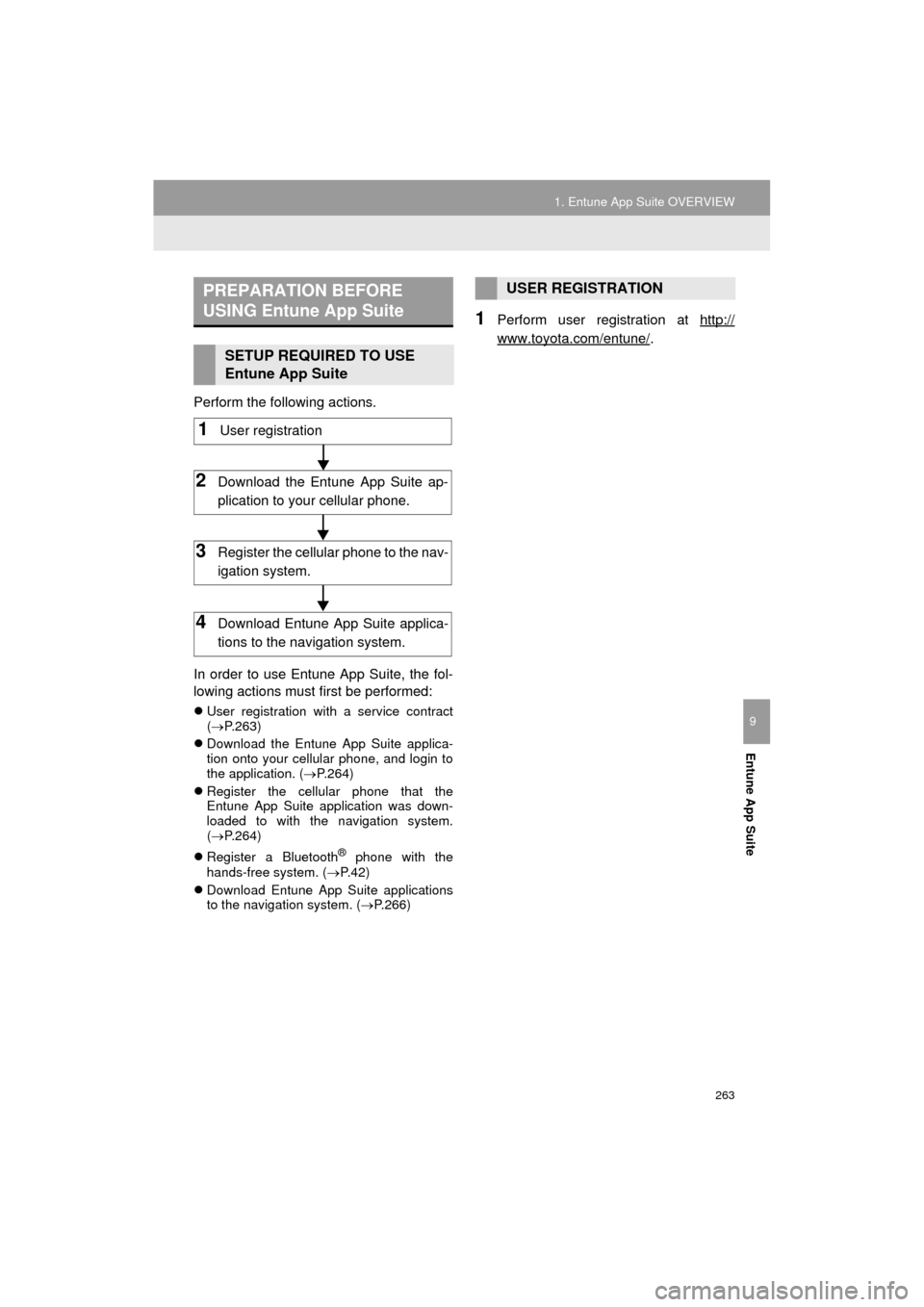
Perform the following actions.
In order to use Entune App Suite, the fol-
lowing actions must first be performed:
User registration with a service contract
( P.263)
Download the Entune App Suite applica-
tion onto your cellular phone, and login to
the application. ( P.264)
Register the cellular phone that the
Entune App Suite application was down-
loaded to with the navigation system.
( P.264)
Register a Bluetooth
® phone with the
hands-free system. ( P.42)
Download Entune App Suite applications
to the navigation system. ( P.266)
1Perform user registration at http://
www.toyota.com/entune/.
PREPARATION BEFORE
USING Entune App Suite
SETUP REQUIRED TO USE
Entune App Suite
1User registration
2Download the Entune App Suite ap-
plication to your cellular phone.
3Register the cellular phone to the nav-
igation system.
4Download Entune App Suite applica-
tions to the na vigation system.
USER REGISTRATION
Page 264 of 292
264
1. Entune App Suite OVERVIEW
COROLLA_13CY_Navi_U
1Download the Entune App Suite appli-
cation to your cellular phone.
2Run the Entune App Suite application
on your cellular phone.
3Enter the information required into the
Entune App Suite application. Login to
the application.
1The actions on P.263 need to be per-
formed before Entune App Suite appli-
cations can be downloaded.
2Once your phone is running the Entune
App Suite application with a valid ac-
count logged in and is connected to the
navigation system, an on-screen pup-
up will be displayed offering to begin
downloading Entune App Suite appli-
cations to the navigation system. After
download has started, see P.267 for
more information.
REGISTERING THE Entune App
Suite APPLICATION
INFORMATION
● Applications can only be used when the
Entune App Suite application has been
downloaded to your cellular phone and
the application is running.
● Entune App Suite operational proce-
dures can also be confirmed by visiting
http://www.toyota.com/entune/
.
● In order to use applications, it is neces-
sary to run the Entune App Suite appli-
cation on your cellular phone.
● If an iPhone is connected via Bluetooth
®
and USB at the same time, system oper-
ation may become unstable. For known
phone compatibility information, refer to
http://www.toyota.com/entune/
.
● If an Entune App Suite application is
used while iPod audio is being played
back, system operation may become
unstable.
DOWNLOADING Entune App
Suite APPLICATIONS
Page 265 of 292
265
COROLLA_13CY_Navi_U
Entune App Suite
9
2. Entune App Suite OPERATION
1. Entune App Suite
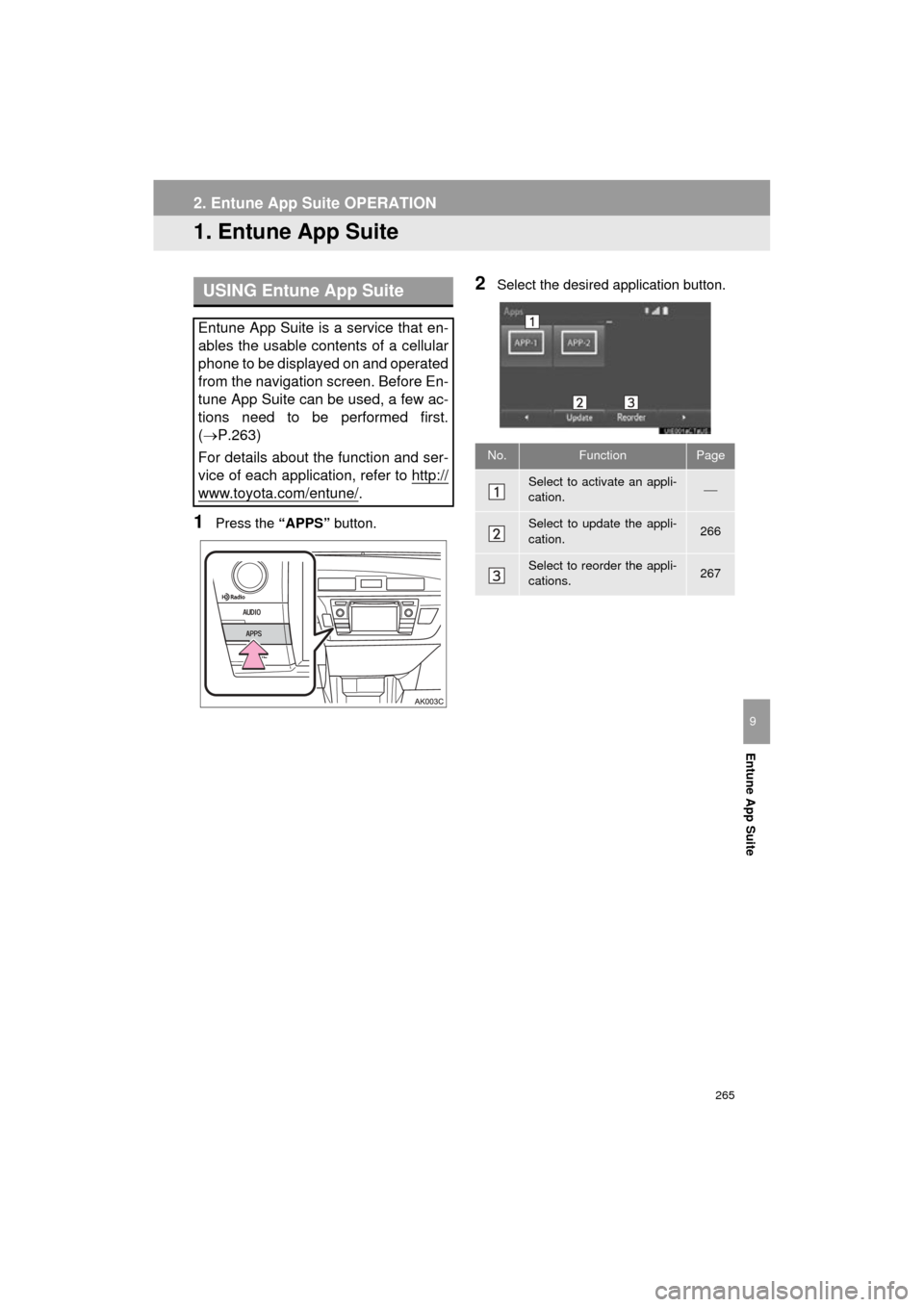
1Press the “APPS” button.
2Select the desired application button.USING Entune App Suite
Entune App Suite is a service that en-
ables the usable contents of a cellular
phone to be displayed on and operated
from the navigation screen. Before En-
tune App Suite can be used, a few ac-
tions need to be performed first.
(P.263)
For details about the function and ser-
vice of each application, refer to http://
www.toyota.com/entune/.
No.FunctionPage
Select to activate an appli-
cation.
Select to update the appli-
cation.266
Select to reorder the appli-
cations.267
Page 268 of 292
268
2. Entune App Suite OPERATION
COROLLA_13CY_Navi_U
IF A MESSAGE APPEARS ON THE SCREEN
When problems occur starting up the application player, a message will appear on
the screen. Referring to the table below to identify the problem, take the suggested
corrective action.
MessageDisplay conditionsCorrective action
“This feature is unavailable
during an emergency call.”Safety Connect is being im-
plemented.After Safety Connect is fin-
ished, perform the operation
again.
“This feature is unavailable
while transferring contacts.”Contacts are being trans-
ferred manually from the
phonebook.When the transfer of contacts
is complete, perform the op-
eration.
“Unable to connect to a
Bluetooth* phone. For trou-
bleshooting assistance,
please visit toyota.com.”
The cellular phone cannot be
connected.
Refer to http://
www.toyota.com/entune/ to
confirm if the phone is com-
patible or not.
“This feature is unavailable
during a handsfree call.”A hands-free call is in
progress.After the hands-free call is fin-
ished, perform the operation.
“To use these services, an
active application needs to be
running on your phone. For
more information, please visit
toyota.com.”
The Entune App Suite appli-
cation cannot be connected
to Bluetooth* SPP.
Refer to http://www.toyota.com/entune/ to
confirm if the phone is
Bluetooth* SPP compatible or
not, and then activate the En-
tune App Suite application.
“Entune connection has been
lost. Please confirm your con-
nection.”Communication was discon-
nected.After a few moments, retry
the operation.
*: Bluetooth is a registered trade mark of Bluetooth SIG, Inc.
Page 270 of 292
270
2. Entune App Suite OPERATION
COROLLA_13CY_Navi_U
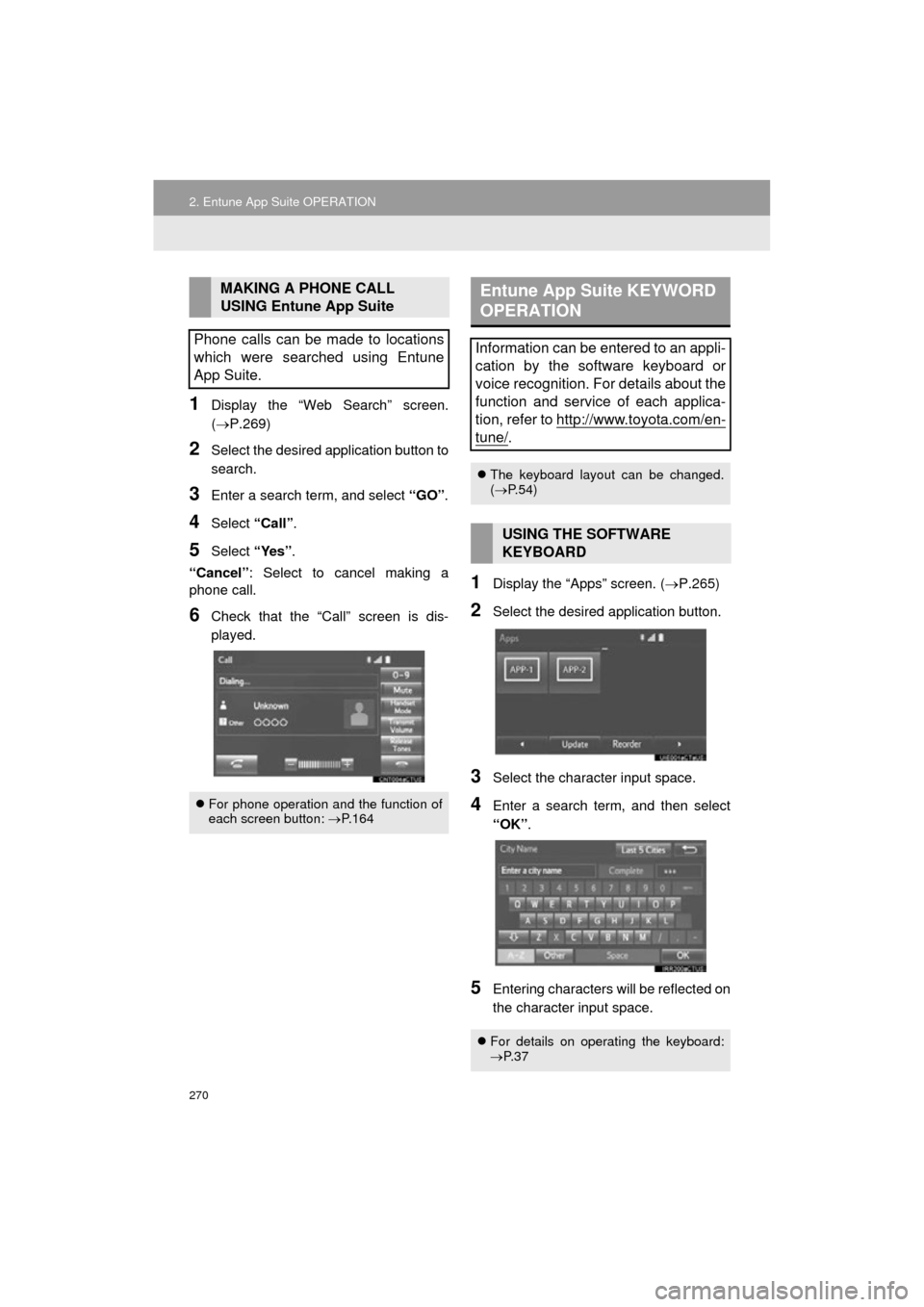
1Display the “Web Search” screen.
(P.269)
2Select the desired application button to
search.
3Enter a search term, and select “GO”.
4Select “Call”.
5Select “Yes”.
“Cancel” : Select to cancel making a
phone call.
6Check that the “Call” screen is dis-
played.
1Display the “Apps” screen. ( P.265)
2Select the desired application button.
3Select the character input space.
4Enter a search term, and then select
“OK”.
5Entering characters will be reflected on
the character input space.
MAKING A PHONE CALL
USING Entune App Suite
Phone calls can be made to locations
which were searched using Entune
App Suite.
For phone operation and the function of
each screen button: P.164
Entune App Suite KEYWORD
OPERATION
Information can be entered to an appli-
cation by the software keyboard or
voice recognition. For details about the
function and service of each applica-
tion, refer to http://www.toyota.com/en-
tune/.
The keyboard layout can be changed.
( P.54)
USING THE SOFTWARE
KEYBOARD
For details on operating the keyboard:
P. 3 7
Page 272 of 292
272
COROLLA_13CY_Navi_U
3. SETUP
1. Entune App Suite SETTINGS
1Press the “APPS” button.
2Select “Setup” .
3Select “Entune” .
4Select the items to be set.
5Select “OK”.
Settings are available for Entune App
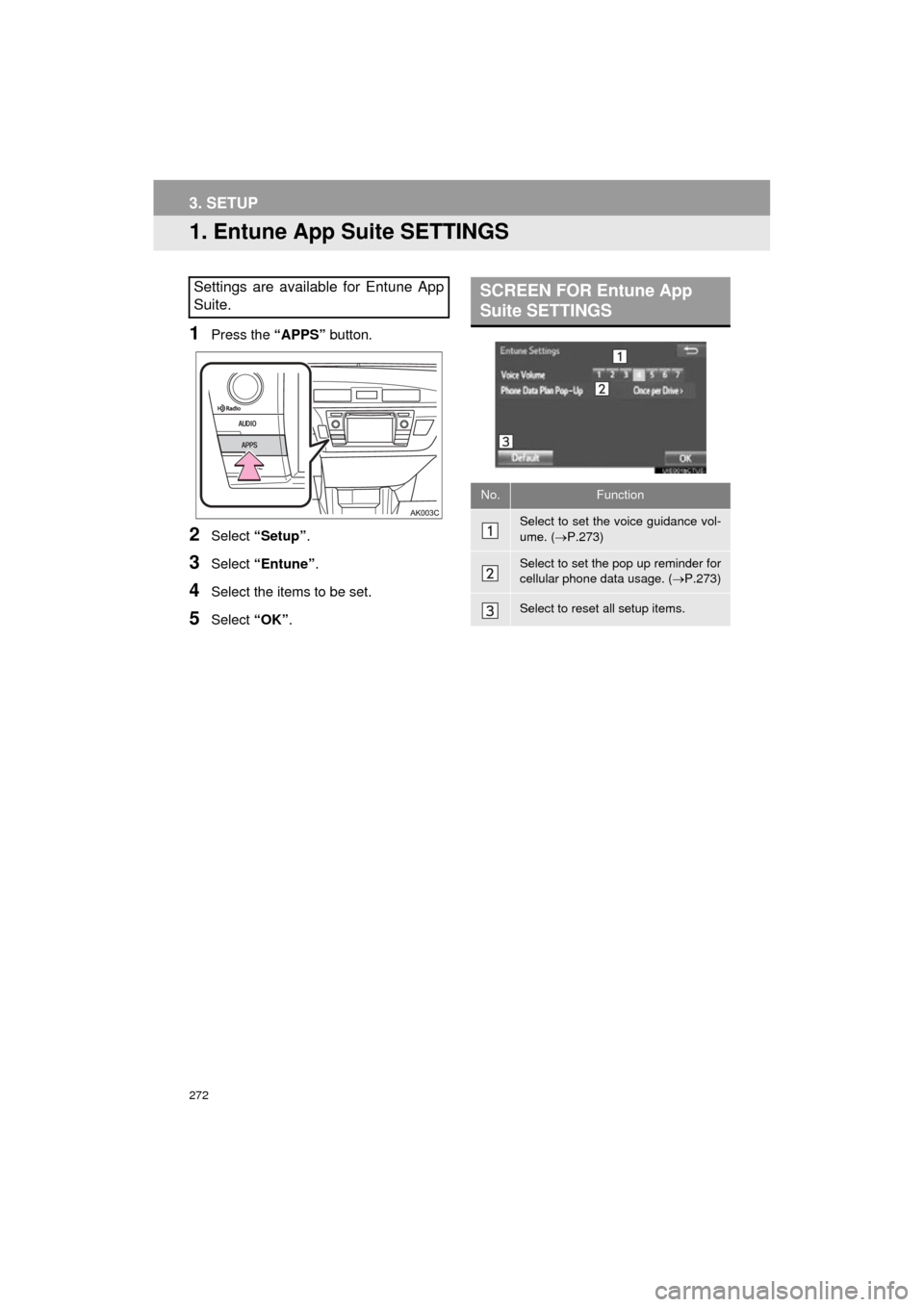
Suite.SCREEN FOR Entune App
Suite SETTINGS
No.Function
Select to set the voice guidance vol-
ume. ( P.273)
Select to set the pop up reminder for
cellular phone data usage. ( P.273)
Select to reset all setup items.
Page 273 of 292
273
3. SETUP
COROLLA_13CY_Navi_U
Entune App Suite
9
1Display the “Entune Settings” screen.
(P.272)
2Select the desired level by selecting
the appropriate number.
3Select “OK”.
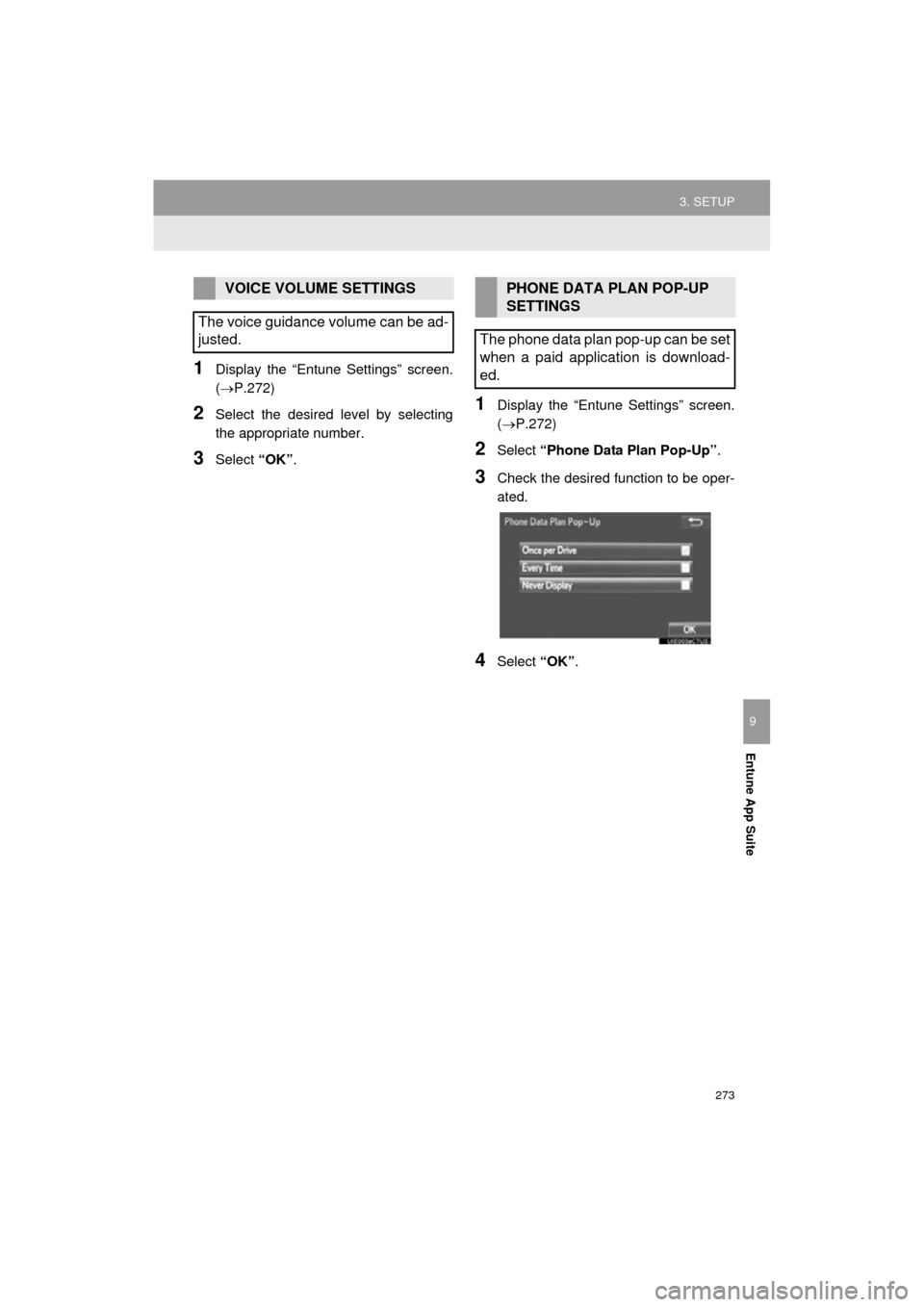
1Display the “Entune Settings” screen.
(P.272)
2Select “Phone Data Plan Pop-Up” .
3Check the desired function to be oper-
ated.
4Select “OK”.
VOICE VOLUME SETTINGS
The voice guidance volume can be ad-
justed.PHONE DATA PLAN POP-UP
SETTINGS
The phone data plan pop-up can be set
when a paid application is download-
ed.
Page 276 of 292

276
ALPHABETICAL INDEX
COROLLA_13CY_Navi_U
A
AAC.......................................................... 91
AM............................................................ 75
APPS button ............................................ 12
“Apps” screen........................................... 14
AUDIO button........................................... 12
Audio settings ........................................ 113
AUX........................................................ 108
B
Bluetooth®................................................ 42
Profiles ................................................. 44
Registering a Bluetooth
® audio
player ................................................ 43
Registering a Bluetooth
® phone ........... 42
Bluetooth® audio .................................... 103
Connecting a Bluetooth® device ........ 107
Listening to Bluetooth® audio ............. 107
Bluetooth® phone................................... 154
Bluetooth® phone message function ..... 167
C
Calling on the Bluetooth® phone............ 158
Casual speech recognization ................. 132
CD ............................................................ 91
Playing an audio CD............................. 93
Playing an MP3/WMA/AAC disc........... 93
Command list ......................................... 133
D
Data services settings ............................ 140
Setting download methods ................. 140
Destination search screen...................... 208
Driver settings .......................................... 61
E
Editing route ........................................... 230
Adding destinations ............................ 231
Deleting destinations .......................... 231
Detour setting ..................................... 233
Reordering destinations...................... 231
Selecting route type ............................ 232
Setting route preferences ................... 232
Emergency ............................................. 217
Entering letters and numbers/ list screen operation ............................. 37
Entering letters and numbers ............... 37
Entune App Suite ................................... 265
Entering keyword operation ................ 270
Linking Entune App Suite and navigation function ........................................... 269