Transmission TOYOTA COROLLA 2015 11.G Service Manual
[x] Cancel search | Manufacturer: TOYOTA, Model Year: 2015, Model line: COROLLA, Model: TOYOTA COROLLA 2015 11.GPages: 612, PDF Size: 8.48 MB
Page 180 of 612
1804-2. Driving procedures
COROLLA_TMMMS_TMMC_U (OM12F00U)
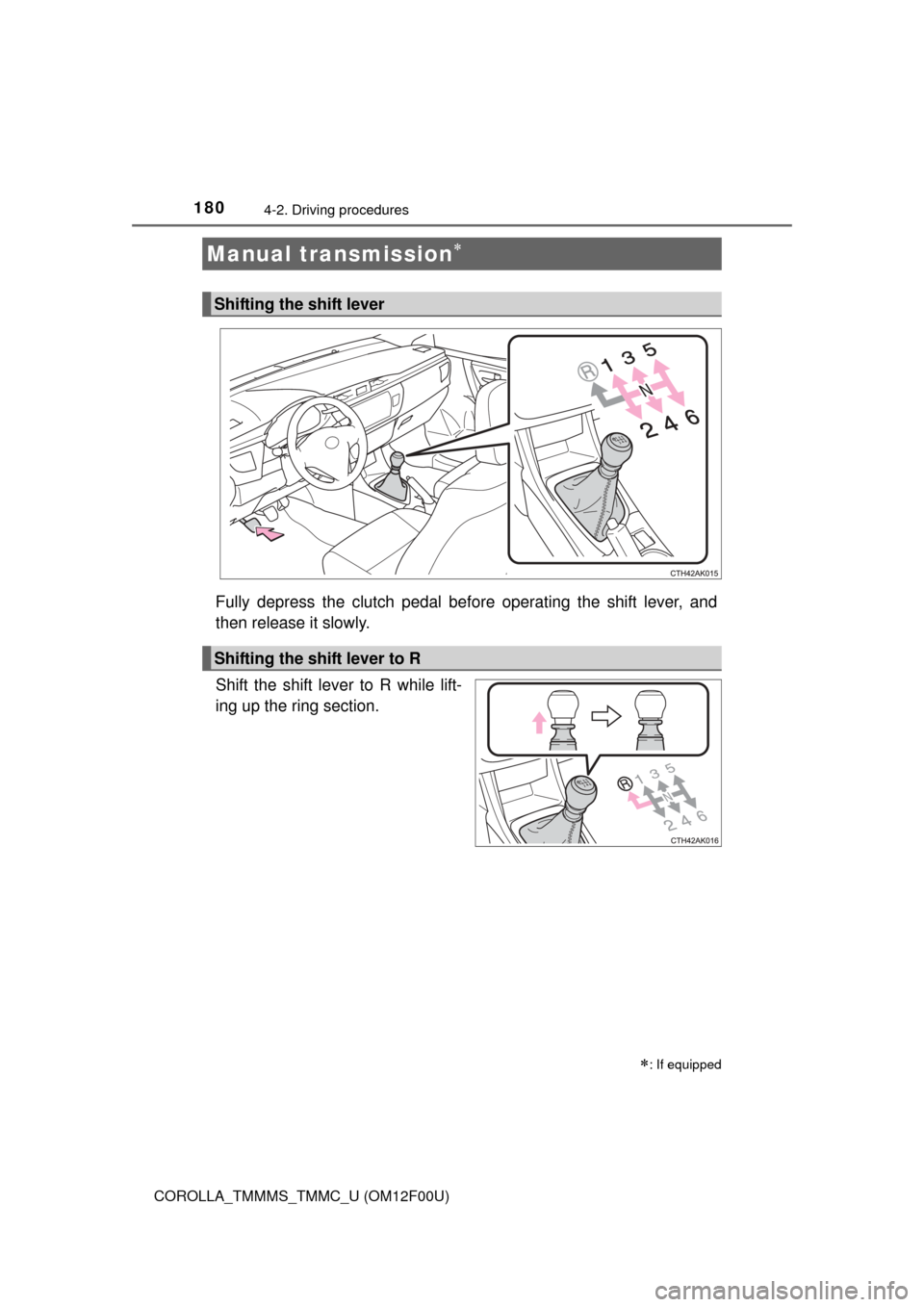
Fully depress the clutch pedal before operating the shift lever, and
then release it slowly.
Shift the shift lever to R while lift-
ing up the ring section.
Manual transmission
: If equipped
Shifting the shift lever
Shifting the shift lever to R
Page 181 of 612
1814-2. Driving procedures
4
Driving
COROLLA_TMMMS_TMMC_U (OM12F00U)
■Maximum allowable speeds
Observe the following maximum allowable speeds in each gear when maxi-
mum acceleration is necessary.
mph (km/h)
Shift position
Maximum speed
Vehicles with 15-inch and 16-inch tiresVehicles with 17-inch tires
130 (49)30 (49)
256 (91)56 (90)
382 (133)82 (132)
4111 (179)111 ( 1 7 9 )
5
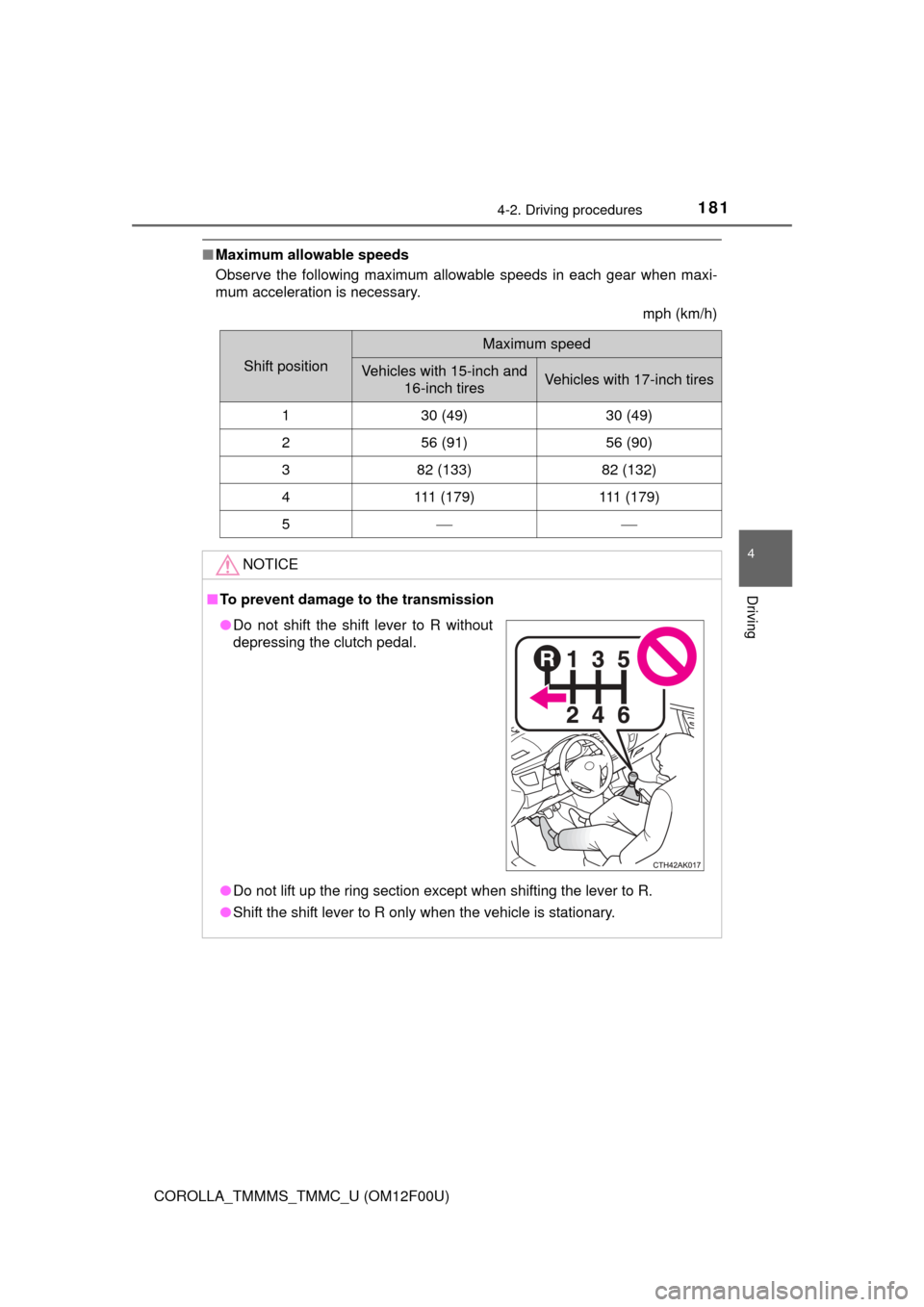
NOTICE
■To prevent damage to the transmission
● Do not lift up the ring section except when shifting the lever to R.
● Shift the shift lever to R only when the vehicle is stationary.
●Do not shift the shift lever to R without
depressing the clutch pedal.
Page 198 of 612
1984-5. Using the driving support systems
COROLLA_TMMMS_TMMC_U (OM12F00U)
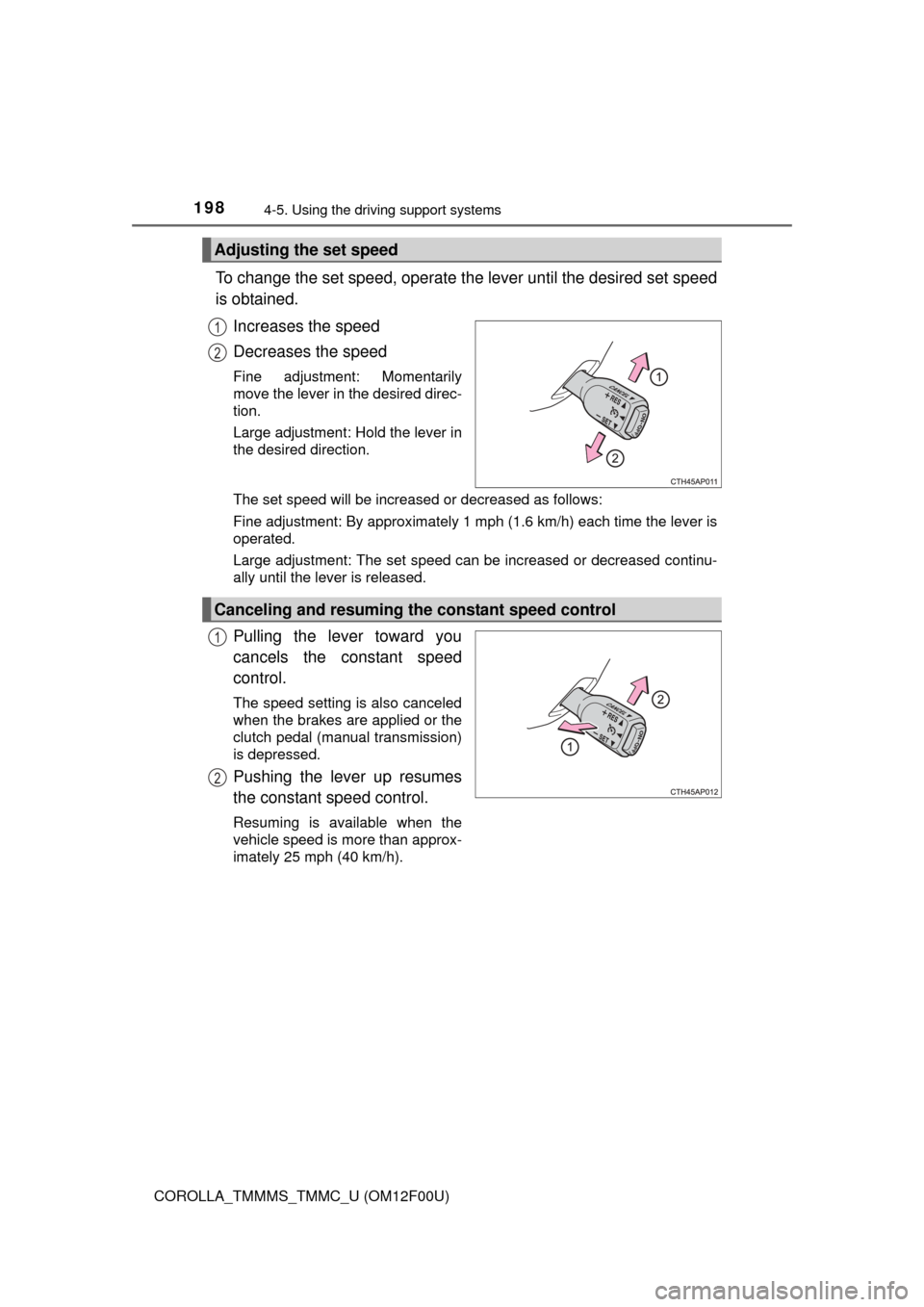
To change the set speed, operate the lever until the desired set speed
is obtained.
Increases the speed
Decreases the speed
Fine adjustment: Momentarily
move the lever in the desired direc-
tion.
Large adjustment: Hold the lever in
the desired direction.
The set speed will be increased or decreased as follows:
Fine adjustment: By approximately 1 mph (1.6 km/h) each time the lever is
operated.
Large adjustment: The set speed can be increased or decreased continu-
ally until the lever is released.
Pulling the lever toward you
cancels the constant speed
control.
The speed setting is also canceled
when the brakes are applied or the
clutch pedal (manual transmission)
is depressed.
Pushing the lever up resumes
the constant speed control.
Resuming is available when the
vehicle speed is more than approx-
imately 25 mph (40 km/h).
Adjusting the set speed
1
2
Canceling and resuming the constant speed control
1
2
Page 199 of 612

1994-5. Using the driving support systems
4
Driving
COROLLA_TMMMS_TMMC_U (OM12F00U)
■Cruise control can be set when
Vehicles with an automatic transmission
● The shift lever is in the D or range 3.
● Vehicle speed is above approximately 25 mph (40 km/h).
Vehicles with a continuously variable transmission (without paddle shift
switches)
● The shift lever is in the D or S.
● Vehicle speed is above approximately 25 mph (40 km/h).
Vehicles with a continuously variable transmission (with paddle shift
switches)
● The shift lever is in the D or range 4 or higher of M has been selected.
● Range 4 or higher has been selected by using the paddle shift.
● Vehicle speed is above approximately 25 mph (40 km/h).
Vehicles with a manual transmission
Vehicle speed is above approximately 25 mph (40 km/h).
■ Accelerating after setting the vehicle speed
●The vehicle can be accelerated normally. After acceleration, the set speed
resumes.
● Even without canceling the cruise control, the set speed can be increased
by first accelerating the vehicle to the desired speed and then pushing the
lever down to set the new speed.
■ Automatic cruise co ntrol cancelation
Cruise control will stop maintaining the vehicle speed in any of the following
situations.
● Actual vehicle speed falls more than approximately 10 mph (16 km/h) below
the preset vehicle speed.
At this time, the memorized set speed is not retained.
● Actual vehicle speed is below approximately 25 mph (40 km/h).
● VSC is activated.
■ If the cruise control indicator light comes on in yellow (vehicles with a
drive monitor display)
Press the “ON-OFF” button once to deactivate the system, and then press
the button again to reactivate the system.
If the cruise control speed cannot be set or if the cruise control cancels imme-
diately after being activated, there may be a malfunction in the cruise control
system. Have the vehicle inspected by your Toyota dealer.
Page 217 of 612
2174-6. Driving tips
4
Driving
COROLLA_TMMMS_TMMC_U (OM12F00U)
Accelerate the vehicle slowly, keep a safe distance between you and
the vehicle ahead, and drive at a reduced speed suitable to road con-
ditions.
Park the vehicle and move the shift lever to P (automatic transmission
or continuously variable transmis sion), 1 or R (manual transmission)
without setting the parking brake. The parking brake may freeze up,
preventing it from bein g released. If necessary, block the wheels to
prevent inadvertent sliding or creeping.
Vehicles with 15-inch tires
Use the tire chains of correct size and type.
Use SAE Class “S” type radial tire chains except radial cable chains or
V-bar type chains.
Vehicles with 16-i nch and 17-inch tires
Use the correct tire chain size when mounting the snow chains.
Chain size is regulated for each tire size.
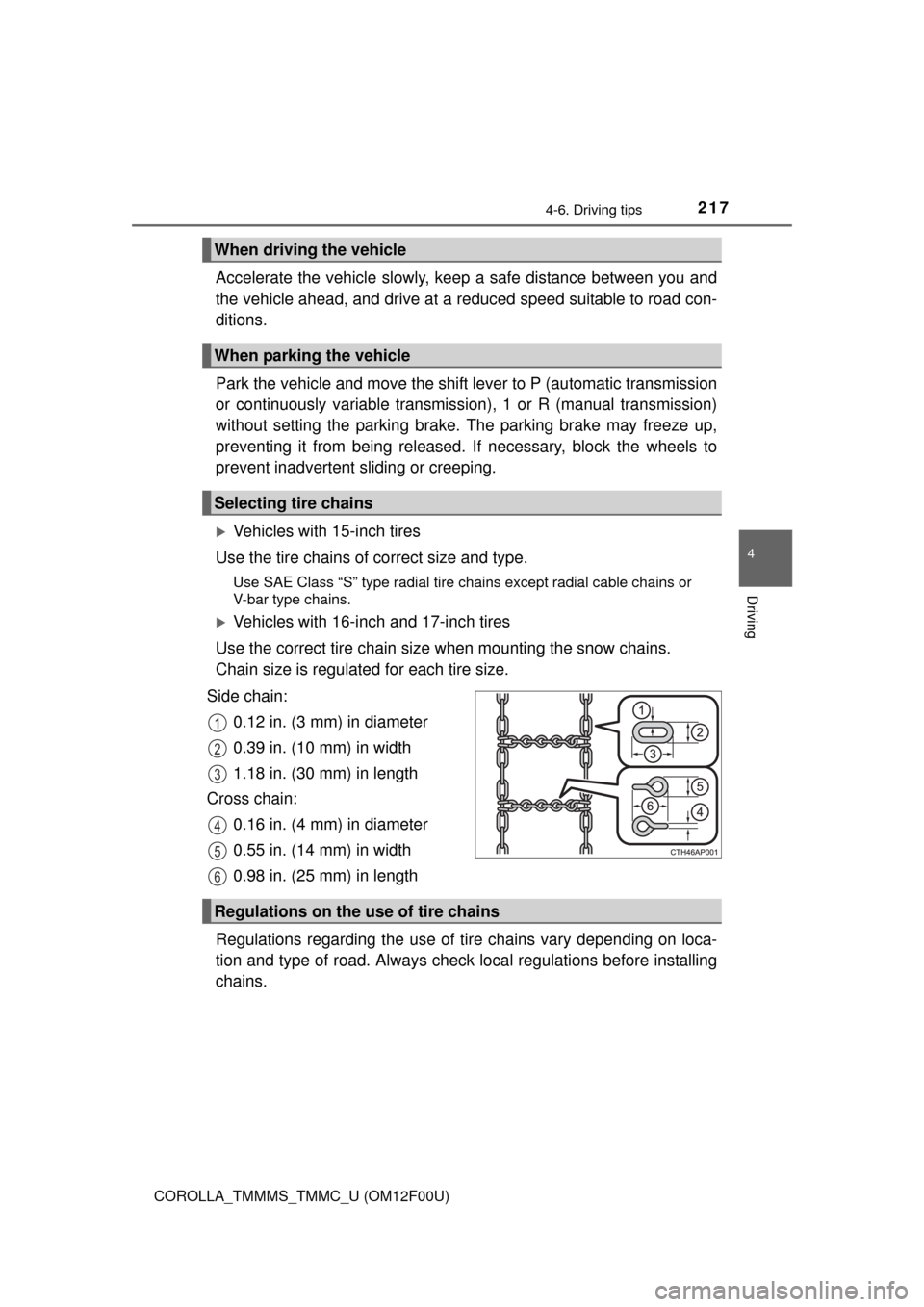
Side chain: 0.12 in. (3 mm) in diameter
0.39 in. (10 mm) in width
1.18 in. (30 mm) in length
Cross chain: 0.16 in. (4 mm) in diameter
0.55 in. (14 mm) in width
0.98 in. (25 mm) in length
Regulations regarding the use of tire chains vary depending on loca-
tion and type of road. Al ways check local regulations before installing
chains.
When driving the vehicle
When parking the vehicle
Selecting tire chains
1
2
3
4
5
6
Regulations on the use of tire chains
Page 424 of 612
4247-2. Maintenance
COROLLA_TMMMS_TMMC_U (OM12F00U)
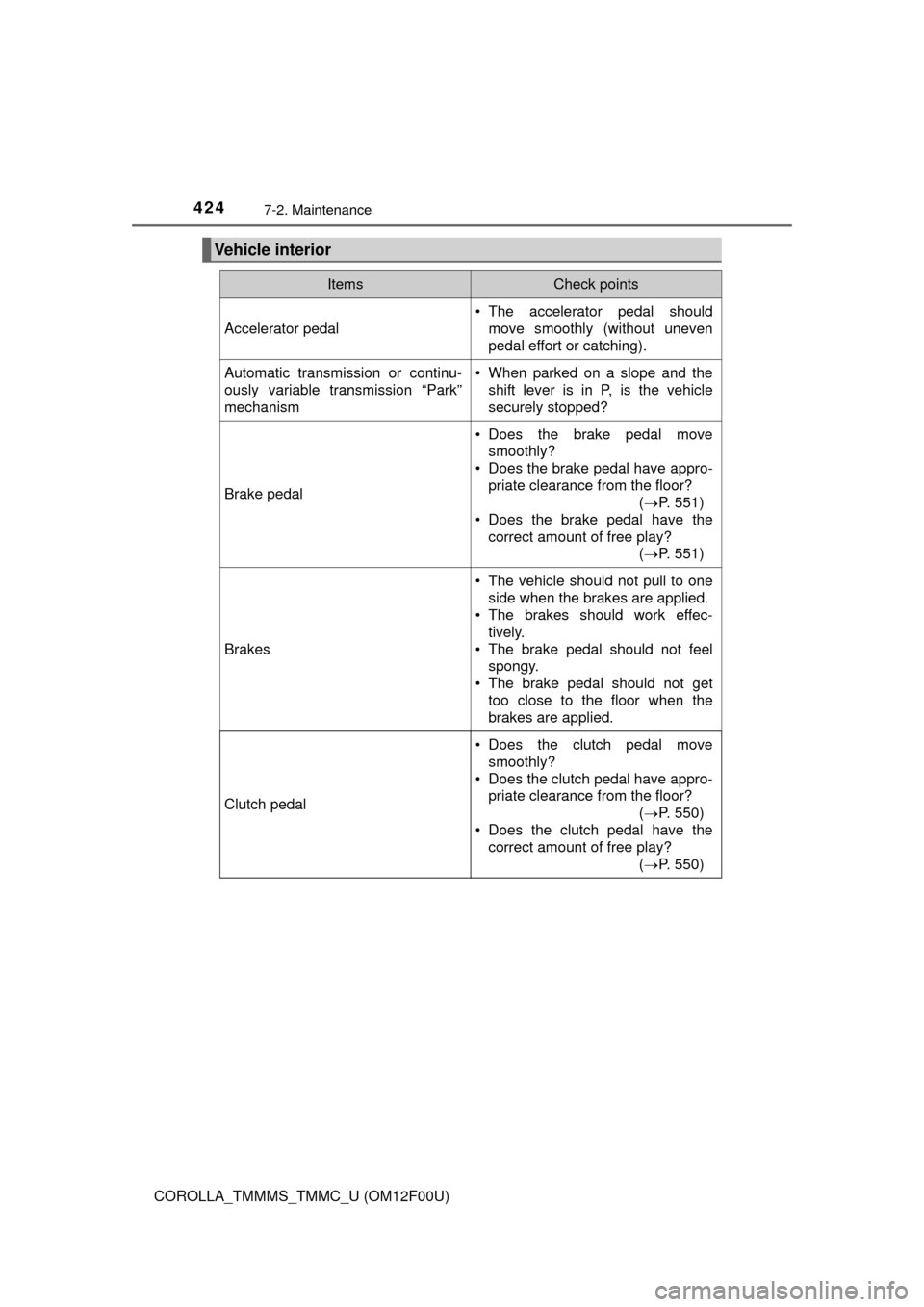
Vehicle interior
ItemsCheck points
Accelerator pedal
• The accelerator pedal shouldmove smoothly (without uneven
pedal effort or catching).
Automatic transmission or continu-
ously variable transmission “Park”
mechanism• When parked on a slope and the
shift lever is in P, is the vehicle
securely stopped?
Brake pedal
• Does the brake pedal movesmoothly?
• Does the brake pedal have appro-
priate clearance from the floor? (P. 551)
• Does the brake pedal have the
correct amount of free play? (P. 551)
Brakes
• The vehicle should not pull to one
side when the brakes are applied.
• The brakes should work effec-
tively.
• The brake pedal should not feel spongy.
• The brake pedal should not get too close to the floor when the
brakes are applied.
Clutch pedal
• Does the clutch pedal move
smoothly?
• Does the clutch pedal have appro- priate clearance from the floor?
(P. 550)
• Does the clutch pedal have the correct amount of free play?
(P. 550)
Page 485 of 612
485
8
When trouble arises
COROLLA_TMMMS_TMMC_U (OM12F00U)
8-2. Steps to take in an emergency
The following may indicate a problem with your transmission. Contact
your Toyota dealer or commercial towing service before towing.
●The engine is running but the vehicle will not move.
● The vehicle makes an abnormal sound.
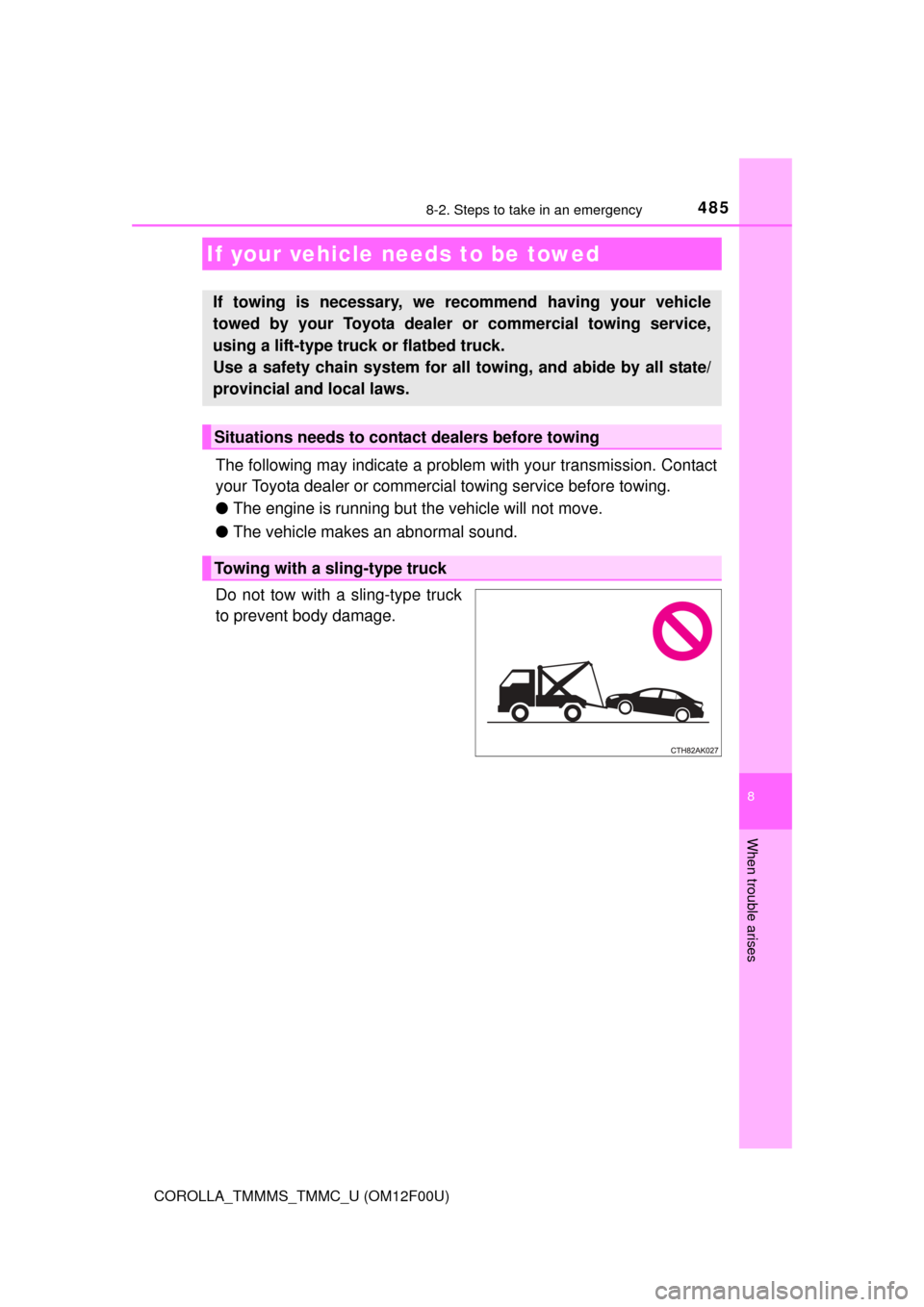
Do not tow with a sling-type truck
to prevent body damage.
If your vehicle needs to be towed
If towing is necessary, we re commend having your vehicle
towed by your Toyota dealer or commercial towing service,
using a lift-type truc k or flatbed truck.
Use a safety chain system for all towing, and abide by all state/
provincial and local laws.
Situations needs to contact dealers before towing
Towing with a sling-type truck
Page 492 of 612
4928-2. Steps to take in an emergency
COROLLA_TMMMS_TMMC_U (OM12F00U)
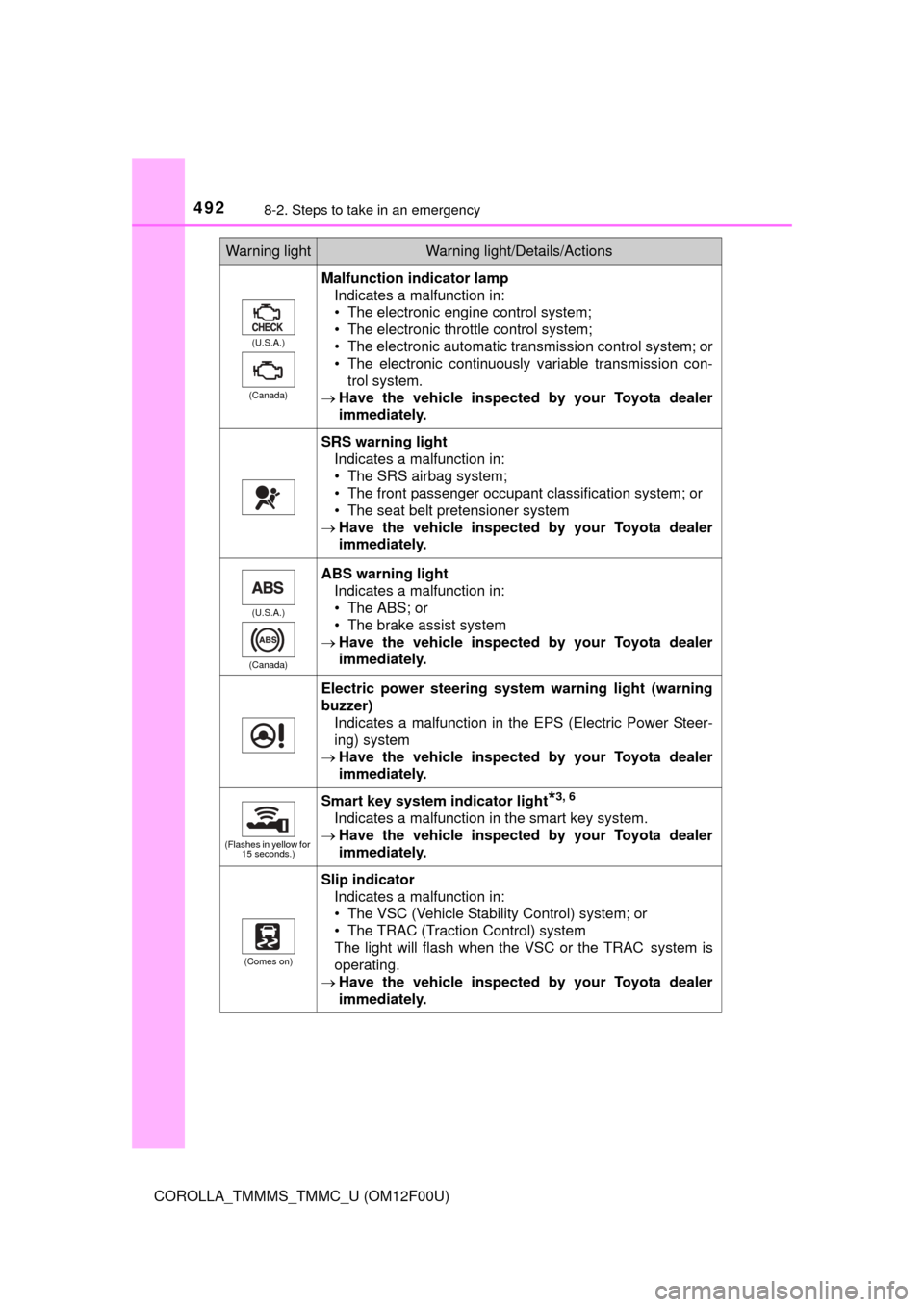
(U.S.A.)
(Canada)
Malfunction indicator lamp Indicates a malfunction in:
• The electronic engine control system;
• The electronic throttle control system;
• The electronic automatic transmission control system; or
• The electronic continuously variable transmission con-
trol system.
Have the vehicle inspected by your Toyota dealer
immediately.
SRS warning light
Indicates a malfunction in:
• The SRS airbag system;
• The front passenger occupant classification system; or
• The seat belt pretensioner system
Have the vehicle inspected by your Toyota dealer
immediately.
(U.S.A.)
(Canada)
ABS warning light Indicates a malfunction in:
• The ABS; or
• The brake assist system
Have the vehicle inspected by your Toyota dealer
immediately.
Electric power steering system warning light (warning
buzzer)
Indicates a malfunction in the EPS (Electric Power Steer-
ing) system
Have the vehicle inspected by your Toyota dealer
immediately.
(Flashes in yellow for
15 seconds.)
Smart key system indicator light*3, 6
Indicates a malfunction in the smart key system.
Have the vehicle inspected by your Toyota dealer
immediately.
(Comes on)
Slip indicator
Indicates a malfunction in:
• The VSC (Vehicle Stability Control) system; or
• The TRAC (Traction Control) system
The light will flash when the VSC or the TRAC
system is
operating.
Have the vehicle inspected by your Toyota dealer
immediately.
Warning lightWarning light/Details/Actions
Page 496 of 612
4968-2. Steps to take in an emergency
COROLLA_TMMMS_TMMC_U (OM12F00U)
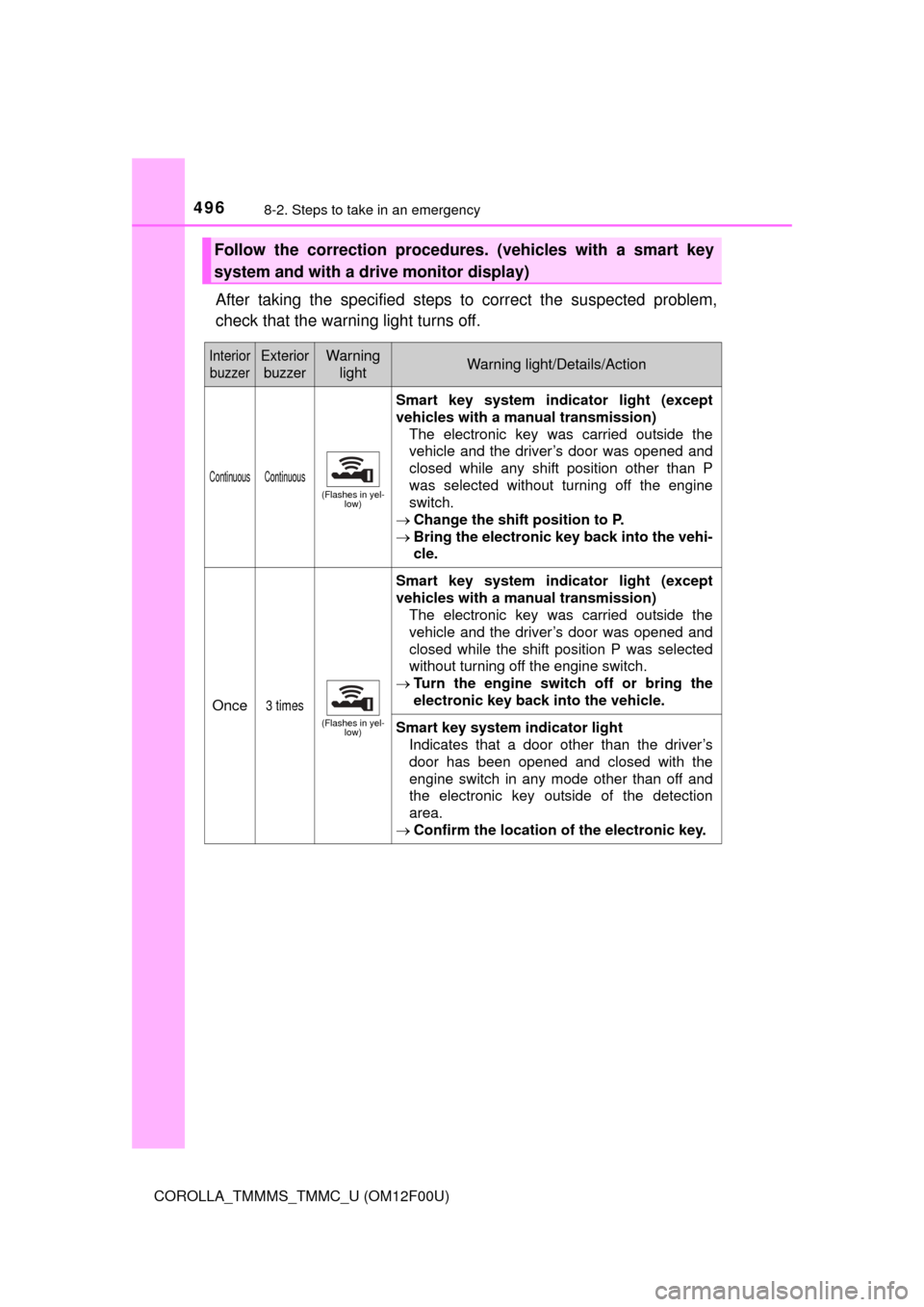
After taking the specified steps to correct the suspected problem,
check that the warning light turns off.
Follow the correction procedures. (vehicles with a smart key
system and with a drive monitor display)
InteriorbuzzerExterior buzzerWarning lightWarning light/Details/Action
Continuous Continuous
(Flashes in yel- low)
Smart key system indi cator light (except
vehicles with a manual transmission)
The electronic key was carried outside the
vehicle and the driver’s door was opened and
closed while any shift position other than P
was selected without turning off the engine
switch.
Change the shift position to P.
Bring the electronic key back into the vehi-
cle.
Once3 times
(Flashes in yel-
low)
Smart key system indi cator light (except
vehicles with a manual transmission) The electronic key was carried outside the
vehicle and the driver’s door was opened and
closed while the shift position P was selected
without turning off the engine switch.
Turn the engine switch off or bring the
electronic key back into the vehicle.
Smart key system indicator light
Indicates that a door other than the driver’s
door has been opened and closed with the
engine switch in any mode other than off and
the electronic key outside of the detection
area.
Confirm the location of the electronic key.
Page 497 of 612
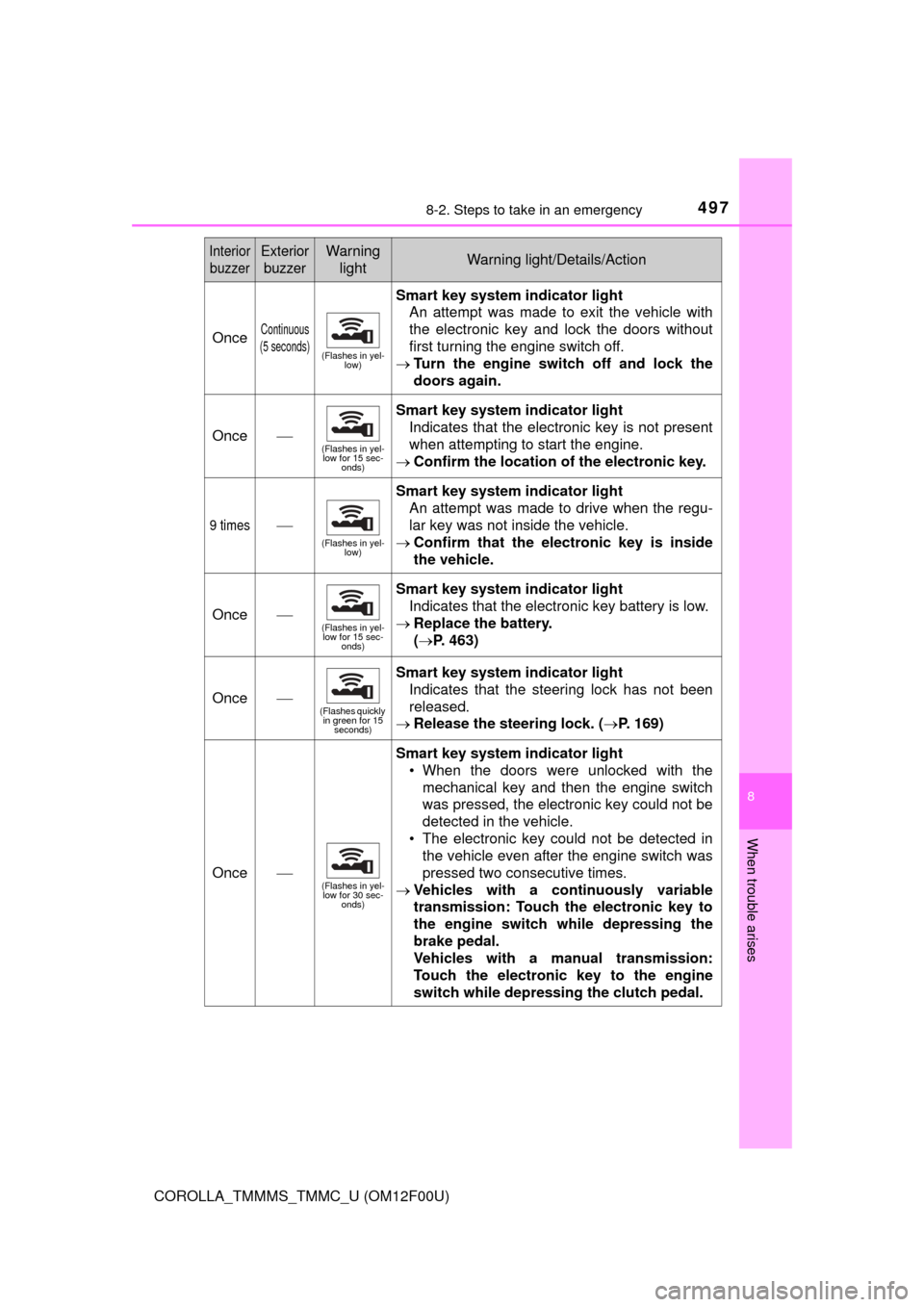
4978-2. Steps to take in an emergency
8
When trouble arises
COROLLA_TMMMS_TMMC_U (OM12F00U)
OnceContinuous
(5 seconds)
(Flashes in yel- low)
Smart key system indicator light
An attempt was made to exit the vehicle with
the electronic key and lock the doors without
first turning the engine switch off.
Turn the engine switch off and lock the
doors again.
Once
(Flashes in yel-
low for 15 sec- onds)
Smart key system indicator light
Indicates that the electronic key is not present
when attempting to start the engine.
Confirm the location of the electronic key.
9 times
(Flashes in yel-
low)
Smart key system indicator light
An attempt was made to drive when the regu-
lar key was not inside the vehicle.
Confirm that the el ectronic key is inside
the vehicle.
Once(Flashes in yel- low for 15 sec-
onds)
Smart key system indicator light
Indicates that the electronic key battery is low.
Replace the battery.
(P. 463)
Once(Flashes quickly
in green for 15 seconds)
Smart key system indicator light
Indicates that the steering lock has not been
released.
Release the steering lock. (P. 169)
Once(Flashes in yel-
low for 30 sec- onds)
Smart key system indicator light
• When the doors were unlocked with themechanical key and then the engine switch
was pressed, the electronic key could not be
detected in the vehicle.
• The electronic key could not be detected in the vehicle even after the engine switch was
pressed two consecutive times.
Vehicles with a continuously variable
transmission: Touch the electronic key to
the engine switch while depressing the
brake pedal.
Vehicles with a manual transmission:
Touch the electronic key to the engine
switch while depressing the clutch pedal.
Interior
buzzerExterior buzzerWarning lightWarning light/Details/Action