Engine TOYOTA COROLLA 2016 11.G Owners Manual
[x] Cancel search | Manufacturer: TOYOTA, Model Year: 2016, Model line: COROLLA, Model: TOYOTA COROLLA 2016 11.GPages: 620, PDF Size: 9.12 MB
Page 232 of 620

2325-1. Basic Operations
COROLLA_TMMMS_TMMC_U (OM12J84U)
NOTICE
nTo prevent battery discharge
Do not leave the audio system on longer than necessary when the engine is
off.
n To avoid damaging the audio system
Take care not to spill drinks or other fluids on the audio system.
Page 271 of 620
2715-7. “SET UP” menu
5
Audio system
COROLLA_TMMMS_TMMC_U (OM12J84U)
Select “Passkey” using . (P. 265)
Input a 4 to 8-digit passkey using .
Input the number 1 digit at a time.
When the entire number to be registered as a passkey has been
input, press again.
If the passkey to be registered has 8 digits, pressing again is not
necessary.
If “BT power” is set to on, the registered device will be connected
automatically when the engine switch is turned to the “ACC” position
(vehicles without a smart key sy stem) or ACCESSORY mode (vehi-
cles with a smart key system).
Select “BT Power” using . ( P. 265)
Select “ON” or “OFF” using .
Changing the passkey
Setting automatic connection of the device on or off
1
2
3
1
2
Page 272 of 620
2725-7. “SET UP” menu
COROLLA_TMMMS_TMMC_U (OM12J84U)
Select “Bluetooth* info” using . (P. 265)
l Displaying the device name
Select “Device Name” using .
l Displaying the device address
Select “Device Address” using .
*: Bluetooth is a registered trademark of Bluetooth SIG, Inc.
If the “Display Setting” is set to on, the portable player connection sta-
tus will be displayed when the engine sw itch is turned to the “ACC” or
“ON” position (vehicles without a smart key system) or ACCESSORY
or IGNITION ON mode (vehicl es with a smart key system).
Select “Display Setting” using . ( P. 265)
Select “ON” or “OFF” using .
Displaying the device status
Setting the automatic connection confirmation display to on or
off
1
2
Page 295 of 620
2955-11. Basic Operations (Multimedia system)
5
Audio system
COROLLA_TMMMS_TMMC_U (OM12J84U)
Select to change on/off.
Select to change on/off.
nUsing cellular phones
Interference may be heard through the multimedia system's speakers if a cel-
lular phone is being used inside or close to the vehicle while the multimedia
system is operating.
Random playback
Repeat play
CAUTION
nLaser product
This product is a class 1 laser product.
Do not open the cover of the player or attempt to repair the unit yourself.
Refer servicing to qualified personnel.
lLaser products
• Do not take this unit apart or attempt to make any changes yourself.
This is an intricate unit that uses a laser pickup to retrieve information
from the surface of compact discs. The laser is carefully shielded so
that its rays remain inside the cabinet. Therefore, never try to disassem-
ble the player or alter any of its parts since you may be exposed to laser
rays and dangerous voltages.
• This product utilizes a laser.
Use of controls or adjustments or performance of procedures other than
those specified herein may result in hazardous radiation exposure.
THE USE OF OPTICAL INSTRUMENTS WITH THIS PRODUCT WILL
INCREASE EYE HAZARD.
NOTICE
n To prevent battery discharge
Do not leave the multimedia system on longer than necessary when the
engine is off.
n To avoid damaging the multimedia system
Take care not to spill drinks or other fluids on the multimedia system.
Page 335 of 620
3355-17. Connecting Bluetooth® (Multimedia system)
5
Audio system
COROLLA_TMMMS_TMMC_U (OM12J84U)
To turn auto connection mode on, set “Bluetooth* Power” to on.
( P. 339)
When you register a phone, auto co nnection will be activated. Always
set it to this mode and leave the Bluetooth
® phone in a place where a
connection can be established.
When the engine switch is turned to ACCESSORY or ON (IGNITION ON)
mode, the system will search for a nearby cellular phone you have regis-
tered.
Next, the system automatically connects with the most recent of the
phones connected to in the past. Then, the connection result is displayed.
*: Bluetooth is a registered trademark of Bluetooth SIG, Inc.
When auto connection has failed or “Bluetooth* Power” is turned off,
you must connec t the Bluetooth® device manually.
Follow the steps in “Connecting a Bluetooth
® device” from step .
( P. 334)
*: Bluetooth is a registered trademark of Bluetooth SIG, Inc.
Registering an additional device
Select “Select Device” on the Bluetooth
® audio control screen.
For more information: P. 3 3 1
Selecting a registered device
Select “Select Device” on the Bluetooth
® audio control screen.
For more information: P. 3 3 4
Auto connection
Manual connection
Connecting a Bluetooth® audio player
11
1
2
1
2
Page 336 of 620

3365-17. Connecting Bluetooth® (Multimedia system)
COROLLA_TMMMS_TMMC_U (OM12J84U)
nReconnecting a Bluetooth® phone
If the system cannot connect due to poor signal strength with the engine
switch in ACCESSORY or ON (IGNITION ON) mode, the system will auto-
matically attempt to reconnect.
If the system is attempting to connect to a Bluetooth
® phone and the
Bluetooth® phone is turned off and then back on, the system will attempt to
reconnect.
Page 379 of 620

3795-20. Bluetooth® (Multimedia system)
5
Audio system
COROLLA_TMMMS_TMMC_U (OM12J84U)n
Certification
NOTE:
This device complies with part 15 of the FCC Rules. Operation is subject to
the following two conditions: (1) This device may not cause harmful interfer-
ence, and (2) this device must accept any interference received, including
interference that may cause undesired operation.
FCC WARNING:
Changes or modifications not expressly approved by the party responsible for
compliance could void the user's authority to operate the equipment.
CAUTION:
Radio Frequency Radiation Exposure
This equipment complies with FCC radiation exposure limits set forth for
uncontrolled equipment and meets the FCC radio frequency (RF) Exposure
Guidelines. This equipment has very lo w levels of RF energy that it deemed
to comply without maximum permissive exposure evaluation (MPE). But it is
desirable that it should be installed and operated with at least 20 cm and
more between the radiator and person’s body in normal use position.
Co-location:
This transmitter must not be co-located or operated in conjunction with any
other antenna or transmitter.
n Reconnecting the portable audio player
If the portable audio player is disconnected due to poor reception when the
engine switch is in ACCESSORY or IGNITION ON mode, the system auto-
matically reconnects the portable audio player.
If you have switched off the portable audio player yourself, follow the instruc-
tions below to reconnect:
lSelect the portable audio player again
l Enter the portable audio player
n When you sell your car
Be sure to delete your personal data. ( P. 298)
Page 391 of 620
3916-1. Using the air conditioning system and defogger
6
Interior features
COROLLA_TMMMS_TMMC_U (OM12J84U)
CAUTION
nTo prevent the windshield from fogging up
lDo not set the air outlet selector dial to during cool air operation in
extremely humid weather. The difference between the temperature of the
outside air and that of the windshield can cause the outer surface of the
windshield to fog up, blocking your vision.
n To prevent burns (vehicles with outs ide rear view mirror defoggers)
Do not touch the rear view mirror surfaces when the outside rear view mirror
defoggers are on.
NOTICE
n To prevent battery discharge
Do not leave the air conditioning system on longer than necessary when the
engine is stopped.
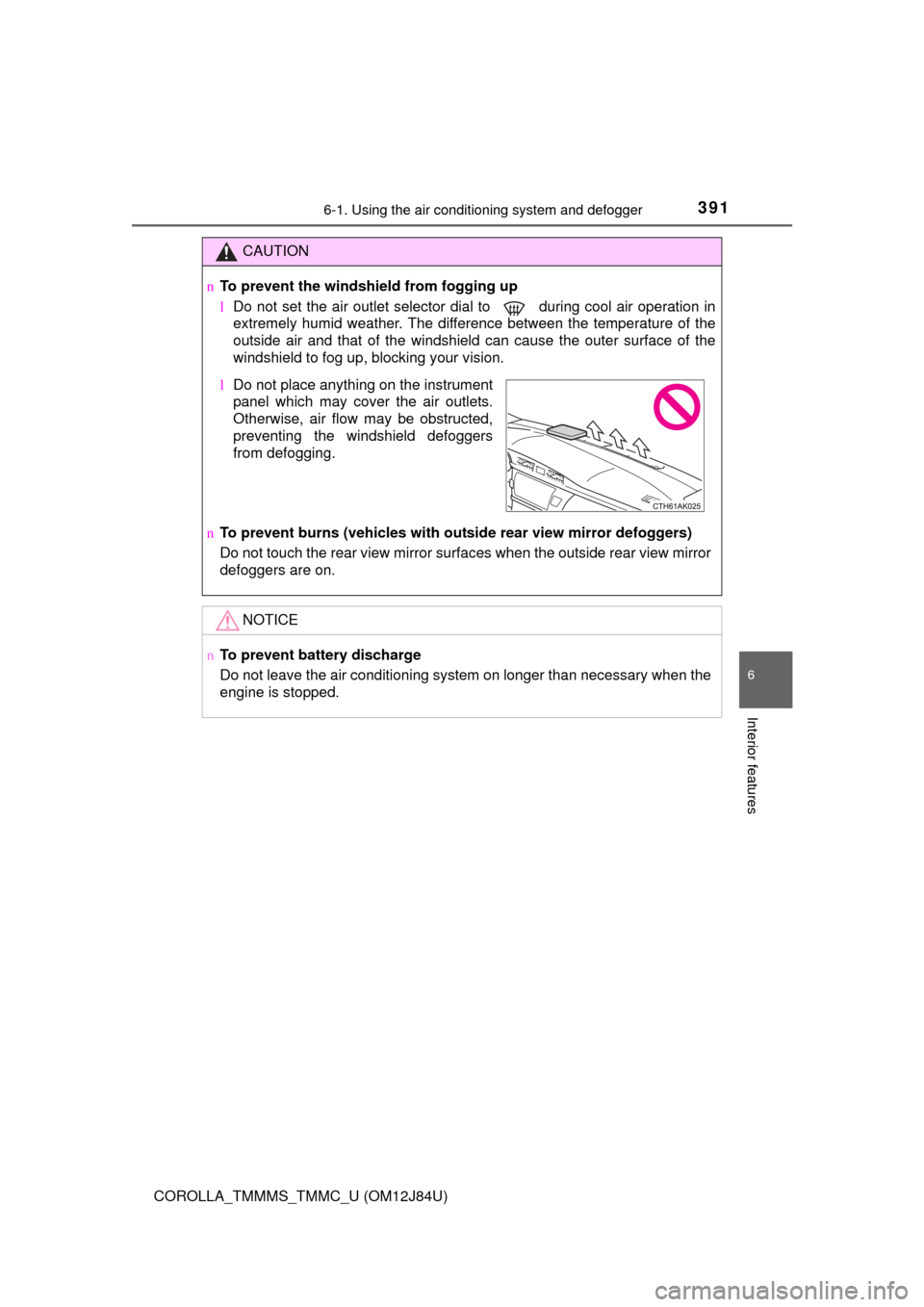
lDo not place anything on the instrument
panel which may cover the air outlets.
Otherwise, air flow may be obstructed,
preventing the windshield defoggers
from defogging.
Page 397 of 620
3976-1. Using the air conditioning system and defogger
6
Interior features
COROLLA_TMMMS_TMMC_U (OM12J84U)
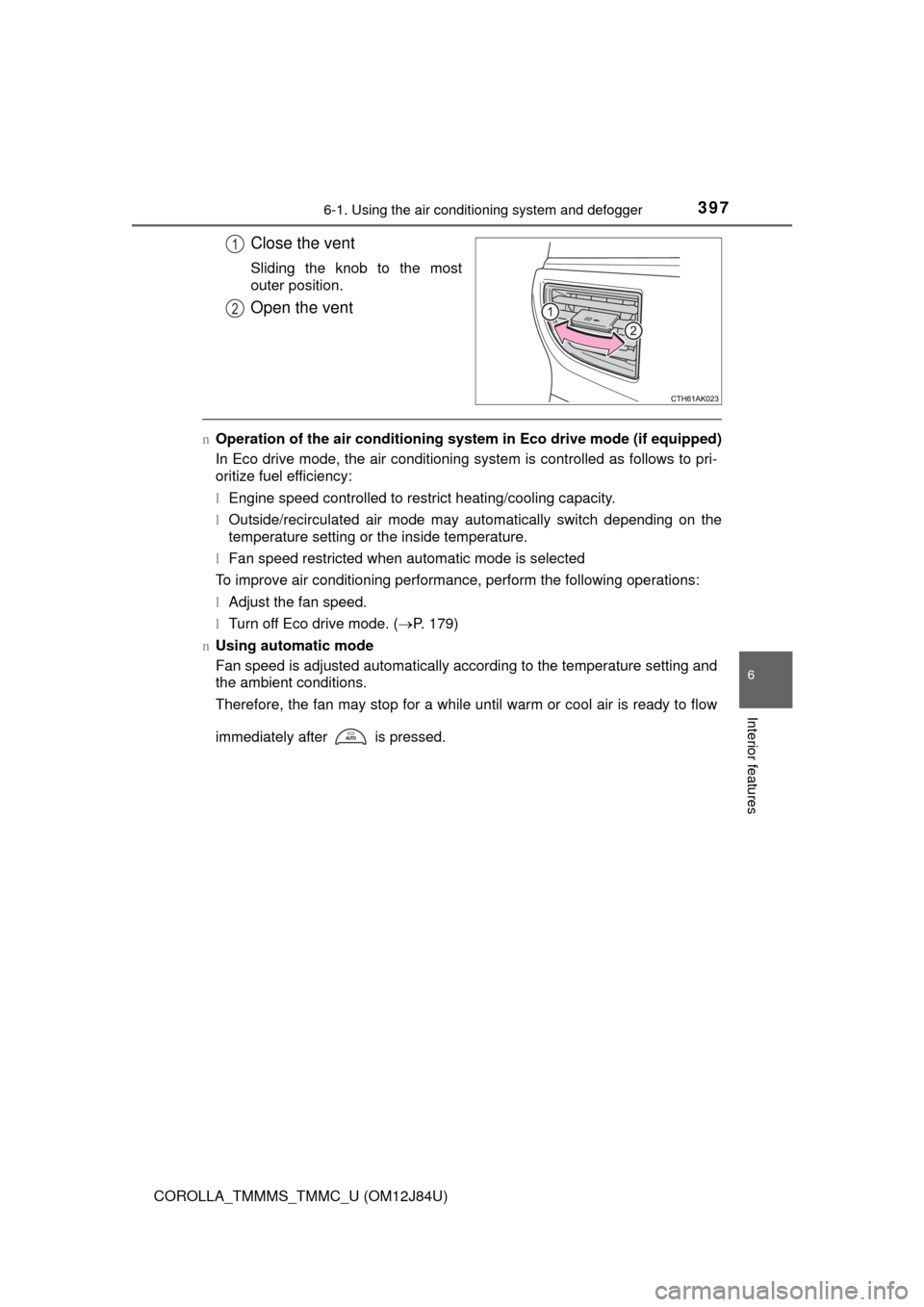
Close the vent
Sliding the knob to the most
outer position.
Open the vent
nOperation of the air conditioning system in Eco drive mode (if equipped)
In Eco drive mode, the air conditioning system is controlled as follows to pri-
oritize fuel efficiency:
l Engine speed controlled to restrict heating/cooling capacity.
l Outside/recirculated air mode may automatically switch depending on the
temperature setting or the inside temperature.
l Fan speed restricted when automatic mode is selected
To improve air conditioning performance, perform the following operations:
l Adjust the fan speed.
l Turn off Eco drive mode. ( P. 179)
n Using automatic mode
Fan speed is adjusted automatically according to the temperature setting and
the ambient conditions.
Therefore, the fan may stop for a while until warm or cool air is ready to flow
immediately after is pressed.
1
2
Page 399 of 620
3996-1. Using the air conditioning system and defogger
6
Interior features
COROLLA_TMMMS_TMMC_U (OM12J84U)n
When the outside temperature exceeds 75°F (24°C) and the air condition-
ing system is on
lIn order to reduce the air conditioning power consumption, the air condition-
ing system may switch to recirculated air mode automatically. This may also
reduce fuel consumption.
Vehicles without a smart key system
l Recirculated air mode is selected as a default mode when the engine switch
is turned to the “ON” position.
Vehicles with a smart key system
l Recirculated air mode is selected as a default mode when the engine switch
is turned to IGNITION ON mode.
l It is possible to switch to outside air mode at any time by pressing .
n When the outside temperature is low
The dehumidification function may not operate even when is pressed.
n Ventilation and air conditioning odors
lTo let fresh air in, set the air conditioning system to the outside air mode.
l During use, various odors from inside and outside the vehicle may enter into
and accumulate in the air conditioning system. This may then cause odor to
be emitted from the vents.
l To reduce potential odors from occurring:
• It is recommended that the air conditioning system be set to outside air
mode prior to turning the vehicle off.
• The start timing of the blower may be delayed for a short period of time immediately after the air conditioning system is started in automatic
mode.
n Air conditioning filter
P. 467
n Customization that can be co nfigured at Toyota dealer
Settings (e.g. air conditioning setting) can be changed.
(Customizable features P. 576)