headlights TOYOTA COROLLA 2016 11.G User Guide
[x] Cancel search | Manufacturer: TOYOTA, Model Year: 2016, Model line: COROLLA, Model: TOYOTA COROLLA 2016 11.GPages: 620, PDF Size: 9.12 MB
Page 194 of 620
1944-3. Operating the lights and wipers
COROLLA_TMMMS_TMMC_U (OM12J84U)n
Battery-saving function
In the following conditions, the headlights and the other remaining lights will
go off automatically after 20 minutes in order to prevent the vehicle battery
from being discharged:
lThe headlights and/or tail lights are on.
l Vehicles without a smart key system: The engine switch is in the “ACC” or
“LOCK” position.
l Vehicles with a smart key system: The engine switch is turned to ACCES-
SORY mode or turned off.
This function will be canceled in any of the following situations:
l Vehicles without a smart key system: When the engine switch is turned to
the “ON” position.
l Vehicles with a smart key system: When the engine switch is turned to IGNI-
TION ON mode.
l When the light switch is operated
l When the door or trunk is opened or closed
n Customization
Settings (e.g. light sensor sensitivity) can be changed.
(Customizable features: P. 576)
NOTICE
nTo prevent battery discharge
Do not leave the lights on longer than necessary when the engine is not
running.
Page 195 of 620
1954-3. Operating the lights and wipers
4
Driving
COROLLA_TMMMS_TMMC_U (OM12J84U)
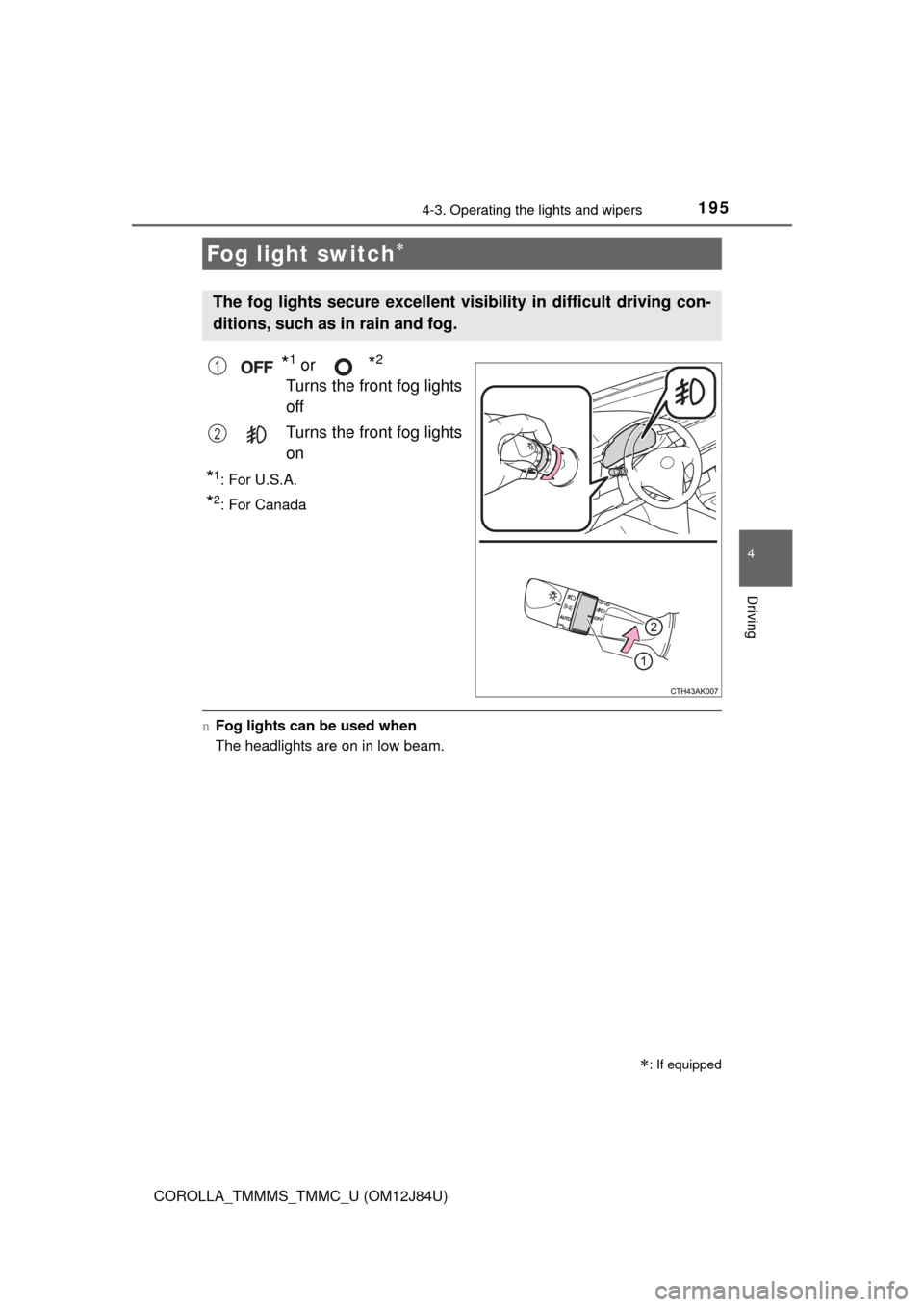
*1 or *2
Turns the front fog lights
off
Turns the front fog lights
on
*1:For U.S.A.
*2: For Canada
nFog lights can be used when
The headlights are on in low beam.
Fog light switch
: If equipped
The fog lights secure excellent visi bility in difficult driving con-
ditions, such as in rain and fog.
1
2
Page 212 of 620
2124-5. Using the driving support systems
COROLLA_TMMMS_TMMC_U (OM12J84U)n
If you notice any symptoms
If you notice any of the following symptoms, refer to the likely cause
and the solution, and re-check.
If the symptom is not resolved by
the solution, have the vehicle
inspected by your Toyota dealer.
Things you should know
Likely causeSolution
The image is difficult to see
• The vehicle is in a dark area
• The temperature around the lens
is either high or low
• The outside temperature is low
• There are water droplets on the camera
• It is raining or humid
• Foreign matter (mud etc.) is adhering to the camera
• Sunlight or headlights are shining directly into the camera
• The vehicle is under fluorescent
lights, sodium lights, mercury
lights etc.
If this happens due to these causes,
it does not indicate a malfunction.
Back up while visually checking the
vehicle’s surroundings. (Use the
monitor again once conditions have
been improved.)
To adjust the image on the rear view
monitor system screen. (P. 301)
The image is blurry
Dirt or foreign matter (such as water
droplets, snow, mud etc.) is adher-
ing to the camera.Flush the camera with a large quan-
tity of water. After that, rinse the
camera lens with water and wipe it
clean with a soft and wet cloth.
The image is out of alignment
The camera or surrounding area has
received a strong impact.Have the vehicle inspected by your
Toyota dealer.
The fixed guide lines are very far out of alignment
• The vehicle is tilted (there is a
heavy load on the vehicle, tire
pressure is low due to a tire punc-
ture, etc.)
• The vehicle is used on an incline.If this happens due to these causes,
it does not indicate a malfunction.
Back up while visually checking the
vehicle's surroundings.
The camera position is out of align-
ment.Have the vehicle inspected by your
Toyota dealer.
Page 301 of 620
3015-12. Setup (Multimedia system)
5
Audio system
COROLLA_TMMMS_TMMC_U (OM12J84U)
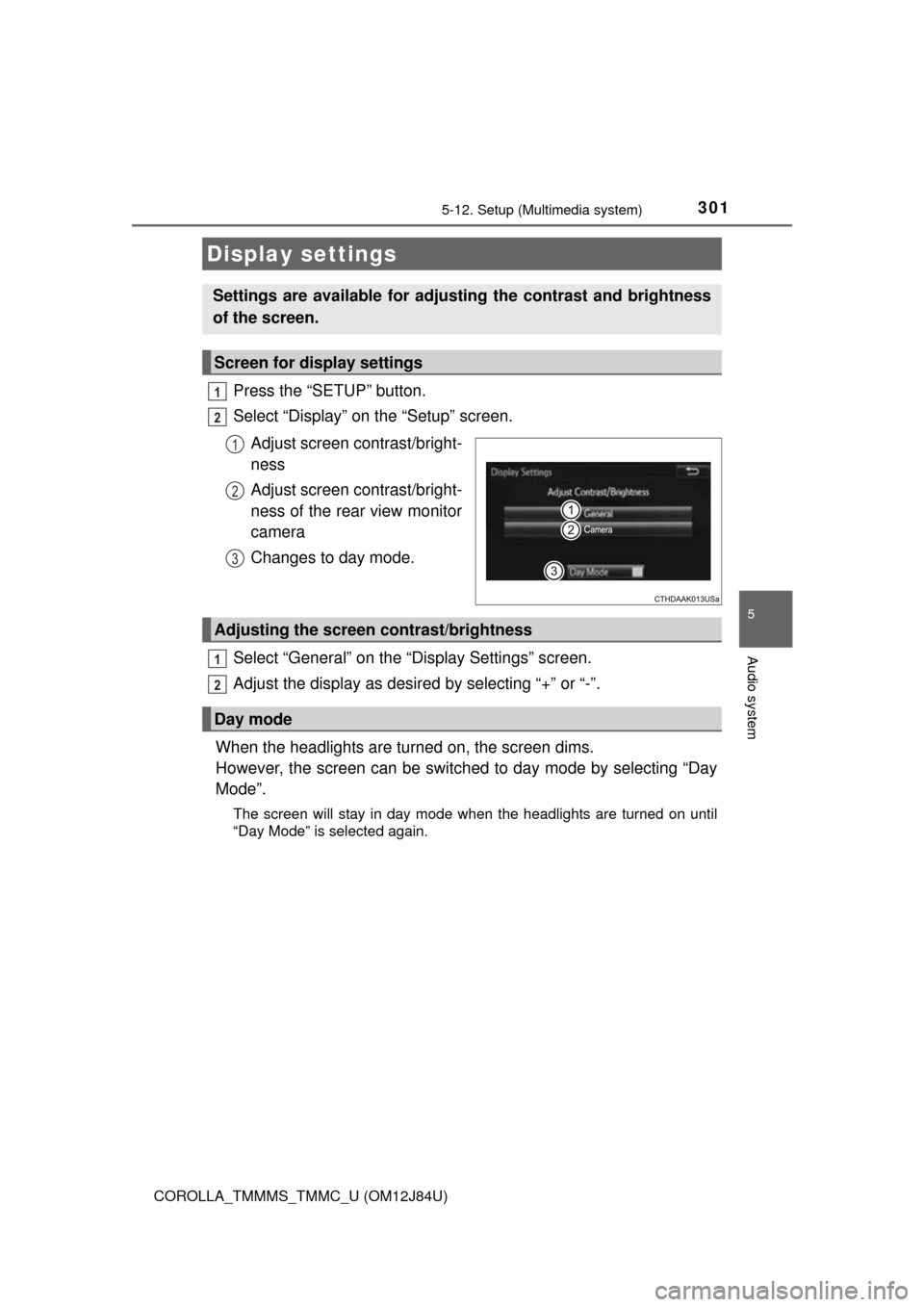
Press the “SETUP” button.
Select “Display” on the “Setup” screen.Adjust screen contrast/bright-
ness
Adjust screen contrast/bright-
ness of the rear view monitor
camera
Changes to day mode.
Select “General” on the “Display Settings” screen.
Adjust the display as desired by selecting “+” or “-”.
When the headlights are turned on, the screen dims.
However, the screen can be switch ed to day mode by selecting “Day
Mode”.
The screen will stay in day mode when the headlights are turned on until
“Day Mode” is selected again.
Display settings
Settings are available for adjusting the contrast and brightness
of the screen.
Screen for display settings
1
2
1
2
3
Adjusting the screen contrast/brightness
Day mode
1
2
Page 477 of 620
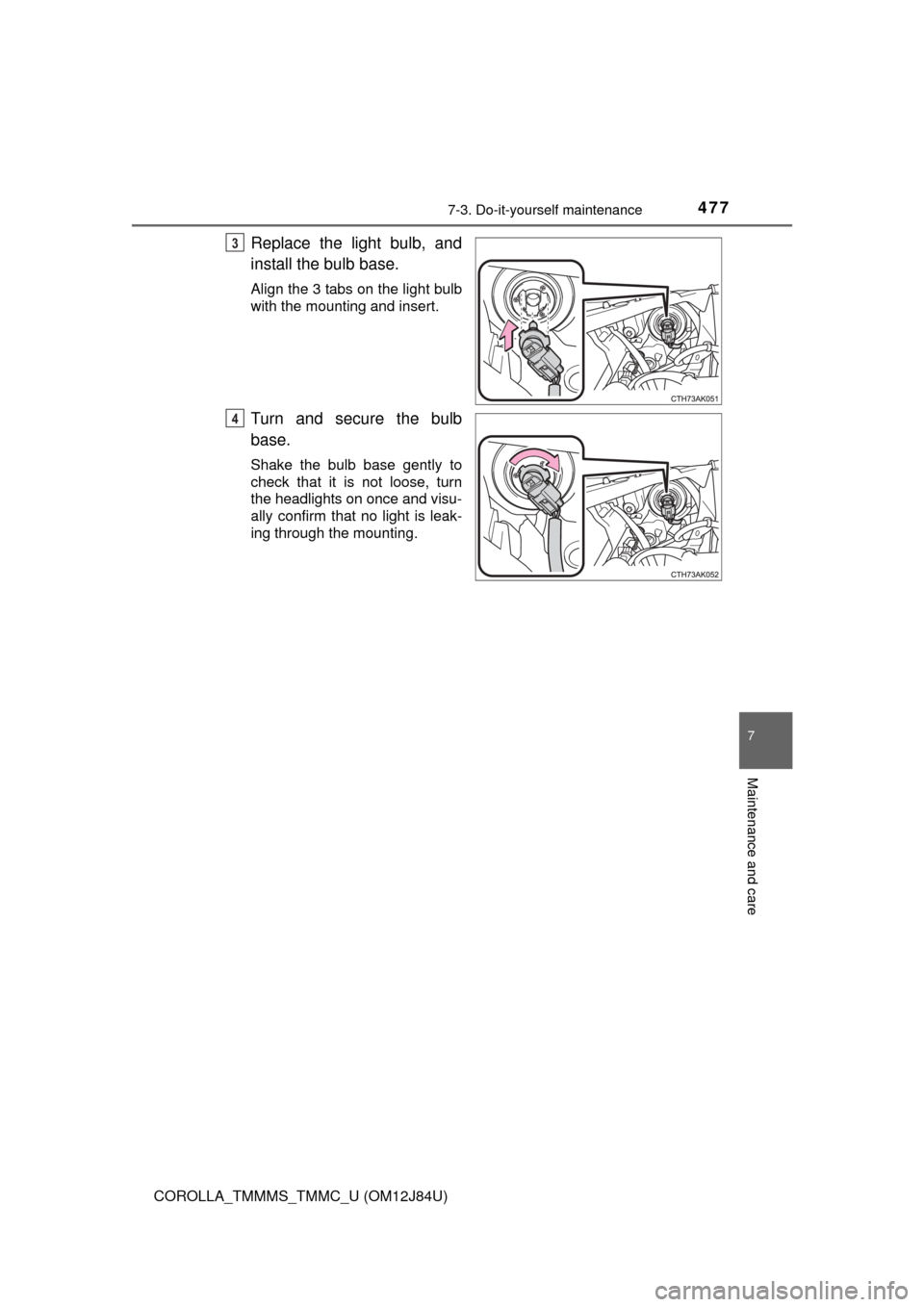
4777-3. Do-it-yourself maintenance
7
Maintenance and care
COROLLA_TMMMS_TMMC_U (OM12J84U)
Replace the light bulb, and
install the bulb base.
Align the 3 tabs on the light bulb
with the mounting and insert.
Turn and secure the bulb
base.
Shake the bulb base gently to
check that it is not loose, turn
the headlights on once and visu-
ally confirm that no light is leak-
ing through the mounting.
3
4
Page 485 of 620
4857-3. Do-it-yourself maintenance
7
Maintenance and care
COROLLA_TMMMS_TMMC_U (OM12J84U)n
Replacing the following bulbs
If any of the lights listed below
has burnt out, have it replaced by
your Toyota dealer.
l Headlight low beams/daytime running lights
l High mounted stoplights
l Side turn signal lights (if equipped)
nLED light bulbs
The high mounted stoplights and headlight low beams/daytime running lights
consist of a number of LEDs. If any of the LEDs burns out, take your vehicle
to your Toyota dealer to have the light replaced.
n Condensation build-up on the inside of the lens
Temporary condensation build-up on the inside of the headlight lens does not
indicate a malfunction.
Contact your Toyota dealer for more information in the following situations:
lLarge drops of water have built up on the inside of the lens.
l Water has built up inside the headlight.
CAUTION
n Replacing light bulbs
lTurn off the lights. Do not attempt to replace the bulb immediately after
turning off the lights.
The bulbs become very hot and may cause burns.
l Do not touch the glass portion of the light bulb with bare hands. When it is
unavoidable to hold the glass portion, use and hold with a clean dry cloth
to avoid getting moisture and oils on the bulb.
Also, if the bulb is scratched or dropped, it may blow out or crack.
l Fully install light bulbs and any parts used to secure them. Failure to do so
may result in heat damage, fire, or water entering the headlight unit. This
may damage the headlights or cause condensation to build up on the lens.
n To prevent damage or fire
Make sure bulbs are fully seated and locked.
Page 541 of 620

5418-2. Steps to take in an emergency
8
When trouble arises
COROLLA_TMMMS_TMMC_U (OM12J84U)
nStarting the engine when the battery is discharged
The engine cannot be started by push-starting.
n To prevent battery discharge
lTurn off the headlights and the audio system while the engine is off.
l Turn off any unnecessary electrical components when the vehicle is running
at a low speed for an extended period, such as in heavy traffic.
n Charging the battery
The electricity stored in the battery will discharge gradually even when the
vehicle is not in use, due to natural discharge and the draining effects of cer-
tain electrical appliances. If the vehicle is left for a long time, the battery may
discharge, and the engine may be unable to start. (The battery recharges
automatically during driving.)
n When recharging or replacing the battery
lVehicles with a smart key system: In some cases, it may not be possible to
unlock the doors using the smart key system when the battery is dis-
charged. Use the wireless remote control or the mechanical key to lock or
unlock the doors.
l The engine may not start on the first attempt after the battery has recharged
but will start normally after the second attempt. This is not a malfunction.
l Vehicles with a smart key system: The engine switch mode is memorized by
the vehicle. When the battery is reconnected, the system will return to the
mode it was in before the battery was discharged. Before disconnecting the
battery, turn the engine switch off.
If you are unsure what mode the engine switch was in before the battery dis-
charged, be especially careful when reconnecting the battery.
l Make sure that the key is not inside the vehicle when recharging or replac-
ing the battery. The key may be locked in the vehicle if the alarm is acti-
vated. ( P. 69)
Page 559 of 620
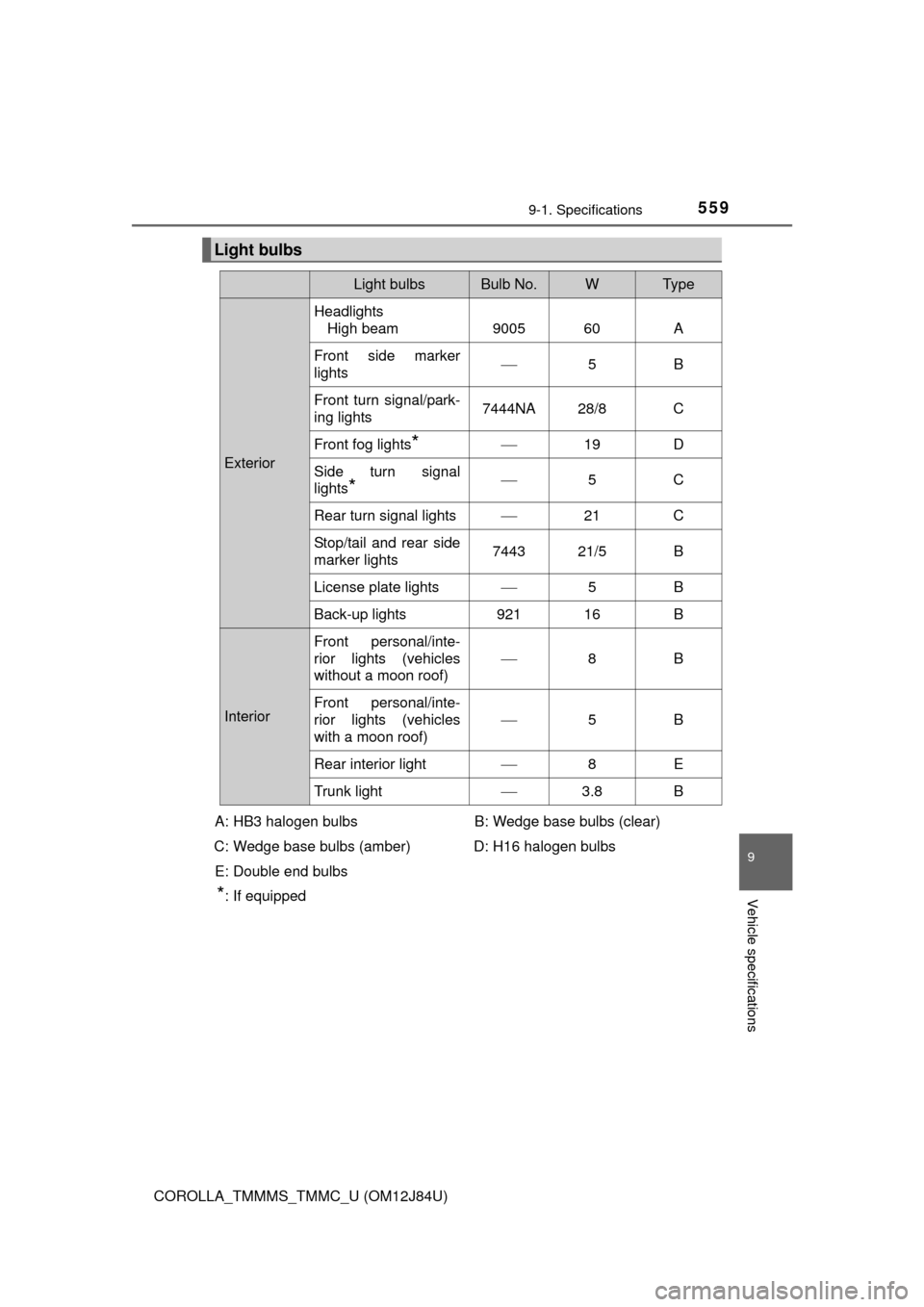
5599-1. Specifications
9
Vehicle specifications
COROLLA_TMMMS_TMMC_U (OM12J84U)
Light bulbs
Light bulbsBulb No.WTy p e
ExteriorHeadlights
High beam 9005 60 A
Front side marker
lights
5B
Front turn signal/park-
ing lights 7444NA 28/8 C
Front fog lights
* 19 D
Side turn signal
lights
* 5C
Rear turn signal lights 21 C
Stop/tail and rear side
marker lights 7443 21/5 B
License plate lights 5B
Back-up lights 921 16 B
Interior Front personal/inte-
rior lights (vehicles
without a moon roof)
8B
Front personal/inte-
rior lights (vehicles
with a moon roof)
5B
Rear interior light 8E
Trunk light 3.8 B
A: HB3 halogen bulbs
C: Wedge base bulbs (amber) E: Double end bulbs
*: If equipped B: Wedge base bulbs (clear)
D: H16 halogen bulbs
Page 580 of 620
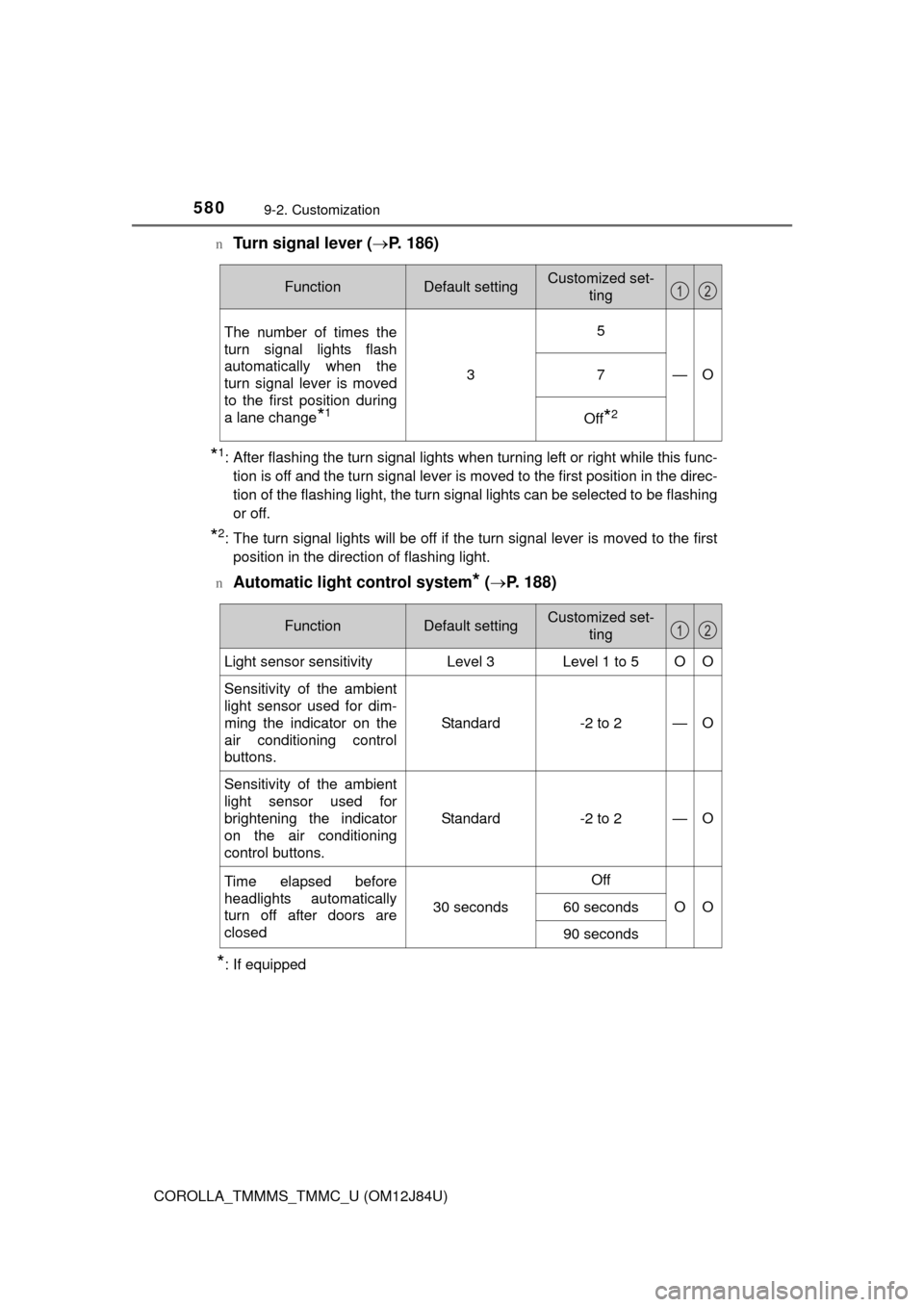
5809-2. Customization
COROLLA_TMMMS_TMMC_U (OM12J84U)n
Turn signal lever (
P. 186)
*1: After flashing the turn signal lights when turning left or right while this func-
tion is off and the turn signal lever is moved to the first position in the direc-
tion of the flashing light, the turn signal lights can be selected to be flashing
or off.
*2: The turn signal lights will be off if the turn signal lever is moved to the firstposition in the direction of flashing light.
n
Automatic light control system* ( P. 188)
*: If equipped
FunctionDefault settingCustomized set-
ting
The number of times the
turn signal lights flash
automatically when the
turn signal lever is moved
to the first position during
a lane change
*1
3
5
—O7
Off*2
12
FunctionDefault settingCustomized set-ting
Light sensor sensitivityLevel 3Level 1 to 5OO
Sensitivity of the ambient
light sensor used for dim-
ming the indicator on the
air conditioning control
buttons. Standard -2 to 2
—O
Sensitivity of the ambient
light sensor used for
brightening the indicator
on the air conditioning
control buttons.Standard -2 to 2
—O
Time elapsed before
headlights automatically
turn off after doors are
closed
30 seconds
Off
OO60 seconds
90 seconds
12
Page 611 of 620
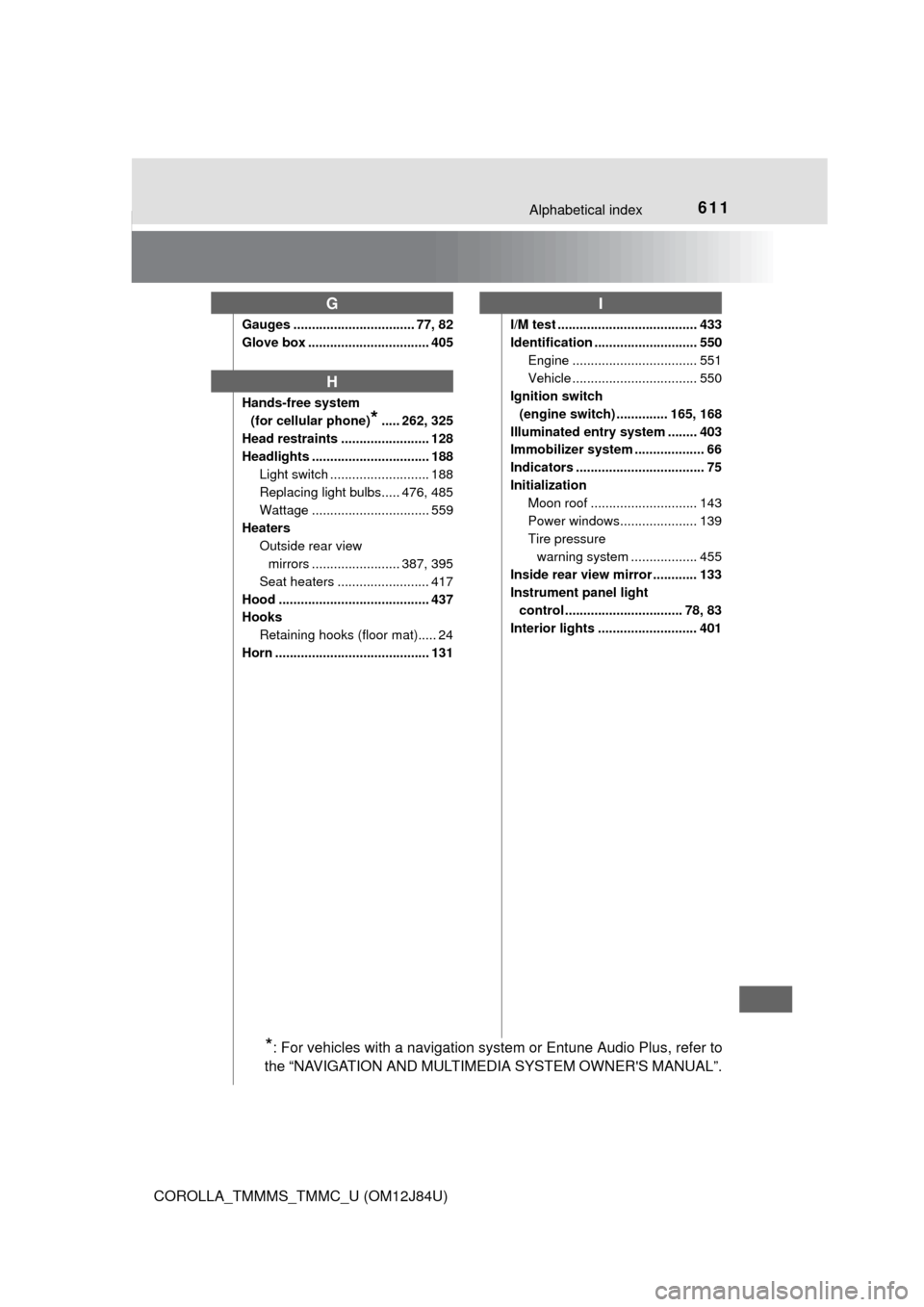
611Alphabetical index
COROLLA_TMMMS_TMMC_U (OM12J84U)
Gauges ................................. 77, 82
Glove box ................................. 405
Hands-free system (for cellular phone)
*..... 262, 325
Head restraints ........................ 128
Headlights ................................ 188 Light switch ........................... 188
Replacing light bulbs..... 476, 485
Wattage ................................ 559
Heaters Outside rear view mirrors ........................ 387, 395
Seat heaters ......................... 417
Hood ......................................... 437
Hooks Retaining hooks (floor mat)..... 24
Horn .......................................... 131 I/M test ...................................... 433
Identification ............................ 550
Engine .................................. 551
Vehicle .................................. 550
Ignition switch
(engine switch) .............. 165, 168
Illuminated entry system ........ 403
Immobilizer system ................... 66
Indicators ................................... 75
Initialization Moon roof ............................. 143
Power windows..................... 139
Tire pressure warning system .... .............. 455
Inside rear view mirror ............ 133
Instrument panel light control ................................ 78, 83
Interior lights ........................... 401
G
H
I
*: For vehicles with a navigation system or Entune Audio Plus, refer to
the “NAVIGATION AND MULTIMEDIA SYSTEM OWNER'S MANUAL”.