reset TOYOTA COROLLA 2016 11.G User Guide
[x] Cancel search | Manufacturer: TOYOTA, Model Year: 2016, Model line: COROLLA, Model: TOYOTA COROLLA 2016 11.GPages: 620, PDF Size: 9.12 MB
Page 238 of 620
2385-3. Using the radio
COROLLA_TMMMS_TMMC_U (OM12J84U)n
Scanning preset radio stations
Press and hold until you hear a beep.
Preset stations will be played for 5 seconds each.
When the desired station is reached, press again.
nScanning all radio stations within rangePress .
All stations with reception will be played for 5 seconds each.
When the desired station is reached, press again.
nWhen the battery is disconnected
Station presets are erased.
n Reception sensitivity
lMaintaining perfect radio reception at all times is difficult due to the continu-
ally changing position of the antenna, differences in signal strength and sur-
rounding objects, such as trains, transmitters, etc.
l The radio antenna is mounted inside the rear window. To maintain clear
radio reception, do not attach metallic window tinting or other metallic
objects to the antenna wire mounted inside the rear window.
l When is used, automatic station selection may not be possible.
Scanning radio stations
1
2
1
2
Page 252 of 620

2525-5. Using an external device
COROLLA_TMMMS_TMMC_U (OM12J84U)n
iPod functions
lWhen an iPod is connected and the audio source is changed to iPod mode,
the iPod will resume play from the same point in which it was last used.
l Depending on the iPod that is connected to the system, certain functions
may not be available. If a function is unavailable due to a malfunction (as
opposed to a system specification), disconnecting the device and recon-
necting it once again may resolve the problem.
l While connected to the system, the iPod cannot be operated with its own
controls. It is necessary to use the controls of the vehicle’s audio system
instead.
l When the battery level of an iPod is very low, the iPod may not operate. If
so, charge the iPod before use.
l Supported models ( P. 254)
n iPod problems
To resolve most problems encountered when using your iPod, disconnect
your iPod from the vehicle iPod connection and reset it.
For instructions on how to reset your iPod, refer to your iPod Owner’s Man-
ual.
n Display
P. 243
Page 283 of 620
2835-9. Bluetooth® Phone
5
Audio system
COROLLA_TMMMS_TMMC_U (OM12J84U)
Select “Phonebook” using .
Select the desired name using and press the off-hook
switch.
By pressing (Add S. Dial) and then one of the speed dial but-
tons (from to ) while the desired name is selected, it can
be registered as a speed dial.
Select “Speed dials” using .
Press the desired preset butto n (from to ) and press
the off-hook switch.
Select “Dial by number” using .
Enter the phone number and press the off-hook switch.
Dialing by selecting a name
Speed dialing
Dialing by entering the number
1
2
1
2
1
2
Page 292 of 620
2925-11. Basic Operations (Multimedia system)
COROLLA_TMMMS_TMMC_U (OM12J84U)
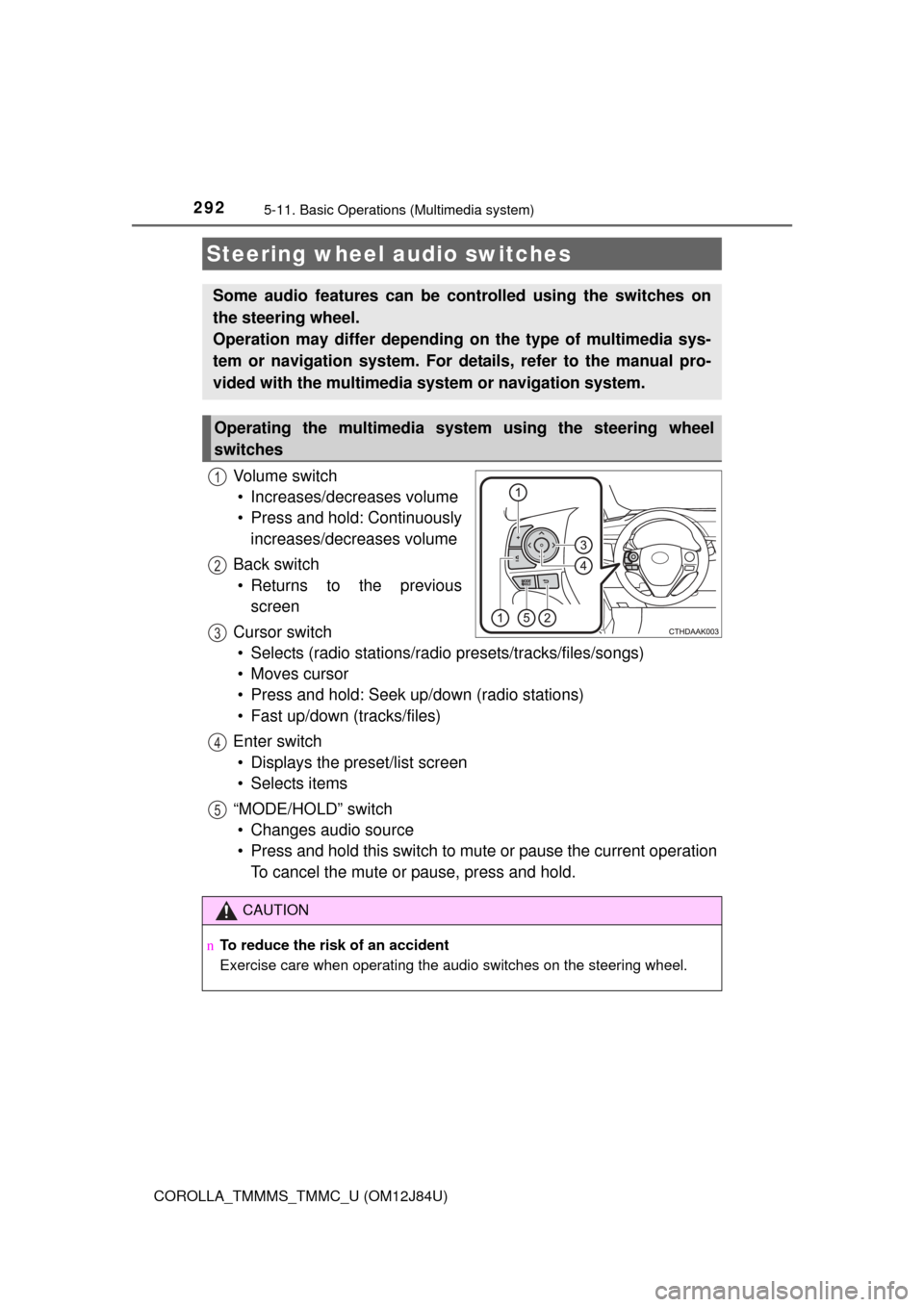
Vo l u m e s w i t c h• Increases/decreases volume
• Press and hold: Continuously increases/decreases volume
Back switch • Returns to the previous screen
Cursor switch • Selects (radio stations/radio presets/tracks/files/songs)
• Moves cursor
• Press and hold: Seek up/down (radio stations)
• Fast up/down (tracks/files)
Enter switch • Displays the preset/list screen
• Selects items
“MODE/HOLD” switch • Changes audio source
• Press and hold this switch to mute or pause the current operation To cancel the mute or pause, press and hold.
Steering wheel audio switches
Some audio features can be c ontrolled using the switches on
the steering wheel.
Operation may differ depending on the type of multimedia sys-
tem or navigation system. For de tails, refer to the manual pro-
vided with the multimedia system or navigation system.
Operating the multimedia system using the steering wheel
switches
1
12
3
4
5
CAUTION
n To reduce the risk of an accident
Exercise care when operating the audio switches on the steering wheel.
Page 299 of 620
2995-12. Setup (Multimedia system)
5
Audio system
COROLLA_TMMMS_TMMC_U (OM12J84U)
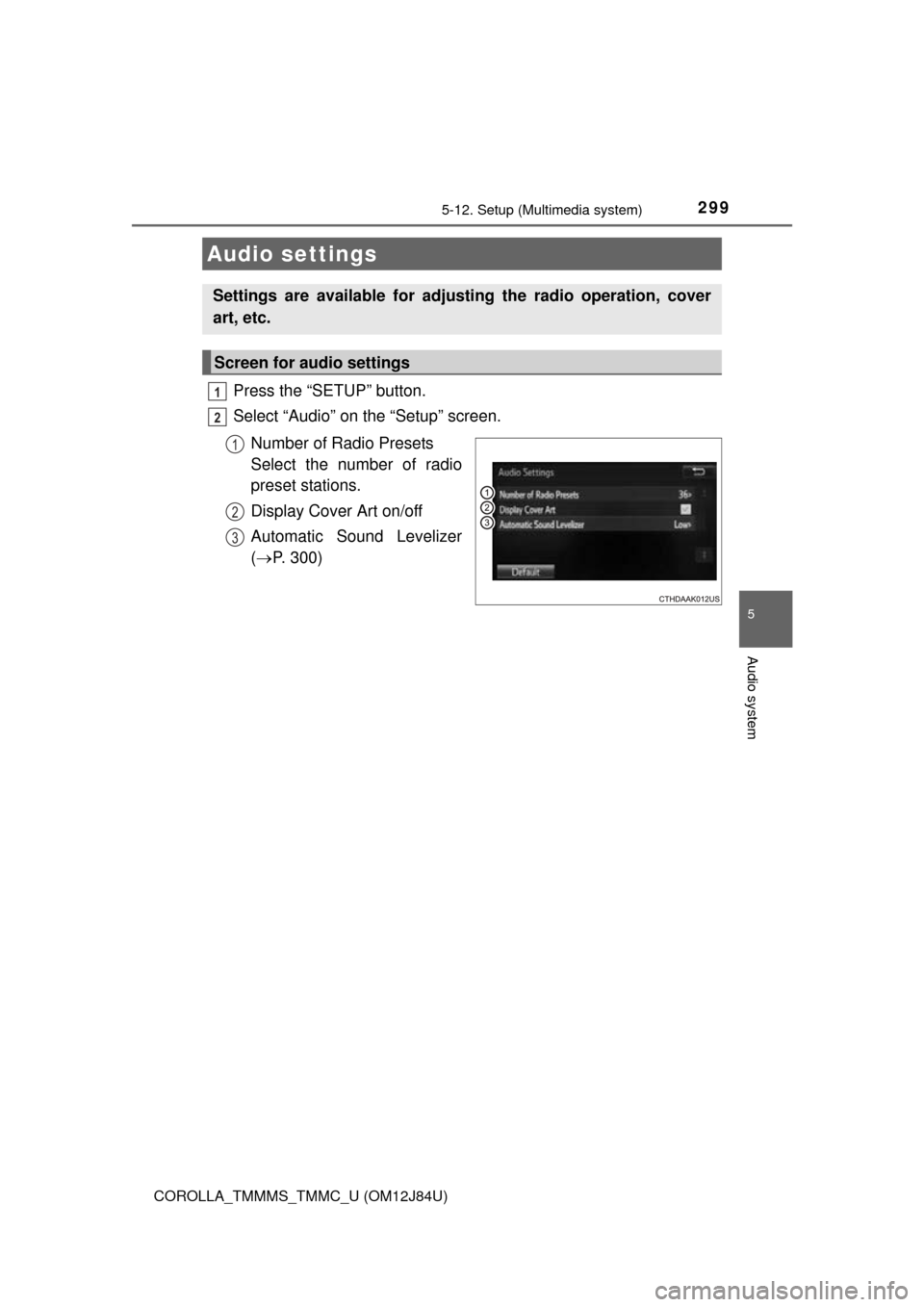
Press the “SETUP” button.
Select “Audio” on the “Setup” screen.Number of Radio Presets
Select the number of radio
preset stations.
Display Cover Art on/off
Automatic Sound Levelizer
( P. 300)
Audio settings
Settings are available for adjusting the radio operation, cover
art, etc.
Screen for audio settings
1
2
1
2
3
Page 307 of 620
307
5
Audio system
COROLLA_TMMMS_TMMC_U (OM12J84U)
5-14.Using the radio (Multimedia system)
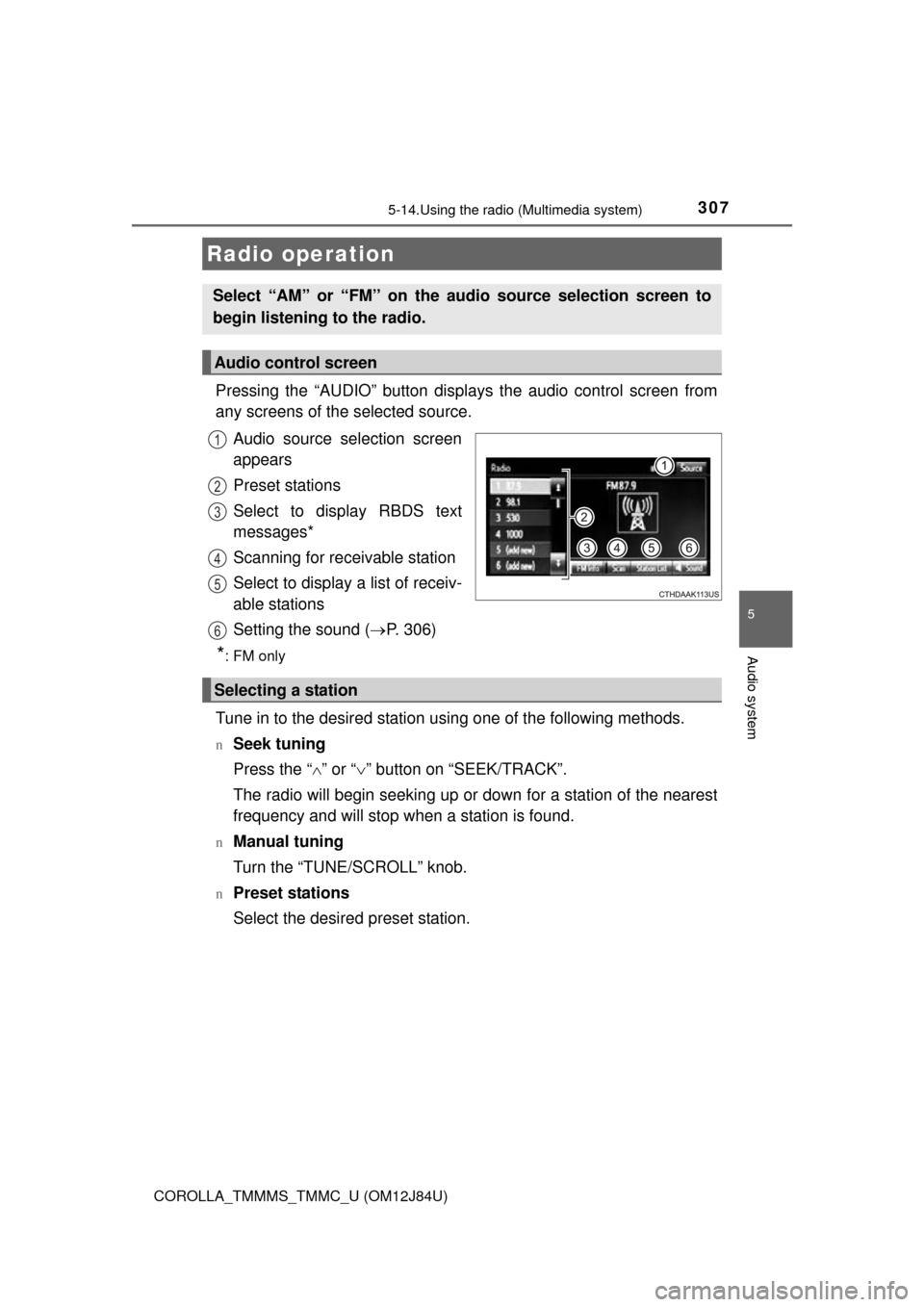
Pressing the “AUDIO” button displays the audio control screen from
any screens of the selected source.
Audio source selection screen
appears
Preset stations
Select to display RBDS text
messages*
Scanning for receivable station
Select to display a list of receiv-
able stations
Setting the sound ( P. 306)
*:FM only
Tune in to the desired station using one of the following methods.
nSeek tuning
Press the “ ” or “ ” button on “SEEK/TRACK”.
The radio will begin seeking up or down for a station of the nearest
frequency and will stop when a station is found.
nManual tuning
Turn the “TUNE/SCROLL” knob.
nPreset stations
Select the desired preset station.
Radio operation
Select “AM” or “FM” on the audio source selection screen to
begin listening to the radio.
Audio control screen
1
2
3
4
5
6
Selecting a station
Page 308 of 620
3085-14. Using the radio (Multimedia system)
COROLLA_TMMMS_TMMC_U (OM12J84U)
Search for desired stations by turning the “TUNE/SCROLL” knob or
pressing the “ ” or “ ” button on “SEEK/TRACK”.
Select “(add new)”.
To change the preset station to a different one, select and hold the preset
station.
Select “Yes”.
Select “OK” after setting the new preset station.
nRefreshing the station list Select “Refresh” on the “Station List” screen.
To cancel the refresh, select “Cancel Refresh”.
nReception sensitivity
lMaintaining perfect radio reception at all times is difficult due to the continu-
ally changing position of the antenna, differences in signal strength and sur-
rounding objects, such as trains, transmitters, etc.
l The radio antenna is mounted inside the rear window. To maintain clear
radio reception, do not attach metallic window tinting or other metallic
objects to the antenna wire mounted inside the rear window.
Setting station presets
1
2
3
4
1
Page 318 of 620
3185-16. Using an external device (Multimedia system)
COROLLA_TMMMS_TMMC_U (OM12J84U)n
iPod problems
To resolve most problems encountered when using your iPod, disconnect
your iPod from the vehicle iPod connection and reset it. For instructions on
how to reset your iPod, refer to your iPod Owner's Manual.
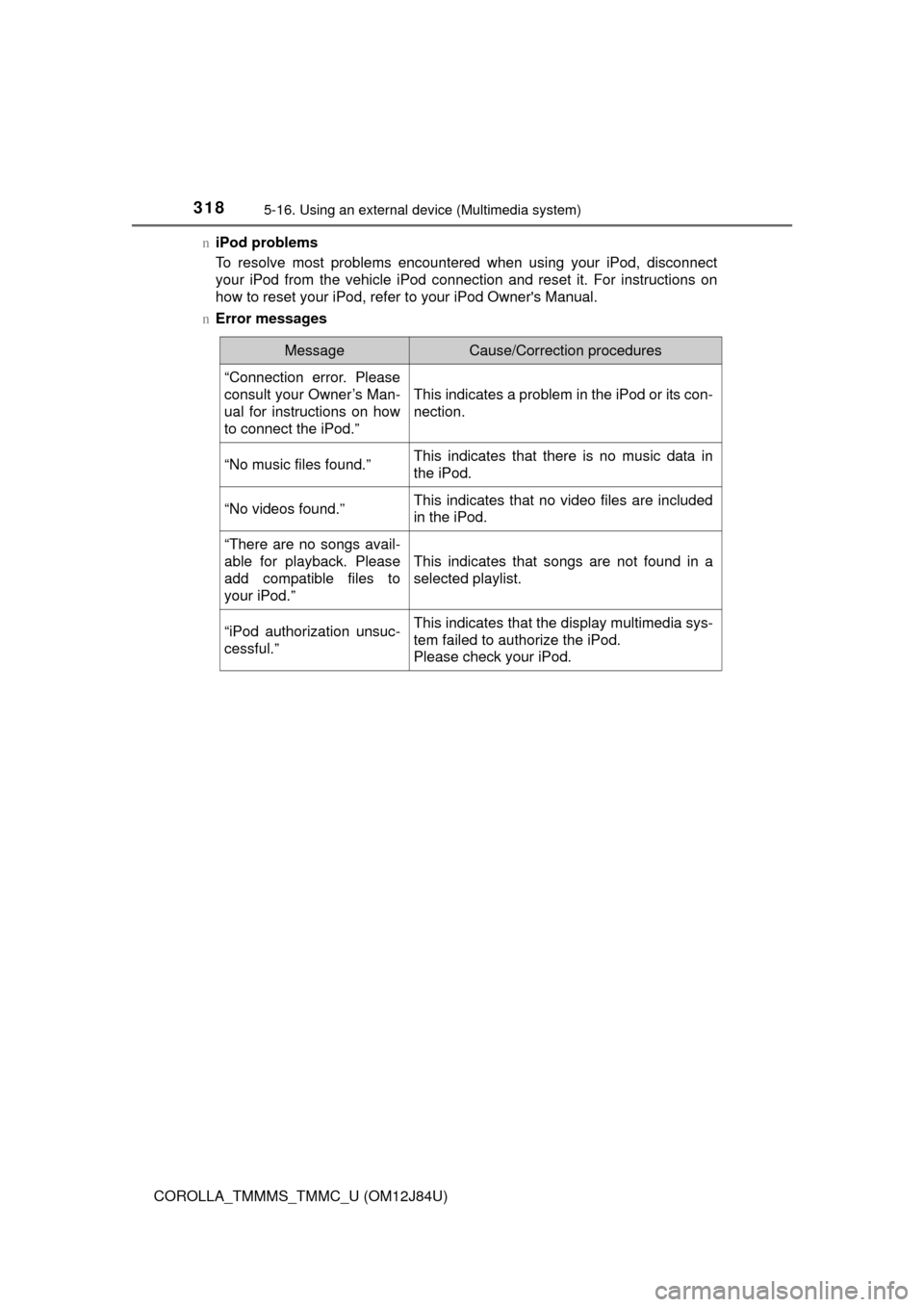
n Error messages
MessageCause/Correction procedures
“Connection error. Please
consult your Owner’s Man-
ual for instructions on how
to connect the iPod.”
This indicates a problem in the iPod or its con-
nection.
“No music files found.”This indicates that there is no music data in
the iPod.
“No videos found.”This indicates that no video files are included
in the iPod.
“There are no songs avail-
able for playback. Please
add compatible files to
your iPod.”
This indicates that songs are not found in a
selected playlist.
“iPod authorization unsuc-
cessful.”This indicates that the display multimedia sys-
tem failed to authorize the iPod.
Please check your iPod.
Page 362 of 620
3625-19. Bluetooth® phone (Multimedia system)
COROLLA_TMMMS_TMMC_U (OM12J84U)
The contact can be transferred from a Bluetooth® phone to the sys-
tem. The contact also c an be added, edited and deleted.
The call history can be deleted and contact and favorites can be
changed. Display the “Phone/Message Settings” screen. ( P. 360)
Select “Contact/Call History Settings”.
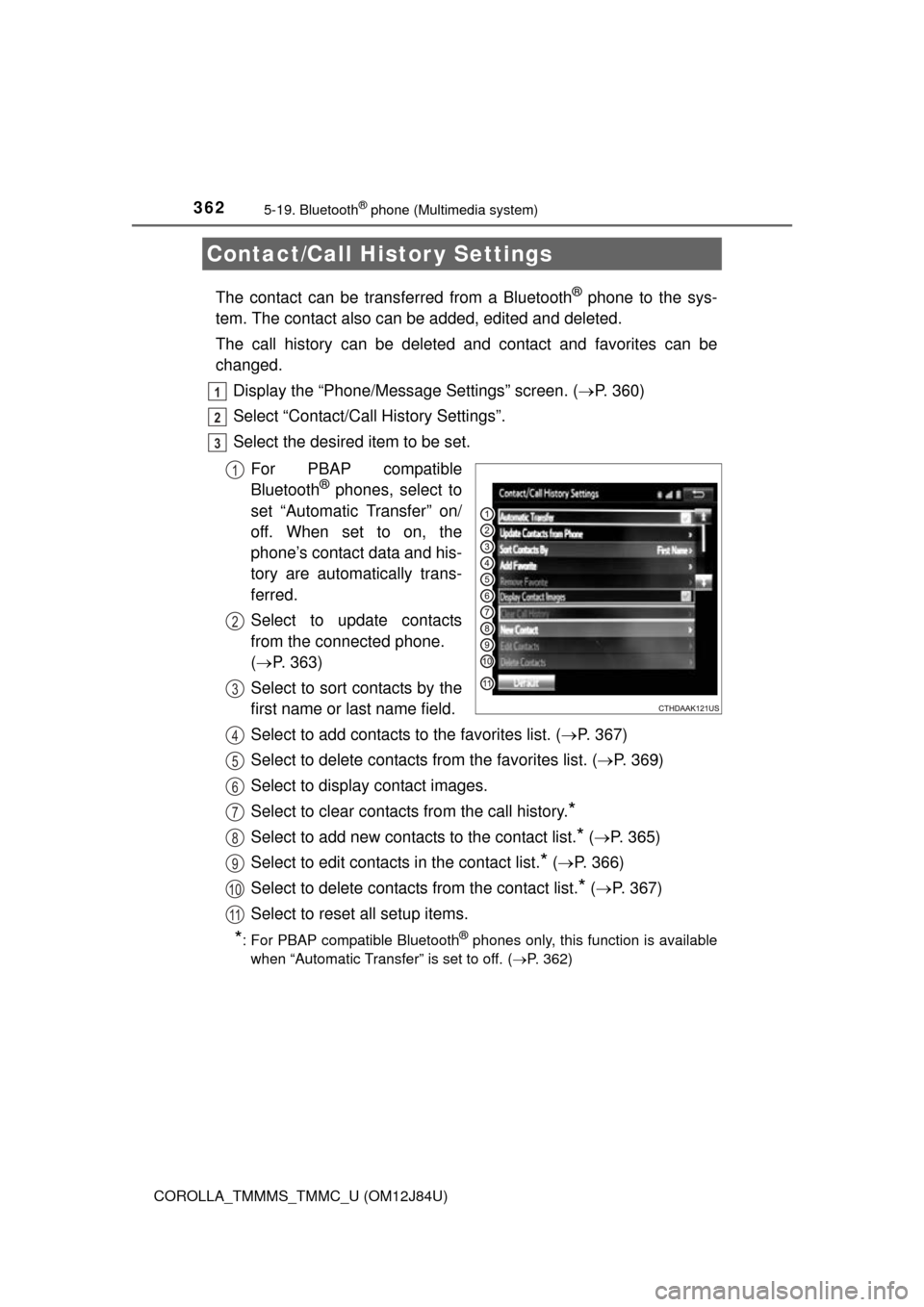
Select the desired item to be set.
For PBAP compatible
Bluetooth
® phones, select to
set “Automatic Transfer” on/
off. When set to on, the
phone’s contact data and his-
tory are automatically trans-
ferred.
Select to update contacts
from the connected phone.
( P. 363)
Select to sort contacts by the
first name or last name field.
Select to add contacts to the favorites list. ( P. 367)
Select to delete contacts from the favorites list. ( P. 369)
Select to display contact images.
Select to clear contacts from the call history.
*
Select to add new contacts to the contact list.* ( P. 365)
Select to edit contacts in the contact list.
* ( P. 366)
Select to delete contacts from the contact list.
* ( P. 367)
Select to reset all setup items.
*: For PBAP compatible Bluetooth® phones only, this function is available
when “Automatic Transfer” is set to off.
( P. 362)
Contact/Call Histor y Settings
1
2
3
1
2
3
4
5
6
7
8
9
10
11
Page 427 of 620

4277-2. Maintenance
7
Maintenance and care
COROLLA_TMMMS_TMMC_U (OM12J84U)
nRepair and replacement
It is recommended that genuine Toyota parts be used for repairs to ensure
performance of each system. If non-Toyota parts are used in replacement or if
a repair shop other than a Toyota dealer performs repairs, confirm the war-
ranty coverage.
n Resetting the reminder light (vehicl es with a drive monitor display) or
the message (vehicles with a multi-in formation display) indicating main-
tenance is required (U.S.A. only)
After the required maintenance is performed according to the maintenance
schedule, please reset the reminder light (vehicles with a drive monitor dis-
play) or the message (vehicles with a multi-information display).
To reset the reminder light (vehicles with a drive monitor display) or the mes-
sage (vehicles with a multi-information display), follow the procedure
described below:
Vehicles without a smart key system: Turn the engine switch to the “LOCK”
position with the trip meter A reading shown. ( P. 77, 82)
Vehicles with a smart key system: Turn the engine switch off with the trip
meter A reading shown. ( P. 77, 82)
Vehicles without a smart key system:
While pressing the “DISP” switch
*1 ( P. 77) or display change button*2
(P. 82), turn the engine switch to the “ON” position (do not start the
engine because reset mode will be canceled).
Vehicles with a smart key system:
While pressing the “DISP” switch
*1 ( P. 77) or display change button*2
(P. 82), turn the engine switch to the IGNITION ON mode (do not start the
engine because otherwise the reset mode will be canceled).
*1: Vehicles with a drive monitor display
*2: Vehicles with a multi-information display
Continue to press and hold the button until the trip meter displays “000000”.
n Allow inspection and repairs to be performed by a Toyota dealer
lToyota technicians are well-trained specialists and are kept up to date with
the latest service information. They are well informed about the operations
of all systems on your vehicle.
l Keep a copy of the repair order. It proves that the maintenance that has
been performed is under warranty cove rage. If any problem should arise
while your vehicle is under warranty, your Toyota dealer will promptly take
care of it.
1
2
3