stop start TOYOTA COROLLA 2016 11.G User Guide
[x] Cancel search | Manufacturer: TOYOTA, Model Year: 2016, Model line: COROLLA, Model: TOYOTA COROLLA 2016 11.GPages: 620, PDF Size: 9.12 MB
Page 166 of 620
1664-2. Driving procedures
COROLLA_TMMMS_TMMC_U (OM12J84U)
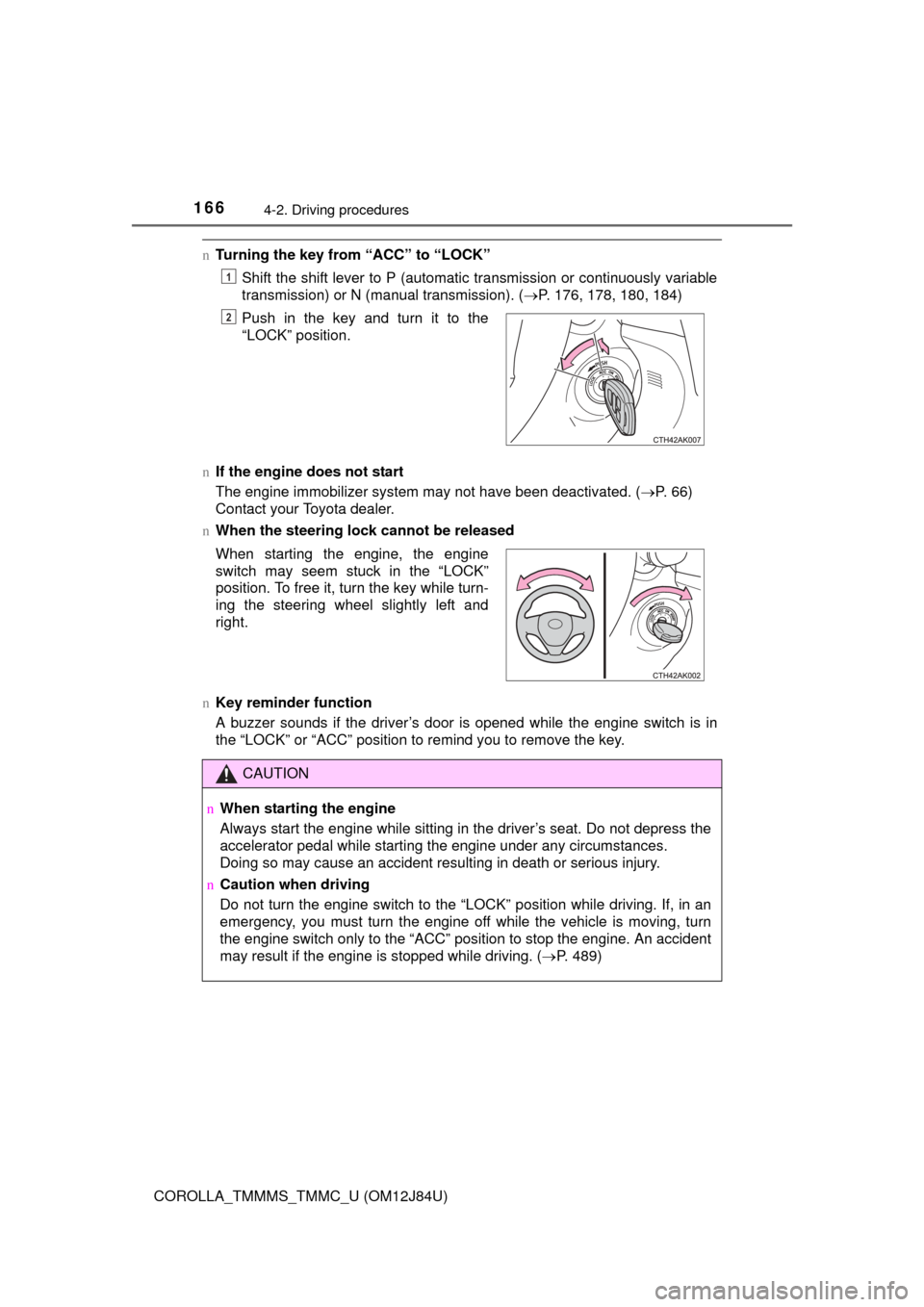
nTurning the key from “ACC” to “LOCK”
Shift the shift lever to P (automatic transmission or continuously variable
transmission) or N (manual transmission). ( P. 176, 178, 180, 184)
n If the engine does not start
The engine immobilizer system may not have been deactivated. ( P. 66)
Contact your Toyota dealer.
n When the steering lock cannot be released
n Key reminder function
A buzzer sounds if the driver’s door is opened while the engine switch is in
the “LOCK” or “ACC” position to remind you to remove the key. Push in the key and turn it to the
“LOCK” position.
1
2
When starting the engine, the engine
switch may seem stuck in the “LOCK”
position. To free it, turn the key while turn-
ing the steering wheel slightly left and
right.
CAUTION
n
When starting the engine
Always start the engine while sitting in the driver’s seat. Do not depress the
accelerator pedal while starting the engine under any circumstances.
Doing so may cause an accident resulting in death or serious injury.
n Caution when driving
Do not turn the engine switch to the “LOCK” position while driving. If, in an
emergency, you must turn the engine off while the vehicle is moving, turn
the engine switch only to the “ACC” position to stop the engine. A\
n accident
may result if the engine is stopped while driving. ( P. 489)
Page 169 of 620
1694-2. Driving procedures
4
Driving
COROLLA_TMMMS_TMMC_U (OM12J84U)
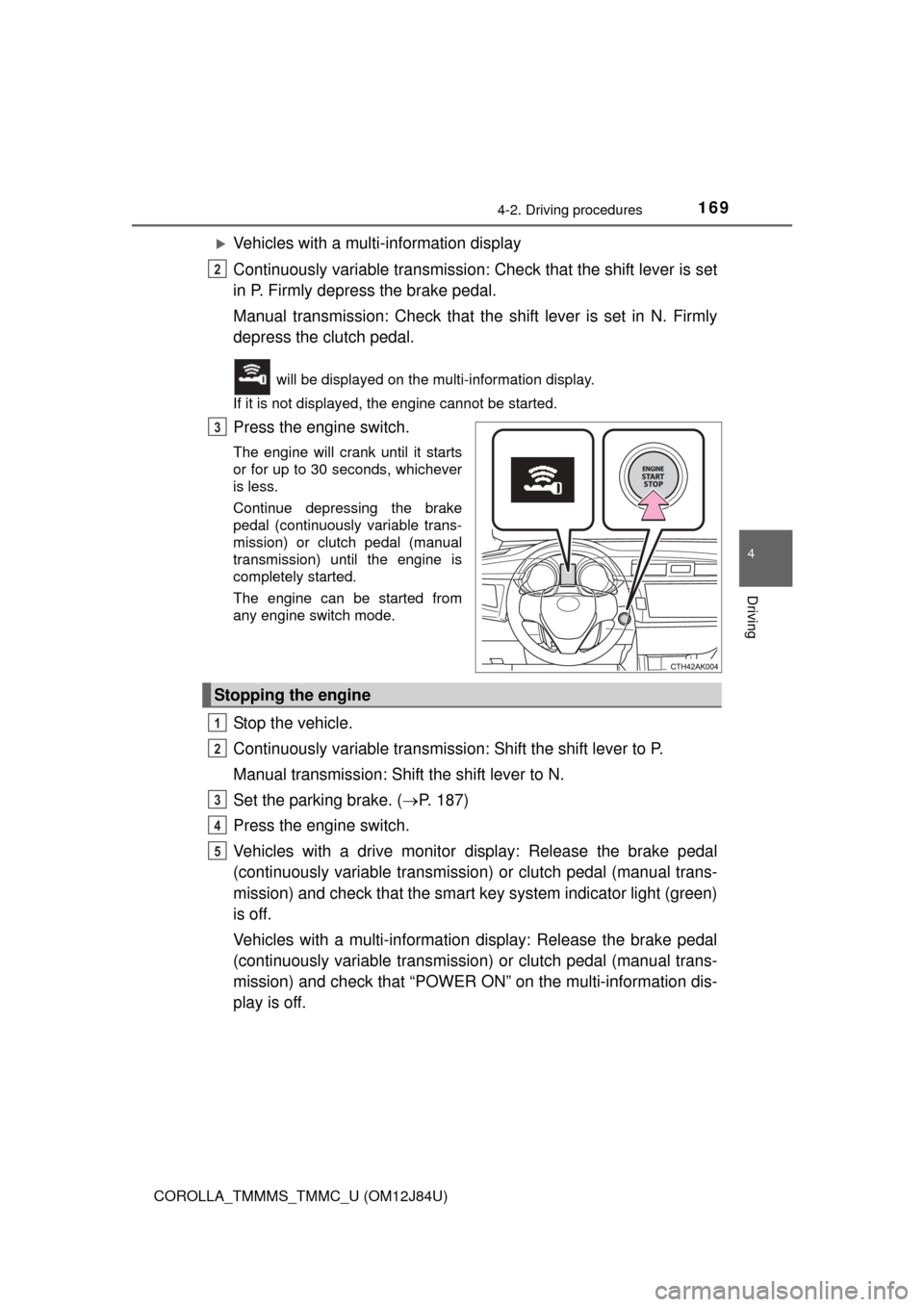
Vehicles with a multi-information display
Continuously variable transmission: Check that the shift lever is set
in P. Firmly depress the brake pedal.
Manual transmission: Check that t he shift lever is set in N. Firmly
depress the clutch pedal.
will be displayed on the multi-information display.
If it is not displayed, the engine cannot be started.
Press the engine switch.
The engine will crank until it starts
or for up to 30 seconds, whichever
is less.
Continue depressing the brake
pedal (continuously variable trans-
mission) or clutch pedal (manual
transmission) until the engine is
completely started.
The engine can be started from
any engine switch mode.
Stop the vehicle.
Continuously variable transmissi on: Shift the shift lever to P.
Manual transmission: Shift the shift lever to N.
Set the parking brake. ( P. 187)
Press the engine switch.
Vehicles with a drive monitor display: Release the brake pedal
(continuously variable transmission) or clutch pedal (manual trans-
mission) and check that the smart ke y system indicator light (green)
is off.
Vehicles with a multi-information display: Release the brake pedal
(continuously variable transmission) or clutch pedal (manual trans-
mission) and check that “POWER ON” on the multi-information dis-
play is off.
2
3
Stopping the engine
1
2
3
4
5
Page 174 of 620
1744-2. Driving procedures
COROLLA_TMMMS_TMMC_U (OM12J84U)n
When the smart key system indicator light flashes in yellow (vehicles
with a drive monitor display)
The system may be malfunctioning. Have the vehicle inspected by your
Toyota dealer immediately.
n When “CHECK SMART KEY SYSTEM” will be displayed on the multi-
information display (vehicles with a multi-information display)
The system may be malfunctioning. Have the vehicle inspected by your
Toyota dealer immediately.
n If the electronic key battery is depleted
P. 469
n Operation of the engine switch
lWhen operating the engine switch, one short, firm press is enough. If the
switch is pressed improperly, the engine may not start or the engine switch
mode may not change. It is not necessary to press and hold the switch.
l If attempting to restart the engine immediately after turning the engine
switch off, the engine may not start in some cases. After turning the engine
switch off, please wait a few seconds before restarting the engine.
n If the smart key system has been deactivated in a customized setting
P. 535
CAUTION
nWhen starting the engine
Always start the engine while sitting in the driver’s seat. Do not depress the
accelerator pedal while starting the engine under any circumstances.
Doing so may cause an accident resulting in death or serious injury.
n Caution while driving
If engine failure occurs while the vehicle is moving, do not lock or open the
doors until the vehicle reaches a safe and complete stop. Activation of the
steering lock in this circumstance may lead to an accident, resulting in
death or serious injury.
n Stopping the engine in an emergency
If you want to stop the engine in an emergency while driving the vehicle,
press and hold the engine switch for more than 2 seconds, or press it briefly
3 times or more in succession. ( P. 489)
However, do not touch the engine switch while driving except in an emer-
gency. Turning the engine off while driving will not cause loss of steering or
braking control, but the power assist to these systems will be lost. This will
make it more difficult to steer and brake, so you should pull over and stop
the vehicle as soon as it is safe to do so.
Page 175 of 620
1754-2. Driving procedures
4
Driving
COROLLA_TMMMS_TMMC_U (OM12J84U)
NOTICE
nTo prevent battery discharge
lDo not leave the engine switch in ACCESSORY or IGNITION ON mode
for long periods of time without the engine running.
l Vehicles with a drive monitor display:
If the smart key system indicator light (green) is illuminated, the engine
switch is not off. When exiting the vehicle, always check that the engine
switch is off.
l Vehicles with a multi-information display:
If “POWER ON” is displayed on the multi-information display, the engine
switch is not off. When exiting the vehicle, always check that the engine
switch is off.
l Vehicles with a continuously variable transmission:
Do not stop the engine when the shift lever is in a position other than P. If
the engine is stopped in another shift lever position, the engine switch will
not be turned off but instead be turned to ACCESSORY mode. If the vehi-
cle is left in ACCESSORY mode, battery discharge may occur.
n When starting the engine
lDo not race a cold engine.
l If the engine becomes difficult to star t or stalls frequently, have your vehi-
cle checked by your Toyota dealer immediately.
n Symptoms indicating a malfunction with the engine switch
If the engine switch seems to be operating somewhat differently than usual,
such as the switch sticking slightly, there may be a malfunction. Contact
your Toyota dealer immediately.
Page 182 of 620
1824-2. Driving procedures
COROLLA_TMMMS_TMMC_U (OM12J84U)
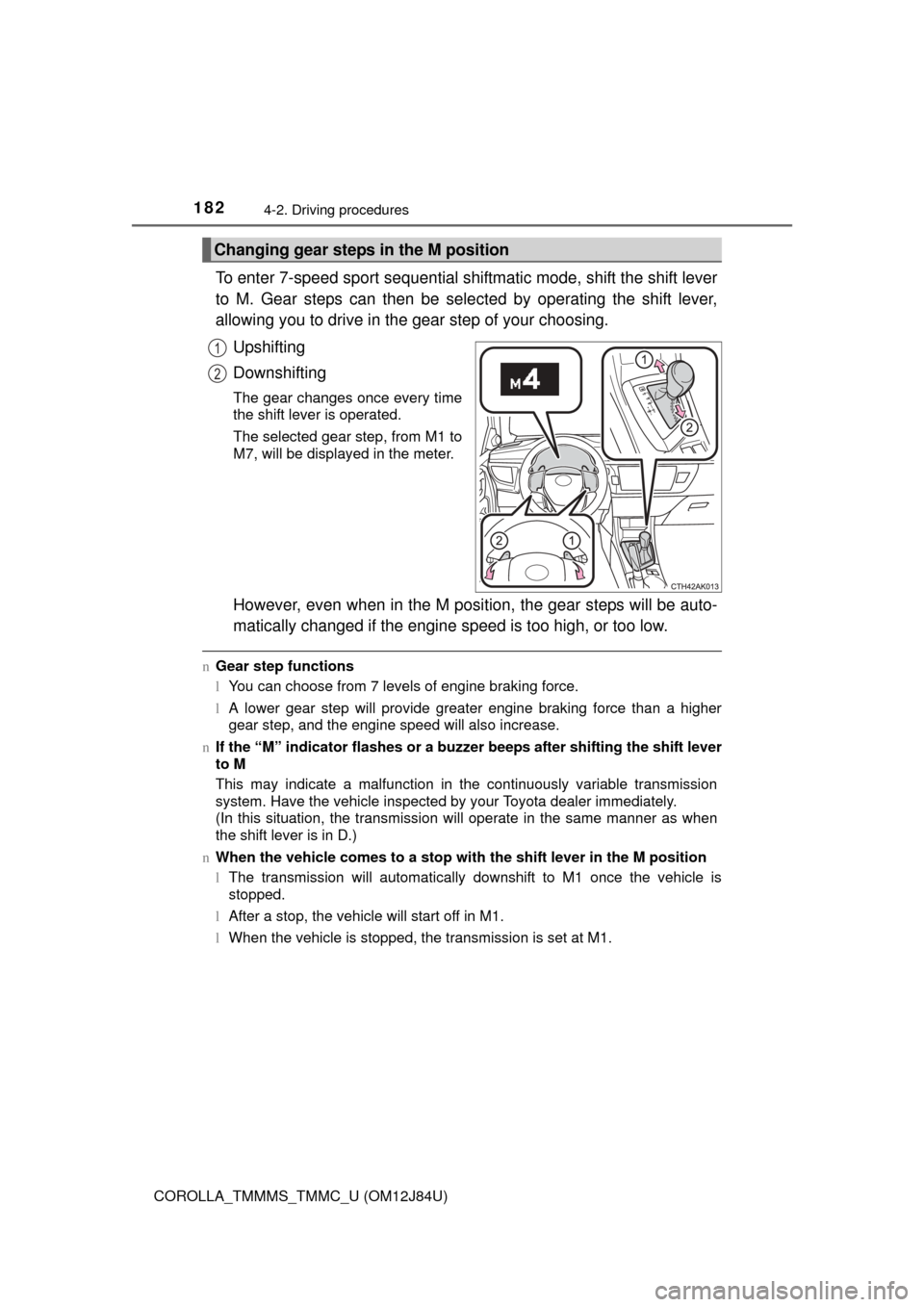
To enter 7-speed sport sequential shiftmatic mode, shift the shift lever
to M. Gear steps can then be selected by operating the shift lever,
allowing you to drive in the gear step of your choosing.Upshifting
Downshifting
The gear changes once every time
the shift lever is operated.
The selected gear step, from M1 to
M7, will be displayed in the meter.
However, even when in the M posi tion, the gear steps will be auto-
matically changed if the engine s peed is too high, or too low.
nGear step functions
lYou can choose from 7 levels of engine braking force.
l A lower gear step will provide greater engine braking force than a higher
gear step, and the engine speed will also increase.
n If the “M” indicator flashes or a buzze r beeps after shifting the shift lever
to M
This may indicate a malfunction in the continuously variable transmission
system. Have the vehicle inspected by your Toyota dealer immediately.
(In this situation, the transmission will operate in the same manner as when
the shift lever is in D.)
n When the vehicle comes to a stop with the shift lever in the M position
l The transmission will automatically downshift to M1 once the vehicle is
stopped.
l After a stop, the vehicle will start off in M1.
l When the vehicle is stopped, the transmission is set at M1.
Changing gear steps in the M position
1
2
Page 215 of 620
2154-5. Using the driving support systems
4
Driving
COROLLA_TMMMS_TMMC_U (OM12J84U)
uABS (Anti-lock Brake System)
Helps to prevent wheel lock when the brakes are applied suddenly,
or if the brakes are applied while driving on a slippery road surface
uBrake assist
Generates an increased level of braking force after the brake pedal
is depressed when the system detects a panic stop situation
uVSC (Vehicle Stability Control)
Helps the driver to control skidding when swerving suddenly or
turning on slippery road surfaces
uTRAC (Traction Control)
Helps to maintain drive power and prevent the drive wheels from
spinning when starting the vehicle or accelerating on slippery roads
uHill-start assist control
Helps to prevent the vehicle from rolling backward when starting on
an incline
uEPS (Electric Power Steering)
Employs an electric motor to redu ce the amount of effort needed to
turn the steering wheel
Driving assist systems
To help enhance driving safety and performance, the following
systems operate automatically in response to various driving
situations. Be aware, however, that these systems are supple-
mentary and should not be relied upon too heavily when operat-
ing the vehicle.
Page 217 of 620
2174-5. Using the driving support systems
4
Driving
COROLLA_TMMMS_TMMC_U (OM12J84U)
nTurning off both TRAC and VSC systems
To turn the TRAC and VSC systems off, press and hold for more than 3
seconds while the vehicle is stopped.
The “TRAC OFF” indicator light and VSC OFF indicator light will come on.
Press again to turn the systems back on.
n When the “TRAC OFF” indicator light comes on even if the VSC OFF
switch has not been pressed
TRAC cannot be operated. Contact your Toyota dealer.
n Sounds and vibrations caused by th e ABS, brake assist, TRAC, VSC and
hill-start assist control systems
l A sound may be heard from the engine compartment when the engine is
started or just after the vehicle begins to move. This sound does not indicate
that a malfunction has occurred in any of these systems.
l Any of the following conditions may occur when the above systems are
operating. None of these indicates that a malfunction has occurred.
• Vibrations may be felt through the vehicle body and steering.
• A motor sound may be heard after the vehicle comes to a stop.
• The brake pedal may pulsate slightly after the ABS is activated.
• The brake pedal may move down slightly after the ABS is activated.
n EPS operation sound
When the steering wheel is operated, a motor sound (whirring sound) may be
heard. This does not indicate a malfunction.
n Automatic reactivation of TRAC and VSC systems
After turning the TRAC and VSC systems off, the systems will be automati-
cally re-enabled in the following situations:
l Vehicles without a smart key system: When the engine switch is turned to
the “LOCK” position
Vehicles with a smart key system: When the engine switch is turned off
l If only the TRAC system is turned off, the TRAC will turn on when vehicle
speed increases
If both the TRAC and VSC systems are turned off, automatic re-enabling will
not occur when vehicle speed increases.
n Reduced effectiveness of the EPS system
The effectiveness of the EPS system is reduced to prevent the system from
overheating when there is frequent steering input over an extended period of
time. The steering wheel may feel heavy as a result. Should this occur, refrain
from excessive steering input or stop the vehicle and turn the engine off. The
EPS system should return to normal within 10 minutes.
Page 218 of 620

2184-5. Using the driving support systems
COROLLA_TMMMS_TMMC_U (OM12J84U)n
Operating conditions of hill-start assist control
When the following four conditions are met, the hill-start assist control will
operate:
lWhen starting off forward/backward
Vehicles with a manual transmission
• The shift lever is in a position other than R (when starting off forward on an upward incline).
• The shift lever is in R (when starting off backward on an upward incline).
Vehicles with an automatic transmission or continuously variable trans-
mission
The shift lever is in a position other than P or N (when starting off forward/
backward on an upward incline).
l The vehicle is stopped.
l The accelerator pedal is not depressed.
l The parking brake is not engaged.
n Automatic system cancelation of hill-start assist control
The hill-start assist control will turn off in any of the following situations:
l When starting off forward/backward
Vehicles with a manual transmission
• The shift lever is in R (when starting off forward on an upward incline).
• The shift lever is in a position other than R (when starting off backward on an upward incline).
Vehicles with an automatic transmission or continuously variable trans-
mission
The shift lever is moved to P or N.
l The accelerator pedal is depressed.
l The parking brake is engaged.
l Approximately 2 seconds elapse after the brake pedal is released.
Page 219 of 620
2194-5. Using the driving support systems
4
Driving
COROLLA_TMMMS_TMMC_U (OM12J84U)
CAUTION
nThe ABS does not operate effectively when
lThe limits of tire gripping performance have been exceeded (such as
excessively worn tires on a snow covered road).
l The vehicle hydroplanes while driving at high speed on wet or slick roads.
n Stopping distance when the ABS is operating may exceed that of nor-
mal conditions
The ABS is not designed to shorten the vehicle’s stopping distance. Always
maintain a safe distance from the vehicle in front of you, especially in the
following situations:
l When driving on dirt, gravel or snow-covered roads
l When driving with tire chains
l When driving over bumps in the road
l When driving over roads with potholes or uneven surfaces
n TRAC may not operat e effectively when
Directional control and power may not be achievable while driving on slip-
pery road surfaces, even if the TRAC system is operating.
Drive the vehicle carefully in conditions where stability and power may be
lost.
n Hill-start assist control does not operate effectively when
lDo not overly rely on hill-start assist control. Hill-start assist control may
not operate effectively on steep inclines and roads covered with ice.
l Unlike the parking brake, hill-start assist control is not intended to hold the
vehicle stationary for an extended period of time. Do not attempt to use
hill-start assist control to hold the vehicle on an incline, as doing so may
lead to an accident.
n When the VSC is activated
The slip indicator light flashes. Always drive carefully. Reckless driving may
cause an accident. Exercise particular care when the indicator light flashes.
n When the TRAC or VSC system is turned off
Be especially careful and drive at a speed appropriate to the road condi-
tions. As these are the systems to help ensure vehicle stability and driving
force, do not turn the TRAC or VSC system off unless necessary.
Page 375 of 620
3755-19. Bluetooth® phone (Multimedia system)
5
Audio system
COROLLA_TMMMS_TMMC_U (OM12J84U)
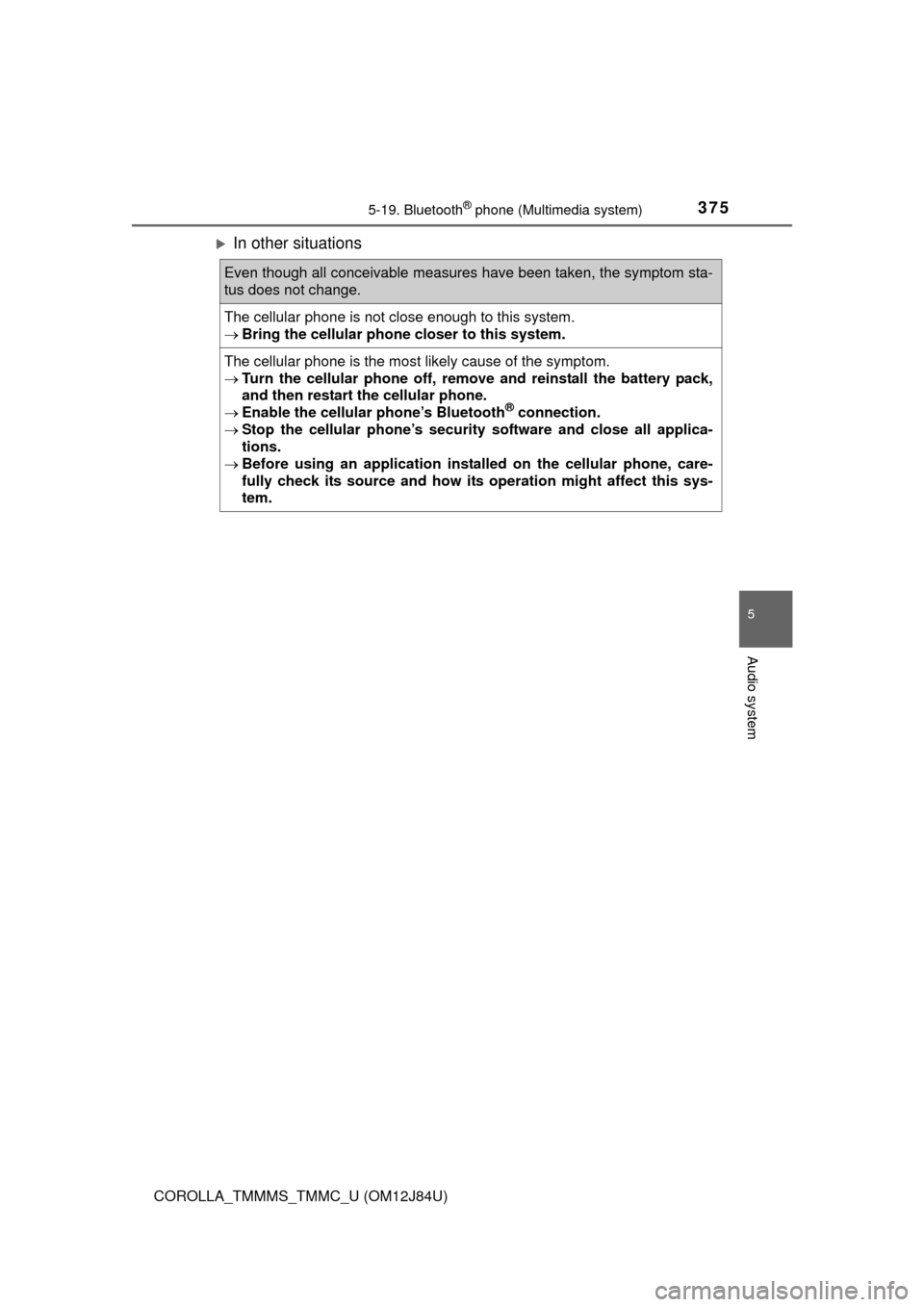
In other situations
Even though all conceivable measures have been taken, the symptom sta-
tus does not change.
The cellular phone is not close enough to this system.
Bring the cellular phone closer to this system.
The cellular phone is the most likely cause of the symptom.
Turn the cellular phone off, remo ve and reinstall the battery pack,
and then restart the cellular phone.
Enable the cellular phone’s Bluetooth
® connection.
Stop the cellular phone’s security software and close all applica-
tions.
Before using an application installed on the cellular phone, care-
fully check its source and how its operation might affect this sys-
tem.