Battery TOYOTA COROLLA 2016 11.G Owner's Manual
[x] Cancel search | Manufacturer: TOYOTA, Model Year: 2016, Model line: COROLLA, Model: TOYOTA COROLLA 2016 11.GPages: 620, PDF Size: 9.12 MB
Page 252 of 620

2525-5. Using an external device
COROLLA_TMMMS_TMMC_U (OM12J84U)n
iPod functions
lWhen an iPod is connected and the audio source is changed to iPod mode,
the iPod will resume play from the same point in which it was last used.
l Depending on the iPod that is connected to the system, certain functions
may not be available. If a function is unavailable due to a malfunction (as
opposed to a system specification), disconnecting the device and recon-
necting it once again may resolve the problem.
l While connected to the system, the iPod cannot be operated with its own
controls. It is necessary to use the controls of the vehicle’s audio system
instead.
l When the battery level of an iPod is very low, the iPod may not operate. If
so, charge the iPod before use.
l Supported models ( P. 254)
n iPod problems
To resolve most problems encountered when using your iPod, disconnect
your iPod from the vehicle iPod connection and reset it.
For instructions on how to reset your iPod, refer to your iPod Owner’s Man-
ual.
n Display
P. 243
Page 288 of 620
288
COROLLA_TMMMS_TMMC_U (OM12J84U)
5-10. Bluetooth®
nWhen using the Bluetooth® audio system
l In the following situations, the system may not function.
• The portable player does not support Bluetooth
®
• The cellular phone is located outside the service area
• The Bluetooth® device is switched off
• The Bluetooth® device has a low battery
• The Bluetooth® device is not connected to the system
• The Bluetooth® device is behind the seat or in the glove box or console
box, or is touching or covered by metal objects
l There may be a delay if a cellular phone connection is made during
Bluetooth
® audio playback.
l Depending on the type of portable audio player that is connected to the sys-
tem, operation may differ slightly and certain functions may not be available.
n When transferring ownership of the vehicle
Be sure to initialize the system to prevent personal data from being improp-
erly accessed. ( P. 273)
n About Bluetooth
®
nCompatible models
lBluetooth® specifications:
Ver. 1.1, or higher (recommended: Ver. 2.1 + EDR or higher)
l Following Profiles:
• A2DP (Advanced Audio Distribution Profile) Ver. 1.0, or higher (recom-
mended: Ver. 1.2 or higher)
• AVRCP (Audio/Video Remote Control Profile) Ver. 1.0 or higher (recom-
mended: Ver. 1.3 or higher)
Portable players must correspond to the above specifications in order to be
connected to the Bluetooth
® audio system. However, please note that some
functions may be limited depending on the type of portable player.
l Cellular phone
• HFP (Hands Free Profile) Ver. 1.0 or higher (recommended: Ver. 1.5)
• OPP (Object Push Profile) Ver. 1.1
• PBAP (Phone Book Access Profile) Ver. 1.0
Bluetooth®
Bluetooth is a registered trademark of
Bluetooth SIG. Inc.
Page 295 of 620
2955-11. Basic Operations (Multimedia system)
5
Audio system
COROLLA_TMMMS_TMMC_U (OM12J84U)
Select to change on/off.
Select to change on/off.
nUsing cellular phones
Interference may be heard through the multimedia system's speakers if a cel-
lular phone is being used inside or close to the vehicle while the multimedia
system is operating.
Random playback
Repeat play
CAUTION
nLaser product
This product is a class 1 laser product.
Do not open the cover of the player or attempt to repair the unit yourself.
Refer servicing to qualified personnel.
lLaser products
• Do not take this unit apart or attempt to make any changes yourself.
This is an intricate unit that uses a laser pickup to retrieve information
from the surface of compact discs. The laser is carefully shielded so
that its rays remain inside the cabinet. Therefore, never try to disassem-
ble the player or alter any of its parts since you may be exposed to laser
rays and dangerous voltages.
• This product utilizes a laser.
Use of controls or adjustments or performance of procedures other than
those specified herein may result in hazardous radiation exposure.
THE USE OF OPTICAL INSTRUMENTS WITH THIS PRODUCT WILL
INCREASE EYE HAZARD.
NOTICE
n To prevent battery discharge
Do not leave the multimedia system on longer than necessary when the
engine is off.
n To avoid damaging the multimedia system
Take care not to spill drinks or other fluids on the multimedia system.
Page 317 of 620

5
Audio system
COROLLA_TMMMS_TMMC_U (OM12J84U)
nAbout iPod
l“Made for iPod”, “Made for iPhone” and “Made for iPad”\
mean that an elec")
3175-16. Using an external device (Multimedia system)
5
Audio system
COROLLA_TMMMS_TMMC_U (OM12J84U)
nAbout iPod
l“Made for iPod”, “Made for iPhone” and “Made for iPad”\
mean that an elec-
tronic accessory has been designed to connect specifically to iPod or
iPhone, or iPad, respectively, and has been certified by the developer to
meet Apple performance standards.
l Apple is not responsible for the operation of this device or its compliance
with safety and regulatory standards. Please note that the use of this acces-
sory with iPod, iPhone or iPad may affect wireless performance.
l iPad, iPhone, iPod, iPod classic, iPod nano, and iPod touch are trademarks
of Apple Inc., registered in the U.S. and other countries. Lightning is a trade-
mark of Apple Inc.
n iPod cover art
lDepending on the iPod and songs in the iPod, iPod cover art may be dis-
played.
l This function can be changed to on/off. ( P. 299)
l It may take time to display iPod cover art, and the iPod may not be operated
while the cover art display is in process.
l Only iPod cover art that is saved in JPEG format can be displayed.
n iPod functions
lWhen an iPod is connected and the audio source is changed to iPod mode,
the iPod will resume play from the same point in which it was last used.
l Depending on the iPod that is connected to the system, certain functions
may not be available. If a function is unavailable due to a malfunction (as
opposed to a system specification), disconnecting the device and recon-
necting it may resolve the problem.
l While connected to the system, the iPod cannot be operated with its own
controls. It is necessary to use the controls of the vehicle's multimedia sys-
tem instead.
l When the battery level of an iPod is very low, the iPod may not operate. If
so, charge the iPod before use.
l Compatible models ( P. 319)
Page 341 of 620
341
5
Audio system
COROLLA_TMMMS_TMMC_U (OM12J84U)
5-18.Bluetooth® Audio (Multimedia system)
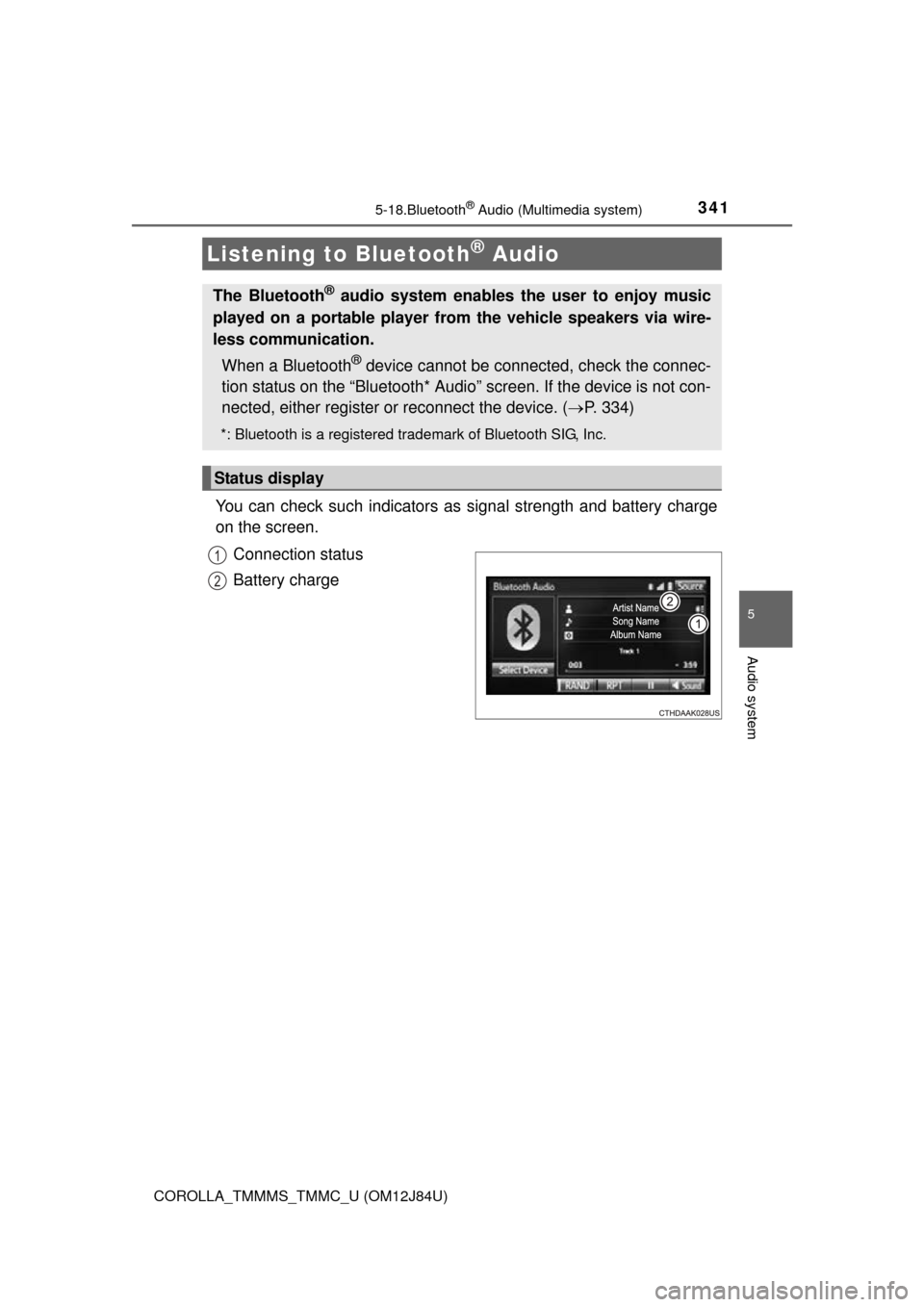
You can check such indicators as signal strength and battery charge
on the screen.
Connection status
Battery charge
Listening to Bluetooth® Audio
The Bluetooth® audio system enables the user to enjoy music
played on a portable player from the vehicle speakers via wire-
less communication.
When a Bluetooth
® device cannot be connected, check the connec-
tion status on the “Bluetooth* Audio” screen. If the device is not con-
nected, either register or reconnect the device. ( P. 334)
*: Bluetooth is a registered trademark of Bluetooth SIG, Inc.
Status display
1
2
Page 342 of 620
3425-18. Bluetooth® Audio (Multimedia system)
COROLLA_TMMMS_TMMC_U (OM12J84U)
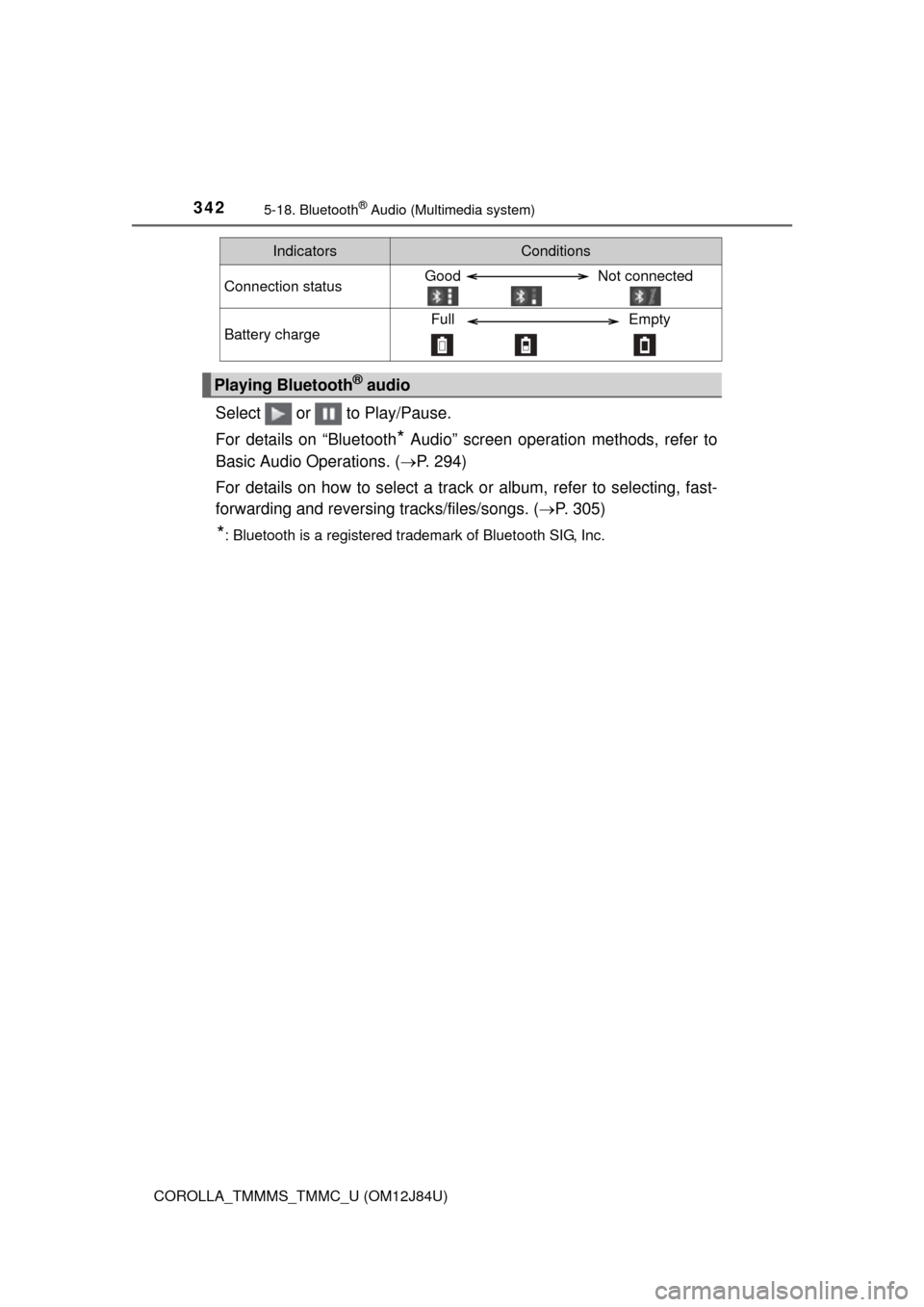
Select or to Play/Pause.
For details on “Bluetooth
* Audio” screen operation methods, refer to
Basic Audio Operations. ( P. 294)
For details on how to select a track or album, refer to selecting, fast-
forwarding and reversing tracks/files/songs. ( P. 305)
*: Bluetooth is a registered trademark of Bluetooth SIG, Inc.
IndicatorsConditions
Connection statusGood Not connected
Battery chargeFull Empty
Playing Bluetooth® audio
Page 343 of 620
343
5
Audio system
COROLLA_TMMMS_TMMC_U (OM12J84U)
5-19.Bluetooth® phone (Multimedia system)
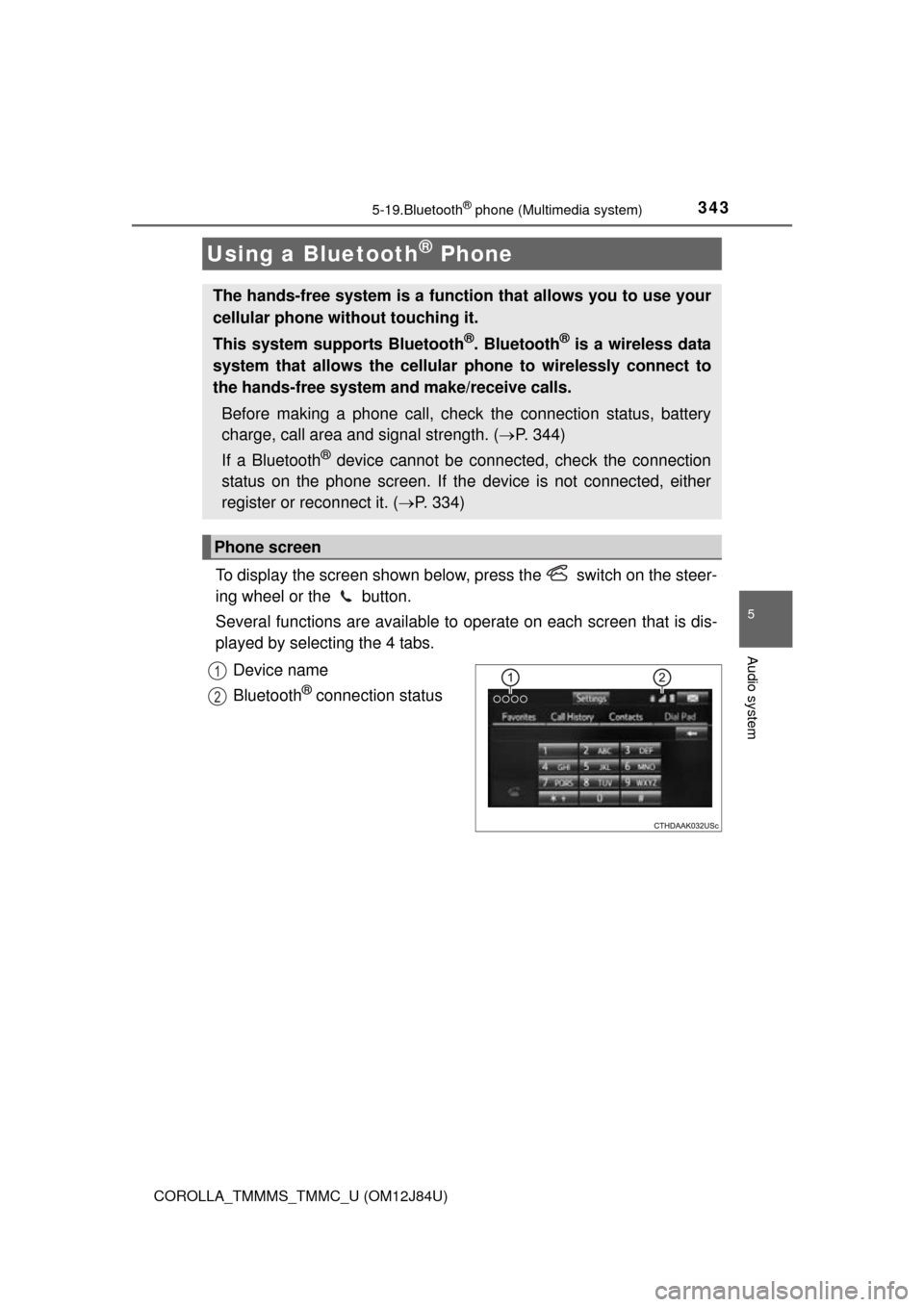
To display the screen shown below, press the switch on the steer-
ing wheel or the button.
Several functions are available to operate on each screen that is dis-
played by selecting the 4 tabs.
Device name
Bluetooth
® connection status
Using a Bluetooth® Phone
The hands-free system is a function that allows you to use your
cellular phone without touching it.
This system supports Bluetooth
®. Bluetooth® is a wireless data
system that allows the cellular phone to wirelessly connect to
the hands-free system and make/receive calls.
Before making a phone call, check the connection status, battery
charge, call area and signal strength. ( P. 344)
If a Bluetooth
® device cannot be connected, check the connection
status on the phone screen. If th e device is not connected, either
register or reconnect it. ( P. 334)
Phone screen
1
2
Page 344 of 620
3445-19. Bluetooth® phone (Multimedia system)
COROLLA_TMMMS_TMMC_U (OM12J84U)n
Telephone switch (
P. 359)
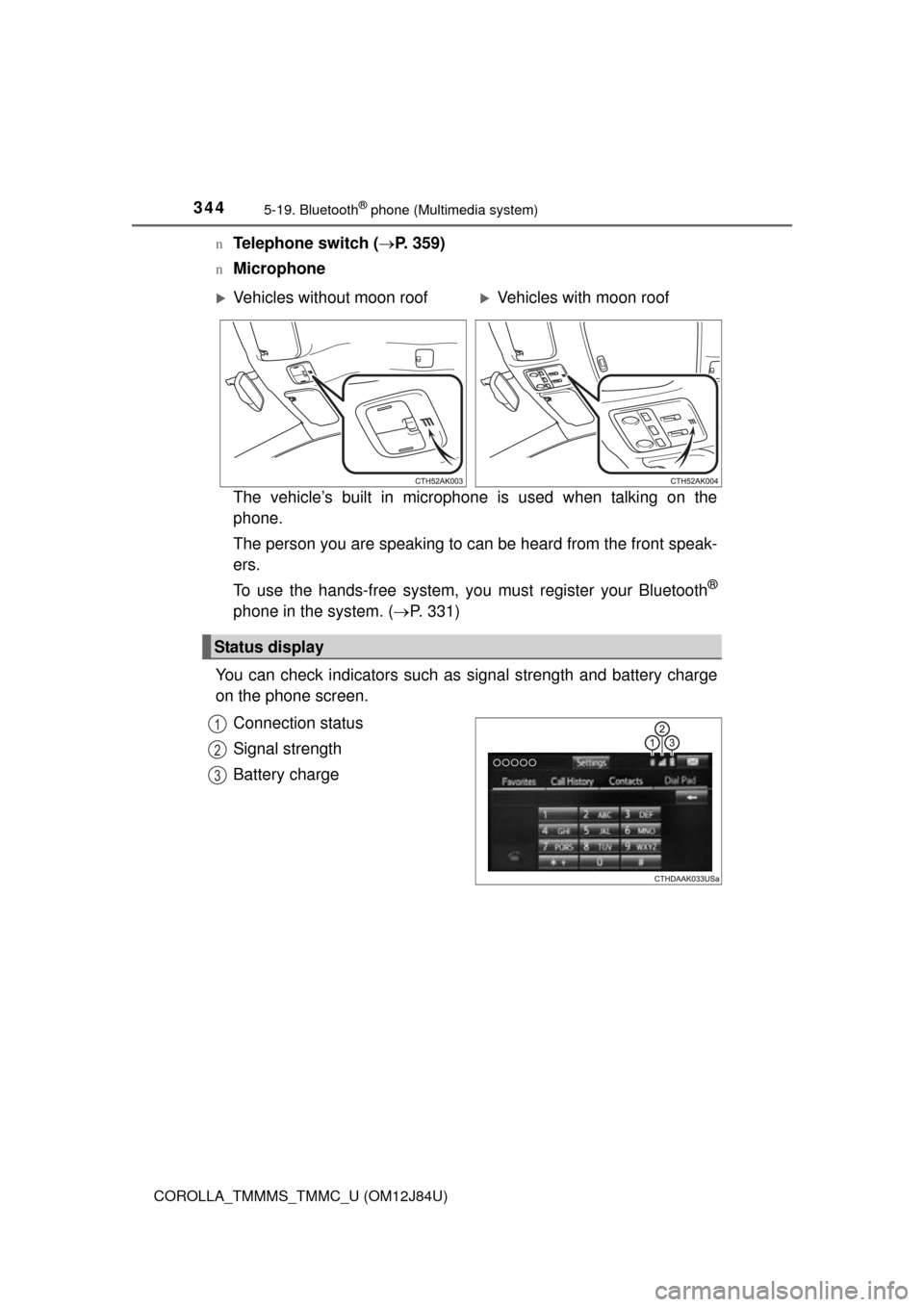
nMicrophone
The vehicle’s built in microphone is used when talking on the
phone.
The person you are speaking to can be heard from the front speak-
ers.
To use the hands-free system, you must register your Bluetooth
®
phone in the system. (P. 331)
You can check indicators such as signal strength and battery charge
on the phone screen.
Connection status
Signal strength
Battery charge
Vehicles without moon roofVehicles with moon roof
Status display
1
2
3
Page 345 of 620
3455-19. Bluetooth® phone (Multimedia system)
5
Audio system
COROLLA_TMMMS_TMMC_U (OM12J84U)
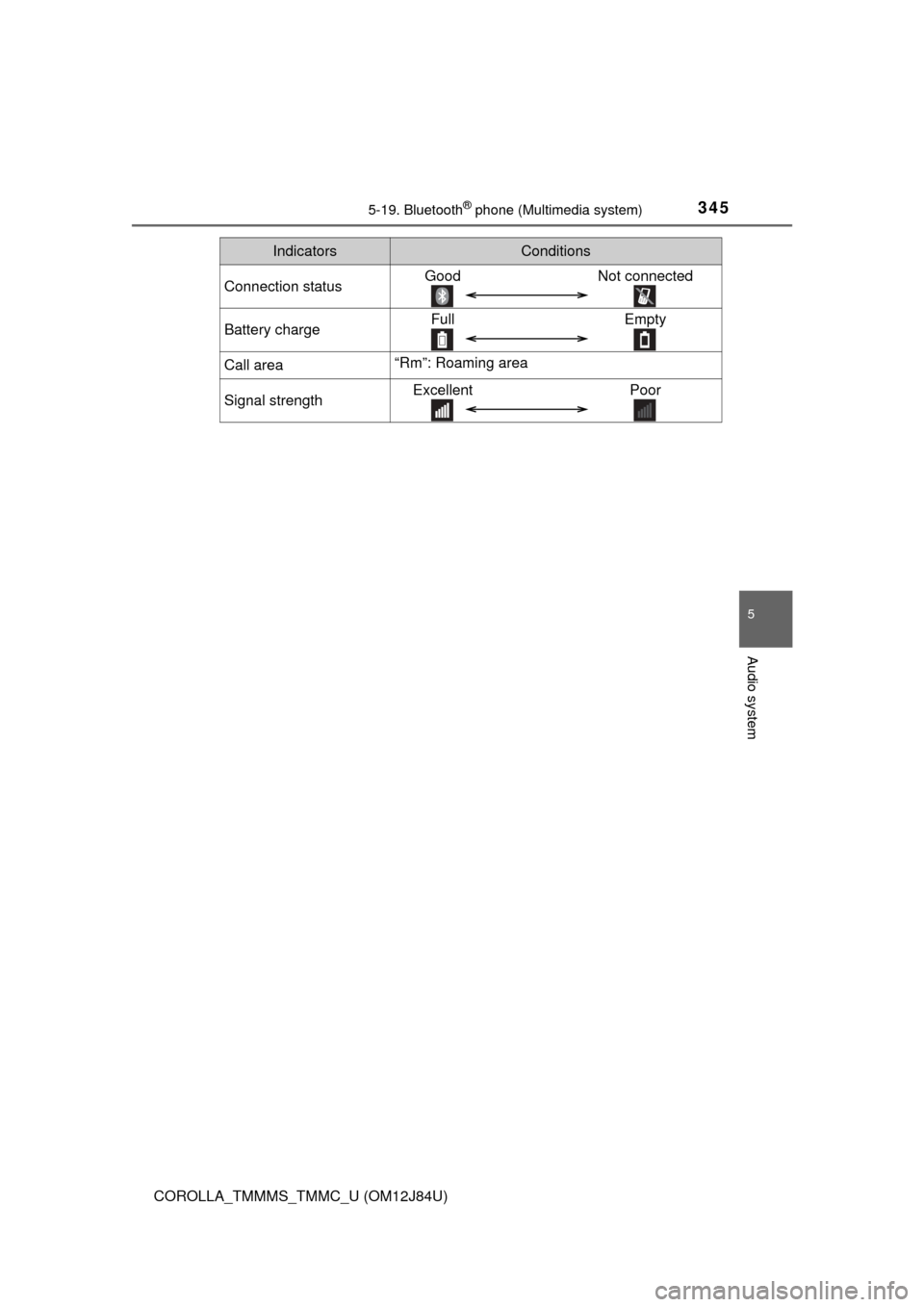
IndicatorsConditions
Connection statusGoodNot connected
Battery chargeFull Empty
Call area“Rm”: Roaming area
Signal strengthExcellent Poor
Page 375 of 620
3755-19. Bluetooth® phone (Multimedia system)
5
Audio system
COROLLA_TMMMS_TMMC_U (OM12J84U)
In other situations
Even though all conceivable measures have been taken, the symptom sta-
tus does not change.
The cellular phone is not close enough to this system.
Bring the cellular phone closer to this system.
The cellular phone is the most likely cause of the symptom.
Turn the cellular phone off, remo ve and reinstall the battery pack,
and then restart the cellular phone.
Enable the cellular phone’s Bluetooth
® connection.
Stop the cellular phone’s security software and close all applica-
tions.
Before using an application installed on the cellular phone, care-
fully check its source and how its operation might affect this sys-
tem.