ESP TOYOTA COROLLA 2016 11.G Owner's Manual
[x] Cancel search | Manufacturer: TOYOTA, Model Year: 2016, Model line: COROLLA, Model: TOYOTA COROLLA 2016 11.GPages: 620, PDF Size: 9.12 MB
Page 150 of 620

1504-1. Before driving
COROLLA_TMMMS_TMMC_U (OM12J84U)
CAUTION
Observe the following precautions.
Failure to do so may result in death or serious injury.
nWhen driving the vehicle
lDo not drive if you are unfamiliar with the location of the brake and ac\
cel-
erator pedals to avoid depressing the wrong pedal.
• Accidentally depressing the accelerator pedal instead of the brake
pedal will result in sudden acceleration that may lead to an accident.
• When backing up, you may twist your body around, leading to a diffi- culty in operating the pedals. Make sure to operate the pedals properly.
• Make sure to keep a correct driving posture even when moving the
vehicle only slightly. This allows you to depress the brake and accelera-
tor pedals properly.
• Depress the brake pedal using your right foot. Depressing the brake
pedal using your left foot may delay response in an emergency, result-
ing in an accident.
l Do not drive the vehicle over or stop the vehicle near flammable materials.
The exhaust system and exhaust gases can be extremely hot. These hot
parts may cause a fire if there is any flammable material nearby.
l During normal driving, do not turn off the engine. Turning the engine off
while driving will not cause loss of steering or braking control, but the
power assist to these systems will be lost. This will make it more difficult to
steer and brake, so you should pull over and stop the vehicle as soon as it
is safe to do so.
However, in the event of an emergency, such as if it becomes impossible
to stop the vehicle in the normal way: P. 489
l Use engine braking (downshift) to maintain a safe speed when driving
down a steep hill.
Using the brakes continuously may cause the brakes to overheat and lose
effectiveness. ( P. 176, 178, 180, 184)
l Do not adjust the display, the positions of the steering wheel, the seat, or
the inside or outside rear view mirrors while driving.
Doing so may result in a loss of vehicle control.
l Always check that all passengers’ arms, heads or other parts of their body
are not outside the vehicle.
l Do not drive in excess of the speed limit. Even if the legal speed limit per-
mits it, do not drive over 85 mph ( 140 km/h) unless your vehicle has high-
speed capability tires. Driving over 85 mph (140 km/h) may result in tire
failure, loss of control and possible injury. Be sure to consult a tire dealer
to determine whether the tires on y our vehicle are high-speed capability
tires or not before driving at such speeds.
Page 179 of 620
1794-2. Driving procedures
4
Driving
COROLLA_TMMMS_TMMC_U (OM12J84U)
*: To improve fuel efficiency and reduce noises, set the shift lever in D fornormal driving.
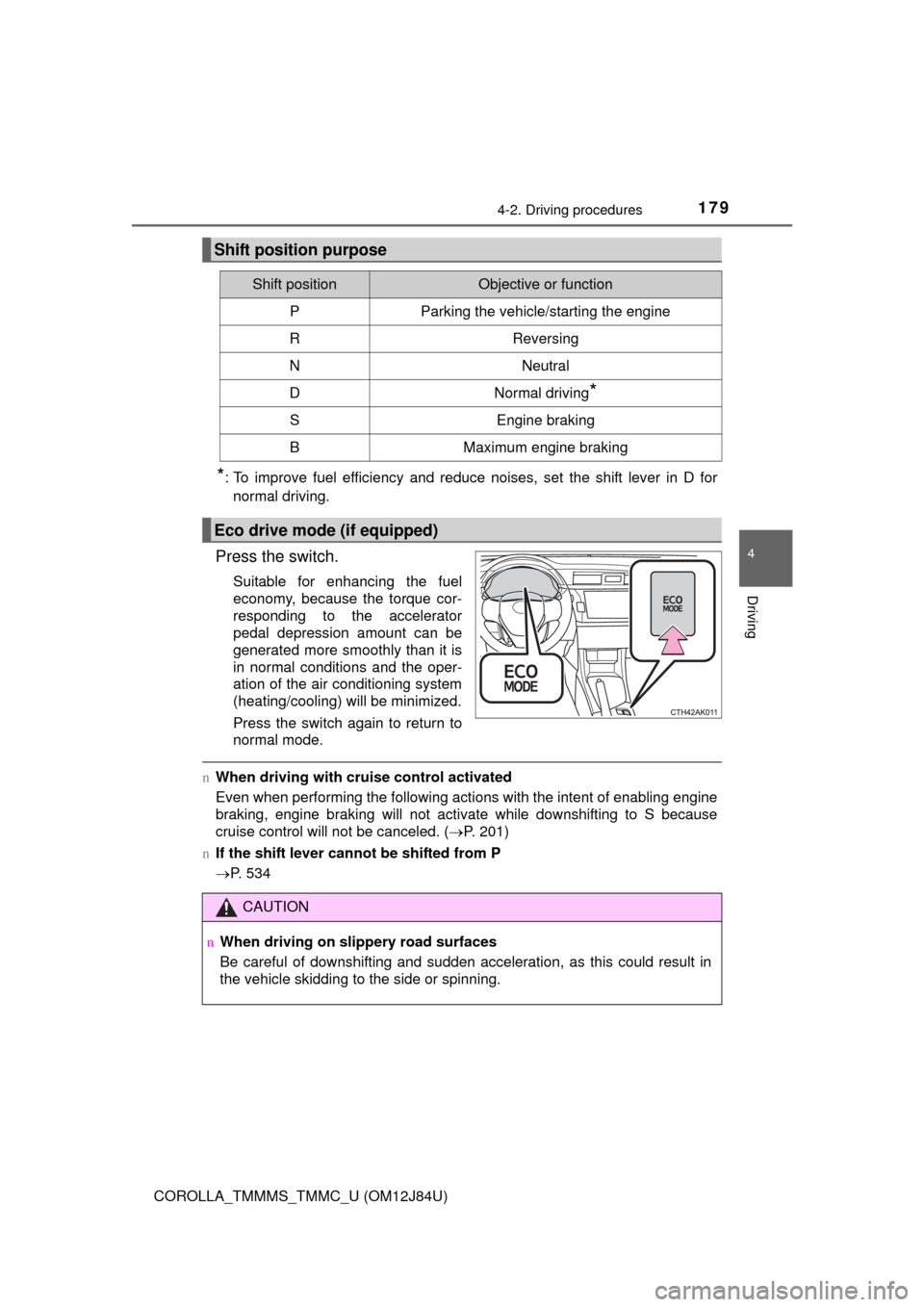
Press the switch.
Suitable for enhancing the fuel
economy, because the torque cor-
responding to the accelerator
pedal depression amount can be
generated more smoothly than it is
in normal conditions and the oper-
ation of the air conditioning system
(heating/cooling) will be minimized.
Press the switch again to return to
normal mode.
n When driving with cruise control activated
Even when performing the following actions with the intent of enabling engine
braking, engine braking will not activate while downshifting to S because
cruise control will not be canceled. ( P. 201)
n If the shift lever cannot be shifted from P
P. 534
Shift position purpose
Shift positionObjective or function
PParking the vehicle/starting the engine
RReversing
NNeutral
DNormal driving*
SEngine braking
BMaximum engine braking
Eco drive mode (if equipped)
CAUTION
nWhen driving on slippery road surfaces
Be careful of downshifting and sudden acceleration, as this could result in
the vehicle skidding to the side or spinning.
Page 215 of 620
2154-5. Using the driving support systems
4
Driving
COROLLA_TMMMS_TMMC_U (OM12J84U)
uABS (Anti-lock Brake System)
Helps to prevent wheel lock when the brakes are applied suddenly,
or if the brakes are applied while driving on a slippery road surface
uBrake assist
Generates an increased level of braking force after the brake pedal
is depressed when the system detects a panic stop situation
uVSC (Vehicle Stability Control)
Helps the driver to control skidding when swerving suddenly or
turning on slippery road surfaces
uTRAC (Traction Control)
Helps to maintain drive power and prevent the drive wheels from
spinning when starting the vehicle or accelerating on slippery roads
uHill-start assist control
Helps to prevent the vehicle from rolling backward when starting on
an incline
uEPS (Electric Power Steering)
Employs an electric motor to redu ce the amount of effort needed to
turn the steering wheel
Driving assist systems
To help enhance driving safety and performance, the following
systems operate automatically in response to various driving
situations. Be aware, however, that these systems are supple-
mentary and should not be relied upon too heavily when operat-
ing the vehicle.
Page 219 of 620

2194-5. Using the driving support systems
4
Driving
COROLLA_TMMMS_TMMC_U (OM12J84U)
CAUTION
nThe ABS does not operate effectively when
lThe limits of tire gripping performance have been exceeded (such as
excessively worn tires on a snow covered road).
l The vehicle hydroplanes while driving at high speed on wet or slick roads.
n Stopping distance when the ABS is operating may exceed that of nor-
mal conditions
The ABS is not designed to shorten the vehicle’s stopping distance. Always
maintain a safe distance from the vehicle in front of you, especially in the
following situations:
l When driving on dirt, gravel or snow-covered roads
l When driving with tire chains
l When driving over bumps in the road
l When driving over roads with potholes or uneven surfaces
n TRAC may not operat e effectively when
Directional control and power may not be achievable while driving on slip-
pery road surfaces, even if the TRAC system is operating.
Drive the vehicle carefully in conditions where stability and power may be
lost.
n Hill-start assist control does not operate effectively when
lDo not overly rely on hill-start assist control. Hill-start assist control may
not operate effectively on steep inclines and roads covered with ice.
l Unlike the parking brake, hill-start assist control is not intended to hold the
vehicle stationary for an extended period of time. Do not attempt to use
hill-start assist control to hold the vehicle on an incline, as doing so may
lead to an accident.
n When the VSC is activated
The slip indicator light flashes. Always drive carefully. Reckless driving may
cause an accident. Exercise particular care when the indicator light flashes.
n When the TRAC or VSC system is turned off
Be especially careful and drive at a speed appropriate to the road condi-
tions. As these are the systems to help ensure vehicle stability and driving
force, do not turn the TRAC or VSC system off unless necessary.
Page 230 of 620

2305-1. Basic Operations
COROLLA_TMMMS_TMMC_U (OM12J84U)
CAUTION
nU.S.A.
FCC ID: ACJ932PTA184
NOTE:
This device complies with Part 15 of the FCC Rules.
Operation is subject to the following two conditions:
(1) this device may not cause harmful interference and
(2) this device must accept any interference received, including interference
that may cause undesired operation.
FCC WARNING:
Changes or modifications in construction not expressly approved by the
party responsible for compliance could void the user’s authority to operate
the equipment.
Radio frequency exposure. This device is approved for Mobile Application
only and, to comply with applicable FCC radio frequency exposure regula-
tions, must be used with a distance of at least 7.9 in. (20 cm) between the
antenna and the body of any person at all time during use.
n U.S.A. and Canada
lPart 15 of the FCC Rules
FCC Warning:
Any unauthorized changes or modifications to this equipment will void the
user’s authority to operate this device.
Page 251 of 620
2515-5. Using an external device
5
Audio system
COROLLA_TMMMS_TMMC_U (OM12J84U)
Pressing (RDM) changes the shuffle playback mode in the fol-
lowing order:
Track shuffle Album shuffle Off.
Press to display or hide the album title.
If there is additional text, is displayed.
Press and hold to display the remaining text.
Press to enter iPod menu mode.
Press to change sound modes. ( P. 235)
nAbout iPod
l“Made for iPod” and “Made for iPhone” mean that an electronic accessory
has been designed to connect specifically to iPod, or iPhone, respectively,
and has been certified by the developer to meet Apple performance stan-
dards.
l Apple is not responsible for the operation of this device or its compliance
with safety and regulatory standards. Please note that the use of this acces-
sory with iPod or iPhone may affect wireless performance.
l iPhone, iPod, iPod classic, iPod nano and iPod touch are trademarks of
Apple Inc., registered in the U.S. and other countries.
Shuffle playback
Switching the display
Adjusting sound quality and volume balance
1
2
Page 258 of 620

2585-5. Using an external device
COROLLA_TMMMS_TMMC_U (OM12J84U)n
USB memory
lCompatible devices
USB memory that can be used for MP3 and WMA playback
l Compatible device formats
The following device formats can be used:
• USB communication formats: USB2.0 FS (12 Mbps)
• File formats: FAT16/32 (Windows)
• Correspondence class: Mass storage class
MP3 and WMA files written in any form at other than those listed above may
not play correctly, and their file names and folder names may not be dis-
played correctly.
Items related to standards and limitations are as follows:
• Maximum directory hierarchy: 8 levels
• Maximum number of folders in a device: 999 (including the root)
• Maximum number of files in a device: 9999
• Maximum number of files per folder: 255
l MP3 and WMA files
MP3 (MPEG Audio LAYER 3) is a standard audio compression format.
Files can be compressed to approximately 1/10 of their original size using
MP3 compression.
WMA (Windows Media Audio) is a Microsoft audio compression format.
This format compresses audio data to a size smaller than that of the MP3
format.
MP3 and WMA file and media/format compatibility are limited.
l MP3 file compatibility
• Compatible standards
MP3 (MPEG1 AUDIO LAYERIII, MP EG2 AUDIO LAYERIII, MPEG2.5)
• Compatible sampling frequencies MPEG1 AUDIO LAYERIII: 32, 44.1, 48 (kHz)
MPEG2 AUDIO LAYERIII: 16, 22.05, 24 (kHz)
MPEG2.5: 8, 11.025, 12 (kHz)
• Compatible bit rates (compatible with VBR) MPEG1 AUDIO LAYERII, III: 32-320 (kbps)
MPEG2 AUDIO LAYERII, III: 8-160 (kbps)
MPEG2.5: 8-160 (kbps)
• Compatible channel modes: stereo, joint stereo, dual channel and mon-
aural
Page 288 of 620
288
COROLLA_TMMMS_TMMC_U (OM12J84U)
5-10. Bluetooth®
nWhen using the Bluetooth® audio system
l In the following situations, the system may not function.
• The portable player does not support Bluetooth
®
• The cellular phone is located outside the service area
• The Bluetooth® device is switched off
• The Bluetooth® device has a low battery
• The Bluetooth® device is not connected to the system
• The Bluetooth® device is behind the seat or in the glove box or console
box, or is touching or covered by metal objects
l There may be a delay if a cellular phone connection is made during
Bluetooth
® audio playback.
l Depending on the type of portable audio player that is connected to the sys-
tem, operation may differ slightly and certain functions may not be available.
n When transferring ownership of the vehicle
Be sure to initialize the system to prevent personal data from being improp-
erly accessed. ( P. 273)
n About Bluetooth
®
nCompatible models
lBluetooth® specifications:
Ver. 1.1, or higher (recommended: Ver. 2.1 + EDR or higher)
l Following Profiles:
• A2DP (Advanced Audio Distribution Profile) Ver. 1.0, or higher (recom-
mended: Ver. 1.2 or higher)
• AVRCP (Audio/Video Remote Control Profile) Ver. 1.0 or higher (recom-
mended: Ver. 1.3 or higher)
Portable players must correspond to the above specifications in order to be
connected to the Bluetooth
® audio system. However, please note that some
functions may be limited depending on the type of portable player.
l Cellular phone
• HFP (Hands Free Profile) Ver. 1.0 or higher (recommended: Ver. 1.5)
• OPP (Object Push Profile) Ver. 1.1
• PBAP (Phone Book Access Profile) Ver. 1.0
Bluetooth®
Bluetooth is a registered trademark of
Bluetooth SIG. Inc.
Page 297 of 620
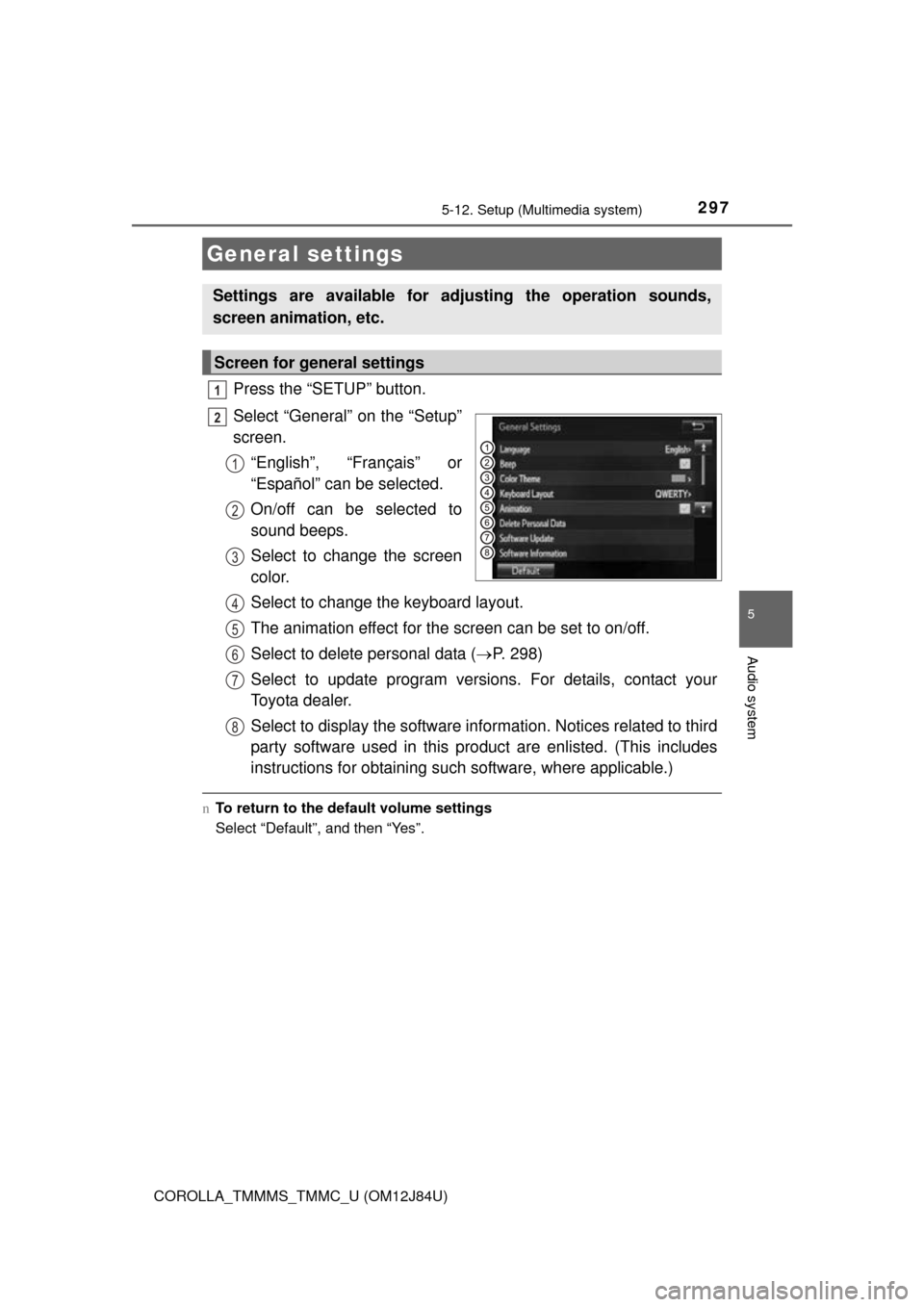
2975-12. Setup (Multimedia system)
5
Audio system
COROLLA_TMMMS_TMMC_U (OM12J84U)
Press the “SETUP” button.
Select “General” on the “Setup”
screen.“English”, “Français” or
“Español” can be selected.
On/off can be selected to
sound beeps.
Select to change the screen
color.
Select to change the keyboard layout.
The animation effect for the screen can be set to on/off.
Select to delete personal data ( P. 298)
Select to update program versions. For details, contact your
Toyota dealer.
Select to display the software info rmation. Notices related to third
party software used in this pr oduct are enlisted. (This includes
instructions for obtaining such software, where applicable.)
n To return to the default volume settings
Select “Default”, and then “Yes”.
General settings
Settings are available for adjusting the operation sounds,
screen animation, etc.
Screen for general settings
1
2
1
2
3
4
5
6
7
8
Page 317 of 620

5
Audio system
COROLLA_TMMMS_TMMC_U (OM12J84U)
nAbout iPod
l“Made for iPod”, “Made for iPhone” and “Made for iPad”\
mean that an elec")
3175-16. Using an external device (Multimedia system)
5
Audio system
COROLLA_TMMMS_TMMC_U (OM12J84U)
nAbout iPod
l“Made for iPod”, “Made for iPhone” and “Made for iPad”\
mean that an elec-
tronic accessory has been designed to connect specifically to iPod or
iPhone, or iPad, respectively, and has been certified by the developer to
meet Apple performance standards.
l Apple is not responsible for the operation of this device or its compliance
with safety and regulatory standards. Please note that the use of this acces-
sory with iPod, iPhone or iPad may affect wireless performance.
l iPad, iPhone, iPod, iPod classic, iPod nano, and iPod touch are trademarks
of Apple Inc., registered in the U.S. and other countries. Lightning is a trade-
mark of Apple Inc.
n iPod cover art
lDepending on the iPod and songs in the iPod, iPod cover art may be dis-
played.
l This function can be changed to on/off. ( P. 299)
l It may take time to display iPod cover art, and the iPod may not be operated
while the cover art display is in process.
l Only iPod cover art that is saved in JPEG format can be displayed.
n iPod functions
lWhen an iPod is connected and the audio source is changed to iPod mode,
the iPod will resume play from the same point in which it was last used.
l Depending on the iPod that is connected to the system, certain functions
may not be available. If a function is unavailable due to a malfunction (as
opposed to a system specification), disconnecting the device and recon-
necting it may resolve the problem.
l While connected to the system, the iPod cannot be operated with its own
controls. It is necessary to use the controls of the vehicle's multimedia sys-
tem instead.
l When the battery level of an iPod is very low, the iPod may not operate. If
so, charge the iPod before use.
l Compatible models ( P. 319)