cluster TOYOTA COROLLA 2016 11.G Owner's Manual
[x] Cancel search | Manufacturer: TOYOTA, Model Year: 2016, Model line: COROLLA, Model: TOYOTA COROLLA 2016 11.GPages: 620, PDF Size: 9.12 MB
Page 89 of 620
892. Instrument cluster
2
Instrument cluster
COROLLA_TMMMS_TMMC_U (OM12J84U)
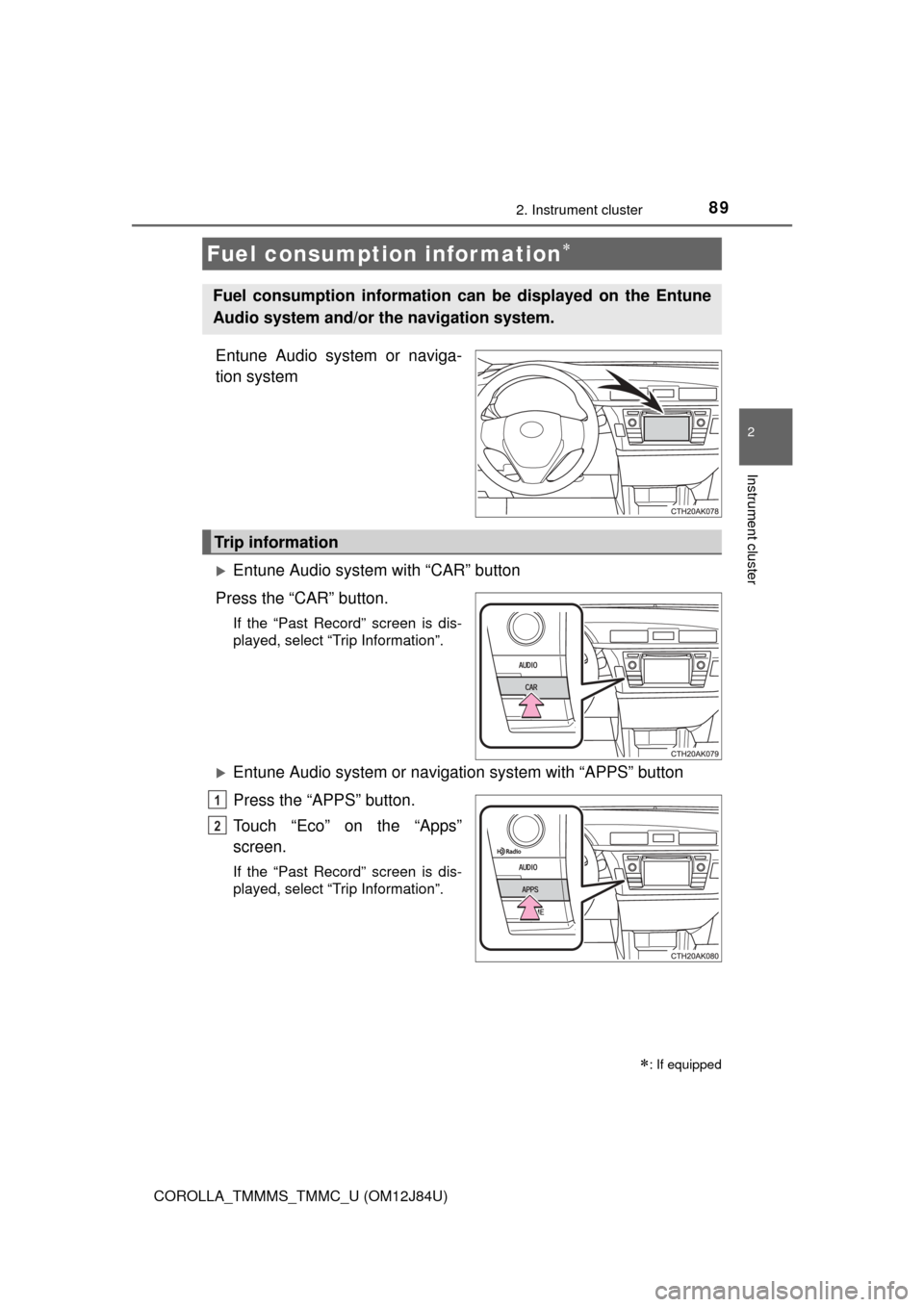
Entune Audio system or naviga-
tion system
Entune Audio system with “CAR” button
Press the “CAR” button.
If the “Past Record” screen is dis-
played, select “Trip Information”.
Entune Audio system or navigation system with “APPS” button
Press the “APPS” button.
Touch “Eco” on the “Apps”
screen.
If the “Past Record” screen is dis-
played, select “Trip Information”.
Fuel consumption information
: If equipped
Fuel consumption information ca n be displayed on the Entune
Audio system and/or th e navigation system.
Trip information
1
2
Page 90 of 620
902. Instrument cluster
COROLLA_TMMMS_TMMC_U (OM12J84U)
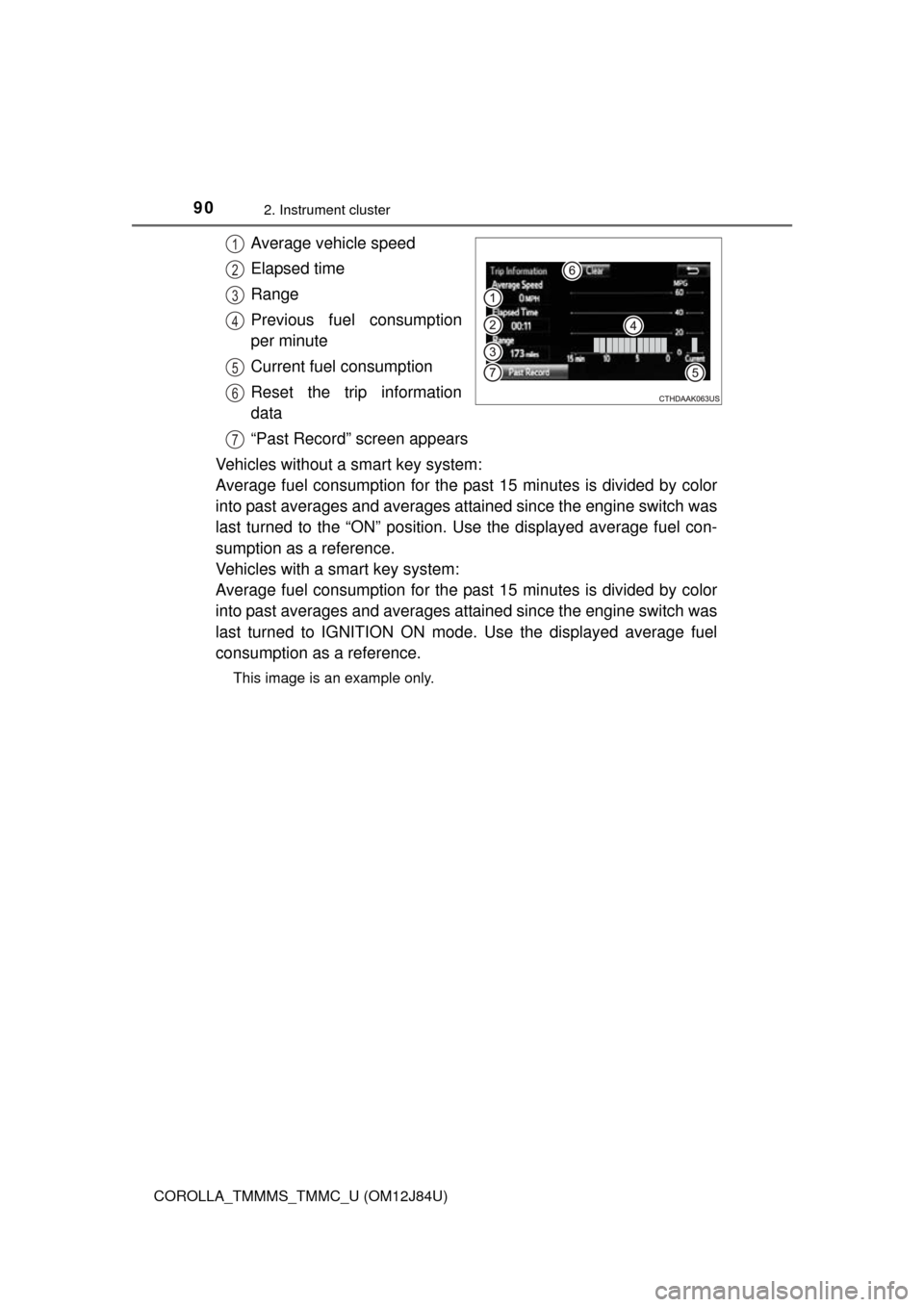
Average vehicle speed
Elapsed time
Range
Previous fuel consumption
per minute
Current fuel consumption
Reset the trip information
data
“Past Record” screen appears
Vehicles without a smart key system:
Average fuel consumption for the past 15 minutes is divided by color
into past averages and averages attained since the engine switch was
last turned to the “ON” position. Use the displayed average fuel con-
sumption as a reference.
Vehicles with a smart key system:
Average fuel consumption for the past 15 minutes is divided by color
into past averages and averages attained since the engine switch was
last turned to IGNITION ON mode. Use the displayed average fuel
consumption as a reference.
This image is an example only.
1
2
3
4
5
6
7
Page 91 of 620
912. Instrument cluster
2
Instrument cluster
COROLLA_TMMMS_TMMC_U (OM12J84U)n
Past record
Entune Audio system with “CAR” button
Press the “CAR” button.
If the “Trip Information” screen is displayed, select “Past Record”.
Entune Audio system or navigation system with “APPS” button
Press the “APPS” button.
Touch “Eco” on the “Apps” screen.
If the “Trip Information” screen is displayed, select “Past Record”.
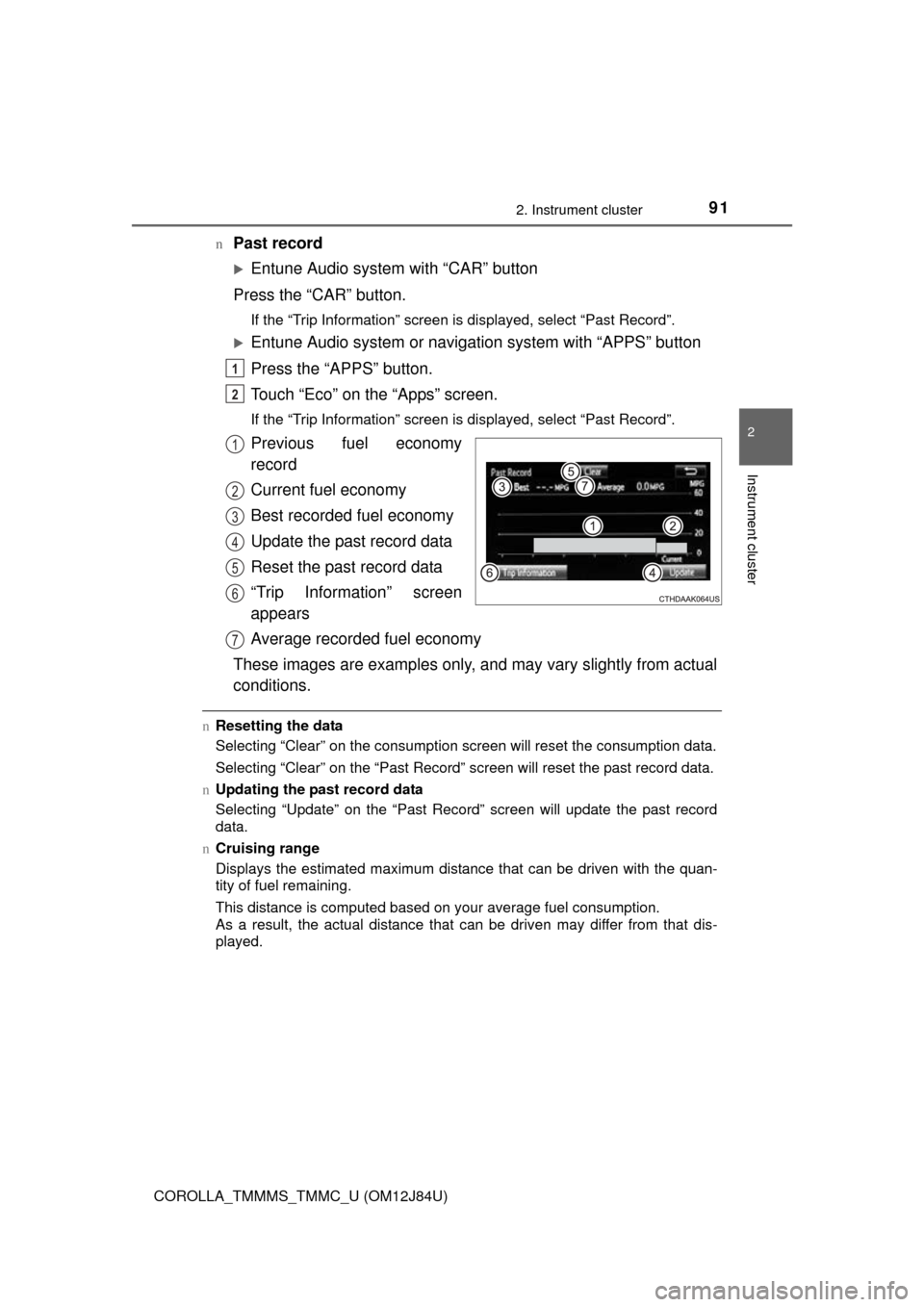
Previous fuel economy
record
Current fuel economy
Best recorded fuel economy
Update the past record data
Reset the past record data
“Trip Information” screen
appears
Average recorded fuel economy
These images are examples only, and may vary slightly from actual
conditions.
n Resetting the data
Selecting “Clear” on the consumption screen will reset the consumption data.
Selecting “Clear” on the “Past Record” screen will reset the past record data.
n Updating the past record data
Selecting “Update” on the “Past Record” screen will update t\
he past record
data.
n Cruising range
Displays the estimated maximum distance that can be driven with the quan-
tity of fuel remaining.
This distance is computed based on your average fuel consumption.
As a result, the actual distance that can be driven may differ from that dis-
played.
1
2
1
2
3
4
5
6
7
Page 92 of 620
922. Instrument cluster
COROLLA_TMMMS_TMMC_U (OM12J84U)
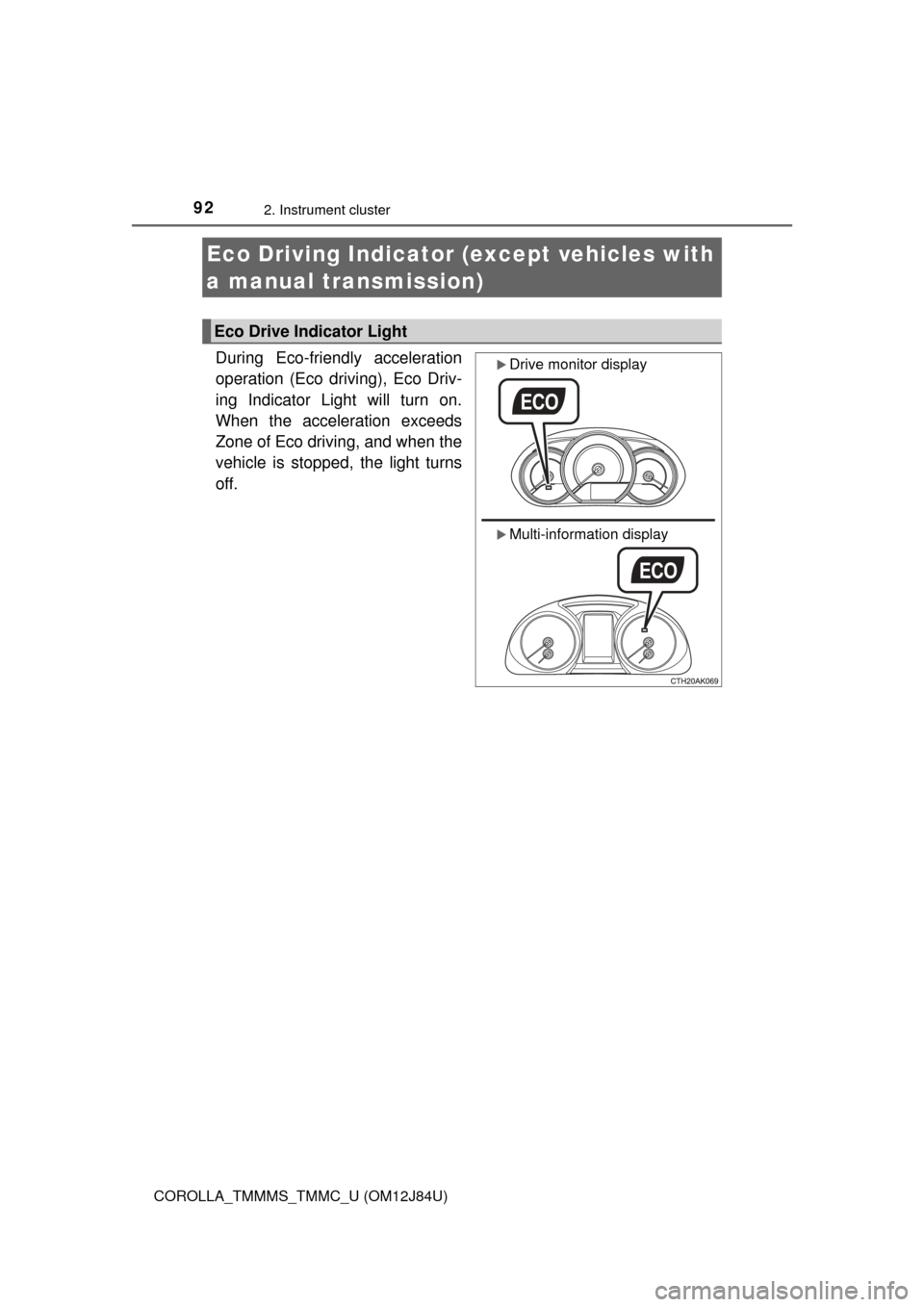
During Eco-friendly acceleration
operation (Eco driving), Eco Driv-
ing Indicator Light will turn on.
When the acceleration exceeds
Zone of Eco driving, and when the
vehicle is stopped, the light turns
off.
Eco Driving Indicator (except vehicles with
a manual transmission)
Eco Drive Indicator Light
Drive monitor display
Multi-information display
Page 93 of 620
932. Instrument cluster
2
Instrument cluster
COROLLA_TMMMS_TMMC_U (OM12J84U)
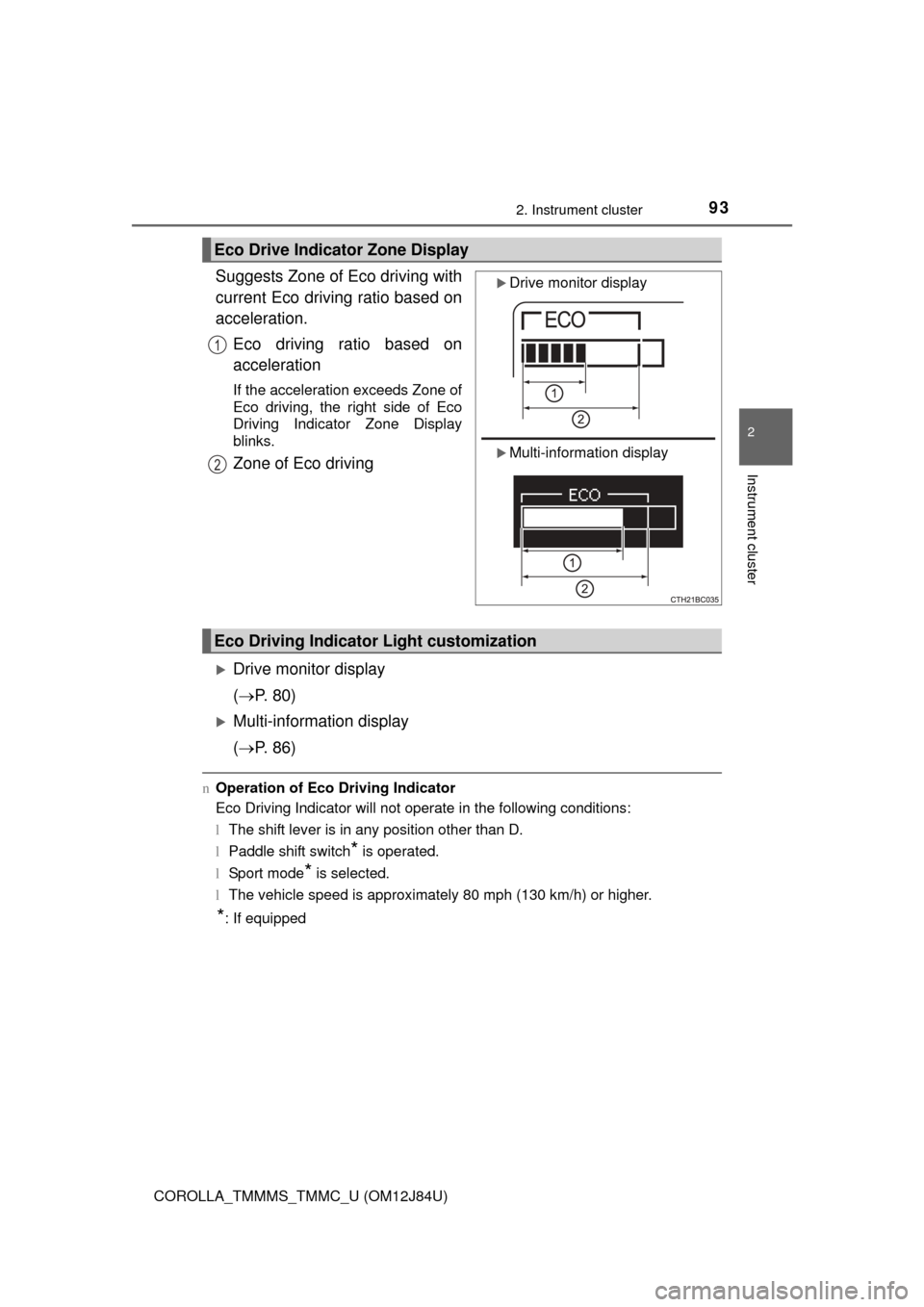
Suggests Zone of Eco driving with
current Eco driving ratio based on
acceleration.Eco driving ratio based on
acceleration
If the acceleration exceeds Zone of
Eco driving, the right side of Eco
Driving Indicator Zone Display
blinks.
Zone of Eco driving
Drive monitor display
( P. 80)
Multi-information display
( P. 86)
nOperation of Eco Driving Indicator
Eco Driving Indicator will not operate in the following conditions:
lThe shift lever is in any position other than D.
l Paddle shift switch
* is operated.
l Sport mode
* is selected.
l The vehicle speed is approximately 80 mph (130 km/h) or higher.
*: If equipped
Eco Drive Indicator Zone Display
Drive monitor display
Multi-information display
1
2
Eco Driving Indicator Light customization
Page 94 of 620

942. Instrument cluster
COROLLA_TMMMS_TMMC_U (OM12J84U)
Page 562 of 620
5629-1. Specifications
COROLLA_TMMMS_TMMC_U (OM12J84U)n
Non-recommendation of the use of gasoline containing MMT
Some gasoline contains an octane enhancing additive called MMT (Methylcy-
clopentadienyl Manganese Tricarbonyl).
Toyota does not recommend the use of gasoline that contains MMT. If fuel
containing MMT is used, your emission control system may be adversely
affected.
The malfunction indicator lamp on the instrument cluster may come on. If this
happens, contact your Toyota dealer for service.
n If your engine knocks
lConsult your Toyota dealer.
l You may occasionally notice light knocking for a short time while accelerat-
ing or driving uphill. This is normal and there is no need for concern.
NOTICE
n Notice on fuel quality
lDo not use improper fuels. If improper fuels are used, the engine will be
damaged.
l Do not use leaded gasoline.
Leaded gasoline can cause damage to your vehicle’s three-way catalytic
converters causing the emission control system to malfunction.
l Do not use gasohol other than the type previously stated.
Other gasohol may cause fuel system damage or vehicle performance
problems.
l Using unleaded gasoline with an octane number or rating lower than the
level previously stated will cause persistent heavy knocking.
At worst, this will lead to engine damage.
n Fuel-related poor driveability
If poor driveability (poor hot starting, vaporization, engine knocking, etc.) is
encountered after using a different type of fuel, discontinue the use of that
type of fuel.
n When refueling with gasohol
Take care not to spill gasohol. It can damage your vehicle’s paint.