service TOYOTA COROLLA 2017 11.G Navigation Manual
[x] Cancel search | Manufacturer: TOYOTA, Model Year: 2017, Model line: COROLLA, Model: TOYOTA COROLLA 2017 11.GPages: 300, PDF Size: 8.56 MB
Page 95 of 300
95
2. RADIO OPERATION
COROLLA_Navi_U_OM02496U
AUDIO SYSTEM
3
INFORMATION
?XM Radio Services⎯Descriptions
• Radio and Entertainment XM offers more than 170 satellite radio
channels of commercial-free music
and premier sports, news, talk, and
entertainment. XM is broadcast via sat-
ellites to millions of listeners across the
continental United States. XM sub-
scribers listen to XM on satellite radio
receivers for the car, home, and porta-
ble use. More information about XM is
available online at www.siriusxm.com
(U.S.A.) or www.siriusxm.ca (Canada).
?XM Radio Services ⎯Subscription
Instructions
• For XM Services requiring a subscrip- tion (such as XM Radio, and some
Infotainment & data services), the fol-
lowing paragraph shall be included.
Required XM Radio and some Infotain-
ment & data services monthly sub-
scriptions sold separately after trial
period. Subscription fee is consumer
only. All fees and programming subject
to change. Subscriptions are subject to
the Customer Agreement available at
www.siriusxm.com
(U.S.A.) or
www.siriusxm.ca (Canada). XM ser-
vice only available in the 48 contiguous
United States (U.S.A.) or 10 Canadian
provinces (Canada). 2011 Sirius XM
Radio Inc. Sirius, XM and all related
marks and logos are trademarks of Sir-
ius XM Radio Inc. All other marks,
channel names and logos are the
property of their respective owners.
For more information, program sched-
ules, and to subscribe or extend sub-
scription after complimentary trial
period; more information is available
at:
USA Customers:
Visit www.siriusxm.com
or call
1-877-447-0011
Canadian Customers:
Visit www.xmradio.ca
or call
1-877-438-9677
INFORMATION
?XM Satellite Radio is solely responsible
for the quality, availability and content of
the satellite radio services provided,
which are subject to the terms and con-
ditions of the XM Satellite Radio cus-
tomer service agreement.
?Customers should have their radio ID
ready; the radio ID can be found by tun-
ing to “Ch 000” on the radio. For details,
see “DISPLAYING THE RADIO ID”
below.
?All fees and programming are the
responsibility of XM Satellite Radio and
are subject to change.
SATELLITE TUNER
TECHNOLOGY NOTICE
Toyota’s satellite radio tuners are
awarded Type Approval Certificates
from XM Satellite Radio Inc. as proof of
compatibility with the services offered
by XM Satellite Radio.
INFORMATION
?Satellite tuner
The tuner supports only Audio Services
(Music and Talk) and the accompanying
Text Information of XM
® Satellite Radio.
Page 96 of 300
96
2. RADIO OPERATION
COROLLA_Navi_U_OM02496U
If “Ch 000” is selected using the
“TUNE•SCROLL” knob, the ID code,
which is 8 alphanumeric characters, will
be displayed. If another channel is
selected, the ID code will no longer be dis-
played. The channel (000) alternates
between displaying the radio ID and the
specific radio code.
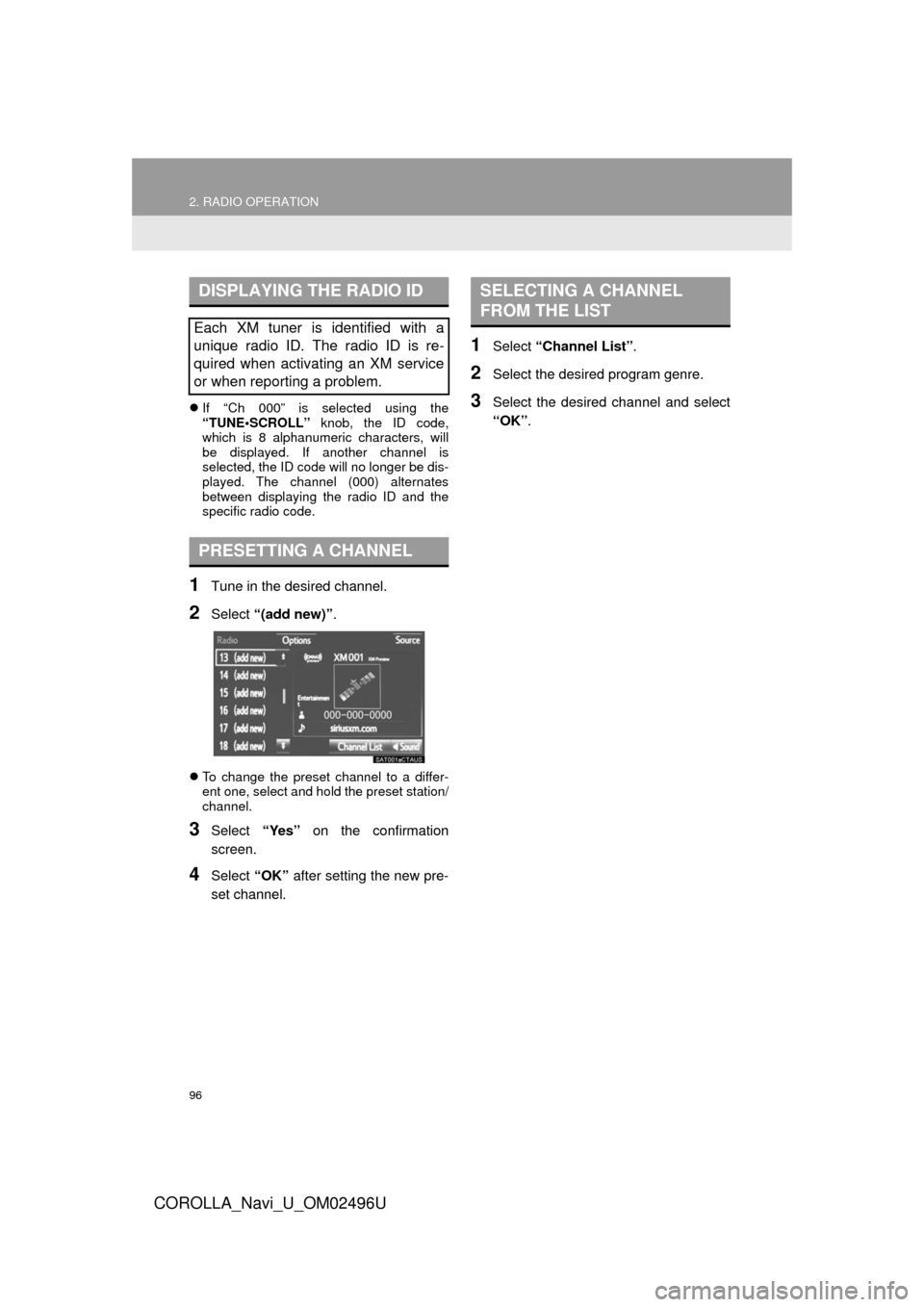
1Tune in the desired channel.
2Select “(add new)” .
To change the preset channel to a differ-
ent one, select and hold the preset station/
channel.
3Select “Yes” on the confirmation
screen.
4Select “OK” after setting the new pre-
set channel.
1Select “Channel List” .
2Select the desired program genre.
3Select the desired channel and select
“OK”.
DISPLAYING THE RADIO ID
Each XM tuner is identified with a
unique radio ID. The radio ID is re-
quired when activating an XM service
or when reporting a problem.
PRESETTING A CHANNEL
SELECTING A CHANNEL
FROM THE LIST
Page 98 of 300
98
2. RADIO OPERATION
COROLLA_Navi_U_OM02496U
3. INTERNET RADIO*
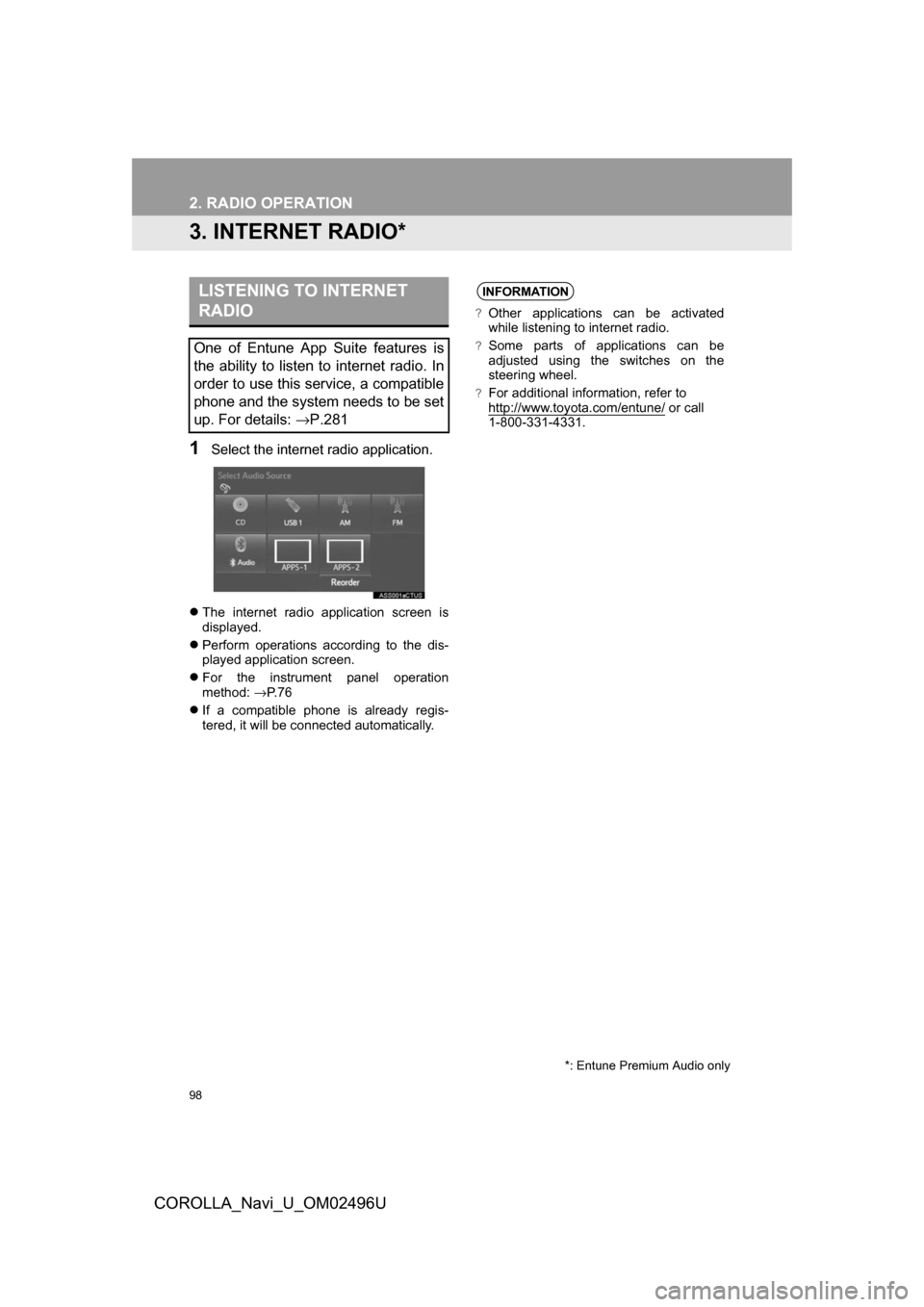
1Select the internet radio application.
The internet radio application screen is
displayed.
Perform operations according to the dis-
played application screen.
For the instrument panel operation
method: →P. 7 6
If a compatible phone is already regis-
tered, it will be connected automatically.
LISTENING TO INTERNET
RADIO
One of Entune App Suite features is
the ability to listen to internet radio. In
order to use this service, a compatible
phone and the system needs to be set
up. For details: →P.281
*: Entune Premium Audio only
INFORMATION
?Other applications can be activated
while listening to internet radio.
?Some parts of applications can be
adjusted using the switches on the
steering wheel.
?For additional information, refer to
http://www.toyota.com/entune/ or call
1-800-331-4331.
Page 147 of 300
5
147
COROLLA_Navi_U_OM02496U
6
7
8
9
1
2
3
4
5
1. RECEIVING WEATHERINFORMATION ......................... 148
DISPLAYING WEATHER
IN FORMATION ................................. 148
2. RECEIVING TRAFFIC
MAP INFORMATION ............... 150
DISPLAYING TRAFFIC MAP
IN FORMATION ................................. 150
3. DATA SERVICES
SETTINGS ................................. 151
SETTING DOWNLOAD
MET HODS ........................................ 151
1USEFUL INFORMATION
INFORMATION
Page 151 of 300
151
1. USEFUL INFORMATION
COROLLA_Navi_U_OM02496U
INFORMATION
5
3. DATA SERVICES SETTINGS*
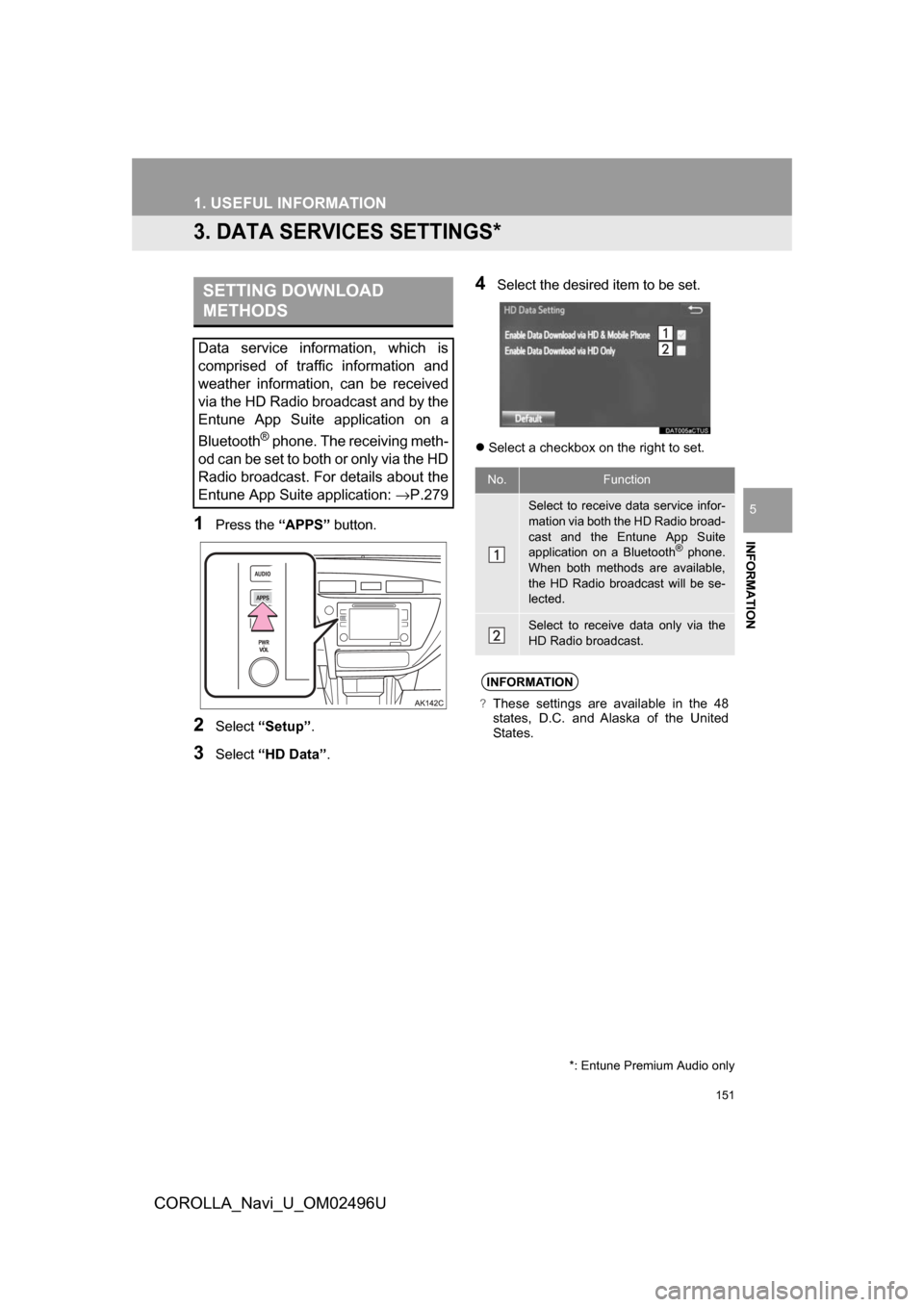
1Press the “APPS” button.
2Select“Setup” .
3Select“HD Data” .
4Select the desired item to be set.
Select a checkbox on the right to set.
SETTING DOWNLOAD
METHODS
Data service information, which is
comprised of traffic information and
weather information, can be received
via the HD Radio broadcast and by the
Entune App Suite application on a
Bluetooth
® phone. The receiving meth-
od can be set to both or only via the HD
Radio broadcast. For details about the
Entune App Suite application: →P.279
*: Entune Premium Audio only
No.Function
Select to receive data service infor-
mation via both the HD Radio broad-
cast and the Entune App Suite
application on a Bluetooth
® phone.
When both methods are available,
the HD Radio broadcast will be se-
lected.
Select to receive data only via the
HD Radio broadcast.
INFORMATION
?These settings are available in the 48
states, D.C. and Alaska of the United
States.
Page 178 of 300
178
1. PHONE OPERATION (HANDS-FREE SYSTEM FOR CELLULAR PHONES)
COROLLA_Navi_U_OM02496U
?BY SELECTING “Release Tones”
1Select“Release Tones” .
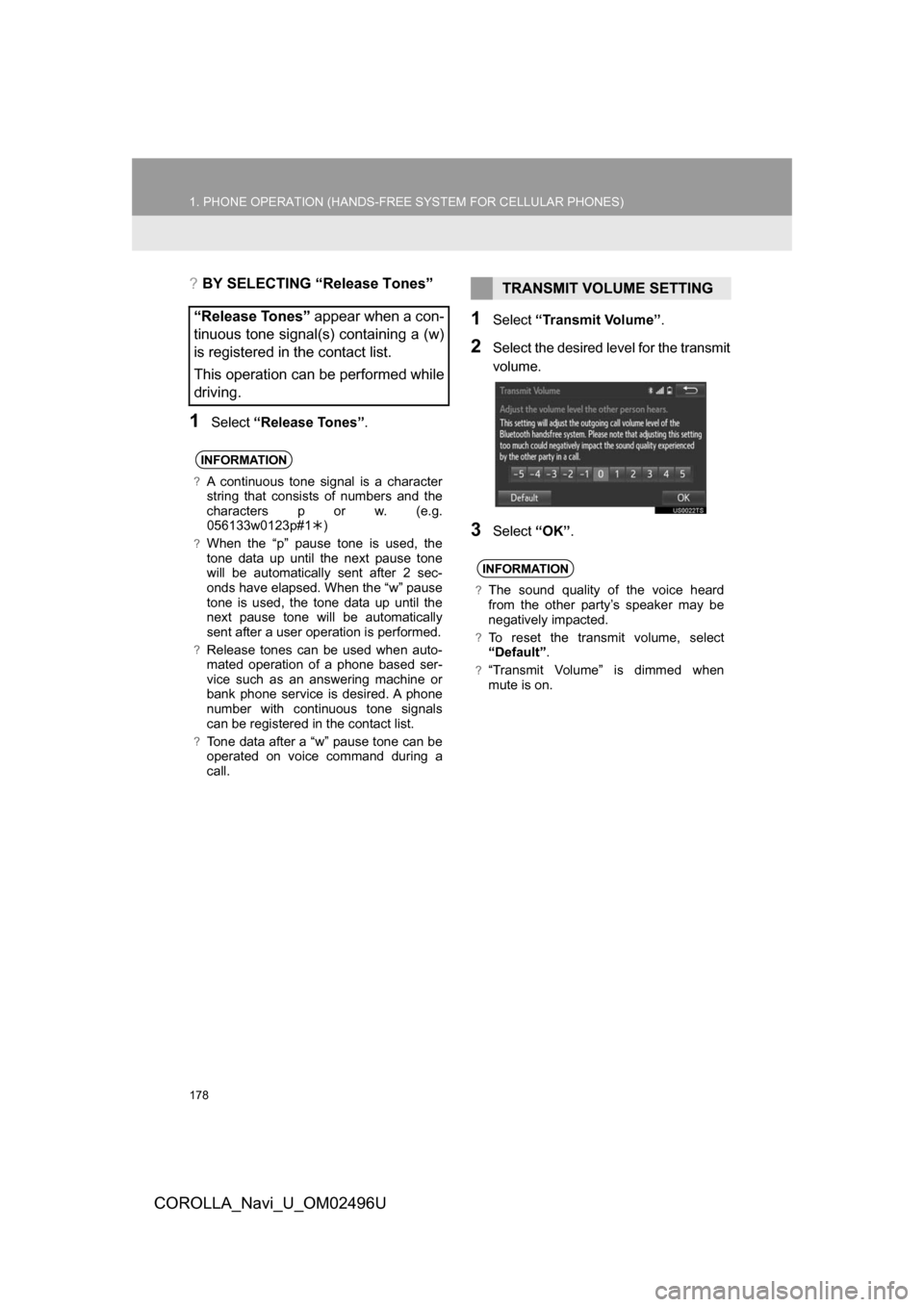
1Select“Transmit Volume”.
2Select the desired level for the transmit
volume.
3Select“OK”.
“Release Tones” appear when a con-
tinuous tone signal(s) containing a (w)
is registered in the contact list.
This operation can be performed while
driving.
INFORMATION
?A continuous tone signal is a character
string that consists of numbers and the
characters p or w. (e.g.
056133w0123p#1)
?When the “p” pause tone is used, the
tone data up until the next pause tone
will be automatically sent after 2 sec-
onds have elapsed. When the “w” pause
tone is used, the tone data up until the
next pause tone will be automatically
sent after a user operation is performed.
?Release tones can be used when auto-
mated operation of a phone based ser-
vice such as an answering machine or
bank phone service is desired. A phone
number with continuous tone signals
can be registered in the contact list.
?Tone data after a “w” pause tone can be
operated on voice command during a
call.
TRANSMIT VOLUME SETTING
INFORMATION
?The sound quality of the voice heard
from the other party’s speaker may be
negatively impacted.
?To reset the transmit volume, select
“Default”.
?“Transmit Volume” is dimmed when
mute is on.
Page 200 of 300
200
3. WHAT TO DO IF...
COROLLA_Navi_U_OM02496U
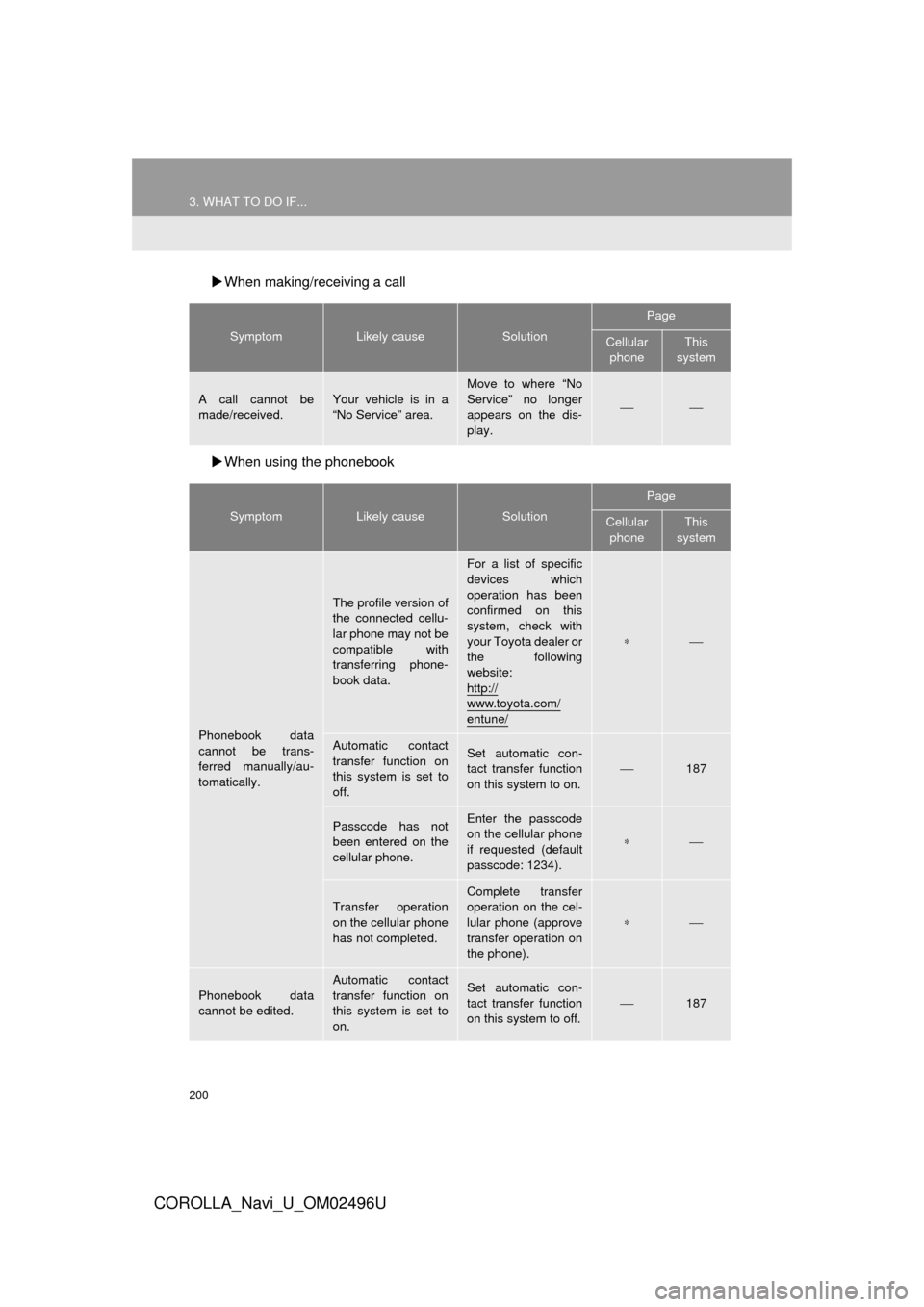
When making/receiving a call
When using the phonebook
SymptomLikely causeSolution
Page
Cellular
phoneThis
system
A call cannot be
made/received.Your vehicle is in a
“No Service” area.
Move to where “No
Service” no longer
appears on the dis-
play.
⎯⎯
SymptomLikely causeSolution
Page
Cellular phoneThis
system
Phonebook data
cannot be trans-
ferred manually/au-
tomatically.
The profile version of
the connected cellu-
lar phone may not be
compatible with
transferring phone-
book data.
For a list of specific
devices which
operation has been
confirmed on this
system, check with
your Toyota dealer or
the following
website:
http://
www.toyota.com/
entune/
∗⎯
Automatic contact
transfer function on
this system is set to
off.Set automatic con-
tact transfer function
on this system to on.⎯187
Passcode has not
been entered on the
cellular phone.Enter the passcode
on the cellular phone
if requested (default
passcode: 1234).
∗⎯
Transfer operation
on the cellular phone
has not completed.
Complete transfer
operation on the cel-
lular phone (approve
transfer operation on
the phone).
∗⎯
Phonebook data
cannot be edited.
Automatic contact
transfer function on
this system is set to
on.Set automatic con-
tact transfer function
on this system to off.
⎯187
Page 222 of 300

222
COROLLA_Navi_U_OM02496U
2. DESTINATION SEARCH
1. DESTINATION SEARCH SCREEN
The “Destination” screen enables to search for a destination. To d\
isplay the “Des-
tination” screen, press the “APPS” button, and select “Navigation” on the “Apps”
screen. Then select “Dest.” on the map screen.
No.FunctionPage
Select to search for a destination by address. 226
Select to search for a destination by point of interest. 228
Select to search for a destination from previously set destinations.231
Select to search for a destination from a registered entry in “Address
book”.231
Select to search for a destination by online database. 285
Select to search for a destinati on from emergency service points.232
Select to search for a destination by intersection or freeway entrance/
exit.232
Select to search for a destination by the last displayed map.234
Select to search for a destination by coordinates.234
Select to set a destination by home.225
Page 275 of 300
9
275
COROLLA_Navi_U_OM02496U
4
5
6
7
8
1
2
3
9
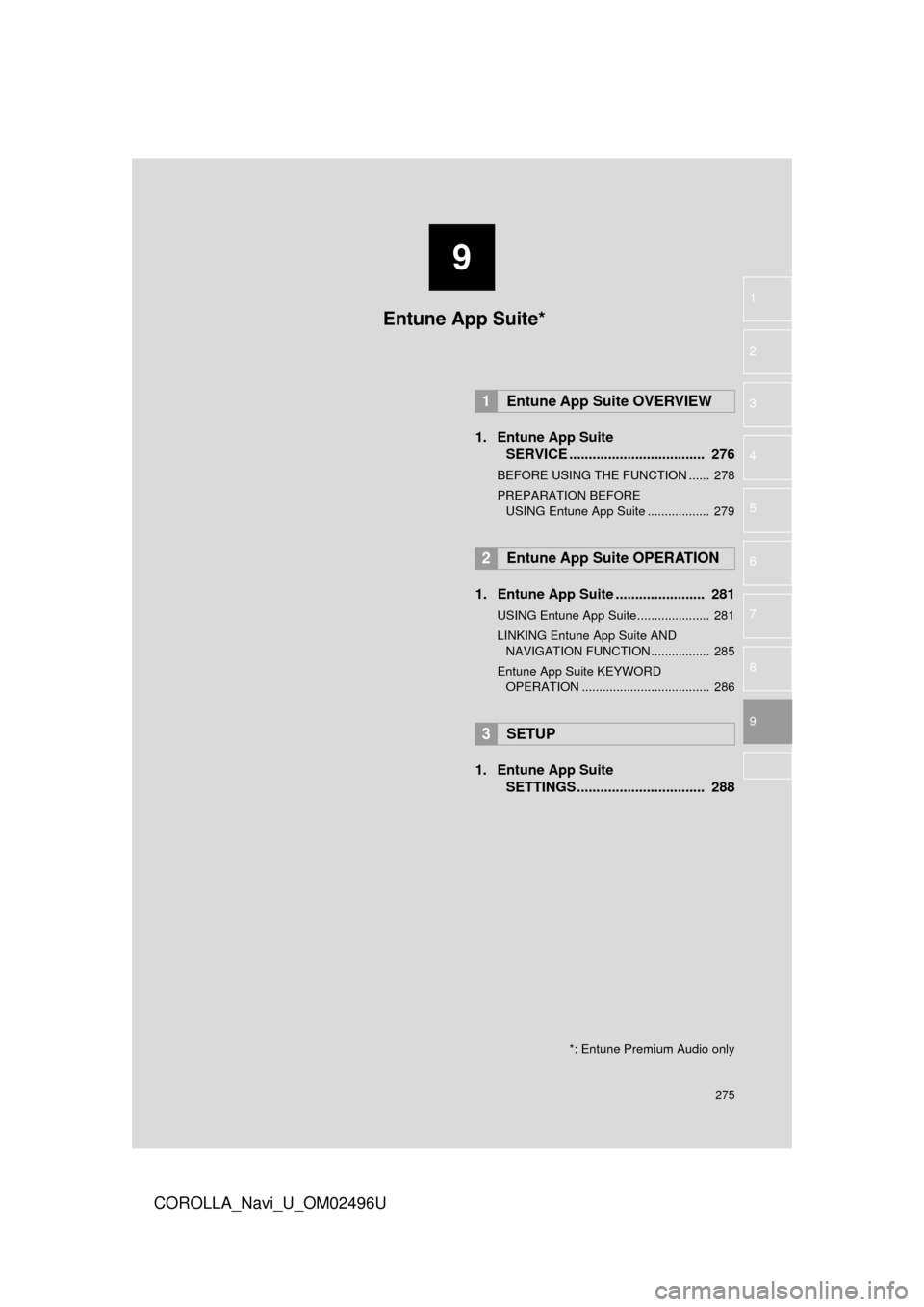
1. Entune App SuiteSERVICE ................................... 276
BEFORE USING THE FUNCTION ...... 278
PREPARATION BEFORE
USING Entune App Suite .................. 279
1. Entune App Suite ....................... 281
USING Entune App Suite..................... 281
LINKING Entune App Suite AND NAVIGATION FUNCTION ................. 285
Entune App Suite KEYWORD OPERATION ..................................... 286
1. Entune App Suite SETTINGS ................................. 288
1Entune App Suite OVERVIEW
2Entune App Suite OPERATION
3SETUP
Entune App Suite*
*: Entune Premium Audio only
Page 276 of 300
276
COROLLA_Navi_U_OM02496U
1. Entune App Suite OVERVIEW
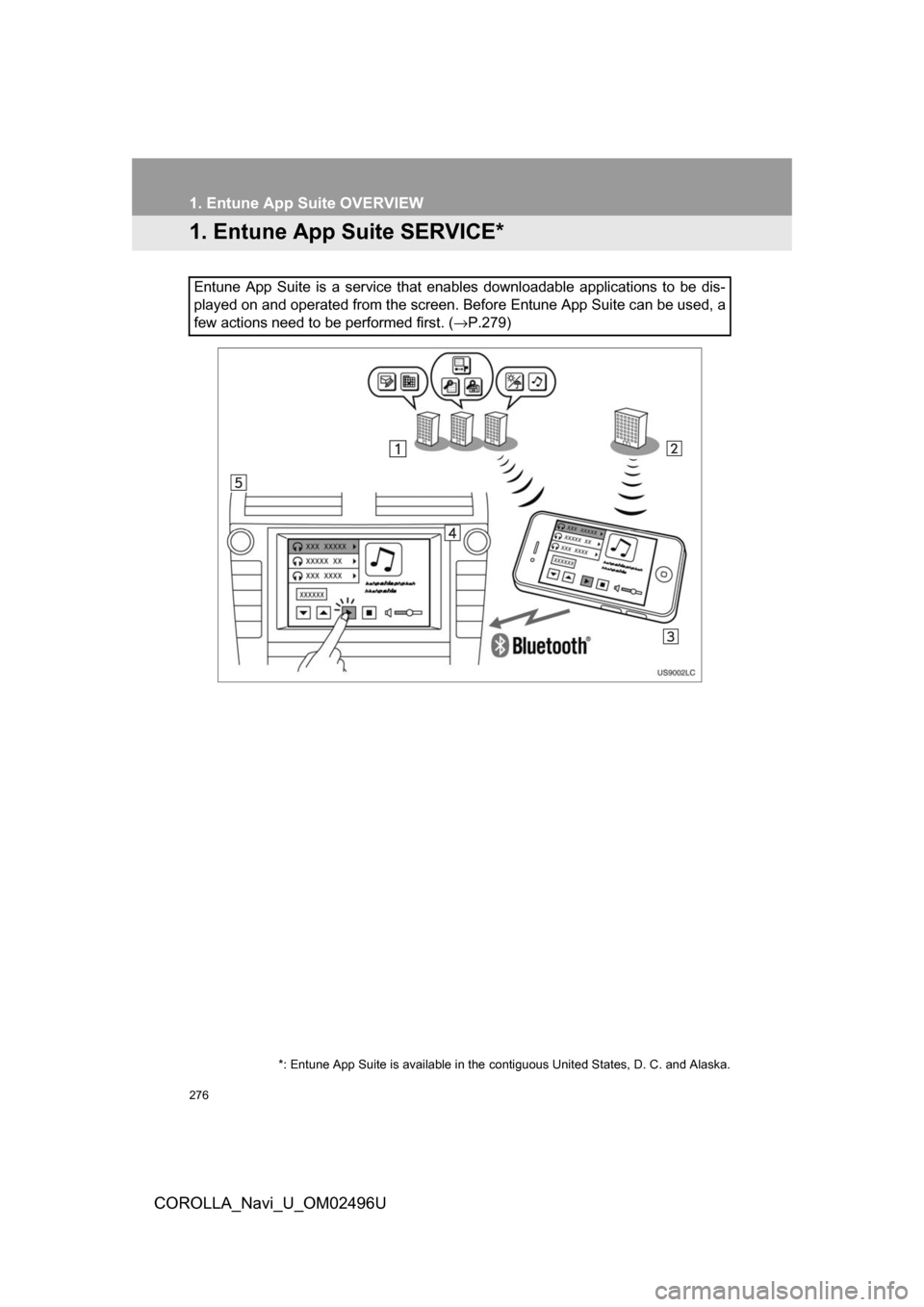
1.Entune App Suite SERVICE*
Entune App Suite is a service that enables downloadable applications to be dis-
played on and operated from the screen. Before Entune App Suite can be used, a
few actions need to be performed first. (→P.279)
*: Entune App Suite is available in the contiguous United States, D. C. and Alaska.