display TOYOTA COROLLA 2017 11.G Owners Manual
[x] Cancel search | Manufacturer: TOYOTA, Model Year: 2017, Model line: COROLLA, Model: TOYOTA COROLLA 2017 11.GPages: 612, PDF Size: 14.18 MB
Page 364 of 612
3645-11. Using the voice command system
COROLLA_TMMMS_TMMC_U (OM02494U)
■Microphone
→P. 327
■When using the microphone
●It is unnecessary to speak directly into the microphone when giving a com-
mand.
●When “Voice Prompt Interrupt” set to on, it is not necessary to wait for the
confirmation beep before speaking a command. (→P. 287)
●Voice commands may not be recognized if:
• Spoken too quickly.
• Spoken at a low or high volume.
• The roof or windows are open.
• Passengers are talking while voice commands are spoken.
• The air conditioning speed is set high.
• The air conditioning vents are turned towards the microphone.
●In the following conditions, the system may not recognize the command
properly and using voice commands may not be possible:
• The command is incorrect or unclear. Note that certain words, accents or
speech patterns may be difficult for the system to recognize.
• There is excessive background noise, such as wind noise.
Due to natural language speech recognition technology, this system
enables recognition of a command when spoken naturally. However,
the system cannot recognize every variation of each command.
In some situations, it is possible to omit the command for the proce-
dure and directly state the desired operation.
Not all voice commands are displayed in the short cut menu.
This function is available in English, Spanish and French.
■Expression examples for each function
Casual speech recognization
CommandExpression examples
“Call (name)
(type)”Get me (Robert Brown).
I need to call (Robert Brown) at (Work) right away.
“Dial (number)”Please dial the number (3334445555).
Ring (3334445555).
Page 365 of 612
3655-11. Using the voice command system
5
Audio system
COROLLA_TMMMS_TMMC_U (OM02494U)
Some recognizable voice commands and their actions are shown
below as examples.
Basic
Phone
Command list
CommandAction
“Help”Prompts voice guidance to offer examples of com-
mands or operation methods
“Go Back”Returns to the previous screen
CommandAction
“Redial”Places a call to the phone number of the latest outgo-
ing call
“Call Back”Places a call to the phone number of latest incoming
call
“Show Recent
Calls”Displays the call history screen
“Dial (phone num-
ber)”Places a call to the said phone number
“Call (contacts)
(phonetypes)”Place a call to the said phone type of the contact from
the phone book
Page 366 of 612
3665-11. Using the voice command system
COROLLA_TMMMS_TMMC_U (OM02494U)
The Mobile Assistant feature will activate Apple’s Siri® Eyes Free
mode via the steering wheel switches. To operate the Mobile Assis-
tant, a compatible cellular phone must be registered and connected to
this system via Bluetooth
®. (→P. 316)
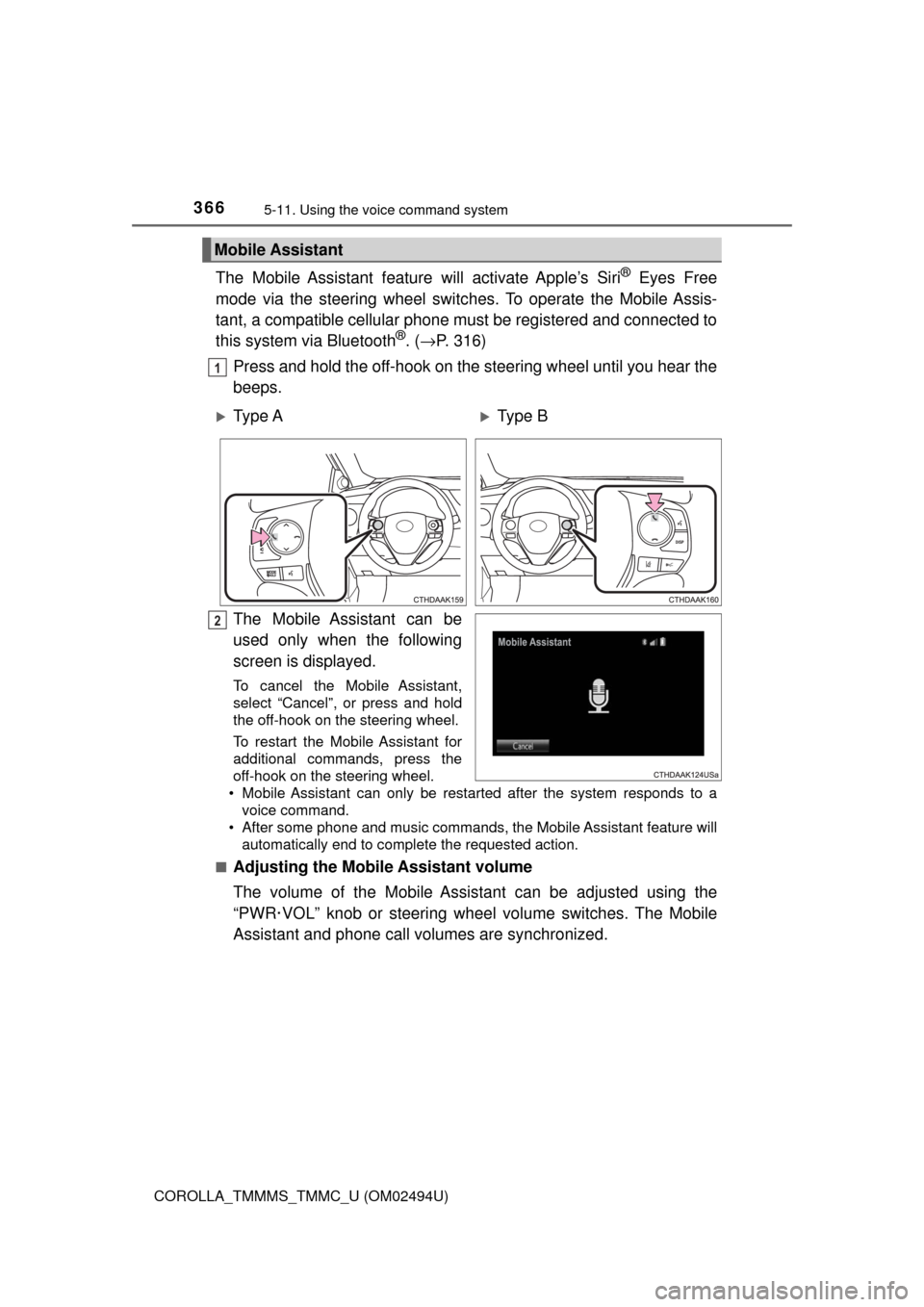
Press and hold the off-hook on the steering wheel until you hear the
beeps.
The Mobile Assistant can be
used only when the following
screen is displayed.
To cancel the Mobile Assistant,
select “Cancel”, or press and hold
the off-hook on the steering wheel.
To restart the Mobile Assistant for
additional commands, press the
off-hook on the steering wheel.
• Mobile Assistant can only be restarted after the system responds to a
voice command.
• After some phone and music commands, the Mobile Assistant feature will
automatically end to complete the requested action.
■
Adjusting the Mobile Assistant volume
The volume of the Mobile Assistant can be adjusted using the
“PWR·VOL” knob or steering wheel volume switches. The Mobile
Assistant and phone call volumes are synchronized.
Mobile Assistant
1
Ty p e AType B
2
Page 367 of 612

3675-11. Using the voice command system
5
Audio system
COROLLA_TMMMS_TMMC_U (OM02494U)
■ Notes about Mobile Assistant
●The available features and functions may vary based on the iOS version
installed on the connected device.
●Some Siri features are limited in Eyes Free mode. If you attempt to use an
unavailable function, Siri will inform you that the function is not available.
●If Siri is not enabled on the cellular phone connected via Bluetooth
®, an
error message will be displayed on the screen.
●While a phone call is active, the Mobile Assistant cannot be used.
●If using the navigation feature of the cellular phone, ensure the active audio
source is Bluetooth
® audio or iPod in order to hear turn by turn direction
prompts.
Page 369 of 612
369
6Interior features
COROLLA_TMMMS_TMMC_U (OM02494U)6-1. Using the air
conditioning system
and defogger
Manual air conditioning
system ............................ 370
Automatic air
conditioning system ........ 377
Heated steering wheel/
seat heaters .................... 386
6-2. Using the interior lights
Interior lights list ................ 388
• Front interior light/
personal lights............... 389
• Rear interior light .......... 390
6-3. Using the storage
features
List of storage features ..... 391
• Glove box...................... 392
• Console box .................. 392
• Bottle holders ................ 393
• Cup holders .................. 394
6-4. Other interior features
Other interior features ....... 396
• Sun visors ..................... 396
• Vanity mirrors................ 396
• Clock ............................. 396
• Outside temperature
display........................... 397
• Power outlet .................. 398
• Assist grips ................... 399
Garage door opener.......... 400
Compass ........................... 407
Page 397 of 612
3976-4. Other interior features
6
Interior features
COROLLA_TMMMS_TMMC_U (OM02494U)
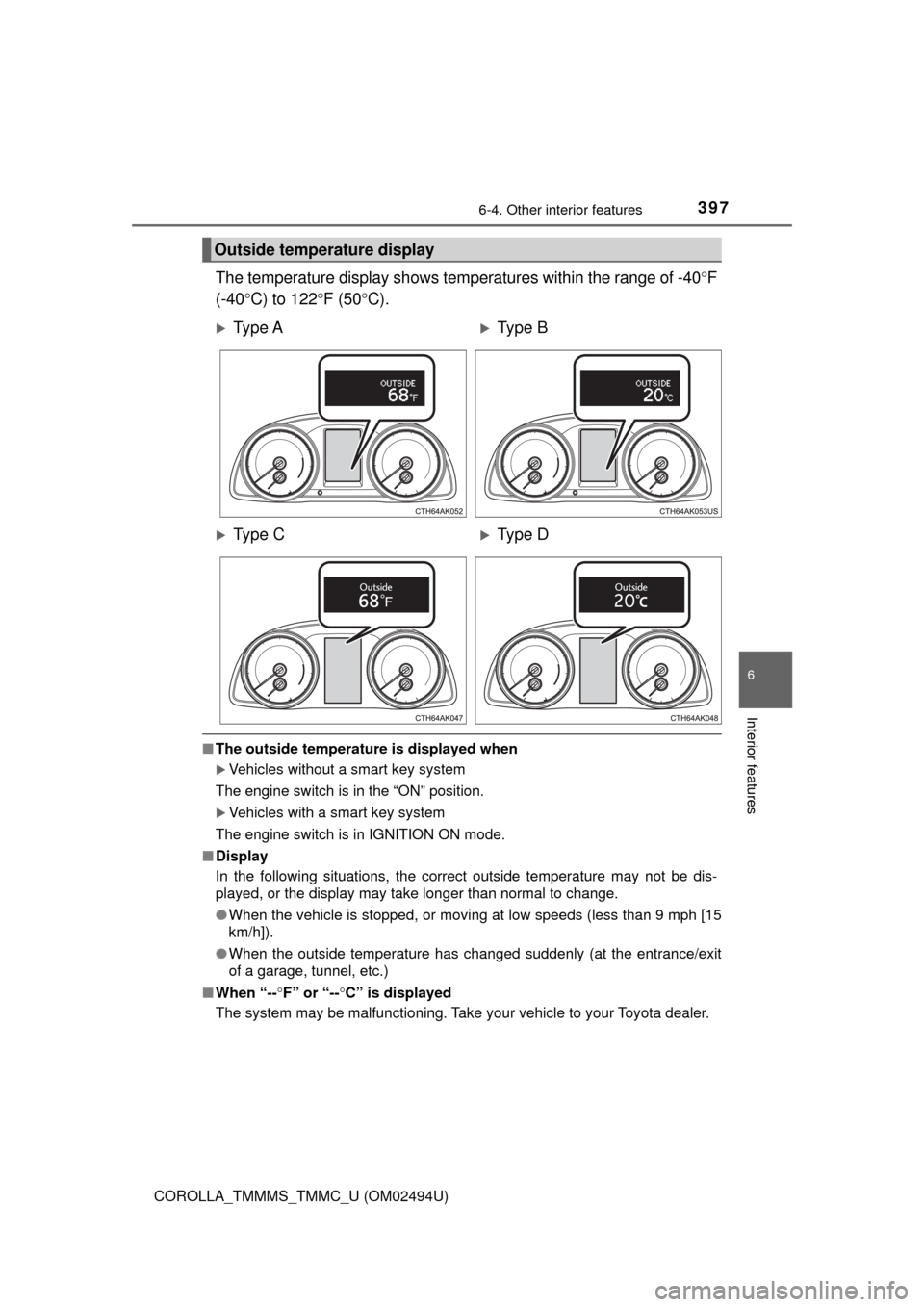
The temperature display shows temperatures within the range of -40°F
(-40°C) to 122°F (50°C).
■The outside temperature is displayed when
Vehicles without a smart key system
The engine switch is in the “ON” position.
Vehicles with a smart key system
The engine switch is in IGNITION ON mode.
■Display
In the following situations, the correct outside temperature may not be dis-
played, or the display may take longer than normal to change.
●When the vehicle is stopped, or moving at low speeds (less than 9 mph [15
km/h]).
●When the outside temperature has changed suddenly (at the entrance/exit
of a garage, tunnel, etc.)
■When “--°F” or “--°C” is displayed
The system may be malfunctioning. Take your vehicle to your Toyota dealer.
Outside temperature display
Ty p e AType B
Ty p e CType D
Page 404 of 612
4046-4. Other interior features
COROLLA_TMMMS_TMMC_U (OM02494U)■
Reprogramming a single HomeLink® button
When the following procedure is performed, buttons which already
have devices registered to them can be overwritten:
With one hand, press and hold the desired HomeLink
® button.
When the HomeLink
® indicator starts flashing orange, continue
to hold the HomeLink® button and perform “Programming Home-
Link®” (it takes 20 seconds for the HomeLink® indicator to
start flashing).
Press the appropriate HomeLink
® button. The HomeLink® indicator
light should turn on.
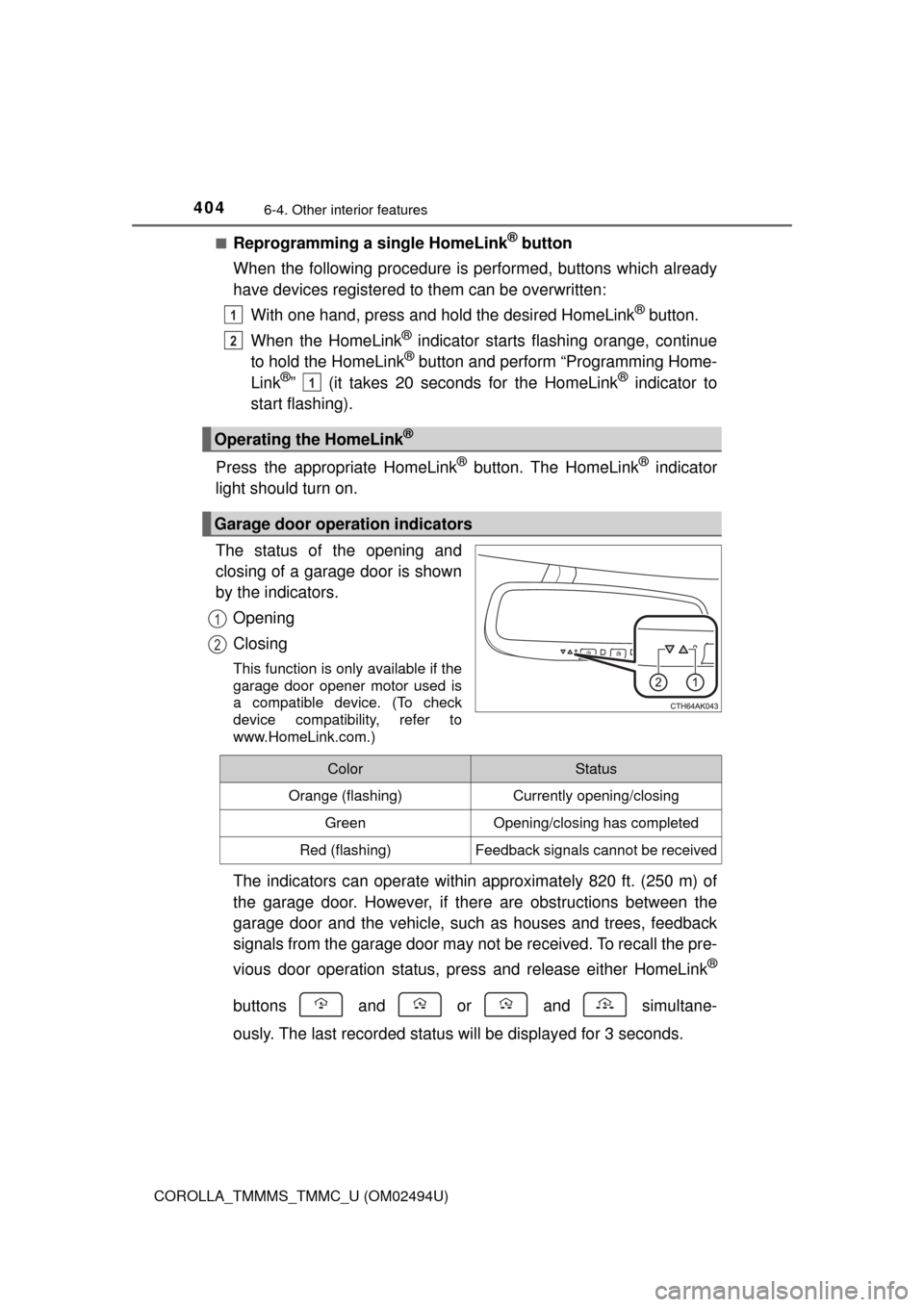
The status of the opening and
closing of a garage door is shown
by the indicators.
Opening
Closing
This function is only available if the
garage door opener motor used is
a compatible device. (To check
device compatibility, refer to
www.HomeLink.com.)
The indicators can operate within approximately 820 ft. (250 m) of
the garage door. However, if there are obstructions between the
garage door and the vehicle, such as houses and trees, feedback
signals from the garage door may not be received. To recall the pre-
vious door operation status, press and release either HomeLink
®
buttons and or and simultane-
ously. The last recorded status will be displayed for 3 seconds.
Operating the HomeLink®
Garage door operation indicators
1
2
1
1
2
ColorStatus
Orange (flashing)Currently opening/closing
GreenOpening/closing has completed
Red (flashing)Feedback signals cannot be received
Page 407 of 612
4076-4. Other interior features
6
Interior features
COROLLA_TMMMS_TMMC_U (OM02494U)
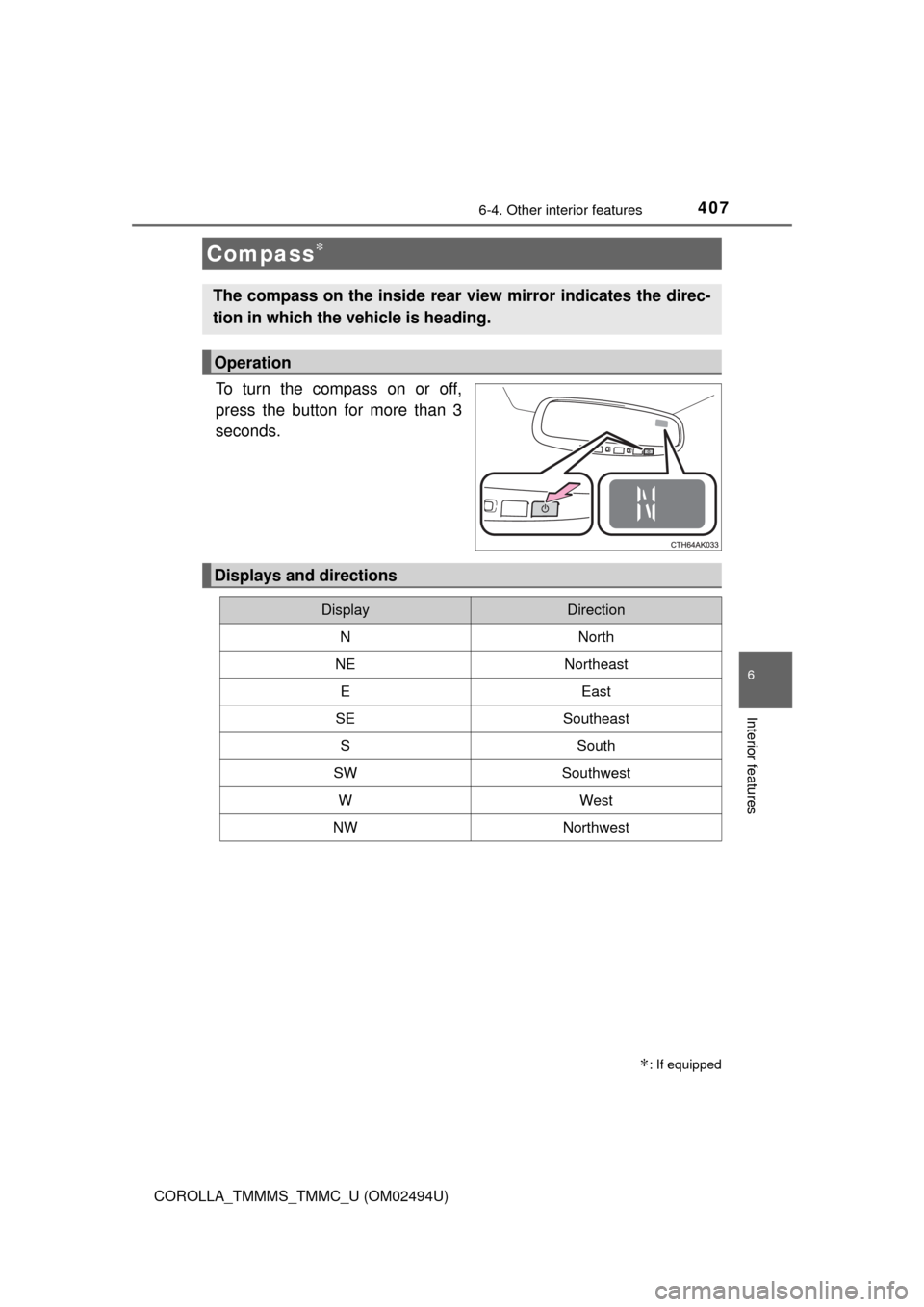
To turn the compass on or off,
press the button for more than 3
seconds.
Compass∗
∗: If equipped
The compass on the inside rear view mirror indicates the direc-
tion in which the vehicle is heading.
Operation
Displays and directions
DisplayDirection
NNorth
NENortheast
EEast
SESoutheast
SSouth
SWSouthwest
WWest
NWNorthwest
Page 408 of 612
4086-4. Other interior features
COROLLA_TMMMS_TMMC_U (OM02494U)
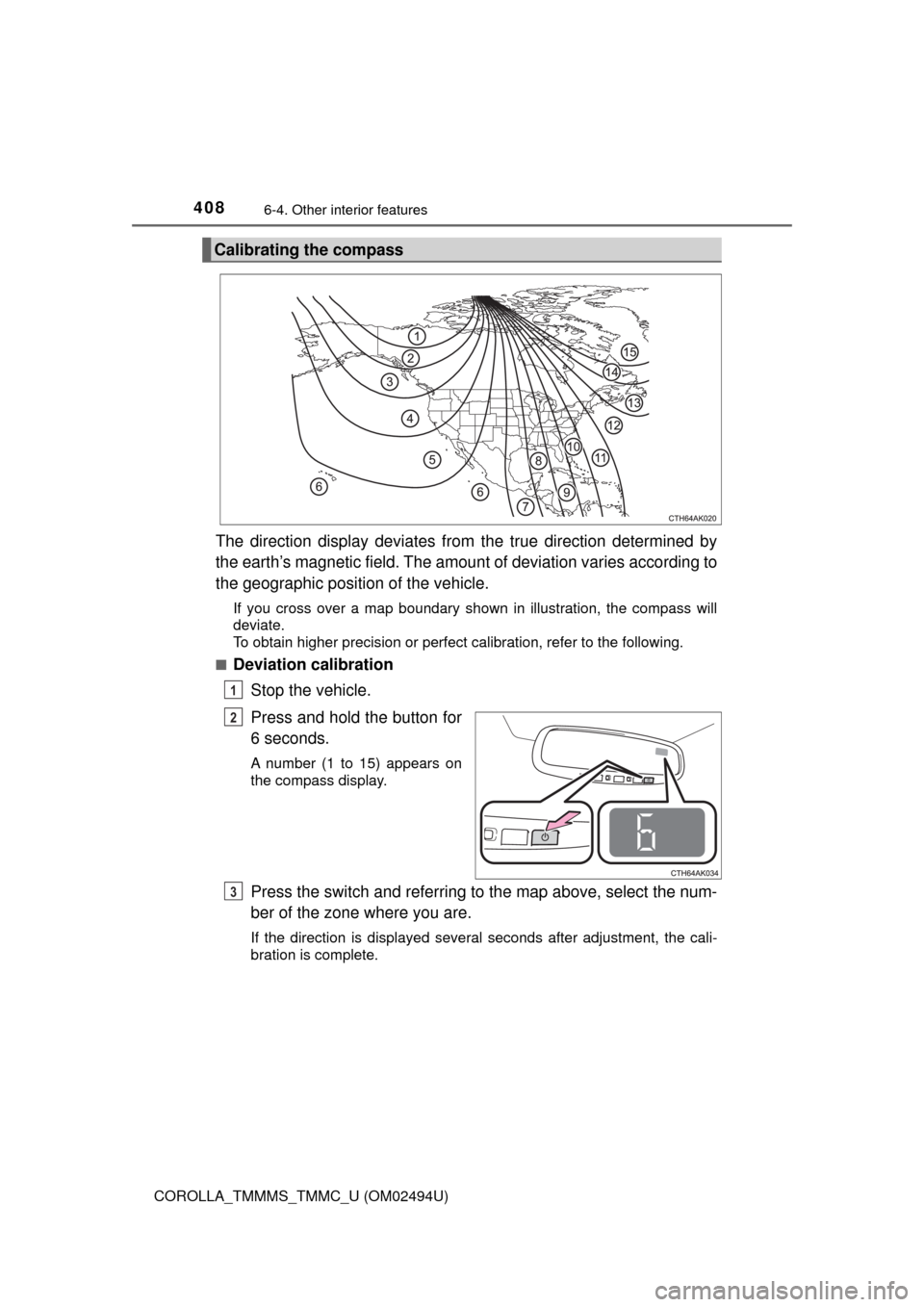
The direction display deviates from the true direction determined by
the earth’s magnetic field. The amount of deviation varies according to
the geographic position of the vehicle.
If you cross over a map boundary shown in illustration, the compass will
deviate.
To obtain higher precision or perfect calibration, refer to the following.
■
Deviation calibration
Stop the vehicle.
Press and hold the button for
6 seconds.
A number (1 to 15) appears on
the compass display.
Press the switch and referring to the map above, select the num-
ber of the zone where you are.
If the direction is displayed several seconds after adjustment, the cali-
bration is complete.
Calibrating the compass
1
2
3
Page 409 of 612
4096-4. Other interior features
6
Interior features
COROLLA_TMMMS_TMMC_U (OM02494U)■
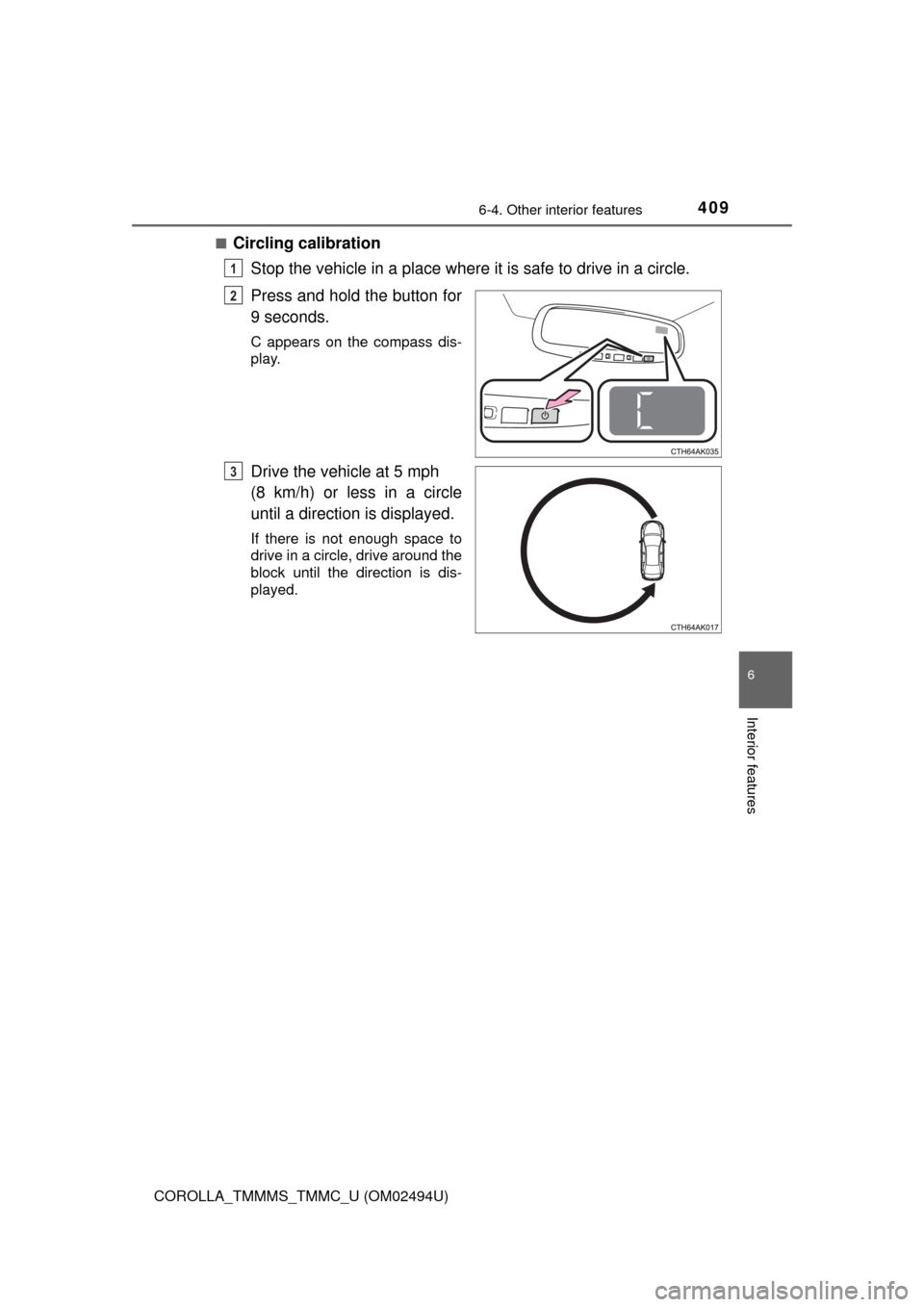
Circling calibration
Stop the vehicle in a place where it is safe to drive in a circle.
Press and hold the button for
9 seconds.
C appears on the compass dis-
play.
Drive the vehicle at 5 mph
(8 km/h) or less in a circle
until a direction is displayed.
If there is not enough space to
drive in a circle, drive around the
block until the direction is dis-
played.
1
2
3