display TOYOTA COROLLA 2017 11.G Owners Manual
[x] Cancel search | Manufacturer: TOYOTA, Model Year: 2017, Model line: COROLLA, Model: TOYOTA COROLLA 2017 11.GPages: 612, PDF Size: 14.18 MB
Page 410 of 612
4106-4. Other interior features
COROLLA_TMMMS_TMMC_U (OM02494U)
■Conditions unfavorable to correct operation
The compass may not show the correct direction in the following conditions:
●The vehicle is stopped immediately after turning.
●The vehicle is on an inclined surface.
●The vehicle is in a place where the earth's magnetic field is subject to inter-
ference by artificial magnetic fields (underground car park/parking lot, under
a steel tower, between buildings, roof car park/parking lot, near an intersec-
tion, near a large vehicle, etc.).
●The vehicle has become magnetized.
(There is a magnet or metal object near the inside rear view mirror.)
●The battery has been disconnected.
●A door is open.
WARNING
■While driving the vehicle
Do not adjust the display. Adjust the display only when the vehicle is
stopped.
■When doing the circling calibration
Secure a wide space, and watch out for people and vehicles in the neigh-
borhood. Do not violate any local traffic rules while performing circling cali-
bration.
NOTICE
■To avoid compass malfunctions
Do not place magnets or any metal objects near the inside rear view mirror.
Doing this may cause the compass sensor to malfunction.
■To ensure normal operation of the compass
●Do not perform circling calibration of the compass in a place where the
earth's magnetic field is subject to interference by artificial magnetic fields.
●During calibration, do not operate electric systems (moon roof, power win-
dows, etc.) as they may interfere with the calibration.
Page 419 of 612
4197-2. Maintenance
7
Maintenance and care
COROLLA_TMMMS_TMMC_U (OM02494U)
■Repair and replacement
It is recommended that genuine Toyota parts be used for repairs to ensure
performance of each system. If non-Toyota parts are used in replacement or if
a repair shop other than a Toyota dealer performs repairs, confirm the war-
ranty coverage.
■Resetting the message indicating maintenance is required (U.S.A. only)
After the required maintenance is performed according to the maintenance
schedule, please reset the message.
To reset the message, follow the procedure described below:
Vehicles with monochrome display
Vehicles without a smart key system: Turn the engine switch to the “LOCK”
position with the trip meter A reading shown. (→P. 79)
Vehicles with a smart key system: Turn the engine switch off with the trip
meter A reading shown. (→P. 79)
Vehicles without a smart key system:
While pressing the display change button (→P. 79), turn the engine switch
to the “ON” position (do not start the engine because reset mode will be
canceled).
Vehicles with a smart key system:
While pressing the display change button (→P. 79), turn the engine switch
to the IGNITION ON mode (do not start the engine because otherwise the
reset mode will be canceled).
Continue to press and hold the button until the trip meter displays “000000”.
Vehicles with color display
While the engine is running, switch the multi-information display to the “Set-
tings” screen. (→P. 95)
Select “Reset Scheduled Maint. Data” on the “Settings” screen.
Select “Yes” when “Reset Data?” is displayed on the multi-information dis-
play.
“The Data Has Been Reset” will be displayed when the reset procedure has
been completed.
■Allow inspection and repairs to be performed by a Toyota dealer
●Toyota technicians are well-trained specialists and are kept up to date with
the latest service information. They are well informed about the operations
of all systems on your vehicle.
●Keep a copy of the repair order. It proves that the maintenance that has
been performed is under warranty coverage. If any problem should arise
while your vehicle is under warranty, your Toyota dealer will promptly take
care of it.
1
2
3
1
2
3
Page 443 of 612
4437-3. Do-it-yourself maintenance
7
Maintenance and care
COROLLA_TMMMS_TMMC_U (OM02494U)
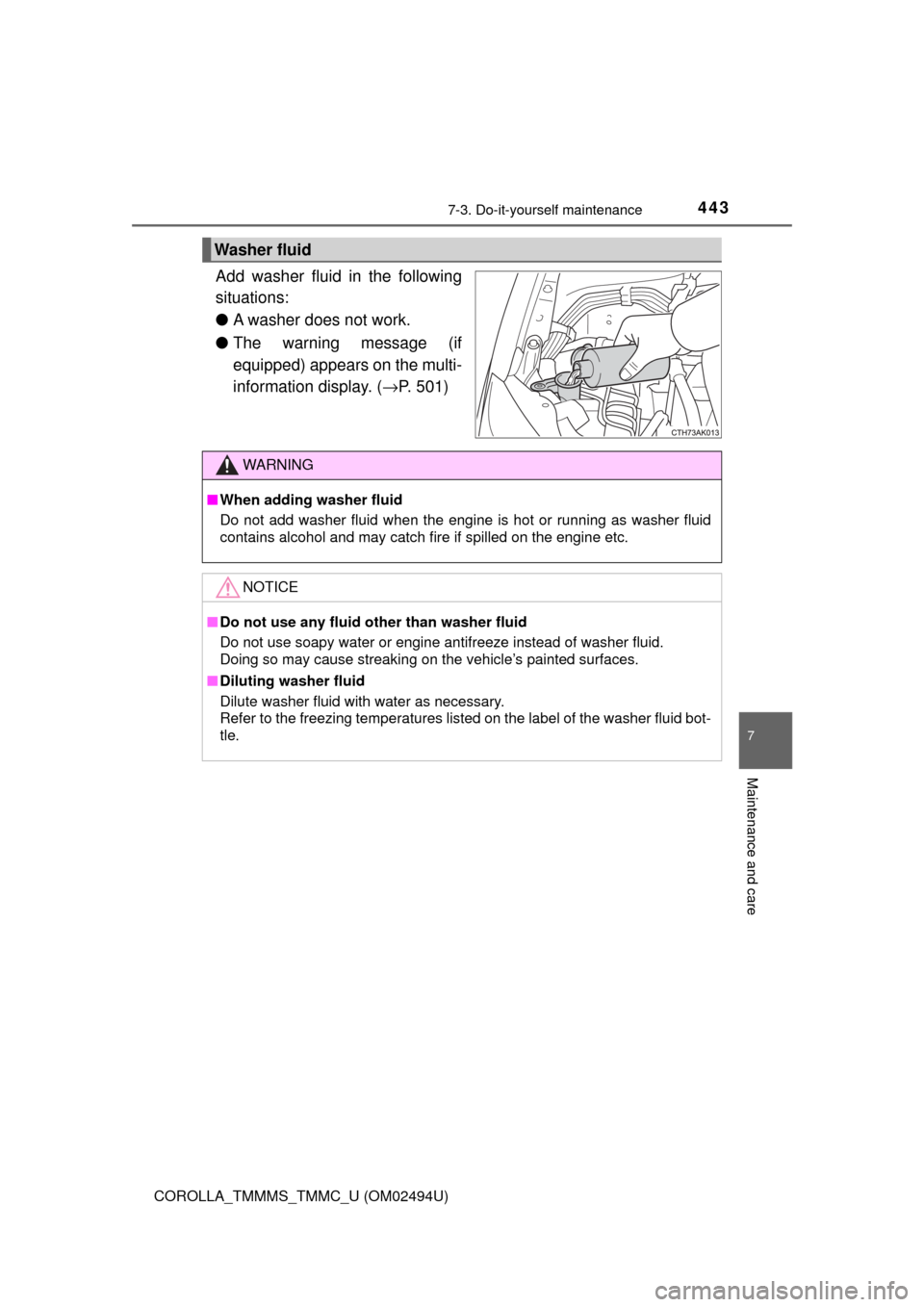
Add washer fluid in the following
situations:
●A washer does not work.
●The warning message (if
equipped) appears on the multi-
information display. (→P. 501)
Washer fluid
WARNING
■When adding washer fluid
Do not add washer fluid when the engine is hot or running as washer fluid
contains alcohol and may catch fire if spilled on the engine etc.
NOTICE
■Do not use any fluid other than washer fluid
Do not use soapy water or engine antifreeze instead of washer fluid.
Doing so may cause streaking on the vehicle’s painted surfaces.
■Diluting washer fluid
Dilute washer fluid with water as necessary.
Refer to the freezing temperatures listed on the label of the washer fluid bot-
tle.
Page 473 of 612
473
8When trouble arises
COROLLA_TMMMS_TMMC_U (OM02494U)8-1. Essential information
Emergency flashers .......... 474
If your vehicle has to be
stopped in an
emergency ...................... 475
8-2. Steps to take in an
emergency
If your vehicle needs to
be towed ......................... 477
If you think something is
wrong .............................. 482
Fuel pump shut off
system ............................ 483
If a warning light turns
on or a warning buzzer
sounds ............................ 484
If a warning message or
indicator is displayed ...... 493
If you have a flat tire.......... 513
If the engine will not
start ................................. 525
If the electronic key does
not operate properly........ 527
If the vehicle battery is
discharged ...................... 530
If your vehicle
overheats ........................ 535
If the vehicle becomes
stuck ............................... 539
Page 486 of 612
4868-2. Steps to take in an emergency
COROLLA_TMMMS_TMMC_U (OM02494U)
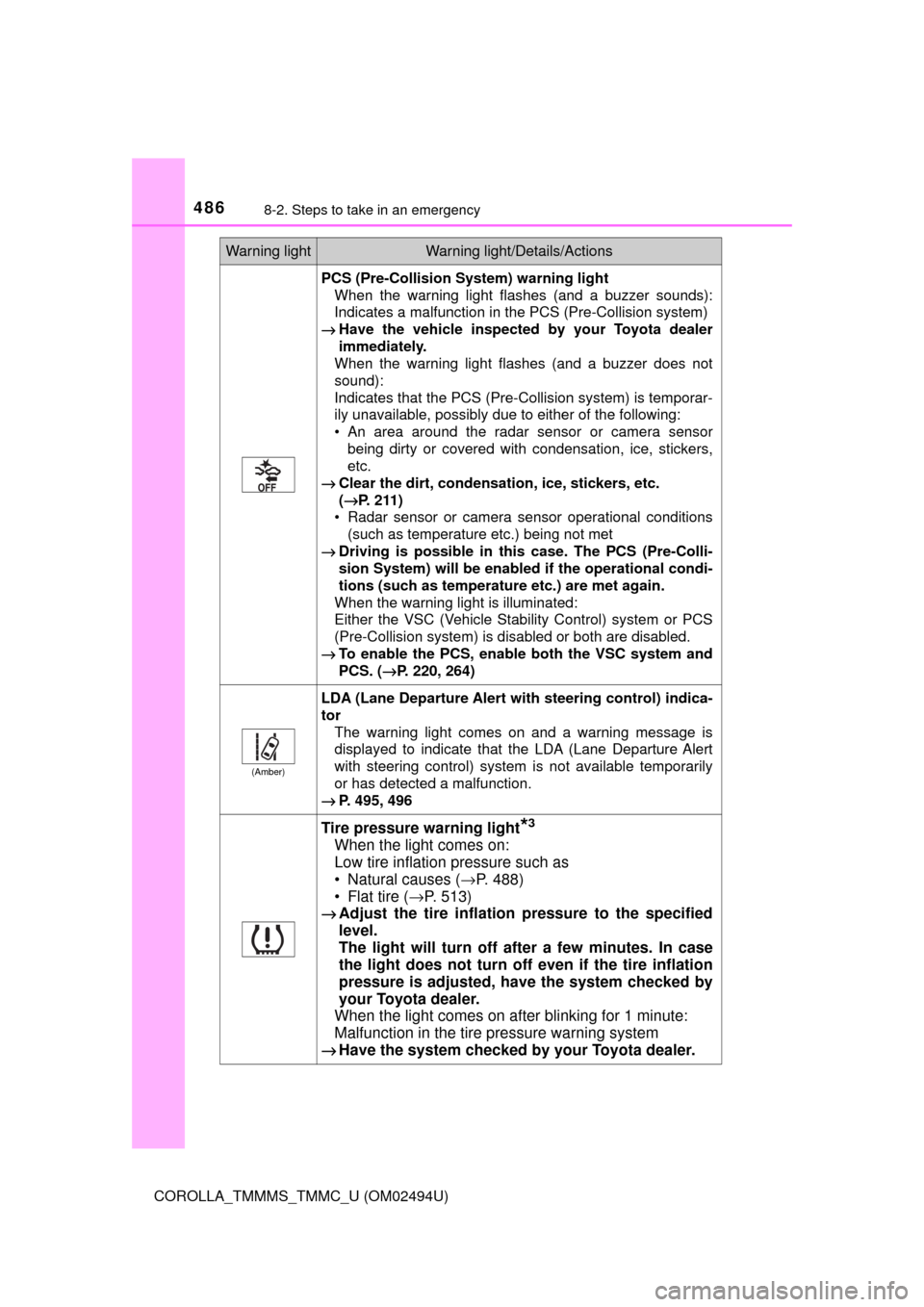
PCS (Pre-Collision System) warning light
When the warning light flashes (and a buzzer sounds):
Indicates a malfunction in the PCS (Pre-Collision system)
→Have the vehicle inspected by your Toyota dealer
immediately.
When the warning light flashes (and a buzzer does not
sound):
Indicates that the PCS (Pre-Collision system) is temporar-
ily unavailable, possibly due to either of the following:
• An area around the radar sensor or camera sensor
being dirty or covered with condensation, ice, stickers,
etc.
→Clear the dirt, condensation, ice, stickers, etc.
(→P. 211)
• Radar sensor or camera sensor operational conditions
(such as temperature etc.) being not met
→Driving is possible in this case. The PCS (Pre-Colli-
sion System) will be enabled if the operational condi-
tions (such as temperature etc.) are met again.
When the warning light is illuminated:
Either the VSC (Vehicle Stability Control) system or PCS
(Pre-Collision system) is disabled or both are disabled.
→To enable the PCS, enable both the VSC system and
PCS. (→P. 220, 264)
(Amber)
LDA (Lane Departure Alert with steering control) indica-
tor
The warning light comes on and a warning message is
displayed to indicate that the LDA (Lane Departure Alert
with steering control) system is not available temporarily
or has detected a malfunction.
→P. 495, 496
Tire pressure warning light*3
When the light comes on:
Low tire inflation pressure such as
• Natural causes (→P. 488)
• Flat tire (→P. 513)
→Adjust the tire inflation pressure to the specified
level.
The light will turn off after a few minutes. In case
the light does not turn off even if the tire inflation
pressure is adjusted, have the system checked by
your Toyota dealer.
When the light comes on after blinking for 1 minute:
Malfunction in the tire pressure warning system
→Have the system checked by your Toyota dealer.
Warning lightWarning light/Details/Actions
Page 493 of 612
4938-2. Steps to take in an emergency
8
When trouble arises
COROLLA_TMMMS_TMMC_U (OM02494U)
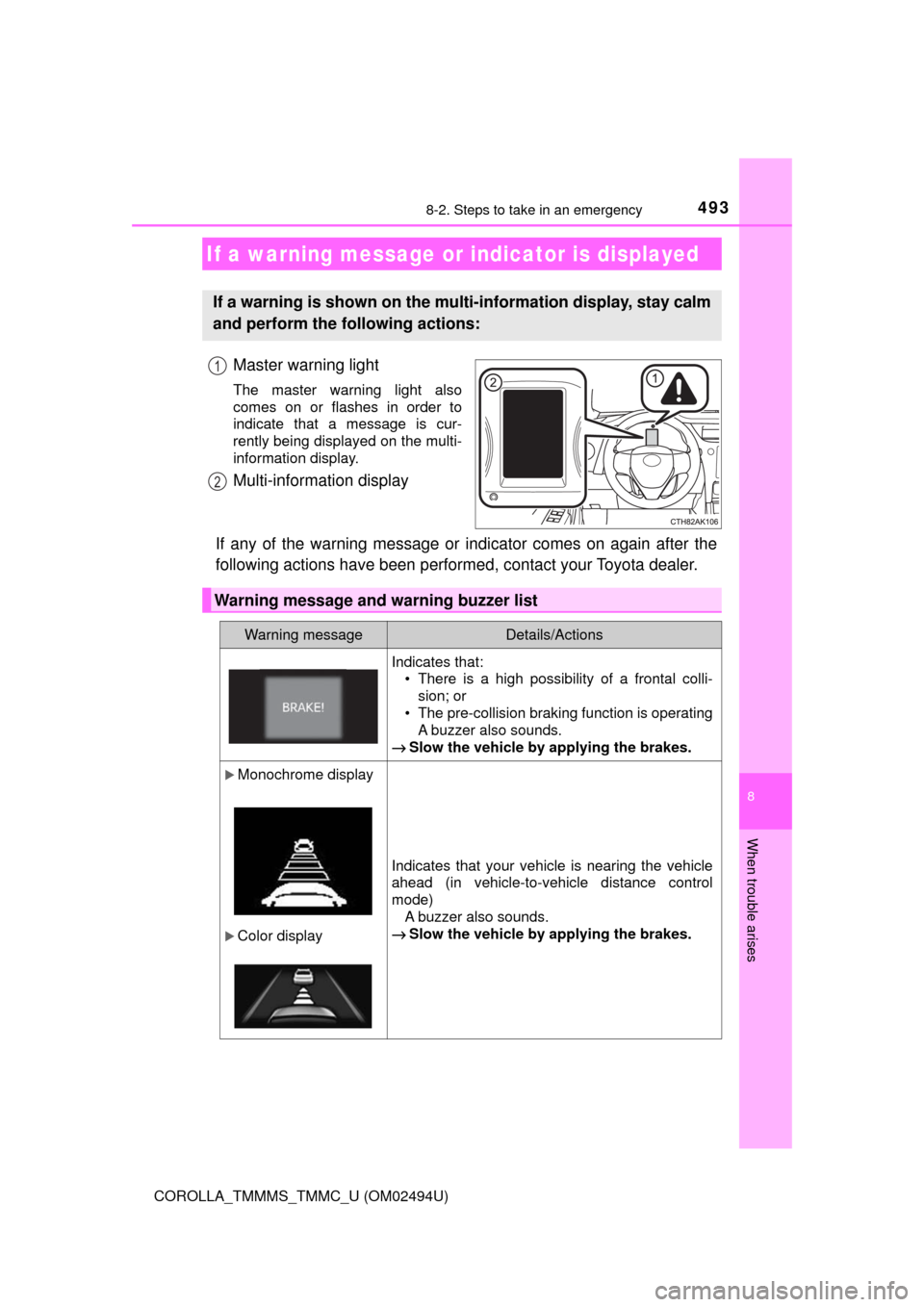
Master warning light
The master warning light also
comes on or flashes in order to
indicate that a message is cur-
rently being displayed on the multi-
information display.
Multi-information display
If any of the warning message or indicator comes on again after the
following actions have been performed, contact your Toyota dealer.
If a warning message or indicator is displayed
If a warning is shown on the multi-information display, stay calm
and perform the following actions:
1
2
Warning message and warning buzzer list
Warning messageDetails/Actions
Indicates that:
• There is a high possibility of a frontal colli-
sion; or
• The pre-collision braking function is operating
A buzzer also sounds.
→Slow the vehicle by applying the brakes.
Monochrome display
Color display
Indicates that your vehicle is nearing the vehicle
ahead (in vehicle-to-vehicle distance control
mode)
A buzzer also sounds.
→Slow the vehicle by applying the brakes.
Page 494 of 612
4948-2. Steps to take in an emergency
COROLLA_TMMMS_TMMC_U (OM02494U)
Monochrome display
Color display
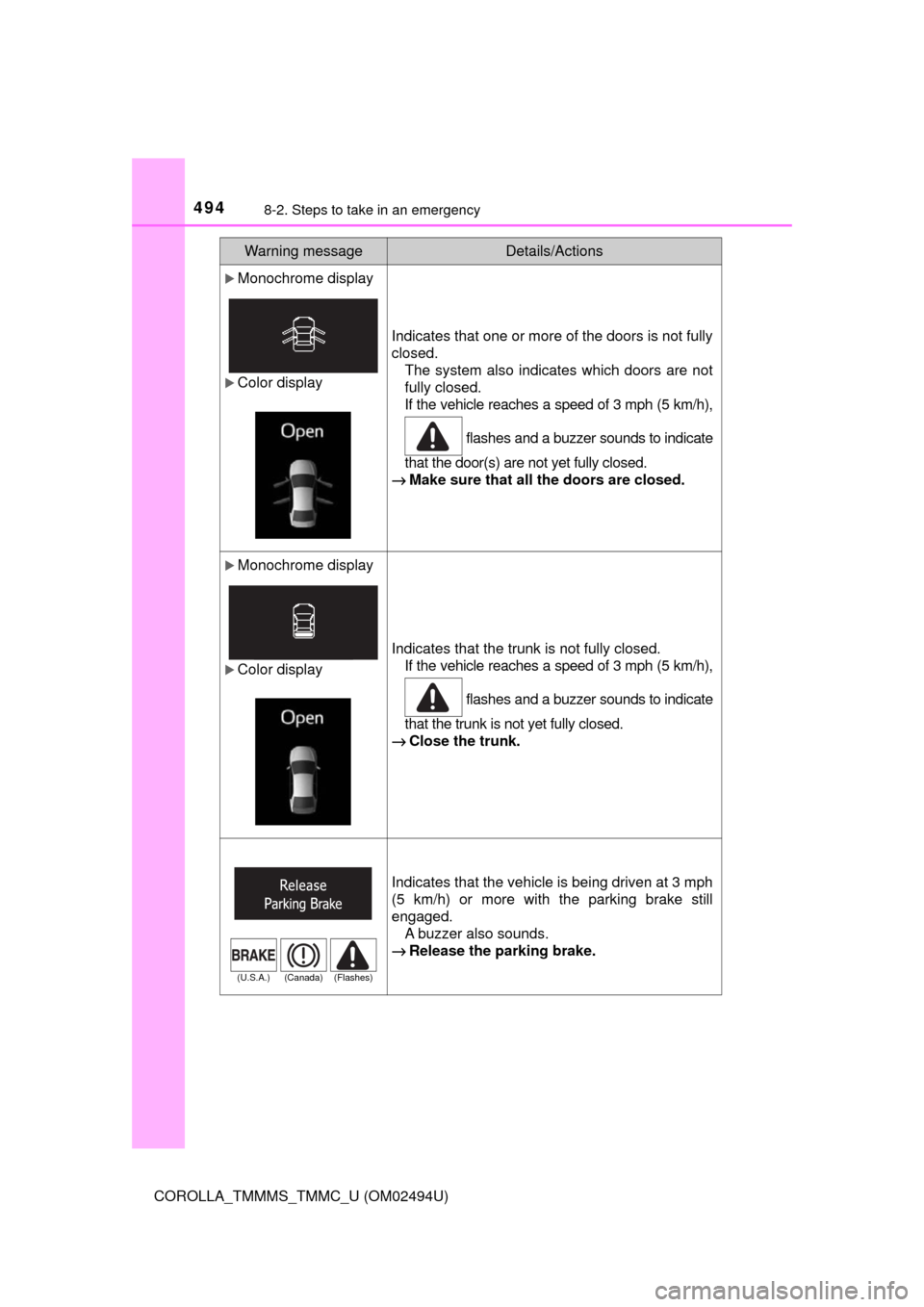
Indicates that one or more of the doors is not fully
closed.
The system also indicates which doors are not
fully closed.
If the vehicle reaches a speed of 3 mph (5 km/h),
flashes and a buzzer sounds to indicate
that the door(s) are not yet fully closed.
→Make sure that all the doors are closed.
Monochrome display
Color display
Indicates that the trunk is not fully closed.
If the vehicle reaches a speed of 3 mph (5 km/h),
flashes and a buzzer sounds to indicate
that the trunk is not yet fully closed.
→Close the trunk.
Indicates that the vehicle is being driven at 3 mph
(5 km/h) or more with the parking brake still
engaged.
A buzzer also sounds.
→Release the parking brake.
Warning messageDetails/Actions
(U.S.A.) (Canada) (Flashes)
Page 495 of 612
4958-2. Steps to take in an emergency
8
When trouble arises
COROLLA_TMMMS_TMMC_U (OM02494U)
Monochrome display
Color display
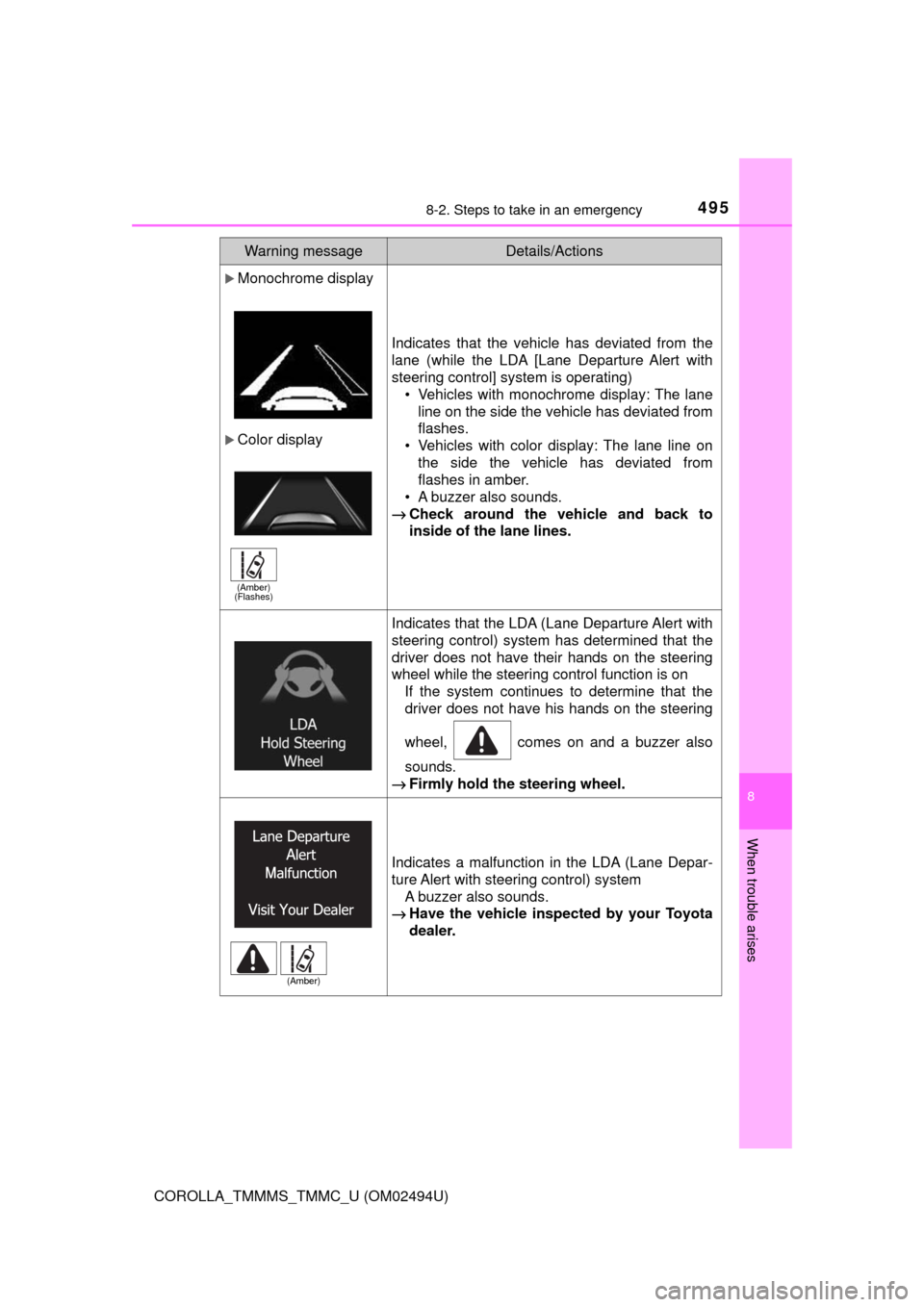
Indicates that the vehicle has deviated from the
lane (while the LDA [Lane Departure Alert with
steering control] system is operating)
• Vehicles with monochrome display: The lane
line on the side the vehicle has deviated from
flashes.
• Vehicles with color display: The lane line on
the side the vehicle has deviated from
flashes in amber.
• A buzzer also sounds.
→Check around the vehicle and back to
inside of the lane lines.
Indicates that the LDA (Lane Departure Alert with
steering control) system has determined that the
driver does not have their hands on the steering
wheel while the steering control function is on
If the system continues to determine that the
driver does not have his hands on the steering
wheel, comes on and a buzzer also
sounds.
→Firmly hold the steering wheel.
Indicates a malfunction in the LDA (Lane Depar-
ture Alert with steering control) system
A buzzer also sounds.
→Have the vehicle inspected by your Toyota
dealer.
Warning messageDetails/Actions
(Amber)
(Flashes)
(Amber)
Page 497 of 612
4978-2. Steps to take in an emergency
8
When trouble arises
COROLLA_TMMMS_TMMC_U (OM02494U)
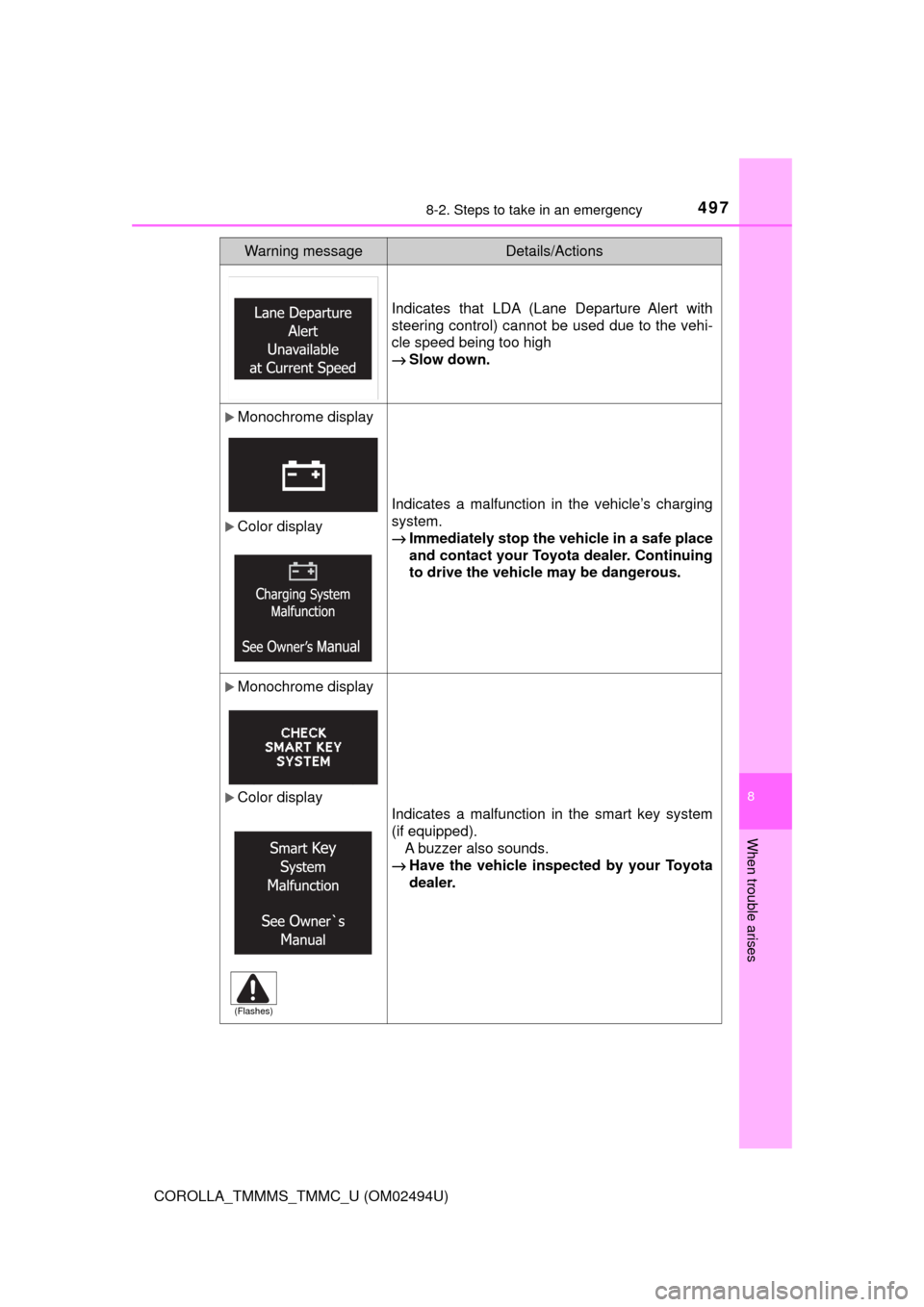
Indicates that LDA (Lane Departure Alert with
steering control) cannot be used due to the vehi-
cle speed being too high
→Slow down.
Monochrome display
Color display
Indicates a malfunction in the vehicle’s charging
system.
→Immediately stop the vehicle in a safe place
and contact your Toyota dealer. Continuing
to drive the vehicle may be dangerous.
Monochrome display
Color display
Indicates a malfunction in the smart key system
(if equipped).
A buzzer also sounds.
→Have the vehicle inspected by your Toyota
dealer.
Warning messageDetails/Actions
(Flashes)
Page 498 of 612
4988-2. Steps to take in an emergency
COROLLA_TMMMS_TMMC_U (OM02494U)
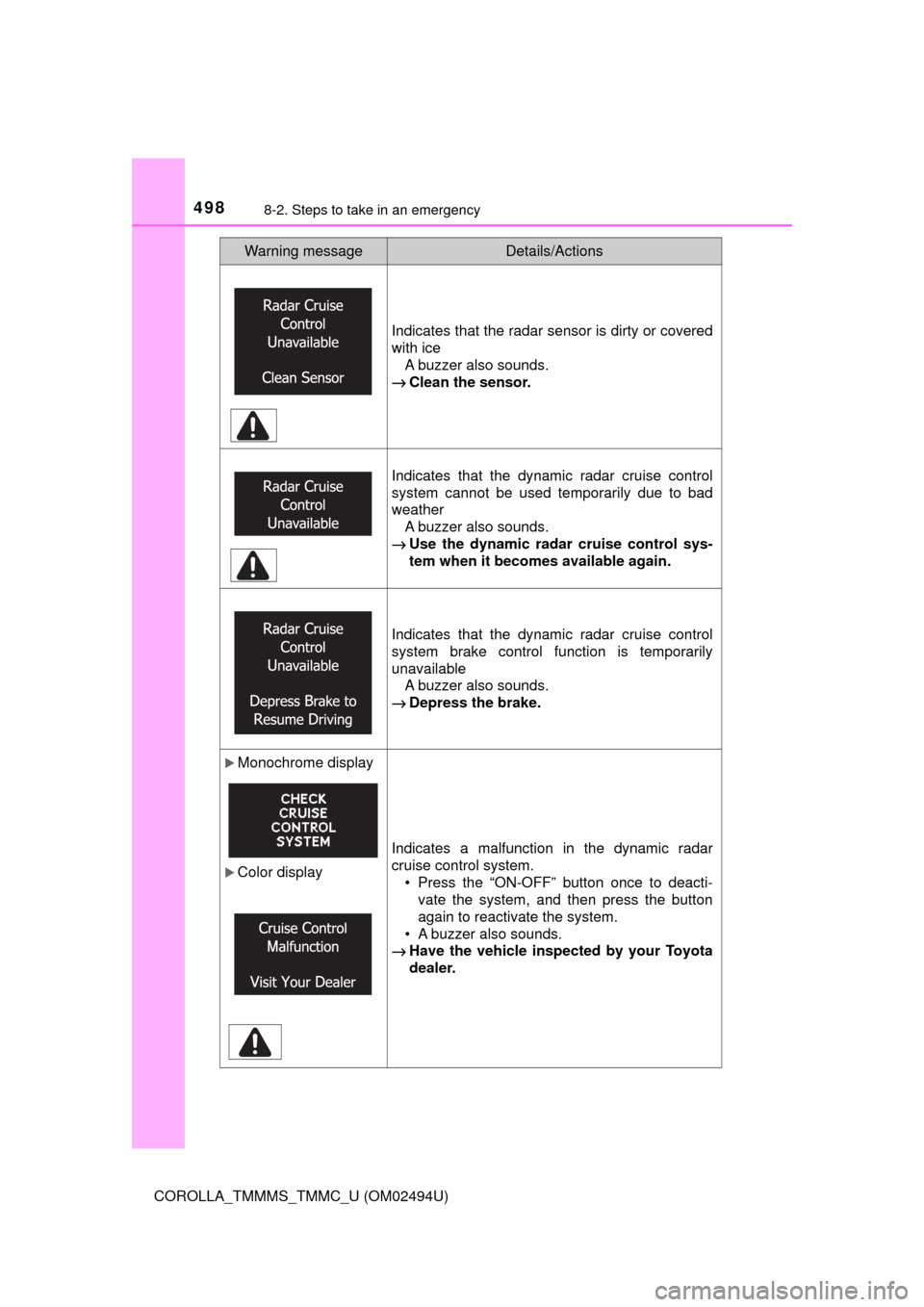
Indicates that the radar sensor is dirty or covered
with ice
A buzzer also sounds.
→Clean the sensor.
Indicates that the dynamic radar cruise control
system cannot be used temporarily due to bad
weather
A buzzer also sounds.
→Use the dynamic radar cruise control sys-
tem when it becomes available again.
Indicates that the dynamic radar cruise control
system brake control function is temporarily
unavailable
A buzzer also sounds.
→Depress the brake.
Monochrome display
Color displayIndicates a malfunction in the dynamic radar
cruise control system.
• Press the “ON-OFF” button once to deacti-
vate the system, and then press the button
again to reactivate the system.
• A buzzer also sounds.
→Have the vehicle inspected by your Toyota
dealer.
Warning messageDetails/Actions