CD player TOYOTA COROLLA 2017 11.G User Guide
[x] Cancel search | Manufacturer: TOYOTA, Model Year: 2017, Model line: COROLLA, Model: TOYOTA COROLLA 2017 11.GPages: 612, PDF Size: 14.18 MB
Page 309 of 612
3095-6. Using an external device
5
Audio system
COROLLA_TMMMS_TMMC_U (OM02494U)
→P. 2 7 6
■Operating portable audio players connected to Entune Audio
The volume can be adjusted using the vehicle's audio controls. All other
adjustments must be made on the portable audio player itself.
■When using a portable audio player connected to the power outlet
Noise may occur during playback. Use the power source of the portable
audio player.
Using the AUX port
To use the AUX port, connect a portable player, press the
“AUDIO” button, then select “AUX” to display the audio control
screen.
Connecting a portable audio player
WARNING
■While driving
Do not connect a portable audio player or operate the device controls.
Page 310 of 612
310
COROLLA_TMMMS_TMMC_U (OM02494U)
5-7. Connecting Bluetooth®
■About Bluetooth®
Preparations to use wireless communica-
tion
The following can be performed using Bluetooth® wireless com-
munication:
■A portable audio player can be operated and listened to via
Entune Audio
■Hands-free phone calls can be made via a cellular phone
In order to use wireless communication, register and connect a
Bluetooth
® device by performing the following procedures.
The Bluetooth® word mark and logos are
registered trademarks owned Bluetooth
SIG, Inc. and any use of such marks by
Fujitsu Ten Limited is under license.
Other trademarks and trade names are
those of their respective owners.
WARNING
■Certifications for the Bluetooth
FCC ID: BABFT0077A
●CAUTION: Radio Frequency Radiation Exposure
This equipment complies with FCC radiation exposure limits set forth for
uncontrolled equipment and meets the FCC radio frequency (RF) Expo-
sure Guidelines.
This equipment has very low levels of RF energy that it deemed to comply
without maximum permissive exposure evaluation (MPE). But it is desir-
able that it should be installed and operated with at least 20cm and more
between the radiator and person's body in normal use position.
• Co-location: This transmitter must not be co-located or operated in con-
junction with any other antenna or transmitter.
• This device complies with part 15 of the FCC Rules. Operation is sub-
ject to the following two conditions: (1) This device may not cause
harmful interference, and (2) this device must accept any interference
received, including interference that may cause undesired operation.
Page 314 of 612
3145-7. Connecting Bluetooth®
COROLLA_TMMMS_TMMC_U (OM02494U)
Turn the Bluetooth® connection setting of your audio player on.
Press the “AUDIO” button.
Select “ Audio”.
Select “Select Device”.
Follow the steps in “How to registering a Bluetooth
® device” from
step . (→P. 316)
Registering a Bluetooth® audio player for
the first time
To use the Bluetooth® Audio, it is necessary to register an audio
player with the system.
Once the player has been registered, it is possible to use the
Bluetooth
® Audio.
For details about registering a Bluetooth
® device (→P. 316)
1
2
3
4
5
2
Page 316 of 612
3165-7. Connecting Bluetooth®
COROLLA_TMMMS_TMMC_U (OM02494U)
Display the “Bluetooth* Setup” screen. (→P. 313)
Select “Add”.
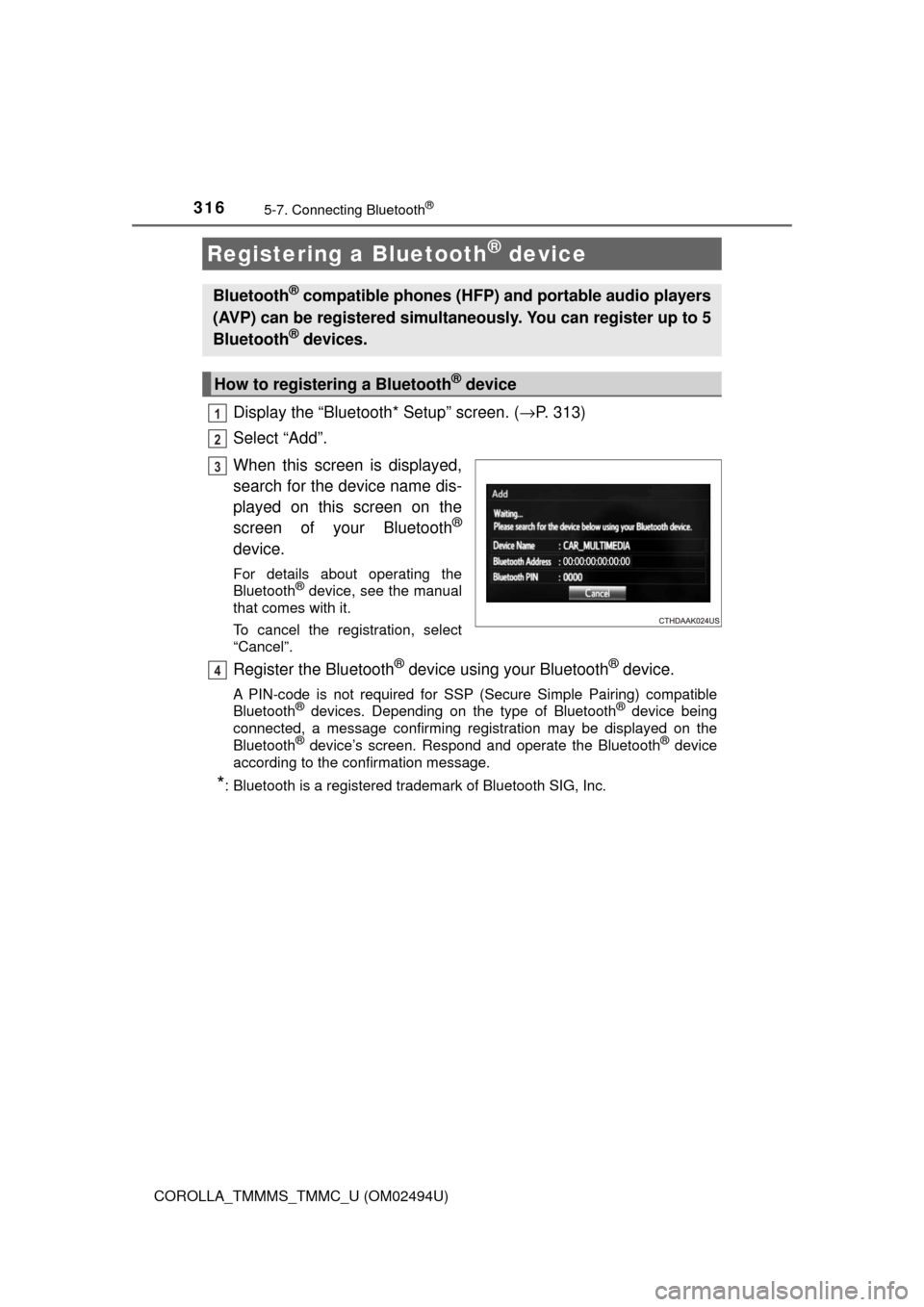
When this screen is displayed,
search for the device name dis-
played on this screen on the
screen of your Bluetooth
®
device.
For details about operating the
Bluetooth® device, see the manual
that comes with it.
To cancel the registration, select
“Cancel”.
Register the Bluetooth® device using your Bluetooth® device.
A PIN-code is not required for SSP (Secure Simple Pairing) compatible
Bluetooth® devices. Depending on the type of Bluetooth® device being
connected, a message confirming registration may be displayed on the
Bluetooth
® device’s screen. Respond and operate the Bluetooth® device
according to the confirmation message.
*: Bluetooth is a registered trademark of Bluetooth SIG, Inc.
Registering a Bluetooth® device
Bluetooth® compatible phones (HFP) and portable audio players
(AVP) can be registered simultaneously. You can register up to 5
Bluetooth
® devices.
How to registering a Bluetooth® device
1
2
3
4
Page 319 of 612
3195-7. Connecting Bluetooth®
5
Audio system
COROLLA_TMMMS_TMMC_U (OM02494U)
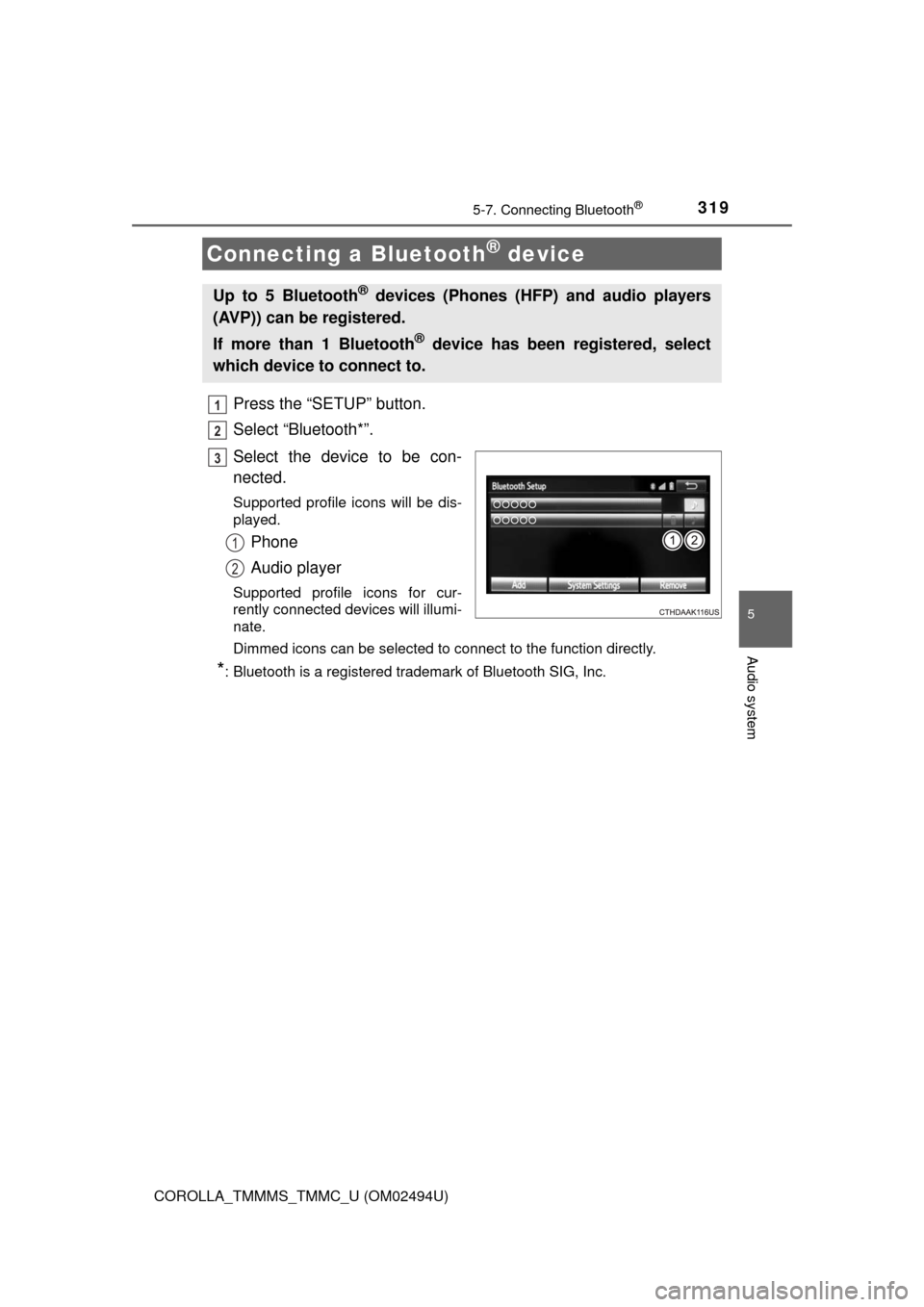
Press the “SETUP” button.
Select “Bluetooth*”.
Select the device to be con-
nected.
Supported profile icons will be dis-
played.
Phone
Audio player
Supported profile icons for cur-
rently connected devices will illumi-
nate.
Dimmed icons can be selected to connect to the function directly.
*: Bluetooth is a registered trademark of Bluetooth SIG, Inc.
Connecting a Bluetooth® device
Up to 5 Bluetooth® devices (Phones (HFP) and audio players
(AVP)) can be registered.
If more than 1 Bluetooth
® device has been registered, select
which device to connect to.
1
2
3
1
2
Page 320 of 612
3205-7. Connecting Bluetooth®
COROLLA_TMMMS_TMMC_U (OM02494U)
To turn auto connection mode on, set “Bluetooth* Power” to on.
(→P. 323)
When you register a phone, auto connection will be activated. Always
set it to this mode and leave the Bluetooth
® phone in a place where a
connection can be established.
When the engine switch is turned to the “ACC” or “ON” position (vehicles
without smart key system) or ACCESSORY or IGNITION ON mode (vehi-
cles with smart key system), the system will search for a nearby cellular
phone you have registered.
Next, the system automatically connects with the most recent of the
phones connected to in the past. Then, the connection result is displayed.
*: Bluetooth is a registered trademark of Bluetooth SIG, Inc.
When auto connection has failed or “Bluetooth* Power” is turned off,
you must connect the Bluetooth® device manually.
Follow the steps in “Connecting a Bluetooth
® device” from step .
(→P. 319)
*: Bluetooth is a registered trademark of Bluetooth SIG, Inc.
Registering an additional device
Select “Select Device” on the Bluetooth
® audio control screen.
For more information: →P. 3 1 6
Selecting a registered device
Select “Select Device” on the Bluetooth
® audio control screen.
For more information: →P. 3 1 9
Auto connection
Manual connection
Connecting a Bluetooth® audio player
11
1
2
1
2
Page 322 of 612
3225-7. Connecting Bluetooth®
COROLLA_TMMMS_TMMC_U (OM02494U)
Display the “Bluetooth* Setup” screen. (→P. 313)
Select the device.
Select “Device Info”.
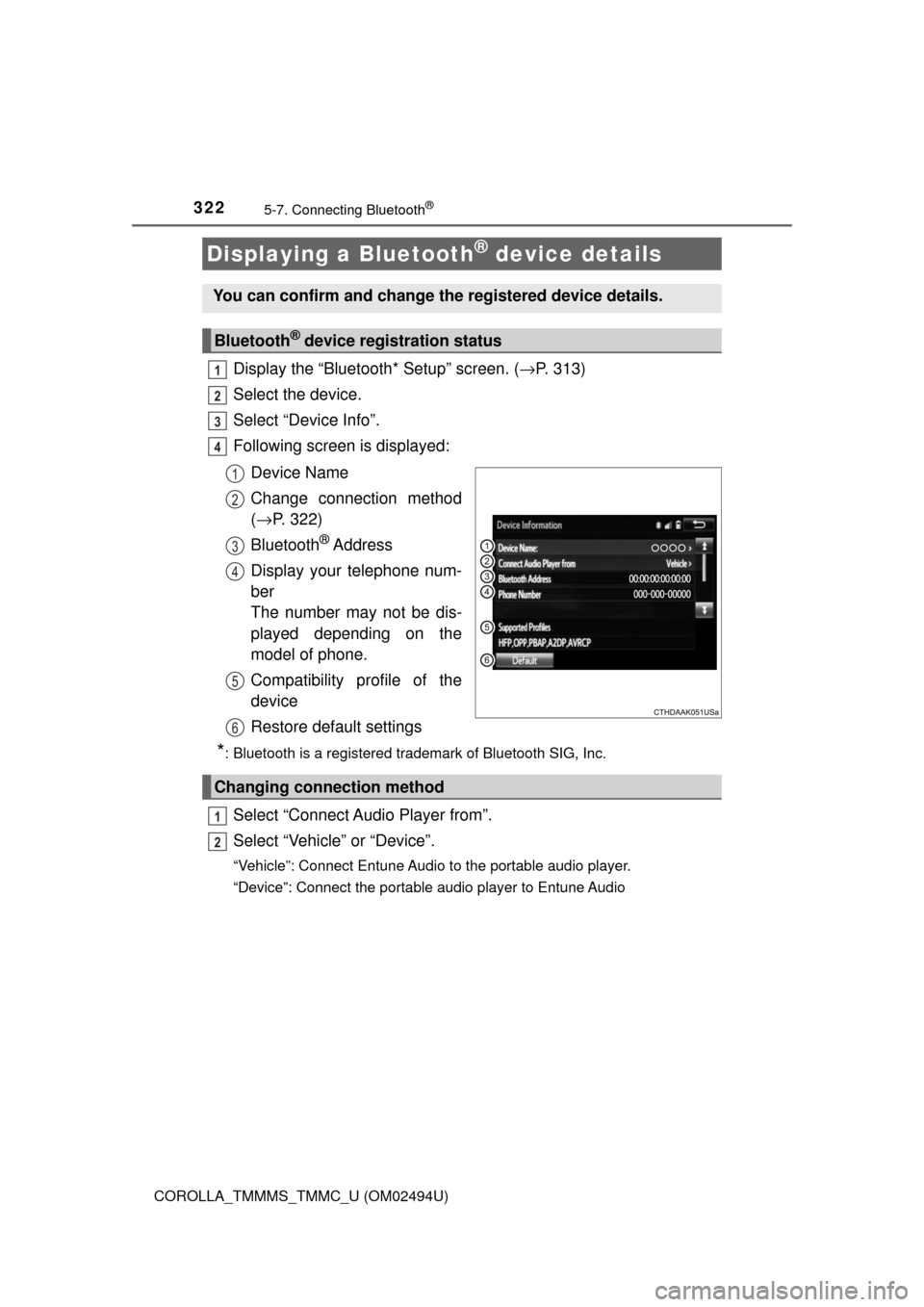
Following screen is displayed:
Device Name
Change connection method
(→P. 322)
Bluetooth
® Address
Display your telephone num-
ber
The number may not be dis-
played depending on the
model of phone.
Compatibility profile of the
device
Restore default settings
*: Bluetooth is a registered trademark of Bluetooth SIG, Inc.
Select “Connect Audio Player from”.
Select “Vehicle” or “Device”.
“Vehicle”: Connect Entune Audio to the portable audio player.
“Device”: Connect the portable audio player to Entune Audio
Displaying a Bluetooth® device details
You can confirm and change the registered device details.
Bluetooth® device registration status
1
2
3
4
1
2
3
4
5
6
Changing connection method
1
2
Page 323 of 612
3235-7. Connecting Bluetooth®
5
Audio system
COROLLA_TMMMS_TMMC_U (OM02494U)
Display the “Bluetooth* Setup” screen. (→P. 313)
Select “System Settings”.
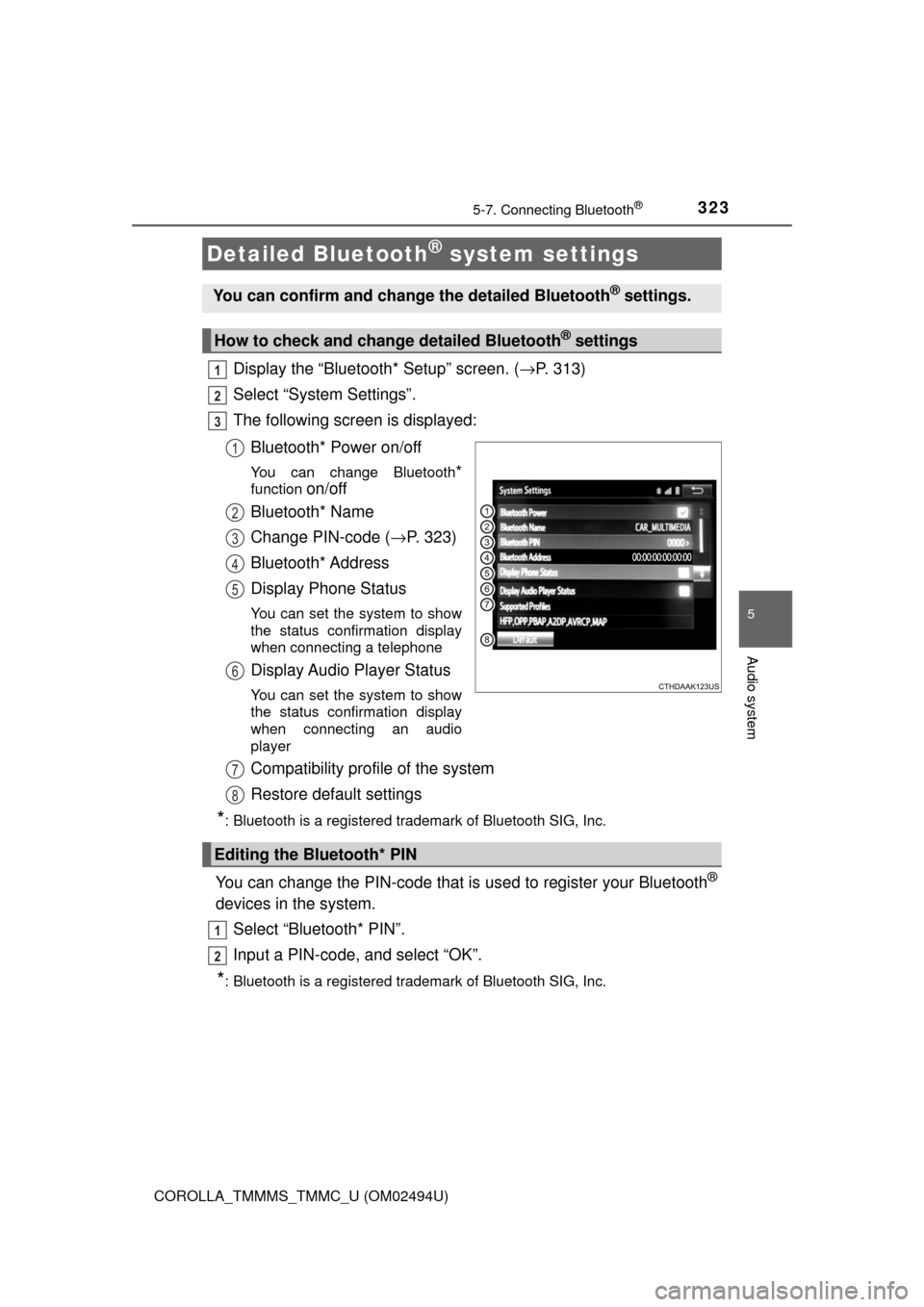
The following screen is displayed:
Bluetooth* Power on/off
You can change Bluetooth*
function on/off
Bluetooth* Name
Change PIN-code (→P. 323)
Bluetooth* Address
Display Phone Status
You can set the system to show
the status confirmation display
when connecting a telephone
Display Audio Player Status
You can set the system to show
the status confirmation display
when connecting an audio
player
Compatibility profile of the system
Restore default settings
*: Bluetooth is a registered trademark of Bluetooth SIG, Inc.
You can change the PIN-code that is used to register your Bluetooth®
devices in the system.
Select “Bluetooth* PIN”.
Input a PIN-code, and select “OK”.
*: Bluetooth is a registered trademark of Bluetooth SIG, Inc.
Detailed Bluetooth® system settings
You can confirm and change the detailed Bluetooth® settings.
How to check and change detailed Bluetooth® settings
1
2
3
1
2
3
4
5
6
Editing the Bluetooth* PIN
7
8
1
2
Page 324 of 612
324
COROLLA_TMMMS_TMMC_U (OM02494U)
5-8. Bluetooth® Audio
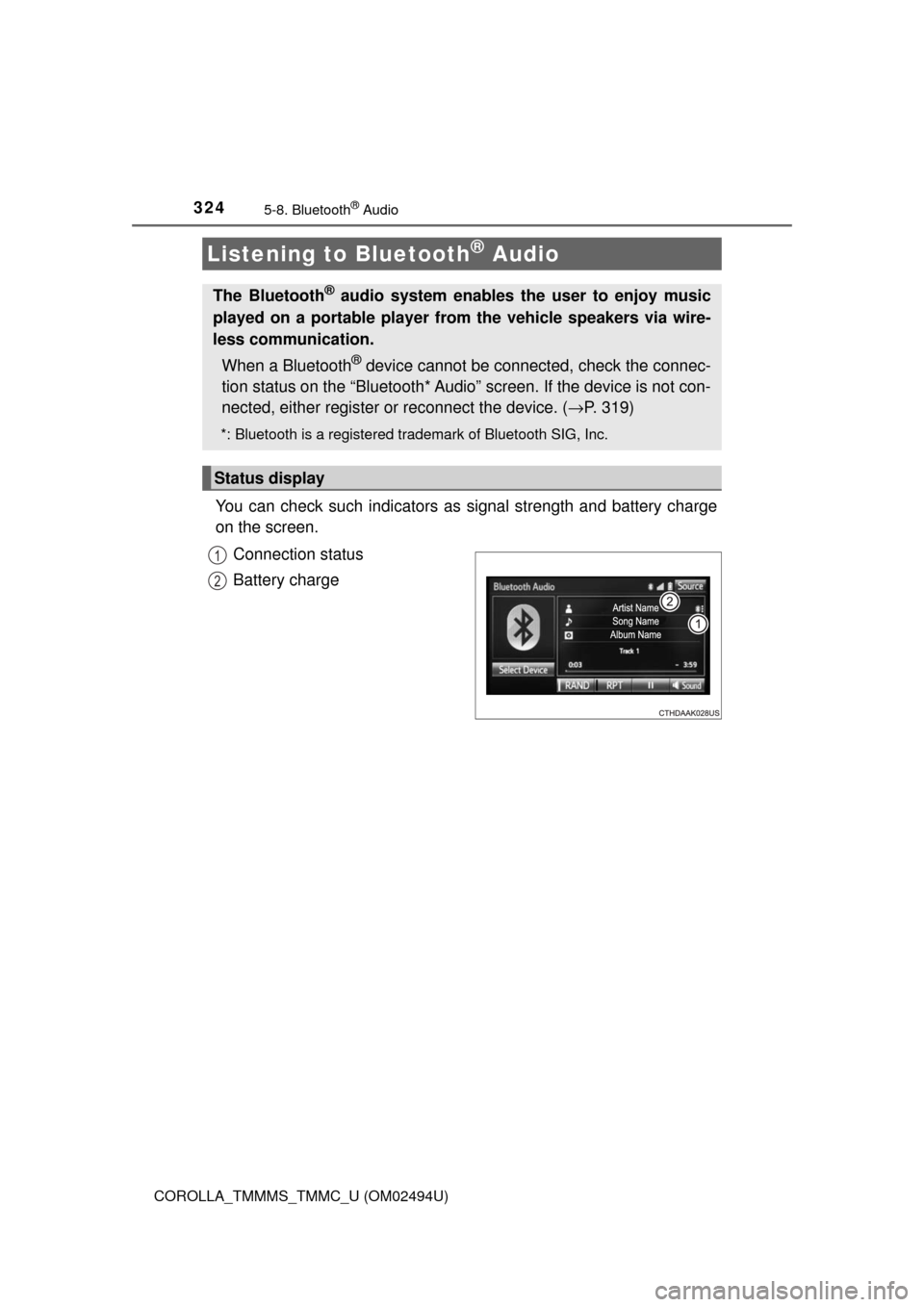
You can check such indicators as signal strength and battery charge
on the screen.
Connection status
Battery charge
Listening to Bluetooth® Audio
The Bluetooth® audio system enables the user to enjoy music
played on a portable player from the vehicle speakers via wire-
less communication.
When a Bluetooth
® device cannot be connected, check the connec-
tion status on the “Bluetooth* Audio” screen. If the device is not con-
nected, either register or reconnect the device. (→P. 319)
*: Bluetooth is a registered trademark of Bluetooth SIG, Inc.
Status display
1
2
Page 359 of 612
359
5
Audio system
COROLLA_TMMMS_TMMC_U (OM02494U)
5-10. Bluetooth®
■When using the Bluetooth® audio system
●In the following conditions, the system may not function.
• If the portable audio player is turned off
• If the portable audio player is not connected
• If the portable audio player’s battery is low
●There may be a delay if a cellular phone connection is made during
Bluetooth
® audio play.
●Depending on the type of portable audio player that is connected to the sys-
tem, operation may differ slightly and certain functions may not be available.
■When using the hands-free system
●Entune Audio is muted when making a call.
●If both parties speak at the same time, it may be difficult to hear.
●If the received call volume is overly loud, an echo may be heard.
If the Bluetooth
® phone is too close to the system, quality of the sound may
deteriorate and connection status may deteriorate.
●In the following circumstances, it may be difficult to hear the other party:
• When driving on unpaved roads
• When driving at high speeds
• If a roof or window is open
• If the air conditioning is blowing directly on the microphone
• If there is interference from the network of the cellular phone
■Conditions under which the system will not operate
●If using a cellular phone that does not support Bluetooth
®
●If the cellular phone is turned off
●If you are outside of cellular phone service coverage
●If the cellular phone is not connected
●If the cellular phone’s battery is low
●When outgoing calls are controlled, due to heavy traffic on telephone lines,
etc.
●When the cellular phone itself cannot be used
●When transferring contact data from the cellular phone
Bluetooth®