key TOYOTA COROLLA 2017 11.G User Guide
[x] Cancel search | Manufacturer: TOYOTA, Model Year: 2017, Model line: COROLLA, Model: TOYOTA COROLLA 2017 11.GPages: 612, PDF Size: 14.18 MB
Page 71 of 612
711-2. Theft deterrent system
1
For safety and security
COROLLA_TMMMS_TMMC_U (OM02494U)
■System maintenance
The vehicle has a maintenance-free type alarm system.
■Items to check before locking the vehicle
To prevent unexpected triggering of the alarm and vehicle theft, make sure of
the following:
●Nobody is in the vehicle.
●The windows and moon roof are closed before the alarm is set.
●No valuables or other personal items are left in the vehicle.
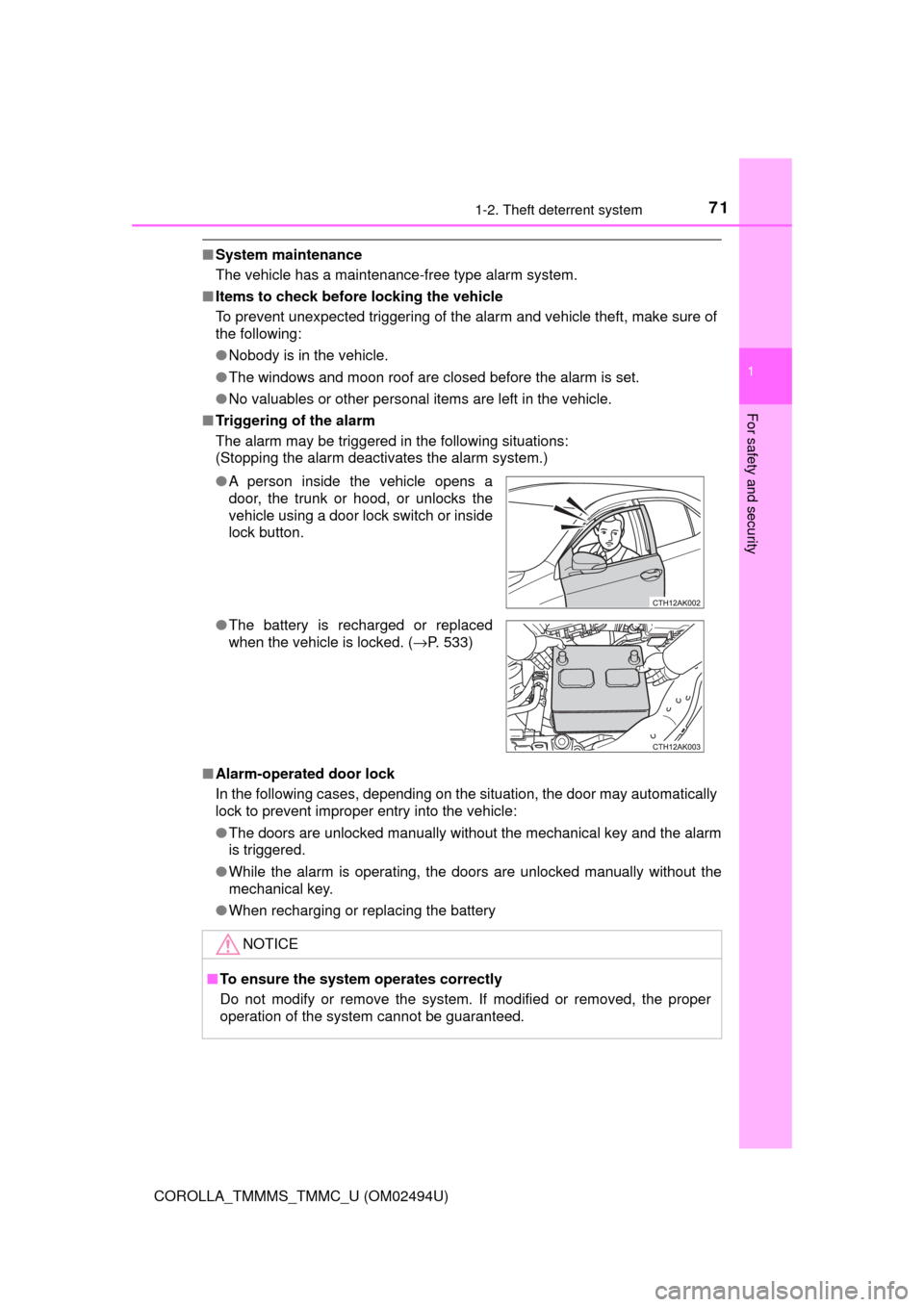
■Triggering of the alarm
The alarm may be triggered in the following situations:
(Stopping the alarm deactivates the alarm system.)
■Alarm-operated door lock
In the following cases, depending on the situation, the door may automatically
lock to prevent improper entry into the vehicle:
●The doors are unlocked manually without the mechanical key and the alarm
is triggered.
●While the alarm is operating, the doors are unlocked manually without the
mechanical key.
●When recharging or replacing the battery ●A person inside the vehicle opens a
door, the trunk or hood, or unlocks the
vehicle using a door lock switch or inside
lock button.
●The battery is recharged or replaced
when the vehicle is locked. (→P. 533)
NOTICE
■To ensure the system operates correctly
Do not modify or remove the system. If modified or removed, the proper
operation of the system cannot be guaranteed.
Page 76 of 612

762. Instrument cluster
COROLLA_TMMMS_TMMC_U (OM02494U)
*1: These lights turn on when the engine switch is turned to the “ON” position
(vehicles without a smart key system) or the engine switch is turned to
IGNITION ON mode (vehicles with a smart key system), to indicate that a
system check is being performed. They will turn off after the engine is
started, or after a few seconds. There may be a malfunction in a system if
a light does not come on, or turn off. Have the vehicle inspected by your
Toyota dealer.
*2: If equipped
*3: The light flashes to indicate a malfunction.
Page 78 of 612

782. Instrument cluster
COROLLA_TMMMS_TMMC_U (OM02494U)
*1: These lights, except those shown on the multi-information display, turn on
when the engine switch is turned to the “ON” position (vehicles without a
smart key system) or the engine switch is turned to IGNITION ON mode
(vehicles with a smart key system) to indicate that a system check is being
performed. They will turn off after the engine is started, or after a few sec-
onds. There may be a malfunction in a system if a light does not come on,
or turn off. Have the vehicle inspected by your Toyota dealer.
*2: If equipped
*3: The light flashes to indicate that the system is operating.
*4: The light does not turn on when the system is disabled.
*5: This light illuminates on the center panel.
*6: The light turns on when the system is off.
*7: When the outside temperature is approximately 37°F (3°C) or lower, the
indicator will flash 10 times, then stay on.
WARNING
■If a safety system warning light does not come on
Should a safety system light such as the ABS and SRS warning lights not
come on when you start the engine, this could mean that these systems are
not available to help protect you in an accident, which could result in death
or serious injury. Have the vehicle inspected by your Toyota dealer immedi-
ately if this occurs.
Page 86 of 612

862. Instrument cluster
COROLLA_TMMMS_TMMC_U (OM02494U)■
Customization
Some settings can be changed. (Customizable features: →P. 568)
■The meters and display illuminate when
Vehicles without a smart key system
The engine switch is in the “ON” position.
Vehicles with a smart key system
The engine switch is in IGNITION ON mode.
■When disconnecting and reconnecting battery terminals
The following information data will be reset:
●Driving range
●Average vehicle speed
●Elapsed time
●Average fuel consumption
■Liquid crystal display
Small spots or light spots may appear on the display. This phenomenon is
characteristic of liquid crystal displays, and there is no problem continuing to
use the display.
■Setting display automatic suspension
In the following situations, the setting display will be suspended.
●When a message appears.
●When the vehicle begins to move.
Page 91 of 612
912. Instrument cluster
2
Instrument cluster
COROLLA_TMMMS_TMMC_U (OM02494U)
■The meters and display illuminate when
Vehicles without a smart key system
The engine switch is in the “ON” position.
Vehicles with a smart key system
The engine switch is in IGNITION ON mode.
NOTICE
■To prevent damage to the engine and its components
●Do not let the indicator needle of the tachometer enter the red zone, which
indicates the maximum engine speed.
●The engine may be overheating if the engine coolant temperature gauge is
in the red zone. In this case, immediately stop the vehicle in a safe place,
and check the engine after it has cooled completely. (→P. 535)
Page 99 of 612
992. Instrument cluster
2
Instrument cluster
COROLLA_TMMMS_TMMC_U (OM02494U)
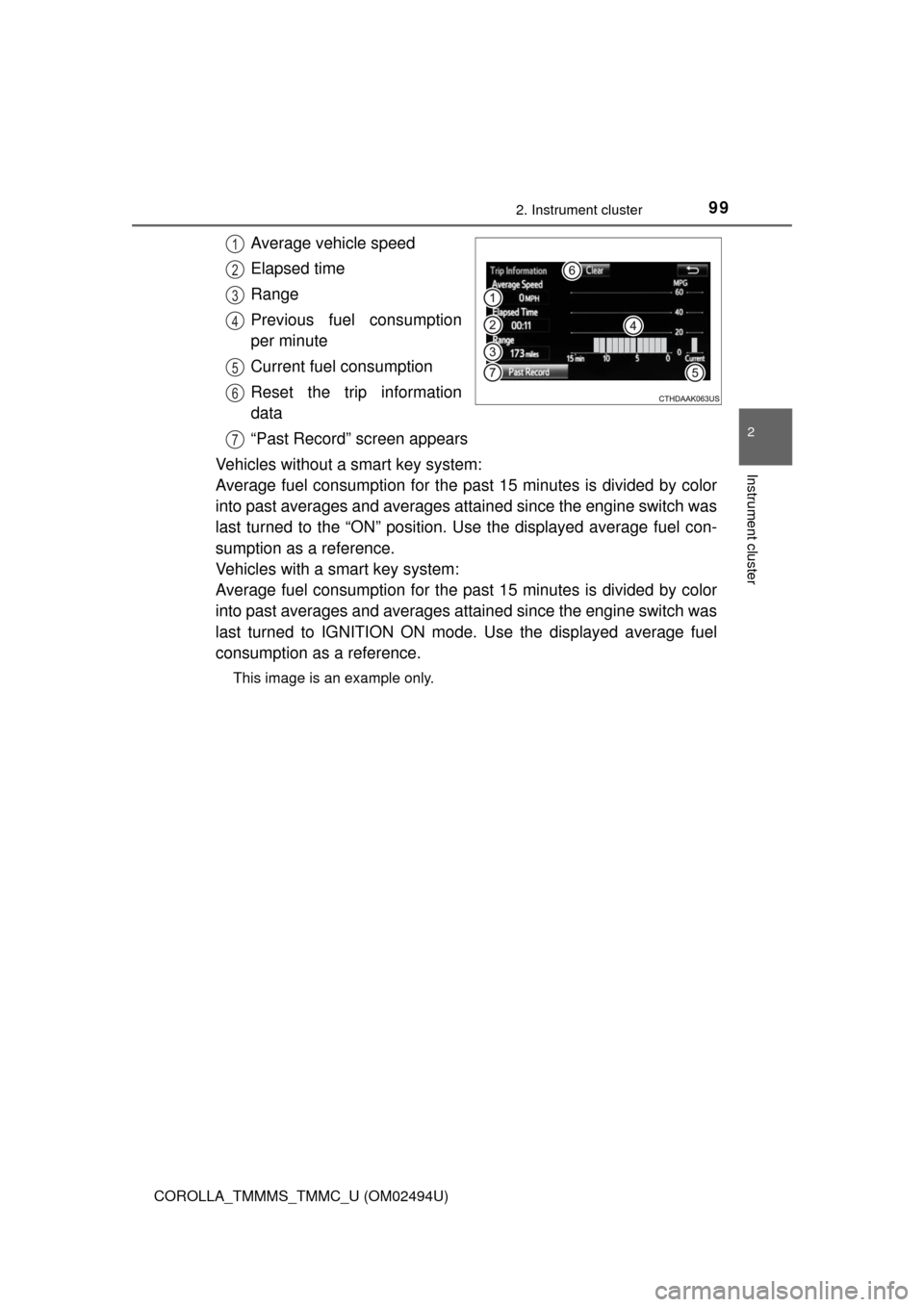
Average vehicle speed
Elapsed time
Range
Previous fuel consumption
per minute
Current fuel consumption
Reset the trip information
data
“Past Record” screen appears
Vehicles without a smart key system:
Average fuel consumption for the past 15 minutes is divided by color
into past averages and averages attained since the engine switch was
last turned to the “ON” position. Use the displayed average fuel con-
sumption as a reference.
Vehicles with a smart key system:
Average fuel consumption for the past 15 minutes is divided by color
into past averages and averages attained since the engine switch was
last turned to IGNITION ON mode. Use the displayed average fuel
consumption as a reference.
This image is an example only.
1
2
3
4
5
6
7
Page 103 of 612
103
3
Operation of
each component
COROLLA_TMMMS_TMMC_U (OM02494U)3-1. Key information
Keys .................................. 104
3-2. Opening, closing and
locking the doors
Doors ................................ 110
Trunk ................................. 119
Smart key system ............. 124
3-3. Adjusting the seats
Front seats ........................ 132
Rear seats......................... 134
Head restraints.................. 136
3-4. Adjusting the steering
wheel and mirrors
Steering wheel .................. 139
Inside rear view mirror ...... 141
Outside rear view
mirrors ............................. 143
3-5. Opening and closing
the windows
Power windows ................. 145
Moon roof .......................... 149
Page 104 of 612
104
COROLLA_TMMMS_TMMC_U (OM02494U)
3-1. Key information
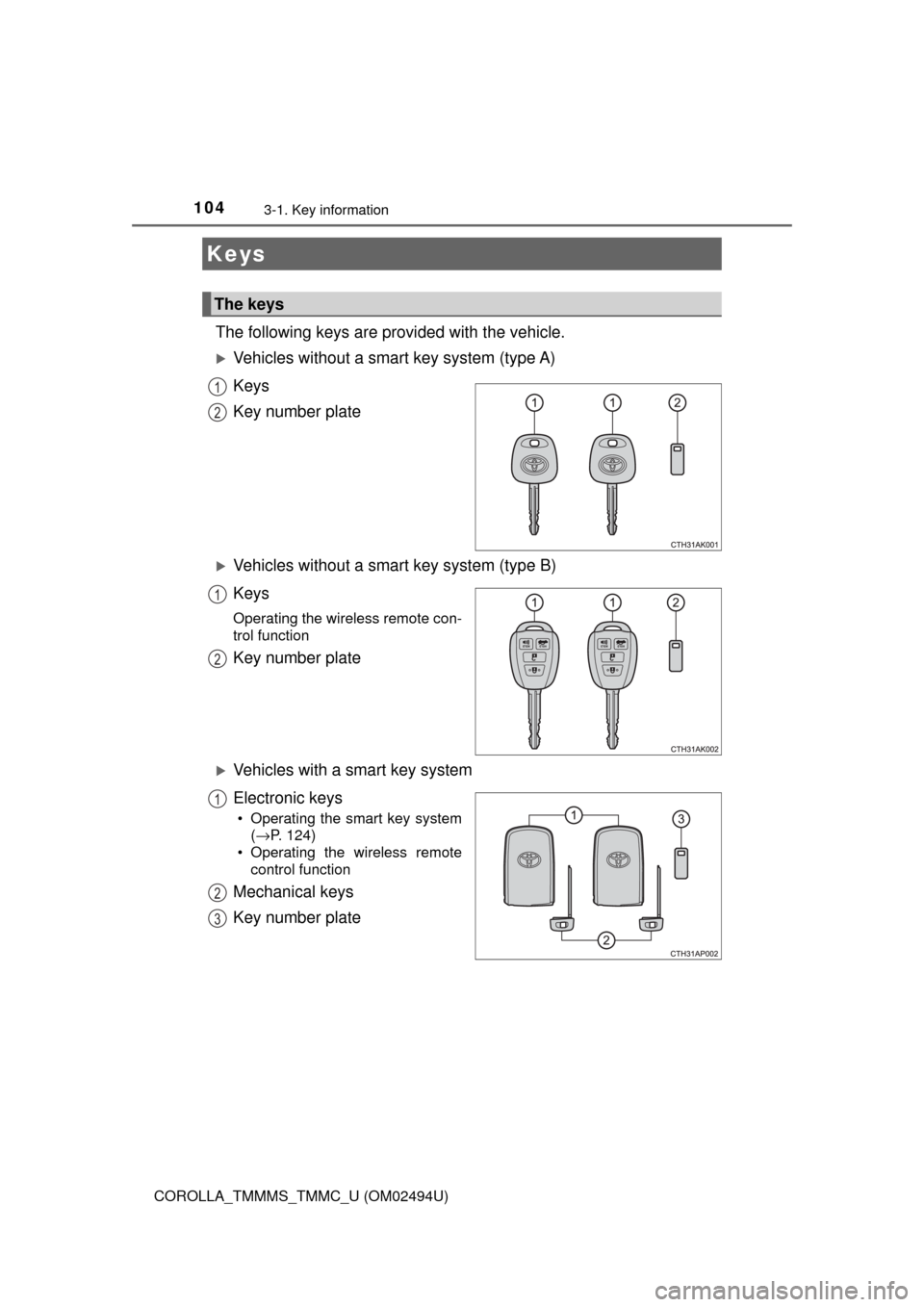
The following keys are provided with the vehicle.
Vehicles without a smart key system (type A)
Keys
Key number plate
Vehicles without a smart key system (type B)
Keys
Operating the wireless remote con-
trol function
Key number plate
Vehicles with a smart key system
Electronic keys
• Operating the smart key system
(→P. 124)
• Operating the wireless remote
control function
Mechanical keys
Key number plate
Keys
The keys
1
2
1
2
1
2
3
Page 105 of 612
1053-1. Key information
3
Operation of each component
COROLLA_TMMMS_TMMC_U (OM02494U)
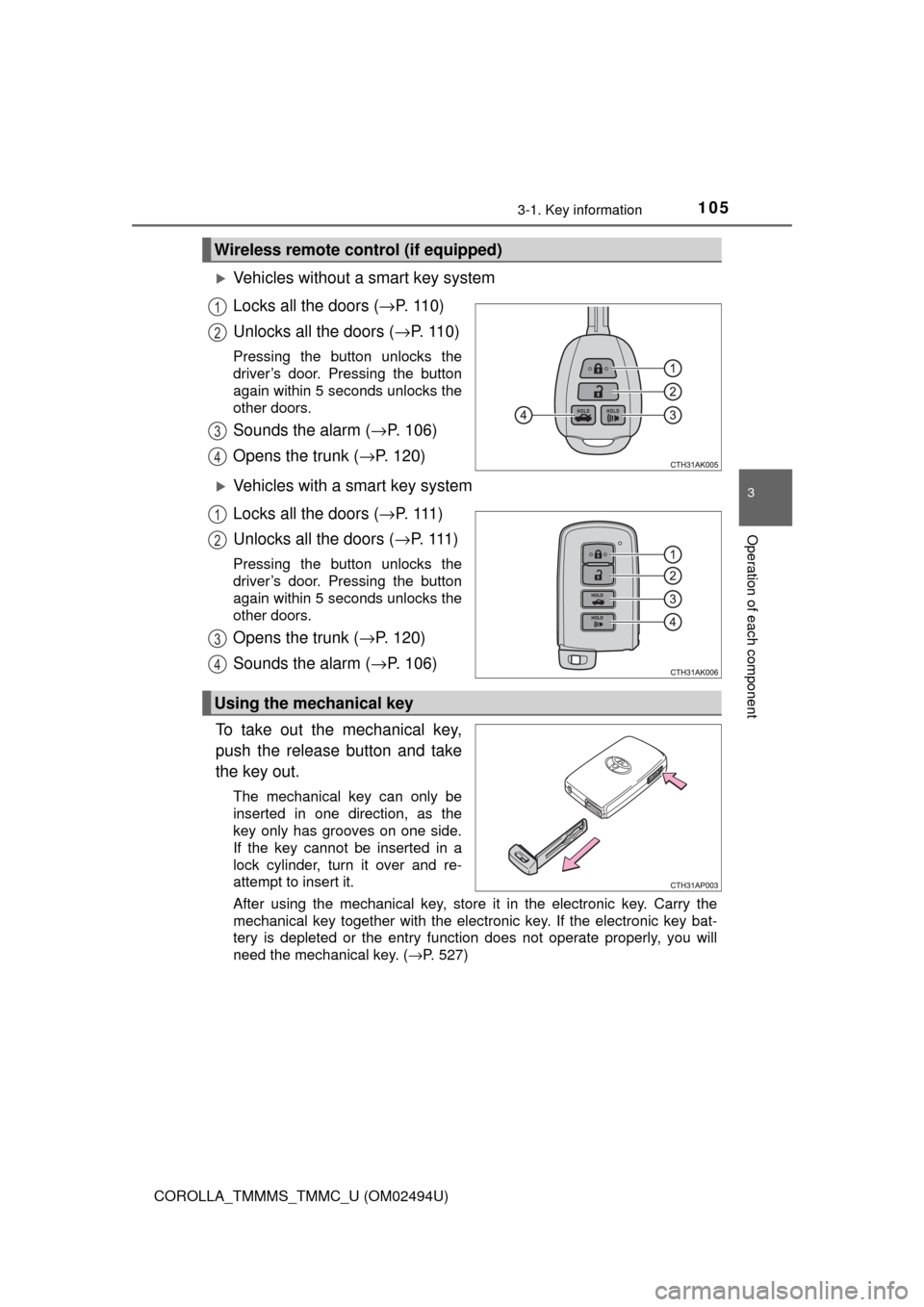
Vehicles without a smart key system
Locks all the doors (→P. 1 1 0 )
Unlocks all the doors (→P. 1 1 0 )
Pressing the button unlocks the
driver’s door. Pressing the button
again within 5 seconds unlocks the
other doors.
Sounds the alarm (→P. 106)
Opens the trunk (→P. 120)
Vehicles with a smart key system
Locks all the doors (→P. 1 1 1 )
Unlocks all the doors (→P. 1 1 1 )
Pressing the button unlocks the
driver’s door. Pressing the button
again within 5 seconds unlocks the
other doors.
Opens the trunk (→P. 120)
Sounds the alarm (→P. 106)
To take out the mechanical key,
push the release button and take
the key out.
The mechanical key can only be
inserted in one direction, as the
key only has grooves on one side.
If the key cannot be inserted in a
lock cylinder, turn it over and re-
attempt to insert it.
After using the mechanical key, store it in the electronic key. Carry the
mechanical key together with the electronic key. If the electronic key bat-
tery is depleted or the entry function does not operate properly, you will
need the mechanical key. (→P. 527)
Wireless remote control (if equipped)
1
2
3
4
1
2
3
4
Using the mechanical key
Page 106 of 612
1063-1. Key information
COROLLA_TMMMS_TMMC_U (OM02494U)
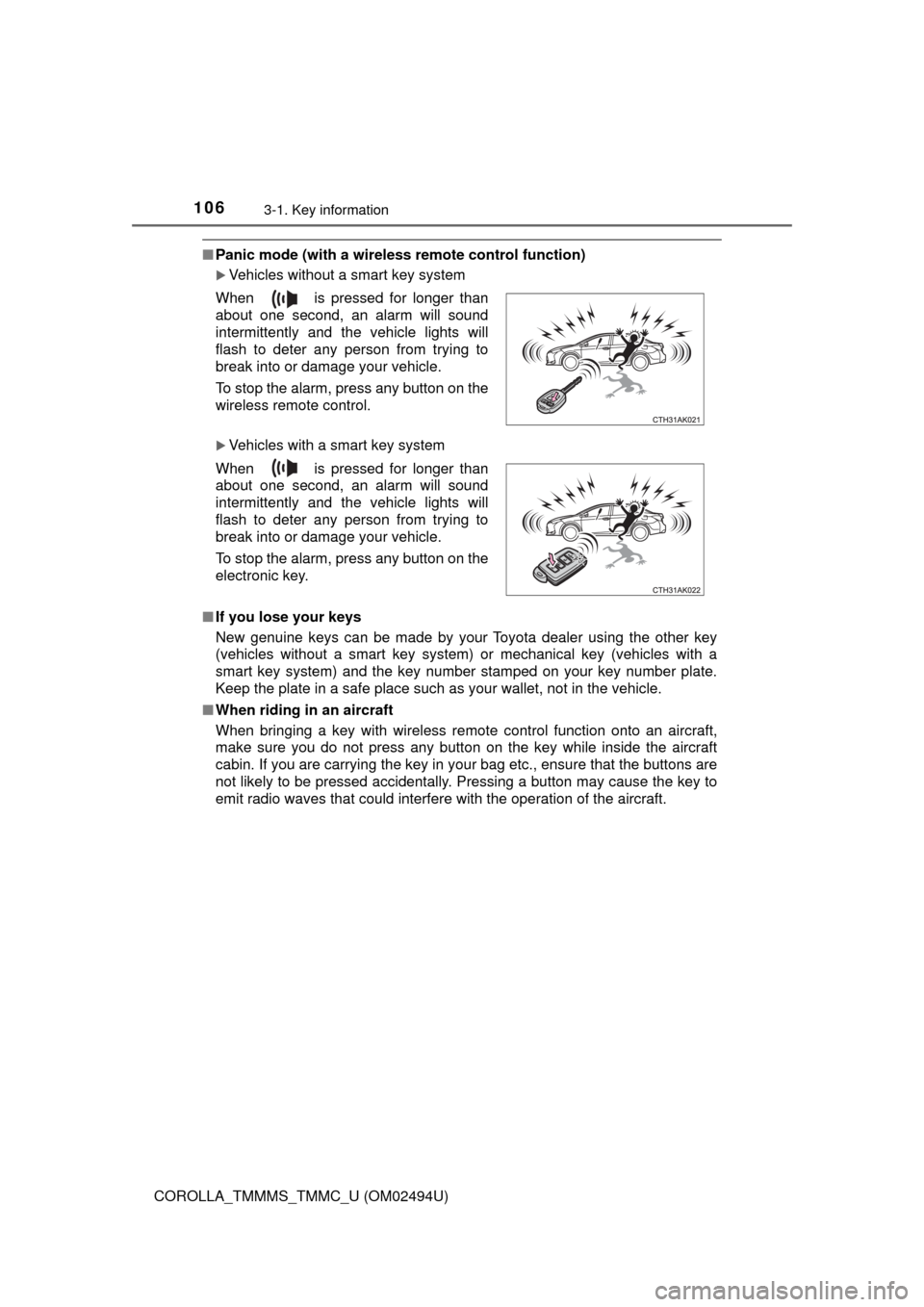
■Panic mode (with a wireless remote control function)
Vehicles without a smart key system
Vehicles with a smart key system
■If you lose your keys
New genuine keys can be made by your Toyota dealer using the other key
(vehicles without a smart key system) or mechanical key (vehicles with a
smart key system) and the key number stamped on your key number plate.
Keep the plate in a safe place such as your wallet, not in the vehicle.
■When riding in an aircraft
When bringing a key with wireless remote control function onto an aircraft,
make sure you do not press any button on the key while inside the aircraft
cabin. If you are carrying the key in your bag etc., ensure that the buttons are
not likely to be pressed accidentally. Pressing a button may cause the key to
emit radio waves that could interfere with the operation of the aircraft. When is pressed for longer than
about one second, an alarm will sound
intermittently and the vehicle lights will
flash to deter any person from trying to
break into or damage your vehicle.
To stop the alarm, press any button on the
wireless remote control.
When is pressed for longer than
about one second, an alarm will sound
intermittently and the vehicle lights will
flash to deter any person from trying to
break into or damage your vehicle.
To stop the alarm, press any button on the
electronic key.