key TOYOTA COROLLA 2017 11.G Owner's Manual
[x] Cancel search | Manufacturer: TOYOTA, Model Year: 2017, Model line: COROLLA, Model: TOYOTA COROLLA 2017 11.GPages: 612, PDF Size: 14.18 MB
Page 107 of 612
1073-1. Key information
3
Operation of each component
COROLLA_TMMMS_TMMC_U (OM02494U)■Key battery depletion (vehicles with a wireless remote control function)
Vehicles without a smart key system
If the wireless remote control function does not operate, the battery may be
depleted. Replace the battery when necessary. (→P. 459)
Vehicles with a smart key system
●The standard battery life is 1 to 2 years.
●If the battery becomes low, an alarm will sound in the cabin when the engine
stops. (→P. 507)
●As the electronic key always receives radio waves, the battery will become
depleted even if the electronic key is not used. The following symptoms indi-
cate that the electronic key battery may be depleted. Replace the battery
when necessary. (→P. 459)
• The smart key system or the wireless remote control does not operate.
• The detection area becomes smaller.
• The LED indicator on the key surface does not turn on.
●To avoid serious deterioration, do not leave the electronic key within 3 ft. (1
m) of the following electrical appliances that produce a magnetic field:
•TVs
• Personal computers
• Cellular phones, cordless phones and battery chargers
• Recharging cellular phones or cordless phones
• Table lamps
• Induction cookers
■Replacing the battery
→P. 459
■Confirmation of the registered key number
The number of keys already registered to the vehicle can be confirmed. Ask
your Toyota dealer for details.
■If a wrong key is used (vehicles with a smart key system)
The key cylinder rotates freely to isolate inside mechanism.
■Certification for the wireless remote control
For the U.S.A.
FCC ID: HYQ23AAH FCC ID: HYQ12BEL
NOTE:
This device complies with part 15 of the FCC Rules. Operation is subject to
the following two conditions: (1) This device may not cause harmful interfer-
ence, and (2) this device must accept any interference received, including
interference that may cause undesired operation.
FCC WARNING:
Changes or modifications not expressly approved by the party responsible for
compliance could void the user’s authority to operate the equipment.
For 12BEL
The FCC ID/IC Certification number is affixed inside the equipment. You can
find the ID/number when replacing the battery.
Page 108 of 612

1083-1. Key information
COROLLA_TMMMS_TMMC_U (OM02494U)
For Canada
NOTE:
This device complies with Industry Canada’s licence-exempt RSSs. Opera-
tion is subject to the following two conditions: (1) This device may not cause
interference; and (2) This device must accept any interference, including
interference that may cause undesired operation of the device.
For 12BEL/12BDP
The FCC ID/IC Certification number is affixed inside the equipment. You can
find the ID/number when replacing the battery.
NOTE:
Le présent appareil est conforme aux CNR d'lndustrie Canada appli-
cables aux appareils radio exempts de licence. L'exploitation est autori-
sée aux deux conditions suivantes: (1) l'appareil ne doit pas produire de
brouillage; (2) l'utilisateur de l'appareil doit accepter tout brouillage
radioélectrique subi, même si le brouillage est susceptible d'en compro-
mettre le fonctionnement.
Pour 12BEL/12BDP
L’identification FCC/le numéro d’accréditation IC est apposé(e) à l’intérieur de
l’appareil. Cette identification/ce numéro est visible au remplacement de la
pile.
■Customization
Settings (e.g. wireless remote control system) can be changed.
(Customizable features: →P. 568)
Page 109 of 612
1093-1. Key information
3
Operation of each component
COROLLA_TMMMS_TMMC_U (OM02494U)
NOTICE
■To prevent key damage
●Do not drop the keys, subject them to strong shocks or bend them.
●Do not expose the keys to high temperatures for long periods of time.
●Do not get the keys wet or wash them in an ultrasonic washer etc.
●Do not attach metallic or magnetic materials to the keys or place the keys
close to such materials.
●Do not disassemble the keys.
●Do not attach a sticker or anything else to the surface of the electronic key
and key (with a wireless remote control function).
●Vehicles with a smart key system: Do not place the keys near objects that
produce magnetic fields, such as TVs, audio systems and induction cook-
ers, or medical electrical equipment, such as low-frequency therapy equip-
ment.
■Carrying the electronic key on your person (vehicles with a smart key
system)
Carry the electronic key 3.9 in. (10 cm) or more away from electric appli-
ances that are turned on. Radio waves emitted from electric appliances
within 3.9 in. (10 cm) of the electronic key may interfere with the key, caus-
ing the key to not function properly.
■In case of a smart key system malfunction or other key-related prob-
lems (vehicles with a smart key system)
Take your vehicle with all the electronic keys provided with your vehicle to
your Toyota dealer.
■When an electronic key is lost (vehicles with a smart key system)
If the electronic key remains lost, the risk of vehicle theft increases signifi-
cantly. Visit your Toyota dealer immediately with all remaining electronic
keys that was provided with your vehicle.
Page 110 of 612
110
COROLLA_TMMMS_TMMC_U (OM02494U)
3-2. Opening, closing and locking the doors
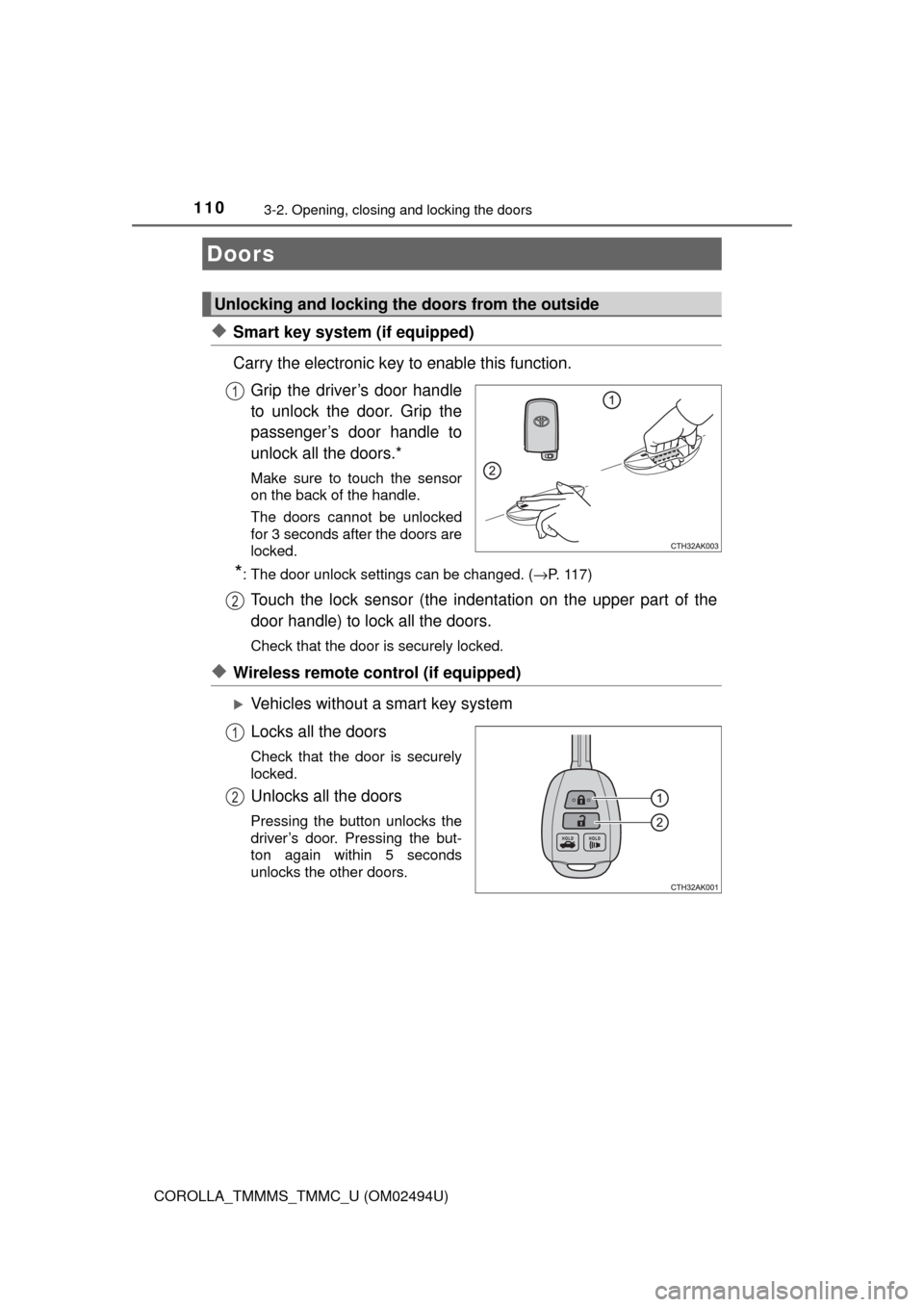
◆Smart key system (if equipped)
Carry the electronic key to enable this function.
Grip the driver’s door handle
to unlock the door. Grip the
passenger’s door handle to
unlock all the doors.*
Make sure to touch the sensor
on the back of the handle.
The doors cannot be unlocked
for 3 seconds after the doors are
locked.
*: The door unlock settings can be changed. (→P. 117)
Touch the lock sensor (the indentation on the upper part of the
door handle) to lock all the doors.
Check that the door is securely locked.
◆Wireless remote control (if equipped)
Vehicles without a smart key system
Locks all the doors
Check that the door is securely
locked.
Unlocks all the doors
Pressing the button unlocks the
driver’s door. Pressing the but-
ton again within 5 seconds
unlocks the other doors.
Doors
Unlocking and locking the doors from the outside
1
2
1
2
Page 111 of 612
1113-2. Opening, closing and locking the doors
3
Operation of each component
COROLLA_TMMMS_TMMC_U (OM02494U)
Vehicles with a smart key system
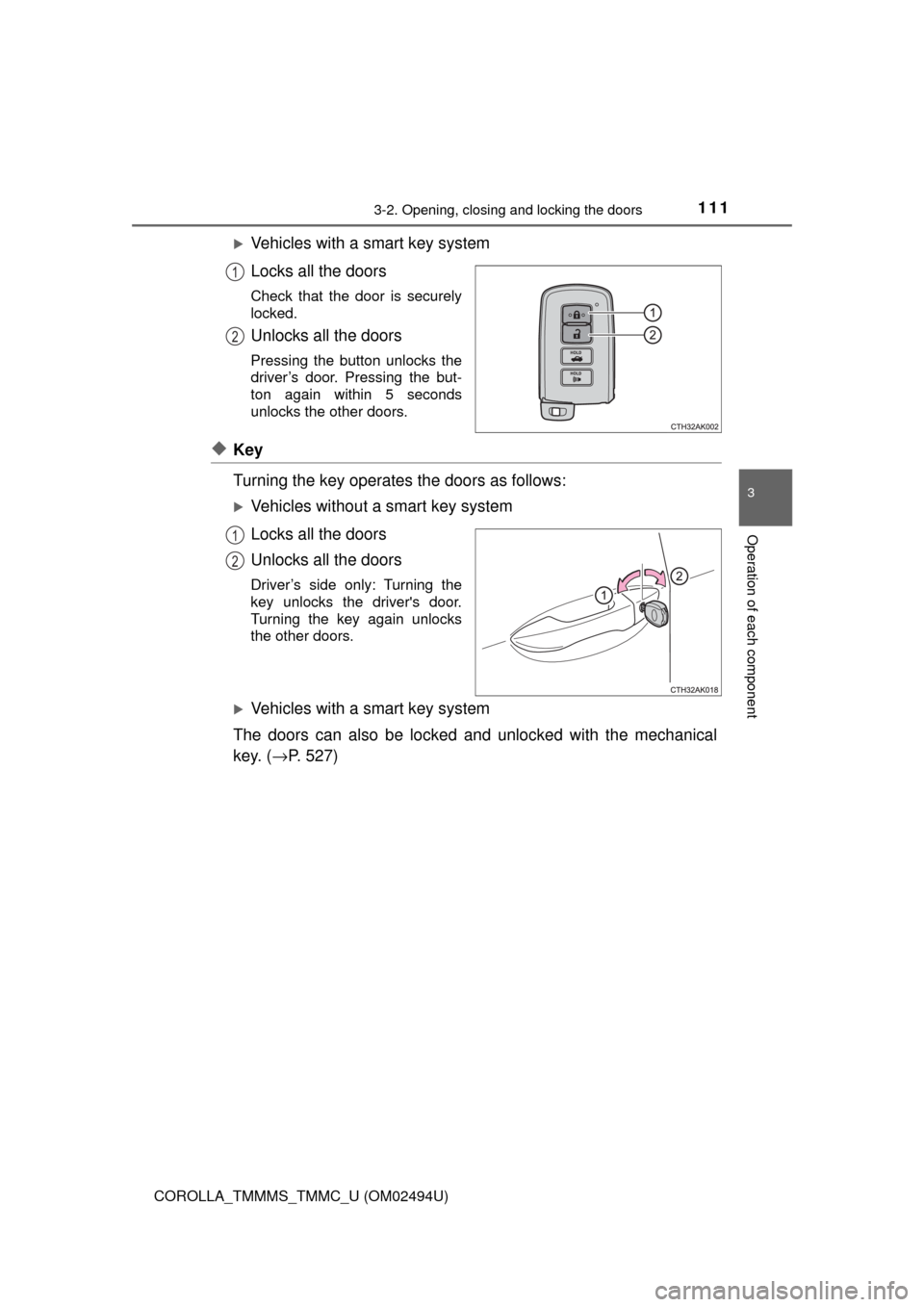
Locks all the doors
Check that the door is securely
locked.
Unlocks all the doors
Pressing the button unlocks the
driver’s door. Pressing the but-
ton again within 5 seconds
unlocks the other doors.
◆Key
Turning the key operates the doors as follows:
Vehicles without a smart key system
Locks all the doors
Unlocks all the doors
Driver’s side only: Turning the
key unlocks the driver's door.
Turning the key again unlocks
the other doors.
Vehicles with a smart key system
The doors can also be locked and unlocked with the mechanical
key. (→P. 527)
1
2
1
2
Page 112 of 612
1123-2. Opening, closing and locking the doors
COROLLA_TMMMS_TMMC_U (OM02494U)
■Operation signals
A buzzer sounds and the emergency flashers flash to indicate that the doors
have been locked/unlocked. (Locked: once; Unlocked: twice)
■Security feature
If a door is not opened within approximately 60 seconds after the vehicle is
unlocked, the security feature automatically locks the vehicle again.
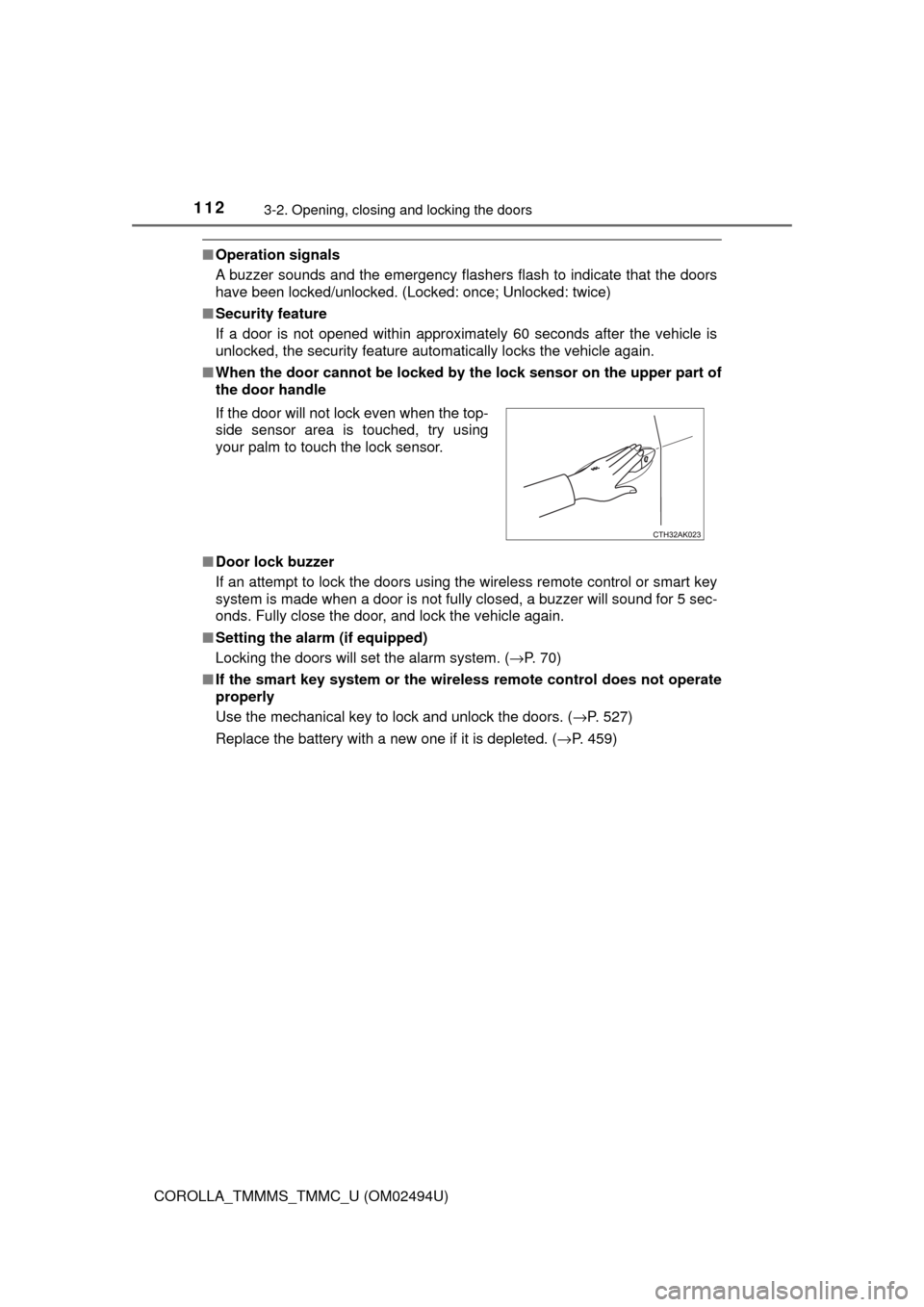
■When the door cannot be locked by the lock sensor on the upper part of
the door handle
■Door lock buzzer
If an attempt to lock the doors using the wireless remote control or smart key
system is made when a door is not fully closed, a buzzer will sound for 5 sec-
onds. Fully close the door, and lock the vehicle again.
■Setting the alarm (if equipped)
Locking the doors will set the alarm system. (→P. 70)
■If the smart key system or the wireless remote control does not operate
properly
Use the mechanical key to lock and unlock the doors. (→P. 527)
Replace the battery with a new one if it is depleted. (→P. 459) If the door will not lock even when the top-
side sensor area is touched, try using
your palm to touch the lock sensor.
Page 113 of 612
1133-2. Opening, closing and locking the doors
3
Operation of each component
COROLLA_TMMMS_TMMC_U (OM02494U)
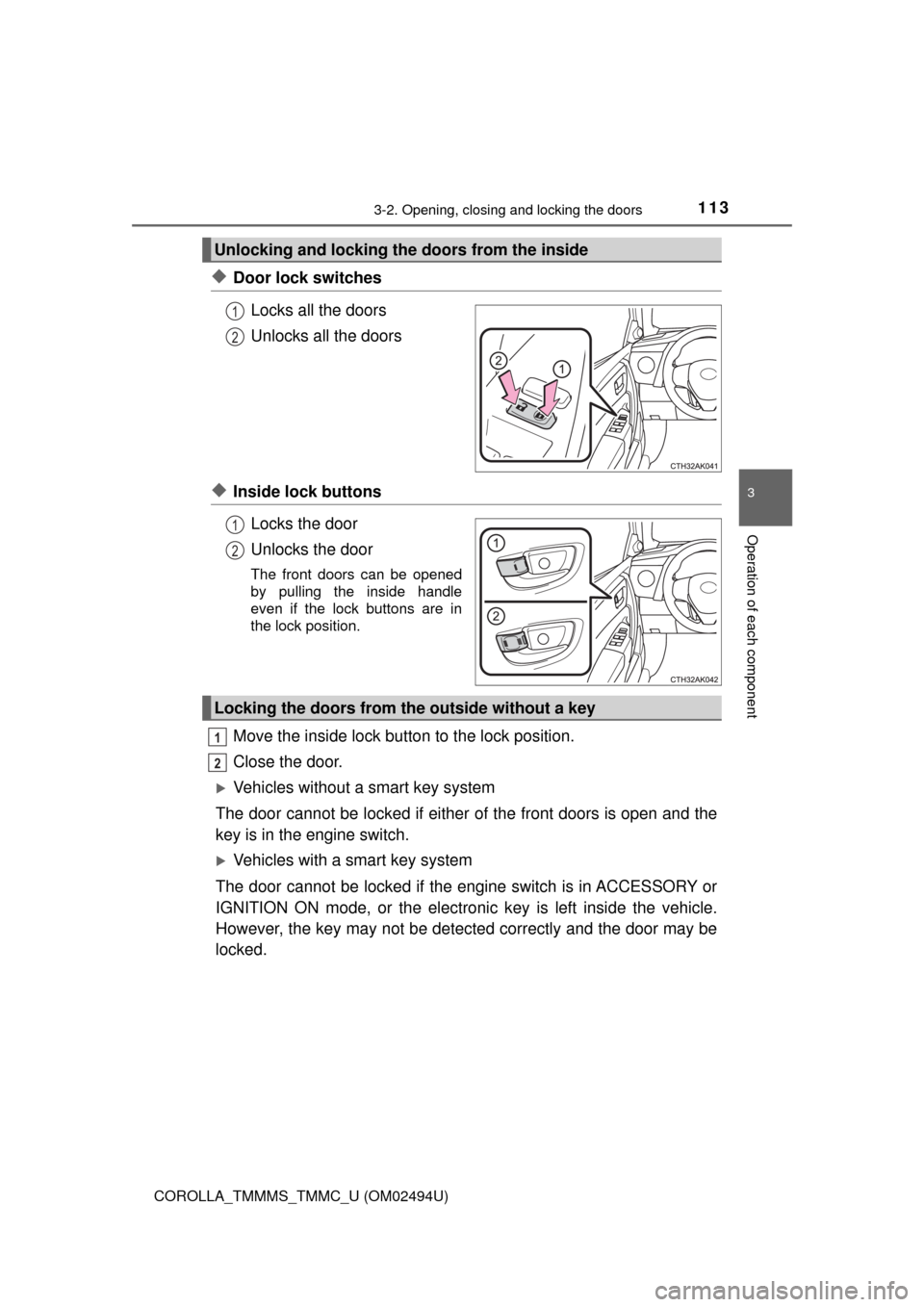
◆Door lock switches
Locks all the doors
Unlocks all the doors
◆Inside lock buttons
Locks the door
Unlocks the door
The front doors can be opened
by pulling the inside handle
even if the lock buttons are in
the lock position.
Move the inside lock button to the lock position.
Close the door.
Vehicles without a smart key system
The door cannot be locked if either of the front doors is open and the
key is in the engine switch.
Vehicles with a smart key system
The door cannot be locked if the engine switch is in ACCESSORY or
IGNITION ON mode, or the electronic key is left inside the vehicle.
However, the key may not be detected correctly and the door may be
locked.
Unlocking and locking the doors from the inside
1
2
1
2
Locking the doors from the outside without a key
1
2
Page 115 of 612
1153-2. Opening, closing and locking the doors
3
Operation of each component
COROLLA_TMMMS_TMMC_U (OM02494U)
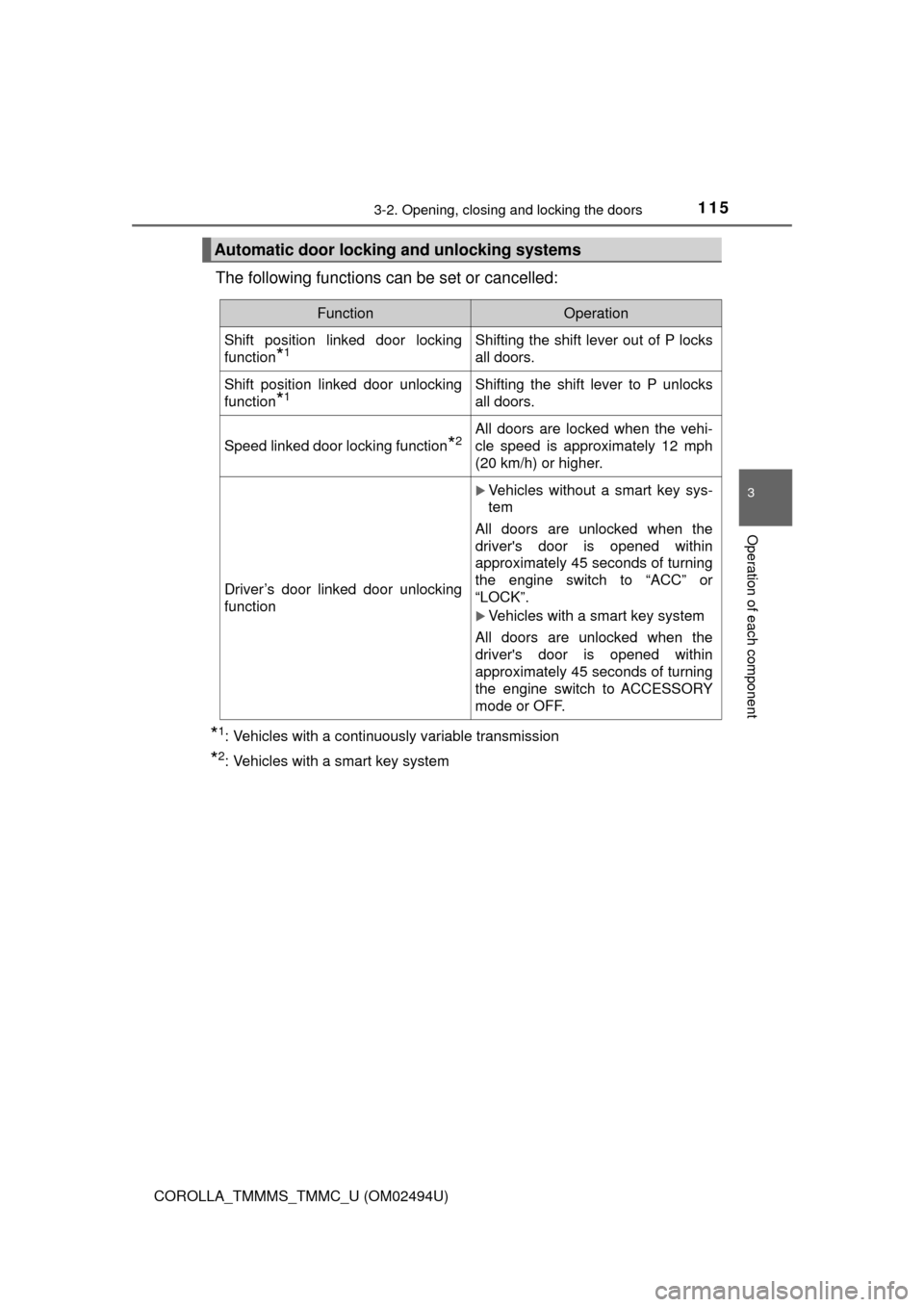
The following functions can be set or cancelled:
*1: Vehicles with a continuously variable transmission
*2: Vehicles with a smart key system
Automatic door locking and unlocking systems
FunctionOperation
Shift position linked door locking
function
*1Shifting the shift lever out of P locks
all doors.
Shift position linked door unlocking
function
*1Shifting the shift lever to P unlocks
all doors.
Speed linked door locking function*2All doors are locked when the vehi-
cle speed is approximately 12 mph
(20 km/h) or higher.
Driver’s door linked door unlocking
function
Vehicles without a smart key sys-
tem
All doors are unlocked when the
driver's door is opened within
approximately 45 seconds of turning
the engine switch to “ACC” or
“LOCK”.
Vehicles with a smart key system
All doors are unlocked when the
driver's door is opened within
approximately 45 seconds of turning
the engine switch to ACCESSORY
mode or OFF.
Page 116 of 612
1163-2. Opening, closing and locking the doors
COROLLA_TMMMS_TMMC_U (OM02494U)■
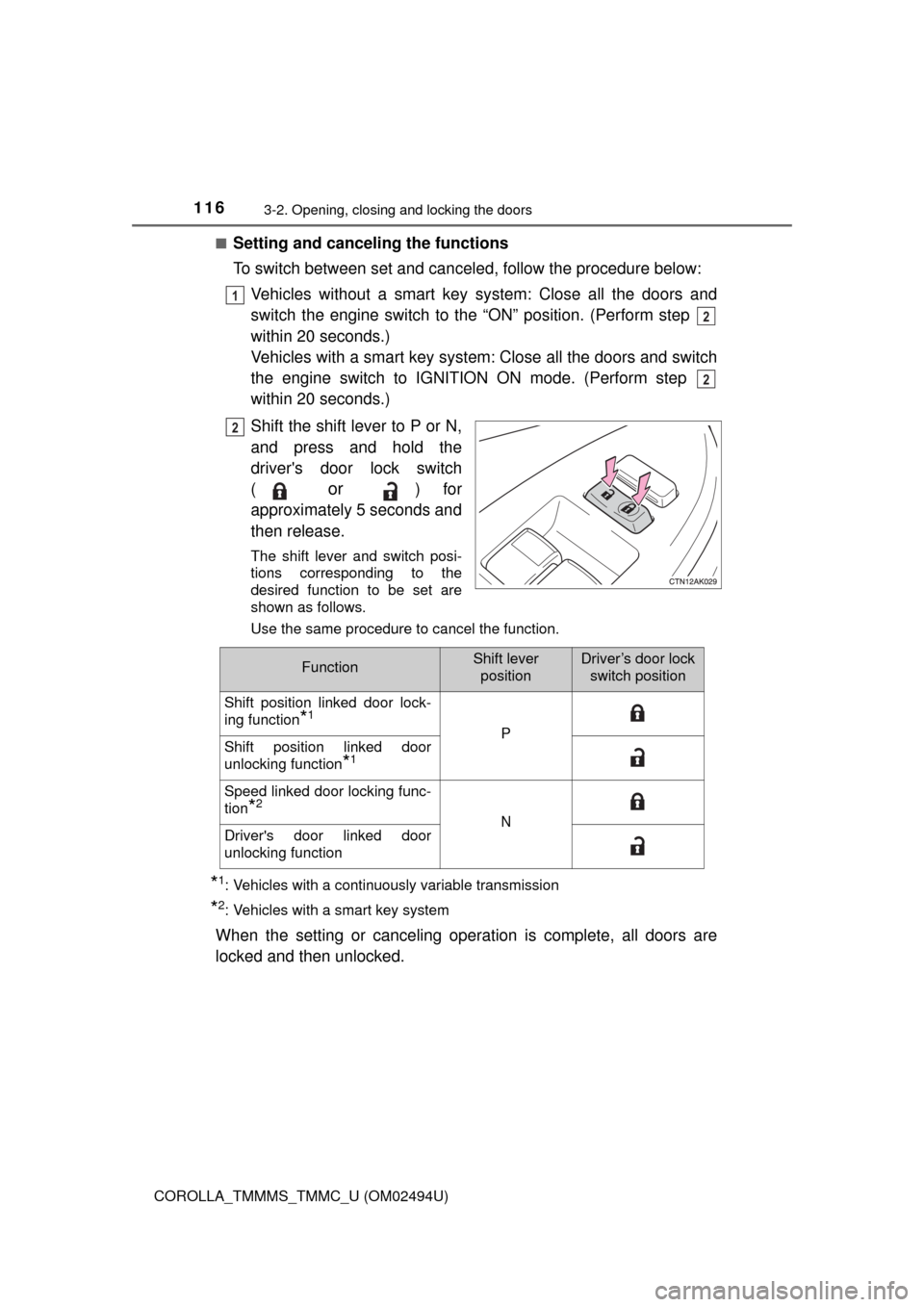
Setting and canceling the functions
To switch between set and canceled, follow the procedure below:
Vehicles without a smart key system: Close all the doors and
switch the engine switch to the “ON” position. (Perform step
within 20 seconds.)
Vehicles with a smart key system: Close all the doors and switch
the engine switch to IGNITION ON mode. (Perform step
within 20 seconds.)
Shift the shift lever to P or N,
and press and hold the
driver's door lock switch
(
or ) for
approximately 5 seconds and
then release.
The shift lever and switch posi-
tions corresponding to the
desired function to be set are
shown as follows.
Use the same procedure to cancel the function.
*1: Vehicles with a continuously variable transmission
*2: Vehicles with a smart key system
When the setting or canceling operation is complete, all doors are
locked and then unlocked.
1
2
2
2
FunctionShift lever
positionDriver’s door lock
switch position
Shift position linked door lock-
ing function
*1
PShift position linked door
unlocking function
*1
Speed linked door locking func-
tion
*2
NDriver's door linked door
unlocking function
Page 117 of 612
1173-2. Opening, closing and locking the doors
3
Operation of each component
COROLLA_TMMMS_TMMC_U (OM02494U)
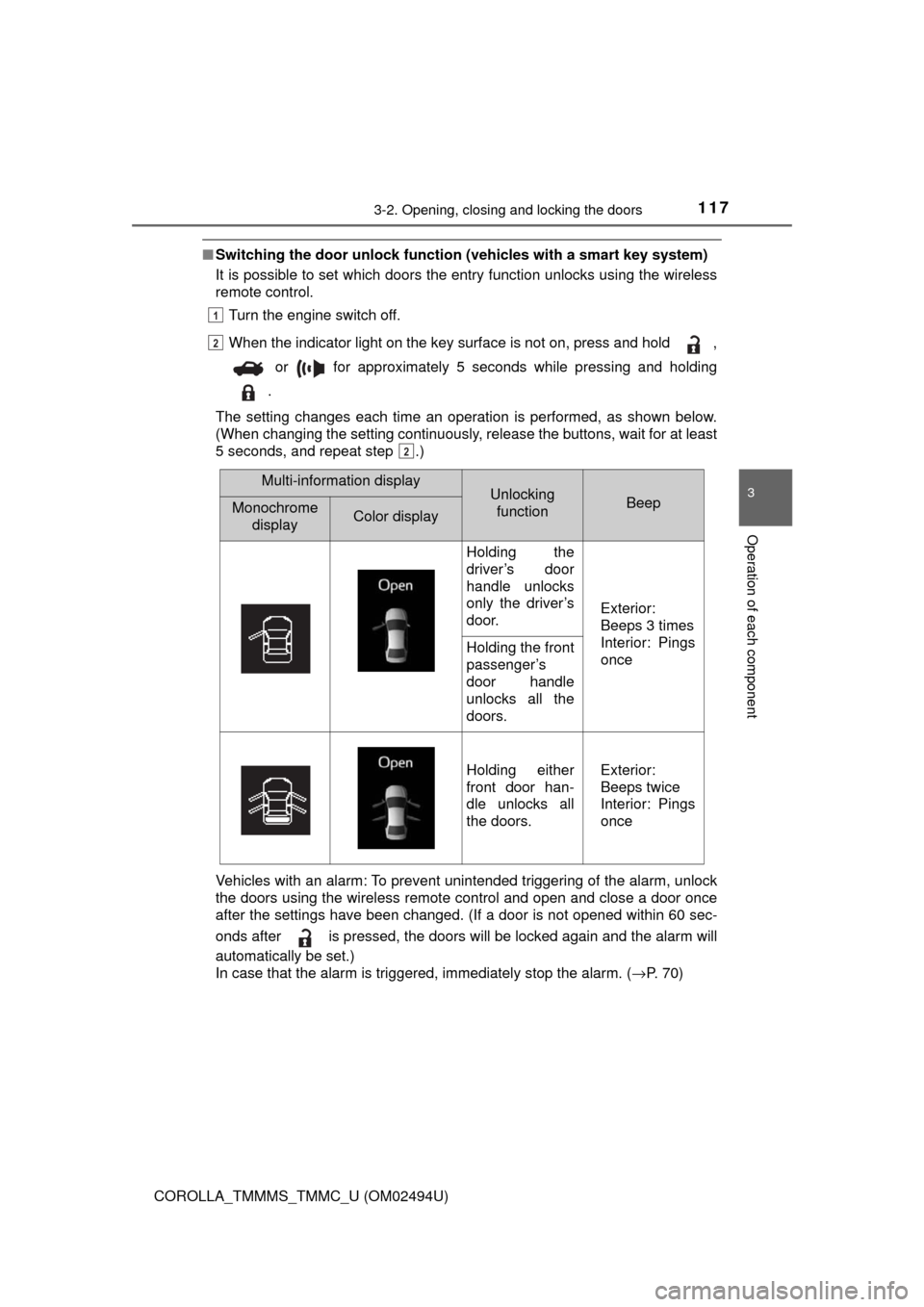
■Switching the door unlock function (vehicles with a smart key system)
It is possible to set which doors the entry function unlocks using the wireless
remote control.
Turn the engine switch off.
When the indicator light on the key surface is not on, press and hold ,
or for approximately 5 seconds while pressing and holding
.
The setting changes each time an operation is performed, as shown below.
(When changing the setting continuously, release the buttons, wait for at least
5 seconds, and repeat step .)
Vehicles with an alarm: To prevent unintended triggering of the alarm, unlock
the doors using the wireless remote control and open and close a door once
after the settings have been changed. (If a door is not opened within 60 sec-
onds after is pressed, the doors will be locked again and the alarm will
automatically be set.)
In case that the alarm is triggered, immediately stop the alarm. (→P. 70)
1
2
2
Multi-information displayUnlocking
functionBeepMonochrome
displayColor display
Holding the
driver’s door
handle unlocks
only the driver’s
door.
Exterior:
Beeps 3 times
Interior: Pings
once
Holding the front
passenger’s
door handle
unlocks all the
doors.
Holding either
front door han-
dle unlocks all
the doors.Exterior:
Beeps twice
Interior: Pings
once