key TOYOTA COROLLA 2017 11.G Repair Manual
[x] Cancel search | Manufacturer: TOYOTA, Model Year: 2017, Model line: COROLLA, Model: TOYOTA COROLLA 2017 11.GPages: 612, PDF Size: 14.18 MB
Page 185 of 612
1854-2. Driving procedures
4
Driving
COROLLA_TMMMS_TMMC_U (OM02494U)■If the shift lever cannot be shifted from P
First, check whether the brake pedal is being depressed.
If the shift lever cannot be shifted with your foot on the brake pedal, there may
be a problem with the shift lock system. Have the vehicle inspected by your
Toyota dealer immediately.
The following steps may be used as an emergency measure to ensure that
the shift lever can be shifted.
Releasing the shift lock:
Set the parking brake.
Vehicles without a smart key system: Turn the engine switch to the “LOCK”
position.
Vehicles with a smart key system: Turn the engine switch off.
Depress the brake pedal.
1
2
3
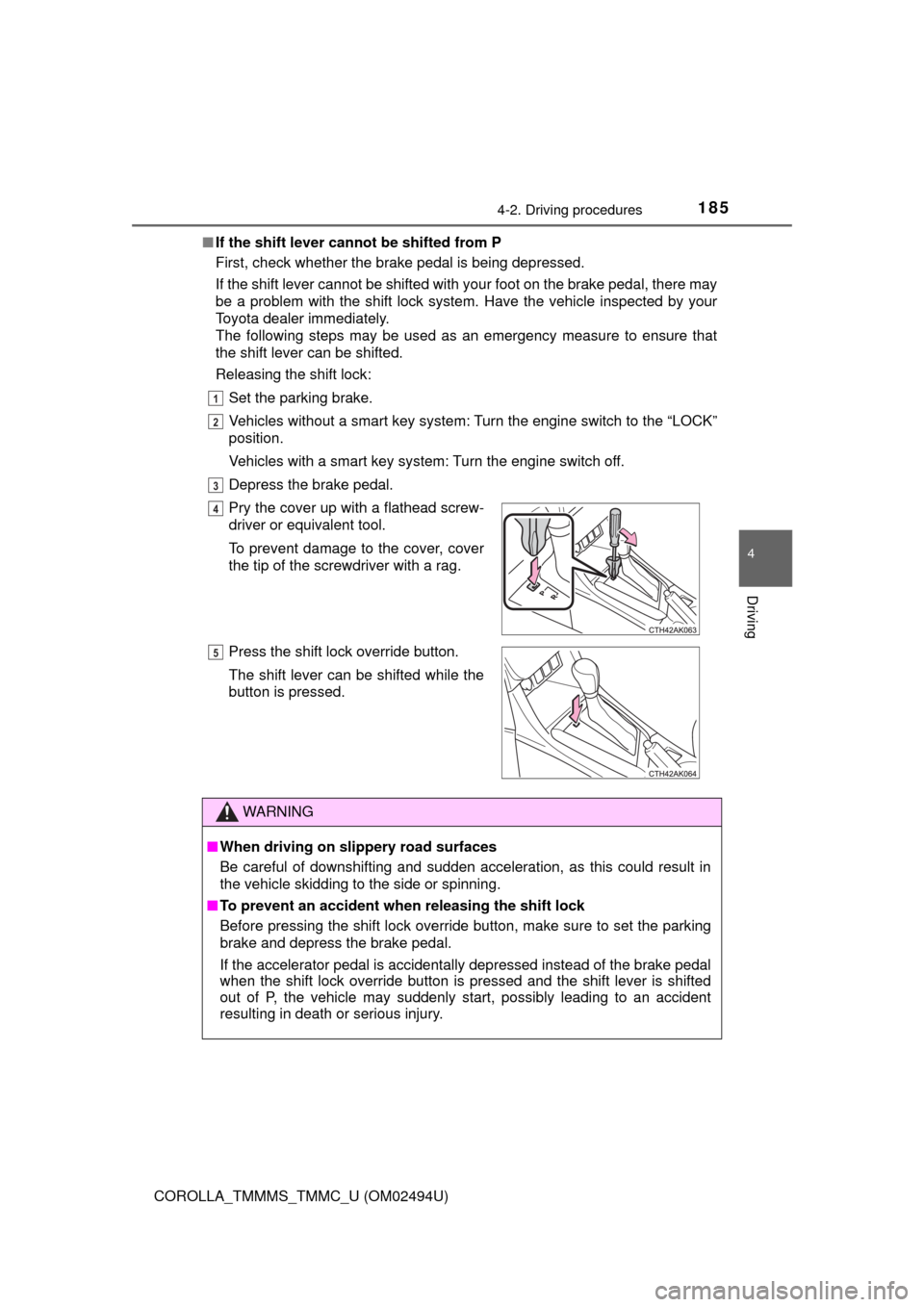
Pry the cover up with a flathead screw-
driver or equivalent tool.
To prevent damage to the cover, cover
the tip of the screwdriver with a rag.
Press the shift lock override button.
The shift lever can be shifted while the
button is pressed.
WARNING
■When driving on slippery road surfaces
Be careful of downshifting and sudden acceleration, as this could result in
the vehicle skidding to the side or spinning.
■To prevent an accident when releasing the shift lock
Before pressing the shift lock override button, make sure to set the parking
brake and depress the brake pedal.
If the accelerator pedal is accidentally depressed instead of the brake pedal
when the shift lock override button is pressed and the shift lever is shifted
out of P, the vehicle may suddenly start, possibly leading to an accident
resulting in death or serious injury.
4
5
Page 186 of 612
1864-2. Driving procedures
COROLLA_TMMMS_TMMC_U (OM02494U)
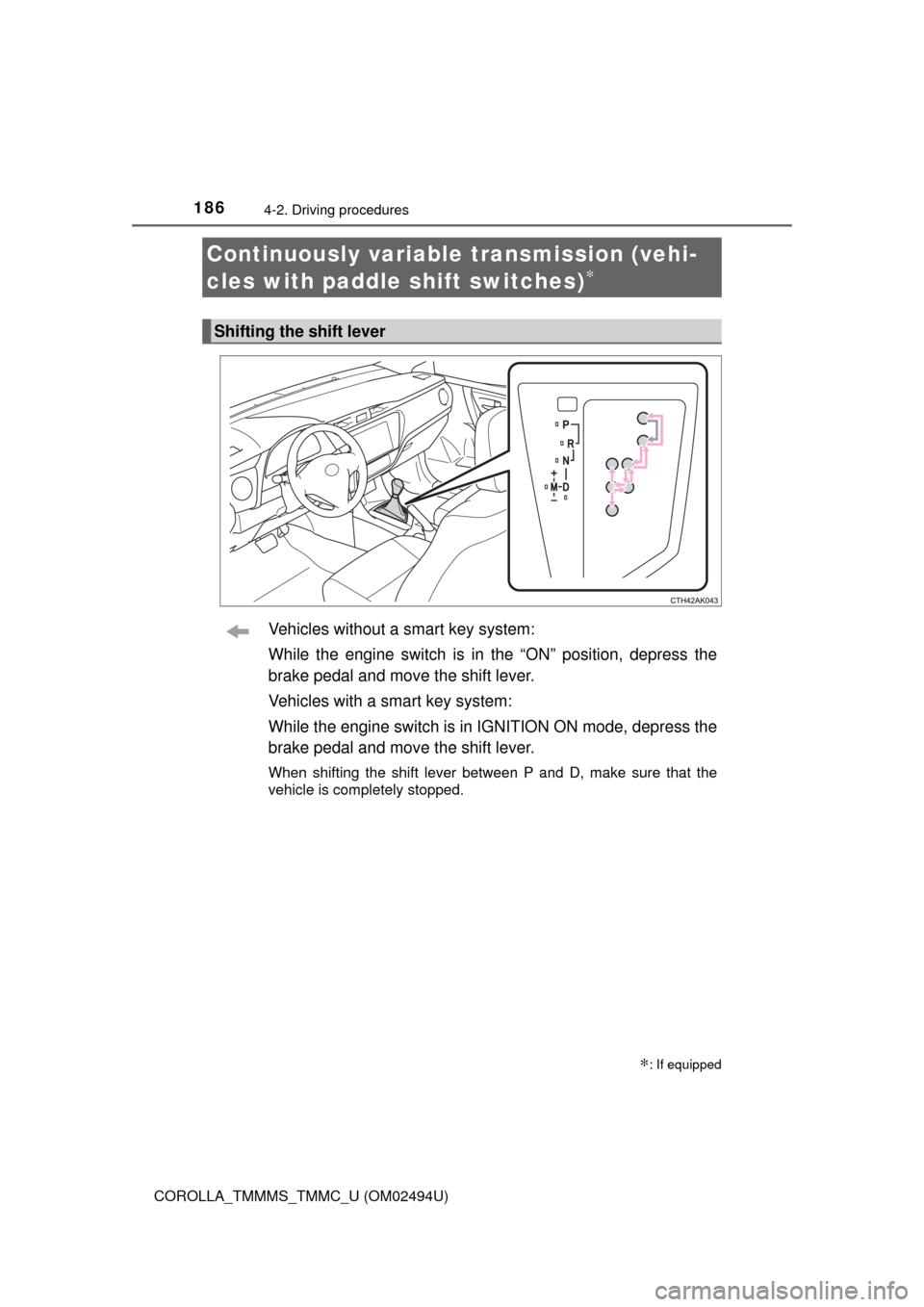
Vehicles without a smart key system:
While the engine switch is in the “ON” position, depress the
brake pedal and move the shift lever.
Vehicles with a smart key system:
While the engine switch is in IGNITION ON mode, depress the
brake pedal and move the shift lever.
When shifting the shift lever between P and D, make sure that the
vehicle is completely stopped.
Continuously variable transmission (vehi-
cles with paddle shift switches)
∗
∗: If equipped
Shifting the shift lever
Page 189 of 612

1894-2. Driving procedures
4
Driving
COROLLA_TMMMS_TMMC_U (OM02494U)■When driving with the dynamic radar cruise control activated
Even when performing the following actions with the intent of enabling engine
braking, engine braking will not activate because the dynamic radar cruise
control will not be canceled.
●While driving in D or 7-speed sport sequential shiftmatic mode, downshifting
to 6, 5 or 4. (→P. 188)
●When switching the driving mode to sport mode while driving in D position.
(→P. 187)
■Downshifting restrictions warning buzzer
To help ensure safety and driving performance, downshifting operation may
sometimes be restricted. In some circumstances, downshifting may not be
possible even when the shift lever is operated. (A buzzer will sound twice.)
■Sport mode automatic deactivation
Sport mode is automatically deactivated if the engine switch is turned off after
driving in sport mode.
■Shift lock system
The shift lock system is a system to prevent accidental operation of the shift
lever in starting.
The shift lever can be shifted from P only when the engine switch is in the
“ON” position (vehicles without a smart key system) or IGNITION ON mode
(vehicles with a smart key system) and the brake pedal is being depressed.
Page 190 of 612
1904-2. Driving procedures
COROLLA_TMMMS_TMMC_U (OM02494U)■If the shift lever cannot be shifted from P
First, check whether the brake pedal is being depressed.
If the shift lever cannot be shifted with your foot on the brake pedal, there may
be a problem with the shift lock system. Have the vehicle inspected by your
Toyota dealer immediately.
The following steps may be used as an emergency measure to ensure that
the shift lever can be shifted.
Releasing the shift lock:
Set the parking brake.
Vehicles without a smart key system: Turn the engine switch to the “LOCK”
position.
Vehicles with a smart key system: Turn the engine switch off.
Depress the brake pedal.
1
2
3
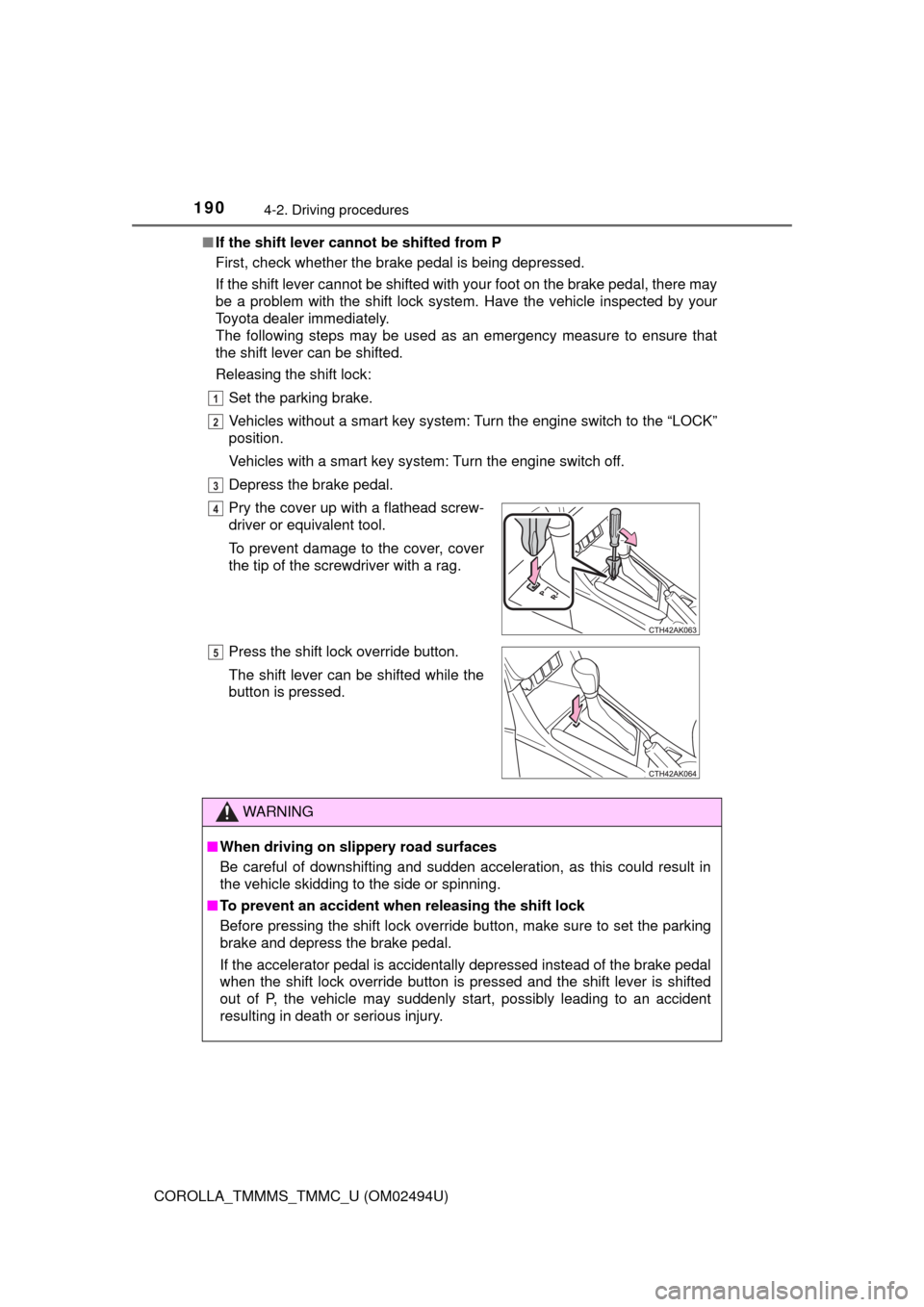
Pry the cover up with a flathead screw-
driver or equivalent tool.
To prevent damage to the cover, cover
the tip of the screwdriver with a rag.
Press the shift lock override button.
The shift lever can be shifted while the
button is pressed.
WARNING
■When driving on slippery road surfaces
Be careful of downshifting and sudden acceleration, as this could result in
the vehicle skidding to the side or spinning.
■To prevent an accident when releasing the shift lock
Before pressing the shift lock override button, make sure to set the parking
brake and depress the brake pedal.
If the accelerator pedal is accidentally depressed instead of the brake pedal
when the shift lock override button is pressed and the shift lever is shifted
out of P, the vehicle may suddenly start, possibly leading to an accident
resulting in death or serious injury.
4
5
Page 193 of 612
1934-2. Driving procedures
4
Driving
COROLLA_TMMMS_TMMC_U (OM02494U)
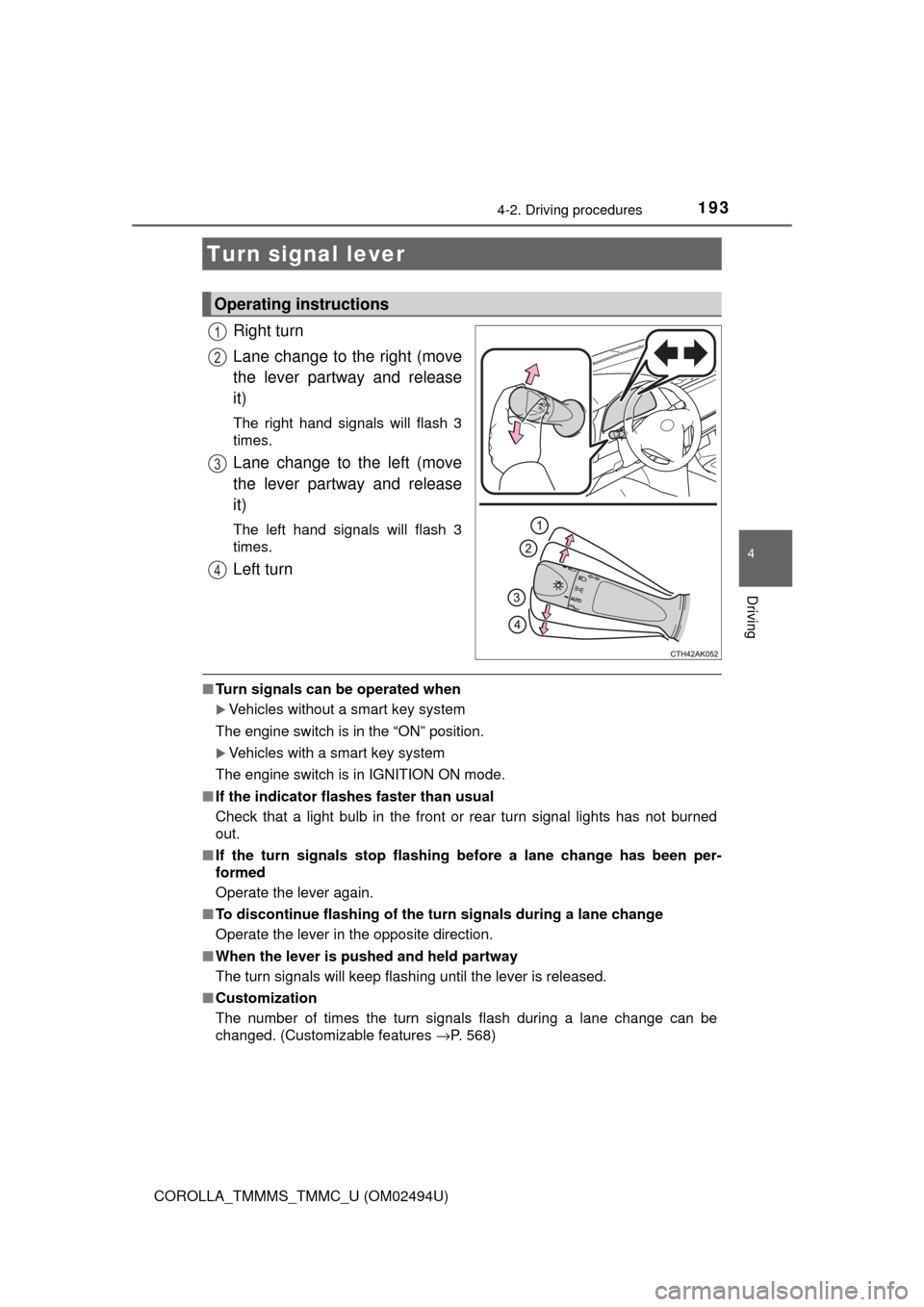
Right turn
Lane change to the right (move
the lever partway and release
it)
The right hand signals will flash 3
times.
Lane change to the left (move
the lever partway and release
it)
The left hand signals will flash 3
times.
Left turn
■Turn signals can be operated when
Vehicles without a smart key system
The engine switch is in the “ON” position.
Vehicles with a smart key system
The engine switch is in IGNITION ON mode.
■If the indicator flashes faster than usual
Check that a light bulb in the front or rear turn signal lights has not burned
out.
■If the turn signals stop flashing before a lane change has been per-
formed
Operate the lever again.
■To discontinue flashing of the turn signals during a lane change
Operate the lever in the opposite direction.
■When the lever is pushed and held partway
The turn signals will keep flashing until the lever is released.
■Customization
The number of times the turn signals flash during a lane change can be
changed. (Customizable features →P. 568)
Turn signal lever
Operating instructions
1
2
3
4
Page 195 of 612
195
4
Driving
COROLLA_TMMMS_TMMC_U (OM02494U)
4-3. Operating the lights and wipers
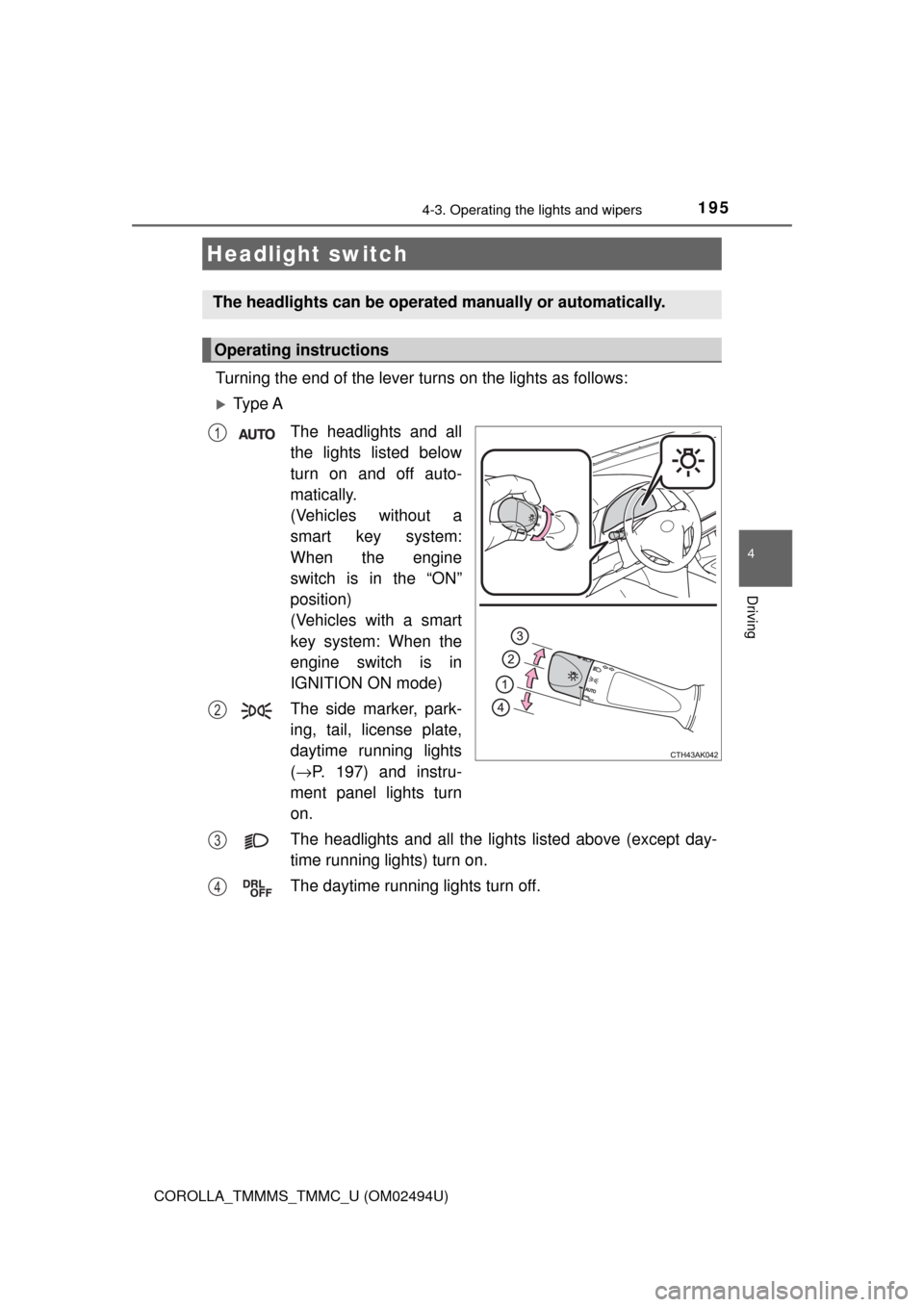
Turning the end of the lever turns on the lights as follows:
Ty p e A
The headlights and all
the lights listed below
turn on and off auto-
matically.
(Vehicles without a
smart key system:
When the engine
switch is in the “ON”
position)
(Vehicles with a smart
key system: When the
engine switch is in
IGNITION ON mode)
The side marker, park-
ing, tail, license plate,
daytime running lights
(→P. 197) and instru-
ment panel lights turn
on.
The headlights and all the lights listed above (except day-
time running lights) turn on.
The daytime running lights turn off.
Headlight switch
The headlights can be operated manually or automatically.
Operating instructions
1
2
3
4
Page 196 of 612
1964-3. Operating the lights and wipers
COROLLA_TMMMS_TMMC_U (OM02494U)
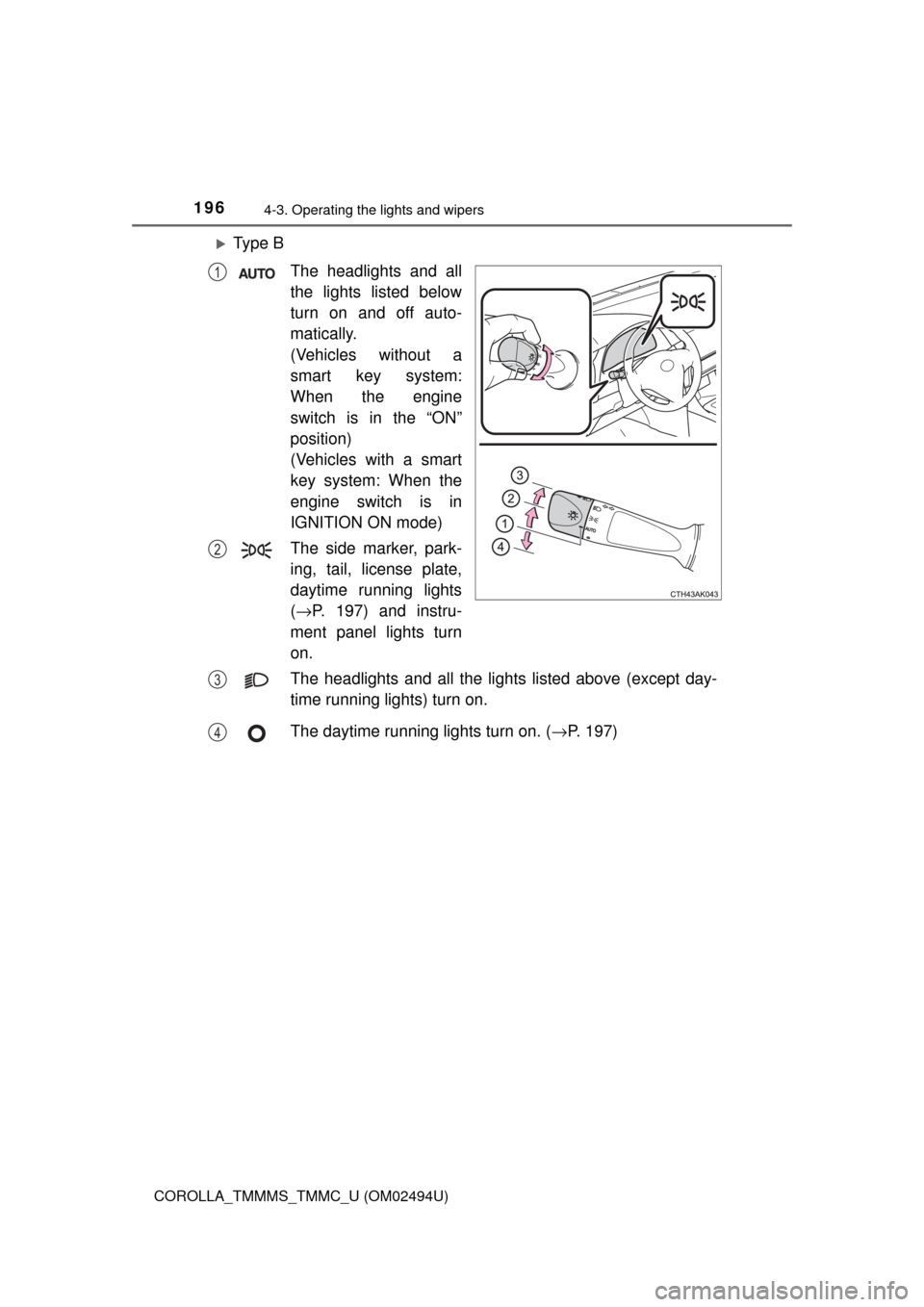
Ty p e B
The headlights and all
the lights listed below
turn on and off auto-
matically.
(Vehicles without a
smart key system:
When the engine
switch is in the “ON”
position)
(Vehicles with a smart
key system: When the
engine switch is in
IGNITION ON mode)
The side marker, park-
ing, tail, license plate,
daytime running lights
(→P. 197) and instru-
ment panel lights turn
on.
The headlights and all the lights listed above (except day-
time running lights) turn on.
The daytime running lights turn on. (→P. 197)
1
2
3
4
Page 198 of 612

1984-3. Operating the lights and wipers
COROLLA_TMMMS_TMMC_U (OM02494U)■Automatic light off system
Vehicles without a smart key system
●When the headlights are on: The headlights and tail lights turn off 30 sec-
onds after the engine switch is turned to the “ACC” or “LOCK” position and a
door is opened and closed. (Vehicles with a wireless remote control: The
lights turn off immediately if on the key is pressed after all the doors
are locked.)
●When only the tail lights are on: The tail lights turn off automatically if the
engine switch is turned to the “ACC” or “LOCK” position and the driver’s
door is opened.
To turn the lights on again, turn the engine switch to “ON” position, or turn the
light switch off once and then back to or .
If any of the doors or trunk lid is kept open, the lights automatically turn off
after 20 minutes.
Vehicles with a smart key system
●When the headlights are on: The headlights and tail lights turn off 30 sec-
onds after the engine switch is turned to ACCESSORY mode or turned off
and a door is opened and closed. (The lights turn off immediately if on
the key is pressed after all the doors are locked.)
●When only the tail lights are on: The tail lights turn off automatically if the
engine switch is turned to ACCESSORY mode or turned off and the driver’s
door is opened.
To turn the lights on again, turn the engine switch to IGNITION ON mode, or
turn the light switch off once and then back to or .
If any of the doors or trunk lid is kept open, the lights automatically turn off
after 20 minutes.
■Light reminder buzzer
Vehicles without a smart key system
A buzzer sounds when the engine switch is turned to “LOCK” position and the
driver's door is opened while the lights are turned on.
Vehicles with a smart key system
A buzzer sounds when the engine switch is turned off or turned to ACCES-
SORY mode and the driver's door is opened while the lights are turned on.
Page 199 of 612

1994-3. Operating the lights and wipers
4
Driving
COROLLA_TMMMS_TMMC_U (OM02494U)■Battery-saving function
In the following conditions, the headlights and the other remaining lights will
go off automatically after 20 minutes in order to prevent the vehicle battery
from being discharged:
●The headlights and/or tail lights are on.
●Vehicles without a smart key system: The engine switch is in the “ACC” or
“LOCK” position.
●Vehicles with a smart key system: The engine switch is turned to ACCES-
SORY mode or turned off.
This function will be canceled in any of the following situations:
●Vehicles without a smart key system: When the engine switch is turned to
the “ON” position.
●Vehicles with a smart key system: When the engine switch is turned to IGNI-
TION ON mode.
●When the light switch is operated
●When the door or trunk is opened or closed
■Customization
Settings (e.g. light sensor sensitivity) can be changed.
(Customizable features: →P. 568)
NOTICE
■To prevent battery discharge
Do not leave the lights on longer than necessary when the engine is not
running.
Page 203 of 612

2034-3. Operating the lights and wipers
4
Driving
COROLLA_TMMMS_TMMC_U (OM02494U)• When driving in inclement weather (heavy rain, snow, fog, sandstorms,
etc.)
• When the windshield is obscured by fog, mist, ice, dirt, etc.
• When the windshield is cracked or damaged
• When the camera sensor is deformed or dirty
• When the temperature of the camera sensor is extremely high
• When the surrounding brightness level is equal to that of headlights, tail
lights or fog lights
• When headlights or tail lights of vehicles ahead are turned off, dirty,
changing color, or not aimed properly
• When the vehicle is hit by water, snow, dust, etc. from a preceding vehi-
cle
• When driving through an area of intermittently changing brightness and
darkness
• When frequently and repeatedly driving ascending/descending roads, or
roads with rough, bumpy or uneven surfaces (such as stone-paved
roads, gravel roads, etc.)
• When frequently and repeatedly taking curves or driving on a winding
road
• When there is a highly reflective object ahead of the vehicle, such as a
sign or mirror
• When the back of a preceding vehicle is highly reflective, such as a con-
tainer on a truck
• When the vehicle's headlights are damaged or dirty, or are not aimed
properly
• When the vehicle is listing or titling due to a flat tire, a trailer being towed,
etc.
• When the headlights are changed between the high beams and low
beams repeatedly in an abnormal manner
• When the driver believes that the high beams may be flashing or dazzling
pedestrians or other drivers
■Temporarily lowering sensor sensitivity
The sensitivity of the sensor can be temporarily lowered.
Turn the engine switch off while the following conditions are met.
• The headlight switch is in .
• The headlight switch lever is in the high beam position.
Turn the engine switch to the “ON” position (vehicles without a smart key
system) or IGNITION ON mode (vehicles with a smart key system).
Within 30 seconds after , repeat pulling the headlight switch lever to the
original position then pushing it to the high beam position quickly 10 times,
then leave the lever in the high beam position.
If the sensitivity is changed, the Automatic High Beam indicator will turn on
and off 3 times.
Automatic High Beam (headlights) may turn on even the vehicle is stopped.
1
2
32
4