brake TOYOTA COROLLA 2019 Owners Manual (in English)
[x] Cancel search | Manufacturer: TOYOTA, Model Year: 2019, Model line: COROLLA, Model: TOYOTA COROLLA 2019Pages: 56, PDF Size: 1.79 MB
Page 3 of 56
1
OVERVIEW FEATURES & OPERATIONS TOYOTA SAFETY SENSE SAFETY & EMERGENCY FEATURES
1 Visit your Toyota dealer for information on customizing this feature.2 Programmable by customer. Refer to the Owner’s Manual for instructions and more information.3 HomeLink® is a registered trademark of Gentex Corporation.
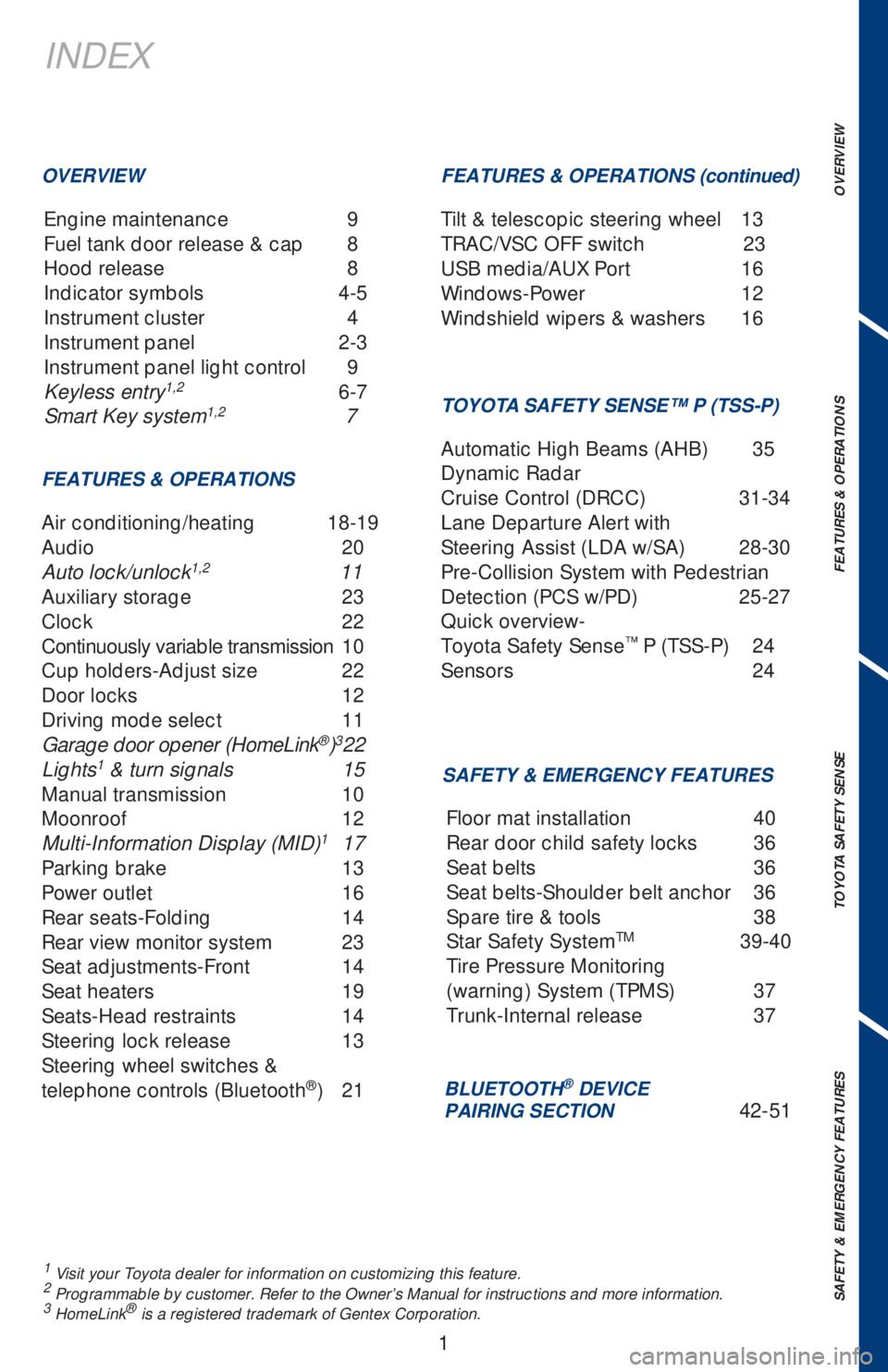
INDEX
Engine maintenance 9
Fuel tank door release & cap 8
Hood release 8
Indicator symbols 4-5
Instrument cluster 4
Instrument panel 2-3
Instrument panel light control 9
Keyless entry
1,2 6-7
Smart Key system1,2 7
OVERVIEW
FEATURES & OPERATIONS
Air conditioning/heating 18-19
Audio 20
Auto lock/unlock
1,2 11
Auxiliary storage 23
Clock 22
Continuously variable transmission 10
Cup holders-Adjust size 22
Door locks 12
Driving mode select 11
Garage door opener (HomeLink
®)3 22
Lights1 & turn signals 15
Manual transmission 10
Moonroof 12
Multi-Information Display (MID)
1 17
Parking brake 13
Power outlet 16
Rear seats-Folding 14
Rear view monitor system 23
Seat adjustments-Front 14
Seat heaters 19
Seats-Head restraints 14
Steering lock release 13
Steering wheel switches &
telephone controls (Bluetooth
®) 21
SAFETY & EMERGENCY FEATURES FEATURES & OPERATIONS (continued)
TOYOTA SAFETY SENSE™ P (TSS-P)
Automatic High Beams (AHB) 35
Dynamic Radar
Cruise Control (DRCC) 31-34
Lane Departure Alert with
Steering Assist (LDA w/SA) 28-30
Pre-Collision System with Pedestrian
Detection (PCS w/PD) 25-27
Quick overview-
Toyota Safety Sense
™ P (TSS-P) 24
Sensors 24
BLUETOOTH® DEVICE
PAIRING SECTION 42-51 Floor mat installation 40
Rear door child safety locks 36
Seat belts 36
Seat belts-Shoulder belt anchor 36
Spare tire & tools 38
Star Safety System
TM 39-40
Tire Pressure Monitoring
(warning) System (TPMS) 37
Trunk-Internal release 37 Tilt & telescopic steering wheel 13
TRAC/VSC OFF switch 23
USB media/AUX Port 16
Windows-Power 12
Windshield wipers & washers 16
Page 5 of 56
3
OVERVIEW FEATURES & OPERATIONS TOYOTA SAFETY SENSE SAFETY & EMERGENCY FEATURES
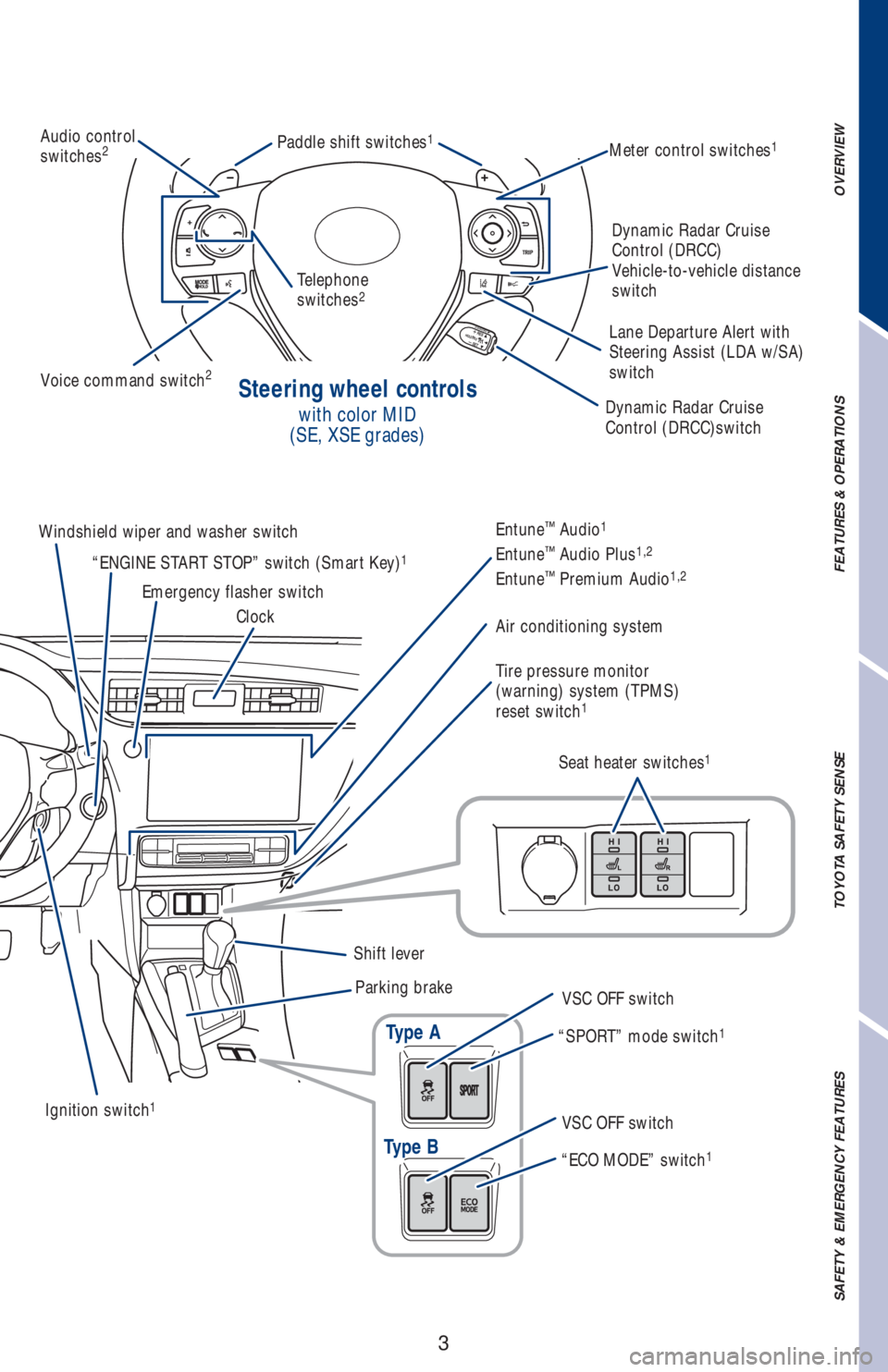
Steering wheel controls
with color MID
(SE, XSE grades)
Type A
Type B
Audio control
switches2Meter control switches1Paddle shift switches1
Voice command switch2
Dynamic Radar Cruise
Control (DRCC)switch
Ignition switch
1
Windshield wiper and washer switch
Emergency flasher switch
ClockEntune™ Audio1
Entune™ Audio Plus1,2
Entune™ Premium Audio1,2
Air conditioning system
Tire pressure monitor
(warning) system (TPMS)
reset switch
1
Seat heater switches1
Shift lever
Parking brake
VSC OFF switch
VSC OFF switch “SPORT” mode switch
1
“ECO MODE” switch1
“ENGINE START STOP” switch (Smart Key)1
Telephone
switches2
Dynamic Radar Cruise
Control (DRCC)
Vehicle-to-vehicle distance
switch
Lane Departure Alert with
Steering Assist (LDA w/SA)
switch
Page 6 of 56
4
OVERVIEW
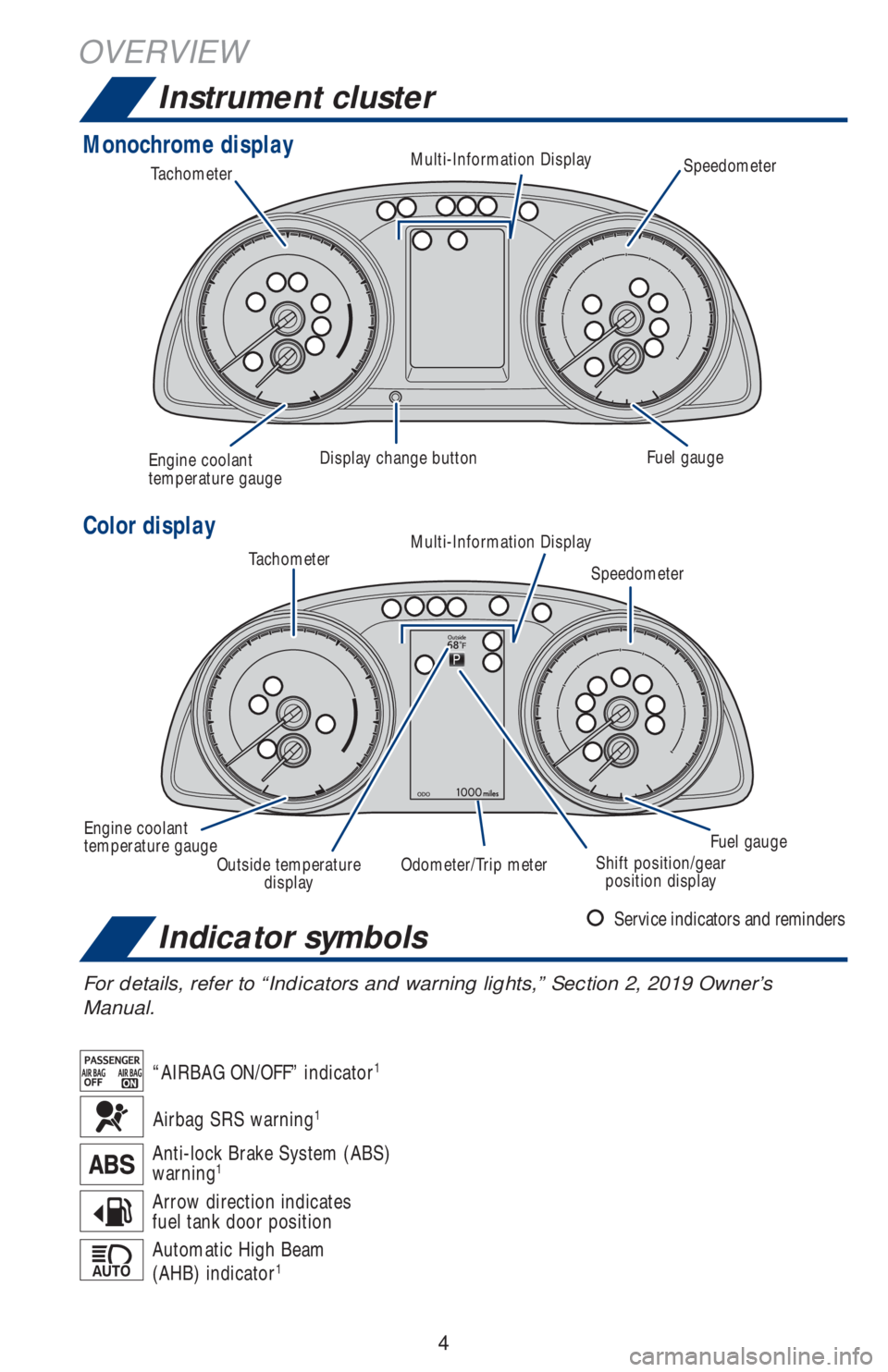
Instrument cluster
Indicator symbols
For details, refer to “Indicators and warning lights,” Section 2, 2019 Owner’s
Manual.
Automatic High Beam
(AHB) indicator1
Arrow direction indicates
fuel tank door position
Anti-lock Brake System (ABS)
warning1
“AIRBAG ON/OFF” indicator1
Service indicators and reminders
Airbag SRS warning1
Monochrome display
Color display
Tachometer
TachometerFuel gauge
Fuel gauge Display change button
Engine coolant
temperature gauge
Engine coolant
temperature gaugeMulti-Information Display
Multi-Information Display
Outside temperature
displayOdometer/Trip meterShift position/gear
position displaySpeedometer
Speedometer
Page 7 of 56
5
OVERVIEW FEATURES & OPERATIONS TOYOTA SAFETY SENSE SAFETY & EMERGENCY FEATURES
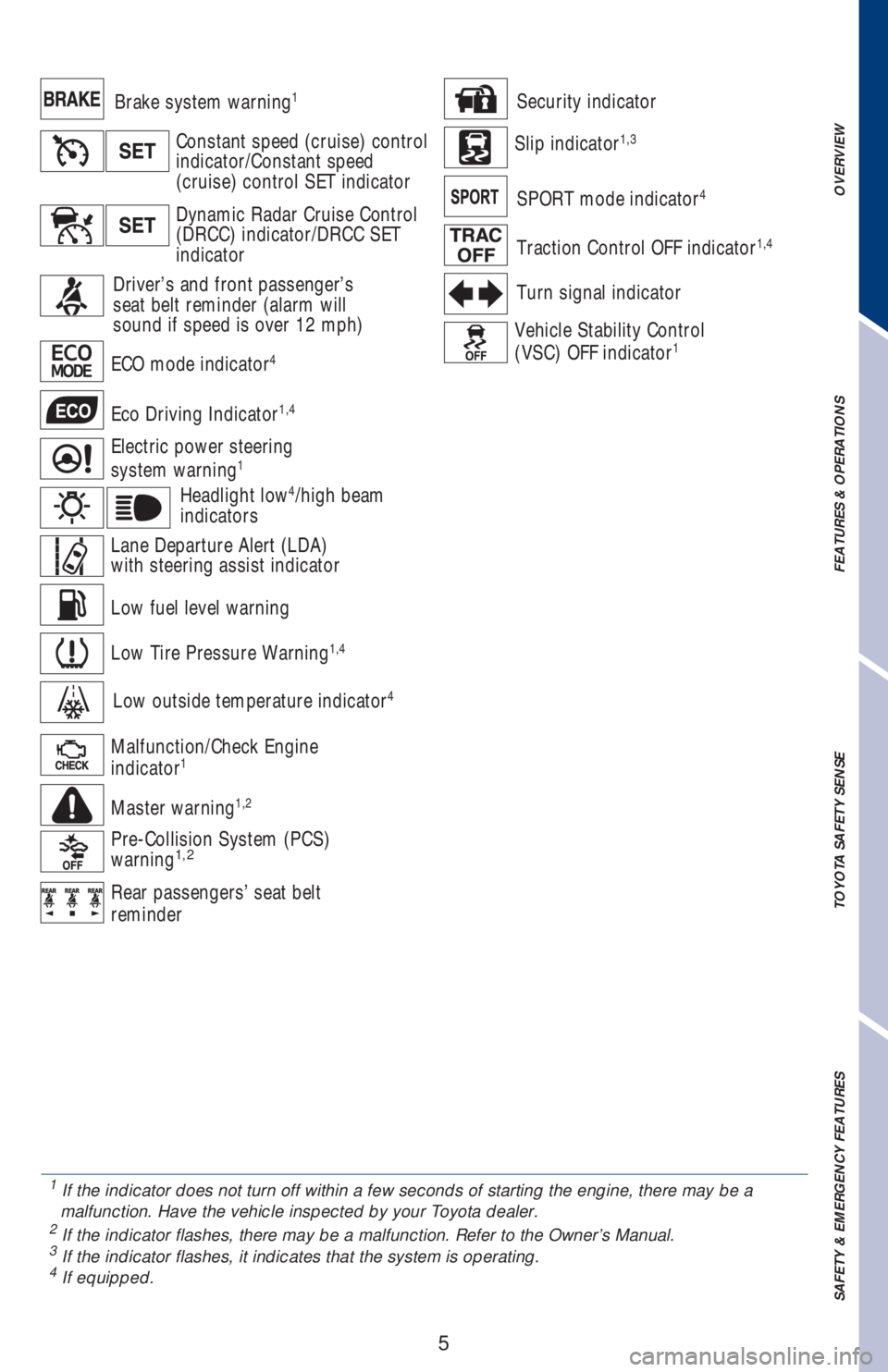
Low fuel level warning
Constant speed (cruise) control
indicator/Constant speed
(cruise) control SET indicator
Low Tire Pressure Warning1,4
Electric power steering
system warning1
ECO mode indicator4
Eco Driving Indicator1,4
Brake system warning1
Headlight low4/high beam
indicators
Lane Departure Alert (LDA)
with steering assist indicator
Low outside temperature indicator4
Dynamic Radar Cruise Control
(DRCC) indicator/DRCC SET
indicator
Driver’s and front passenger’s
seat belt reminder (alarm will
sound if speed is over 12 mph)
Master warning1,2
Turn signal indicator
Vehicle Stability Control
(VSC) OFF indicator1
Traction Control OFF indicator1,4
Malfunction/Check Engine
indicator1
SPORT mode indicator4
Pre-Collision System (PCS)
warning1,2
Slip indicator1,3
Security indicator
Rear passengers’ seat belt
reminder
1
If the indicator does not turn off within a few seconds of starting the engine, there may be a
malfunction. Have the vehicle inspected by your Toyota dealer.
2 If the indicator flashes, there may be a malfunction. Refer to the Owner’s Manual.3 If the indicator flashes, it indicates that the system is operating.4 If equipped.
Page 9 of 56
7
OVERVIEW FEATURES & OPERATIONS TOYOTA SAFETY SENSE SAFETY & EMERGENCY FEATURES
Smart Key system (if equipped)
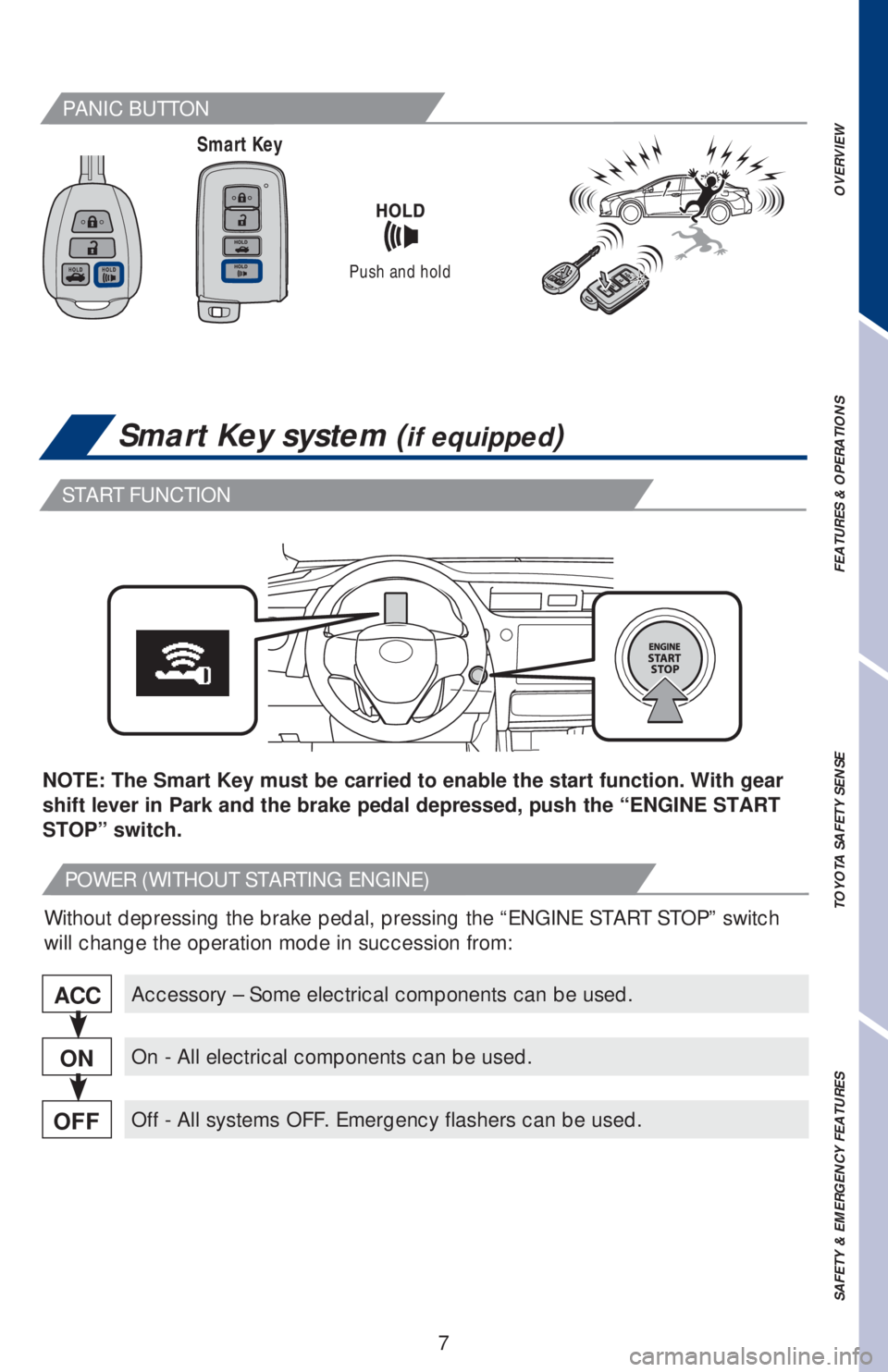
Smart Key
Push and hold
PANIC BUTTON
START FUNCTION
POWER (WITHOUT STARTING ENGINE)
Accessory – Some electrical components can be used.
On - All electrical components can be used.
Off - All systems OFF. Emergency flashers can be used.
ACC
ON
OFF
NOTE: The Smart Key must be carried to enable the start function. With gear
shift lever in Park and the brake pedal depressed, push the “ENGINE START
STOP” switch.
Without depressing the brake pedal, pressing the “ENGINE START STOP” switch
will change the operation mode in succession from:
Page 12 of 56
10
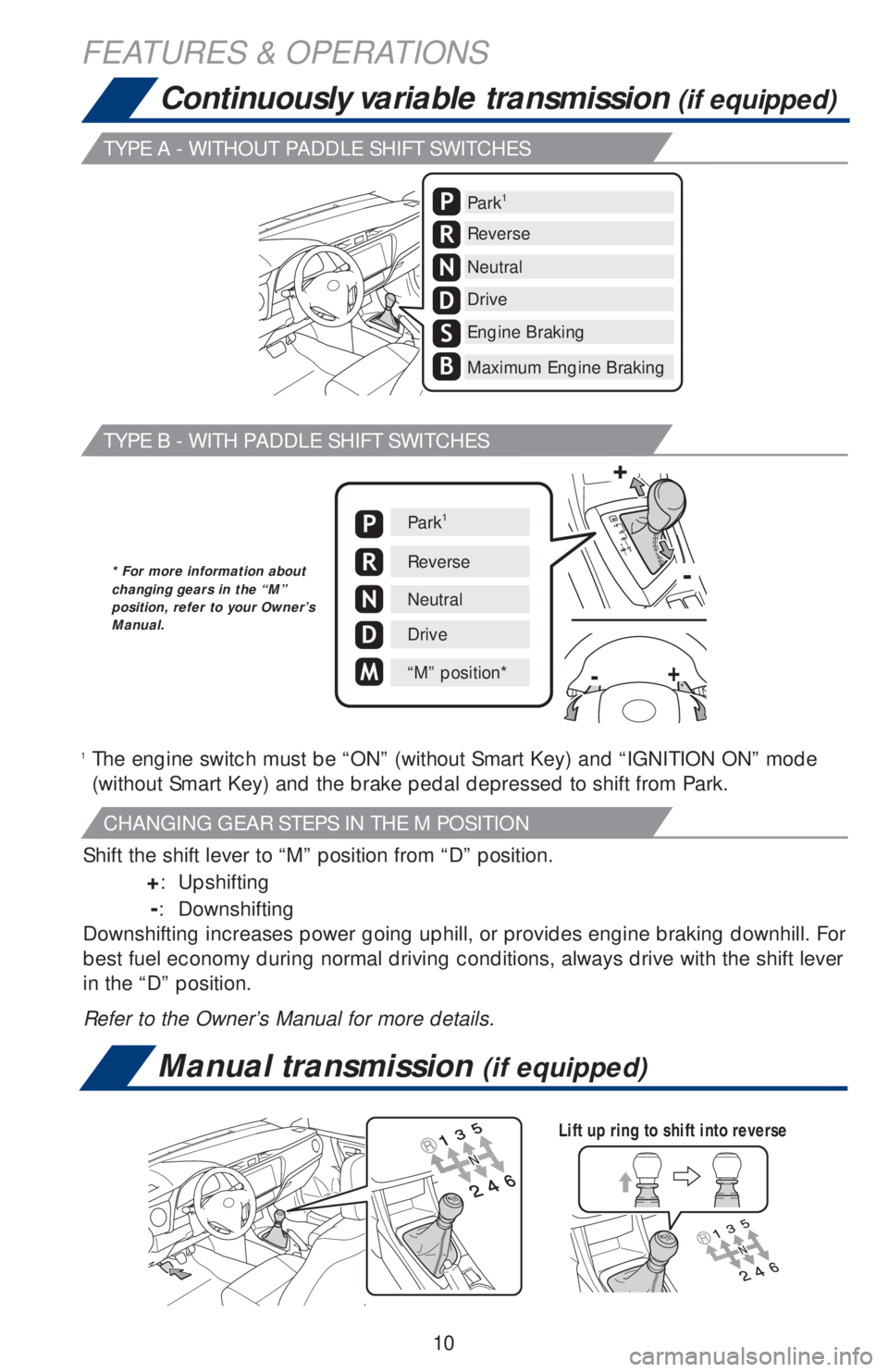
Manual transmission (if equipped)
Continuously variable transmission (if equipped)
Lift up ring to shift into reverse
Park1
Reverse
Neutral
Drive
Engine Braking
Maximum Engine Braking
S
B
P
R
N
D
1 The engine switch must be “ON” (without Smart Key) and “IGNITION ON” mode
(without Smart Key) and the brake pedal depressed to shift from Park.
Shift the shift lever to “M” position from “D” position.
+: Upshifting
-: Downshifting
Downshifting increases power going uphill, or provides engine braking downhill. For
best fuel economy during normal driving conditions, always drive with the shift lever
in the “D” position.
Refer to the Owner’s Manual for more details.
Park1
Reverse
Neutral
Drive
“M” position*
P
R
N
D
M
+
+
-
-
* For more information about
changing gears in the “M”
position, refer to your Owner’s
Manual.
FEATURES & OPERATIONS
TYPE A - WITHOUT PADDLE SHIFT SWITCHES
TYPE B - WITH PADDLE SHIFT SWITCHES
CHANGING GEAR STEPS IN THE M POSITION
Page 15 of 56
13
OVERVIEW FEATURES & OPERATIONS TOYOTA SAFETY SENSE SAFETY & EMERGENCY FEATURES
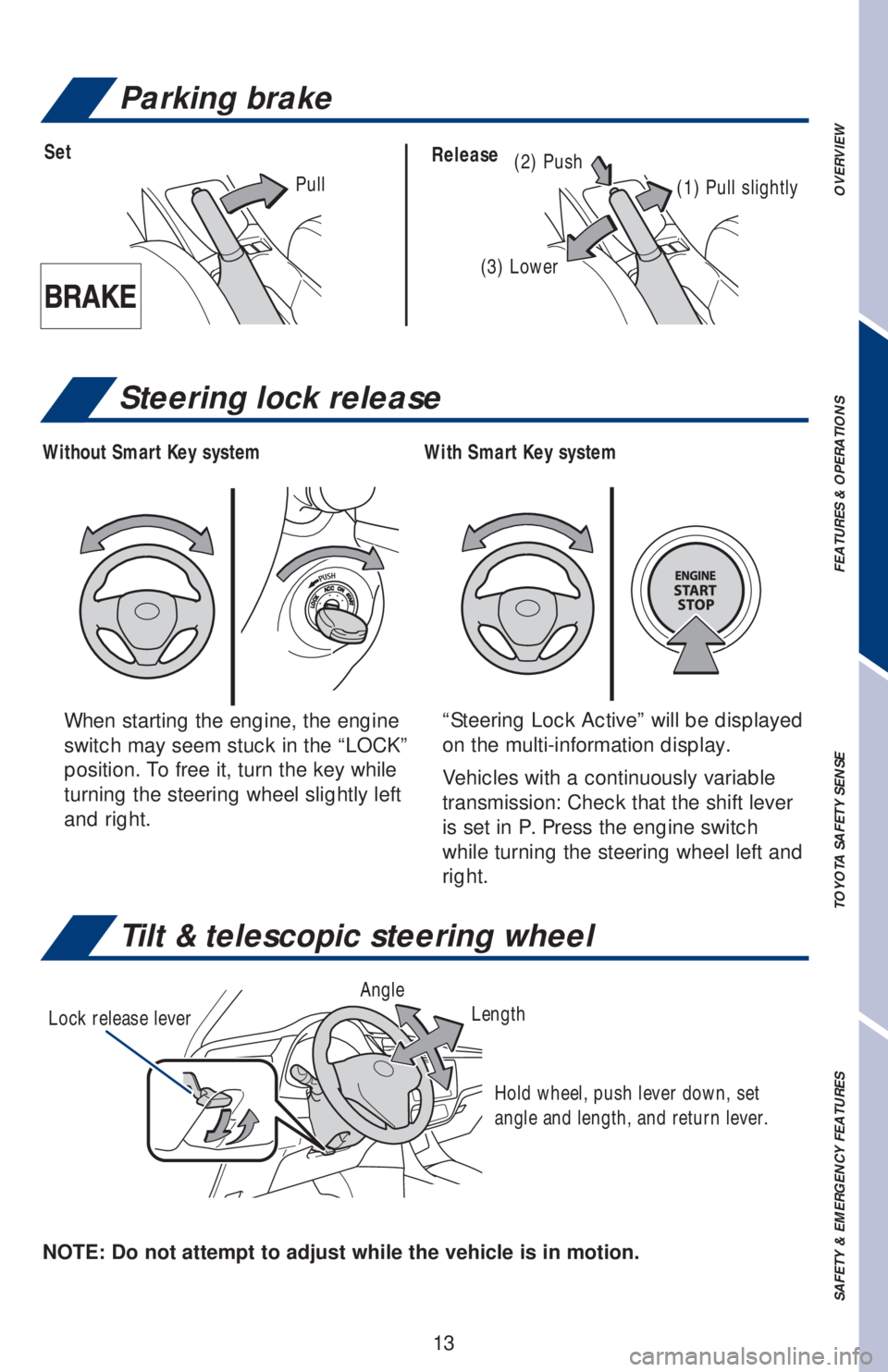
Tilt & telescopic steering wheel
NOTE: Do not attempt to adjust while the vehicle is in motion.Lock release leverAngle
Length
Hold wheel, push lever down, set
angle and length, and return lever.
Parking brake
(2) PushSetRelease
(1) Pull slightly
(3) Lower
Pull
When starting the engine, the engine
switch may seem stuck in the “LOCK”
position. To free it, turn the key while
turning the steering wheel slightly left
and right.“Steering Lock Active” will be displayed
on the multi-information display.
Vehicles with a continuously variable
transmission: Check that the shift lever
is set in P. Press the engine switch
while turning the steering wheel left and
right.
Steering lock release
With Smart Key system Without Smart Key system
Page 27 of 56
25
OVERVIEW FEATURES & OPERATIONS TOYOTA SAFETY SENSE SAFETY & EMERGENCY FEATURES
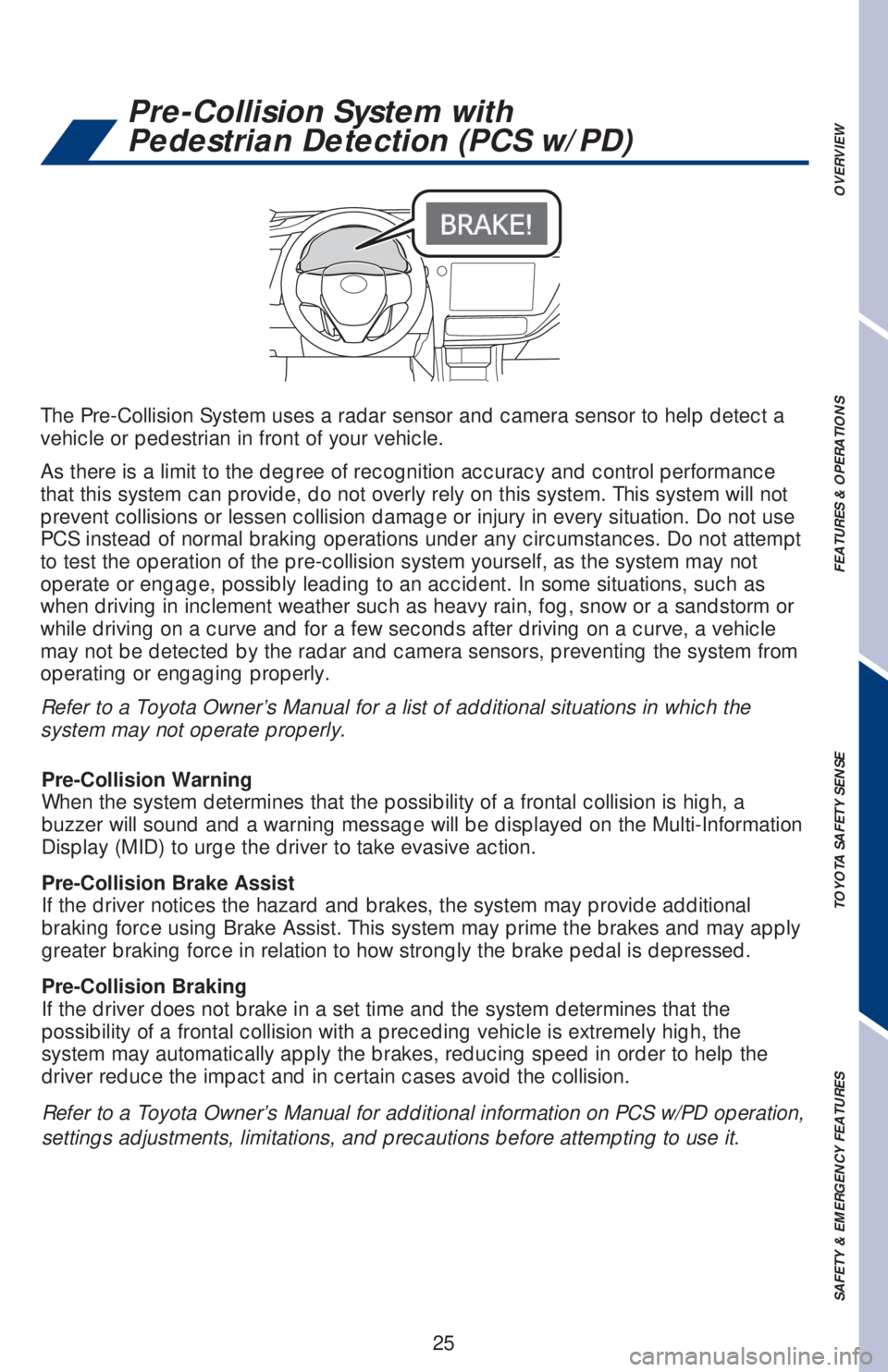
The Pre-Collision System uses a radar sensor and camera sensor to help detect a
vehicle or pedestrian in front of your vehicle.
As there is a limit to the degree of recognition accuracy and control performance
that this system can provide, do not overly rely on this system. This system will not
prevent collisions or lessen collision damage or injury in every situation. Do not use
PCS instead of normal braking operations under any circumstances. Do not attempt
to test the operation of the pre-collision system yourself, as the system may not
operate or engage, possibly leading to an accident. In some situations, such as
when driving in inclement weather such as heavy rain, fog, snow or a sandstorm or
while driving on a curve and for a few seconds after driving on a curve, a vehicle
may not be detected by the radar and camera sensors, preventing the system from
operating or engaging properly.
Refer to a Toyota Owner’s Manual for a list of additional situations in which the
system may not operate properly.
Refer to a Toyota Owner’s Manual for additional information on PCS w/PD operation,
settings adjustments, limitations, and precautions before attempting to use it. Pre-Collision Warning
When the system determines that the possibility of a frontal collision is high, a
buzzer will sound and a warning message will be displayed on the Multi-Information
Display (MID) to urge the driver to take evasive action.
Pre-Collision Brake Assist
If the driver notices the hazard and brakes, the system may provide additional
braking force using Brake Assist. This system may prime the brakes and may apply
greater braking force in relation to how strongly the brake pedal is depressed.
Pre-Collision Braking
If the driver does not brake in a set time and the system determines that the
possibility of a frontal collision with a preceding vehicle is extremely high, the
system may automatically apply the brakes, reducing speed in order to help the
driver reduce the impact and in certain cases avoid the collision.
Pre-Collision System with
Pedestrian Detection (PCS w/PD)
Page 28 of 56
26
CHANGING PCS ALERT TIMING
FarMiddle
(default)Near
TOYOTA SAFETY SENSE™
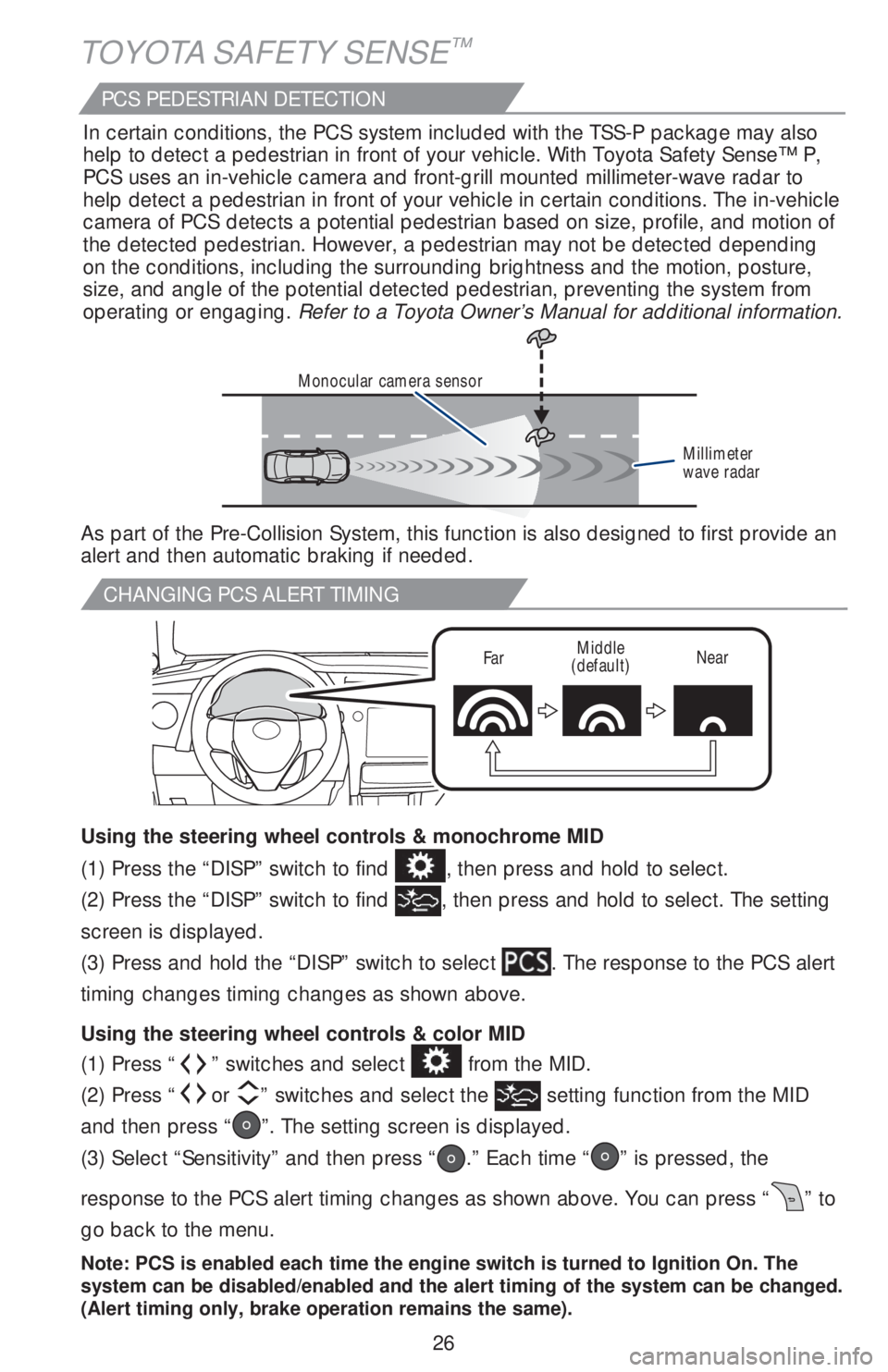
(1) Press “” switches and select from the MID.
(2) Press “
or ” switches and select the setting function from the MID
and then press “
”. The setting screen is displayed.
(3) Select “Sensitivity” and then press “
.” Each time “” is pressed, the
response to the PCS alert timing changes as shown above. You can press “
” to
go back to the menu.
Note: PCS is enabled each time the engine switch is turned to Ignition On. The
system can be disabled/enabled and the alert timing of the system can be changed.
(Alert timing only, brake operation remains the same).
(1) Press the “DISP” switch to find , then press and hold to select.
(2) Press the “DISP” switch to find
, then press and hold to select. The setting
screen is displayed.
(3) Press and hold the “DISP” switch to select
. The response to the PCS alert
timing changes timing changes as shown above.
Using the steering wheel controls & color MID Using the steering wheel controls & monochrome MID
Monocular camera sensor
Millimeter
wave radar
As part of the Pre-Collision System, this function is also designed to first provide an
alert and then automatic braking if needed.In certain conditions, the PCS system included with the TSS-P package may also
help to detect a pedestrian in front of your vehicle. With Toyota Safety Sense™ P,
PCS uses an in-vehicle camera and front-grill mounted millimeter-wave radar to
help detect a pedestrian in front of your vehicle in certain conditions. The in-vehicle
camera of PCS detects a potential pedestrian based on size, profile, and motion of
the detected pedestrian. However, a pedestrian may not be detected depending
on the conditions, including the surrounding brightness and the motion, posture,
size, and angle of the potential detected pedestrian, preventing the system from
operating or engaging. Refer to a Toyota Owner’s Manual for additional information.
PCS PEDESTRIAN DETECTION
Page 34 of 56
32
ADJUSTING DRCC SET SPEED
1
The set speed may also be cancelled by depressing the brake pedal.
2 The set speed may be resumed once vehicle speed exceeds 25 mph.
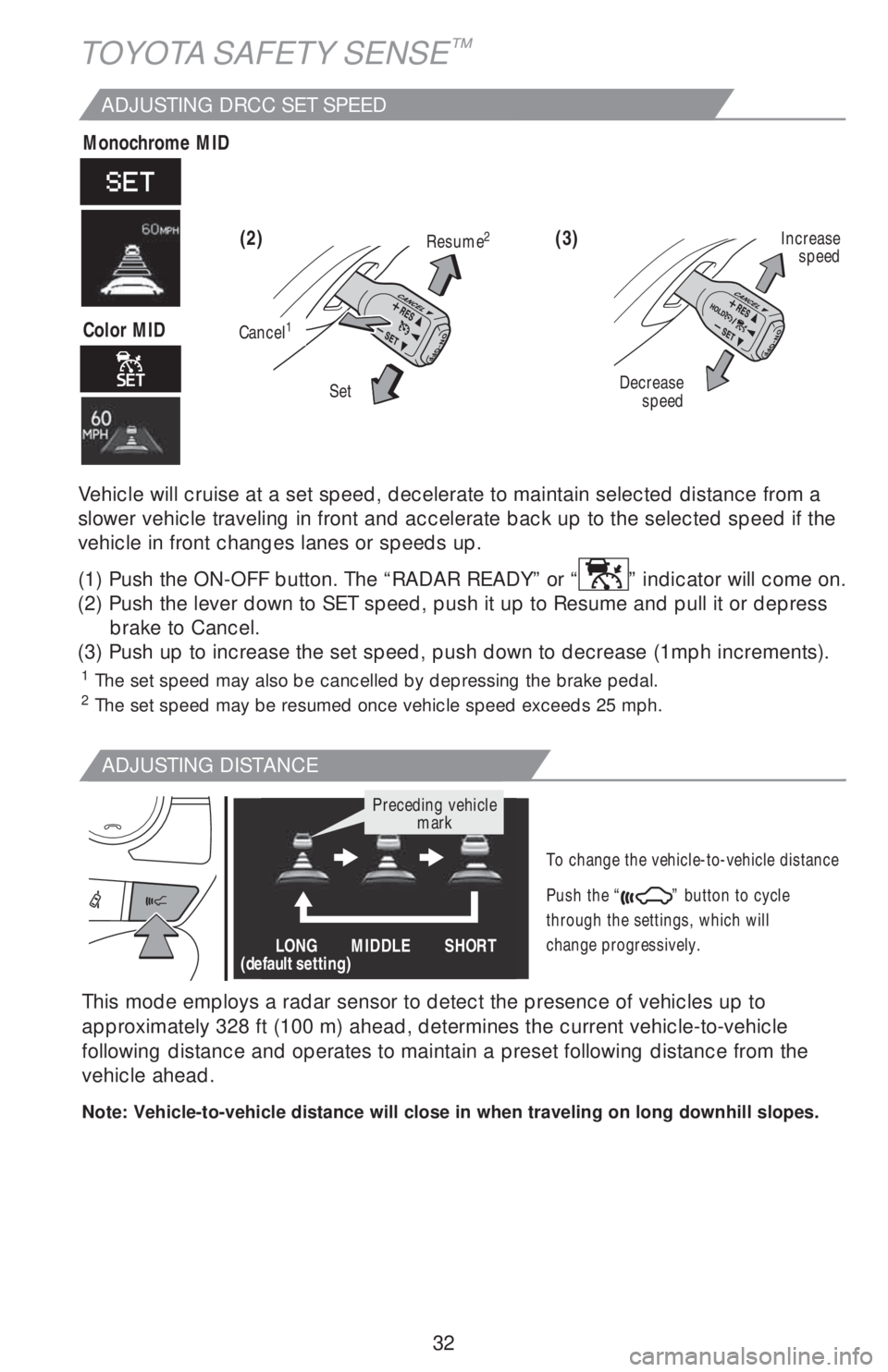
Vehicle will cruise at a set speed, decelerate to maintain selected distance from a
slower vehicle traveling in front and accelerate back up to the selected speed if the
vehicle in front changes lanes or speeds up.
(1) Push the ON-OFF button. The “RADAR READY” or “
” indicator will come on.
(2) Push the lever down to SET speed, push it up to Resume and pull it or depress
brake to Cancel.
(3) Push up to increase the set speed, push down to decrease (1mph increments).
(3) (2)
ADJUSTING DISTANCE
To change the vehicle-to-vehicle distance
Push the “
” button to cycle
through the settings, which will
change progressively.
Decrease
speedIncrease
speed
Cancel1
Resume2
Set
This mode employs a radar sensor to detect the presence of vehicles up to
approximately 328 ft (100 m) ahead, determines the current vehicle-to-vehicle
following distance and operates to maintain a preset following distance from the
vehicle ahead.
Note: Vehicle-to-vehicle distance will close in when traveling on long downhill slopes.
LONG
(default setting)MIDDLE SHORT
Preceding vehicle
mark
TOYOTA SAFETY SENSE™
Monochrome MID
Color MID