warning light TOYOTA COROLLA 2019 (in English) Owner's Manual
[x] Cancel search | Manufacturer: TOYOTA, Model Year: 2019, Model line: COROLLA, Model: TOYOTA COROLLA 2019Pages: 608, PDF Size: 10.15 MB
Page 72 of 608
72
COROLLA_TMMMS_TMMC_U
2. Instrument cluster
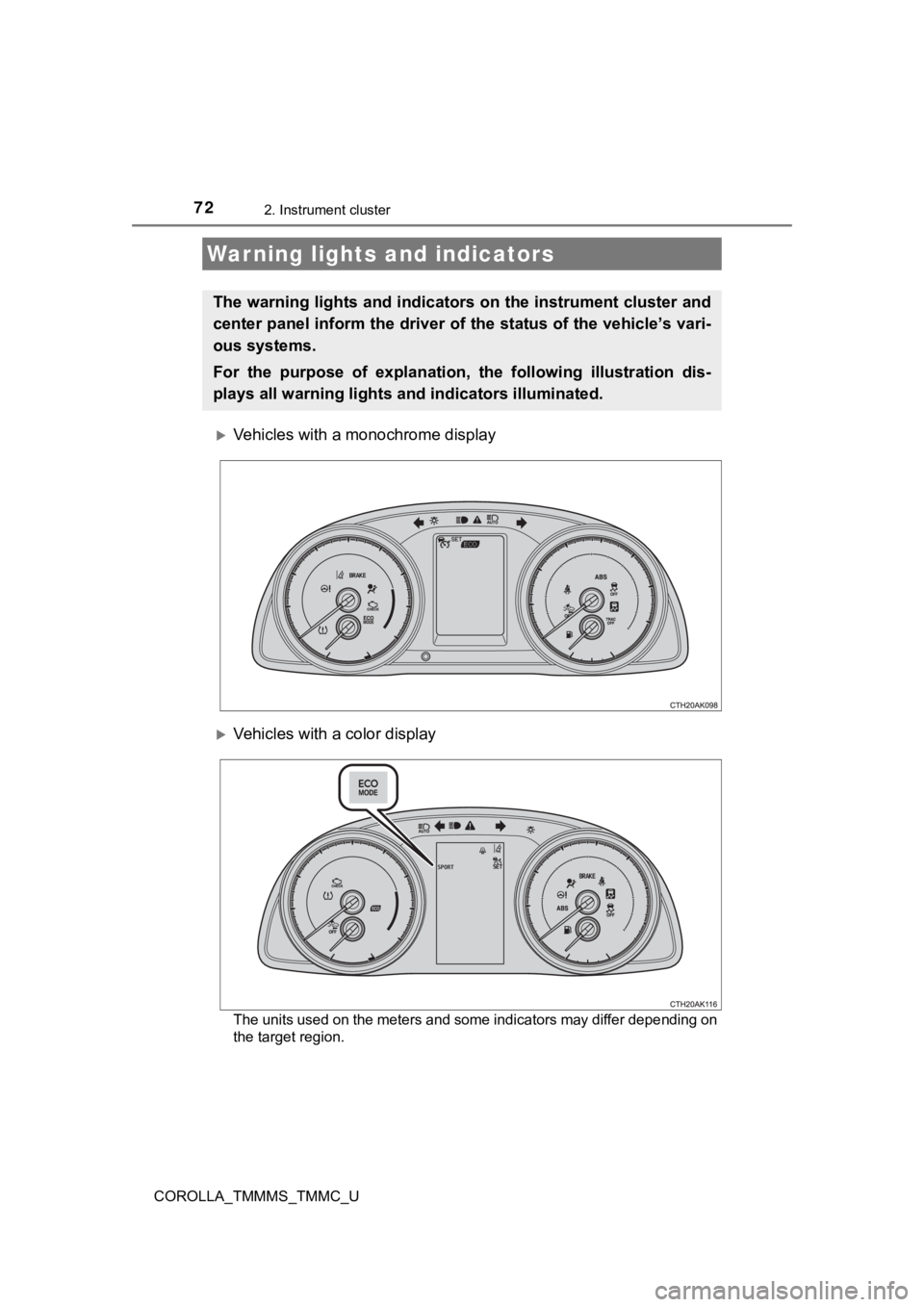
Vehicles with a monochrome display
Vehicles with a color display
The units used on the meters and some indicators may differ depending on
the target region.
Warning lights and indicators
The warning lights and indicators on the instrument cluster and
center panel inform the driver of the status of the vehicle’s vari-
ous systems.
For the purpose of explanation, t he following illustration dis-
plays all warning lights a nd indicators illuminated.
Page 73 of 608
732. Instrument cluster
2
Instrument cluster
COROLLA_TMMMS_TMMC_U
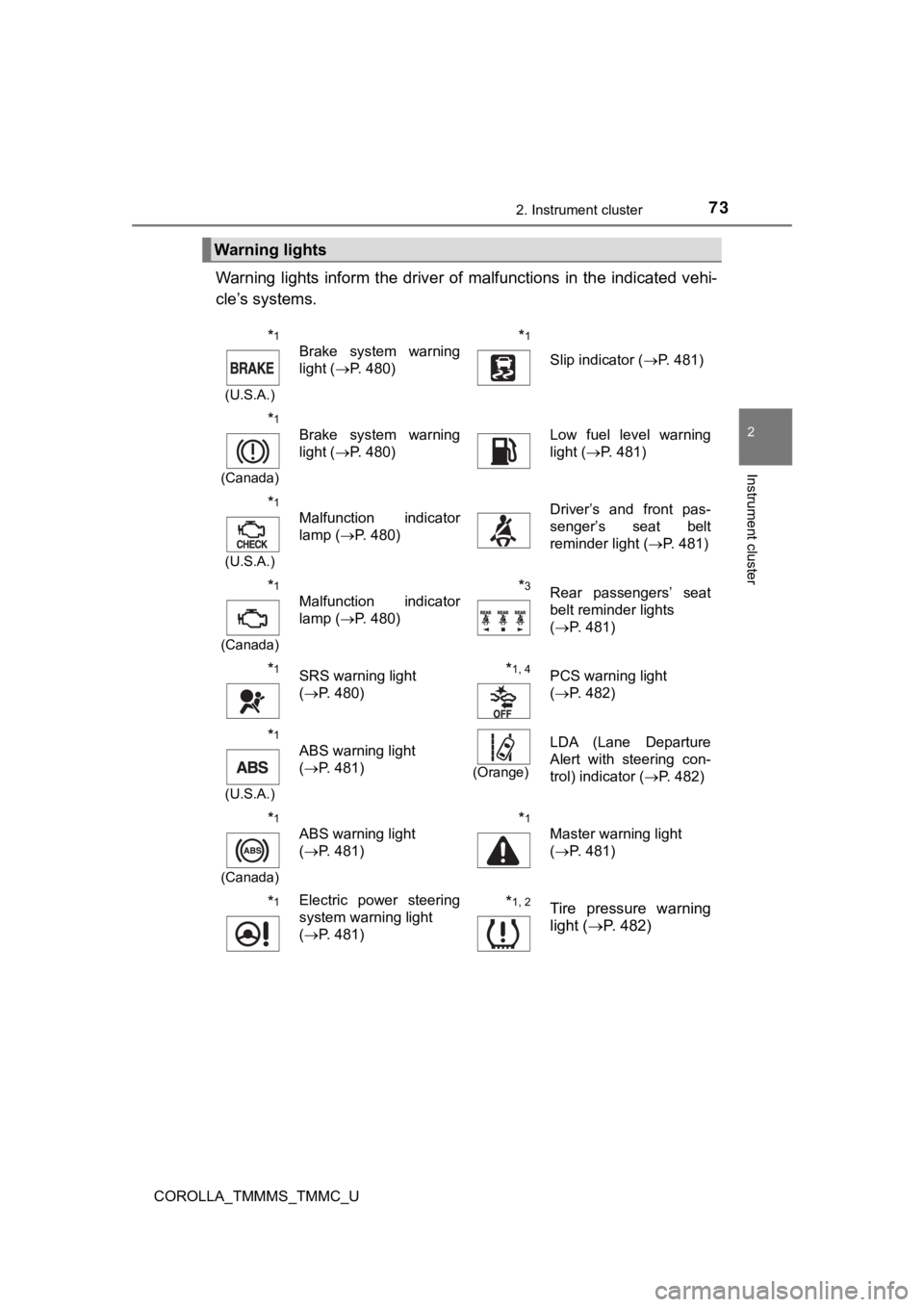
Warning lights inform the driver of malfunctions in the indicated vehi-
cle’s systems.
Warning lights
*1
(U.S.A.)
Brake system warning
light ( P. 480)*1
Slip indicator ( P. 481)
*1
(Canada)
Brake system warning
light (P. 480)Low fuel level warning
light (P. 481)
*1
(U.S.A.)
Malfunction indicator
lamp ( P. 480)Driver’s and front pas-
senger’s seat belt
reminder light ( P. 481)
*1
(Canada)
Malfunction indicator
lamp (P. 480)*3Rear passengers’ seat
belt reminder lights
(P. 481)
*1SRS warning light
(P. 480)*1, 4PCS warning light
(P. 482)
*1
(U.S.A.)
ABS warning light
(P. 481)
(Orange)
LDA (Lane Departure
Alert with steering con-
trol) indicator ( P. 482)
*1
(Canada)
ABS warning light
(P. 481)*1
Master warning light
(P. 481)
*1Electric power steering
system warning light
(P. 481)*1, 2Tire pressure warning
light ( P. 482)
Page 75 of 608
752. Instrument cluster
2
Instrument cluster
COROLLA_TMMMS_TMMC_U
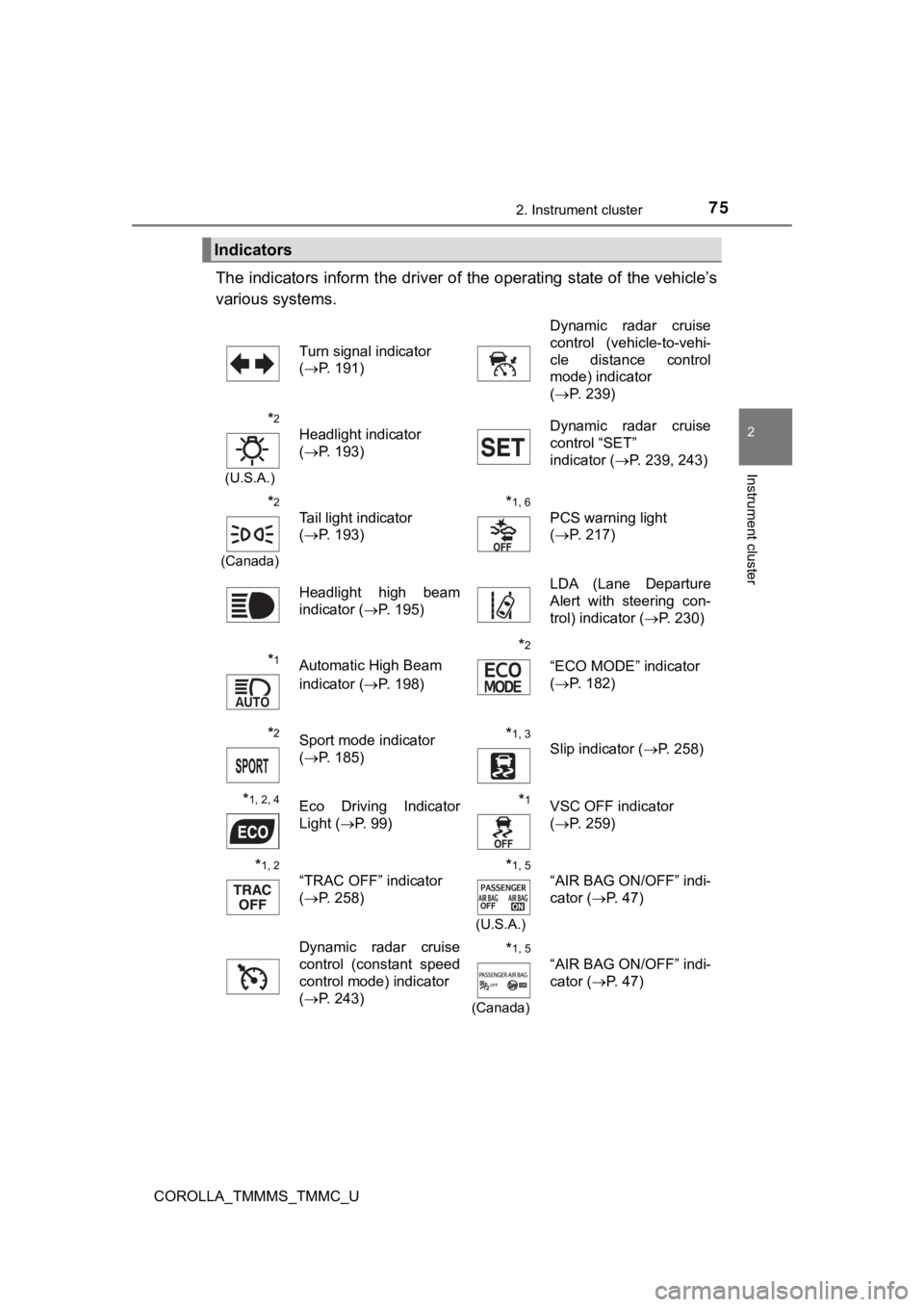
The indicators inform the driver of the operating state of the vehicle’s
various systems.
Indicators
Turn signal indicator
( P. 191) Dynamic radar cruise
control (vehicle-to-vehi-
cle distance control
mode) indicator
(
P. 239)
*2
(U.S.A.)
Headlight indicator
(P. 193) Dynamic radar cruise
control “SET”
indicator (
P. 239, 243)
*2
(Canada)
Tail light indicator
(P. 193) *1, 6
PCS warning light
(P. 217)
Headlight high beam
indicator ( P. 195) LDA (Lane Departure
Alert with steering con-
trol) indicator (
P. 230)
*1Automatic High Beam
indicator (P. 198)
*2
“ECO MODE” indicator
(P. 182)
*2Sport mode indicator
(P. 185)*1, 3 Slip indicator ( P. 258)
*1, 2, 4Eco Driving Indicator
Light (P. 99)*1VSC OFF indicator
(P. 259)
*1, 2
“TRAC OFF” indicator
(P. 258)*1, 5
(U.S.A.)
“AIR BAG ON/OFF” indi-
cator ( P. 47)
Dynamic radar cruise
control (constant speed
control mode) indicator
( P. 243)
*1, 5
(Canada)
“AIR BAG ON/OFF” indi-
cator ( P. 47)
Page 76 of 608
762. Instrument cluster
COROLLA_TMMMS_TMMC_U
*1: These lights, except those shown on the multi-information display, turn on
when the engine switch is turned to the “ON” position (vehicles without a
smart key system) or the engine switch is turned to IGNITION ON mode
(vehicles with a smart key system) to indicate that a system ch eck is being
performed. They will turn off after the engine is started, or a fter a few sec-
onds. There may be a malfunction in a system if a light does not come on,
or turn off. Have the vehicle inspected by your Toyota dealer.
*2: If equipped
*3: The light flashes to indicate that the system is operating.
*4: The light does not turn on when the system is disabled.
*5: This light illuminates on the center panel.
*6: The light turns on when the system is off.
*7: When the outside temperature is approximately 37°F (3°C) or lo wer, the
indicator will flash 10 times, then stay on.
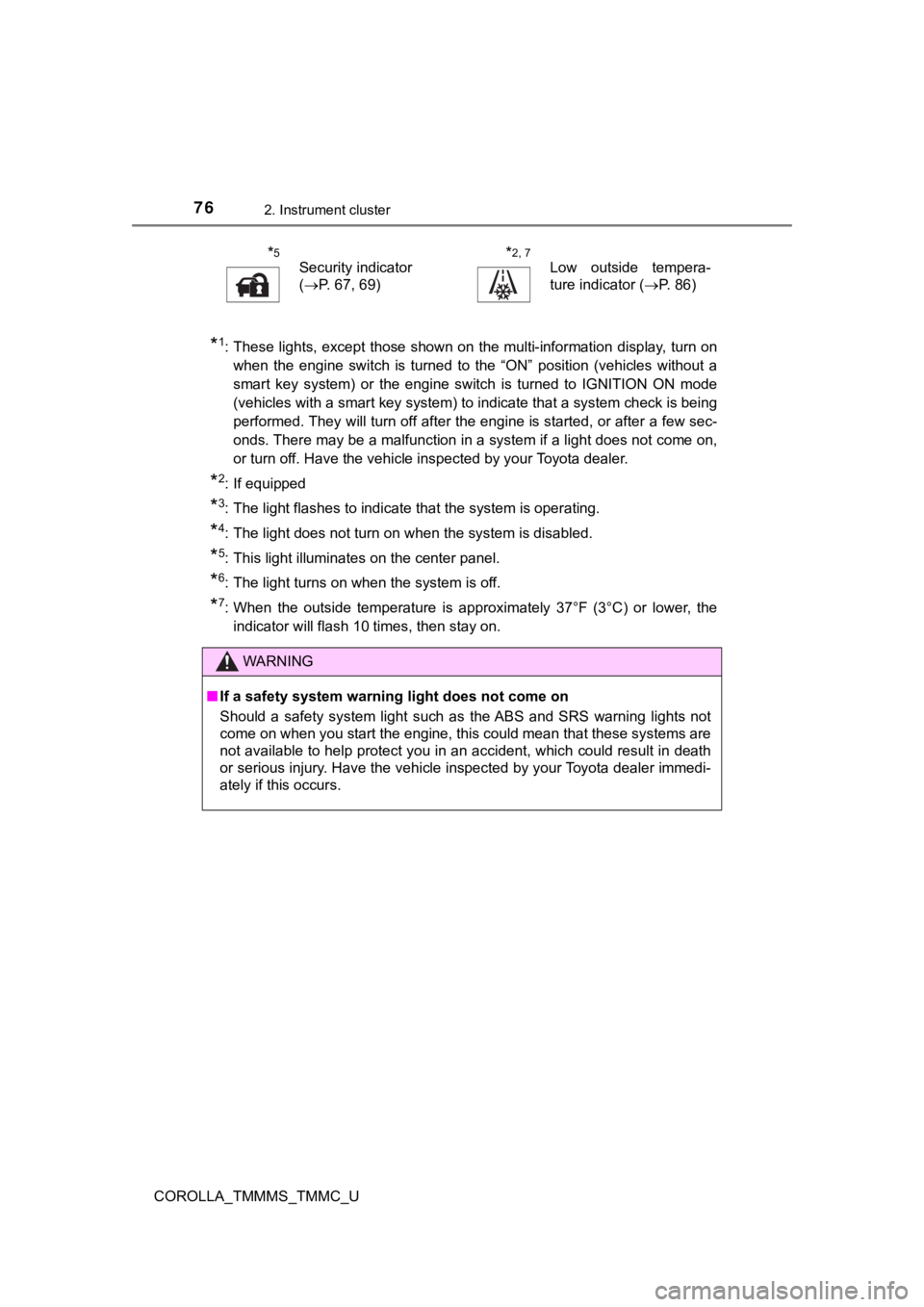
*5
Security indicator
( P. 67, 69)*2, 7
Low outside tempera-
ture indicator ( P. 86)
WARNING
■If a safety system warning light does not come on
Should a safety system light such as the ABS and SRS warning lights not
come on when you start the engine, this could mean that these s ystems are
not available to help protect you in an accident, which could r esult in death
or serious injury. Have the vehicle inspected by your Toyota de aler immedi-
ately if this occurs.
Page 86 of 608
862. Instrument cluster
COROLLA_TMMMS_TMMC_U
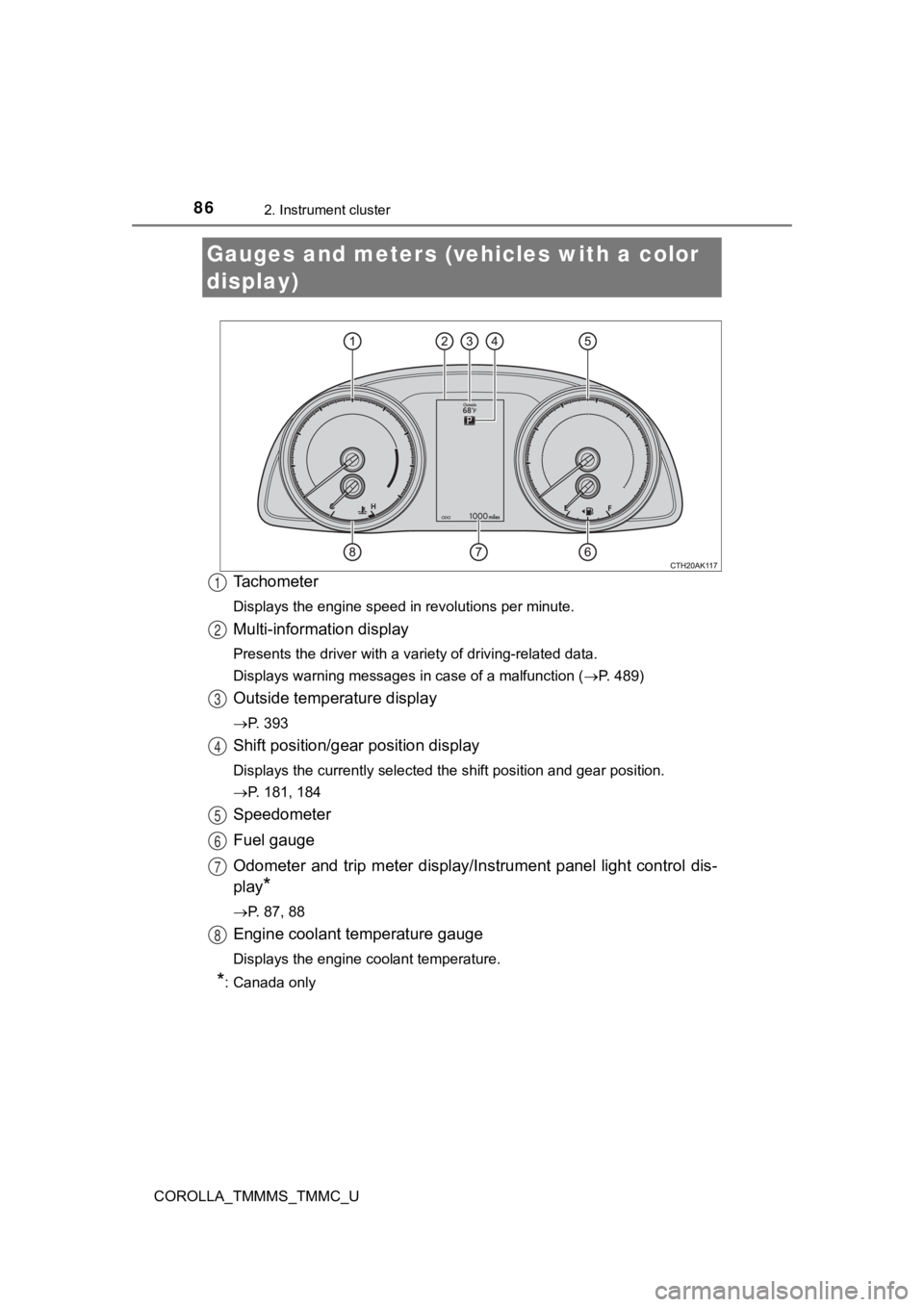
Tachometer
Displays the engine speed in revolutions per minute.
Multi-information display
Presents the driver with a variety of driving-related data.
Displays warning messages in case of a malfunction (P. 489)
Outside temperature display
P. 393
Shift position/gear position display
Displays the currently selected the shift position and gear pos ition.
P. 181, 184
Speedometer
Fuel gauge
Odometer and trip meter display/Instrument panel light control dis-
play
*
P. 87, 88
Engine coolant temperature gauge
Displays the engine coolant temperature.
*: Canada only
Gauges and meters (vehicles with a color
display)
1
2
3
4
5
6
7
8
Page 93 of 608

932. Instrument cluster
2
Instrument cluster
COROLLA_TMMMS_TMMC_U■
Changing the settings
Select using the meter control switch.
Select an item and then set it with the center button.
■Customizable items
●LDA (Lane Departure Alert with steering control)
P. 2 2 6
● LDA (Lane Departure Alert with steering control) vehicle sway
warning
P. 2 2 7
● PCS (Pre-Collision System)
P. 2 1 4
● Language
Select to change the language displayed on the multi-informatio n
display.
● Units
Select to change the unit of measure displayed on the multi-inf or-
mation display.
● Drive information 1/ Drive information 2
Select to select up to 2 items that will be displayed on a Driv e
information screen.
● Eco driving indicator light
Select to activate/deactivate the Eco Driving Indicator Light.
(
P. 9 9 )
● Pop-up display
Select to set the following pop-up displays, which may appear i n
some situations, on/off. • Route guidance display of the navigation system-linked sys-
tem (if equipped)
• Incoming call disp lay of the hands-free phone system
● Accent color
Select to change the accent colors on the screen, such as the
cursor color.
Settings display
1
2
Page 94 of 608

942. Instrument cluster
COROLLA_TMMMS_TMMC_U
●Maintenance sy stem (U.S.A.)
Select to reset the message after the required maintenance is
performed. (
P. 415)
● Initialization
Registered or changed meter settings will be deleted or returne d
to their default setting.
■ Pop-up display
In some situations, such as when a switch operation is performe d, a pop-up
display, such as the operating dynamic radar cruise control swi tch, will be
temporarily displayed on the multi-information display.
The pop-up display function can be set on/off.
■ Setting display automatic cancelation
In the following situations, a setting display in which the settings can be
changed through the meter control switches will automatically b e turned off.
● When a warning message appears while the setting display is dis played
● When the vehicle begins to move while the setting display is displayed
■ Liquid crystal display
Small spots or light spots may appear on the display. This phen omenon is
characteristic of liquid crystal displays, and there is no prob lem continuing to
use the display.
Page 121 of 608
1213-2. Opening, closing and locking the doors
3
Operation of each component
COROLLA_TMMMS_TMMC_U
WARNING
■Using the trunk
Observe the following precautions.
Failure to do so may cause parts of the body to be caught, resu lting in seri-
ous injury.
● Remove any heavy loads, such as snow and ice, from the trunk li d before
opening it. Failure to do so may cause the trunk lid to suddenl y shut again
after it is opened.
● When opening or closing the trunk lid, thoroughly check to make sure the
surrounding area is safe.
● If anyone is in the vicinity, make sure they are safe and let t hem know that
the trunk is about to open or close.
● Use caution when opening or closing the trunk lid in windy weat her as it
may move abruptly in strong wind.
● Do not attach any accessories other than genuine Toyota parts t o the trunk
lid. Such additional weight on the trunk lid may cause the lid to suddenly
shut again after it is opened.
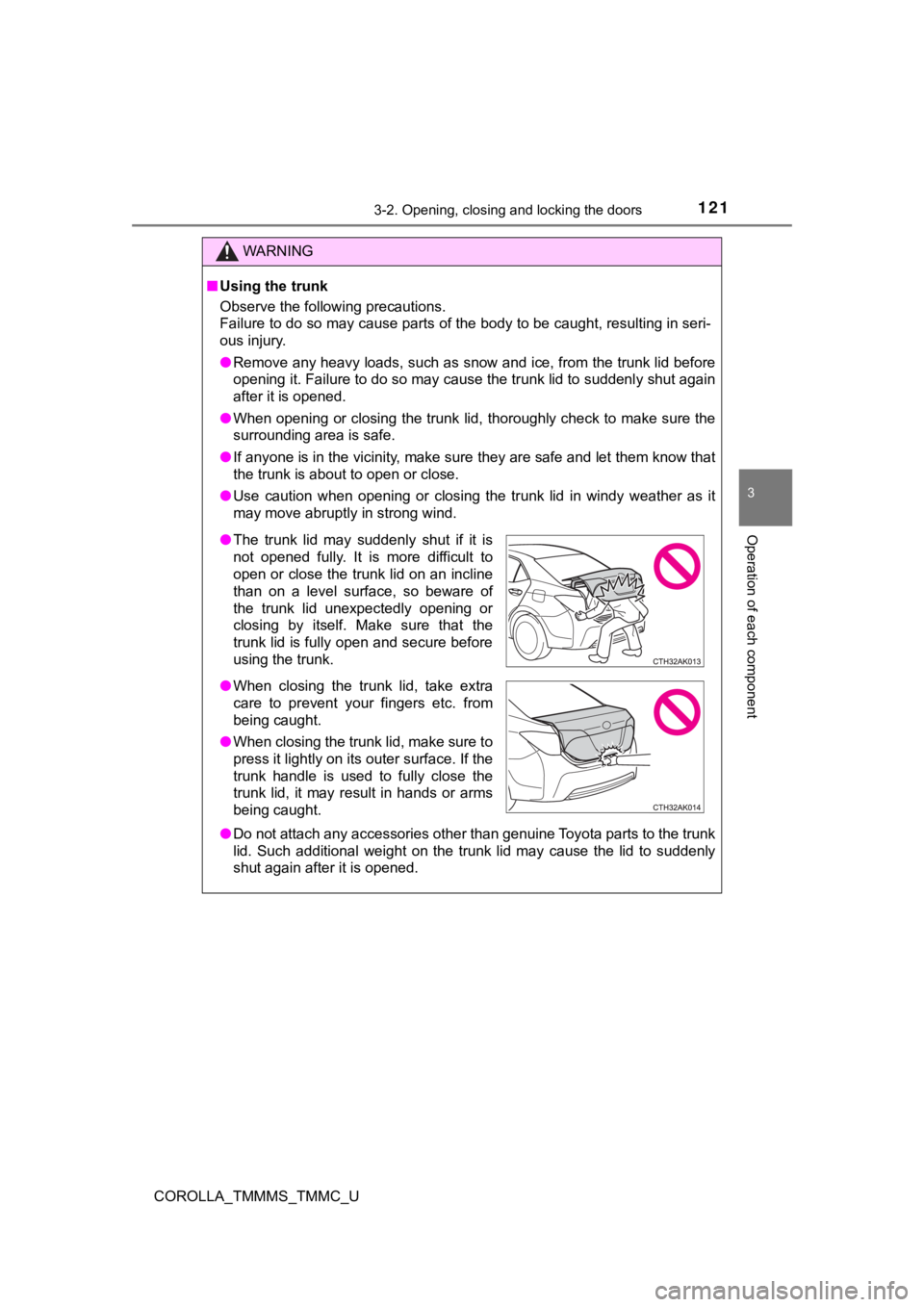
● The trunk lid may suddenly shut if it is
not opened fully. It is more difficult to
open or close the trunk lid on an incline
than on a level surface, so beware of
the trunk lid unexpectedly opening or
closing by itself. Make sure that the
trunk lid is fully open and secure before
using the trunk.
● When closing the trunk lid, take extra
care to prevent your fingers etc. from
being caught.
● When closing the trunk lid, make sure to
press it lightly on its outer surface. If the
trunk handle is used to fully close the
trunk lid, it may result in hands or arms
being caught.
Page 133 of 608
1333-3. Adjusting the seats
3
Operation of each component
COROLLA_TMMMS_TMMC_U
WARNING
■When folding the rear seatbacks down
Observe the following precautions. Failure to do so may result in death or
serious injury.
● Do not fold the seatbacks down while driving.
● Stop the vehicle on level ground, set the parking brake and shi ft the shift
lever to P (continuously variable transmission) or N (manual transmission).
● Do not allow anyone to sit on a folded seatback or in the trunk while driv-
ing.
● Do not allow children to enter the trunk.
● Do not allow anyone to sit on the rear center seat if the rear right seat is
folded down, as the seat belt buckle for the rear center seat belt is then
concealed under the folded seat and cannot be used.
● Be careful not to catch your hand when folding the rear seatbac ks.
● Adjust the position of the front seat before folding down the rear seatbacks
so that the front seat does not interfere with the rear seatbacks when fold-
ing down the rear seatbacks.
■ After returning the seatback to the upright position
Observe the following precautions. Failure to do so may result in death or
serious injury.
● Check that the seat belts are not twisted or caught under the seat.
NOTICE
■When the rear right seatback is folded down
Make sure the luggage loaded in the enlarged trunk will not dam age the
webbing of the rear center seat belt.
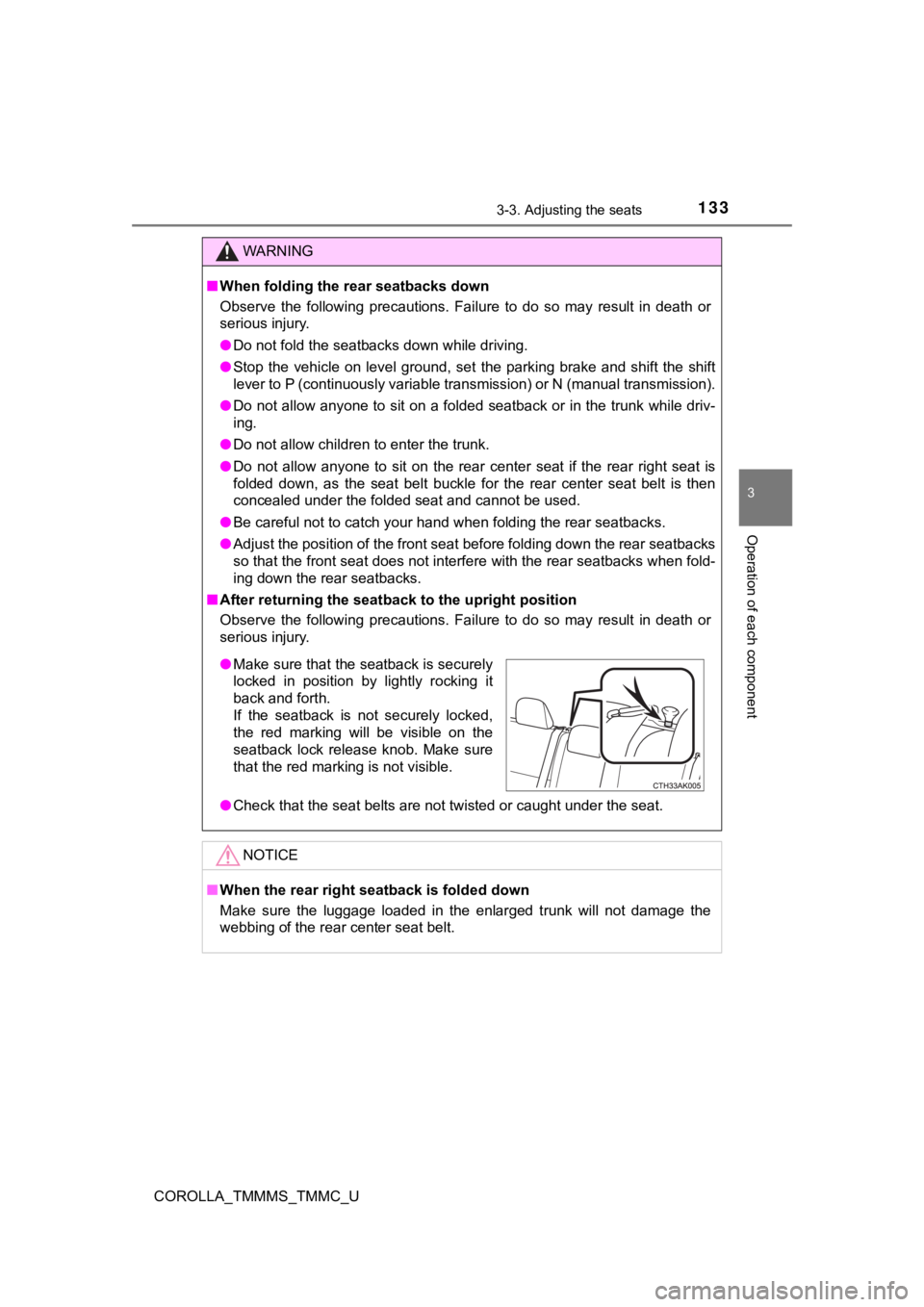
● Make sure that the seatback is securely
locked in position by lightly rocking it
back and forth.
If the seatback is not securely locked,
the red marking will be visible on the
seatback lock release knob. Make sure
that the red marking is not visible.
Page 140 of 608
1403-4. Adjusting the steering wheel and mirrors
COROLLA_TMMMS_TMMC_U
Auto anti-glare inside rear view mirror
Responding to the level of brightness of the headlights of vehi cles
behind, the reflected light is automatically reduced.
Changing automatic anti-glare
function mode
On/off
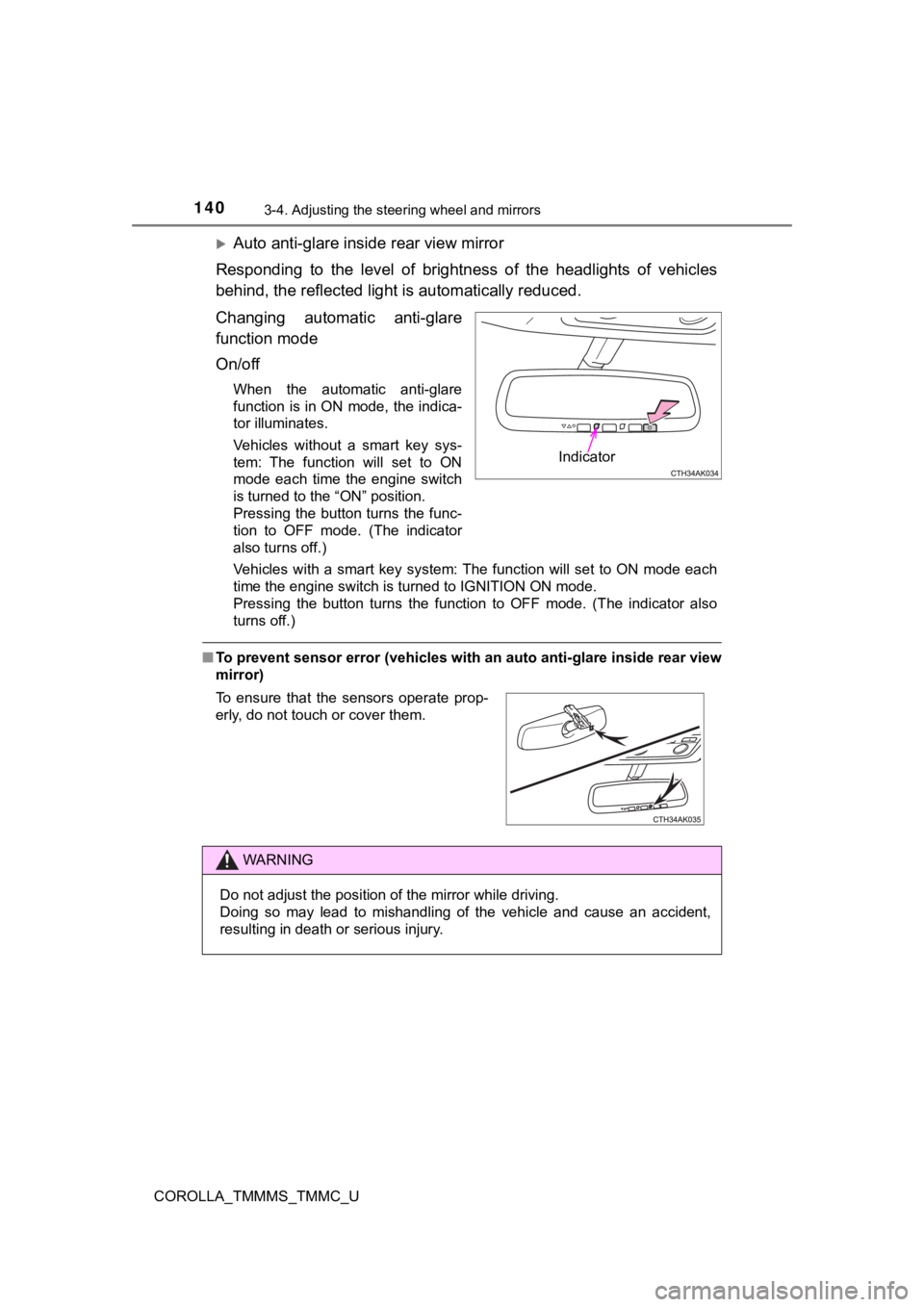
When the automatic anti-glare
function is in ON mode, the indica-
tor illuminates.
Vehicles without a smart key sys-
tem: The function will set to ON
mode each time the engine switch
is turned to the “ON” position.
Pressing the button turns the func-
tion to OFF mode. (The indicator
also turns off.)
Vehicles with a smart key system: The function will set to ON m ode each
time the engine switch is turned to IGNITION ON mode.
Pressing the button turns the function to OFF mode. (The indica tor also
turns off.)
■ To prevent sensor error (vehicles with an auto anti-glare insid e rear view
mirror)
Indicator
To ensure that the sensors operate prop-
erly, do not touch or cover them.
WARNING
Do not adjust the position of the mirror while driving.
Doing so may lead to mishandling of the vehicle and cause an ac cident,
resulting in death or serious injury.