reset TOYOTA COROLLA 2019 Owners Manual (in English)
[x] Cancel search | Manufacturer: TOYOTA, Model Year: 2019, Model line: COROLLA, Model: TOYOTA COROLLA 2019Pages: 608, PDF Size: 10.15 MB
Page 18 of 608
18Pictorial index
COROLLA_TMMMS_TMMC_U
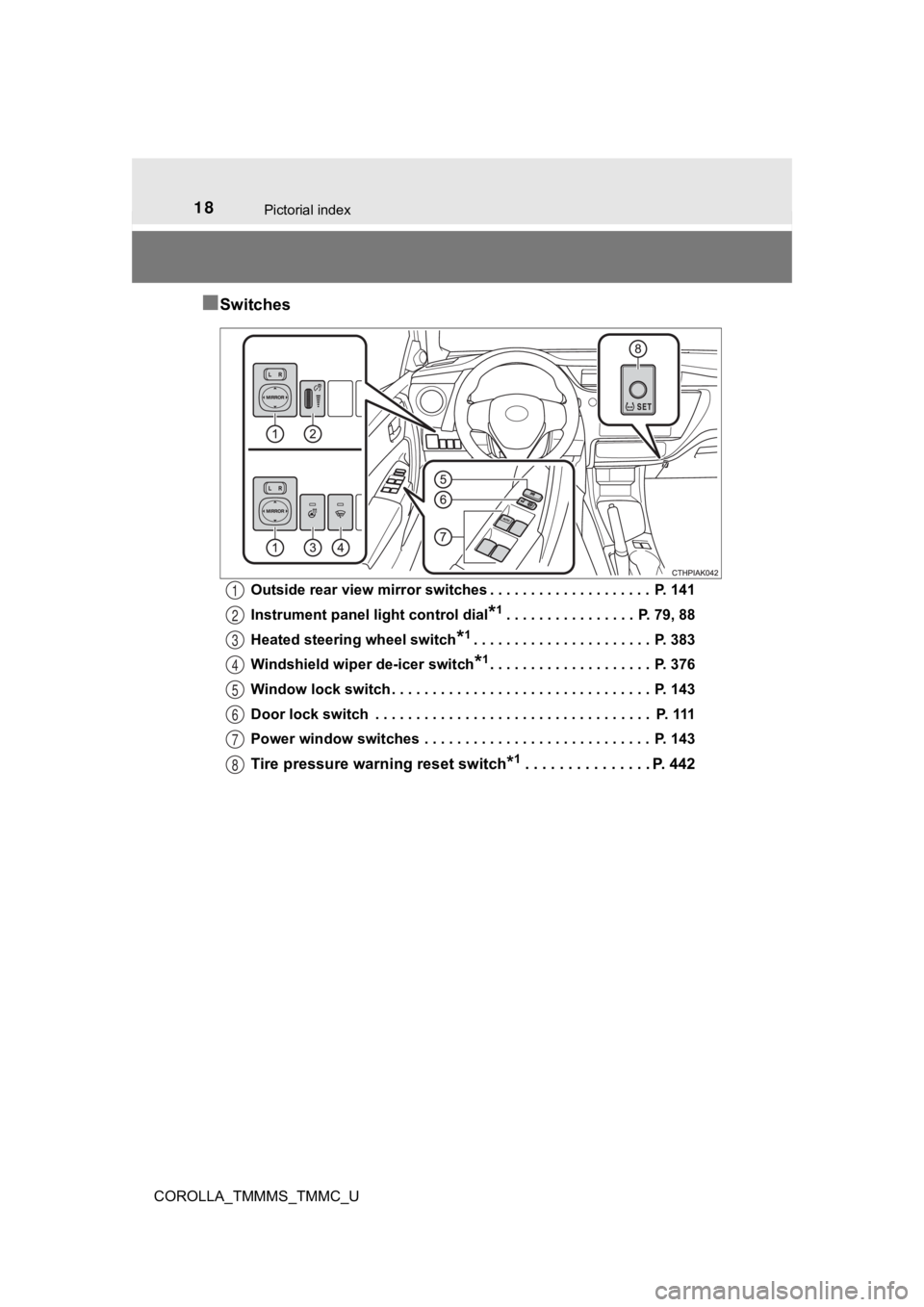
■Switches
Outside rear view mirror switches . . . . . . . . . . . . . . . . . . . . P. 141
Instrument panel light control dial
*1. . . . . . . . . . . . . . . . P. 79, 88
Heated steering wheel switch
*1. . . . . . . . . . . . . . . . . . . . . . P. 383
Windshield wiper de-icer switch
*1. . . . . . . . . . . . . . . . . . . . P. 376
Window lock switch . . . . . . . . . . . . . . . . . . . . . . . . . . . . . . . . P. 143
Door lock switch . . . . . . . . . . . . . . . . . . . . . . . . . . . . . . . . . . P. 111
Power window switches . . . . . . . . . . . . . . . . . . . . . . . . . . . . P. 143
Tire pressure warn ing reset switch*1. . . . . . . . . . . . . . . P. 442
1
2
3
4
5
6
7
8
Page 80 of 608
802. Instrument cluster
COROLLA_TMMMS_TMMC_U■
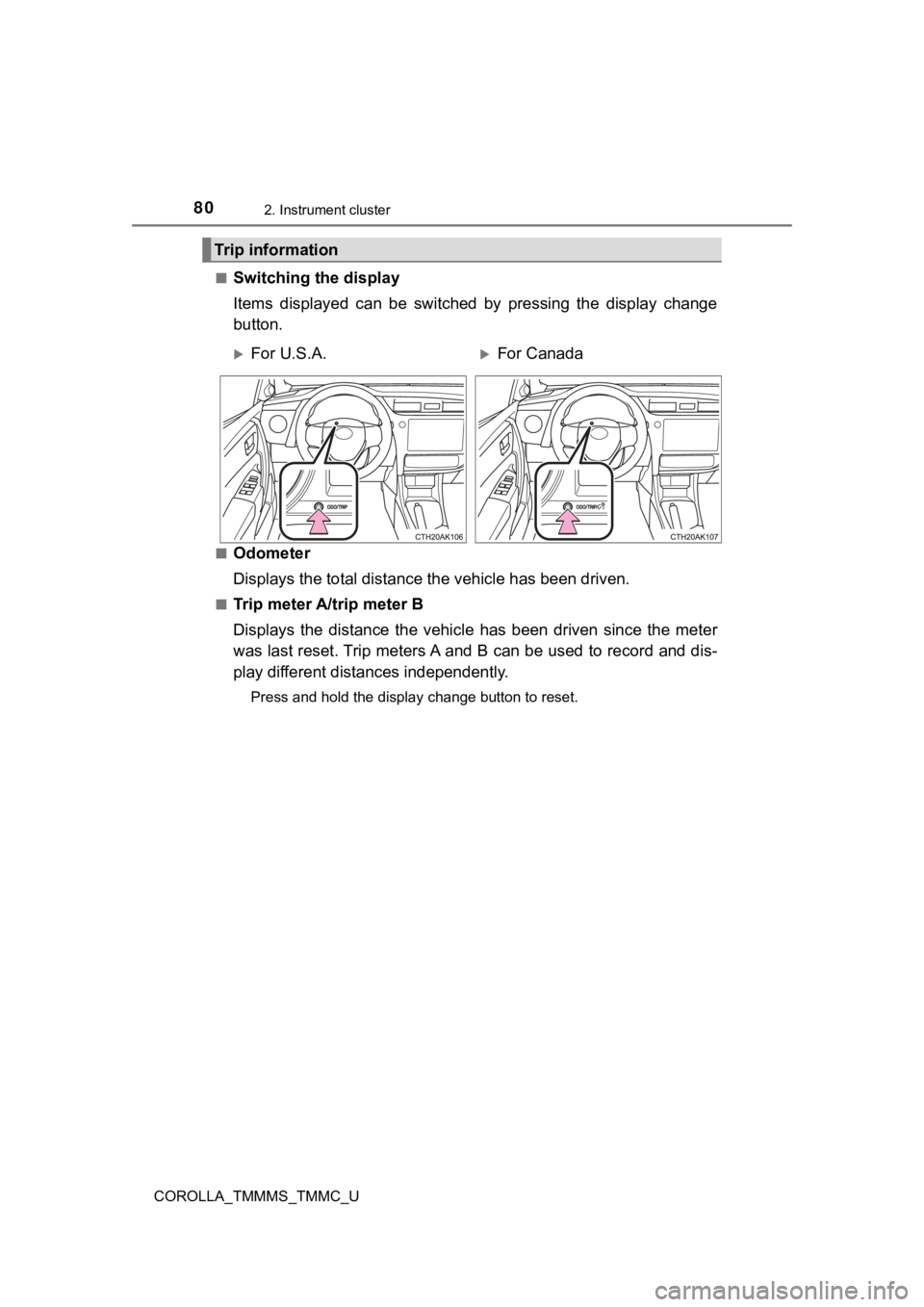
Switching the display
Items displayed can be switched by pressing the display change
button.
■Odometer
Displays the total distance
the vehicle has been driven.
■Trip meter A/trip meter B
Displays the distance the vehicl e has been driven since the met er
was last reset. Trip meters A and B can be used to record and d is-
play different distances independently.
Press and hold the display change button to reset.
Trip information
For U.S.A.For Canada
Page 81 of 608
812. Instrument cluster
2
Instrument cluster
COROLLA_TMMMS_TMMC_U■
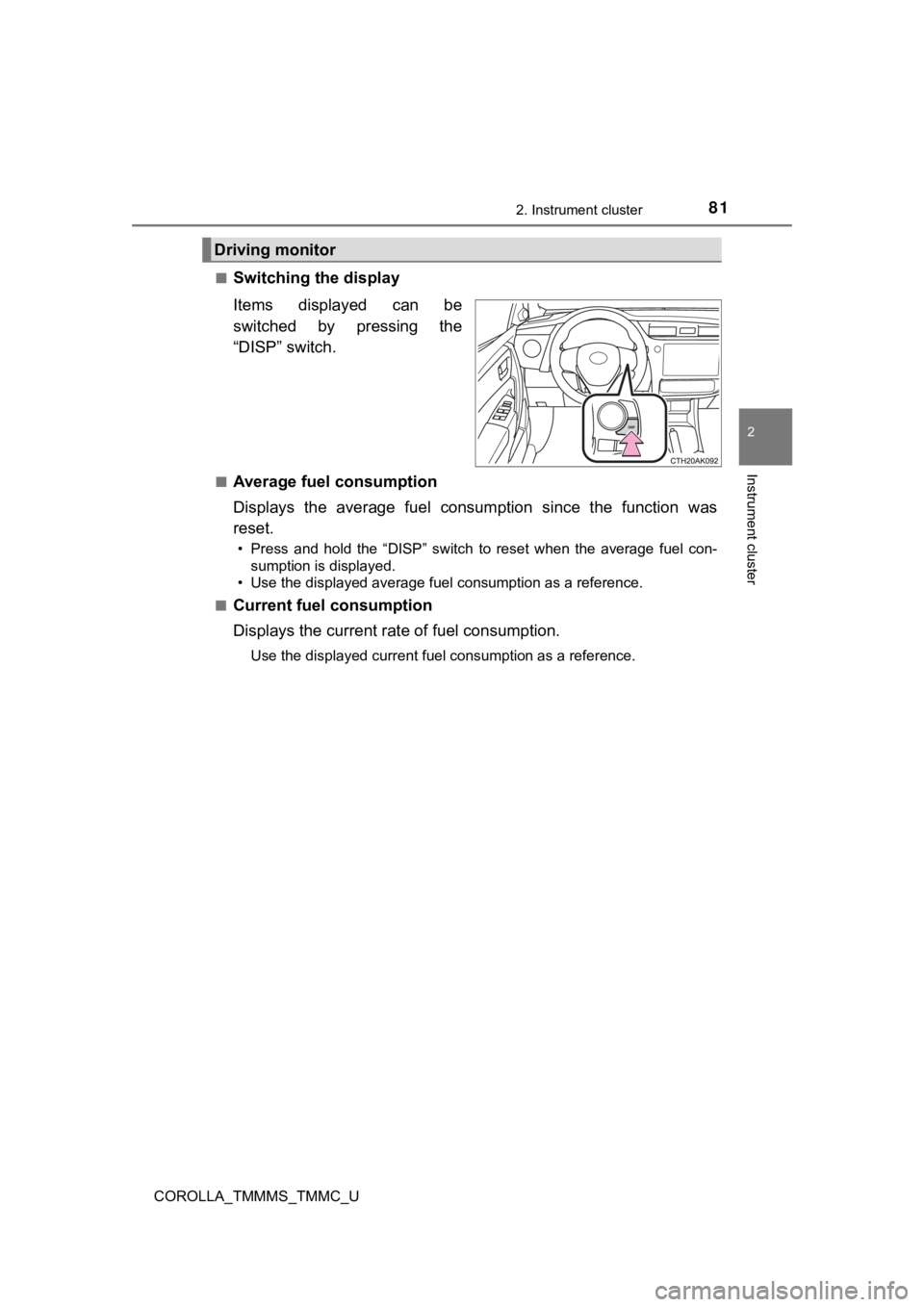
Switching the display
Items displayed can be
switched by pressing the
“DISP” switch.
■Average fuel consumption
Displays the average fuel consum
ption since the function was
reset.
• Press and hold the “DISP” switch to reset when the average fuel con- sumption is displayed.
• Use the displayed average fuel consumption as a reference.
■
Current fuel consumption
Displays the current rat e of fuel consumption.
Use the displayed current fuel consumption as a reference.
Driving monitor
Page 84 of 608

842. Instrument cluster
COROLLA_TMMMS_TMMC_U■
Customization
Some settings can be changed
. (Customizable features: P. 5 6 4 )
■The meters and display illuminate when
Vehicles without a smart key system
The engine switch is in the “ON” position.
Vehicles with a smart key system
The engine switch is in IGNITION ON mode.
■ When disconnecting and reco nnecting battery terminals
The following information data will be reset:
● Driving range
● Average vehicle speed
● Elapsed time
● Average fuel consumption
■ Liquid crystal display
Small spots or light spots may appear on the display. This phen omenon is
characteristic of liquid crystal displays, and there is no prob lem continuing to
use the display.
■ Setting display automatic suspension
In the following situations, the setting display will be suspen ded.
● When a message appears.
● When the vehicle begins to move.
Page 87 of 608
872. Instrument cluster
2
Instrument cluster
COROLLA_TMMMS_TMMC_U
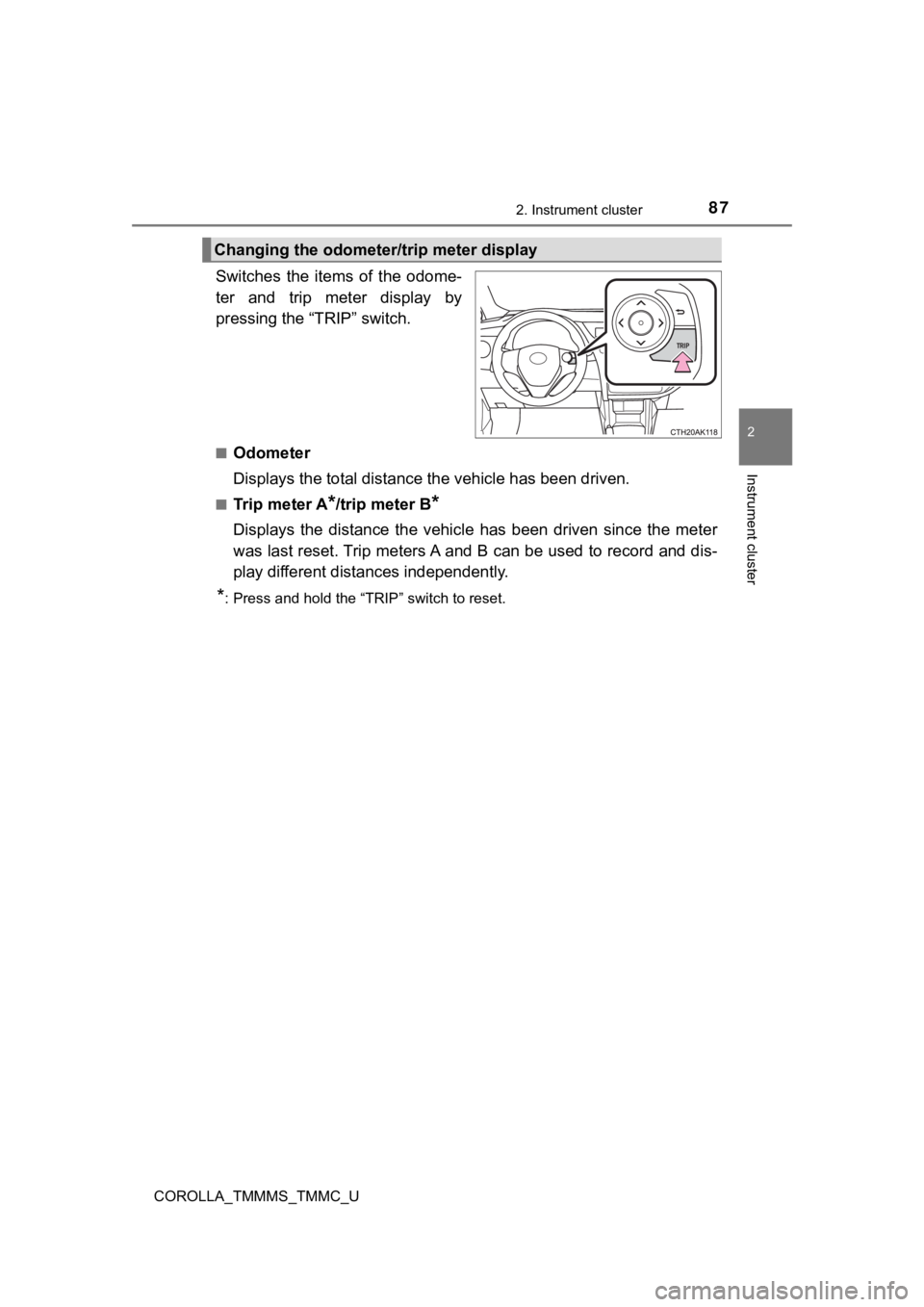
Switches the items of the odome-
ter and trip meter display by
pressing the “TRIP” switch.
■Odometer
Displays the total distance the vehicle has been driven.
■Tr i p m e t e r A*/trip meter B*
Displays the distance the vehicl e has been driven since the met er
was last reset. Trip meters A and B can be used to record and d is-
play different distances independently.
*: Press and hold the “TRIP” switch to reset.
Changing the odometer/t rip meter display
Page 91 of 608
912. Instrument cluster
2
Instrument cluster
COROLLA_TMMMS_TMMC_U
Warning message display
Select to display warning messages and measures to be taken if a
malfunction is detected. ( P. 489)
Settings display
Select to change the meter display settings. ( P. 93)
■
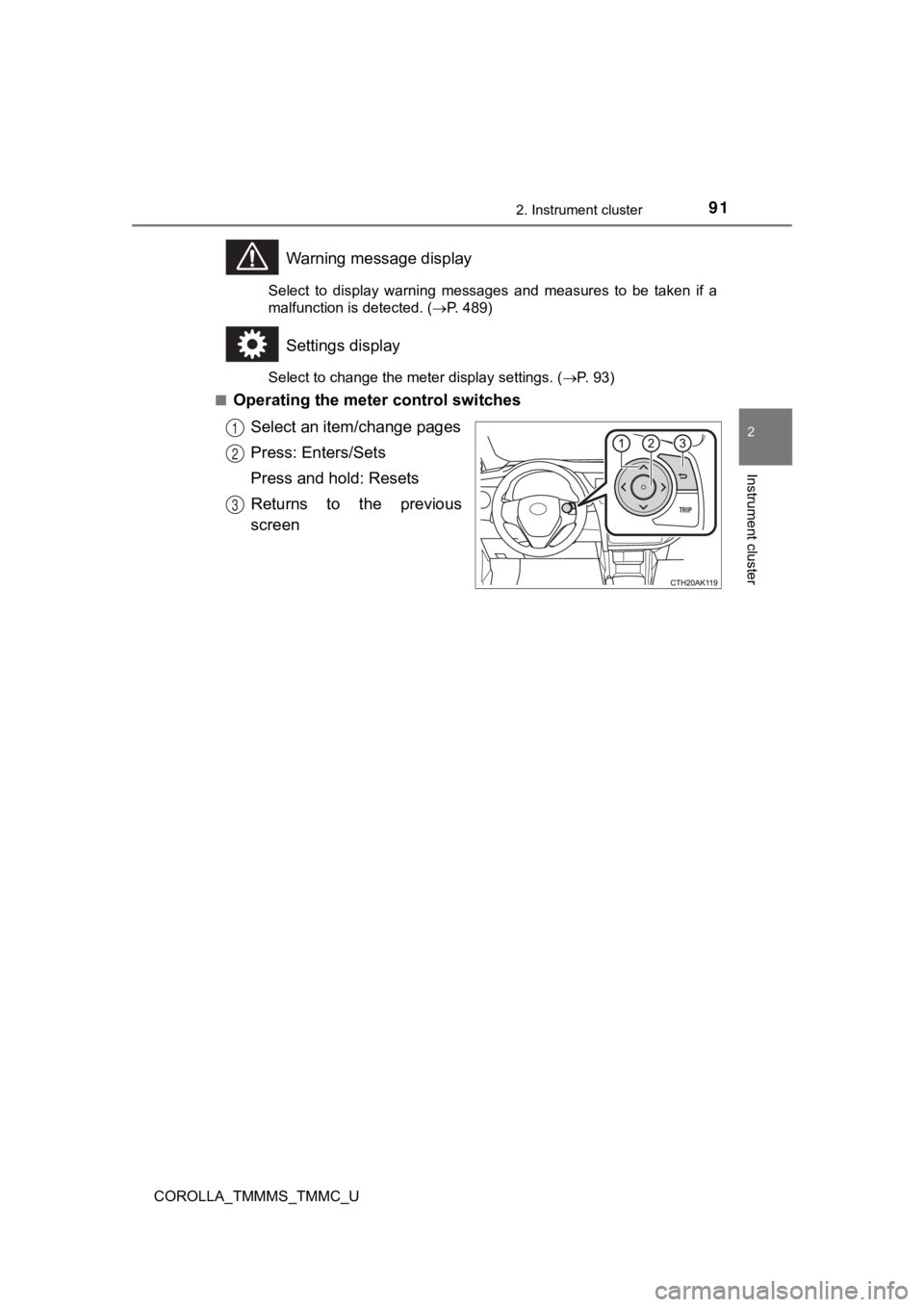
Operating the meter control switches
Select an item/change pages
Press: Enters/Sets
Press and hold: Resets
Returns to the previous
screen
1
2
3
Page 92 of 608

922. Instrument cluster
COROLLA_TMMMS_TMMC_U
●Current fuel consumption*1
●Average fuel consumption (after reset*2/after start/after refuel)*1
Displays the average fuel consum ption since the function was
reset, the engine was started, and the vehicle was refueled, re spec-
tively
Use the displayed average fuel consumption as a reference.
● Average speed (after reset*2/after start)*1
Displays the average vehicle speed since the function was reset
and the engine was sta rted, respectively
● Distance (driving range/after start)
*1
Displays the estimated maximum distance that can be driven with
the quantity of fuel remaining and the distance driven after th e
engine was started, respectively.
• This distance is computed based on your average fuel consumpti on. As
a result, the actual distance that can be driven may differ fro m that dis-
played.
• When only a small amount of fuel is added to the tank, the dis play may
not be updated.
When refueling, turn the engine switch off. If the vehicle is r efueled with-
out turning the engine switch off, the display may not be updat ed.
●Elapsed time (after reset*2/after start)*1
Displays the elapsed time since the function was reset and the
engine was started, respectively
● Eco Driving Indicator Zone Display (vehicles with a continuousl y
variable transmission)
P. 1 0 0
● LDA (Lane Departure Alert with steering control) vehicle sway
warning
P. 2 2 7
● Display off
A blank screen is displayed
*1: Can be registered to Drive information 1 or 2. ( P. 93)
*2: Resetting procedures:
• Select a function to be reset using the meter control switch a nd then
press and hold to reset.
• If there is more than one function that can be reset, check bo xes will be
displayed next to those functions.
Drive information
Page 94 of 608

942. Instrument cluster
COROLLA_TMMMS_TMMC_U
●Maintenance sy stem (U.S.A.)
Select to reset the message after the required maintenance is
performed. (
P. 415)
● Initialization
Registered or changed meter settings will be deleted or returne d
to their default setting.
■ Pop-up display
In some situations, such as when a switch operation is performe d, a pop-up
display, such as the operating dynamic radar cruise control swi tch, will be
temporarily displayed on the multi-information display.
The pop-up display function can be set on/off.
■ Setting display automatic cancelation
In the following situations, a setting display in which the settings can be
changed through the meter control switches will automatically b e turned off.
● When a warning message appears while the setting display is dis played
● When the vehicle begins to move while the setting display is displayed
■ Liquid crystal display
Small spots or light spots may appear on the display. This phen omenon is
characteristic of liquid crystal displays, and there is no prob lem continuing to
use the display.
Page 97 of 608
972. Instrument cluster
2
Instrument cluster
COROLLA_TMMMS_TMMC_U
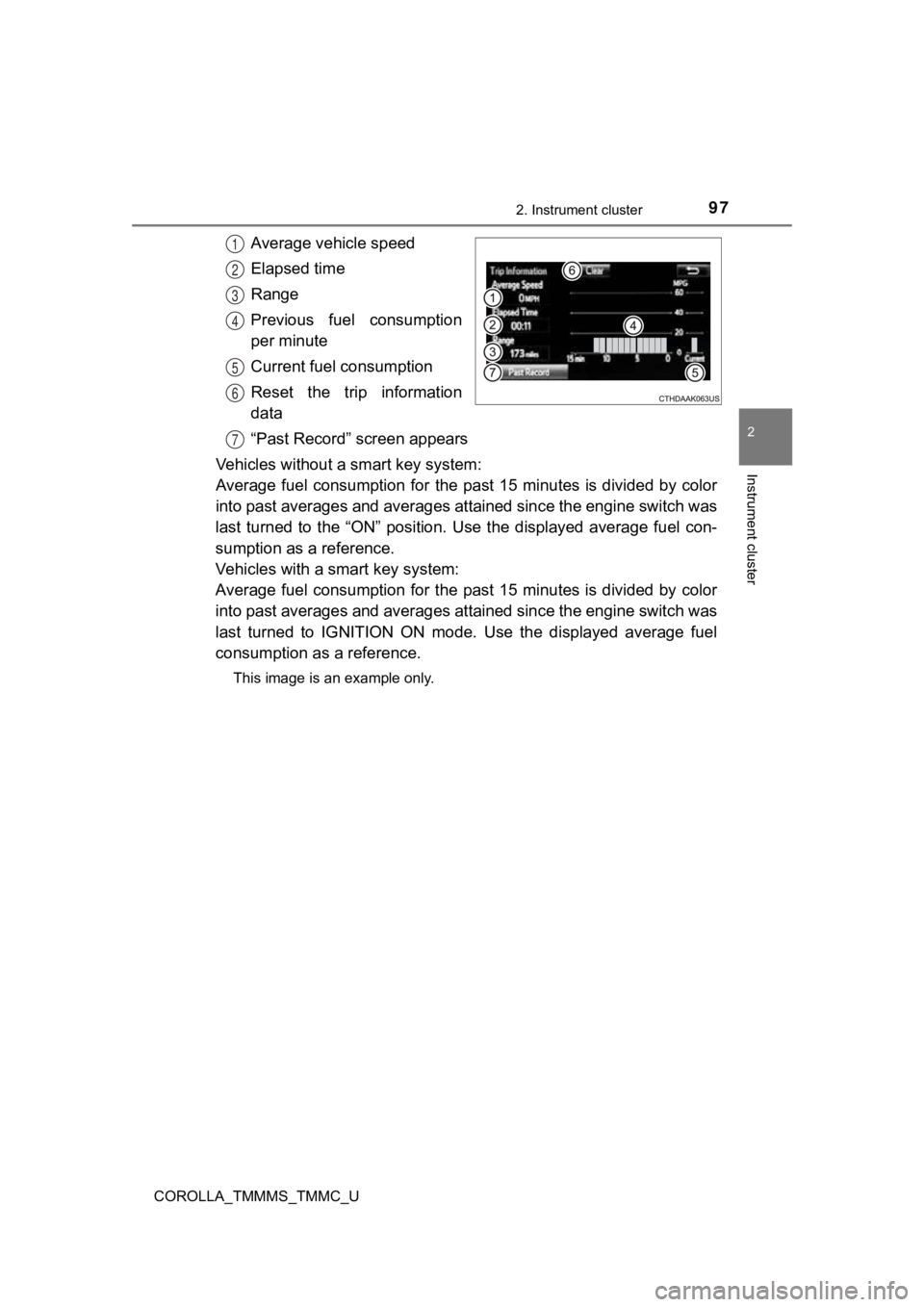
Average vehicle speed
Elapsed time
Range
Previous fuel consumption
per minute
Current fuel consumption
Reset the trip information
data
“Past Record” screen appears
Vehicles without a smart key system:
Average fuel consumption for the past 15 minutes is divided by color
into past averages and averages attained since the engine switch was
last turned to the “ON” position. Use the displayed average fue l con-
sumption as a reference.
Vehicles with a smart key system:
Average fuel consumption for the past 15 minutes is divided by color
into past averages and averages attained since the engine switch was
last turned to IGNITION ON mode. Use the displayed average fuel
consumption as a reference.
This image is an example only.
1
2
3
4
5
6
7
Page 98 of 608
982. Instrument cluster
COROLLA_TMMMS_TMMC_U■
Past record
Entune Audio
Press the “CAR” button.
If the “Trip Information” screen is displayed, select “Past Rec ord”.
Entune Audio Plus or Entune Premium Audio
Press the “APPS” button.
Touch “Eco” on the “Apps” screen.
If the “Trip Information” screen is displayed, select “Past Record”.
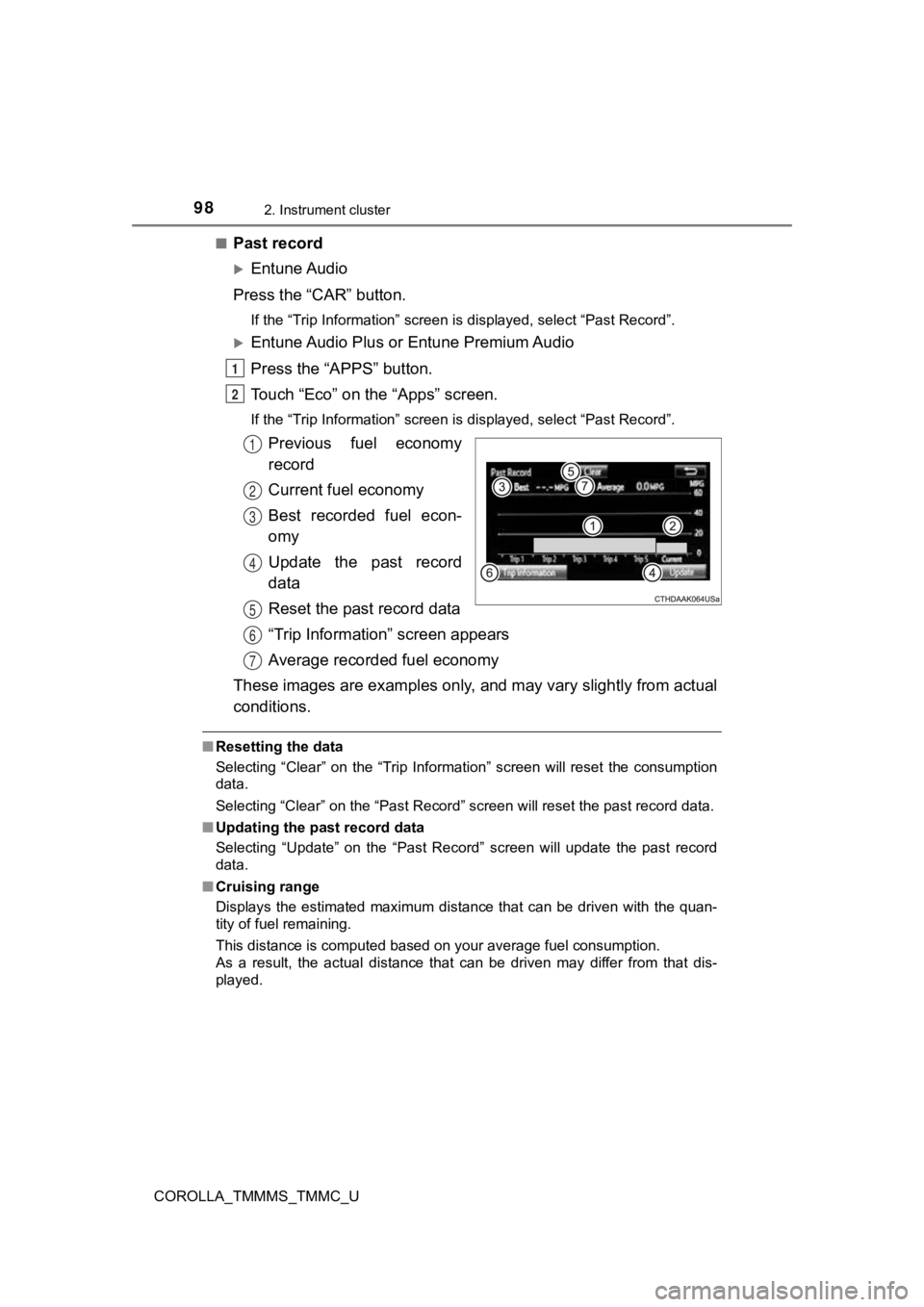
Previous fuel economy
record
Current fuel economy
Best recorded fuel econ-
omy
Update the past record
data
Reset the past record data
“Trip Information” screen appears
Average recorded fuel economy
These images are examples only, and may vary slightly from actual
conditions.
■ Resetting the data
Selecting “Clear” on the “Trip Information” screen will reset t he consumption
data.
Selecting “Clear” on the “Past Record” screen will reset the pa st record data.
■ Updating the past record data
Selecting “Update” on the “Past Record” screen will update the past record
data.
■ Cruising range
Displays the estimated maximum distance that can be driven with the quan-
tity of fuel remaining.
This distance is computed based on your average fuel consumptio n.
As a result, the actual distance that can be driven may differ from that dis-
played.
1
2
1
2
3
4
5
6
7