light TOYOTA COROLLA 2020 (in English) Owner's Guide
[x] Cancel search | Manufacturer: TOYOTA, Model Year: 2020, Model line: COROLLA, Model: TOYOTA COROLLA 2020Pages: 588, PDF Size: 13.49 MB
Page 73 of 588
732-1. Instrument cluster
COROLLA_U
2
Vehicle status information and indicators
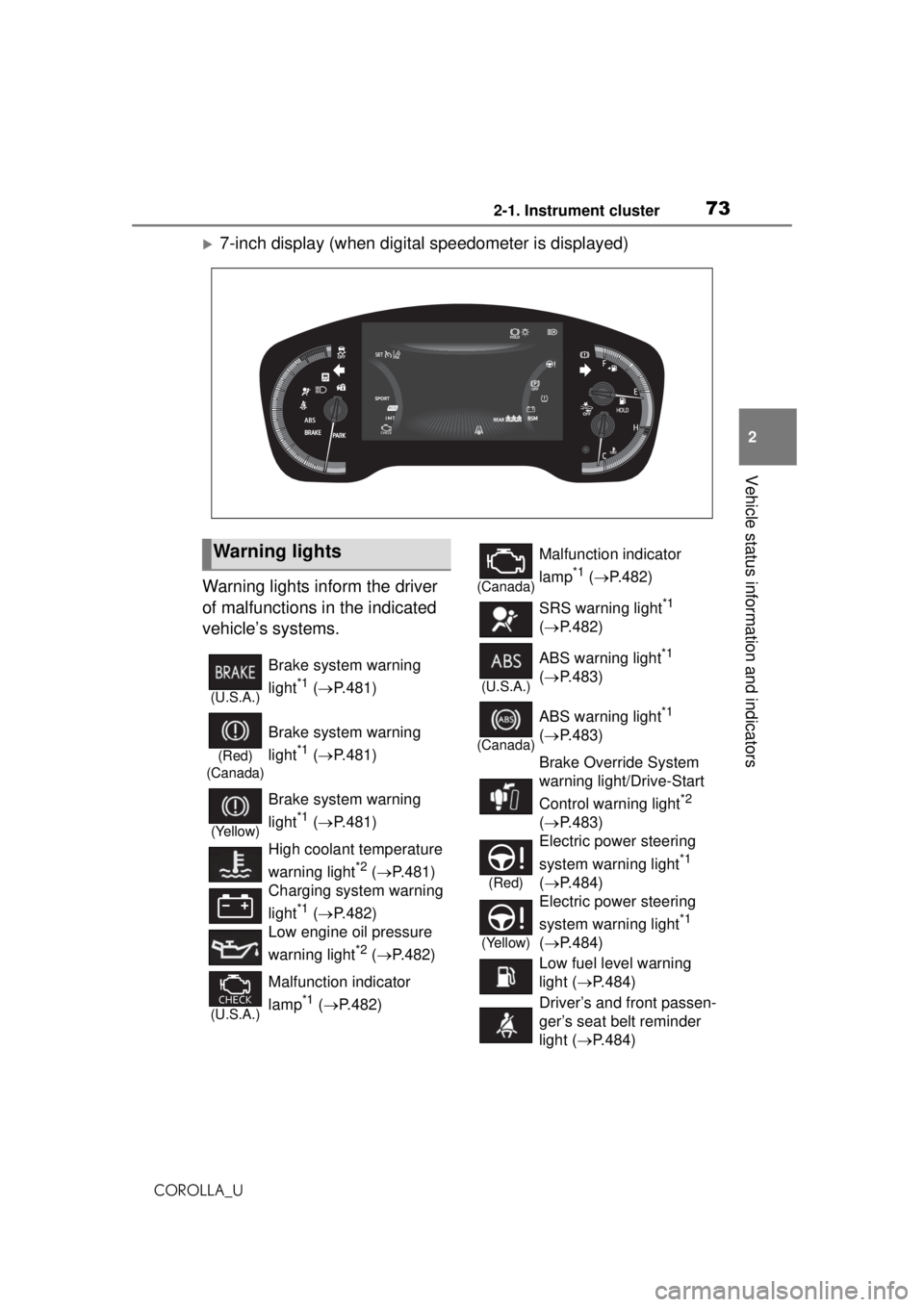
7-inch display (when digital speedometer is displayed)
Warning lights inform the driver
of malfunctions in the indicated
vehicle’s systems.
Warning lights
(U.S.A.)
Brake system warning
light
*1 ( P.481)
(Red)
(Canada)
Brake system warning
light
*1 ( P.481)
(Yellow)
Brake system warning
light
*1 ( P.481)
High coolant temperature
warning light
*2 ( P.481)
Charging system warning
light
*1 ( P.482)
Low engine oil pressure
warning light
*2 ( P.482)
(U.S.A.)
Malfunction indicator
lamp
*1 ( P.482)
(Canada)
Malfunction indicator
lamp
*1 ( P.482)
SRS warning light
*1
( P.482)
(U.S.A.)
ABS warning light*1
( P.483)
(Canada)
ABS warning light*1
( P.483)
Brake Override System
warning light/Drive-Start
Control warning light
*2
( P.483)
(Red)
Electric power steering
system warning light
*1
( P.484)
(Yellow)
Electric power steering
system warning light
*1
( P.484)
Low fuel level warning
light ( P.484)
Driver’s and front passen-
ger’s seat belt reminder
light ( P.484)
Page 74 of 588
742-1. Instrument cluster
COROLLA_U
*1: These lights come on when the engine switch is turned to ON to
indicate that a system check is
being performed. They will turn
off after the engine is started, or
after a few seconds. There may
be a malfunction in a system if
the lights do not come on, or turn
off. Have the vehicle inspected
by your Toyota dealer.
*2: This light illuminates on the multi-information display.
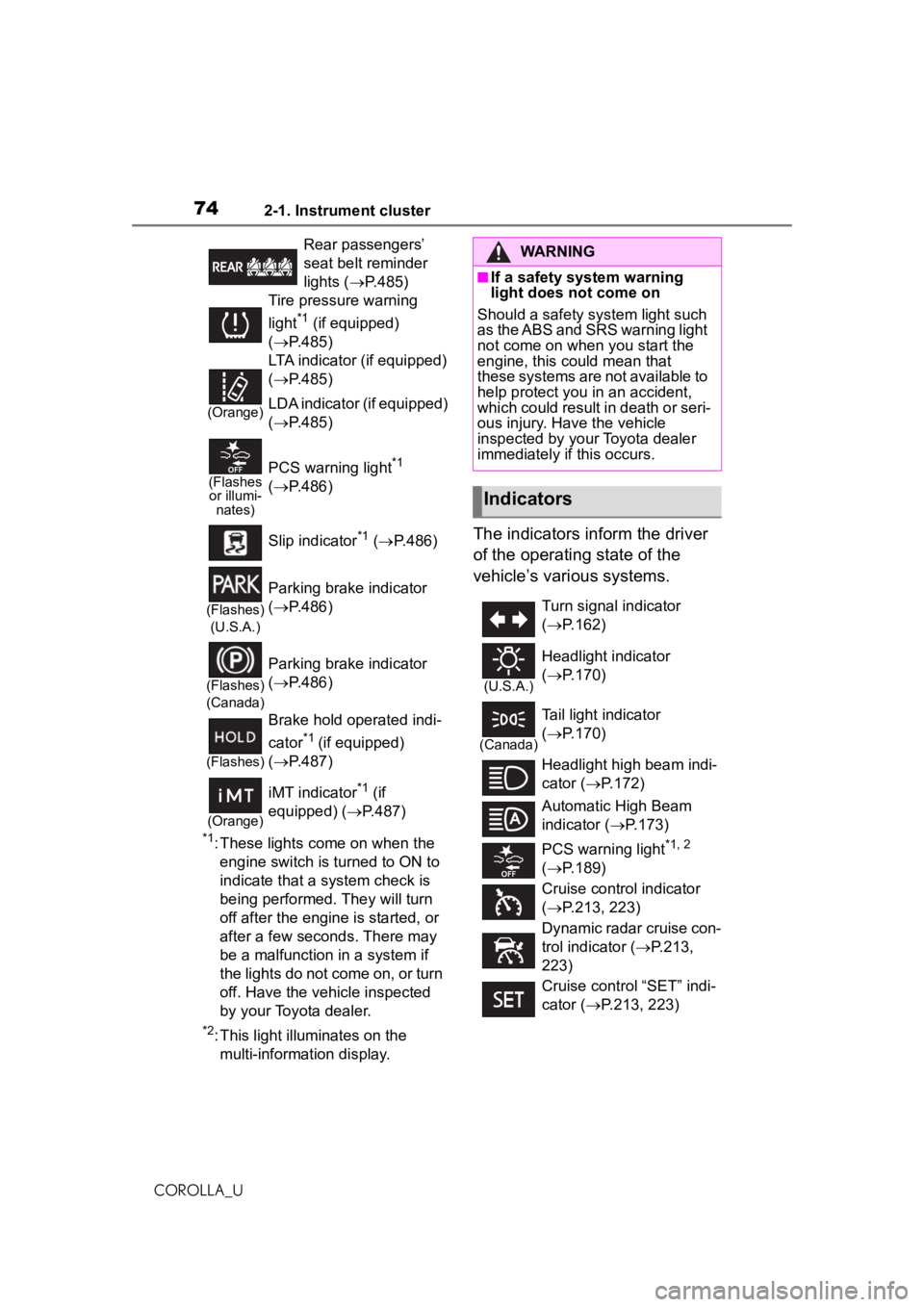
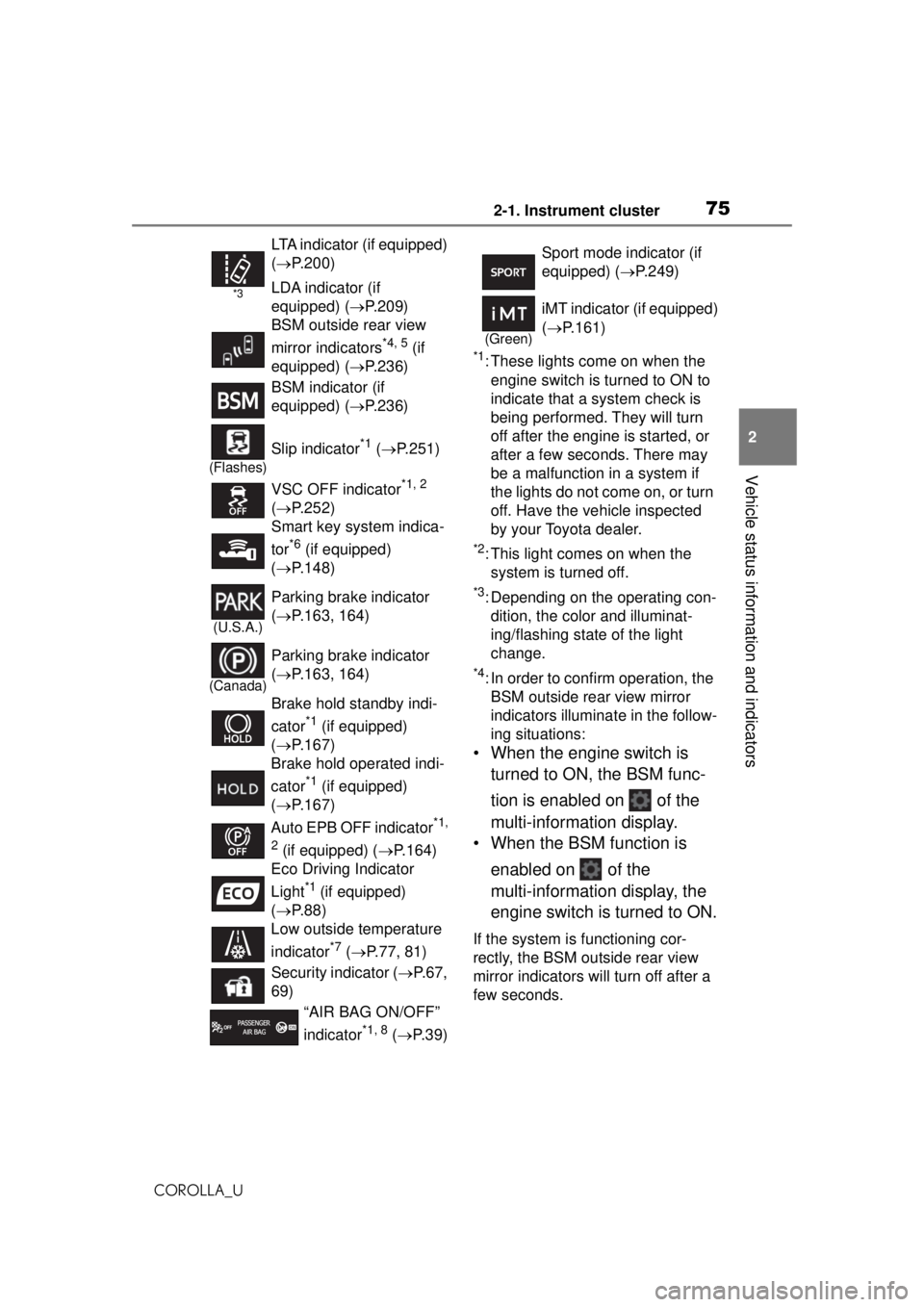
The indicators inform the driver
of the operating state of the
vehicle’s various systems.
Rear passengers’
seat belt reminder
lights ( P.485)
Tire pressure warning
light
*1 (if equipped)
( P.485)
(Orange)
LTA indicator (if equipped)
( P.485)
LDA indicator (if equipped)
( P.485)
(Flashes
or illumi- nates)PCS warning light*1
( P.486)
Slip indicator
*1 ( P.486)
(Flashes)
(U.S.A.)
Parking brake indicator
( P.486)
(Flashes)
(Canada)
Parking brake indicator
( P.486)
(Flashes)
Brake hold operated indi-
cator
*1 (if equipped)
( P.487)
(Orange)
iMT indicator*1 (if
equipped) ( P.487)
WARNING
■If a safety system warning
light does not come on
Should a safety system light such
as the ABS and SRS warning light
not come on when you start the
engine, this could mean that
these systems are not available to
help protect you in an accident,
which could result in death or seri-
ous injury. Have the vehicle
inspected by your Toyota dealer
immediately if this occurs.
Indicators
Turn signal indicator
( P.162)
(U.S.A.)
Headlight indicator
( P.170)
(Canada)
Tail light indicator
( P.170)
Headlight high beam indi-
cator ( P.172)
Automatic High Beam
indicator ( P.173)
PCS warning light
*1, 2
( P.189)
Cruise contro l indicator
( P.213, 223)
Dynamic radar cruise con-
trol indicator ( P.213,
223)
Cruise control “SET” indi-
cator ( P.213, 223)
Page 75 of 588
752-1. Instrument cluster
COROLLA_U
2
Vehicle status information and indicators
*1: These lights come on when the engine switch is turned to ON to
indicate that a system check is
being performed. They will turn
off after the engine is started, or
after a few sec onds. There may
be a malfunction in a system if
the lights do not come on, or turn
off. Have the vehicle inspected
by your Toyota dealer.
*2: This light comes on when the system is turned off.
*3: Depending on the operating con-dition, the color and illuminat-
ing/flashing state of the light
change.
*4: In order to confirm operation, the BSM outside rear view mirror
indicators illumina te in the follow-
ing situations:
• When the engine switch is
turned to ON, the BSM func-
tion is enabled on of the
multi-information display.
• When the BSM function is
enabled on of the
multi-information display, the
engine switch is turned to ON.
If the system is functioning cor-
rectly, the BSM outside rear view
mirror indicators will turn off after a
few seconds.
*3
LTA indicator (if equipped)
( P.200)
LDA indicator (if
equipped) ( P.209)
BSM outside rear view
mirror indicators
*4, 5 (if
equipped) ( P.236)
BSM indicator (if
equipped) ( P.236)
(Flashes)
Slip indicator*1 ( P.251)
VSC OFF indicator
*1, 2
( P.252)
Smart key system indica-
tor
*6 (if equipped)
( P.148)
(U.S.A.)
Parking brake indicator
( P.163, 164)
(Canada)
Parking brake indicator
( P.163, 164)
Brake hold standby indi-
cator
*1 (if equipped)
( P.167)
Brake hold operated indi-
cator
*1 (if equipped)
( P.167)
Auto EPB OFF indicator
*1,
2
(if equipped) ( P.164)
Eco Driving Indicator
Light
*1 (if equipped)
( P.88)
Low outside temperature
indicator
*7 ( P.77, 81)
Security indicator ( P.67,
69)
“AIR BAG ON/OFF”
indicator
*1, 8 ( P. 3 9 )
Sport mode indicator (if
equipped) ( P.249)
(Green)
iMT indicator (if equipped)
( P.161)
Page 76 of 588

762-1. Instrument cluster
COROLLA_UIf the BSM outside rear view mirror
indicators do not illuminate or do
not turn off, there may be a mal-
function in the system.
If this occurs, have the vehicle
inspected by your Toyota dealer.
*5: This light illuminates on the out-
side rear view mirrors.
*6: This light illuminates on the multi-information display.
*7: When the outside temperature is approximately 37°F (3°C) or
lower, this indicator will flash for
approximately 10 seconds, then
stay on.
*8: This light illuminates on the cen-ter panel.
Page 79 of 588
792-1. Instrument cluster
COROLLA_U
2
Vehicle status information and indicators
different distances independently.
To reset, display the desired trip
meter and press and hold the dis-
play change button.
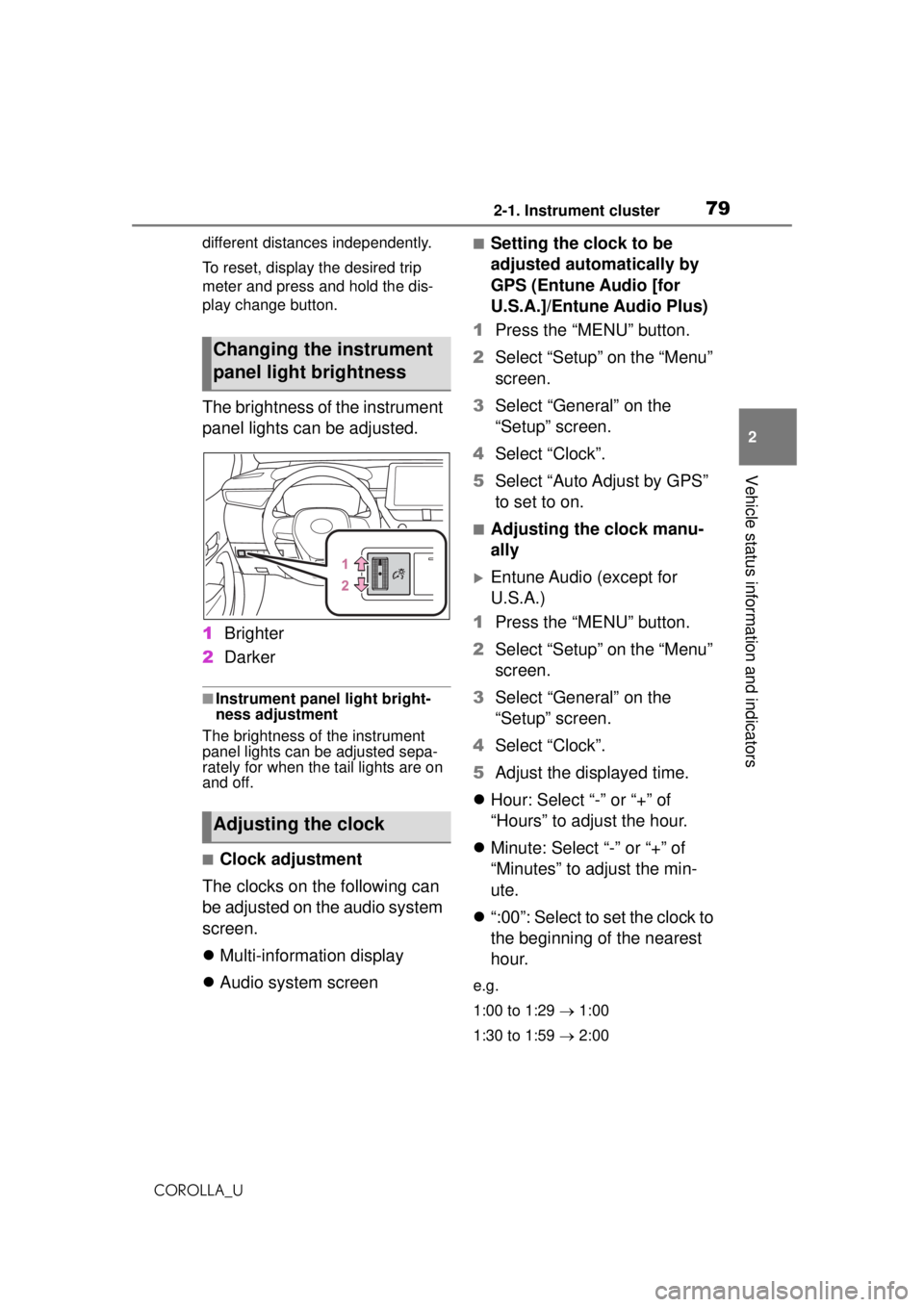
The brightness of the instrument
panel lights can be adjusted.
1 Brighter
2 Darker
■Instrument panel light bright-
ness adjustment
The brightness of the instrument
panel lights can be adjusted sepa-
rately for when the tail lights are on
and off.
■Clock adjustment
The clocks on the following can
be adjusted on the audio system
screen.
Multi-information display
Audio system screen
■Setting the clock to be
adjusted automatically by
GPS (Entune Audio [for
U.S.A.]/Entune Audio Plus)
1 Press the “MENU” button.
2 Select “Setup” on the “Menu”
screen.
3 Select “General” on the
“Setup” screen.
4 Select “Clock”.
5 Select “Auto Adjust by GPS”
to set to on.
■Adjusting the clock manu-
ally
Entune Audio (except for
U.S.A.)
1 Press the “MENU” button.
2 Select “Setup” on the “Menu”
screen.
3 Select “General” on the
“Setup” screen.
4 Select “Clock”.
5 Adjust the displayed time.
Hour: Select “-” or “+” of
“Hours” to adjust the hour.
Minute: Select “-” or “+” of
“Minutes” to adjust the min-
ute.
“:00”: Select to set the clock to
the beginning of the nearest
hour.
e.g.
1:00 to 1:29 1:00
1:30 to 1:59 2:00
Changing the instrument
panel light brightness
Adjusting the clock
Page 80 of 588
802-1. Instrument cluster
COROLLA_U
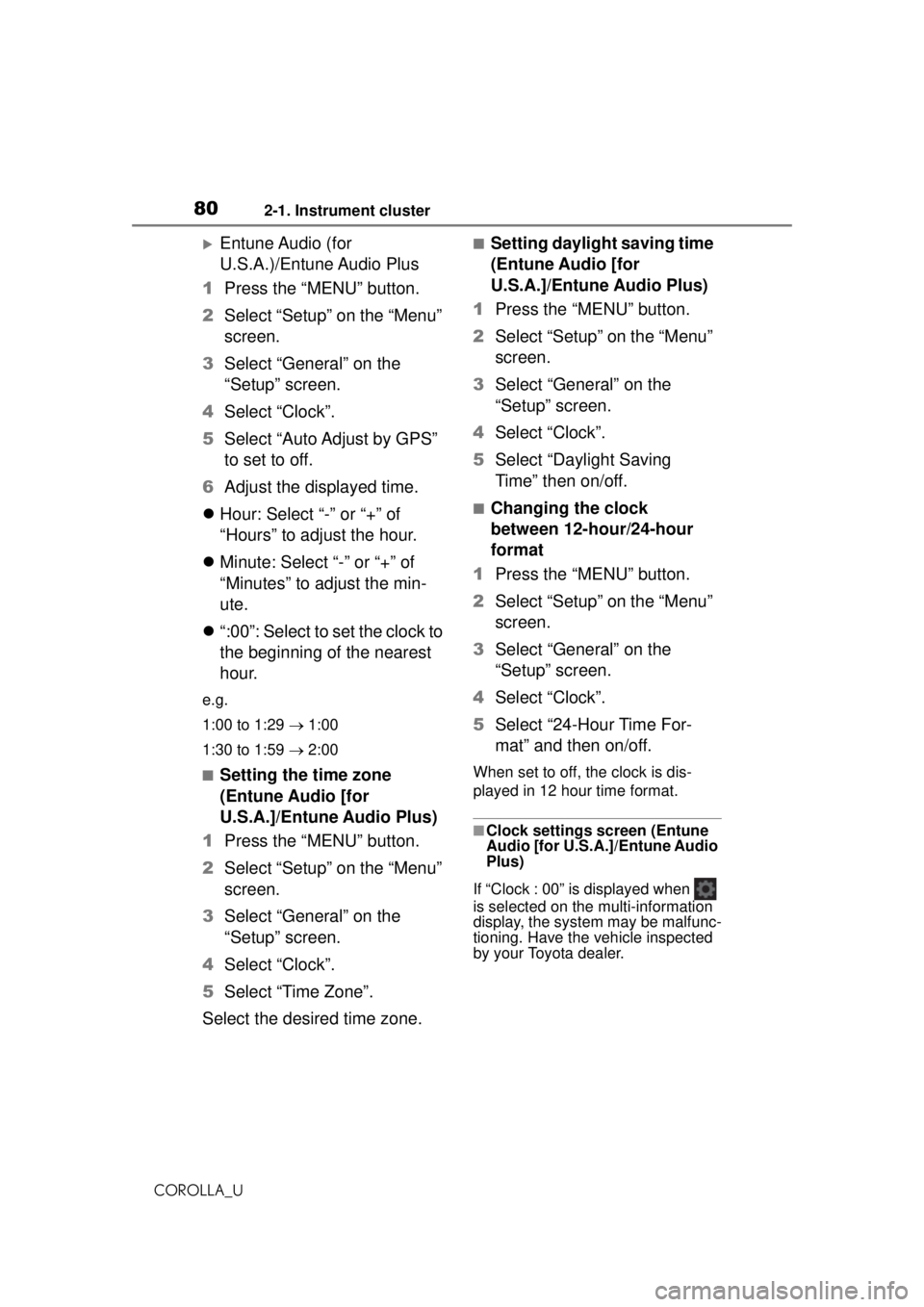
Entune Audio (for
U.S.A.)/Entune Audio Plus
1 Press the “MENU” button.
2 Select “Setup” on the “Menu”
screen.
3 Select “General” on the
“Setup” screen.
4 Select “Clock”.
5 Select “Auto Adjust by GPS”
to set to off.
6 Adjust the displayed time.
Hour: Select “-” or “+” of
“Hours” to adjust the hour.
Minute: Select “-” or “+” of
“Minutes” to adjust the min-
ute.
“:00”: Select to set the clock to
the beginning of the nearest
hour.
e.g.
1:00 to 1:29 1:00
1:30 to 1:59 2:00
■Setting the time zone
(Entune Audio [for
U.S.A.]/Entune Audio Plus)
1 Press the “MENU” button.
2 Select “Setup” on the “Menu”
screen.
3 Select “General” on the
“Setup” screen.
4 Select “Clock”.
5 Select “Time Zone”.
Select the desired time zone.
■Setting daylight saving time
(Entune Audio [for
U.S.A.]/Entune Audio Plus)
1 Press the “MENU” button.
2 Select “Setup” on the “Menu”
screen.
3 Select “General” on the
“Setup” screen.
4 Select “Clock”.
5 Select “Daylight Saving
Time” then on/off.
■Changing the clock
between 12-hour/24-hour
format
1 Press the “MENU” button.
2 Select “Setup” on the “Menu”
screen.
3 Select “General” on the
“Setup” screen.
4 Select “Clock”.
5 Select “24-Hour Time For-
mat” and then on/off.
When set to off, the clock is dis-
played in 12 hour time format.
■Clock settings screen (Entune
Audio [for U.S.A.]/Entune Audio
Plus)
If “Clock : 00” is displayed when
is selected on the multi-information
display, the system may be malfunc-
tioning. Have the vehicle inspected
by your Toyota dealer.
Page 84 of 588
842-1. Instrument cluster
COROLLA_Udifferent distances independently.
To reset, display the desired trip
meter and press and hold the dis-
play change button.
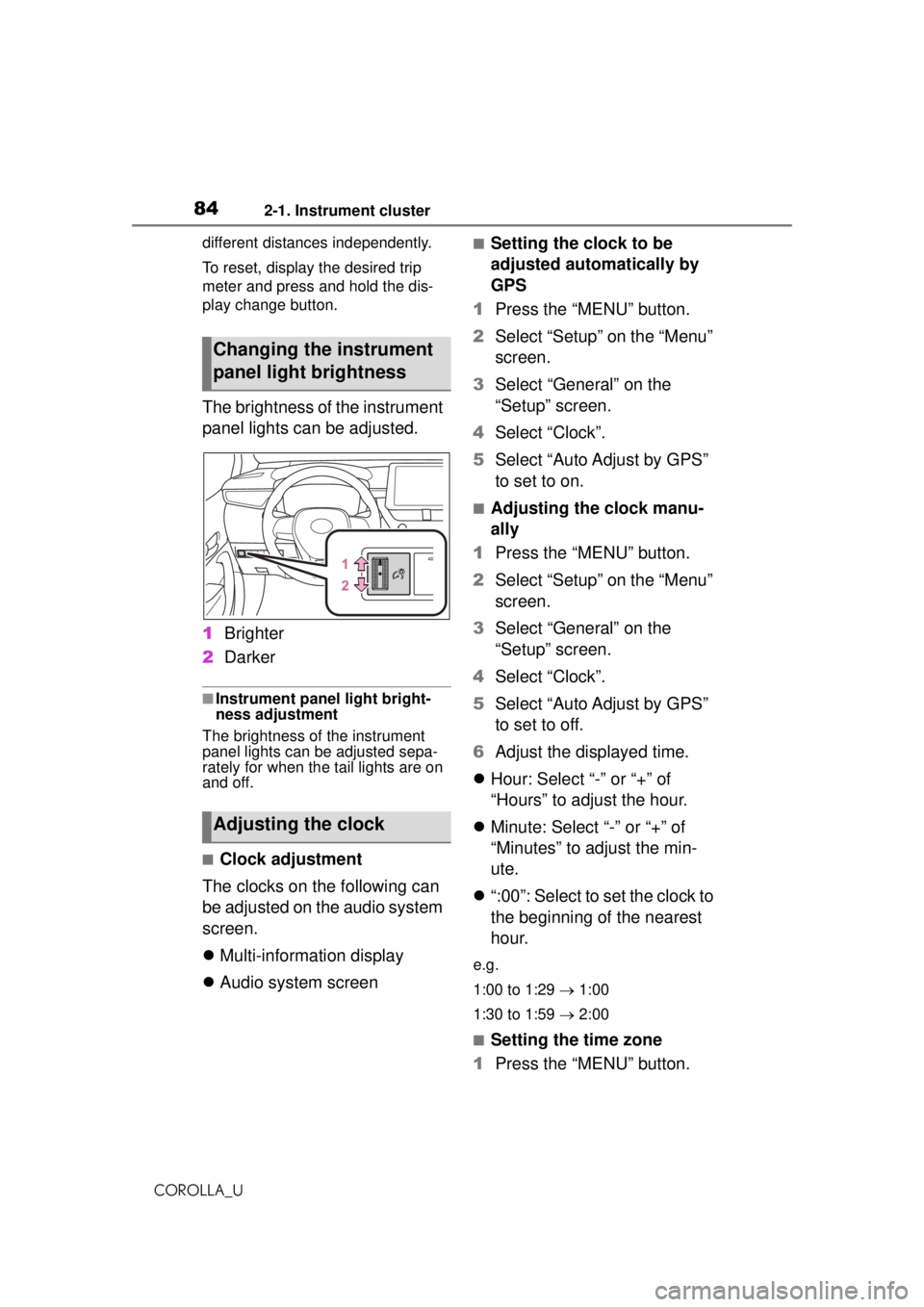
The brightness of the instrument
panel lights can be adjusted.
1
Brighter
2 Darker
■Instrument panel light bright-
ness adjustment
The brightness of the instrument
panel lights can be adjusted sepa-
rately for when the tail lights are on
and off.
■Clock adjustment
The clocks on the following can
be adjusted on the audio system
screen.
Multi-information display
Audio system screen
■Setting the clock to be
adjusted automatically by
GPS
1 Press the “MENU” button.
2 Select “Setup” on the “Menu”
screen.
3 Select “General” on the
“Setup” screen.
4 Select “Clock”.
5 Select “Auto Adjust by GPS”
to set to on.
■Adjusting the clock manu-
ally
1 Press the “MENU” button.
2 Select “Setup” on the “Menu”
screen.
3 Select “General” on the
“Setup” screen.
4 Select “Clock”.
5 Select “Auto Adjust by GPS”
to set to off.
6 Adjust the displayed time.
Hour: Select “-” or “+” of
“Hours” to adjust the hour.
Minute: Select “-” or “+” of
“Minutes” to adjust the min-
ute.
“:00”: Select to set the clock to
the beginning of the nearest
hour.
e.g.
1:00 to 1:29 1:00
1:30 to 1:59 2:00
■Setting the time zone
1 Press the “MENU” button.
Changing the instrument
panel light brightness
Adjusting the clock
Page 85 of 588
852-1. Instrument cluster
COROLLA_U
2
Vehicle status information and indicators
2 Select “Setup” on the “Menu”
screen.
3 Select “General” on the
“Setup” screen.
4 Select “Clock”.
5 Select “Time Zone”.
Select the desired time zone.
Entune Premium Audio only:
If “Auto” is selected, the time zone
is selected automa tically by current
vehicle position.
■Setting daylight saving time
1 Press the “MENU” button.
2 Select “Setup” on the “Menu”
screen.
3 Select “General” on the
“Setup” screen.
4 Select “Clock”.
5 Select “Daylight Saving
Time” then on/off/auto
*.
*: Entune Premium Audio only
■Changing the clock
between 12-hour/24-hour
format
1 Press the “MENU” button.
2 Select “Setup” on the “Menu”
screen.
3 Select “General” on the
“Setup” screen.
4 Select “Clock”.
5 Select “24-Hour Time For-
mat” and then on/off.
When set to off, the clock is dis-
played in 12 hour time format.
■Clock settings screen
If “Clock : 00” is displayed when
is selected on the multi-information
display, the system may be malfunc-
tioning. Have the vehicle inspected
by your Toyota dealer.
Page 87 of 588
872-1. Instrument cluster
COROLLA_U
2
Vehicle status information and indicators
■Liquid crystal display
Small spots or light spots may
appear on the display. This phenom-
enon is characteristic of liquid crys-
tal displays, and there is no problem
continuing to use the display.
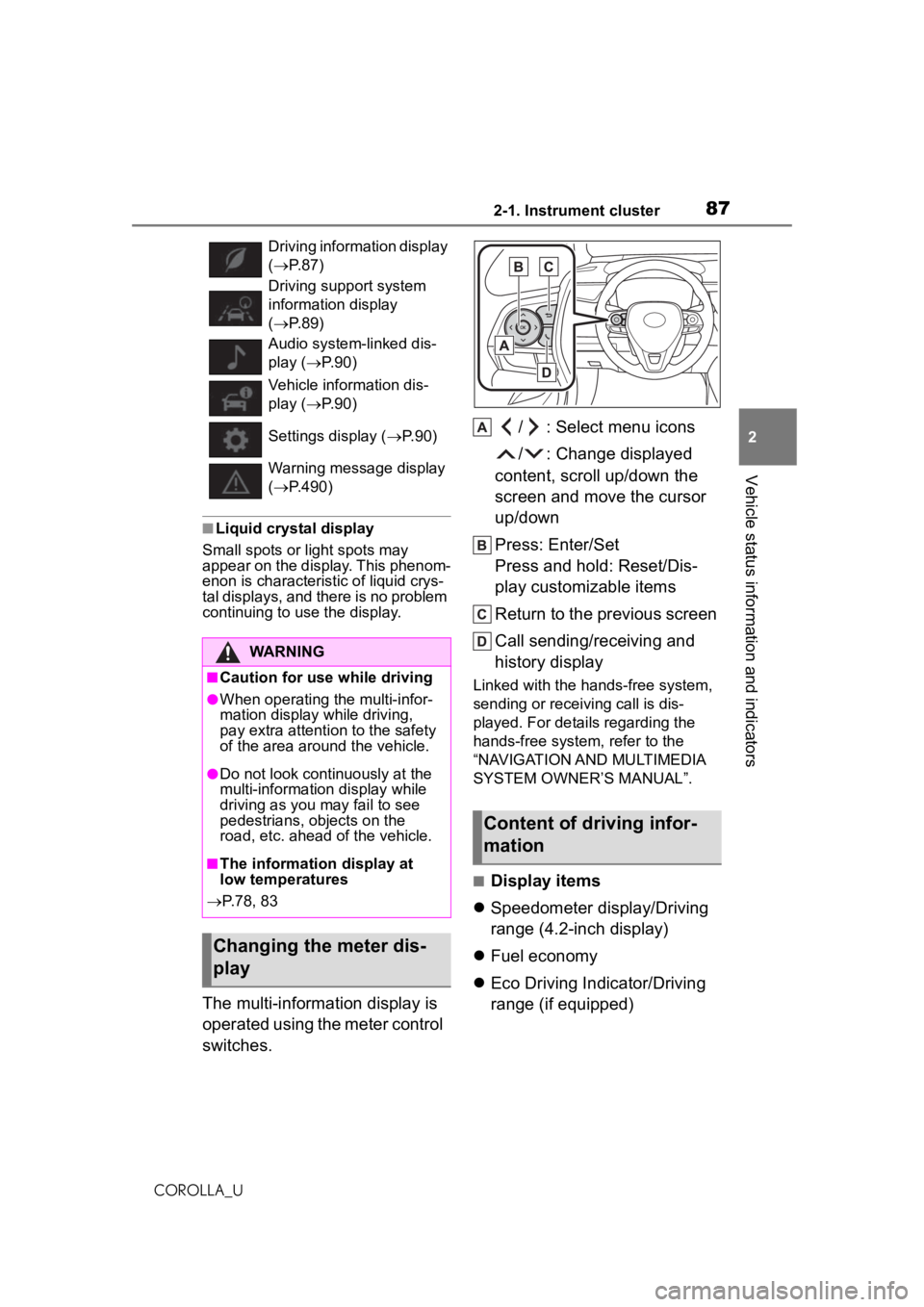
The multi-information display is
operated using the meter control
switches. / : Select menu icons
/ : Change displayed
content, scroll up/down the
screen and move the cursor
up/down
Press: Enter/Set
Press and hold: Reset/Dis-
play customizable items
Return to the previous screen
Call sending/receiving and
history display
Linked with the hands-free system,
sending or receiving call is dis-
played. For details regarding the
hands-free system, refer to the
“NAVIGATION AND MULTIMEDIA
SYSTEM OWNER’S MANUAL”.
■Display items
Speedometer display/Driving
range (4.2-inch display)
Fuel economy
Eco Driving Indicator/Driving
range (if equipped)
Driving information display
( P. 8 7 )
Driving support system
information display
( P. 8 9 )
Audio system-linked dis-
play ( P. 9 0 )
Vehicle information dis-
play ( P. 9 0 )
Settings display ( P. 9 0 )
Warning message display
( P.490)
WARNING
■Caution for use while driving
●When operating the multi-infor-
mation display while driving,
pay extra attention to the safety
of the area around the vehicle.
●Do not look continuously at the
multi-information display while
driving as you may fail to see
pedestrians, objects on the
road, etc. ahead of the vehicle.
■The information display at
low temperatures
P.78, 83
Changing the meter dis-
play
Content of driving infor-
mation
Page 89 of 588
892-1. Instrument cluster
COROLLA_U
2
Vehicle status information and indicators
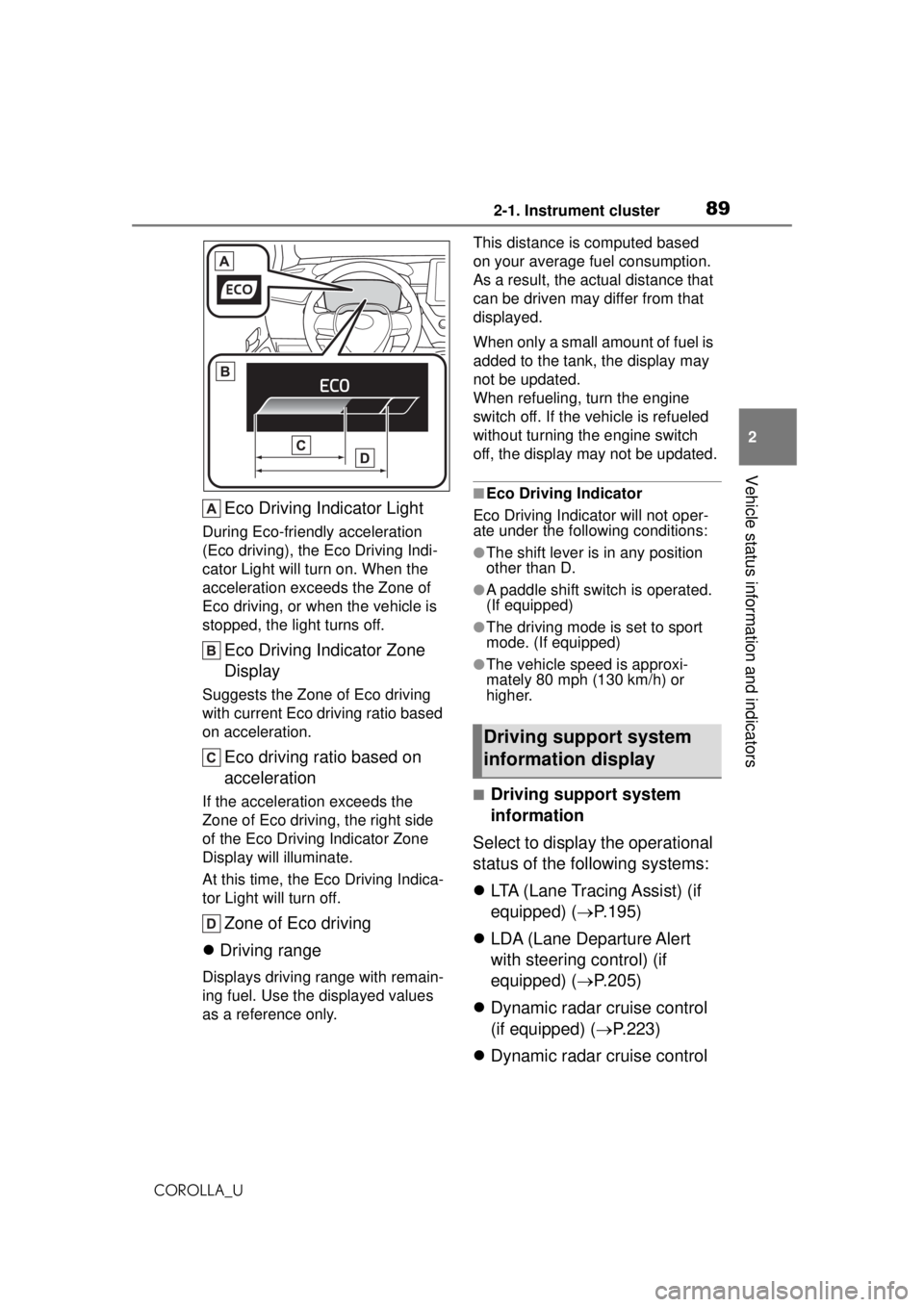
Eco Driving Indicator Light
During Eco-friendly acceleration
(Eco driving), the Eco Driving Indi-
cator Light will turn on. When the
acceleration exceeds the Zone of
Eco driving, or when the vehicle is
stopped, the light turns off.
Eco Driving Indicator Zone
Display
Suggests the Zone of Eco driving
with current Eco driving ratio based
on acceleration.
Eco driving ratio based on
acceleration
If the acceleration exceeds the
Zone of Eco drivi ng, the right side
of the Eco Driving Indicator Zone
Display will illuminate.
At this time, the Eco Driving Indica-
tor Light will turn off.
Zone of Eco driving
Driving range
Displays driving range with remain-
ing fuel. Use the displayed values
as a reference only. This distance is computed based
on your average fuel consumption.
As a result, the actual distance that
can be driven may differ from that
displayed.
When only a small amount of fuel is
added to the tank, the display may
not be updated.
When refueling, turn the engine
switch off. If the vehicle is refueled
without turning the engine switch
off, the display may not be updated.
■Eco Driving Indicator
Eco Driving Indicator will not oper-
ate under the following conditions:
●The shift lever is in any position
other than D.
●A paddle shift switch is operated.
(If equipped)
●The driving mode is set to sport
mode. (If equipped)
●The vehicle speed is approxi-
mately 80 mph (130 km/h) or
higher.
■Driving support system
information
Select to display the operational
status of the following systems:
LTA (Lane Tracing Assist) (if
equipped) ( P.195)
LDA (Lane Departure Alert
with steering control) (if
equipped) ( P.205)
Dynamic radar cruise control
(if equipped) ( P.223)
Dynamic radar cruise control
Driving support system
information display