fuel consumption TOYOTA COROLLA 2020 Owners Manual (in English)
[x] Cancel search | Manufacturer: TOYOTA, Model Year: 2020, Model line: COROLLA, Model: TOYOTA COROLLA 2020Pages: 588, PDF Size: 13.49 MB
Page 2 of 588
2
COROLLA_UTABLE OF CONTENTS
For your information ........................
6
Reading this manual ...................... 10
How to search ................................ 11
Pictorial index ................................ 12
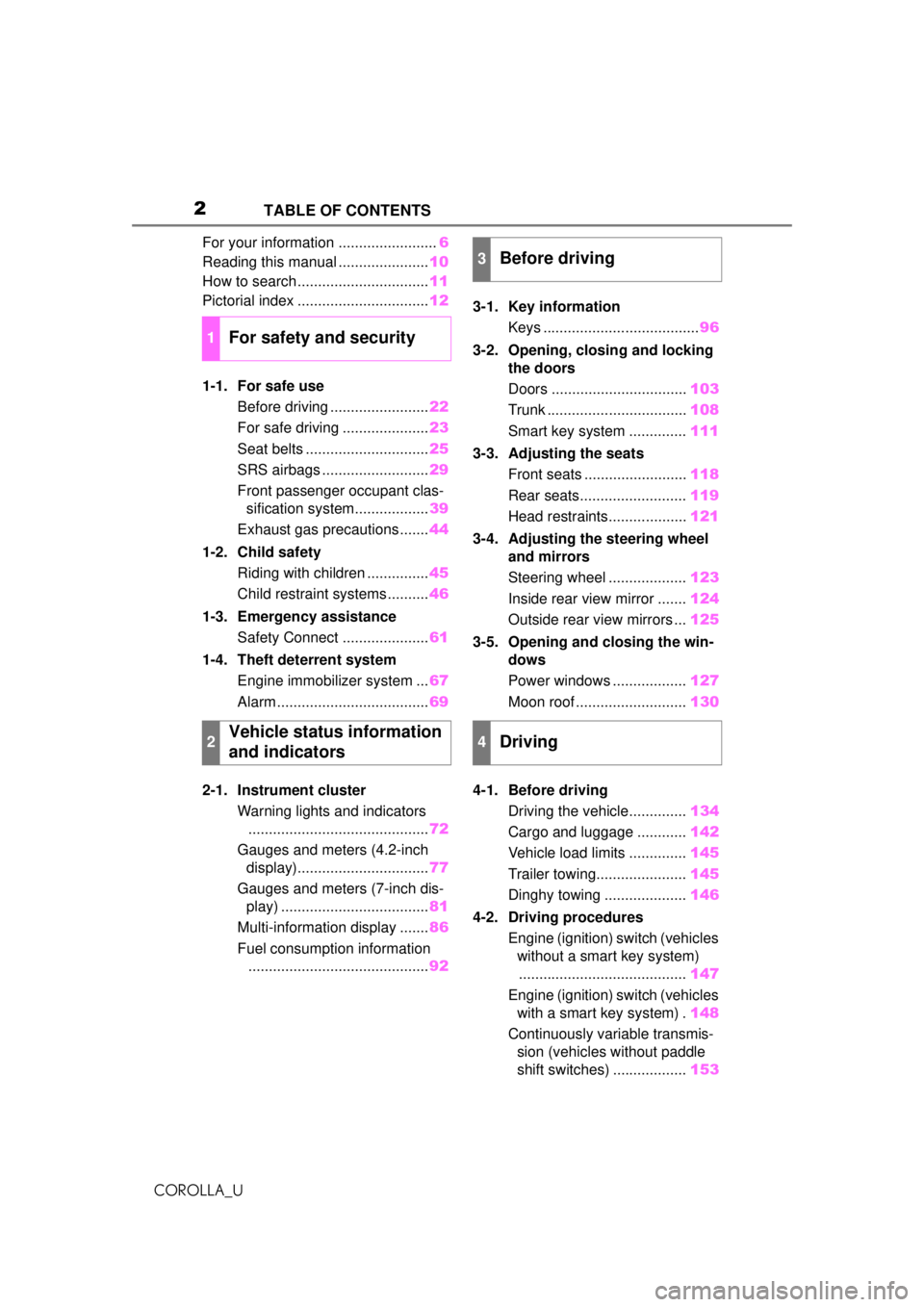
1-1. For safe use Before driving ........................ 22
For safe driving ..................... 23
Seat belts .............................. 25
SRS airbags .......................... 29
Front passenger occupant clas- sification system.................. 39
Exhaust gas precautions....... 44
1-2. Child safety Riding with children ............... 45
Child restraint systems .......... 46
1-3. Emergency assistance Safety Connect ..................... 61
1-4. Theft deterrent system Engine immobilizer system ... 67
Alarm ..................................... 69
2-1. Instrument cluster Warning lights and indicators............................................ 72
Gauges and meters (4.2-inch display)................................ 77
Gauges and meters (7-inch dis- play) .................................... 81
Multi-information display ....... 86
Fuel consumption information ............................................ 923-1. Key information
Keys ...................................... 96
3-2.
Opening, closing and locking
th
e doors
Doors ................................. 103
Trunk .................................. 108
Smart key system .............. 111
3-3. Adjusting the seats Front seats ......................... 118
Rear seats.......................... 119
Head restraints................... 121
3-4. Adjust
ing the steering wheel
and mirrors
Ste
ering wheel ...................123
Inside rear view mirror ....... 124
Outside rear view mirrors ... 125
3-5. Opening and closing the win- dows
Power windows .................. 127
Moon roof ........................... 130
4-1. Before driving Driving the vehicle.............. 134
Cargo and luggage ............ 142
Vehicle load limits .............. 145
Trailer towing...................... 145
Dinghy towing .................... 146
4-2. Driving procedures Engine (ignition) switch (vehicles without a smart key system)......................................... 147
Engine (ignition) switch (vehicles with a smart key system) . 148
Continuously variable transmis- sion (vehic les without paddle
shift switches)
..................153
1For safety and security
2Vehicle status information
and indicators
3Before driving
4Driving
Page 71 of 588
71
COROLLA_U
2
2
Vehicle status information and indicators
Vehicle status informationand indicators
.2-1. Instrument cluster
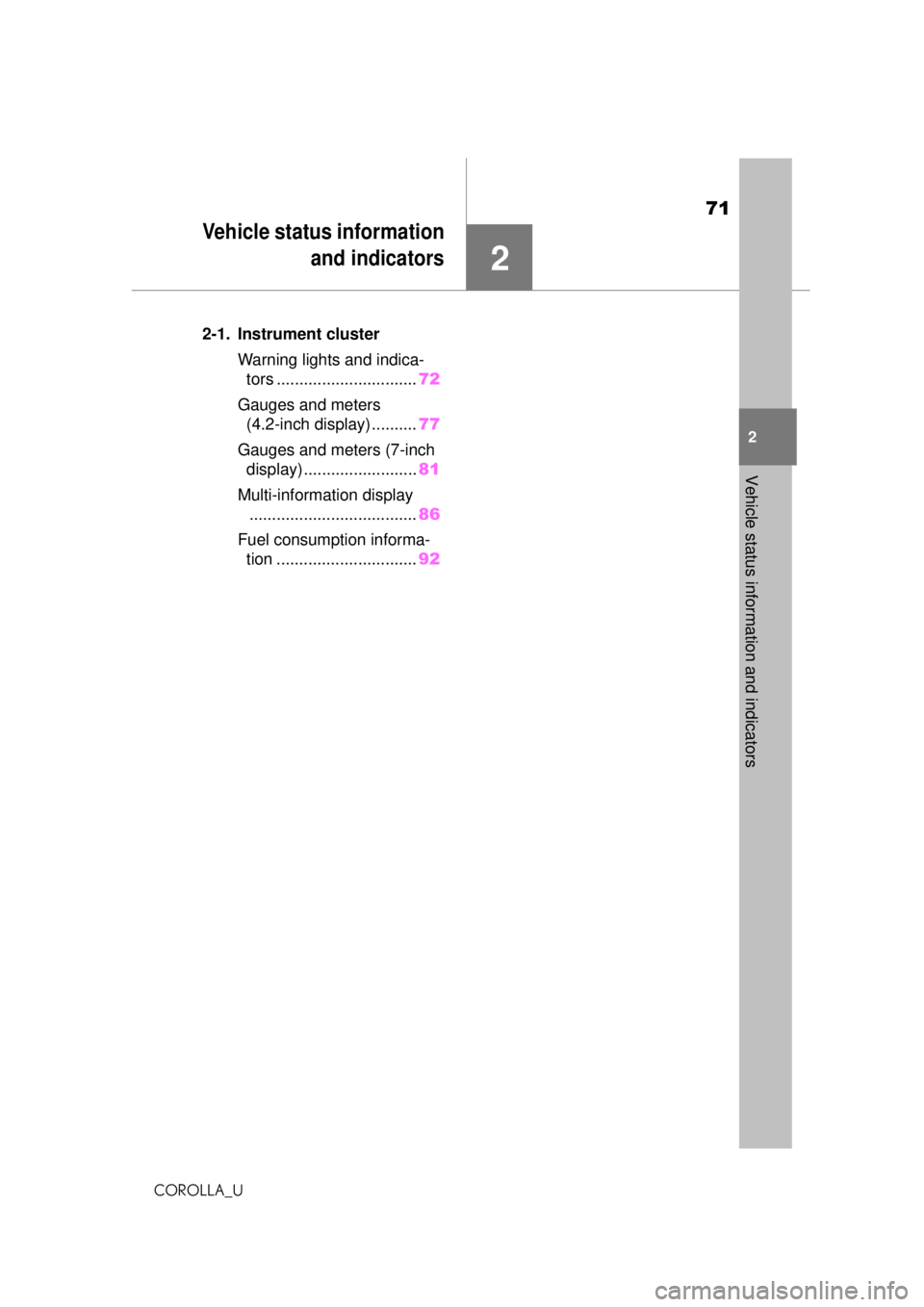
Warning lights and indica-tors ............................... 72
Gauges and meters (4.2-inch display) .......... 77
Gauges and meters (7-inch display) ......................... 81
Multi-information display ..................................... 86
Fuel consumption informa- tion ............................... 92
Page 88 of 588
882-1. Instrument cluster
COROLLA_U
■Speedometer display/Driv-
ing range (4.2-inch display)
Speedometer display
Driving range
Displays driving range with remain-
ing fuel. Use the displayed values
as a reference only.
This distance is computed based
on your average fuel consumption.
As a result, the actual distance that
can be driven may differ from that
displayed.
When only a small amount of fuel is
added to the tank, the display may
not be updated.
When refueling, turn the engine
switch off. If the vehicle is refueled
without turning the engine switch
off, the display may not be updated.
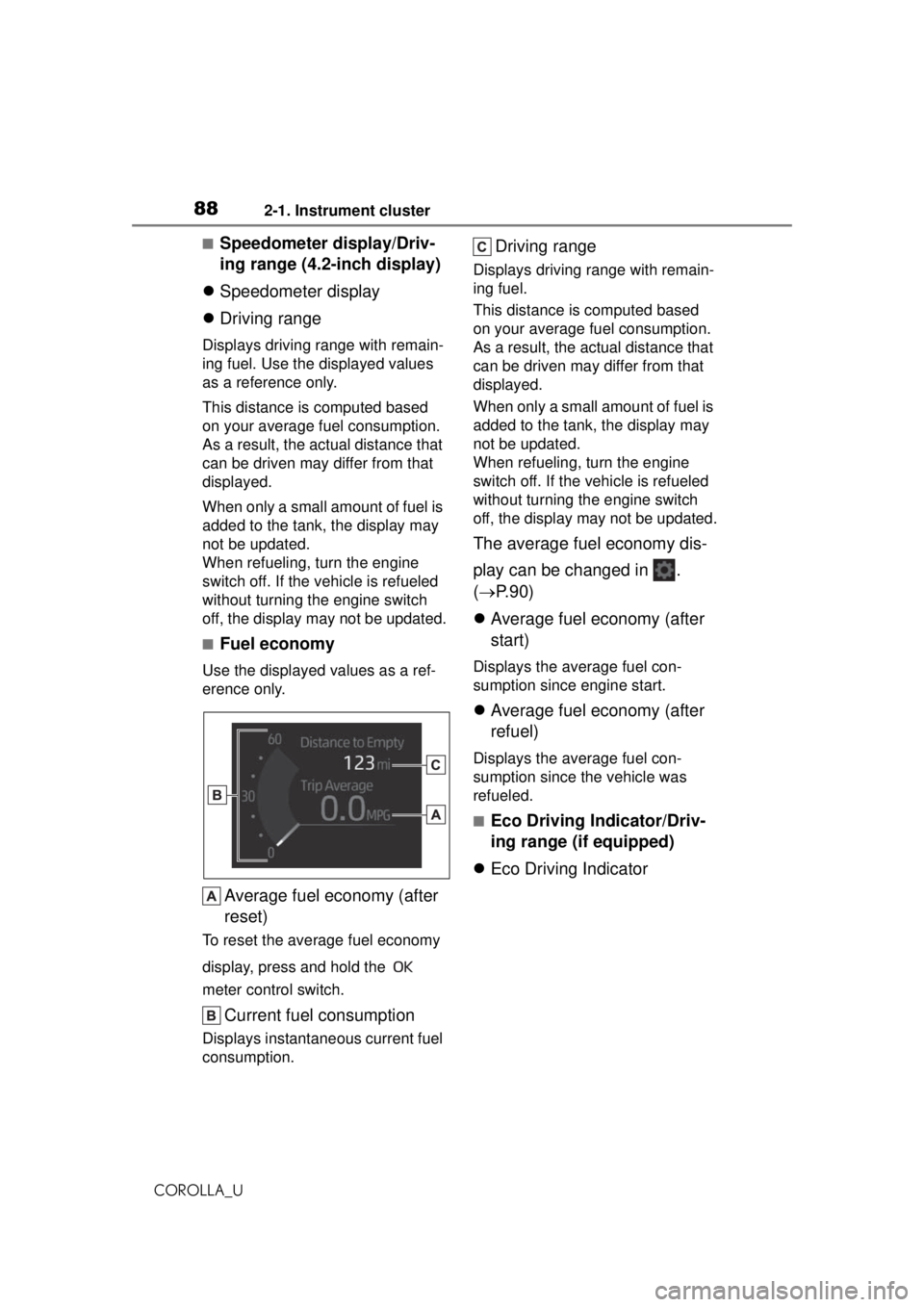
■Fuel economy
Use the displayed values as a ref-
erence only.
Average fuel economy (after
reset)
To reset the average fuel economy
display, press and hold the
meter control switch.
Current fuel consumption
Displays instantaneous current fuel
consumption.
Driving range
Displays driving range with remain-
ing fuel.
This distance is computed based
on your average fuel consumption.
As a result, the actual distance that
can be driven may differ from that
displayed.
When only a small amount of fuel is
added to the tank, the display may
not be updated.
When refueling, turn the engine
switch off. If the vehicle is refueled
without turning the engine switch
off, the display may not be updated.
The average fuel economy dis-
play can be changed in .
( P.90)
Average fuel economy (after
start)
Displays the average fuel con-
sumption since engine start.
Average fuel economy (after
refuel)
Displays the average fuel con-
sumption since the vehicle was
refueled.
■Eco Driving Indicator/Driv-
ing range (if equipped)
Eco Driving Indicator
Page 89 of 588
892-1. Instrument cluster
COROLLA_U
2
Vehicle status information and indicators
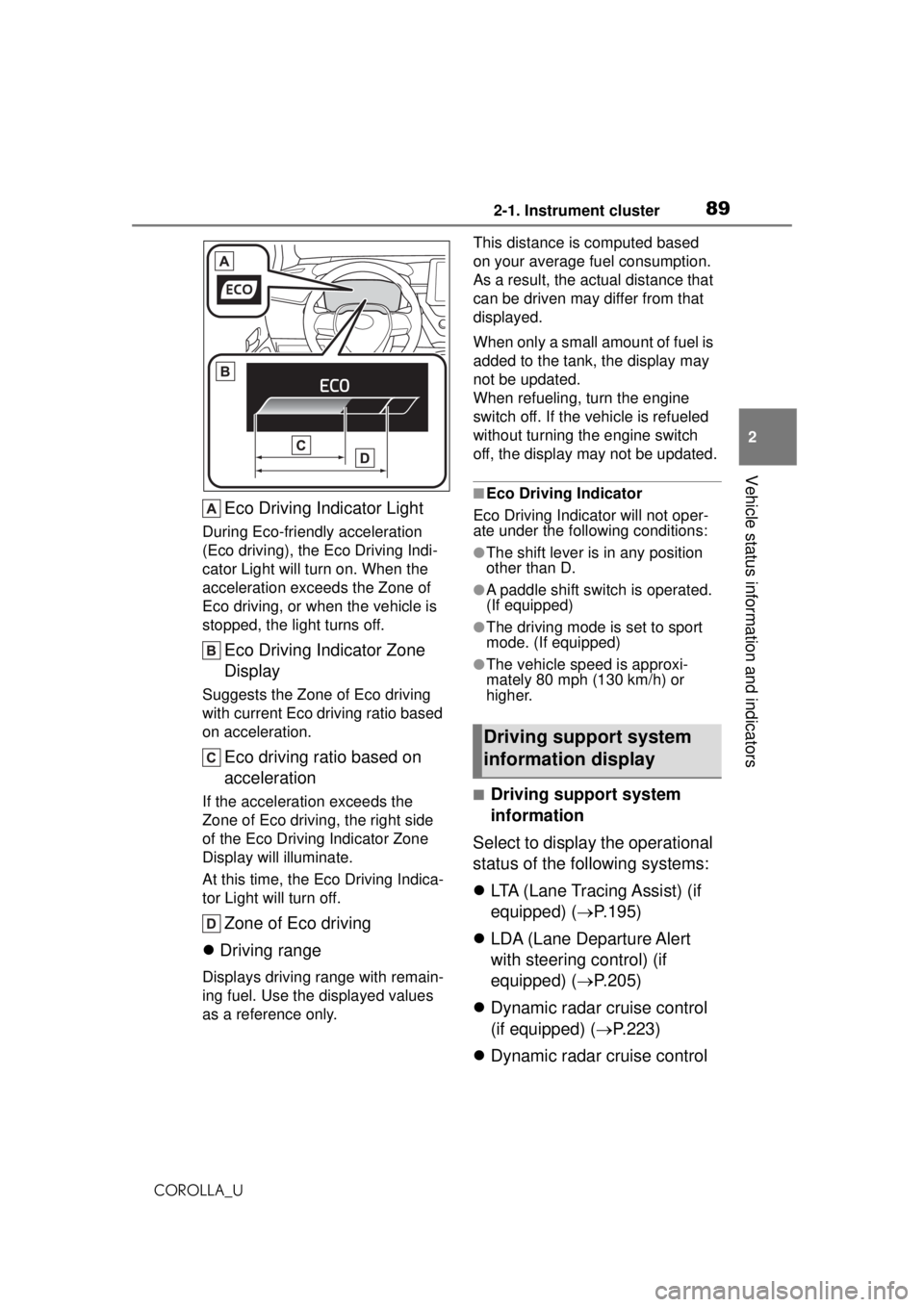
Eco Driving Indicator Light
During Eco-friendly acceleration
(Eco driving), the Eco Driving Indi-
cator Light will turn on. When the
acceleration exceeds the Zone of
Eco driving, or when the vehicle is
stopped, the light turns off.
Eco Driving Indicator Zone
Display
Suggests the Zone of Eco driving
with current Eco driving ratio based
on acceleration.
Eco driving ratio based on
acceleration
If the acceleration exceeds the
Zone of Eco drivi ng, the right side
of the Eco Driving Indicator Zone
Display will illuminate.
At this time, the Eco Driving Indica-
tor Light will turn off.
Zone of Eco driving
Driving range
Displays driving range with remain-
ing fuel. Use the displayed values
as a reference only. This distance is computed based
on your average fuel consumption.
As a result, the actual distance that
can be driven may differ from that
displayed.
When only a small amount of fuel is
added to the tank, the display may
not be updated.
When refueling, turn the engine
switch off. If the vehicle is refueled
without turning the engine switch
off, the display may not be updated.
■Eco Driving Indicator
Eco Driving Indicator will not oper-
ate under the following conditions:
●The shift lever is in any position
other than D.
●A paddle shift switch is operated.
(If equipped)
●The driving mode is set to sport
mode. (If equipped)
●The vehicle speed is approxi-
mately 80 mph (130 km/h) or
higher.
■Driving support system
information
Select to display the operational
status of the following systems:
LTA (Lane Tracing Assist) (if
equipped) ( P.195)
LDA (Lane Departure Alert
with steering control) (if
equipped) ( P.205)
Dynamic radar cruise control
(if equipped) ( P.223)
Dynamic radar cruise control
Driving support system
information display
Page 91 of 588
912-1. Instrument cluster
COROLLA_U
2
Vehicle status information and indicators
display)
Select to set the display of the
speedometer to analog/digital.
Eco Driving Indicator Light (if
equipped)
Select to enable/disable the Eco
Driving Indicator Light.
• Fuel economy display
Select to change the average fuel
consumption display between after
start/after reset. ( P. 8 8 )
Select to display/not display the
audio system linked display.
Select to change the displayed con-
tent of the following:
• Drive information type
Select to change the drive informa-
tion type display between after
start/after reset.
• Drive information items
Select to set the first and second
items of the drive information dis-
play to any of the following: aver-
age vehicle
speed/distance/elapsed time.
Pop-up display
Select to enable/disable pop-up
displays for each relevant system.
Multi-information display off
Select to turn the multi-information
display off.
To turn the multi-information display
on again, press any of the following
meter control switches //// /.
Default setting
Select to reset the meter display
settings to the default setting.
■Vehicle functions and set-
tings that can be changed
P.548
■Suspension of the settings dis-
play
●Some settings cannot be changed
while driving. When changing set-
tings, park the vehicle in a safe
place.
●If a warning message is displayed,
operation of the settings display
will be suspended.
WARNING
■Cautions during setting up
the display
If the engine is running when
changing the display settings,
ensure that the vehicle is parked
in a place with adequate ventila-
tion. In a closed area such as a
garage, exhaust gases including
harmful carbon monoxide (CO)
may collect and enter the vehicle.
This may lead to death or a seri-
ous health hazard.
NOTICE
■During setting up the display
To prevent battery discharge,
ensure that the engine is running
while setting up the display fea-
tures.
Page 92 of 588
922-1. Instrument cluster
COROLLA_U
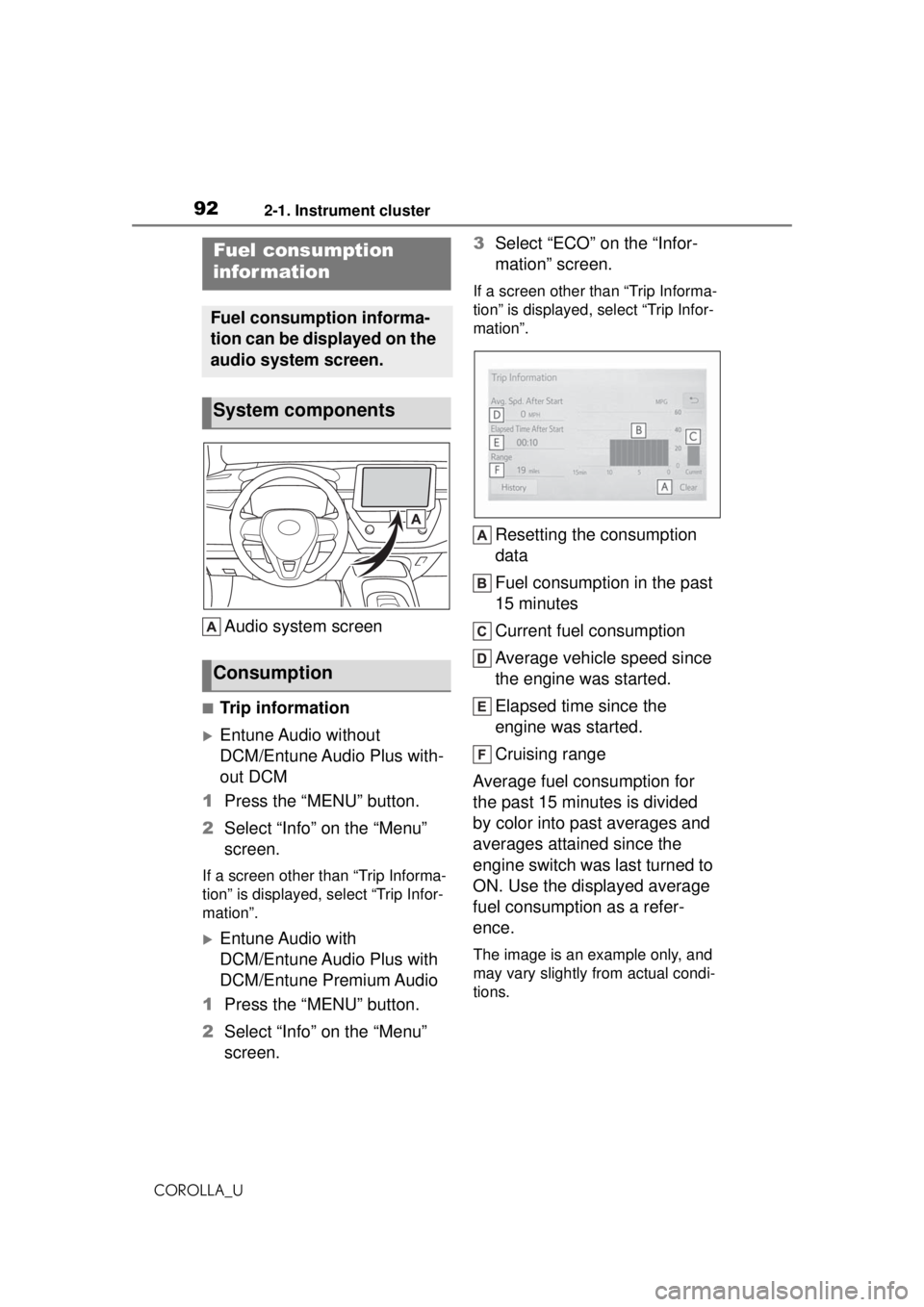
Audio system screen
■Trip information
Entune Audio without
DCM/Entune Audio Plus with-
out DCM
1 Press the “MENU” button.
2 Select “Info” on the “Menu”
screen.
If a screen other than “Trip Informa-
tion” is displayed, select “Trip Infor-
mation”.
Entune Audio with
DCM/Entune Audio Plus with
DCM/Entune Premium Audio
1 Press the “MENU” button.
2 Select “Info” on the “Menu”
screen. 3
Select “ECO” on the “Infor-
mation” screen.
If a screen other than “Trip Informa-
tion” is displayed, select “Trip Infor-
mation”.
Resetting the consumption
data
Fuel consumption in the past
15 minutes
Current fuel consumption
Average vehicle speed since
the engine was started.
Elapsed time since the
engine was started.
Cruising range
Average fuel consumption for
the past 15 minutes is divided
by color into past averages and
averages attained since the
engine switch was last turned to
ON. Use the displayed average
fuel consumption as a refer-
ence.
The image is an example only, and
may vary slightly from actual condi-
tions.
Fuel consumption
infor mation
Fuel consumption informa-
tion can be displayed on the
audio system screen.
System components
Consumption
Page 93 of 588
932-1. Instrument cluster
COROLLA_U
2
Vehicle status information and indicators
■History
Entune Audio without
DCM/Entune Audio Plus with-
out DCM
1 Press the “MENU” button.
2 Select “Info” on the “Menu”
screen.
If a screen other than “History” is
displayed, select “History”.
Entune Audio with
DCM/Entune Audio Plus with
DCM/Entune Premium Audio
1 Press the “MENU” button.
2 Select “Info” on the “Menu”
screen.
3 Select “ECO” on the “Infor-
mation” screen.
If a screen other than “History” is
displayed, select “History”.
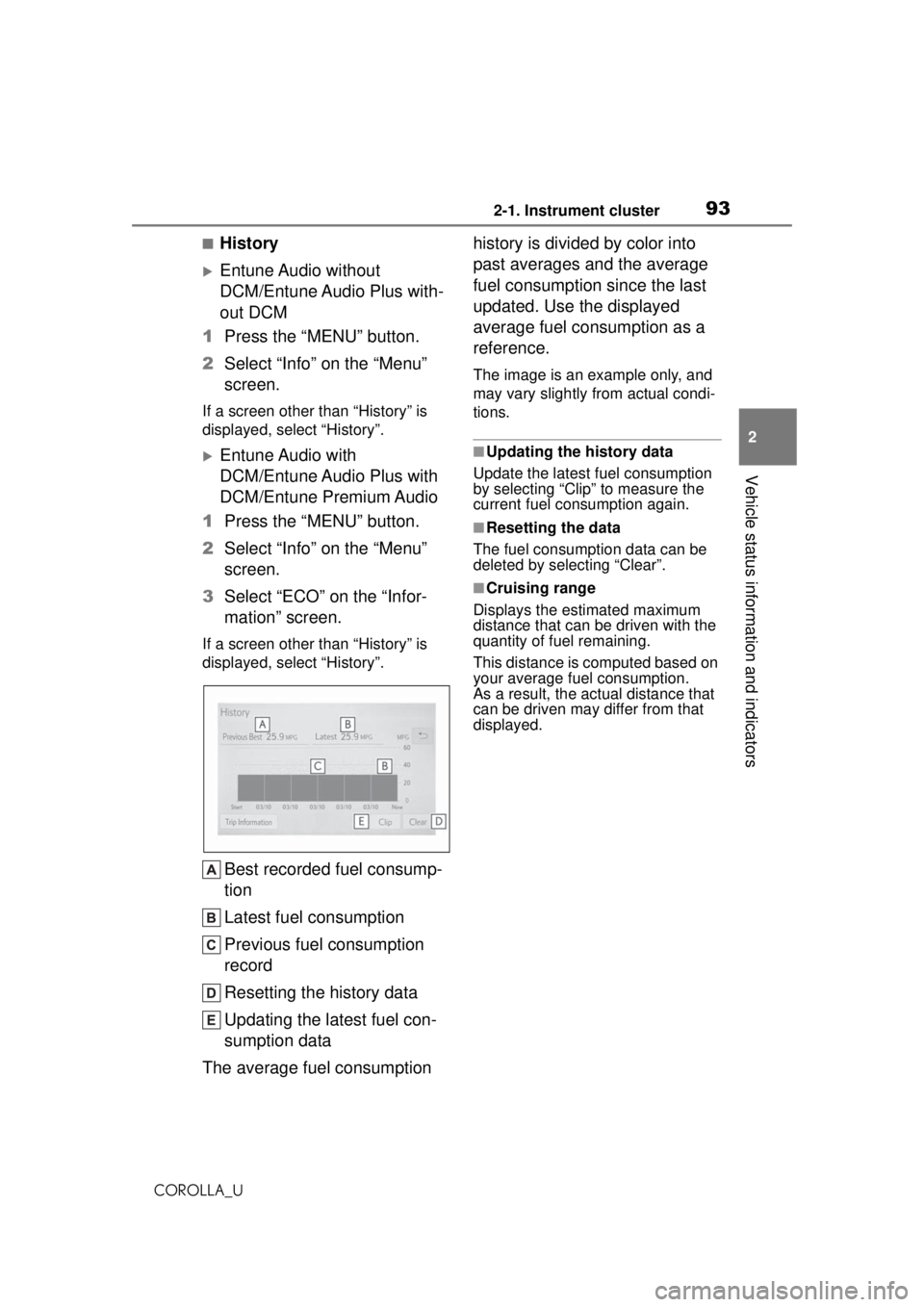
Best recorded fuel consump-
tion
Latest fuel consumption
Previous fuel consumption
record
Resetting the history data
Updating the latest fuel con-
sumption data
The average fuel consumption history is divided by color into
past averages and the average
fuel consumption since the last
updated. Use the displayed
average fuel consumption as a
reference.
The image is an example only, and
may vary slightly from actual condi-
tions.
■Updating the history data
Update the latest fuel consumption
by selecting “Clip” to measure the
current fuel consumption again.
■Resetting the data
The fuel consumption data can be
deleted by selecting “Clear”.
■Cruising range
Displays the estimated maximum
distance that can be driven with the
quantity of fuel remaining.
This distance is computed based on
your average fuel consumption.
As a result, the actual distance that
can be driven may differ from that
displayed.
Page 263 of 588
2635-1. Basic function
COROLLA_U
5
Entune audio
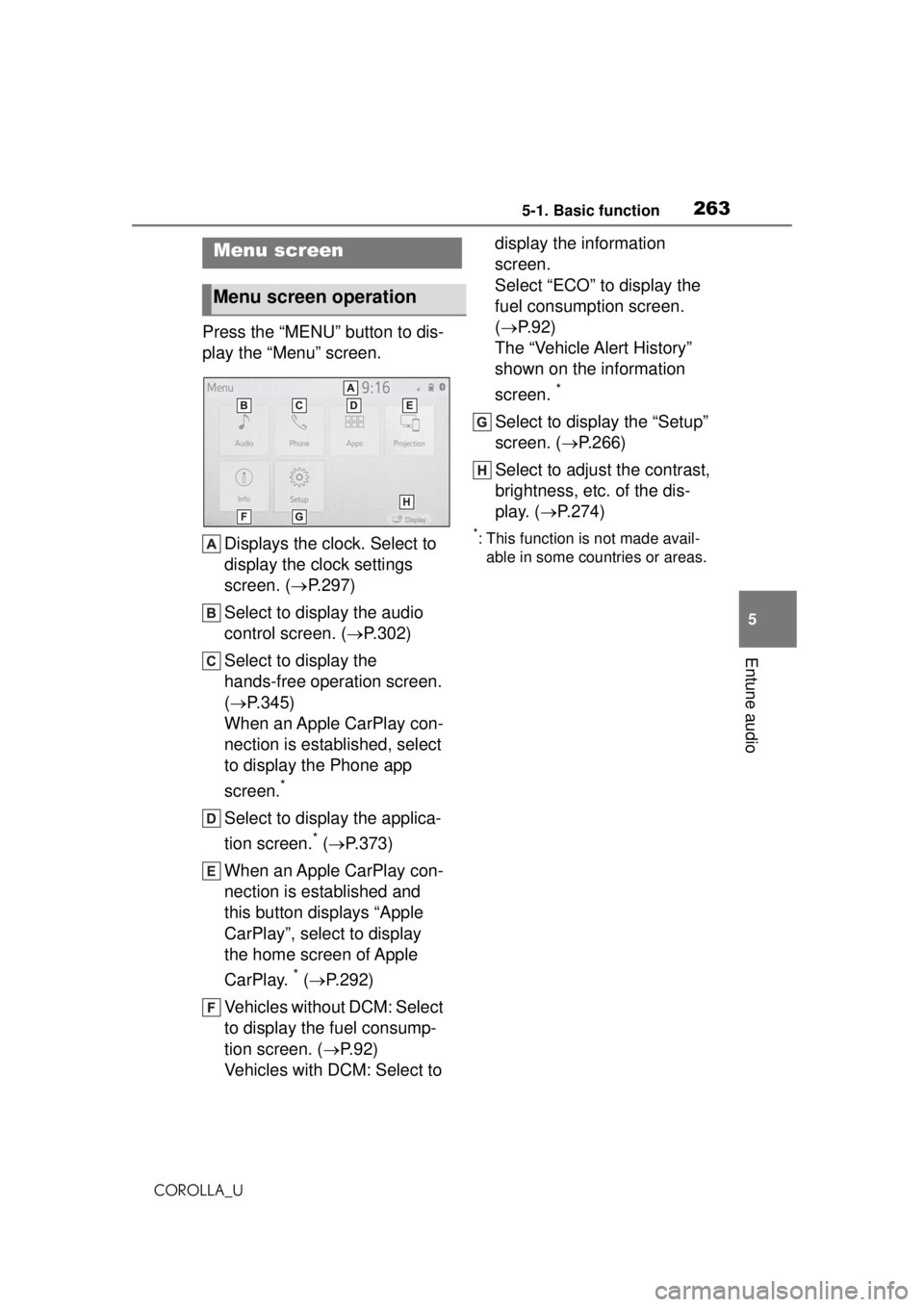
Press the “MENU” button to dis-
play the “Menu” screen. Displays the clock. Select to
display the clock settings
screen. ( P.297)
Select to display the audio
control screen. ( P.302)
Select to display the
hands-free operation screen.
( P.345)
When an Apple CarPlay con-
nection is established, select
to display the Phone app
screen.
*
Select to display the applica-
tion screen.
* ( P.373)
When an Apple CarPlay con-
nection is established and
this button displays “Apple
CarPlay”, select to display
the home screen of Apple
CarPlay.
* ( P.292)
Vehicles without DCM: Select
to display the fuel consump-
tion screen. ( P.92)
Vehicles with DCM: Select to display the information
screen.
Select “ECO” to display the
fuel consumption screen.
(
P.92)
The “Vehicle Alert History”
shown on the information
screen.
*
Select to display the “Setup”
screen. ( P.266)
Select to adjust the contrast,
brightness, etc. of the dis-
play. ( P.274)
*: This function is not made avail-
able in some countries or areas.
Menu screen
Menu screen operation
Page 296 of 588
2965-4. Other settings
COROLLA_U
5-4.Other settings
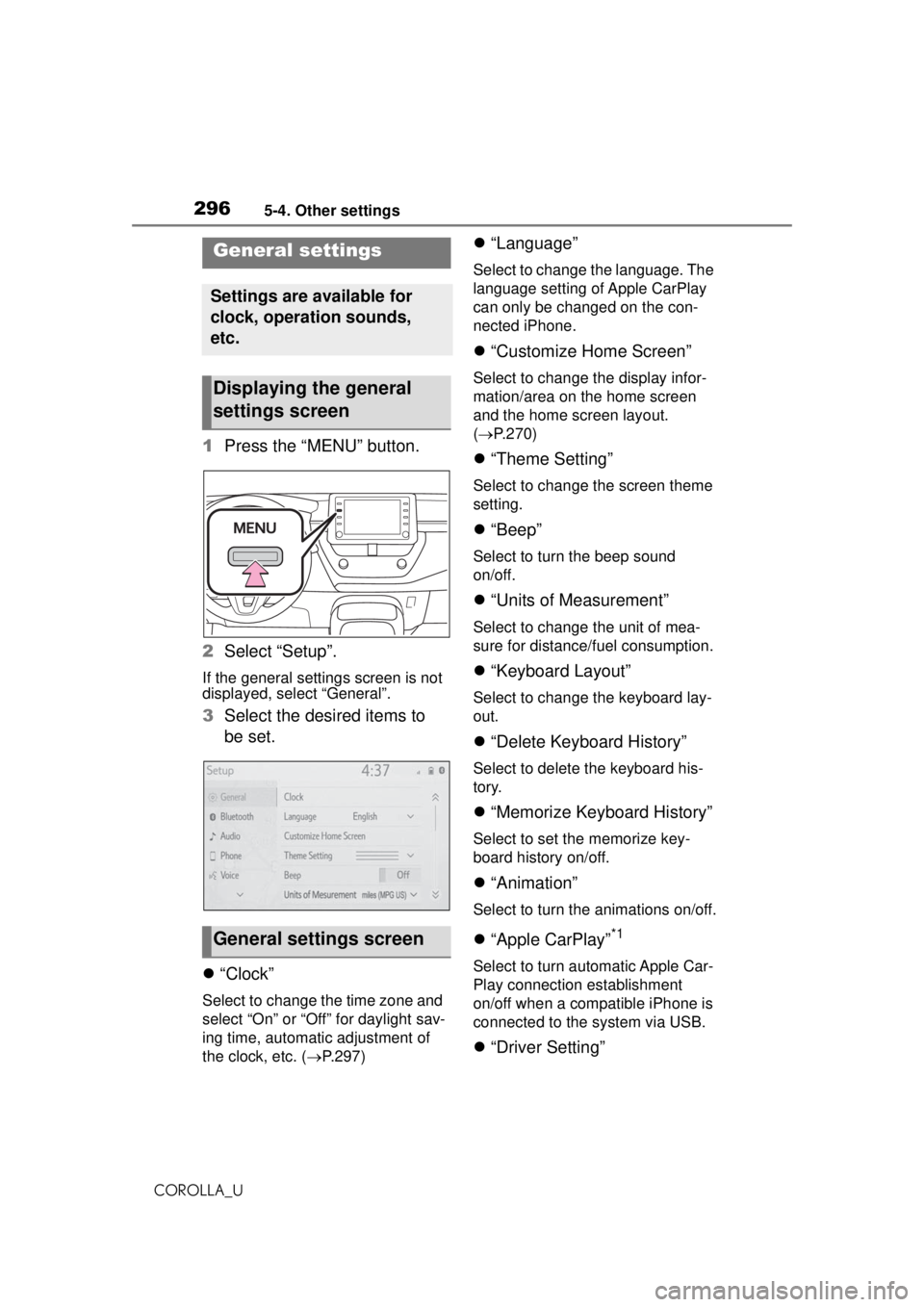
1Press the “MENU” button.
2 Select “Setup”.
If the general settings screen is not
displayed, select “General”.
3Select the desired items to
be set.
“Clock”
Select to change the time zone and
select “On” or “Off” for daylight sav-
ing time, automatic adjustment of
the clock, etc. ( P.297)
“Language”
Select to change the language. The
language setting of Apple CarPlay
can only be changed on the con-
nected iPhone.
“Customize Home Screen”
Select to change the display infor-
mation/area on the home screen
and the home screen layout.
( P.270)
“Theme Setting”
Select to change the screen theme
setting.
“Beep”
Select to turn the beep sound
on/off.
“Units of Measurement”
Select to change the unit of mea-
sure for distance/fuel consumption.
“Keyboard Layout”
Select to change the keyboard lay-
out.
“Delete Keyboard History”
Select to delete the keyboard his-
tory.
“Memorize Keyboard History”
Select to set the memorize key-
board history on/off.
“Animation”
Select to turn the animations on/off.
“Apple CarPlay”*1
Select to turn automatic Apple Car-
Play connection establishment
on/off when a compatible iPhone is
connected to the system via USB.
“Driver Setting”
General settings
Settings are available for
clock, operation sounds,
etc.
Displaying the general
settings screen
General settings screen
Page 393 of 588
3936-1. Using the air conditioning system and defogger
COROLLA_U
6
Interior features
the outside rear view mirrors.
Press the rear window and out-
side rear view mirror defoggers
switch.
The defoggers will automatically
turn off after a while.
When the rear window and outside
rear view mirror defoggers switch is
on, the indicator illuminates on the
rear window and outside rear view
mirror defoggers switch.
■Eco air conditioning mode
The air conditioning is controlled
with low fuel consumption priori-
tized such as reducing fan
speed, etc.
Press the eco air conditioning
mode switch.
When the eco air conditioning
mode is on, the indicator illumi-
nates on the eco air conditioning
mode switch.
■When the outside temperature
exceeds 75°F (24°C) and the air
conditioning system is on
●In order to reduce the air condi-
tioning power consumption, the air
conditioning system may switch to
recirculated air mode automati-
cally. This may also reduce fuel
consumption.
●Recirculated air mode is selected
as a default mode when the
engine switch is turned to ON.
●It is possible to switch to outside
air mode at any time by pressing
the outside air mode switch.
■Fogging up of the windows
●The windows will easily fog up
when the humidity in the vehicle is
high. Turning “A/C” on will dehu-
midify the air from the outlets and defog the windshield effectively.
●If you turn “A/C” off, the windows
may fog up more easily.
●The windows may fog up if the
recirculated air mode is used.
■Outside/recirculated air mode
●When driving on
dusty roads such
as tunnels or in heavy traffic, set
the outside/recirculated air mode
switch to the recirculated air
mode. This is effective in prevent-
ing outside air from entering the
vehicle interior. During cooling
operation, setting the recirculated
air mode will also cool the vehicle
interior effectively.
●Outside/recirculated air mode may
automatically switch depending on
the temperature setting or the
inside temperature.
■When the outside temperature
falls to nearly 32°F (0°C)
The dehumidification function may
not operate even when “A/C” switch
is pressed.
■Ventilation and air conditioning
odors
●To let fresh air in, set the air condi-
tioning system to the outside air
mode.
●During use, various odors from
inside and outside the vehicle may
enter into and accumulate in the
air conditioning system. This may
then cause odor to be emitted
from the vents.
●To reduce potential odors from
occurring:
• It is recommended that the air conditioning system be set to out-
side air mode prior to turning the
vehicle off.
• The start timing of the blower may be delayed for a short period of
time immediately after the air con-
ditioning system is started in auto-
matic mode.
●When parking, the system auto-
matically switches to outside air