air conditioning TOYOTA COROLLA 2021 Owners Manual (in English)
[x] Cancel search | Manufacturer: TOYOTA, Model Year: 2021, Model line: COROLLA, Model: TOYOTA COROLLA 2021Pages: 624, PDF Size: 20.3 MB
Page 4 of 624
4TABLE OF CONTENTS
COROLLA_U
iPod/iPhone (Apple CarPlay)......................................... 341
Android Auto ...................... 344
Bluetooth
® audio ................ 345
5-8. Audio/visual remote controls Steering switches ............... 349
5-9. Audio settings Setup .................................. 351
5-10. Tips for operating the audio/visual system
Operating information......... 352
5-11. Voice command system oper- ation
Voice command system ..... 364
Command list ..................... 367
5-12. Mobile Assistant operation Mobile Assistant ................. 371
5-13. Phone operation (Hands-free system for cellular phones)
Quick reference .................. 373
Some basics ...................... 374
Placing a call using the Blue-
tooth
® hands-free system 378
Receiving a call using the Blue-
tooth
® hands-free system 381
Talking on the Bluetooth
®
hands-free system ........... 382
Bluetooth
® phone message
function ............................ 384
5-14. Phone settings Setup .................................. 388
5-15. What to do if... (Bluetooth
®)
Troubleshooting ................. 398
5-16. Connected Services Overview Functional overview ........... 402
Type A: Function achieved by using a smart phone or DCM......................................... 403Type B: Function achieved by
using DCM and the system......................................... 406
Type C: Function achieved by using DCM ....................... 407
Type D: Function achieved by using DCM and a smartphone......................................... 407
5-17. Connected Services Opera- tion
Toyota apps........................ 409
5-18. Toyota apps settings Setup.................................. 413
6-1. Using the air conditioning system and defogger
Manual air conditioning system......................................... 416
Automatic air conditioning sys- tem ................................... 421
Heated steering wheel/seat heaters ............................. 426
6-2. Using the interior lights Interior lights list ................. 428
6-3. Using the storage features List of storage features ...... 430
Trunk features .................... 433
6-4. Other interior features Other interior features ........ 434
Garage door opener........... 444
7-1. Maintenance and care Cleaning and protecting the vehicle exterior................. 452
Cleaning and protecting the vehicle interior.................. 454
6Interior features
7Maintenance and care
Page 5 of 624
5TABLE OF CONTENTS
1
2
3
4
5
6
7
8
9
10
COROLLA_U
7-2. Maintenance Maintenance requirements......................................... 457
General maintenance ......... 458
Emission inspection and mainte- nance (I/M) programs....... 461
7-3. Do-it-yourself maintenance Do-it-yourself service precau-tions ................................. 462
Hood .................................. 464
Positioning a floor jack ....... 465
Engine compartment .......... 466
Tires ................................... 475
Tire inflation pressure......... 484
Wheels ............................... 486
Air conditioning filter ........... 487
Wireless remote control/elec- tronic key battery.............. 489
Checking and replacing fuses ......................................... 492
Light bulbs .......................... 495
8-1. Essential information Emergency flashers ........... 502
If your vehicle has to be stopped in an emergency .............. 502
If the vehicle is trapped in rising water ................................ 504
8-2. Steps to take in an emergency If your vehicle needs to be towed......................................... 505
If you think something is wrong ......................................... 509
Fuel pump shut off system ......................................... 510
If a warning light turns on or a warning buzzer sounds .... 511
If a warning message is dis- played .............................. 521If you have a flat tire (vehicles
without spare tire) ............ 523
If you have a flat tire (vehicles with a spare tire) .............. 534
If the engine will not start ... 542
If you lose your keys .......... 544
If the electronic key does not operate properly............... 544
If the vehicle battery is dis- charged ............................ 546
If your vehicle overheats .... 550
If the vehicle becomes stuck ......................................... 553
9-1. Specifications Maintenance data (fuel, oil level, etc.) .................................. 556
Fuel information ................. 568
Tire information .................. 570
9-2. Customization Customizable features ....... 581
9-3. Initialization Items to initialize ................ 589
10-1. For owners Reporting safety defects for U.S. owners ............................. 592
Seat belt instructions for Cana- dian owners (in French) ... 592
SRS airbag instructions for Canadian owners (in French)........ ................................. 59
4
8When trouble arises
9Vehicle specifications
10For owners
Page 16 of 624
16Pictorial index
COROLLA_UWhen a warning message is displayed ............................
.... P.521
Parking brake
*4............................................................... .... P.180
Applying/releasing............................................. ................... P.180
Precautions for winter seas on.............................................. P.278
Warning light/message..... ............................................ P.180, 511
Turn signal lever.............................................. ................... P.179
Headlight switch ............................................... ................. P.186
Headlights/parking lights/tail lig hts/side marker lights/daytime run-
ning lights/LED accent lights
*4............................................. P.186
Windshield wiper and washer switch............................... P.192
Usage................................................................................... P.192
Adding washer fluid .............................................................. P.474
Emergency flasher switch ....................................... .......... P.502
Hood lock release lever ........................................ ............. P.464
Tilt and telescopic steering lock release lever ................P. 1 3 8
Air conditioning system ............................. ............... P.416, 421
Usage.......................................................... ................. P.416, 421
Rear window defogger ........................................... ...... P.418, 422
Audio
*4............................................................... ................. P.283
Audio Plus
*4, 5
Premium Audio*4, 5
*1
: Vehicles without a smart key system
*2: Vehicles with a smart key system
*3: Vehicles with a continuous ly variable transmission
*4: If equipped
*5: Refer to “NAVIGATION AND MULTIMEDIA SYSTEM OWNER’S MAN-
UAL”.
Page 201 of 624
2014-5. Using the driving support systems
4
Driving
COROLLA_U
■If a warning message is displayed on the multi-information display
A system may be tempor arily unavailable or there may be a malfu nction in
the system.
●In the following situations, perform the actions specified in t he table. When
the normal operating conditions are detected, the message will disappear
and the system will be come operational.
If the message does not disapp ear, contact your Toyota dealer.
SituationActions
When the area around a sensor is
covered with dirt, moisture (fogged
up, covered with condensation, ice,
etc.), or other foreign matterTo clean the part of the windshield in
front of the front camera, use the
windshield wipers or the windshield
defogger of the air conditioning sys-
tem ( P.417, 422).
Page 202 of 624
2024-5. Using the driving support systems
COROLLA_U
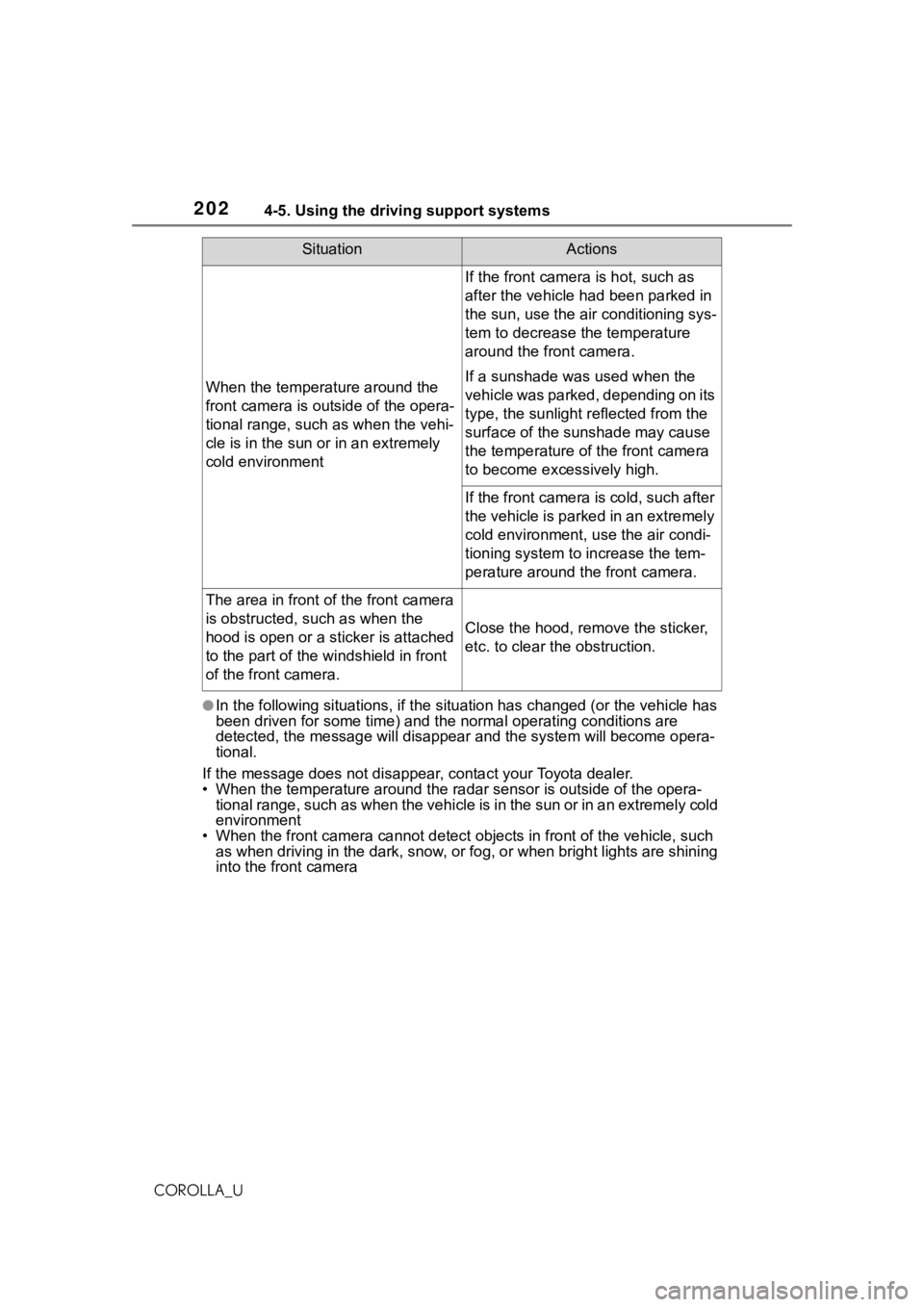
●In the following situations, if the situation has changed (or the vehicle has
been driven for some time) and the normal operating conditions are
detected, the message will disappear and the system will become opera-
tional.
If the message does not disapp ear, contact your Toyota dealer.
• When the temperature around the radar sensor is outside of the opera-
tional range, such as when the vehicle is in the sun or in an e xtremely cold
environment
• When the front camera cannot d etect objects in front of the vehicle, such
as when driving in the dark, sno w, or fog, or when bright lights are shining
into the front camera
When the temperature around the
front camera is out side of the opera-
tional range, such as when the vehi-
cle is in the sun or in an extremely
cold environment
If the front camera is hot, such as
after the vehicle had been parked in
the sun, use the air conditioning sys-
tem to decrease the temperature
around the front camera.
If a sunshade was used when the
vehicle was parked, depending on its
type, the sunlight r eflected from the
surface of the sunshade may cause
the temperature of the front camera
to become exce ssively high.
If the front camera is cold, such after
the vehicle is parked in an extremely
cold environment, use the air condi-
tioning system to increase the tem-
perature around the front camera.
The area in front of the front camera
is obstructed, such as when the
hood is open or a sticker is attached
to the part of the windshield in front
of the front camera.
Close the hood, remove the sticker,
etc. to clear the obstruction.
SituationActions
Page 364 of 624
3645-11. Voice command system operation
COROLLA_U
5-11.Voice command system operation
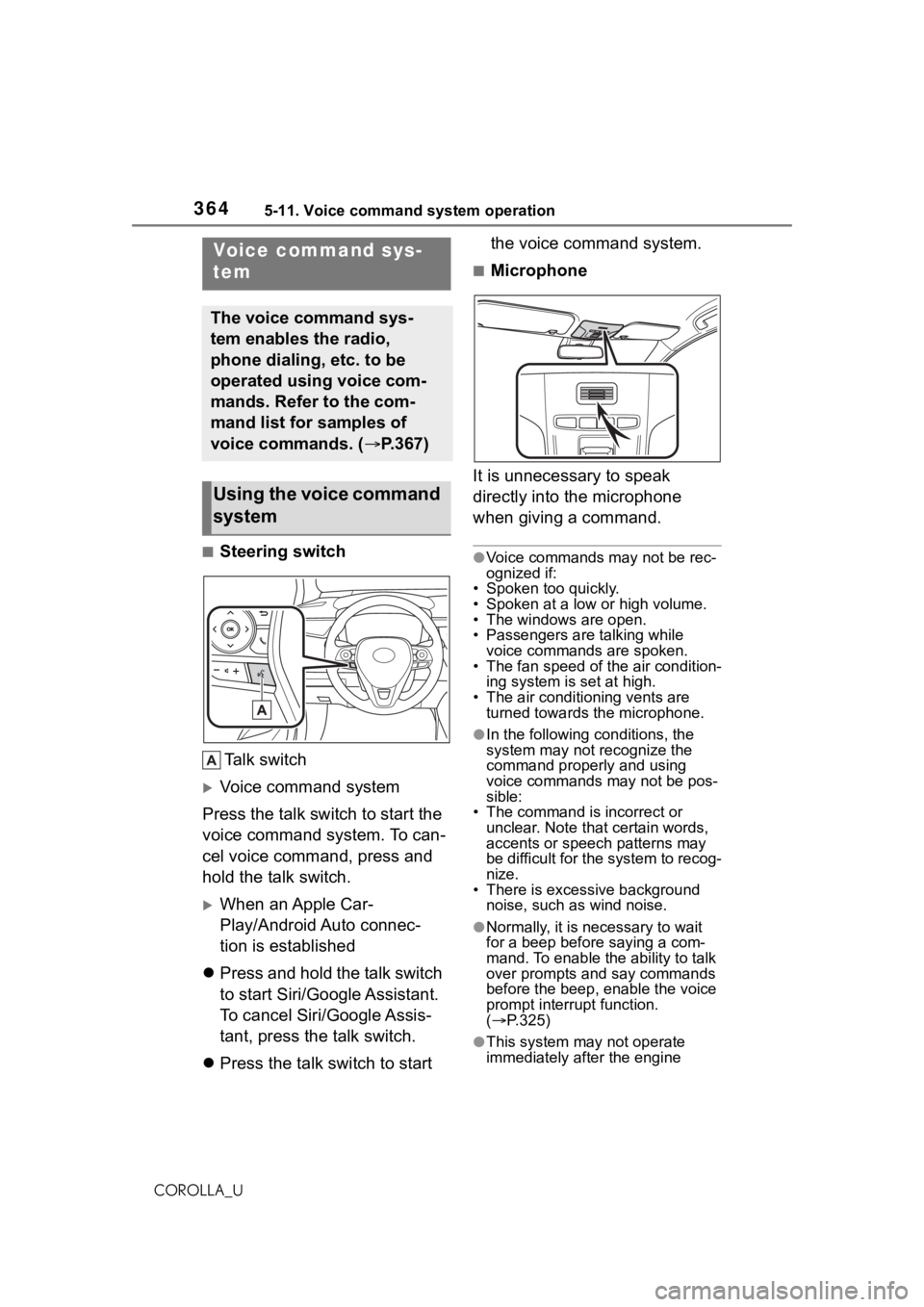
■Steering switchTa l k s w i t c h
Voice command system
Press the talk switch to start the
voice command system. To can-
cel voice command, press and
hold the talk switch.
When an Apple Car-
Play/Android Auto connec-
tion is established
Press and hold the talk switch
to start Siri/Google Assistant.
To cancel Siri/Google Assis-
tant, press the talk switch.
Press the talk switch to start the voice command system.
■Microphone
It is unnecessary to speak
directly into the microphone
when giving a command.
●Voice commands may not be rec-
ognized if:
• Spoken too quickly.
• Spoken at a low or high volume.
• The windows are open.
• Passengers are talking while voice commands are spoken.
• The fan speed of the air condition-
ing system is set at high.
• The air conditioning vents are turned towards the microphone.
●In the following c onditions, the
system may not recognize the
command properly and using
voice commands may not be pos-
sible:
• The command is incorrect or unclear. Note that certain words,
accents or speech patterns may
be difficult for the system to recog-
nize.
• There is excessive background
noise, such as wind noise.
●Normally, it is necessary to wait
for a beep before saying a com-
mand. To enable th e ability to talk
over prompts and say commands
before the beep, enable the voice
prompt interrupt function.
( P.325)
●This system may not operate
immediately after the engine
Voice command sys-
tem
The voice command sys-
tem enables the radio,
phone dialing, etc. to be
operated using voice com-
mands. Refer to the com-
mand list for samples of
voice commands. ( P.367)
Using the voice command
system
Page 371 of 624
3715-12. Mobile Assistant operation
5
Audio
COROLLA_U
5-12.Mobile Assistant operation
●While a phone call is active, the
Mobile Assistant cannot be used.
●If using the navig ation feature of
the cellular phone, ensure the
active audio source is Bluetooth
®
audio or iPod in order to hear turn
by turn direction prompts.
●Wait for the listening beeps before
using the Mobile Assistant.
●The Mobile Assistant may not rec-
ognize commands in the following
situations:
• Spoken too quickly.
• Spoken at a low or high volume. • The windows are open.
• Passengers are talking while the
Mobile Assistant is being used.
• The fan speed of the air condition- ing system is set at high.
• The air conditioning vents are
turned toward the microphone.
Mobile Assist supports the Siri
Eyes Free Mode and Google
App. The available features and
functions may vary based on the
iOS/Android version installed on
the connected device.
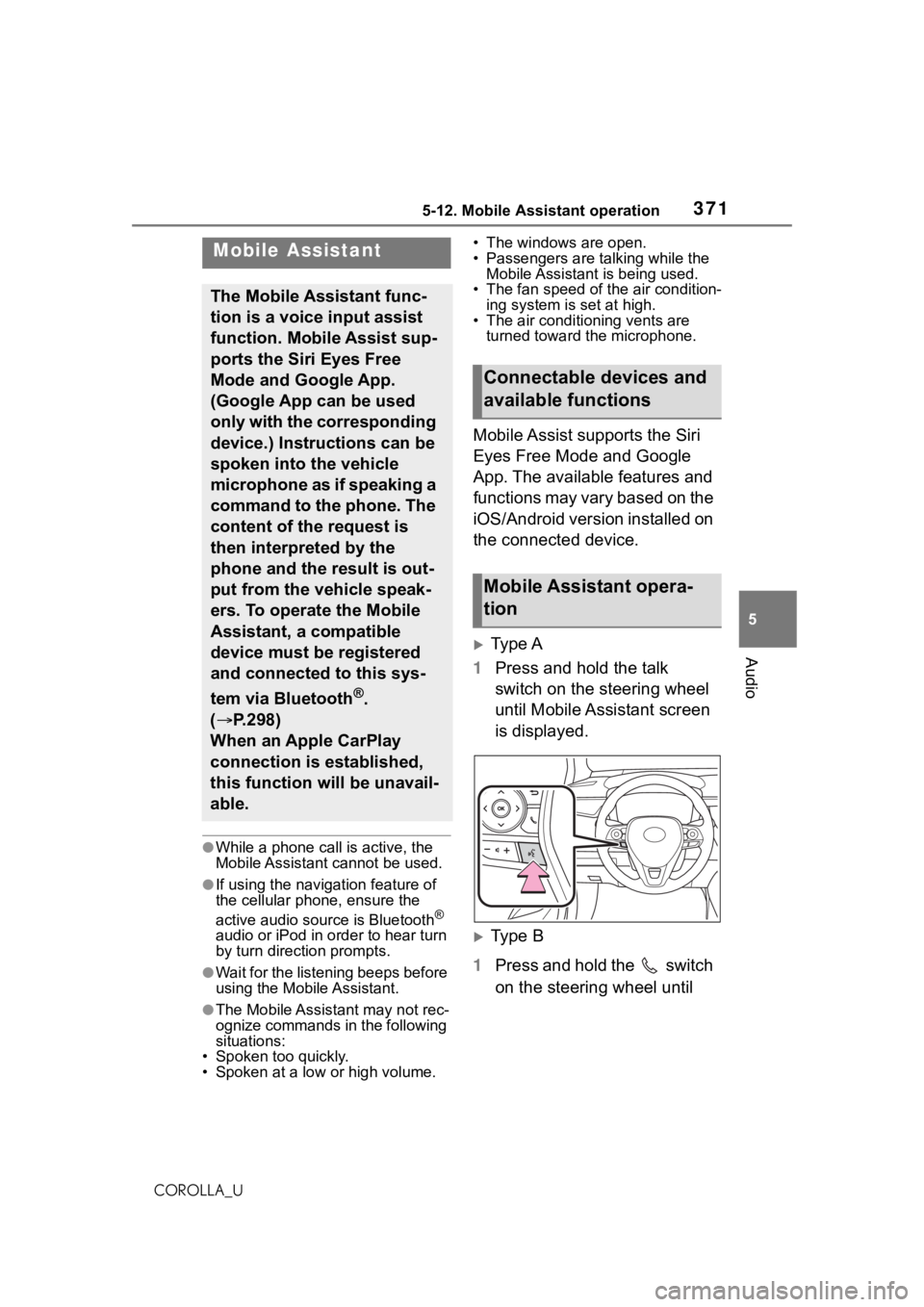
Type A
1 Press and hold the talk
switch on the steering wheel
until Mobile Assistant screen
is displayed.
Type B
1 Press and hold the switch
on the steering wheel until
Mobile Assistant
The Mobile Assistant func-
tion is a voice input assist
function. Mobile Assist sup-
ports the Siri Eyes Free
Mode and Google App.
(Google App can be used
only with the corresponding
device.) Instructions can be
spoken into the vehicle
microphone as if speaking a
command to the phone. The
content of the request is
then interpreted by the
phone and the result is out-
put from the vehicle speak-
ers. To operate the Mobile
Assistant, a compatible
device must be registered
and connected to this sys-
tem via Bluetooth
®.
( P.298)
When an Apple CarPlay
connection is established,
this function will be unavail-
able.
Connectable devices and
available functions
Mobile Assistant opera-
tion
Page 376 of 624
3765-13. Phone operation (Hands-free system for cellular phones)
COROLLA_U
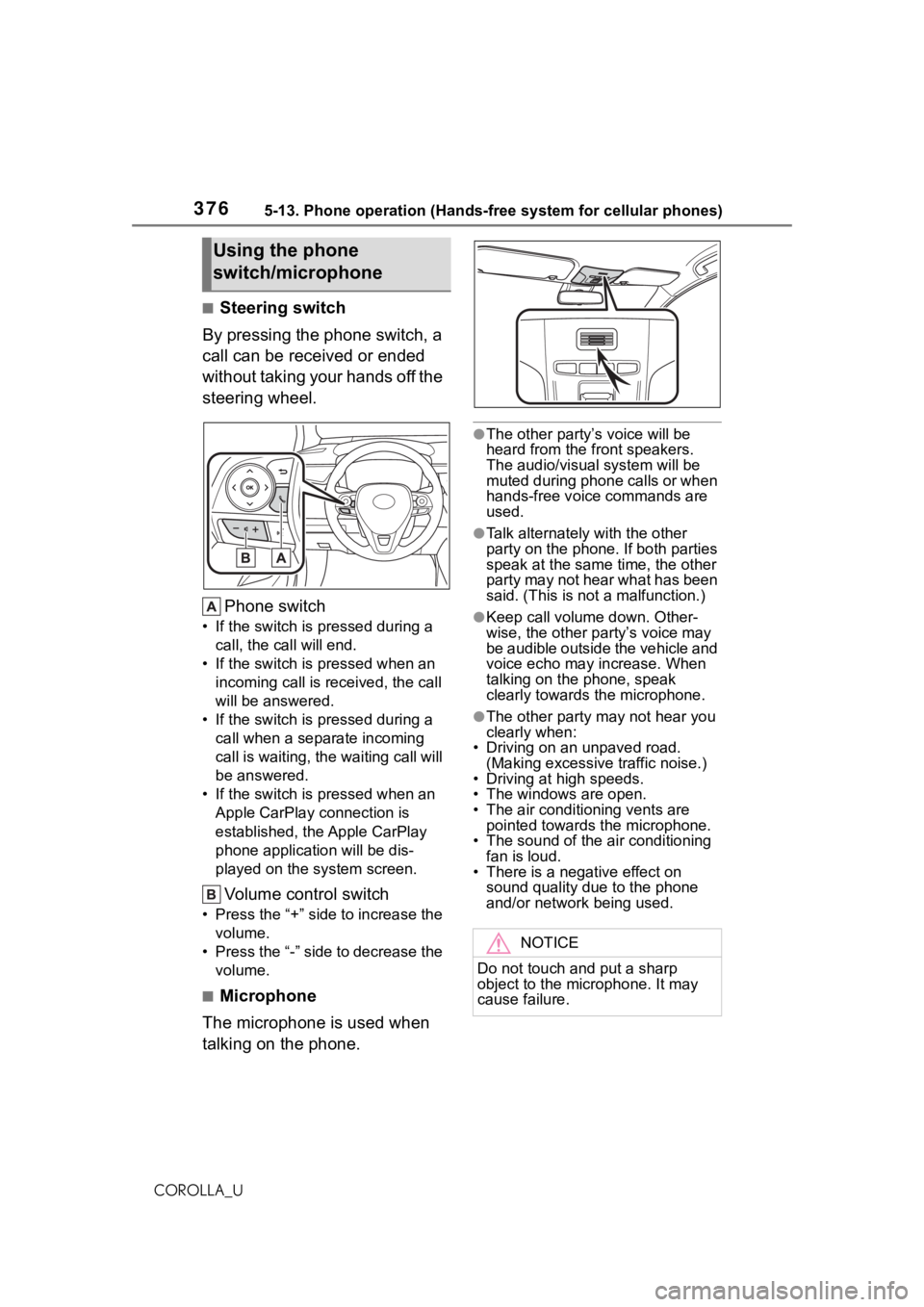
■Steering switch
By pressing the phone switch, a
call can be received or ended
without taking your hands off the
steering wheel.
Phone switch
• If the switch is pressed during a call, the call will end.
• If the switch is pressed when an incoming call is r eceived, the call
will be answered.
• If the switch is pressed during a call when a separate incoming
call is waiting, the waiting call will
be answered.
• If the switch is pressed when an Apple CarPlay connection is
established, the Apple CarPlay
phone application will be dis-
played on the system screen.
Volume control switch
• Press the “+” side to increase the volume.
• Press the “-” side to decrease the volume.
■Microphone
The microphone is used when
talking on the phone.
●The other party’s voice will be
heard from the front speakers.
The audio/vis ual system will be
muted during phone calls or when
hands-free voice commands are
used.
●Talk alternately with the other
party on the phone. If both parties
speak at the same time, the other
party may not hear what has been
said. (This is not a malfunction.)
●Keep call volume down. Other-
wise, the other party’s voice may
be audible outside the vehicle and
voice echo may increase. When
talking on the phone, speak
clearly towards the microphone.
●The other party may not hear you
clearly when:
• Driving on an unpaved road.
(Making excessive traffic noise.)
• Driving at high speeds.
• The windows are open.
• The air conditioning vents are pointed towards the microphone.
• The sound of the air conditioning
fan is loud.
• There is a negative effect on sound quality due to the phone
and/or network being used.
Using the phone
switch/microphone
NOTICE
Do not touch and put a sharp
object to the microphone. It may
cause failure.
Page 415 of 624
415
6
6
Interior features
COROLLA_U
Interior features
.6-1. Using the air conditioning system and defogger
Manual air conditioning sys- tem ............................ 416
Automatic air conditioning system ....................... 421
Heated steering wheel/seat heaters ...................... 426
6-2. Using the interior lights Interior lights list .......... 428
6-3. Using the storage features List of storage features.................................. 430
Trunk features ............. 433
6-4. Other interior features
Other interior features . 434
Garage door opener.... 444
Page 416 of 624
4166-1. Using the air conditioning system and defogger
COROLLA_U
6-1.Using the air conditioning system and defogger
*: If equipped
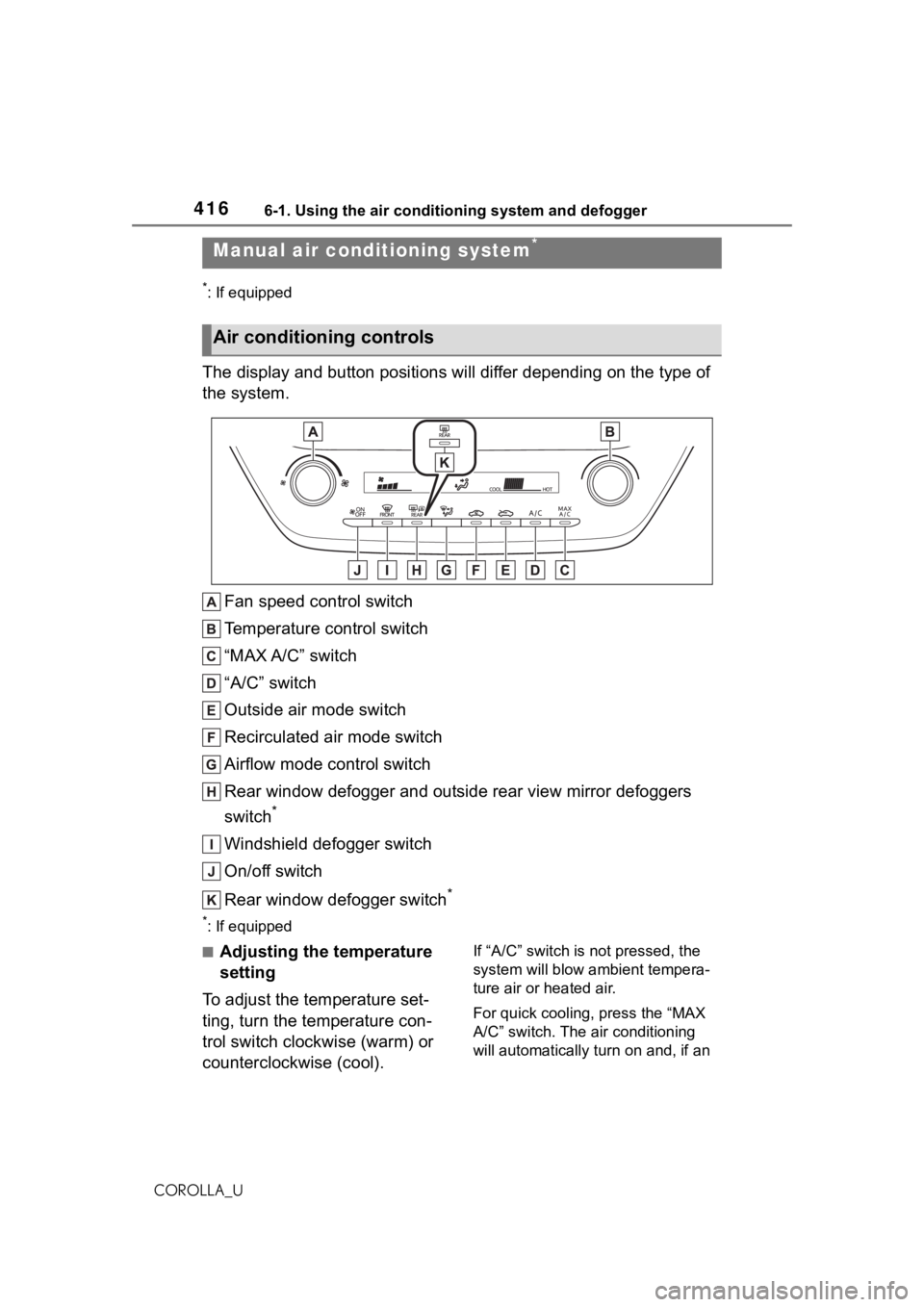
The display and button positions will differ depending on the type of
the system.
Fan speed control switch
Temperature control switch
“MAX A/C” switch
“A/C” switch
Outside air mode switch
Recirculated air mode switch
Airflow mode control switch
Rear window defogger and outside rear view mirror defoggers
switch
*
Windshield defogger switch
On/off switch
Rear window defogger switch
*
*: If equipped
■Adjusting the temperature
setting
To adjust the temperature set-
ting, turn the temperature con-
trol switch clockwise (warm) or
counterclockwise (cool).If “A/C” switch is not pressed, the
system will blow ambient tempera-
ture air or heated air.
For quick cooling, press the “MAX
A/C” switch. The air conditioning
will automatically turn on and, if an
Manual air conditioning system*
Air conditioning controls