charging TOYOTA COROLLA 2021 Owners Manual (in English)
[x] Cancel search | Manufacturer: TOYOTA, Model Year: 2021, Model line: COROLLA, Model: TOYOTA COROLLA 2021Pages: 624, PDF Size: 20.3 MB
Page 83 of 624
831-4. Theft deterrent system
1
For safety and security
COROLLA_U
hood, and lock all the doors.
The system will set automati-
cally after 30 seconds.
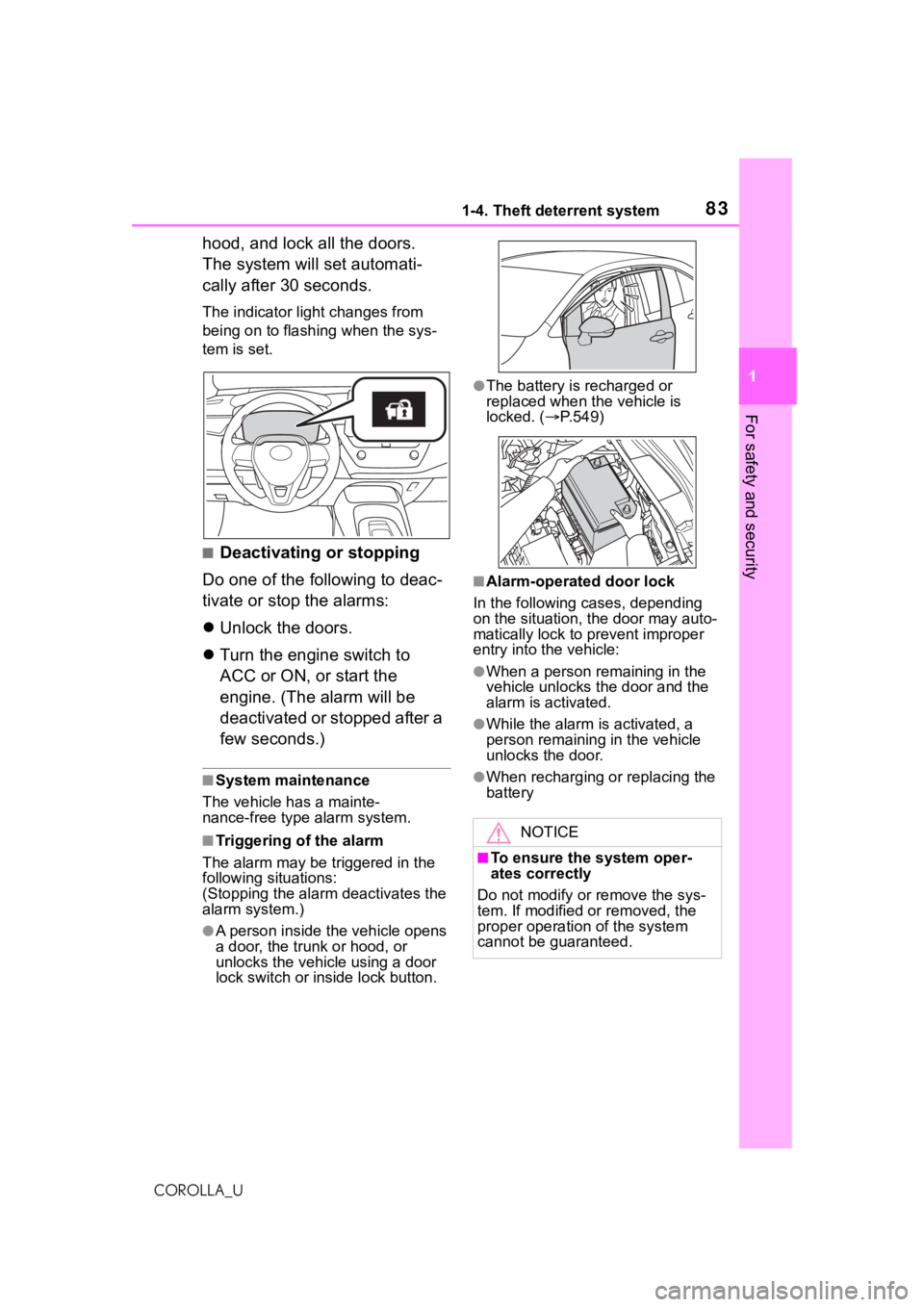
The indicator light changes from
being on to flashing when the sys-
tem is set.
■Deactivating or stopping
Do one of the following to deac-
tivate or stop the alarms:
Unlock the doors.
Turn the engine switch to
ACC or ON, or start the
engine. (The alarm will be
deactivated or stopped after a
few seconds.)
■System maintenance
The vehicle has a mainte-
nance-free type alarm system.
■Triggering of the alarm
The alarm may be triggered in the
following situations:
(Stopping the alarm deactivates the
alarm system.)
●A person inside the vehicle opens
a door, the trunk or hood, or
unlocks the vehicle using a door
lock switch or inside lock button.
●The battery is recharged or
replaced when the vehicle is
locked. ( P.549)
■Alarm-operated door lock
In the following cases, depending
on the situation, the door may auto-
matically lock to prevent improper
entry into the vehicle:
●When a person remaining in the
vehicle unlocks the door and the
alarm is activated.
●While the alarm i s activated, a
person remaining in the vehicle
unlocks the door.
●When recharging or replacing the
battery
NOTICE
■To ensure the system oper-
ates correctly
Do not modify or remove the sys-
tem. If modified or removed, the
proper operation of the system
cannot be guaranteed.
Page 87 of 624
872-1. Instrument cluster
2
Vehicle status information and indicators
COROLLA_U
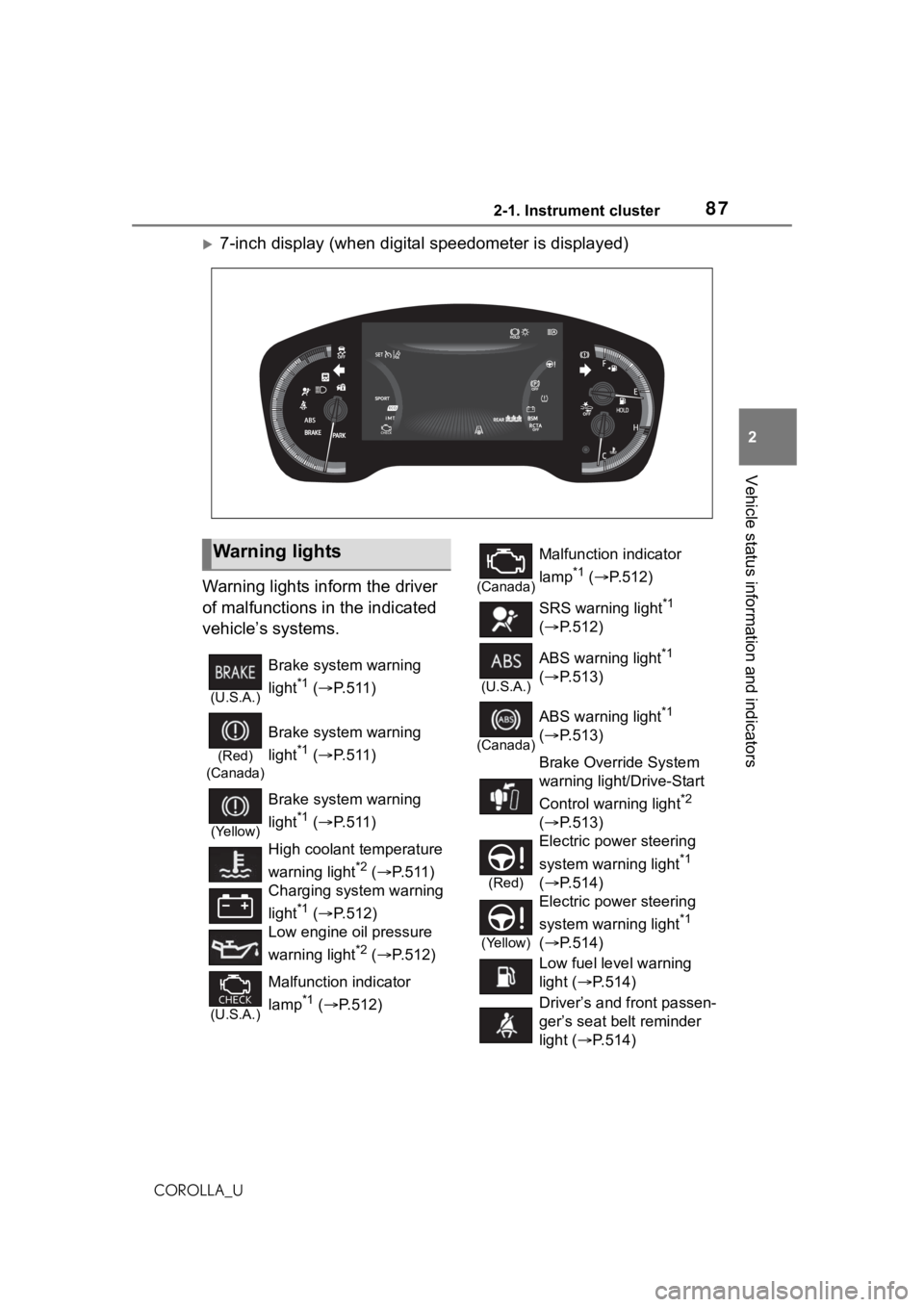
7-inch display (when digital speedometer is displayed)
Warning lights inform the driver
of malfunctions in the indicated
vehicle’s systems.
Warning lights
(U.S.A.)
Brake system warning
light
*1 ( P.511)
(Red)
(Canada)
Brake system warning
light
*1 ( P.511)
(Yellow)
Brake system warning
light
*1 ( P.511)
High coolant temperature
warning light
*2 ( P.511)
Charging system warning
light
*1 ( P.512)
Low engine oil pressure
warning light
*2 ( P.512)
(U.S.A.)
Malfunction indicator
lamp
*1 ( P.512)
(Canada)
Malfunction indicator
lamp
*1 ( P.512)
SRS warning light
*1
( P.512)
(U.S.A.)
ABS warning light*1
( P.513)
(Canada)
ABS warning light*1
( P.513)
Brake Override System
warning light/Drive-Start
Control warning light
*2
( P.513)
(Red)
Electric power steering
system warning light
*1
( P.514)
(Yellow)
Electric power steering
system warning light
*1
( P.514)
Low fuel level warning
light ( P.514)
Driver’s and front passen-
ger’s seat belt reminder
light ( P.514)
Page 111 of 624
1113-1. Key information
3
Before driving
COROLLA_U• The wireless remote control does
not operate.
• The detection area becomes
smaller.
Vehicles with a smart key system
●The standard battery life is 1 to 2
years.
●If the battery becomes low, an
alarm will sound in the cabin and a
message will be s hown on the
multi-information display when the
engine is stopped.
●To reduce key battery depletion
when the electronic key is to not
be used for long periods of time,
set the electronic key to the bat-
tery-saving mode. ( P.127)
●As the electronic key always
receives radio waves, the battery
will become deplet ed even if the
electronic key is not used. The fol-
lowing symptoms indicate that the
electronic key battery may be
depleted. Replace the battery
when necessary. ( P.489)
• The smart key system or the wire- less remote control does not oper-
ate.
• The detection area becomes
smaller.
• The LED indicator on the key sur-
face does not turn on.
●To avoid serious deterioration, do
not leave the electronic key within
3 ft. (1 m) of the following electri-
cal appliances t hat produce a
magnetic field:
•TVs
• Personal computers
• Cellular phones, cordless phones and battery chargers
• Recharging cellular phones or
cordless phones
• Table lamps
• Induction cookers
●If the electronic key is near the
vehicle for longer than necessary,
even if the smart key system is not
operated, the key battery may
become depleted faster than nor-
mal.
■Replacing the battery (with a
wireless remote control func-
tion)
P.489
■If “A New Key has been Regis-
tered Contact Your Dealer for
Details” is shown on the
multi-information display (vehi-
cles with a smart key system)
This message will be displayed
each time the driver’s door is
opened when the doors are
unlocked from the outside for
approximately 10 days after a new
electronic key has been registered.
If this message is displayed but you
have not had a new electronic key
registered, ask your Toyota dealer to
check if an unknown electronic key
(other than those in your posses-
sion) has been registered.
■If a wrong key is used (with a
wireless remote control func-
tion)
The key cylinder rotates freely, iso-
lated from the internal mechanism.
NOTICE
■To prevent key damage
●Do not drop the keys, subject
them to strong shocks or bend
them.
●Do not expose the keys to high
temperatures for long periods of
time.
●Do not get the keys wet or wash
them in an ultrasonic washer
etc.
●Vehicles with a smart key sys-
tem: Do not att ach metallic or
magnetic materials to the keys
or place the keys close to such
materials.
●Do not disassemble the keys.
Page 170 of 624
1704-2. Driving procedures
COROLLA_Ufull-speed rang
e will not be can-
celed. ( P.271)
■Restraining sudden start
(Drive-Start Control)
P. 1 5 2
■G AI-SHIFT
G AI-SHIFT automatically selects a
suitable gear for sporty driving
according to driver’s input and driv-
ing conditions. G AI-SHIFT operates
automatically when th e shift lever is
in D and sport mode is selected for
the driving mode. (Selecting normal
mode or shifting the shift lever to the
B position cancels this function.)
■After recharging/reconnecting
the battery
P. 5 4 9
■Continuously variable transmis-
sion fail-safe control
The system detects malfunctioning
parts targeted (all of the solenoids
that perform the shifting function) by
the On-Board Diagnostics, and per-
forms fail-safe mechanisms, such
as restricting the shifting function or
transmission ratio control.
In this event, the malfunction indica-
tor lamp turns on.
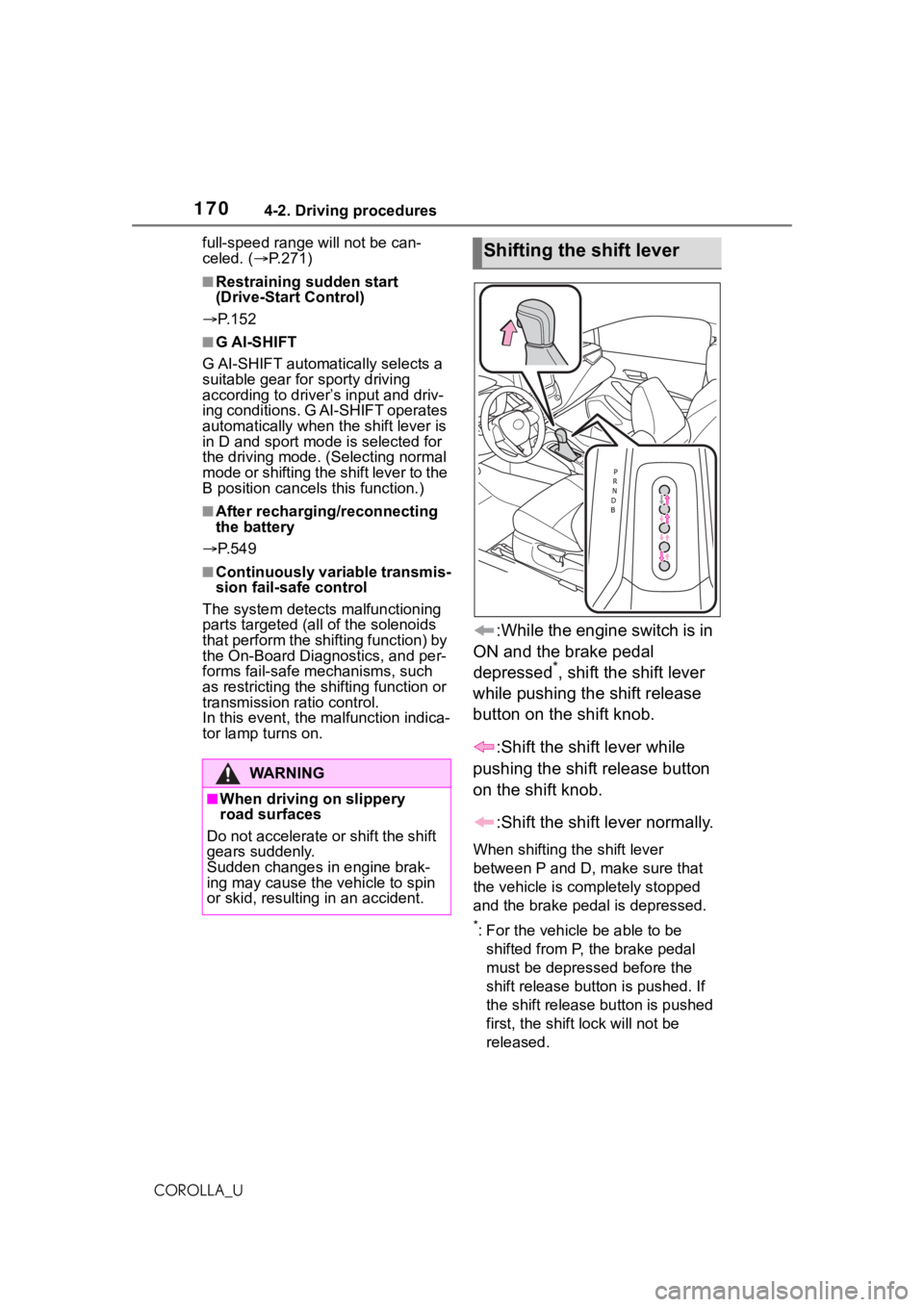
:While the engine switch is in
ON and the brake pedal
depressed
*, shift the shift lever
while pushing the shift release
button on the shift knob.
:Shift the shift lever while
pushing the shift release button
on the shift knob.
:Shift the shift lever normally.
When shifting the shift lever
between P and D, make sure that
the vehicle is completely stopped
and the brake pe dal is depressed.
*: For the vehicle be able to be
shifted from P, the brake pedal
must be depressed before the
shift release button is pushed. If
the shift release button is pushed
first, the shift lock will not be
released.
WA R N I N G
■When driving on slippery
road surfaces
Do not accelerate o r shift the shift
gears suddenly.
Sudden changes in engine brak-
ing may cause the vehicle to spin
or skid, resulting in an accident.
Shifting the shift lever
Page 172 of 624
1724-2. Driving procedures
COROLLA_U
*: If equipped
*: To improve fuel efficiency and reduce noise, shift the shift lever
to D for normal driving.
■To protect the continuously
variable transmission
If the continuously variable trans-
mission fluid temperature is high,
“Transmission Oil Temp. High Stop
in a Safe Place and See Owner’s
Manual” will be d isplayed on the
multi-information display and the
vehicle will go into transmission pro-
tection mode automatically. Have the vehicle inspected by your Toyota
dealer.
■When driving with dynamic
radar cruise control with
full-speed range activated
Even when switching the driving
mode to sport mode with the intent
of enabling engine braking, engine
braking will not occur because
dynamic radar cruise control with
full-speed range will not be can-
celed. ( P.271)
■Restraining sudden start
(Drive-Start Control)
P.152
■G AI-SHIFT
G AI-SHIFT automat ically selects a
suitable gear for sporty driving
according to drive r’s input and driv-
ing conditions. G AI-SHIFT operates
automatically when th e shift lever is
in D and sport mode is selected for
the driving mode. (Selecting normal
mode or shifting the shift lever to the
M position cancels this function.)
■After recharging/reconnecting
the battery
P.549
Continuously variable
transmission (vehi-
cles with paddle shift
switches)
*
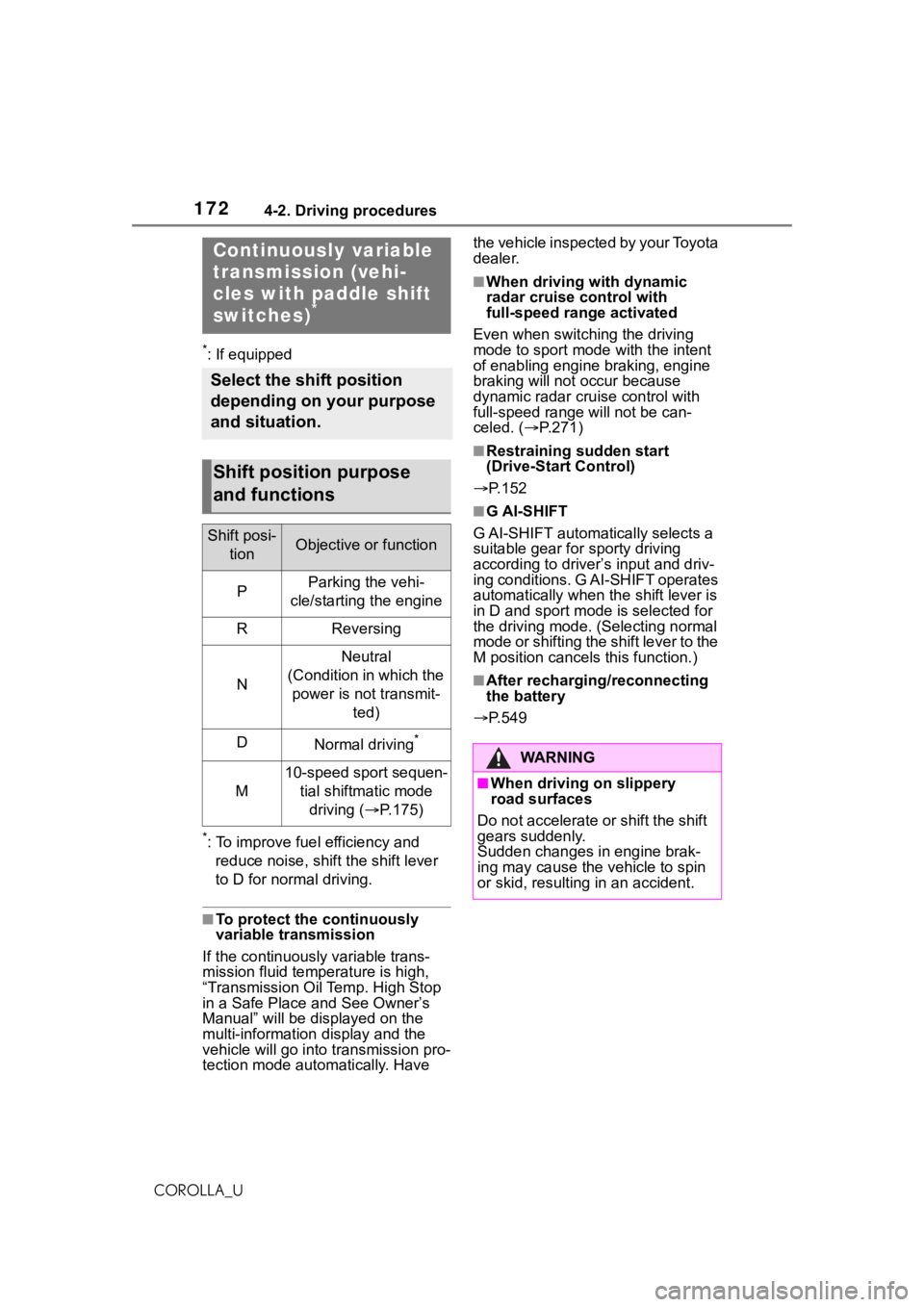
Select the shift position
depending on your purpose
and situation.
Shift position purpose
and functions
Shift posi-
tionObjective or function
PParking the vehi-
cle/starting the engine
RReversing
N
Neutral
(Condition in which the power is not transmit- ted)
DNormal driving*
M
10-speed sport sequen-tial shiftmatic mode driving ( P.175)WA R N I N G
■When driving on slippery
road surfaces
Do not accelerate or shift the shift
gears suddenly.
Sudden changes in engine brak-
ing may cause the vehicle to spin
or skid, resulting in an accident.
Page 187 of 624
1874-3. Operating the lights and wipers
4
Driving
COROLLA_U
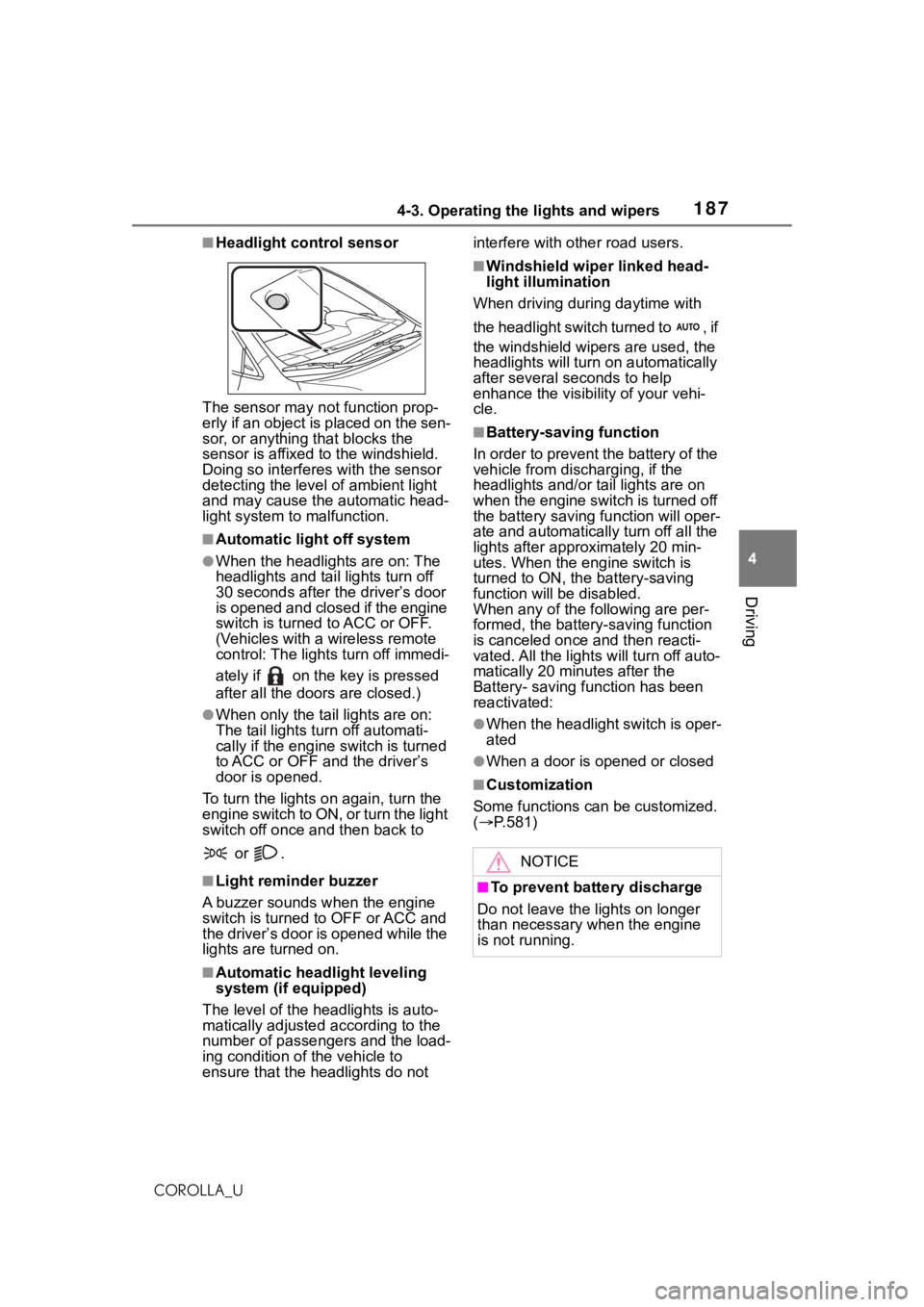
■Headlight control sensor
The sensor may not function prop-
erly if an object is placed on the sen-
sor, or anything that blocks the
sensor is affixed to the windshield.
Doing so interfere s with the sensor
detecting the level of ambient light
and may cause the automatic head-
light system to malfunction.
■Automatic light off system
●When the headlights are on: The
headlights and tail lights turn off
30 seconds after the driver’s door
is opened and closed if the engine
switch is turned to ACC or OFF.
(Vehicles with a wireless remote
control: The lights turn off immedi-
ately if on the key is pressed
after all the doors are closed.)
●When only the tail lights are on:
The tail lights tu rn off automati-
cally if the engine switch is turned
to ACC or OFF an d the driver’s
door is opened.
To turn the lights on again, turn the
engine switch to ON, or turn the light
switch off once and then back to
or .
■Light reminder buzzer
A buzzer sounds when the engine
switch is turned to OFF or ACC and
the driver’s door is opened while the
lights are turned on.
■Automatic headlight leveling
system (if equipped)
The level of the headlights is auto-
matically adjusted according to the
number of passengers and the load-
ing condition of the vehicle to
ensure that the headlights do not interfere with o
ther road users.
■Windshield wiper linked head-
light illumination
When driving during daytime with
the headlight switch turned to , if
the windshield wipers are used, the
headlights will turn o n automatically
after several se conds to help
enhance the visibility of your vehi-
cle.
■Battery-saving function
In order to prevent the battery of the
vehicle from discharging, if the
headlights and/or tail lights are on
when the engine switch is turned off
the battery saving function will oper-
ate and automatically turn off all the
lights after approximately 20 min-
utes. When the engine switch is
turned to ON, the battery-saving
function will be disabled.
When any of the following are per-
formed, the battery-saving function
is canceled once and then reacti-
vated. All the lights will turn off auto-
matically 20 minutes after the
Battery- saving function has been
reactivated:
●When the headlight switch is oper-
ated
●When a door is opened or closed
■Customization
Some functions can be customized.
( P.581)
NOTICE
■To prevent battery discharge
Do not leave the lights on longer
than necessary w hen the engine
is not running.
Page 287 of 624
2875-1. Basic function
5
Audio
COROLLA_U
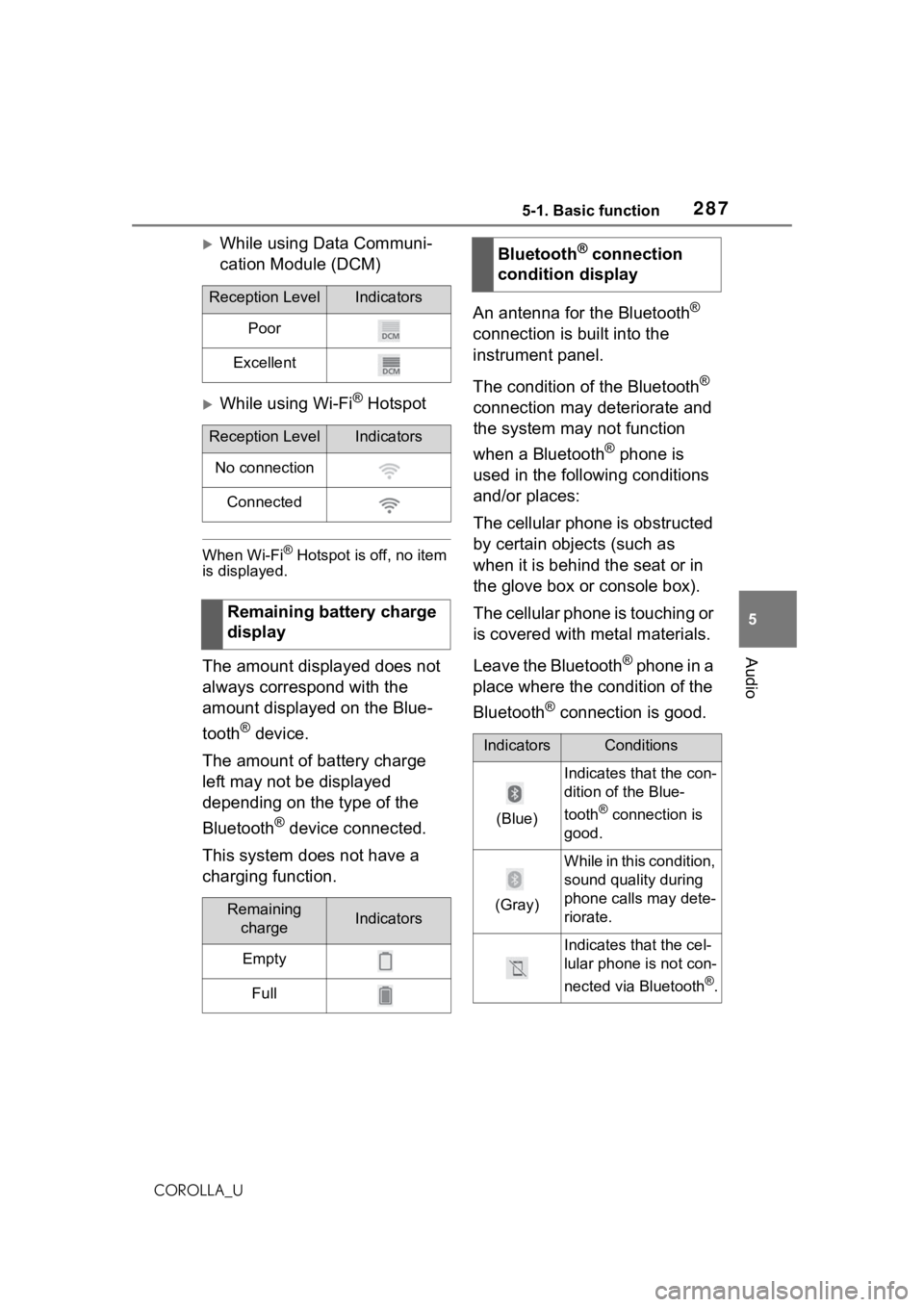
While using Data Communi-
cation Module (DCM)
While using Wi-Fi® Hotspot
When Wi-Fi® Hotspot is off, no item
is displayed.
The amount displayed does not
always correspond with the
amount displayed on the Blue-
tooth
® device.
The amount of battery charge
left may not be displayed
depending on the type of the
Bluetooth
® device connected.
This system does not have a
charging function. An antenna for the Bluetooth
®
connection is built into the
instrument panel.
The condition of the Bluetooth
®
connection may deteriorate and
the system may not function
when a Bluetooth
® phone is
used in the following conditions
and/or places:
The cellular phone is obstructed
by certain objects (such as
when it is behind the seat or in
the glove box or console box).
The cellular phone is touching or
is covered with metal materials.
Leave the Bluetooth
® phone in a
place where the condition of the
Bluetooth
® connection is good.
Reception LevelIndicators
Poor
Excellent
Reception LevelIndicators
No connection
Connected
Remaining battery charge
display
Remaining chargeIndicators
Empty
Full
Bluetooth® connection
condition display
IndicatorsConditions
(Blue)
Indicates that the con-
dition of the Blue-
tooth
® connection is
good.
(Gray)
While in this condition,
sound quality during
phone calls may dete-
riorate.
Indicates that the cel-
lular phone is not con-
nected via Bluetooth
®.
Page 319 of 624
3195-3. Connectivity settings
5
Audio
COROLLA_U
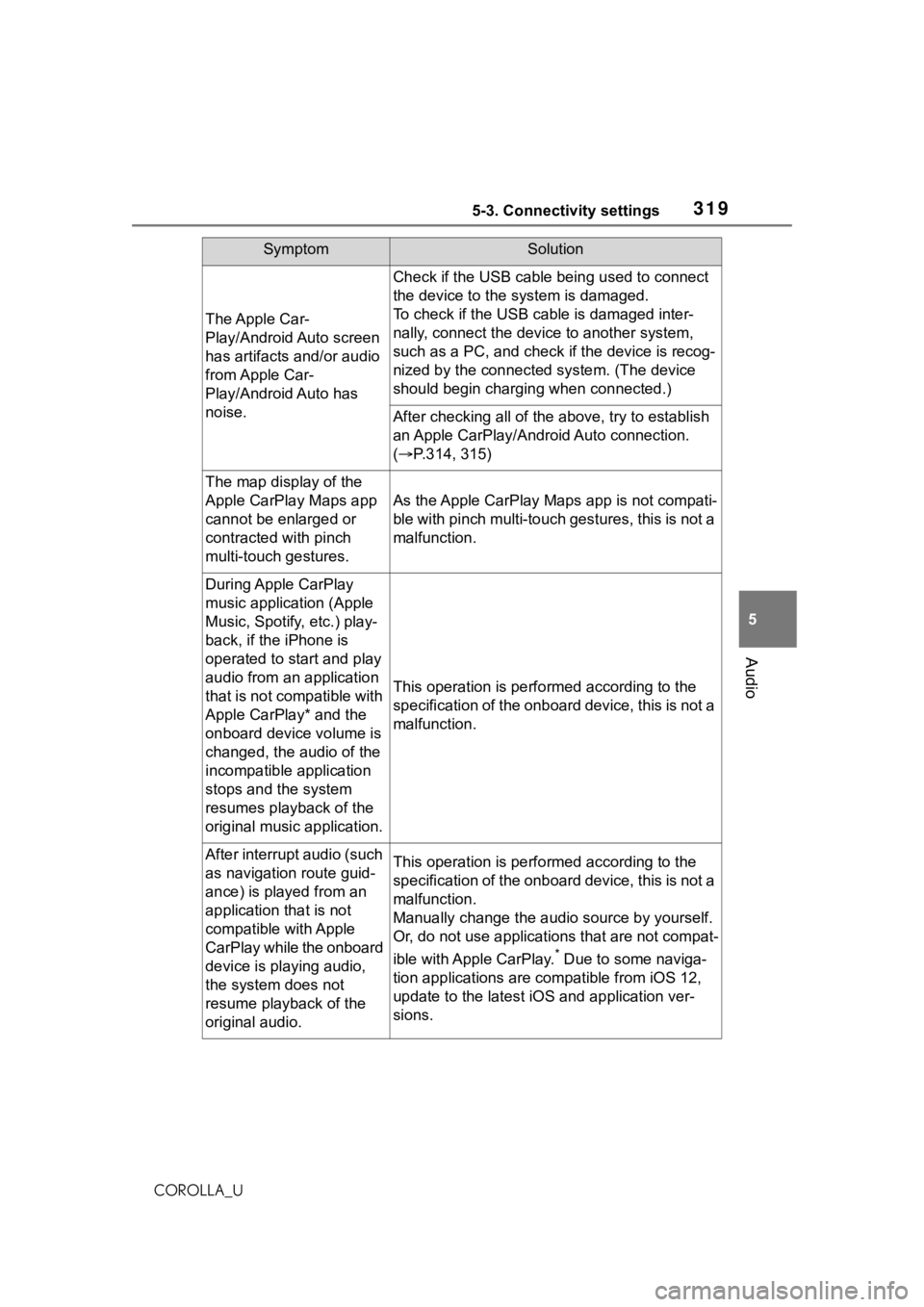
The Apple Car-
Play/Android Auto screen
has artifacts and/or audio
from Apple Car-
Play/Android Auto has
noise.
Check if the USB cable being used to connect
the device to the system is damaged.
To check if the USB cable is damaged inter-
nally, connect the devic e to another system,
such as a PC, and check i f the device is recog-
nized by the connect ed system. (The device
should begin charging when connected.)
After checking all of the above, try to establish
an Apple CarPlay/Android Auto connection.
( P.314, 315)
The map display of the
Apple CarPlay Maps app
cannot be enlarged or
contracted with pinch
multi-touch gestures.
As the Apple CarPlay Maps app is not compati-
ble with pinch multi-touch gestures, this is not a
malfunction.
During Apple CarPlay
music application (Apple
Music, Spotify, etc.) play-
back, if the iPhone is
operated to start and play
audio from an application
that is not compatible with
Apple CarPlay* and the
onboard device volume is
changed, the audio of the
incompatible application
stops and the system
resumes playback of the
original music application.
This operation is perfo rmed according to the
specification of the onboard device, this is not a
malfunction.
After interrupt audio (such
as navigation route guid-
ance) is played from an
application that is not
compatible with Apple
CarPlay while the onboard
device is playing audio,
the system does not
resume playback of the
original audio.This operation is perfo rmed according to the
specification of the onboard device, this is not a
malfunction.
Manually change the audi o source by yourself.
Or, do not use applications that are not compat-
ible with Apple CarPlay.
* Due to some naviga-
tion applications are compatible from iOS 12,
update to the latest iOS and application ver-
sions.
SymptomSolution
Page 342 of 624
3425-7. Media operation
COROLLA_U
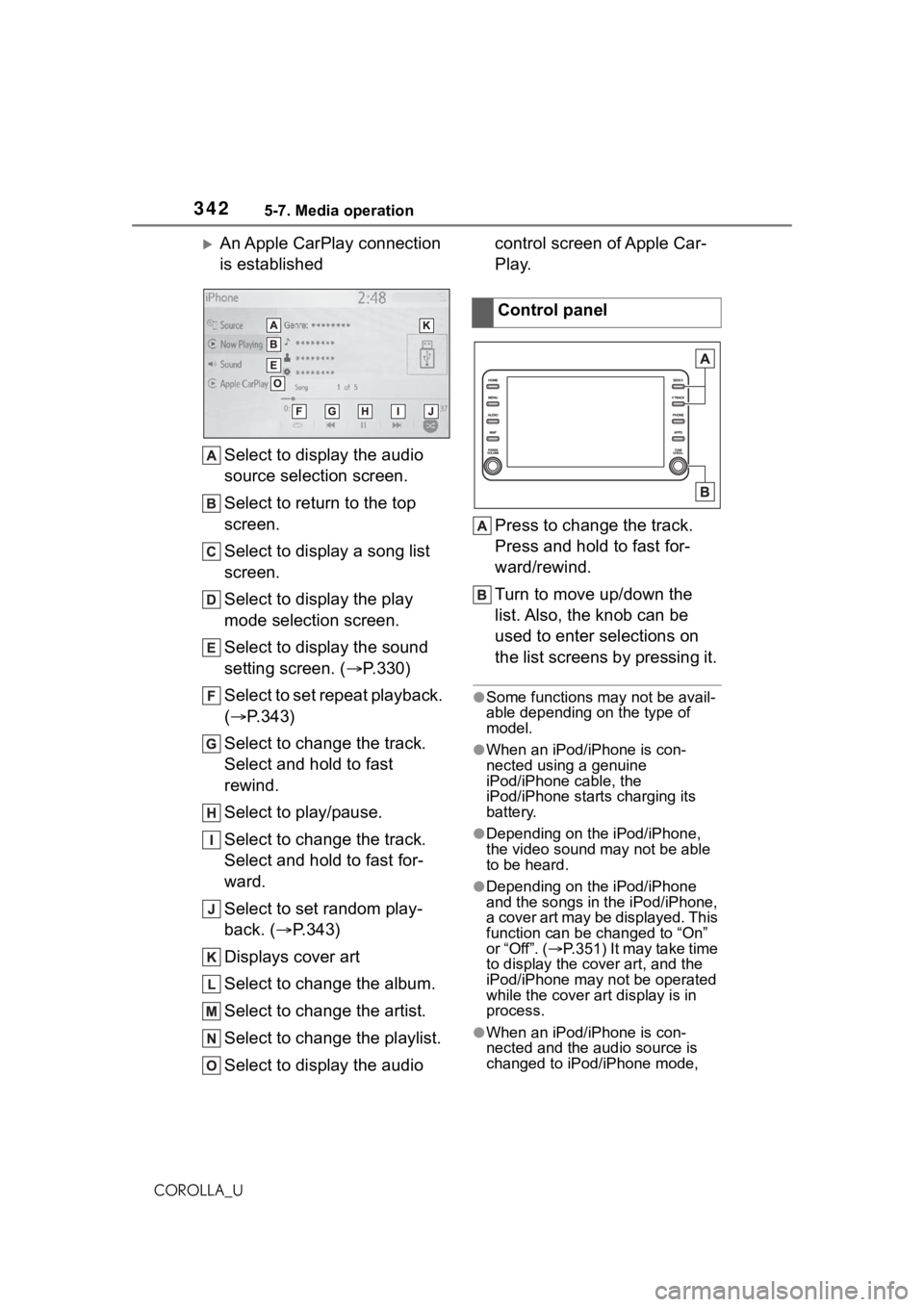
An Apple CarPlay connection
is establishedSelect to display the audio
source selection screen.
Select to return to the top
screen.
Select to display a song list
screen.
Select to display the play
mode selection screen.
Select to display the sound
setting screen. ( P.330)
Select to set repeat playback.
( P.343)
Select to change the track.
Select and hold to fast
rewind.
Select to play/pause.
Select to change the track.
Select and hold to fast for-
ward.
Select to set random play-
back. ( P.343)
Displays cover art
Select to change the album.
Select to change the artist.
Select to change the playlist.
Select to display the audio control screen of Apple Car-
Play.
Press to change the track.
Press and hold to fast for-
ward/rewind.
Turn to move up/down the
list. Also, the knob can be
used to enter selections on
the list screens by pressing it.
●Some functions may not be avail-
able depending on the type of
model.
●When an iPod/iPhone is con-
nected using a genuine
iPod/iPhone cable, the
iPod/iPhone starts charging its
battery.
●Depending on the iPod/iPhone,
the video sound
may not be able
to be heard.
●Depending on the iPod/iPhone
and the songs in the iPod/iPhone,
a cover art may be displayed. This
function can be changed to “On”
or “Off”. ( P.351) It may take time
to display the cov er art, and the
iPod/iPhone may not be operated
while the cover art display is in
process.
●When an iPod/iPhone is con-
nected and the audio source is
changed to iPod/iPhone mode,
Control panel
Page 413 of 624
4135-18. Toyota apps settings
5
Audio
COROLLA_U
5-18.Toyota apps settings
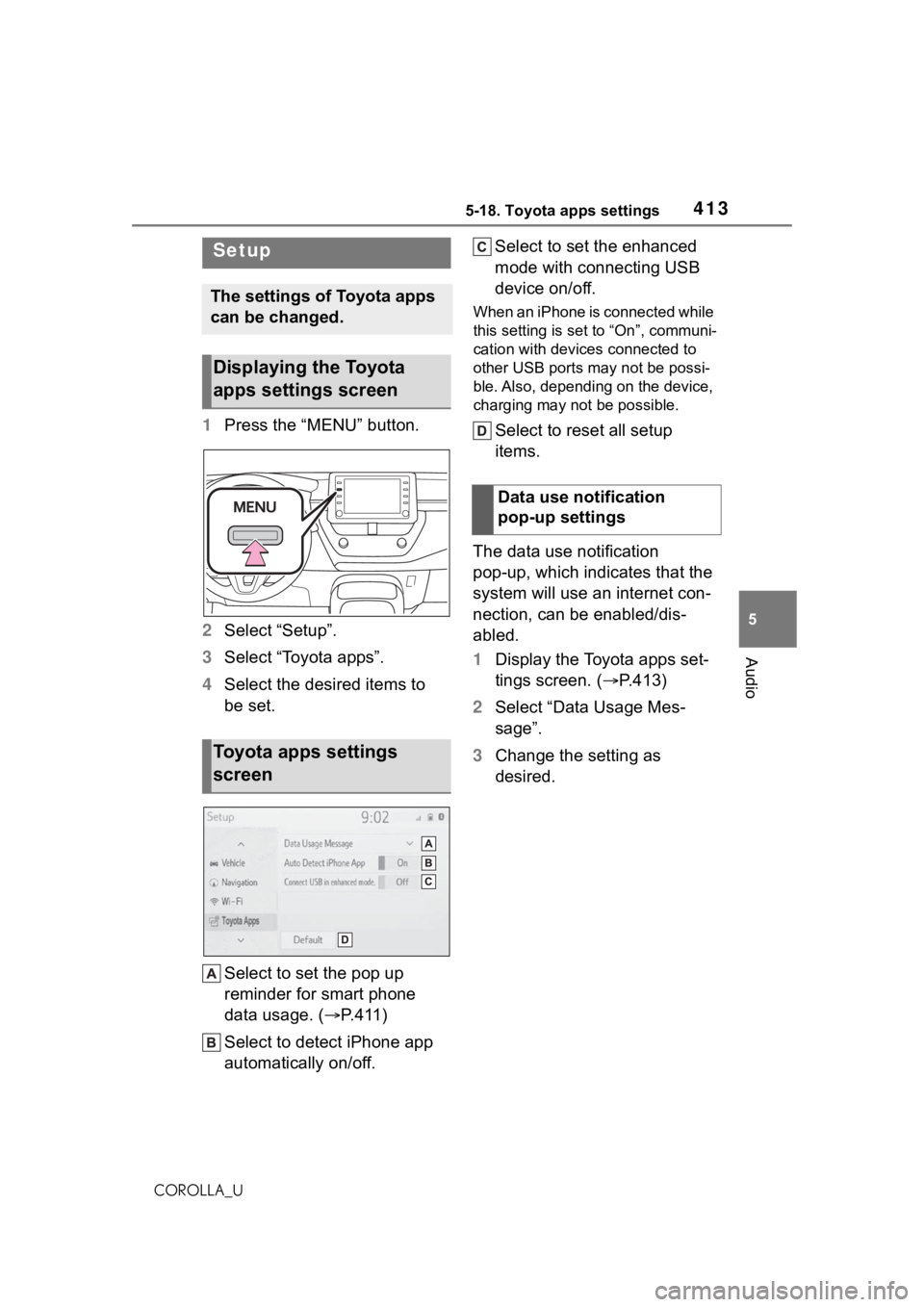
1Press the “MENU” button.
2 Select “Setup”.
3 Select “Toyota apps”.
4 Select the desired items to
be set.
Select to set the pop up
reminder for smart phone
data usage. ( P. 4 1 1 )
Select to detect iPhone app
automatically on/off. Select to set the enhanced
mode with connecting USB
device on/off.
When an iPhone is connected while
this setting is set to “On”, communi-
cation with devices connected to
other USB ports may not be possi-
ble. Also, depending on the device,
charging may not be possible.
Select to reset all setup
items.
The data use notification
pop-up, which indicates that the
system will use an internet con-
nection, can be enabled/dis-
abled.
1 Display the Toyota apps set-
tings screen. ( P.413)
2 Select “Data Usage Mes-
sage”.
3 Change the setting as
desired.
Setup
The settings of Toyota apps
can be changed.
Displaying the Toyota
apps settings screen
Toyota apps settings
screen
Data use notification
pop-up settings