remote start TOYOTA COROLLA 2021 Owners Manual (in English)
[x] Cancel search | Manufacturer: TOYOTA, Model Year: 2021, Model line: COROLLA, Model: TOYOTA COROLLA 2021Pages: 624, PDF Size: 20.3 MB
Page 5 of 624
5TABLE OF CONTENTS
1
2
3
4
5
6
7
8
9
10
COROLLA_U
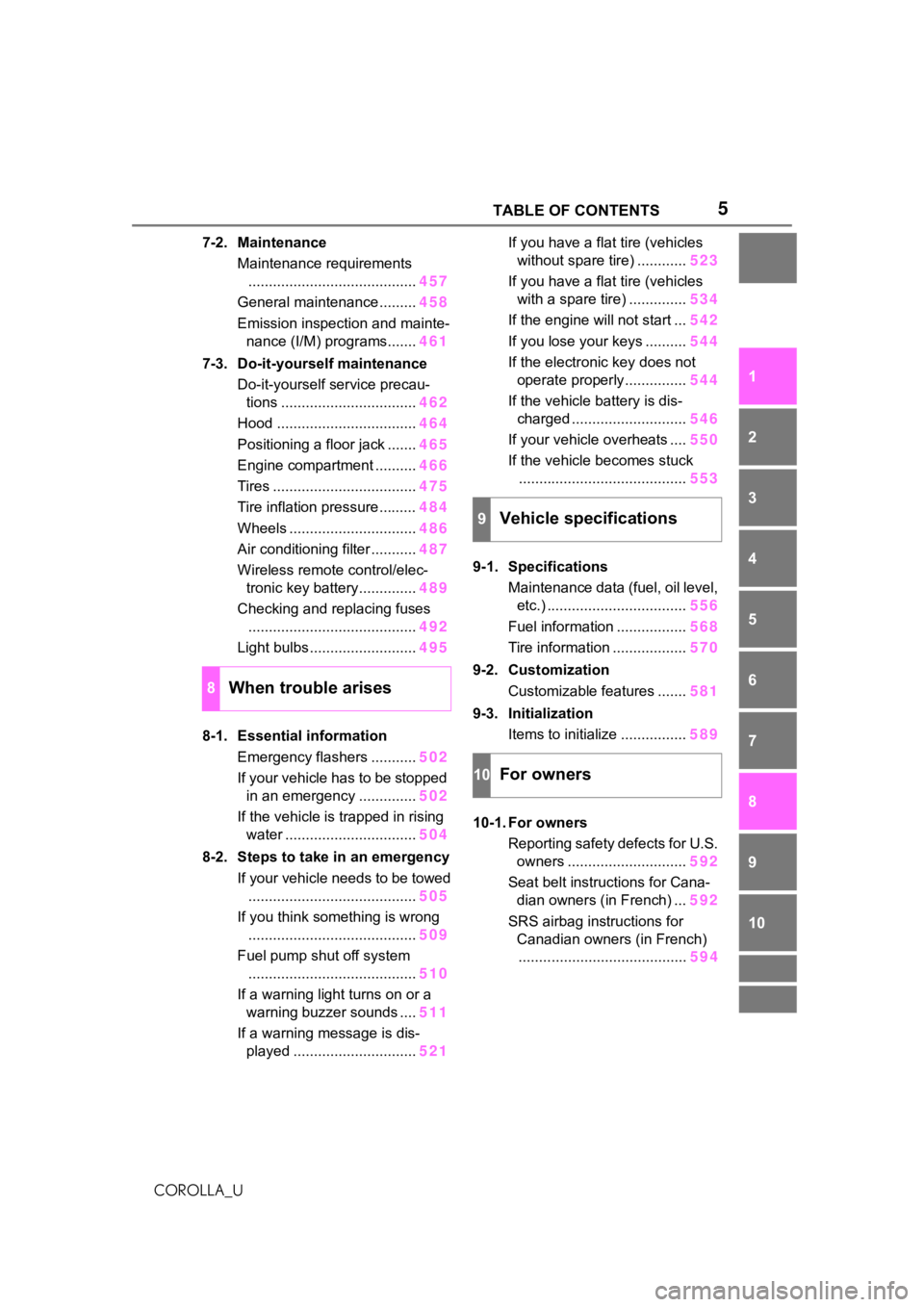
7-2. Maintenance Maintenance requirements......................................... 457
General maintenance ......... 458
Emission inspection and mainte- nance (I/M) programs....... 461
7-3. Do-it-yourself maintenance Do-it-yourself service precau-tions ................................. 462
Hood .................................. 464
Positioning a floor jack ....... 465
Engine compartment .......... 466
Tires ................................... 475
Tire inflation pressure......... 484
Wheels ............................... 486
Air conditioning filter ........... 487
Wireless remote control/elec- tronic key battery.............. 489
Checking and replacing fuses ......................................... 492
Light bulbs .......................... 495
8-1. Essential information Emergency flashers ........... 502
If your vehicle has to be stopped in an emergency .............. 502
If the vehicle is trapped in rising water ................................ 504
8-2. Steps to take in an emergency If your vehicle needs to be towed......................................... 505
If you think something is wrong ......................................... 509
Fuel pump shut off system ......................................... 510
If a warning light turns on or a warning buzzer sounds .... 511
If a warning message is dis- played .............................. 521If you have a flat tire (vehicles
without spare tire) ............ 523
If you have a flat tire (vehicles with a spare tire) .............. 534
If the engine will not start ... 542
If you lose your keys .......... 544
If the electronic key does not operate properly............... 544
If the vehicle battery is dis- charged ............................ 546
If your vehicle overheats .... 550
If the vehicle becomes stuck ......................................... 553
9-1. Specifications Maintenance data (fuel, oil level, etc.) .................................. 556
Fuel information ................. 568
Tire information .................. 570
9-2. Customization Customizable features ....... 581
9-3. Initialization Items to initialize ................ 589
10-1. For owners Reporting safety defects for U.S. owners ............................. 592
Seat belt instructions for Cana- dian owners (in French) ... 592
SRS airbag instructions for Canadian owners (in French)........ ................................. 59
4
8When trouble arises
9Vehicle specifications
10For owners
Page 10 of 624
10
COROLLA_U• Disclose the data to a third party
for research purposes without
disclosing information about the
specific vehicle or vehicle owner
The SRS airbag and seat belt
pretensioner devices in your
Toyota contain explosive chemi-
cals. If the vehicle is scrapped
with the airbags and seat belt
pretensioners left as they are,
this may cause an accident such
as fire. Be sure to have the sys-
tems of the SRS airbag and seat
belt pretensioner removed and
disposed of by a qualified ser-
vice shop or by your Toyota
dealer before you scrap your
vehicle.
Special handling may apply, See
www.dtsc.ca.gov/
hazardouswaste/perchlorate.
Your vehicle has components
that may contain perchlorate.
These components may include
the airbags, seat belt preten-
sioners, wireless remote control
batteries, and the batteries in
the tire pressure warning valve
and transmitters.
Scrapping of your Toyota
Perchlorate Material
WA R N I N G
■General precautions while
driving
Driving under the influence: Never
drive your vehicle when under the
influence of alcohol or drugs that
have impaired your ability to oper-
ate your vehicle. Alcohol and cer-
tain drugs delay reaction time,
impair judgment and reduce coor-
dination, which c ould lead to an
accident that could result in death
or serious injury.
Defensive driving: Always drive
defensively. Anticipate mistakes
that other drivers or pedestrians
might make and be ready to avoid
accidents.
Driver distraction: Always give
your full attentio n to driving. Any-
thing that distracts the driver, such
as adjusting controls, talking on a
cellular phone or reading can
result in a collision with resulting
death or serious injury to you,
your occupants or others.
■General precaution regarding
children’s safety
Never leave children unattended
in the vehicle, and never allow
children to have or use the key.
Children may be able to start the
vehicle or shift the vehicle into
neutral. There is also a danger
that children ma y injure them-
selves by playing with the win-
dows, the moon roof, or other
features of the vehicle. In addi-
tion, heat build-up or extremely
cold temperatures inside the vehi-
cle can be fatal to children.
Page 112 of 624
1123-1. Key information
COROLLA_U
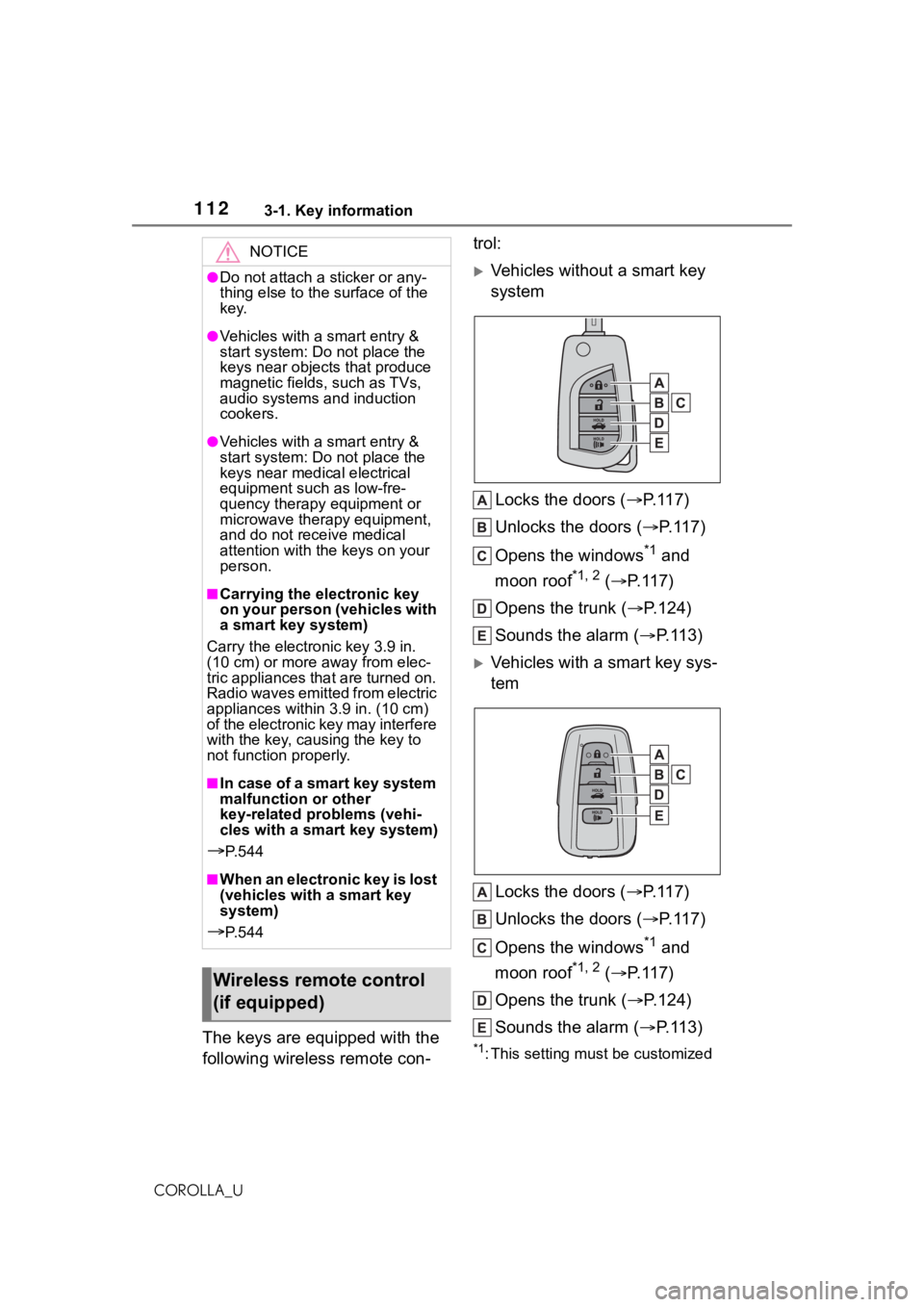
The keys are equipped with the
following wireless remote con-trol:
Vehicles without a smart key
system
Locks the doors ( P.117)
Unlocks the doors ( P.117)
Opens the windows
*1 and
moon roof
*1, 2 ( P.117)
Opens the trunk ( P.124)
Sounds the alarm ( P. 1 1 3 )
Vehicles with a smart key sys-
tem
Locks the doors ( P.117)
Unlocks the doors ( P.117)
Opens the windows
*1 and
moon roof
*1, 2 ( P.117)
Opens the trunk ( P.124)
Sounds the alarm ( P. 1 1 3 )
*1: This setting must be customized
NOTICE
●Do not attach a sticker or any-
thing else to the surface of the
key.
●Vehicles with a smart entry &
start system: Do not place the
keys near object s that produce
magnetic fields, such as TVs,
audio systems and induction
cookers.
●Vehicles with a smart entry &
start system: Do not place the
keys near medical electrical
equipment such as low-fre-
quency therapy equipment or
microwave therapy equipment,
and do not receive medical
attention with the keys on your
person.
■Carrying the electronic key
on your person (vehicles with
a smart key system)
Carry the electronic key 3.9 in.
(10 cm) or more away from elec-
tric appliances that are turned on.
Radio waves emitted from electric
appliances within 3.9 in. (10 cm)
of the electronic key may interfere
with the key, causing the key to
not function properly.
■In case of a smart key system
malfunction or other
key-related problems (vehi-
cles with a smart key system)
P. 5 4 4
■When an electronic key is lost
(vehicles with a smart key
system)
P. 5 4 4
Wireless remote control
(if equipped)
Page 125 of 624
1253-2. Opening, closing and locking the doors
3
Before driving
COROLLA_Ucan be opened. In order to pre-
vent theft, take all electronic keys
with you when leaving the vehicle.
●If the electronic key is put in the
trunk with all the doors locked, the
key may not be detected depend-
ing on the location of the key and
the surrounding radio wave condi-
tions. In this case, the key con-
finement prevention function
cannot be activate
d, causing the
doors to lock when the trunk is
closed. Make sure to check where
the key is before closing the trunk.
●The key confinement prevention
function cannot be activated if any
one of the doors is unlocked. In
this case, open the trunk using the
trunk opener.
■Internal trunk release lever
The trunk lid can be opened by pull-
ing up the glow-in -the-dark lever
located on the inside of the trunk lid.
The lever will conti nue to glow for
some time after the trunk lid is
closed.
■If the smart key system or the
wireless remote control does
not operate properly (if
equipped)
Replace the key battery with a new
one if it is depleted. ( P.489)
■Open door warning buzzer
P. 1 2 1
■Customization
Some functions can be customized.
( P.581)
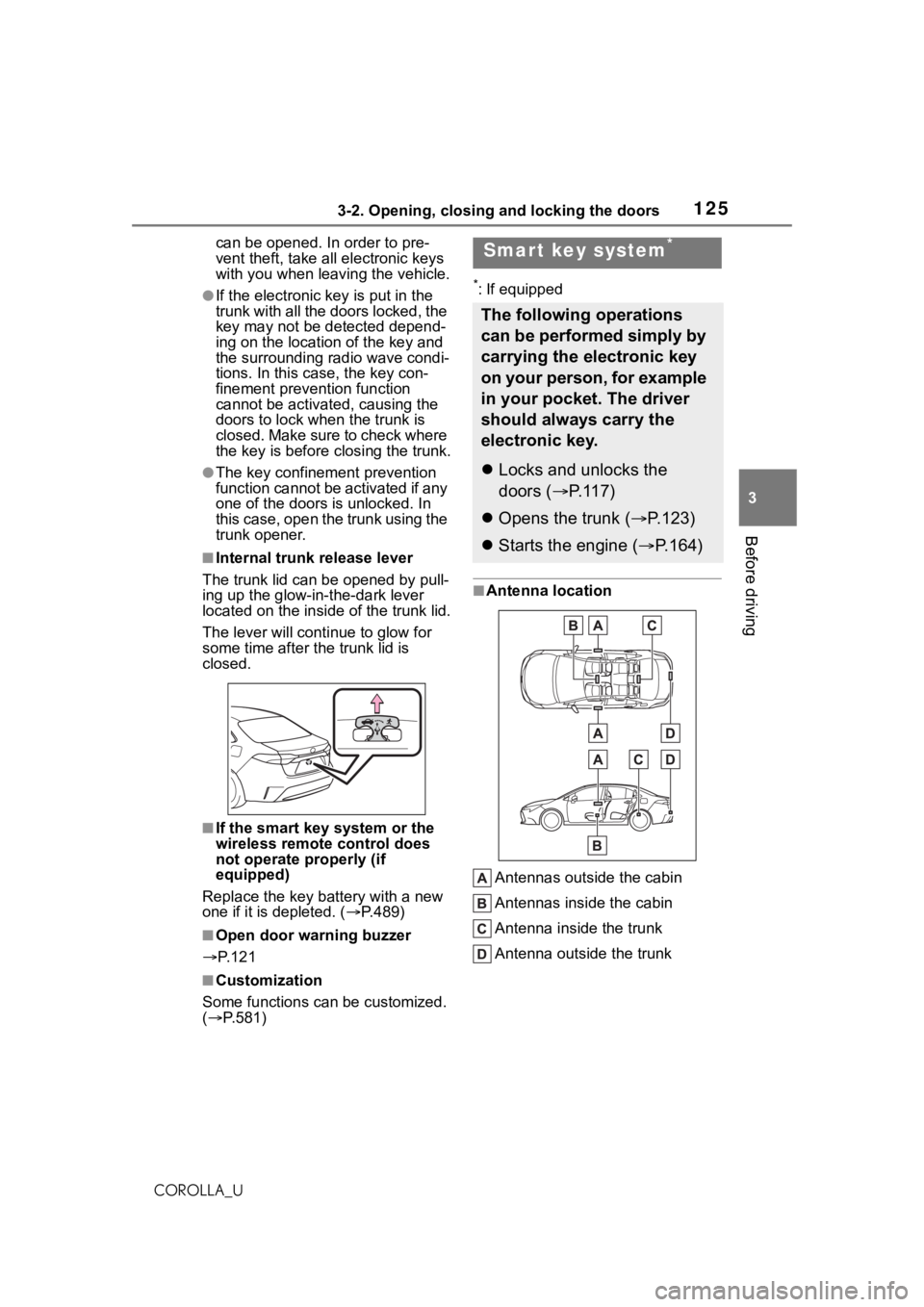
*: If equipped
■Antenna location
Antennas outside the cabin
Antennas inside the cabin
Antenna inside the trunk
Antenna outside the trunk
Smart key system*
The following operations
can be performed simply by
carrying the electronic key
on your person, for example
in your pocket. The driver
should always carry the
electronic key.
Locks and unlocks the
doors ( P.117)
Opens the trunk ( P.123)
Starts the engine ( P.164)
Page 127 of 624
1273-2. Opening, closing and locking the doors
3
Before driving
COROLLA_Ubeen used for 5 days or longer.
●If the smart key system has not
been used for 14 days or longer,
the doors cann
ot be unlocked
from any door except the driver’s
door. In this case, hold the driver’s
door handle, or use the wireless
remote control or mechanical key
to unlock the doors.
■Electronic key battery-saving
function
When battery-savi ng mode is set,
battery depletion is minimized by
stopping the electronic key from
receiving radio waves.
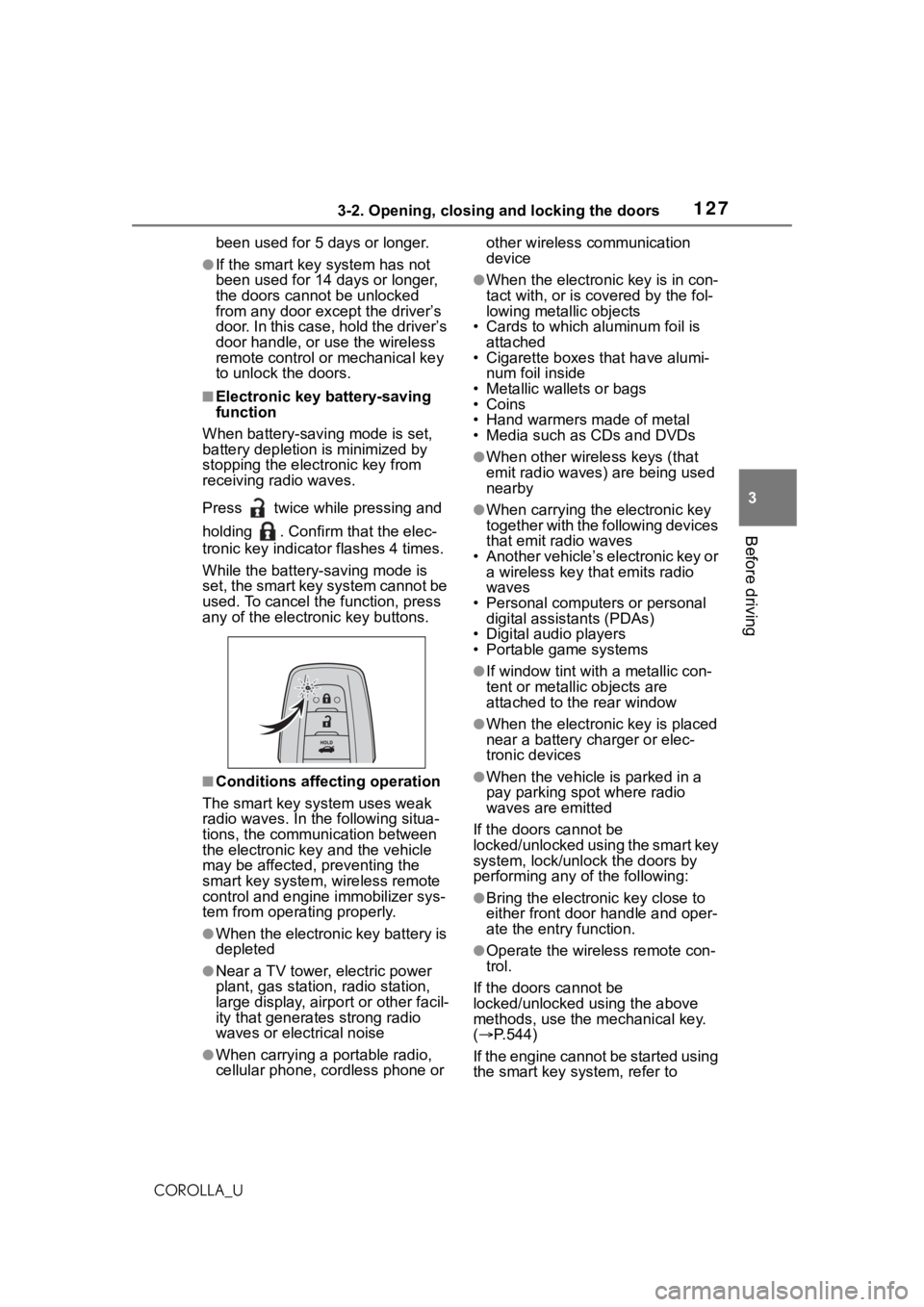
Press twice while pressing and
holding . Confirm that the elec-
tronic key indicator flashes 4 times.
While the battery-saving mode is
set, the smart key system cannot be
used. To cancel the function, press
any of the electronic key buttons.
■Conditions affecting operation
The smart key system uses weak
radio waves. In the following situa-
tions, the communication between
the electronic key and the vehicle
may be affected, preventing the
smart key system, wireless remote
control and engine immobilizer sys-
tem from operating properly.
●When the electronic key battery is
depleted
●Near a TV tower, electric power
plant, gas station , radio station,
large display, airpo rt or other facil-
ity that generates strong radio
waves or electrical noise
●When carrying a portable radio,
cellular phone, cordless phone or other wireless communication
device
●When the electronic key is in con-
tact with, or is c
overed by the fol-
lowing metallic objects
• Cards to which aluminum foil is
attached
• Cigarette boxes that have alumi-
num foil inside
• Metallic wallets or bags
•Coins
• Hand warmers made of metal
• Media such as CDs and DVDs
●When other wirel ess keys (that
emit radio waves) are being used
nearby
●When carrying the electronic key
together with the following devices
that emit radio waves
• Another vehicle’s electronic key or a wireless key that emits radio
waves
• Personal computers or personal digital assistants (PDAs)
• Digital audio players
• Portable game systems
●If window tint wit h a metallic con-
tent or metallic objects are
attached to the rear window
●When the electronic key is placed
near a battery charger or elec-
tronic devices
●When the vehicle is parked in a
pay parking spot where radio
waves are emitted
If the doors cannot be
locked/unlocked using the smart key
system, lock/unlock the doors by
performing any of the following:
●Bring the electronic key close to
either front door handle and oper-
ate the entry function.
●Operate the wireless remote con-
trol.
If the doors cannot be
locked/unlocked using the above
methods, use the mechanical key.
( P.544)
If the engine cannot be started using
the smart key system, refer to
Page 128 of 624

1283-2. Opening, closing and locking the doors
COROLLA_UP.545.
■Note for the entry function
●Even when the electronic key is
within the effective range (detec-
tion areas), the system may not
operate properly in the following
cases:
• The electronic key is too close to the window or outside door han-
dle, near the ground, or in a high
place when the doors are locked
or unlocked.
• The electronic key is near the ground or in a high place, or too
close to the center of the rear
bumper when the trunk is opened.
• The electronic key is on the instru- ment panel, rear package tray or
floor, or in the door pockets or
glove box when the engine is
started or engine switch modes
are changed.
●Do not leave the electronic key on
top of the instrument panel or near
the door pockets when exiting the
vehicle. Depending on the radio
wave reception conditions, it may
be detected by the antenna out-
side the cabin and the door will
become lockable from the outside,
possibly trapping the electronic
key inside the vehicle.
●As long as the electronic key is
within the effective range, the
doors may be locked or unlocked
by anyone. However, only the
doors detecting the electronic key
can be used to unl ock the vehicle.
●Even if the electronic key is not
inside the vehicle, it may be possi-
ble to start the engine if the elec-
tronic key is near the window.
●The doors may unlock or lock if a
large amount of water splashes on
the door handle, such as in the
rain or in a car wash when the
electronic key is w ithin the effec-
tive range. (The doors will auto-
matically be locked after
approximately 60 seconds if the
doors are not opened and closed.)
●If the wireless remote control is
used to lock the doors when the
electronic key is near the vehicle,
there is a possib ility that the door
may not be unlocked by the entry
function. (Use the wireless remote
control to unlock the doors.)
●If the doors have been locked
from outside of the vehicle and are
then not unlocked using the wire-
less remote control or smart key
system, the engine cannot be
started using the smart key sys-
tem. (However, if the doors have
been locked from i nside the vehi-
cle, the engine can be started
using the smart key system.)
If it is necessary to start the
engine, it can be started using the
procedure in “If the electronic key
dose not opera te properly”
( P.545).
●Touching the door lock or unlock
sensor while wearing gloves may
prevent lock or unlock operation.
●When the lock operation is per-
formed using the lock sensor, rec-
ognition signals will be shown up
to two consecutive times. After
this, no recognition signals will be
given.
●If the door handle becomes wet
while the electronic key is within
the effective range, the door may
lock and unlock repeatedly. In that
case, follow the following correc-
tion procedures to wash the vehi-
cle:
• Place the electronic key in a loca- tion 6 ft. (2 m) or more away from
the vehicle. (Take care to ensure
that the key is not stolen.)
• Set the electronic key to bat- tery-saving mode to disable the
smart key system. ( P.127)
●If the electronic key is inside the
vehicle and a door handle
becomes wet during a car wash, a
message may be shown on the
multi-information display and a
buzzer will sound outside the vehi-
cle. To turn off the alarm, lock all
Page 129 of 624
1293-2. Opening, closing and locking the doors
3
Before driving
COROLLA_Uthe doors.
●The lock sensor may not work
properly if it com
es into contact
with ice, snow, mud, etc. Clean
the lock sensor and attempt to
operate it again.
●A sudden handle operation or a
handle operation immediately
after entering the effective range
may prevent the doors from being
unlocked. Touch the door unlock
sensor and check that the doors
are unlocked bef ore pulling the
door handle again.
●If there is another electronic key in
the detection area, it may take
slightly longer to unlock the doors
after the door handle is gripped.
■When the vehicle is not driven
for extended periods
●To prevent theft of the vehicle, do
not leave the electronic key within
6 ft. (2 m) of the vehicle.
●The smart key system can be
deactivated in advance. ( P.581)
●Setting the electronic key to bat-
tery-saving mode helps to reduce
key battery depletion. ( P.127)
■To operate the system properly
●Make sure to carry the electronic
key when operati ng the system.
Do not get the electronic key too
close to the vehicle when operat-
ing the system from the outside of
the vehicle.
Depending on the position and hold-
ing condition of the electronic key,
the key may not be detected cor-
rectly and the system may not oper-
ate properly. (The alarm may go off
accidentally, or the door lock pre-
vention function may not operate.)
●Do not leave the electronic key
inside the trunk.
The key confinement prevention
function may not operate, depend-
ing on the location of the key (the
inside edge of the trunk), condi-
tions (inside a met al bag, close to metallic objects)
and the radio
waves in the surrounding area.
( P.124)
■If the smart key system does
not operate properly
●Locking and unlocking the doors:
P. 5 4 4
●Starting the engine: P. 5 4 5
■Customization
Some functions can be customized.
( P.581)
■If the smart key system has
been deactivated in a custom-
ized setting
●Locking and unlocking the doors:
Use the wireless remote control or
mechanical key. ( P.117, 544)
●Starting the engi ne and changing
engine switch modes: P. 5 4 5
●Stopping the engine: P. 1 6 6
Page 143 of 624
1433-5. Opening and closing the windows
3
Before driving
COROLLA_Upushing the switch in the
one-touch opening direction, and
hold it there for a
pproximately 4
seconds or more.
6 Pull and hold the power window
switch in the one-touch closing
direction again. After the door
window is completely closed,
continue holding the switch for a
further 1 second or more.
If you release the switch while the
window is moving, start again from
the beginning.
If the window reverses and cannot
be fully closed or opened, have the
vehicle inspected by your Toyota
dealer.
■Door lock linked window opera-
tion
●Vehicles without a smart key sys-
tem: The power windows can be
opened and closed using the key.
*
( P.118)
Vehicles with a smart key system:
The power windows can be
opened and closed using the
mechanical key.
* ( P.545)
●The power windows can be
opened using the wireless remote
control.
* (with a wireless remote
control function) ( P. 1 1 7 )
*: These settings must be custom-
ized at your Toyota dealer.
■Customization
Some functions can be customized.
( P.581)
WA R N I N G
Observe the following precau-
tions. Failure to do so may result
in death or serious injury.
■Closing the windows
●The driver is responsible for all
the power window operations,
including the operation for the
passengers. In order to prevent
accidental operation, especially
by a child, do not let a child
operate the power windows. It is
possible for children and other
passengers to have body parts
caught in the power window.
Also, when ridin g with a child, it
is recommended to use the win-
dow lock switch. (
P.144)
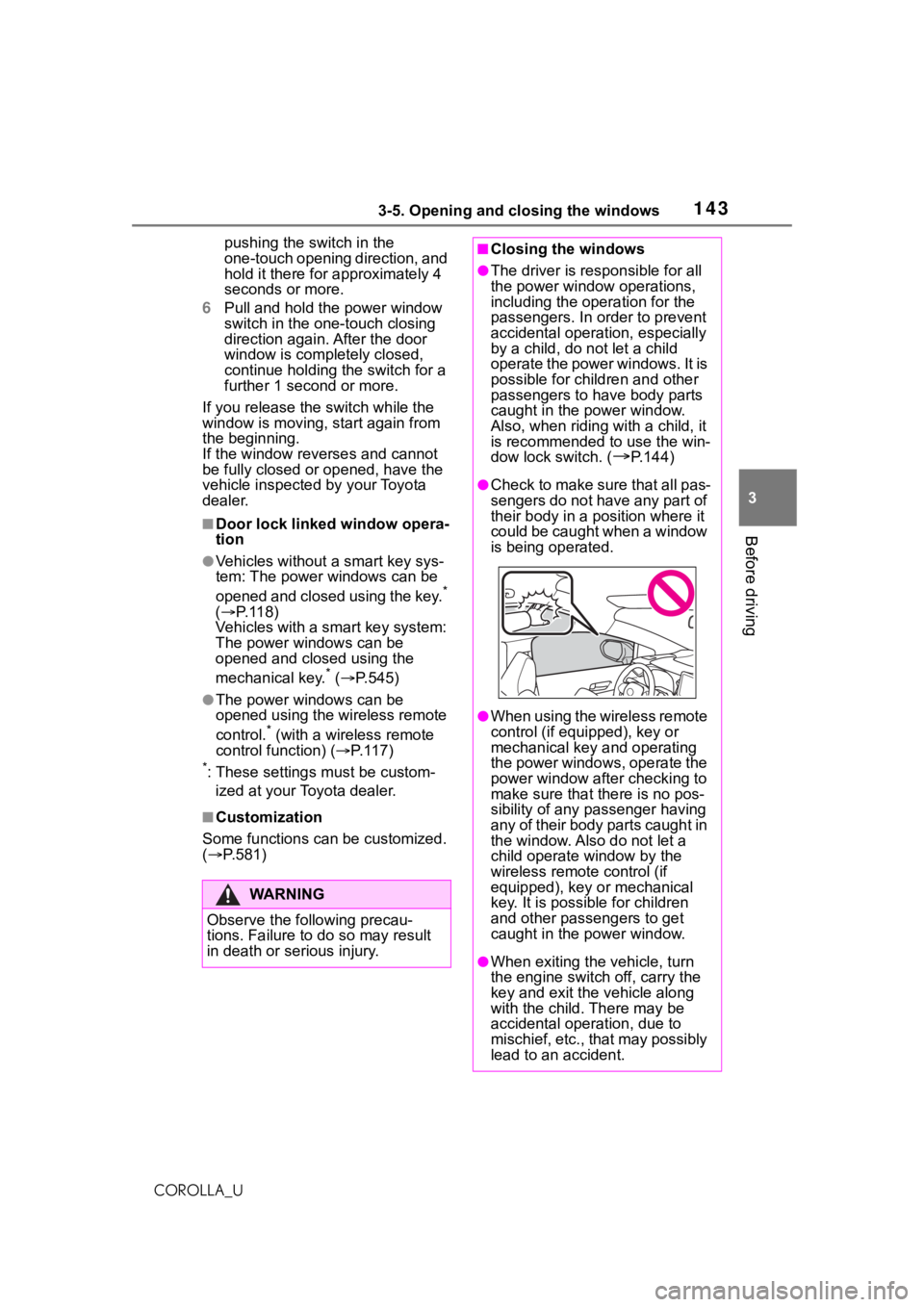
●Check to make sure that all pas-
sengers do not have any part of
their body in a pos ition where it
could be caught when a window
is being operated.
●When using the wireless remote
control (if equipped), key or
mechanical key and operating
the power windows, operate the
power window after checking to
make sure that t here is no pos-
sibility of any passenger having
any of their body parts caught in
the window. Also do not let a
child operate window by the
wireless remote control (if
equipped), key or mechanical
key. It is possib le for children
and other passengers to get
caught in the power window.
●When exiting the vehicle, turn
the engine switch off, carry the
key and exit the vehicle along
with the child. There may be
accidental operation, due to
mischief, etc., that may possibly
lead to an accident.
Page 473 of 624
4737-3. Do-it-yourself maintenance
7
Maintenance and care
COROLLA_U
■After recharging/reconnecting
the battery (vehicles with a
smart key system)
●Unlocking the doors using the
smart key system may not be pos-
sible immediately after reconnect-
ing the battery. If this happens,
use the wireless remote control or
the mechanical key to lock/unlock
the doors.
●Start the engine with the engine
switch in ACC. The engine may
not start with the engine switch
turned off. However, the engine
will operate normally from the sec-
ond attempt.
●The engine switch mode is
recorded by the vehicle. If the bat-
tery is reconnected, the vehicle
will return the engine switch mode
to the status it was in before the
battery was disconnected. Make
sure to turn off the engine before
disconnecting the battery. Take
extra care when connecting the
battery if the engine switch mode
prior to discharge is unknown.
If the system will not start even after
multiple attempts, contact your Toy-
ota dealer.
WA R N I N G
■Chemicals in the battery
The battery contains poisonous
and corrosive sulfuric acid and
may produce hydrogen gas which
is flammable and explosive. To
reduce the risk of death or serious
injury, take the following precau-
tions while working on or near the
battery:
●Do not cause sparks by touch-
ing the battery terminals with
tools.
●Do not smoke or light a match
near the battery.
●Avoid contact with eyes, skin
and clothes.
●Never inhale or swallow electro-
lyte.
●Wear protective safety glasses
when working near the battery.
●Keep children away from the
battery.
■Where to safely charge the
battery
Always charge the battery in an
open area. Do no t charge the bat-
tery in a garage or closed room
where there is ins ufficient ventila-
tion.
■Emergency measures regard-
ing electrolyte
●If electrolyte gets in your eyes
Flush your eyes with clean
water for at least 15 minutes
and get immediate medical
attention. If possible, continue
to apply water with a sponge or
cloth while traveling to the near-
est medical facility.
●If electrolyte gets on your skin
Wash the affected area thor-
oughly. If you feel pain or burn-
ing, get medical attention
immediately.
●If electrolyte gets on your
clothes
It can soak through clothing on
to your skin. Imm ediately take
off the clothing and follow the
procedure above if necessary.
●If you accidentally swallow elec-
trolyte
Drink a large quantity of water
or milk. Get emergency medical
attention immediately.
Page 544 of 624
5448-2. Steps to take in an emergency
COROLLA_U
■When the electronic key does
not work properly
●Make sure that the smart key sys-
tem has not been deactivated in
the customization setting. If it is
off, turn the function on. (Custom-
izable features: P.581)
●Check if battery-saving mode is
set. If it is set, cancel the function.
( P.127)
Use the mechanical key
( P.114) in order to perform the
If you lose your keys
New genuine keys can be
made by your Toyota dealer
using the other key (vehi-
cles without a smart key
system) or mechanical key
(vehicles with a smart key
system) and the key number
stamped on your key num-
ber plate.
Keep the plate in a safe
place such as your wallet,
not in the vehicle.
NOTICE
■When an electronic key is lost
(vehicles with a smart key
system)
If the electronic key remains lost,
the risk of vehicle theft increases
significantly. Visit your Toyota
dealer immediately with all
remaining electronic keys that
were provided wit h your vehicle.
If the electronic key
does not operate prop-
erly (vehicles with a
smar t key system)
If communication between
the electronic key and vehi-
cle is interrupted ( P.127)
or the electronic key cannot
be used because the battery
is depleted, the smart key
system and wireless remote
control cannot be used. In
such cases, the doors can
be opened and the engine
can be started by following
the procedure below.
NOTICE
■In case of a smart key system
malfunction or other
key-related problems
Take your vehicle with all the elec-
tronic keys provided with your
vehicle to your Toyota dealer.
Locking and unlocking
the doors