width TOYOTA COROLLA 2021 Owners Manual (in English)
[x] Cancel search | Manufacturer: TOYOTA, Model Year: 2021, Model line: COROLLA, Model: TOYOTA COROLLA 2021Pages: 624, PDF Size: 20.3 MB
Page 218 of 624
2184-5. Using the driving support systems
COROLLA_U
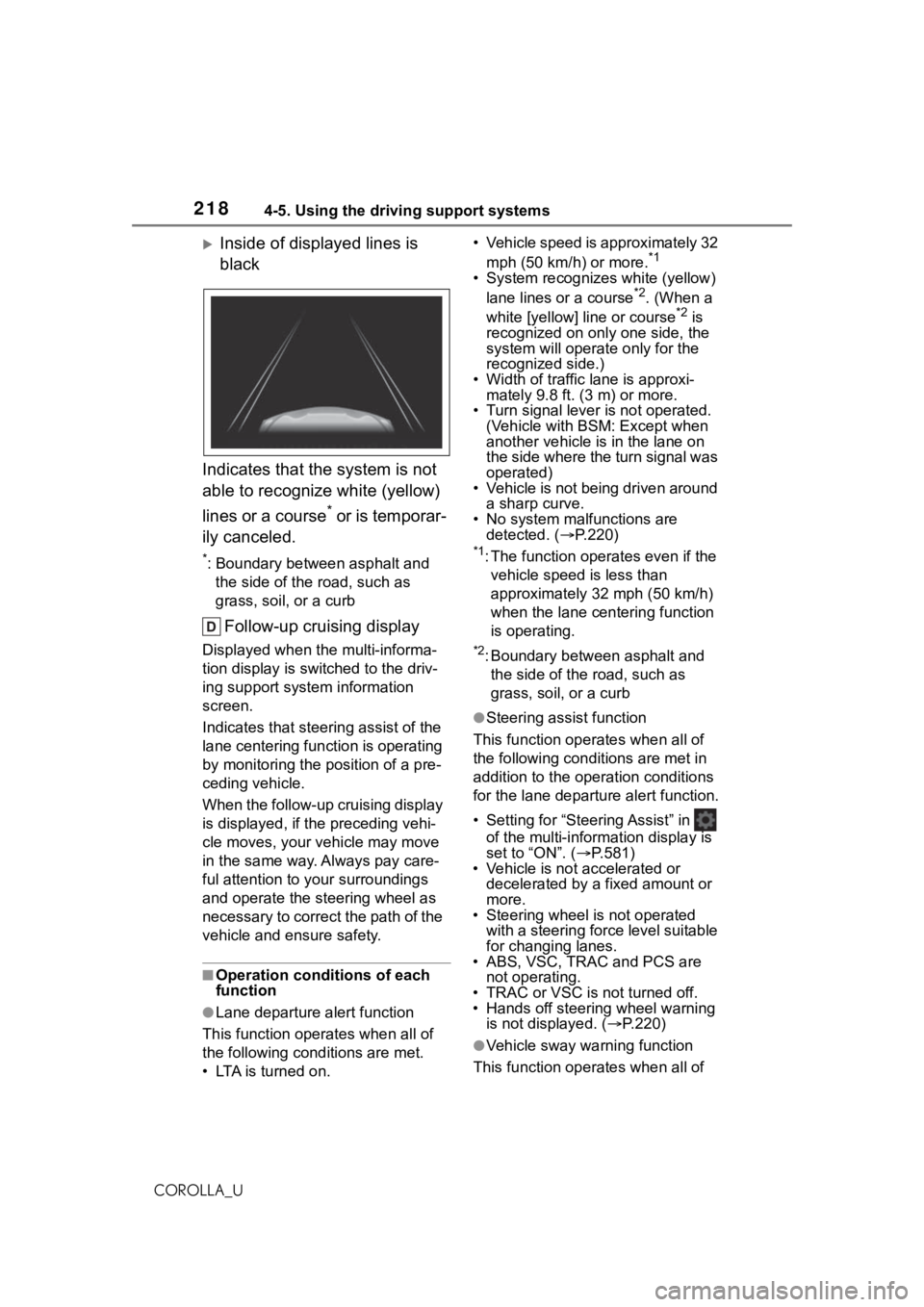
Inside of displayed lines is
black
Indicates that the system is not
able to recognize white (yellow)
lines or a course
* or is temporar-
ily canceled.
*: Boundary between asphalt and the side of the road, such as
grass, soil, or a curb
Follow-up cruising display
Displayed when the multi-informa-
tion display is switched to the driv-
ing support system information
screen.
Indicates that steering assist of the
lane centering function is operating
by monitoring the position of a pre-
ceding vehicle.
When the follow-up cruising display
is displayed, if the preceding vehi-
cle moves, your vehicle may move
in the same way. A lways pay care-
ful attention to your surroundings
and operate the steering wheel as
necessary to correct the path of the
vehicle and ensure safety.
■Operation conditions of each
function
●Lane departure alert function
This function oper ates when all of
the following cond itions are met.
• LTA is turned on. • Vehicle speed is approximately 32
mph (50 km/h) or more.
*1
• System recognizes white (yellow) lane lines or a course*2. (When a
white [yellow] line or course*2 is
recognized on only one side, the
system will operate only for the
recognized side.)
• Width of traffic lane is approxi- mately 9.8 ft. (3 m) or more.
• Turn signal lever is not operated. (Vehicle with BSM: Except when
another vehicle is in the lane on
the side where the turn signal was
operated)
• Vehicle is not being driven around
a sharp curve.
• No system malfunctions are detected. ( P.220)
*1: The function oper ates even if the
vehicle speed is less than
approximately 32 mph (50 km/h)
when the lane centering function
is operating.
*2: Boundary between asphalt and the side of the road, such as
grass, soil, or a curb
●Steering assist function
This function operates when all of
the following conditions are met in
addition to the operation conditions
for the lane departure alert function.
• Setting for “Steering Assist” in of the multi-information display is
set to “ON”. ( P.581)
• Vehicle is not accelerated or decelerated by a fixed amount or
more.
• Steering wheel is not operated with a steering force level suitable
for changing lanes.
• ABS, VSC, TRAC and PCS are
not operating.
• TRAC or VSC is not turned off.
• Hands off steering wheel warning
is not displayed. ( P.220)
●Vehicle sway warning function
This function operates when all of
Page 219 of 624
2194-5. Using the driving support systems
4
Driving
COROLLA_Uthe following cond
itions are met.
• Setting for “Sway Warning” in of the multi-information display is
set to “ON”. ( P.581)
• Vehicle speed is approximately 32
mph (50 km/h) or more.
• Width of traffic lane is approxi- mately 9.8 ft. ( 3 m) or more.
• No system malfunctions are detected. ( P.220)
●Lane centering function
This function oper ates when all of
the following cond itions are met.
• LTA is turned on.
• Setting for “Steering Assist” and
“Lane Center” in of the
multi-information di splay are set to
“ON”. ( P.581)
• This function recognizes white (yellow) lane lines or the position
of a preceding vehicle (except
when the preceding vehicle is
small, such as a motorcycle).
• The dynamic radar cruise control
with full-speed range is operating
in vehicle-to-vehic le distance con-
trol mode.
• Width of traffic lane is approxi- mately 10 to 13 ft. (3 to 4 m).
• Turn signal lever is not operated.
• Vehicle is not being driven around a sharp curve.
• No system malfunctions are
detected. ( P.220)
• Vehicle does not accelerate or decelerate by a fixed amount or
more.
• Steering wheel is not operated with a steering force level suitable
for changing lanes.
• ABS, VSC, TRAC and PCS are not operating.
• TRAC or VSC is not turned off.
• Hands off steering wheel warning
is not displayed. ( P.220)
• The vehicle is being driven in the
center of a lane.
• Steering assist function is not operating.
■Temporary cancelation of func-
tions
●When operation conditions are no
longer met, a function may be
temporarily canceled. However,
when the operation conditions are
met again, operation of the func-
tion is automatically restored.
( P.218)
●If the operation conditions
( P.216) are no longer met while
the lane centering function is
operating, the buzzer may sound
to indicate that the function has
been temporarily canceled.
■Steering assist function/lane
centering function
●Depending on the vehicle speed,
lane departure situation, road con-
ditions, etc., the driver may not
feel the function is operating or
the function may not operate at
all.
●The steering control of the func-
tion is overridden by the driver’s
steering wheel operation.
●Do not attempt to test the opera-
tion of the steering assist function.
■Lane departure alert function
●The warning buzzer may be diffi-
cult to hear due to external noise,
audio playback, etc.
●If the edge of the course* is not
clear or straight, the lane depar-
ture alert function may not oper-
ate.
●Vehicle with BSM: It may not be
possible for the system to deter-
mine if there is a danger of a colli-
sion with a vehicl e in an adjacent
lane.
●Do not attempt to test the opera-
tion of the lane departure alert
function.
*: Boundary between asphalt and
the side of the road, such as
grass, soil, or a curb
Page 227 of 624
2274-5. Using the driving support systems
4
Driving
COROLLA_U
*: Boundary between asphalt and the side of the road, such as
grass, soil, or a curb
■Operation conditions of each
function
●Lane departure alert function
This function oper ates when all of
the following cond itions are met.
• LDA is turned on.
• Vehicle speed is approximately 32 mph (50 km/h) or more.
• System recognizes white (yellow)
lane lines or a course
*. (When a
white [yellow] line or course* is
recognized on only one side, the
system will operat e only for the
recognized side.)
• Width of traffic lane is approxi-
mately 9.8 ft. ( 3 m) or more.
• Turn signal lever is not operated.
(Vehicle with BSM : Except when
another vehicle is in the lane on
the side where the turn signal was
operated)
• Vehicle is not being driven around a sharp curve.
• No system malfunctions are
detected. ( P.228)
*: Boundary between asphalt and
the side of the road, such as
grass, soil, or a curb
●Steering assist function
This function oper ates when all of
the following conditions are met in
addition to the operation conditions
for the lane departure alert function.
• Setting for “Steering Assist” in of the multi-information display is
set to “ON”. ( P.581)
• Vehicle is not accelerated or decelerated by a fixed amount or
more.
• Steering wheel is not operated with a steering force level suitable
for changing lanes.
• ABS, VSC, TRAC and PCS are not operating. • TRAC or VSC is not turned off.
• Hands off steering wheel warning
is not displayed. ( P.228)
●Vehicle sway warning function
This function operates when all of
the following conditions are met.
• Setting for “Sway Warning” in of the multi-information display is
set to “ON”. ( P.581)
• Vehicle speed is approximately 32
mph (50 km/h) or more.
• Width of traffic lane is approxi- mately 9.8 ft. (3 m) or more.
• No system malfunctions are detected. ( P.228)
■Temporary cancelation of func-
tions
When operation conditions are no
longer met, a func tion may be tem-
porarily canceled. However, when
the operation conditions are met
again, operation of the function is
automatically restored. ( P.227)
■Steering assist function
●Depending on the vehicle speed,
lane departure situation, road con-
ditions, etc., the driver may not
feel the function is operating or
the function may not operate at
all.
●The steering control of the func-
tion is overridden by the driver’s
steering wheel operation.
●Do not attempt to test the opera-
tion of the steering assist function.
■Lane departure alert function
●The warning buzzer may be diffi-
cult to hear due to external noise,
audio playback, etc.
●If the edge of the course* is not
clear or straight, the lane depar-
ture alert function may not oper-
ate.
●Vehicle with BSM: It may not be
possible for the system to deter-
mine if there is a danger of a colli-
sion with a vehicl e in an adjacent
lane.
Page 264 of 624
2644-5. Using the driving support systems
COROLLA_U
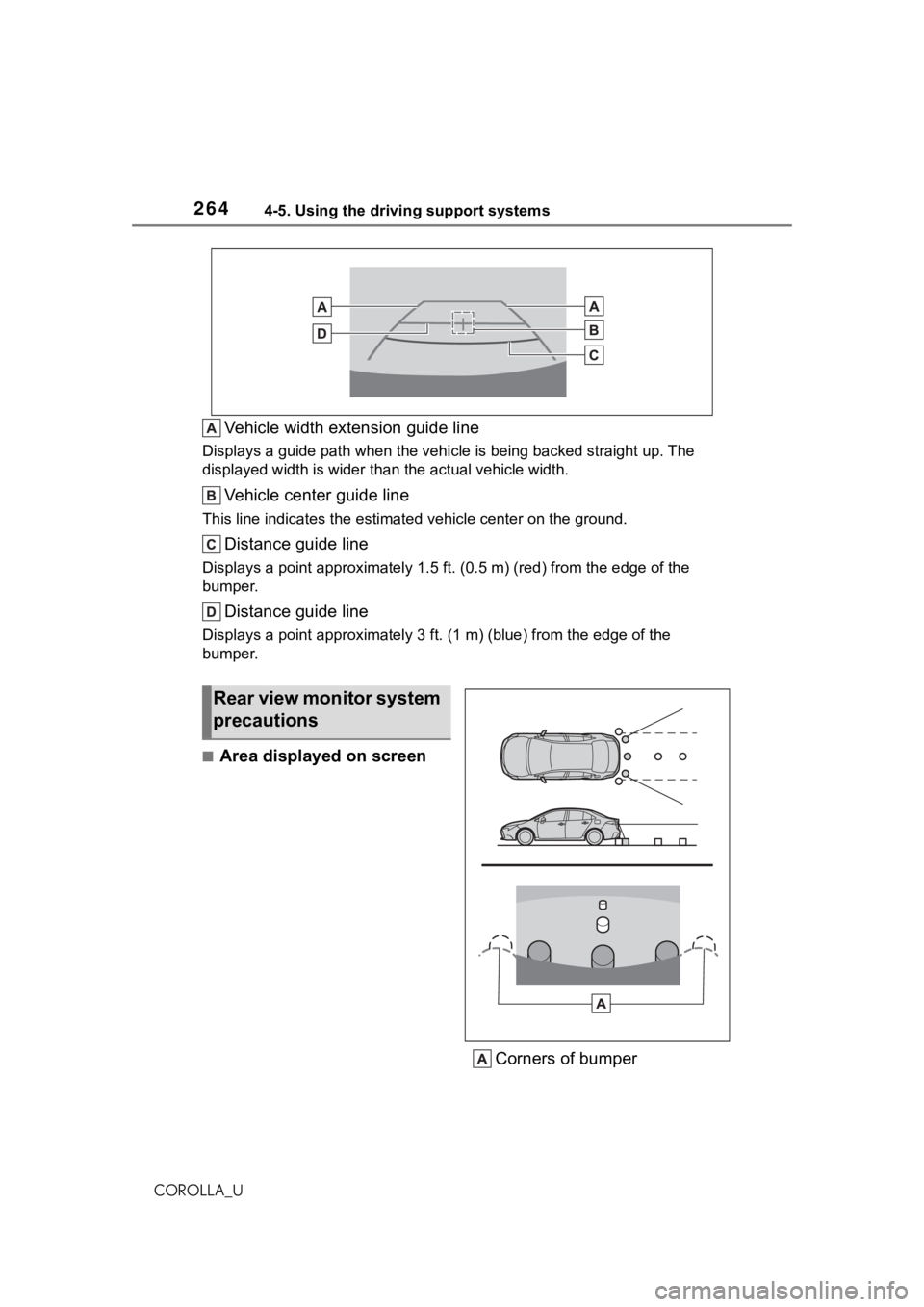
Vehicle width extension guide line
Displays a guide path when the vehicle is being backed straight up. The
displayed width is wider than the actual vehicle width.
Vehicle center guide line
This line indicates the estimated vehicle center on the ground.
Distance guide line
Displays a point approximately 1.5 ft. (0.5 m) (r ed) from the edge of the
bumper.
Distance guide line
Displays a point approximately 3 ft. (1 m) (blue) from the edge of the
bumper.
■Area displayed on screen
Corners of bumper
Rear view monitor system
precautions
Page 265 of 624
2654-5. Using the driving support systems
4
Driving
COROLLA_U
The rear view monitor system
displays an image of the view
from the bumper of the rear area
of the vehicle.
The image adjustment proce-
dure for the rear view monitor
system screen is the same as
the procedure for adjusting the
screen. (P.296)
The area displayed on the
screen may vary according to
vehicle orientation conditions.
Objects which are close to
either corner of the bumper or
under the bumper cannot be
displayed.
The camera uses a special
lens. The distance of the
image that appears on the
screen differs from the actual
distance.
Items which are located
higher than the camera may
not be displayed on the moni-
tor.
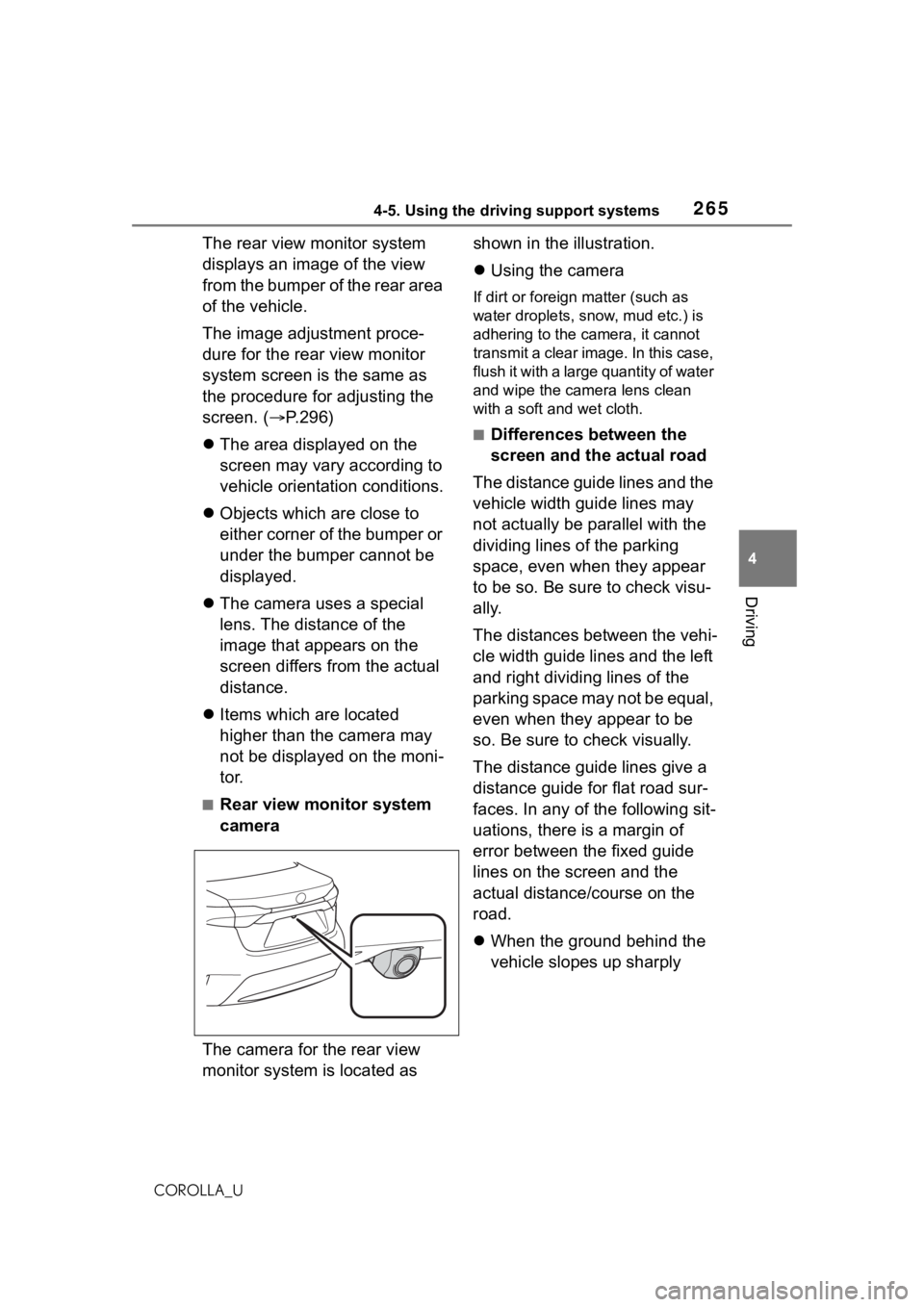
■Rear view monitor system
camera
The camera for the rear view
monitor system is located as shown in the illustration.
Using the camera
If dirt or foreign matter (such as
water droplets, snow, mud etc.) is
adhering to the camera, it cannot
transmit a clear image. In this case,
flush it with a large quantity of water
and wipe the camera lens clean
with a soft and wet cloth.
■Differences between the
screen and the actual road
The distance guide lines and the
vehicle width guide lines may
not actually be parallel with the
dividing lines of the parking
space, even when they appear
to be so. Be sure to check visu-
ally.
The distances between the vehi-
cle width guide lines and the left
and right dividing lines of the
parking space may not be equal,
even when they appear to be
so. Be sure to check visually.
The distance guide lines give a
distance guide for flat road sur-
faces. In any of the following sit-
uations, there is a margin of
error between the fixed guide
lines on the screen and the
actual distance/course on the
road.
When the ground behind the
vehicle slopes up sharply
Page 267 of 624
2674-5. Using the driving support systems
4
Driving
COROLLA_Uthe distribution of t
he load, there is
a margin of error between the fixed
guide lines on the screen and the
actual distance/course on the road.
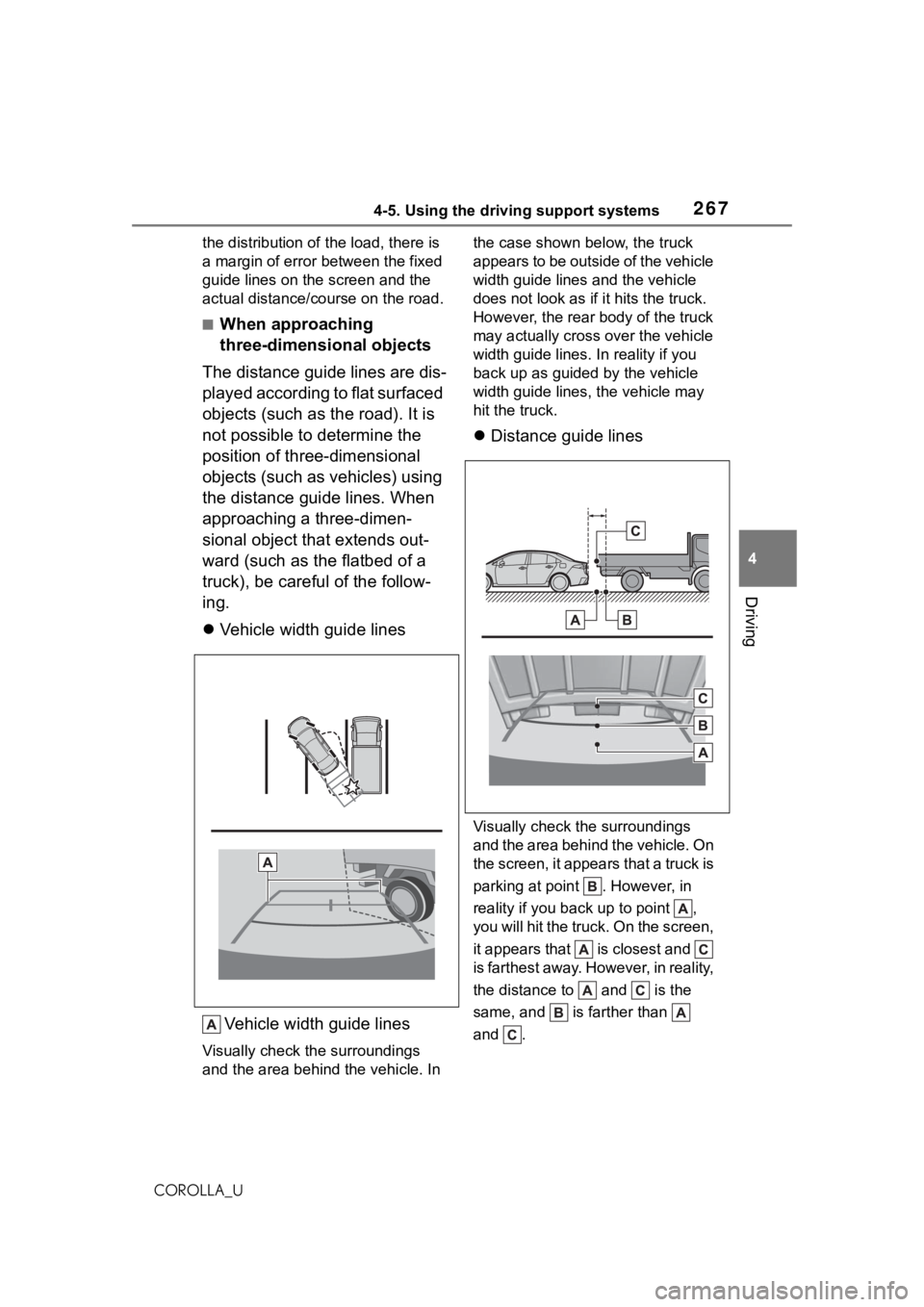
■When approaching
three-dimensional objects
The distance guide lines are dis-
played according to flat surfaced
objects (such as the road). It is
not possible to determine the
position of three-dimensional
objects (such as vehicles) using
the distance guide lines. When
approaching a three-dimen-
sional object that extends out-
ward (such as the flatbed of a
truck), be careful of the follow-
ing.
Vehicle width guide lines
Vehicle width guide lines
Visually check the surroundings
and the area behind the vehicle. In the case shown below, the truck
appears to be outside of the vehicle
width guide lines and the vehicle
does not look as if it hits the truck.
However, the rear body of the truck
may actually cross over the vehicle
width guide lines. In
reality if you
back up as guided by the vehicle
width guide lines, the vehicle may
hit the truck.
Distance guide lines
Visually check the surroundings
and the area behind the vehicle. On
the screen, it appears that a truck is
parking at point . However, in
reality if you back up to point ,
you will hit the truck. On the screen,
it appears that is closest and
is farthest away. However, in reality,
the distance to and is the
same, and is farther than
and .
Page 279 of 624
![TOYOTA COROLLA 2021 Owners Manual (in English) 2794-6. Driving tips
4
Driving
COROLLA_U
Side chain (0.12 in. [3 mm] in
diameter)
Side chain (0.39 in. [10 mm]
in width)
Side chain (1.18 in. [30 mm]
in length)
Cross chain (0.16 in. [4 mm]
in dia](/img/14/42494/w960_42494-278.png "TOYOTA COROLLA 2021 Owners Manual (in English) 2794-6. Driving tips
4
Driving
COROLLA_U
Side chain (0.12 in. [3 mm] in
diameter)
Side chain (0.39 in. [10 mm]
in width)
Side chain (1.18 in. [30 mm]
in length)
Cross chain (0.16 in. [4 mm]
in dia")
2794-6. Driving tips
4
Driving
COROLLA_U
Side chain (0.12 in. [3 mm] in
diameter)
Side chain (0.39 in. [10 mm]
in width)
Side chain (1.18 in. [30 mm]
in length)
Cross chain (0.16 in. [4 mm]
in diameter)
Cross chain (0.55 in. [14 mm]
in width)
Cross chain (0.98 in. [25 mm]
in length)
Regulations regarding the use
of tire chains vary depending on
location and type of road.
Always check local regulations
before installing chains.
■Tire chain installation
Observe the following precautions
when installing and removing
chains:
●Install and remove tire chains in a
safe location.
●Install tire chains on the front tires
only. Do not install tire chains on
the rear tires.
●Install tire chains on the front tires
as tightly as possible. Retighten
chains after driving 1/4 1/2 mile
(0.5 1.0 km).
●Install tire chains following the
instructions provided with the tire
chains.
Regulations on the use of
tire chains
NOTICE
■Fitting tire chains (vehicles
with a tire pressure warning
system)
The tire pressure warning valves
and transmitters may not function
correctly when tire chains are fit-
ted.
Page 486 of 624
4867-3. Do-it-yourself maintenance
COROLLA_U
When replacing wheels, care
should be taken to ensure that
they are equivalent to those
removed in load capacity, diam-
eter, rim width and inset
*.
Replacement wheels are avail-
able at your Toyota dealer.
*: Conventionally referred to as off- set.
Toyota does not recommend
using the following:
Wheels of different sizes or
types
Used wheels
Bent wheels that have been
straightened
■When replacing wheels (vehi-
cles with a tire pressure warn-
ing system)
The wheels of your vehicle are
equipped with tire pressure warning
valves and transmit ters that allow
the tire pressure warning system to
provide advance warning in the
event of a loss in tire inflation pres-
sure. Whenever wheels are
replaced, the tire pressure warning
valves and transmitters must be
installed. ( P.480)
Wheels
If a wheel is bent, cracked or
heavily corroded, it should
be replaced. Otherwise, the
tire may separate from the
wheel or cause a loss of
handling control.
Wheel selection
WA R N I N G
■When replacing wheels
●Do not use wheels that are a dif-
ferent size from those recom-
mended in the Owner’s Manual,
as this may result in a loss of
handling control.
●Never use an inner tube in a
leaking wheel which is designed
for a tubeless tire.
Doing so may result in an acci-
dent, causing death or serious
injury.
■When installing the wheel
nuts
●Be sure to install the wheel nuts
with the tapered ends facing
inward.(P.539) Installing the
nuts with the tapered ends fac-
ing outward can cause the
wheel to break and eventually
cause the wheel to come off
while driving, wh ich could lead
to an accident resulting in death
or serious injury.
●Never use oil or grease on the
wheel bolts or wheel nuts.
Oil and grease may cause the
wheel nuts to be excessively
tightened, leading to bolt or disc
wheel damage. In addition, the
oil or grease can cause the
wheel nuts to loosen and the
wheel may fall off, causing an
accident and resulting in death
or serious injury. Remove any
oil or grease fr om the wheel
bolts or wheel nuts.
■Use of defective wheels pro-
hibited
Do not use cracke d or deformed
wheels. Doing so could cause the
tire to leak air during driving, pos-
sibly causing an accident.
Page 556 of 624
5569-1. Specifications
COROLLA_U
9-1.Specifications
*1: Unladen vehicles
*2: 1.8 L 4-cylinder (2ZR-FAE) engine
*3: 2.0 L 4-cylinder (M20A-FKS) engine
*4: Except for APEX models
*5: For APEX models
*6: For Guam and Saipan
Maintenance data (fuel, oil level, etc.)
Dimensions and weight
Overall length
182.3 in. (4630 mm)*2
182.5 in. (4635 mm)*3, 4
182.8 in. (4643 mm)*5
Overall width70.1 in. (1780 mm)*4
70.1 in. (1781 mm)*5
Overall height*1
55.9 in. (1420 mm)*5
56.5 in. (1435 mm)*4
57.3 in. (1455 mm)*4, 6
Wheelbase106.3 in. (2700 mm)
Tread
Front60.1 in. (1527 mm)*4, 6
60.3 in. (1531 mm)
Rear
60.0 in. (1525 mm)*2, 6
60.1 in. (1526 mm)*3, 4, 6
60.4 in. (1534 mm)
Vehicle capacity weight
(Occupants + luggage)825 lb. (375 kg)*2
860 lb. (390 kg)*3
Seating capacity
Seating capacity5 (Front 2, Rear 3)
Page 572 of 624
5729-1. Specifications
COROLLA_U
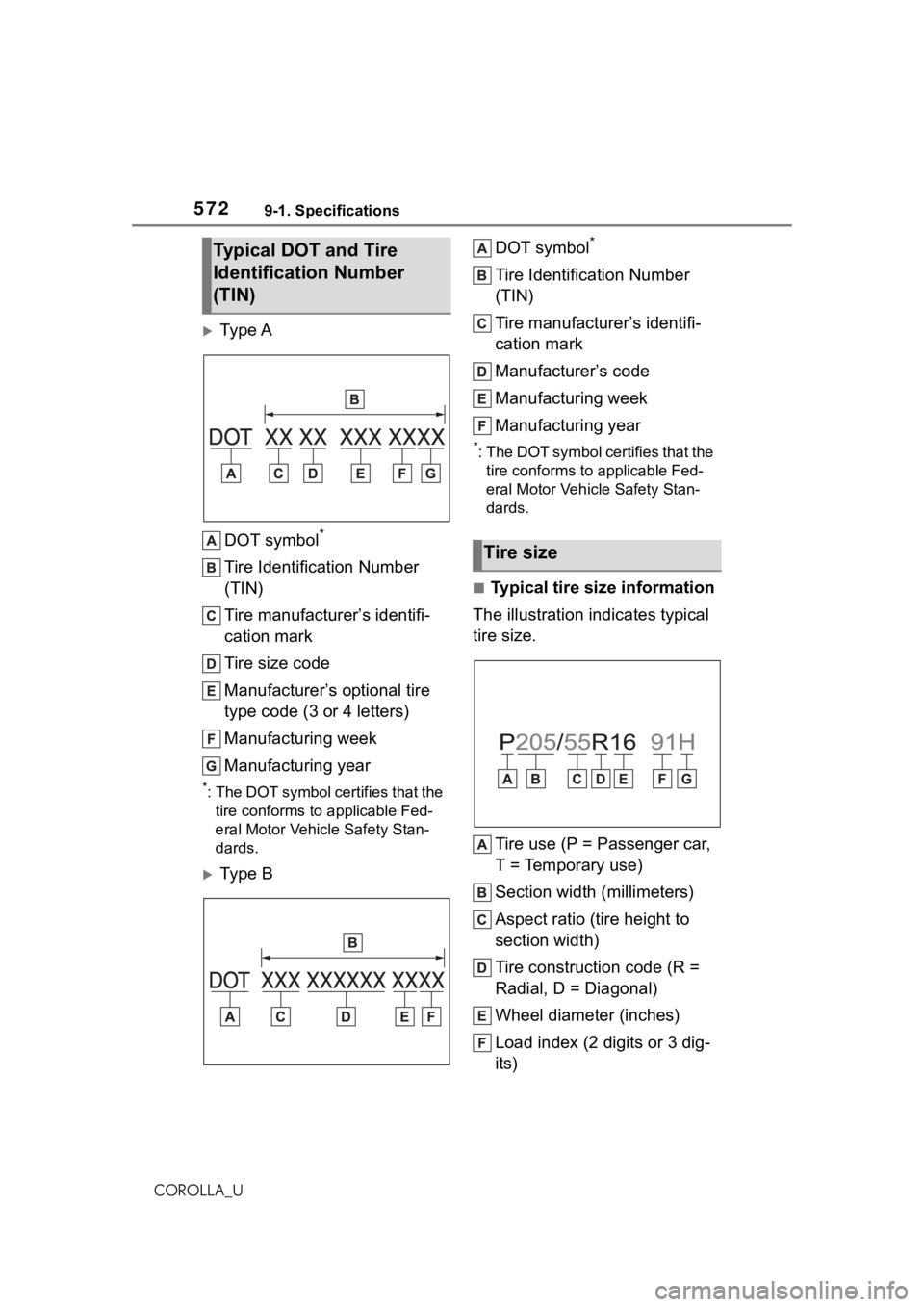
Ty p e ADOT symbol
*
Tire Identification Number
(TIN)
Tire manufacturer’s identifi-
cation mark
Tire size code
Manufacturer’s optional tire
type code (3 or 4 letters)
Manufacturing week
Manufacturing year
*: The DOT symbol certifies that the tire conforms to applicable Fed-
eral Motor Vehicle Safety Stan-
dards.
Ty p e B DOT symbol
*
Tire Identification Number
(TIN)
Tire manufacturer’s identifi-
cation mark
Manufacturer’s code
Manufacturing week
Manufacturing year
*: The DOT symbol ce
rtifies that the
tire conforms to applicable Fed-
eral Motor Vehicle Safety Stan-
dards.
■Typical tire size information
The illustration indicates typical
tire size.
Tire use (P = Passenger car,
T = Temporary use)
Section width (millimeters)
Aspect ratio (tire height to
section width)
Tire construction code (R =
Radial, D = Diagonal)
Wheel diameter (inches)
Load index (2 digits or 3 dig-
its)
Typical DOT and Tire
Identification Number
(TIN)
Tire size