spare tire TOYOTA COROLLA 2022 Owners Manual (in English)
[x] Cancel search | Manufacturer: TOYOTA, Model Year: 2022, Model line: COROLLA, Model: TOYOTA COROLLA 2022Pages: 678, PDF Size: 147.24 MB
Page 7 of 678
5TABLE OF CONTENTS
1
6
5
4
3
2
9
8
7
If your vehicle has to be stopped
in an emergency ............... 462
If the vehicle is submerged or
water on the road is rising
.......................................... 464
8-2. Steps to take in an emergency
If your vehicle needs to be towed
.......................................... 465
If you think something is wrong
.......................................... 469
Fuel pump shut off system
.......................................... 470
If a warning light turns on or a
warning buzzer sounds ..... 471
If a warning message is dis-
played ............................... 480
If you have a flat tire (vehicles
with an emergency tire punc-
ture repair kit) ................... 482
If you have a flat tire (vehicles
with a spare tire) ............... 498
If the engine will not start .... 509
If you lose your keys ........... 511
If the electronic key does not
operate properly ............... 511
If the vehicle battery is dis-
charged............................. 513
If your vehicle overheats ..... 518
If the vehicle becomes stuck
.......................................... 520
9-1. Specifications
Maintenance data (fuel, oil level,
etc.)................................... 524
Fuel information .................. 537
9-2. Customization
Customizable features ........ 538
9-3. Initialization
Items to initialize ................. 547
What to do if... (Troubleshooting)
.......................................... 550
Alphabetical Index .............. 553
9Vehicle specifications
Index
Page 159 of 678
157
4
4-1. Before driving
Driving
of your vehicle and trailer and
ensure that the vehicle-to-vehicle
distance is sufficient before execut-
ing lane changes.
■Transmission information
Multidrive
To maintain engine braking effi-
ciency and charging system perfor-
mance when using engine braking,
do not use the transmission in D,
must be in M and select gear step 4
or lower. ( P. 1 6 5 )
Manual transmission
Refrain from driving in 6th gear to
maintain the effectiveness of
engine braking and to maintain
charging system performance.
■If the engine overheats
Towing a loaded trailer up a long,
steep incline in temperatures
exceeding 30°C (85°F) may result
in the engine overheating. If the
engine coolant temperature gauge
indicates that the engine is over-
heating, turn the air conditioning off
immediately, leave the road and
stop the vehicle in a safe place.
( P.518)
■When parking the vehicle
Always place wheel chocks under
the wheels of both the vehicle and
trailer. Firmly set the parking brake
and shift the shift lever to P
(Multidrive) and 1 or R (manual
transmission).
WA R N I N G
Follow all the instructions described in
this section. Failure to do so could
cause an accident resulting in death or serious injury.
■Trailer towing precautions
When towing, make sure that none of
the weight limits are exceeded.
( P.153)
■Vehicle speed in towing
Observe the legal maximum speeds
for trailer towing.
■Before descending hills or long
declines
Reduce speed and downshift. How-
ever, never downshift suddenly while
descending steep or long downhill grades.
■Operation of the brake pedal
Do not hold the brake pedal
depressed often or for long periods of
time. Doing so may result in the brake overheating or reduce braking effects.
■To avoid accident or injury
●Vehicles with a compact spare tire:
Do not tow a trailer when the com-
pact spare tire is installed on your vehicle.
●Vehicles with the emergency tire puncture repair kit: Do not tow a
trailer when the tire installed is
repaired with the emergency tire puncture repair kit.
●Do not use the following systems when trailer towing.
• Cruise control (if equipped)
• Dynamic radar cruise control (if
equipped)
• Dynamic radar cruise control with
full-speed range (if equipped)
Page 206 of 678
2044-5. Using the driving support systems
■Enabling/disabling the pre-col-
lision system
The pre-collisio n system can be
enabled/disabled on ( P.538)
of the multi-information display.
The system is auto matically enabled
each time the engine switch is turned to
ON.
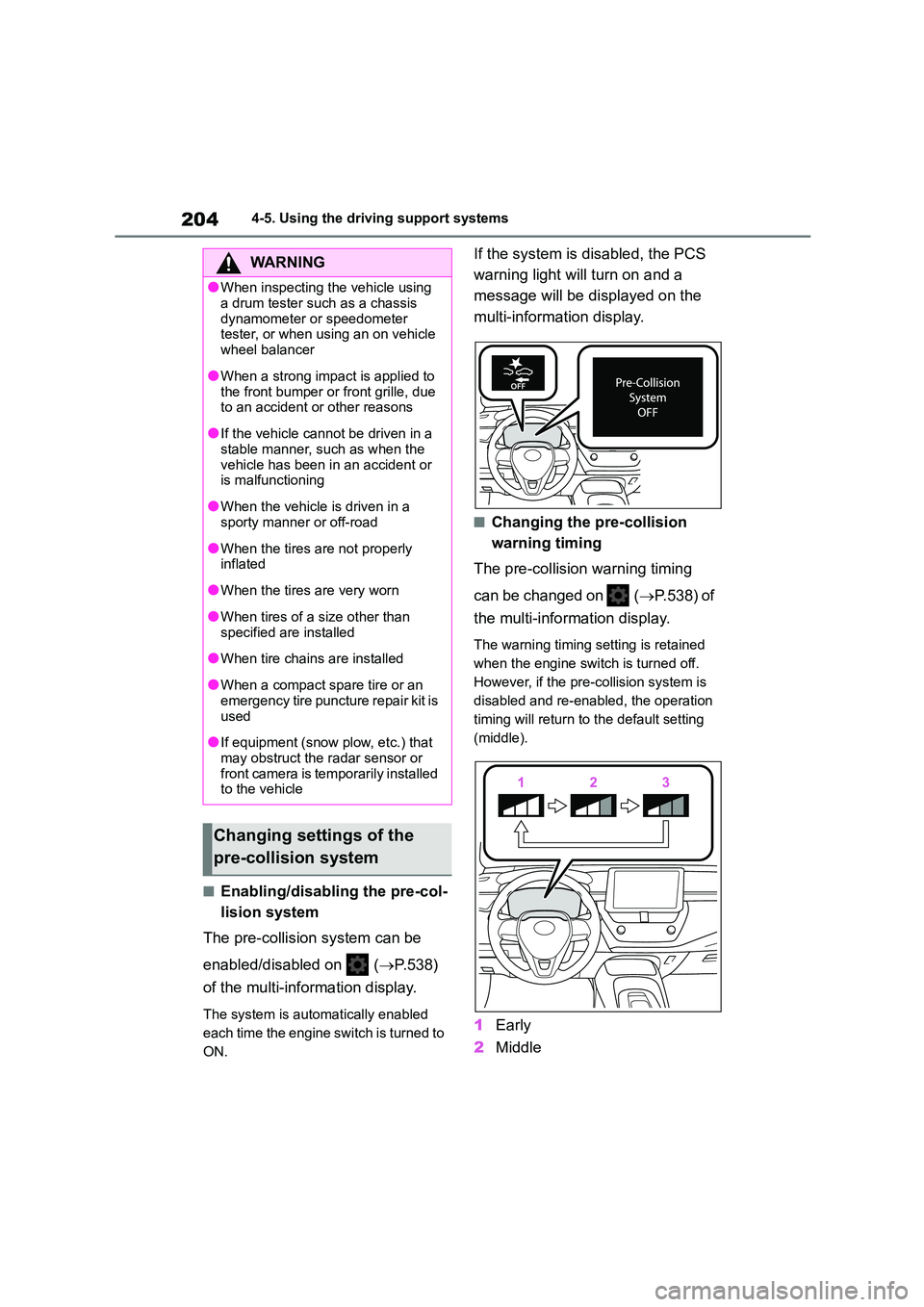
If the system is disabled, the PCS
warning light will turn on and a
message will be di splayed on the
multi-information display.
■Changing the pre-collision
warning timing
The pre-collision warning timing
can be changed on ( P.538) of
the multi-information display.
The warning timing setting is retained
when the engine switch is turned off.
However, if the pr e-collision system is
disabled and re-enabled, the operation
timing will return to the default setting
(middle).
1 Early
2 Middle
WA R N I N G
●When inspecting the vehicle using
a drum tester such as a chassis
dynamometer or speedometer tester, or when using an on vehicle
wheel balancer
●When a strong impact is applied to
the front bumper or front grille, due
to an accident or other reasons
●If the vehicle cannot be driven in a
stable manner, such as when the
vehicle has been in an accident or is malfunctioning
●When the vehicle is driven in a sporty manner or off-road
●When the tires are not properly inflated
●When the tires are very worn
●When tires of a size other than
specified are installed
●When tire chains are installed
●When a compact spare tire or an
emergency tire puncture repair kit is
used
●If equipment (snow plow, etc.) that
may obstruct the radar sensor or front camera is temporarily installed
to the vehicle
Changing settings of the
pre-collision system
Page 212 of 678
2104-5. Using the driving support systems
WA R N I N G
■Before using LTA system
●Do not rely solely upon the LTA sys-
tem. The LTA system does not automatically drive the vehicle or
reduce the amount of attention that
must be paid to the area in front of the vehicle. The driver must always
assume full responsibility for driving
safely by paying careful attention to
the surrounding conditions and operating the steering wheel to cor-
rect the path of the vehicle. Also,
the driver must take adequate breaks when fatigued, such as from
driving for a long period of time.
●Failure to perform appropriate driv-
ing operations and pay careful
attention may lead to an accident, resulting in death or serious injury.
●When not using the LTA system, use the LTA switch to turn the sys-
tem off.
■Situations unsuitable for LTA
system
In the following situations, use the LTA switch to turn the system off. Fail-
ure to do so may lead to an accident,
resulting in death or serious injury.
●Vehicle is driven on a road surface
which is slippery due to rainy weather, fallen snow, freezing, etc.
●Vehicle is driven on a snow-cov-ered road.
●White (yellow) lines are difficult to see due to rain, snow, fog, dust,
etc.
●Vehicle is driven in a temporary
lane or restricted lane due to con-
struction work.
●Vehicle is driven in a construction
zone.
●A spare tire, tire chains, etc. are
equipped.
●When the tires have been exces- sively worn, or when the tire infla-
tion pressure is low.
●When tires of a size other than
specified are installed.
●Vehicle is driven in traffic lanes
other than that highways and free-
ways.
●When your vehicle is towing a
trailer or during emergency towing
■Preventing LTA system malfunc-
tions and operations performed by mistake
●Do not modify the headlights or
place stickers, etc. on the surface of the lights.
●Do not modify the suspension etc. If the suspension etc. needs to be
replaced, contact any authorized
Toyota retailer or Toyota authorized repairer, or any reliable repairer.
●Do not install or place anything on the hood or grille. Also, do not
install a grille guar d (bull bars, kan-
garoo bar, etc.).
●If your windshield needs repairs,
contact any authorized Toyota retailer or Toyota authorized
repairer, or any reliable repairer.
■Conditions in which functions
may not operate properly
In the following situations, the func- tions may not operate properly and
the vehicle may depart from its lane.
Drive safely by always paying careful attention to your surroundings and
operate the steering wheel to correct
the path of the vehicle without relying
solely on the functions.
Page 221 of 678
219
4
4-5. Using the driving support systems
Driving
*: If equipped
LDA (Lane Depar ture
Alert with steering con-
trol)*
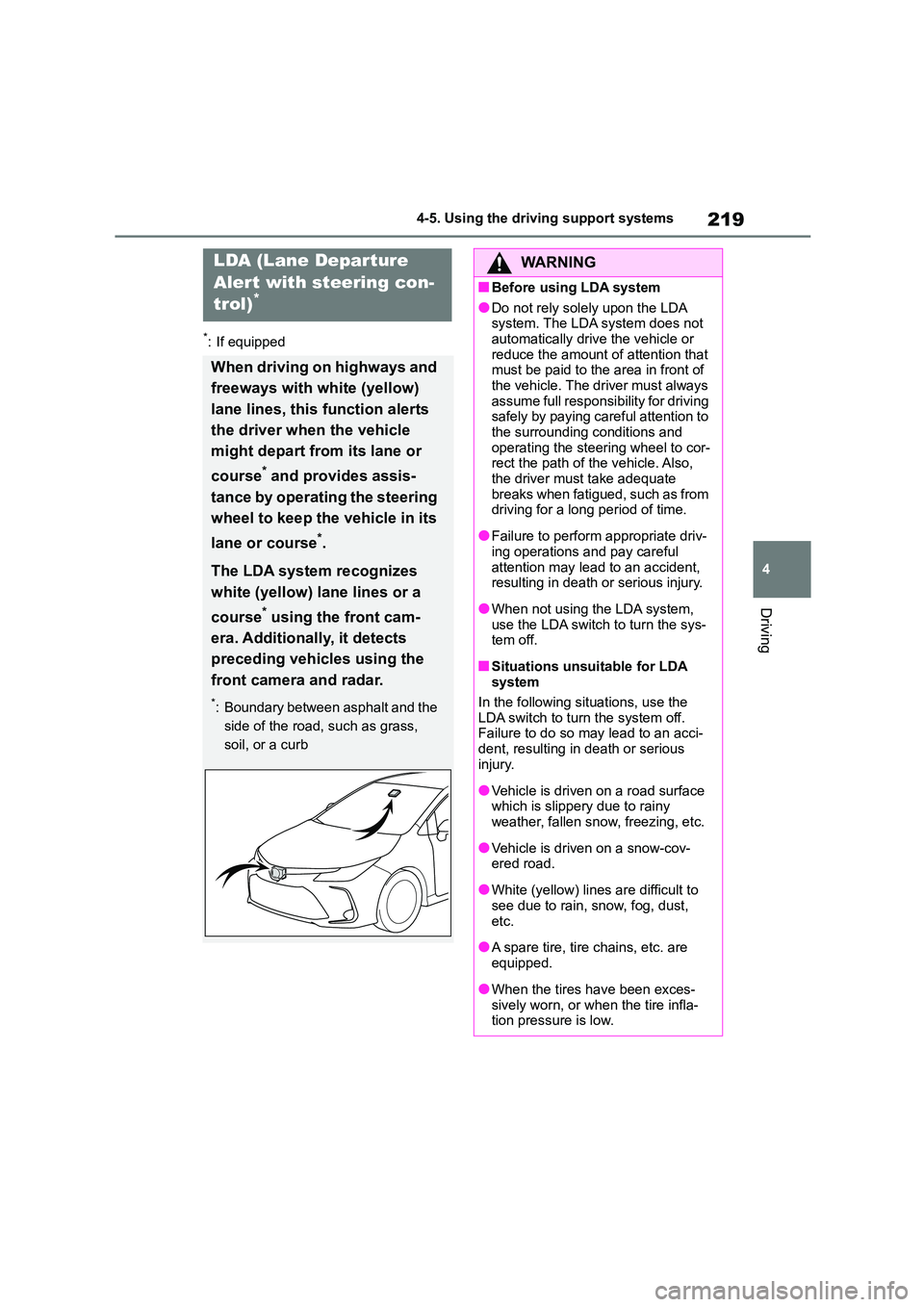
When driving on highways and
freeways with white (yellow)
lane lines, this function alerts
the driver when the vehicle
might depart from its lane or
course* and provides assis-
tance by operating the steering
wheel to keep the vehicle in its
lane or course*.
The LDA system recognizes
white (yellow) lane lines or a
course* using the front cam-
era. Additionally , it detects
preceding vehicles using the
front camera and radar.
*: Boundary between asphalt and the
side of the road, such as grass,
soil, or a curb
WA R N I N G
■Before using LDA system
●Do not rely solely upon the LDA
system. The LDA system does not automatically drive the vehicle or
reduce the amount of attention that
must be paid to the area in front of the vehicle. The driver must always
assume full responsibility for driving
safely by paying careful attention to
the surrounding conditions and operating the steering wheel to cor-
rect the path of the vehicle. Also,
the driver must take adequate breaks when fatigued, such as from
driving for a long period of time.
●Failure to perform appropriate driv-
ing operations and pay careful
attention may lead to an accident, resulting in death or serious injury.
●When not using the LDA system, use the LDA switch to turn the sys-
tem off.
■Situations unsuitable for LDA
system
In the following situations, use the LDA switch to turn the system off.
Failure to do so may lead to an acci-
dent, resulting in death or serious injury.
●Vehicle is driven on a road surface which is slippery due to rainy
weather, fallen snow, freezing, etc.
●Vehicle is driven on a snow-cov-
ered road.
●White (yellow) lines are difficult to
see due to rain, snow, fog, dust,
etc.
●A spare tire, tire chains, etc. are
equipped.
●When the tires have been exces-
sively worn, or when the tire infla- tion pressure is low.
Page 269 of 678
267
4
4-5. Using the driving support systems
Driving
(ex. skirts with gathers or frills).
●When objects that are not perpendicu-
lar to the ground, not perpendicular to
the vehicle traveling direction, une- ven, or waving are in the detection
range.
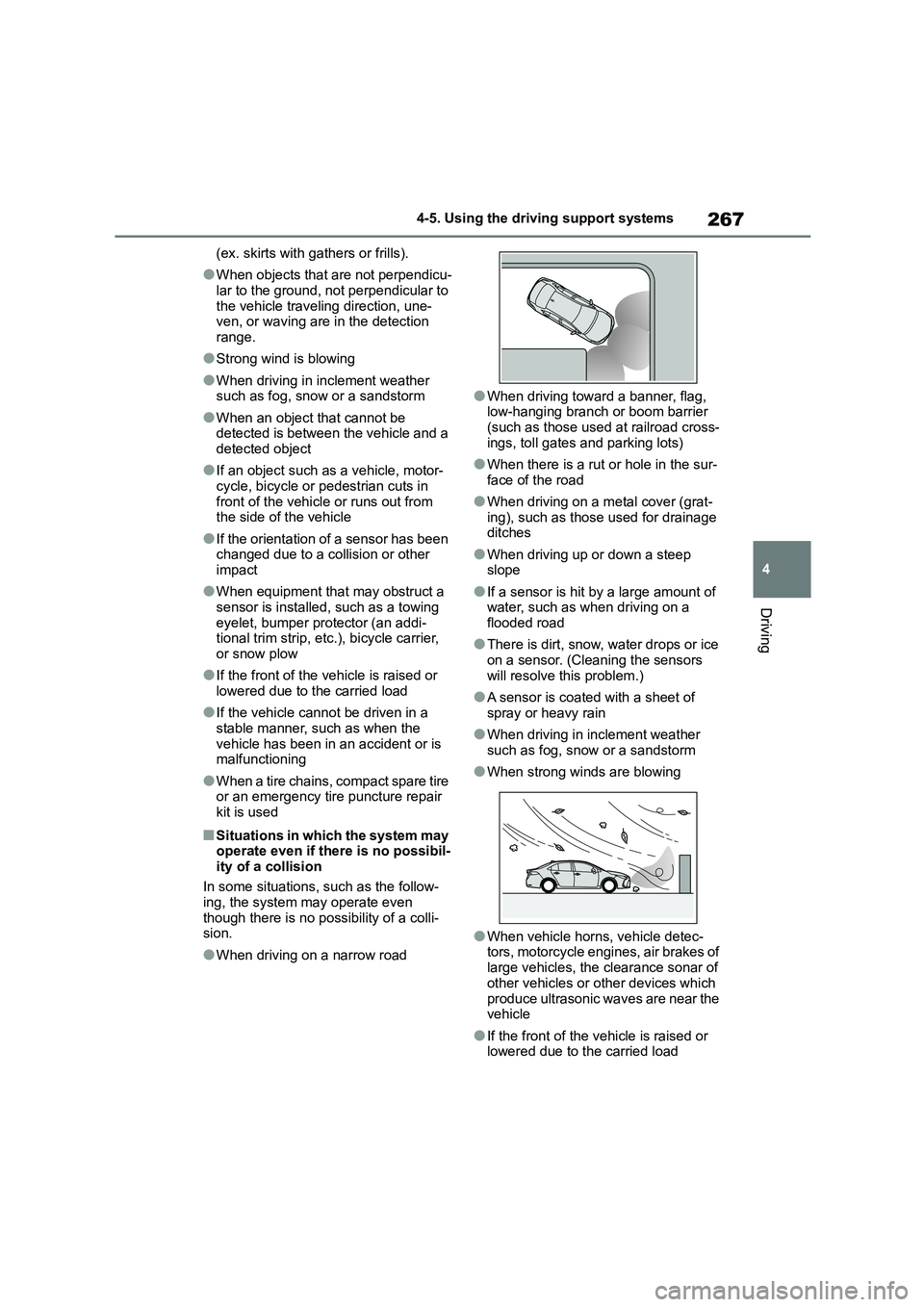
●Strong wind is blowing
●When driving in inclement weather such as fog, snow or a sandstorm
●When an object that cannot be detected is between the vehicle and a
detected object
●If an object such as a vehicle, motor-
cycle, bicycle or pedestrian cuts in
front of the vehicle or runs out from the side of the vehicle
●If the orientation of a sensor has been changed due to a collision or other
impact
●When equipment that may obstruct a
sensor is installed, such as a towing
eyelet, bumper protector (an addi- tional trim strip, et c.), bicycle carrier,
or snow plow
●If the front of the vehicle is raised or
lowered due to the carried load
●If the vehicle cannot be driven in a
stable manner, such as when the
vehicle has been in an accident or is malfunctioning
●When a tire chains, compact spare tire or an emergency tire puncture repair
kit is used
■Situations in which the system may
operate even if there is no possibil- ity of a collision
In some situations, such as the follow-
ing, the system may operate even
though there is no possibility of a colli- sion.
●When driving on a narrow road
●When driving toward a banner, flag,
low-hanging branch or boom barrier (such as those used at railroad cross-
ings, toll gates and parking lots)
●When there is a rut or hole in the sur-
face of the road
●When driving on a metal cover (grat-
ing), such as those used for drainage
ditches
●When driving up or down a steep
slope
●If a sensor is hit by a large amount of
water, such as when driving on a flooded road
●There is dirt, snow, water drops or ice on a sensor. (Cleaning the sensors
will resolve this problem.)
●A sensor is coated with a sheet of
spray or heavy rain
●When driving in inclement weather
such as fog, snow or a sandstorm
●When strong winds are blowing
●When vehicle horns, vehicle detec- tors, motorcycle engines, air brakes of
large vehicles, the clearance sonar of
other vehicles or other devices which
produce ultrasonic waves are near the vehicle
●If the front of the vehicle is raised or lowered due to the carried load
Page 270 of 678
2684-5. Using the driving support systems
●If the orientation of a sensor has been
changed due to a collision or other impact
●The vehicle is approaching a tall or curved curb
●Driving close to columns (H-shaped steel beams, etc.) in multi-story park-
ing garages, construction sites, etc.
●If the vehicle cannot be driven in a
stable manner, such as when the
vehicle has been in an accident or is malfunctioning
●On an extremely bumpy road, on an incline, on gravel, or on grass
●When a tire chains, compact spare tire or an emergency tire puncture repair
kit is used
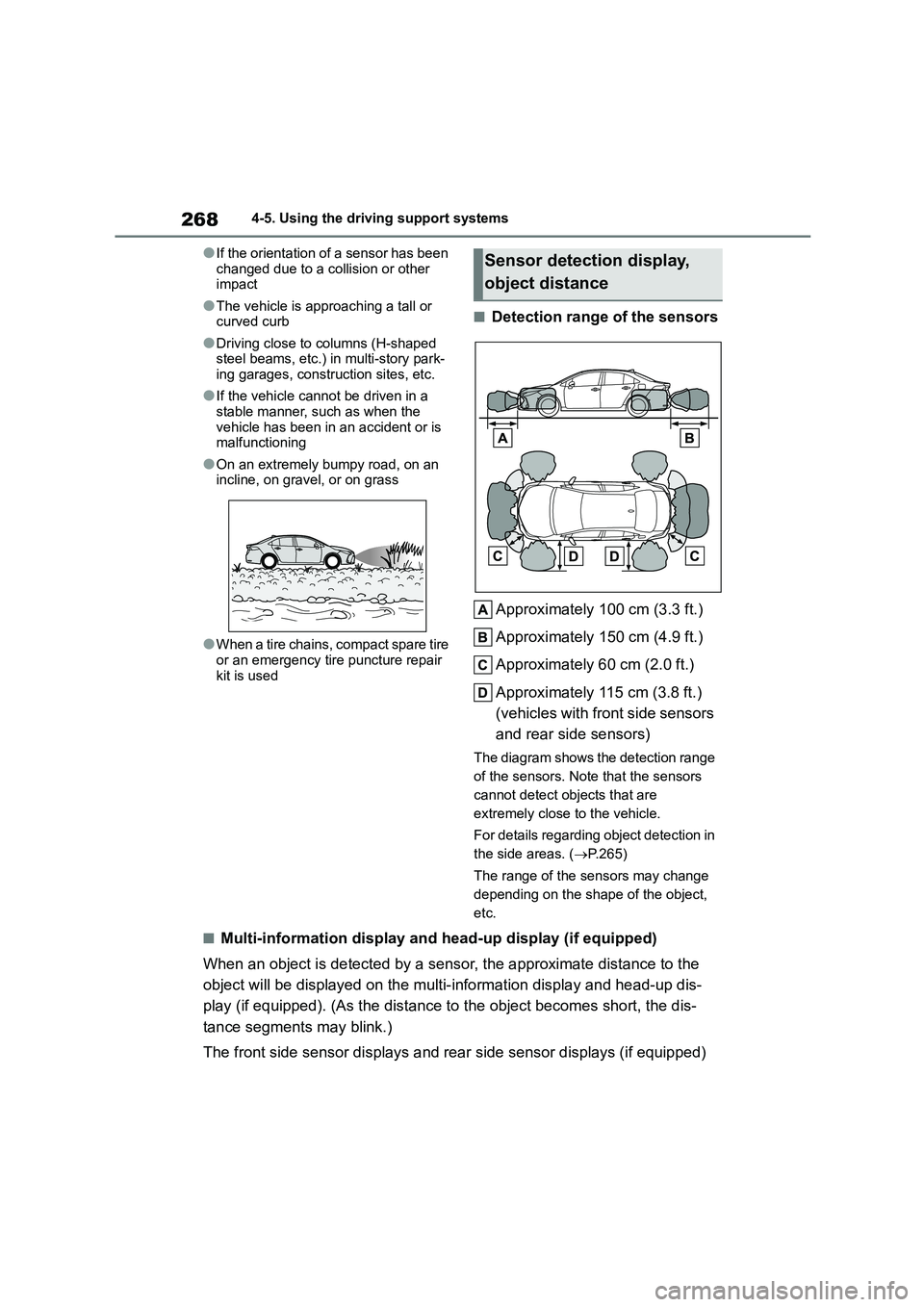
■Detection range of the sensors
Approximately 100 cm (3.3 ft.)
Approximately 150 cm (4.9 ft.)
Approximately 60 cm (2.0 ft.)
Approximately 115 cm (3.8 ft.)
(vehicles with front side sensors
and rear side sensors)
The diagram shows the detection range
of the sensors. Note that the sensors
cannot detect objects that are
extremely close to the vehicle.
For details regarding object detection in
the side areas. ( P.265)
The range of the sensors may change
depending on the shape of the object,
etc.
■Multi-information display and head-up display (if equipped)
When an object is detected by a sens or, the approximate distance to the
object will be displayed on the multi- information display and head-up dis-
play (if equipped). (As the distance to the object becomes short, the dis-
tance segments may blink.)
The front side sensor displays and rear side sensor displays (if equipped)
Sensor detection display,
object distance
Page 279 of 678
277
4
4-5. Using the driving support systems
Driving
detection area behind the vehicle
when backing up. ( P.286)
The Parking Support Brake can be
enabled/disabled on the multi-infor-
mation display. All of the Parking
WA R N I N G
■Cautions regarding the use of
the system
Do not overly rely on the system, as
doing so may lead to an accident.
●The driver is solely responsible for safe driving. Always drive carefully,
taking care to observe your
surroundings. The Parking Support Brake system is designed to pro-
vide support to lessen the severity
of collisions. However, it may not operate in some situations.
●The Parking Support Brake system is not designed to stop the vehicle
completely. Additionally, even if the
system has stopped the vehicle, it is necessary to depress the brake
pedal immediately as brake control
will be canceled after approximately 2 seconds.
●It is extremely dangerous to check the system operatio ns by intention-
ally driving the vehicle into the
direction of a wall, etc. Never attempt such actions.
■When to disable the Parking Sup-port Brake
In the following situations, disable the
Parking Support Br ake as the system may operate even though there is no
possibility of a collision.
●When inspecting the vehicle using
a chassis roller, chassis dynamo or
free roller
●When loading the vehicle onto a
boat, truck or other transport vessel
●If the suspension has been modi-
fied or tires of a size other than specified are installed
●If the front of the vehicle is raised or lowered due to the carried load
●When equipment that may obstruct a sensor is installed, such as a tow-
ing eyelet, bumper protector (an
additional trim strip, etc.), bicycle carrier, or snow plow
●When using automatic car washing devices
●If the vehicle cannot be driven in a stable manner, such as when the
vehicle has been in an accident or
is malfunctioning
●When the vehicle is driven in a
sporty manner or off-road
●When the tires are not properly
inflated
●When the tires are very worn
●When a tire chains, compact spare
tire or an emergency tire puncture
repair kit is used
NOTICE
■If “Parking Support Brake Una- vailable” is displayed on the
multi-information display and the
PKSB OFF indicator is flashing
If this message is displayed immedi-
ately after the engine switch is
changed to ON, operate the vehicle carefully, paying attention to your
surroundings. It may be necessary to
drive the vehicle for a certain amount of time before the system returns to
normal. (If the system does not return
to normal after driving for a while, clean the sensors and their surround-
ing area on the bumpers.)
Enabling/Disabling the Park-
ing Support Brake
Page 314 of 678
3124-5. Using the driving support systems
WA R N I N G
●If it seems the vehicle may make
contact with a pedestrian, another
vehicle or any other obstacles, stop the vehicle by depressing the brake
pedal, and then press the S-IPA
switch to turn off the system.
●Use the system in a parking lot with
a flat surface.
●Observe the following precautions,
as the steering wheel automatically
turns during use.
• There is risk of a necktie, scarf,
your arm, etc. being caught on the
steering wheel. Please do not allow your upper body to be close to the
steering wheel. Also, do not allow
children close to the steering wheel.
• There is a possibility of injury when
the steering wheel turns if you have long fingernails.
• In case of emergency, stop the vehicle by depressing the brake
pedal, and then press the S-IPA
switch to turn off the system.
●Always confirm that there is appro-
priate space before attempting to park the vehicle and operate the
system.
●Do not use the syst em in the follow-
ing situations, as the system may
be unable to correctly assist you in reaching the target parking spot
and may lead to an unexpected
accident.
• In an area that is not a parking lot
• A parking lot that is not paved and has no parking space lines, such as
a sand or gravel parking lot
• A parking lot that has a slope or
undulations in the road
• A frozen, snow-covered or slippery
road
• The asphalt is melting due to hot weather
• There is an obstacle between the vehicle and the target parking spot
• Using tire chains or compact spare tire (if equipped)
●Do not use tire other than that pro-vided by the manufacturer. The sys-
tem may not operate properly.
When replacing tires, contact any authorized Toyota retailer or Toyota
authorized repairer, or any reliable
repairer.
●The system may not be able posi-
tion the vehicle in the set location in the following situations.
• The tires are extremely worn or the
tire pressure is low
• The vehicle is carrying very heavy
load
• The vehicle is tilted due to having
luggage, etc. located on one side of the vehicle
• There are road heaters installed in the parking lot to prevent the road
surface from freezing.
In any other situations when the set
position and vehicle position greatly
differ, have the vehicle inspected by any authorized Toyota retailer or
Toyota authorized repairer, or any reli-
able repairer.
Page 431 of 678
429
7
7-3. Do-it-yourself maintenance
Maintenance and care
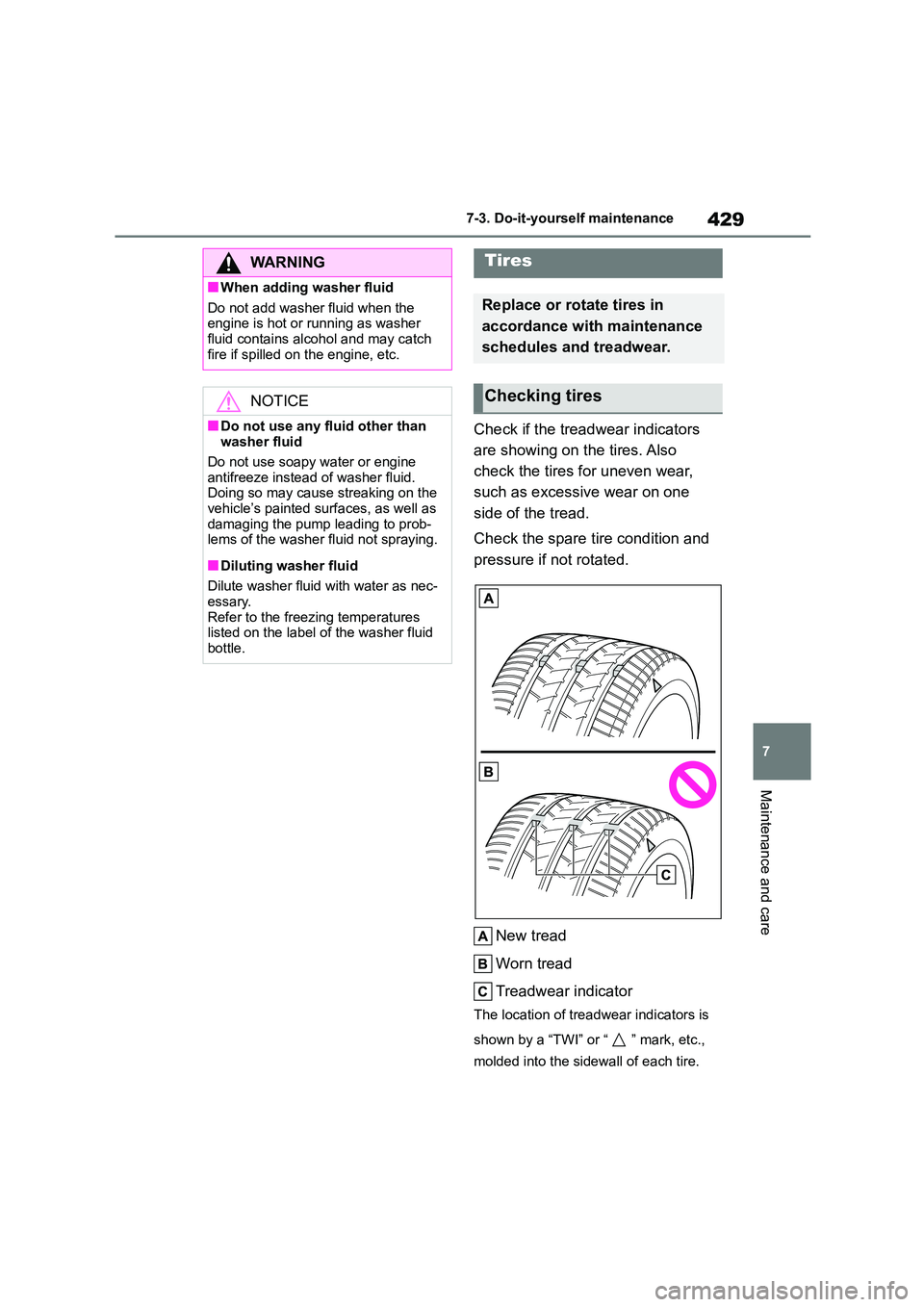
Check if the treadwear indicators
are showing on the tires. Also
check the tires for uneven wear,
such as excessive wear on one
side of the tread.
Check the spare tire condition and
pressure if not rotated.
New tread
Worn tread
Treadwear indicator
The location of treadwear indicators is
shown by a “TWI” or “ ” mark, etc.,
molded into the sidewall of each tire.
WA R N I N G
■When adding washer fluid
Do not add washer fluid when the
engine is hot or running as washer fluid contains alcohol and may catch
fire if spilled on the engine, etc.
NOTICE
■Do not use any fluid other than washer fluid
Do not use soapy water or engine
antifreeze instead of washer fluid. Doing so may cause streaking on the
vehicle’s painted surfaces, as well as
damaging the pump leading to prob- lems of the washer fluid not spraying.
■Diluting washer fluid
Dilute washer fluid with water as nec-
essary.
Refer to the freezing temperatures listed on the label of the washer fluid
bottle.
Tires
Replace or rotate tires in
accordance with maintenance
schedules and treadwear.
Checking tires