Engine TOYOTA COROLLA CROSS 2022 Owners Manual
[x] Cancel search | Manufacturer: TOYOTA, Model Year: 2022, Model line: COROLLA CROSS, Model: TOYOTA COROLLA CROSS 2022Pages: 612, PDF Size: 17.18 MB
Page 261 of 612
2614-5. Using the driving support systems
4
Driving
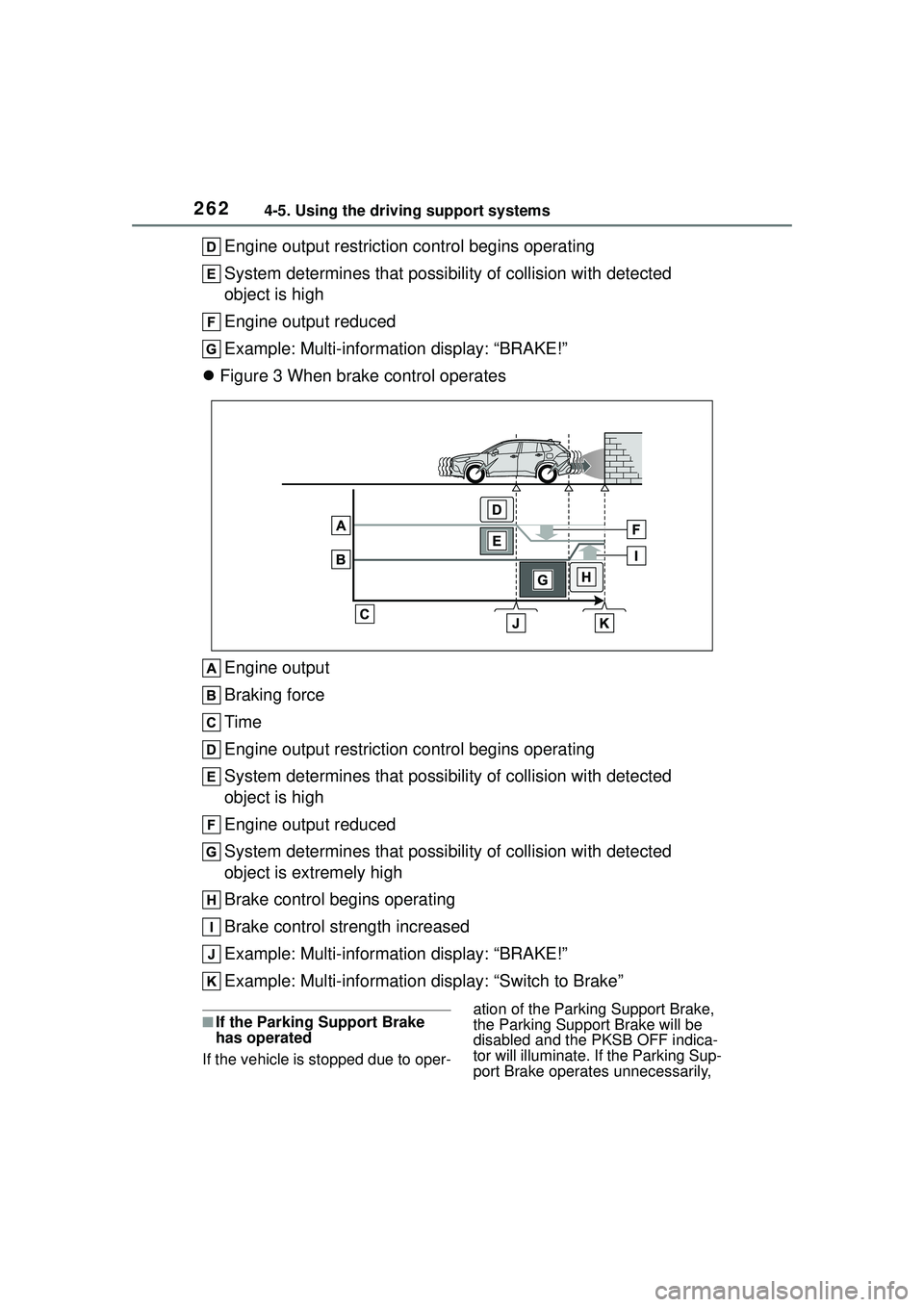
control: See figure 2.)
Additionally, if the accelerator pedal continues to be depressed, the
brakes will be applied automatically to reduce the vehicle speed.
(Brake control: See figure 3.)
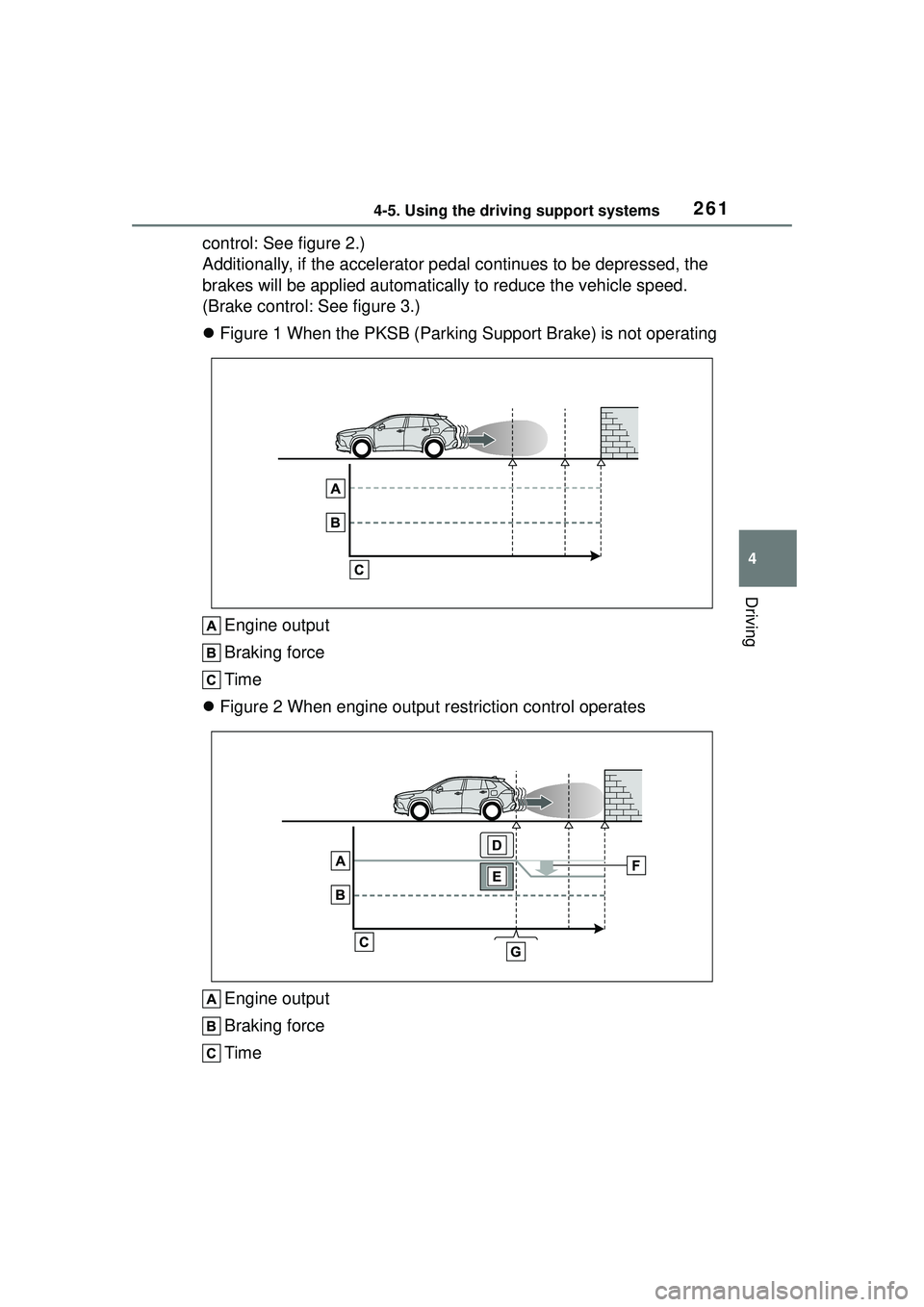
Figure 1 When the PKSB (Parking S upport Brake) is not operating
Engine output
Braking force
Time
Figure 2 When engine output restriction control operates
Engine output
Braking force
Time
Page 262 of 612
2624-5. Using the driving support systems
Engine output restriction control begins operating
System determines that possibility of collision with detected
object is high
Engine output reduced
Example: Multi-information display: “BRAKE!”
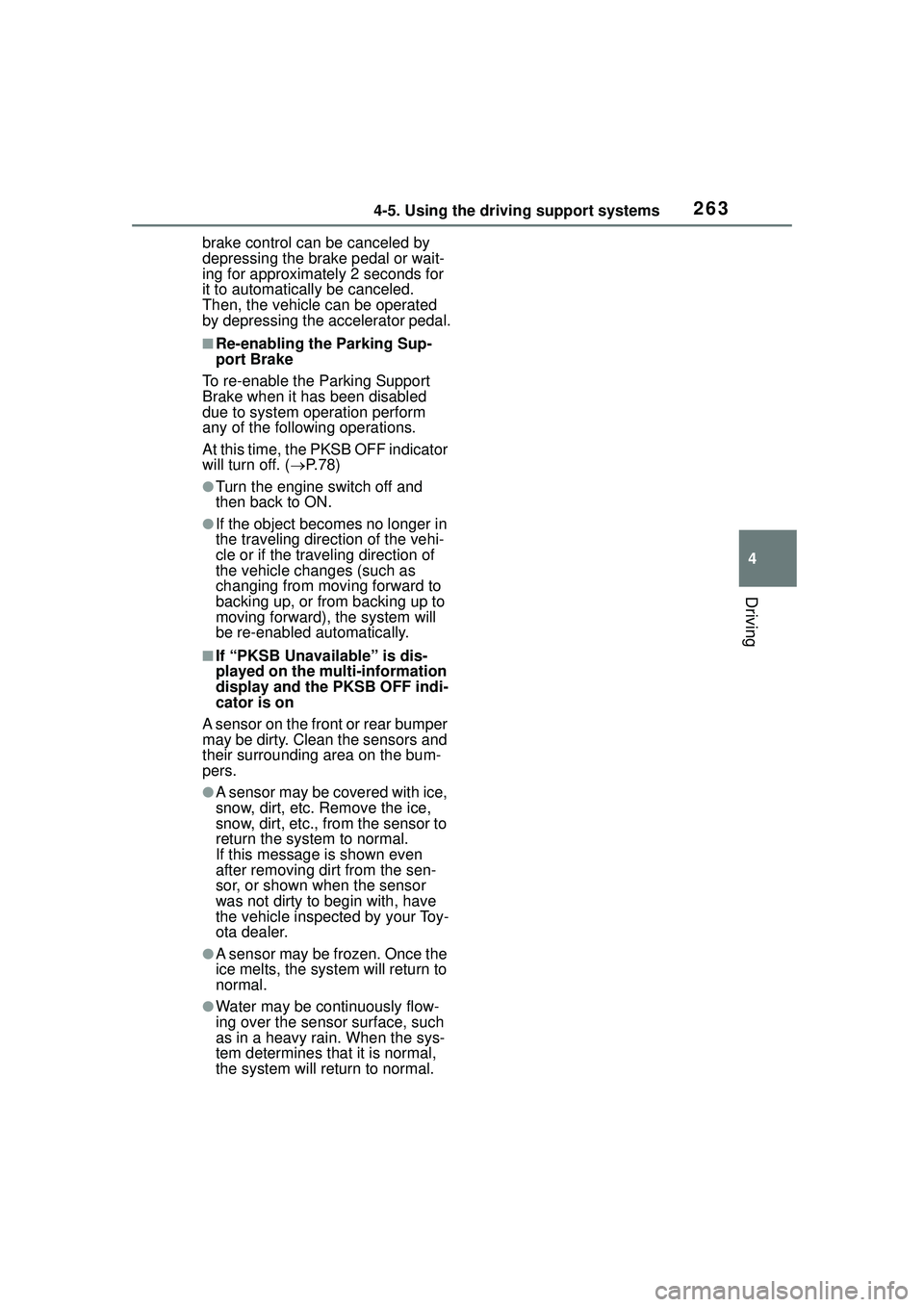
Figure 3 When brake control operates
Engine output
Braking force
Time
Engine output restriction control begins operating
System determines that possibility of collision with detected
object is high
Engine output reduced
System determines that possibility of collision with detected
object is extremely high
Brake control begins operating
Brake control strength increased
Example: Multi-information display: “BRAKE!”
Example: Multi-information display: “Switch to Brake”
■If the Parking Support Brake
has operated
If the vehicle is stopped due to oper- ation of the Parking Support Brake,
the Parking Support Brake will be
disabled and the PKSB OFF indica-
tor will illuminate. If the Parking Sup-
port Brake operates unnecessarily,
Page 263 of 612
2634-5. Using the driving support systems
4
Driving
brake control can be canceled by
depressing the brake pedal or wait-
ing for approximately 2 seconds for
it to automatically be canceled.
Then, the vehicle can be operated
by depressing the accelerator pedal.
■Re-enabling the Parking Sup-
port Brake
To re-enable the Parking Support
Brake when it has been disabled
due to system operation perform
any of the following operations.
At this time, the PKSB OFF indicator
will turn off. ( P. 7 8 )
●Turn the engine switch off and
then back to ON.
●If the object becomes no longer in
the traveling direction of the vehi-
cle or if the traveling direction of
the vehicle changes (such as
changing from moving forward to
backing up, or from backing up to
moving forward), the system will
be re-enabled automatically.
■If “PKSB Unavailable” is dis-
played on the multi-information
display and the PKSB OFF indi-
cator is on
A sensor on the front or rear bumper
may be dirty. Clean the sensors and
their surrounding area on the bum-
pers.
●A sensor may be covered with ice,
snow, dirt, etc. Remove the ice,
snow, dirt, etc., from the sensor to
return the system to normal.
If this message is shown even
after removing dirt from the sen-
sor, or shown when the sensor
was not dirty to begin with, have
the vehicle inspected by your Toy-
ota dealer.
●A sensor may be frozen. Once the
ice melts, the system will return to
normal.
●Water may be continuously flow-
ing over the sensor surface, such
as in a heavy rain. When the sys-
tem determines that it is normal,
the system will return to normal.
Page 266 of 612
2664-5. Using the driving support systems
■The Parking Support Brake
function (static object) will
operate when
The function will operate when the
PKSB OFF indicator is not illumi-
nated or flashing ( P.77, 78) and all
of the following conditions are met:
●Engine output restriction control
• The Parking Support Brake is
enabled.
• The vehicle speed is approxi- mately 9 mph (15 km/h) or less.
• There is a static object in the trav-
eling direction of the vehicle and
approximately 6 to 13 ft. (2 to 4 m)
away.
• The Parking Support Brake deter- mines that a stronger-than-nor-
mal brake operation is necessary
to avoid a collision.
●Brake control
• Engine output restriction control is operating.
• The Parking Support Brake deter- mines that an immediate brake
operation is necessary to avoid a
collision.
■The Parking Support Brake
function (static objects) will
stop operating when
The function will stop operating if
any of the following conditions are
met:
●Engine output restriction control
• The Parking Support Brake is dis-
abled.
• The system determines that the collision has become avoidable
with normal brake operation.
• The static object is no longer approximately 6 to 13 ft. (2 to 4 m)
away from the vehicle or in the
traveling direction of the vehicle.
●Brake control
• The Parking Support Brake is dis- abled.
• Approximately 2 seconds have elapsed since the vehicle was
stopped by brake control.
• The brake pedal is depressed after the vehicle is stopped by
brake control.
• The static object is no longer
approximately 6 to 13 ft. (2 to 4 m)
away from the vehicle or in the
traveling direction of the vehicle.
■Detection range of the Parking
Support Brake function (static
objects)
The detection range of the Parking
Support Brake function (static
objects) differs from the detection
range of the intuitive parking assist.
( P.256) Therefore, even if the intu-
itive parking assist detects an object
and provides a warning, the Parking
Support Brake function (static
objects) may not start operating.
■Situations in which the system
may not operate properly
P.254
■Situations in which the system
may operate even if there is no
possibility of a collision
P.255
Page 267 of 612
2674-5. Using the driving support systems
4
Driving
*: If equipped
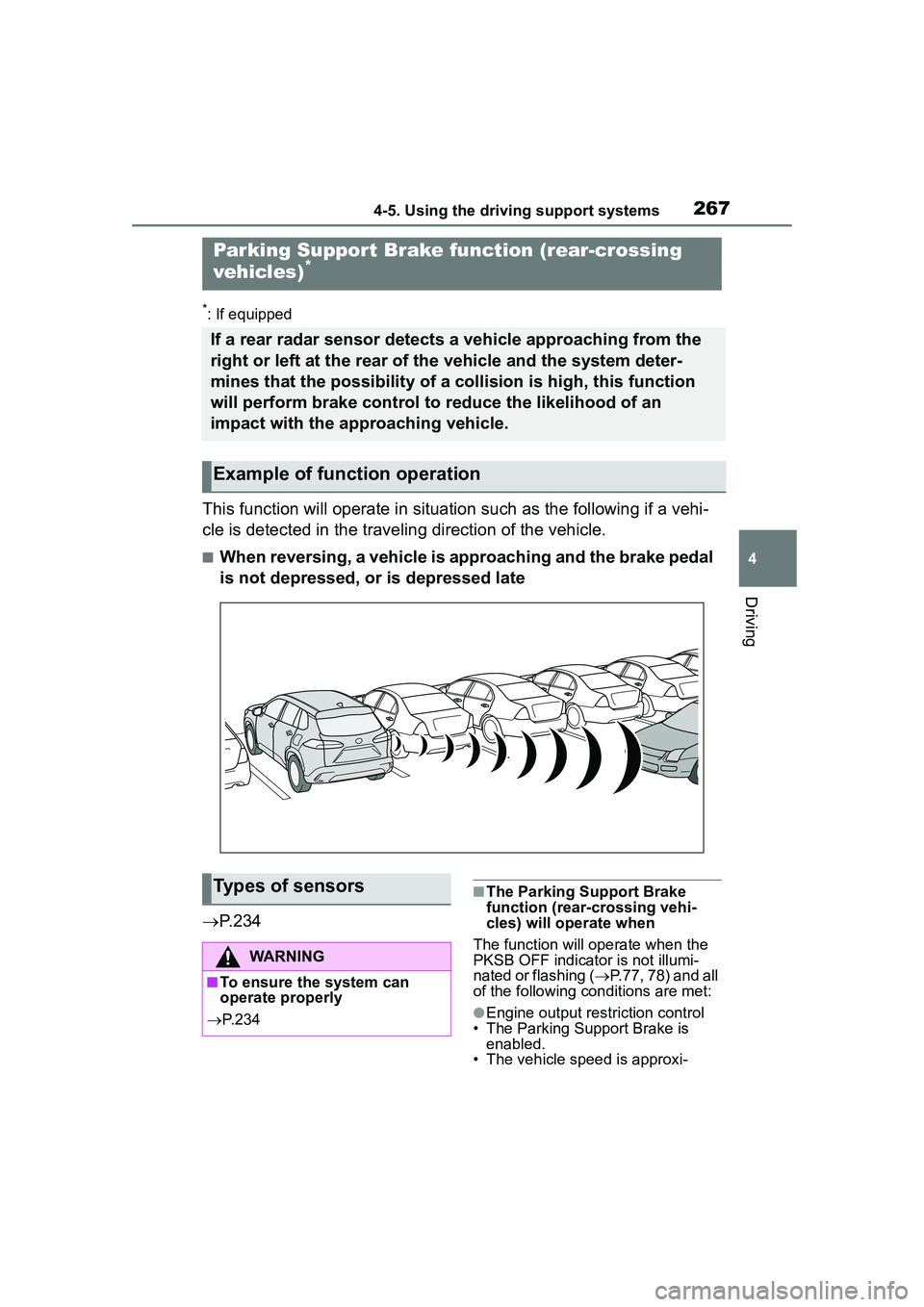
This function will operate in situation such as the following if a vehi-
cle is detected in the traveling direction of the vehicle.
■When reversing, a vehicle is approaching and the brake pedal
is not depressed, or is depressed late
P.234
■The Parking Support Brake
function (rear-crossing vehi-
cles) will operate when
The function will operate when the
PKSB OFF indicator is not illumi-
nated or flashing ( P.77, 78) and all
of the following conditions are met:
●Engine output restriction control
• The Parking Support Brake is enabled.
• The vehicle speed is approxi-
Parking Suppor t Brake function (rear-crossing
vehicles)*
If a rear radar sensor detects a vehicle approaching from the
right or left at the rear of the vehicle and the system deter-
mines that the possibility of a collision is high, this function
will perform brake control to reduce the likelihood of an
impact with the approaching vehicle.
Example of function operation
Types of sensors
WARNING
■To ensure the system can
operate properly
P. 2 3 4
Page 268 of 612
2684-5. Using the driving support systems
mately 9 mph (15 km/h) or less.
• Vehicles which are approaching from the right or left at the rear of
the vehicle at a traveling speed of
approximately 5 mph (8 km/h) or
more.
• The shift lever is in R.
• The Parking Support Brake deter- mines that a stronger than normal
brake operation is necessary to
avoid a collision with an approach-
ing vehicle.
●Brake control
• Engine output restriction control is
operating.
• The Parking Support Brake deter- mines that an emergency brake
operation is necessary to avoid a
collision with an approaching vehi-
cle.
■The Parking Support Brake
function (rear-crossing vehi-
cles) will stop operating when
The function will stop operating if
any of the following conditions are
met:
●Engine output restriction control
• The Parking Support Brake is dis-
abled.
• The collision becomes avoidable with normal brake operation.
• A vehicle is no longer approaching from the right or left at the rear of
the vehicle.
●Brake control
• The Parking Support Brake is dis-
abled.
• Approximately 2 seconds have elapsed since the vehicle was
stopped by brake control.
• The brake pedal is depressed after the vehicle is stopped by
brake control.
• A vehicle is no longer approaching from the right or left at the rear of
the vehicle.
■Detection area of the Parking
Support Brake function
(rear-crossing vehicles)
The detection area of the Parking
Support Brake function (rear-cross- ing vehicles) differs from the detec-
tion area of the RCTA function
(
P.239). Therefore, even if the
RCTA function detects a vehicle and
provides an alert, the Parking Sup-
port Brake function (rear-crossing
vehicles) may not start operating.
■Situations in which the system
may not operate properly
P.241
■Situations in which the system
may operate even if there is no
possibility of a collision
P.242
Page 270 of 612
2704-5. Using the driving support systems
conditions including normal driv-
ing, during cornering, on a
uphill, when starting off, during
acceleration, on a slippery roads
due to snow or rain, thus con-
tributing to stable operability and
driving stability.
■The Secondary Collision
Brake
When the SRS airbag sensor
detects a collision and the sys-
tem operates, the brakes and
brake lights are automatically
controlled to reduce the vehicle
speed and help reduce the pos-
sibility of further damage due to
a secondary collision.
■When the TRAC/VSC systems
are operating
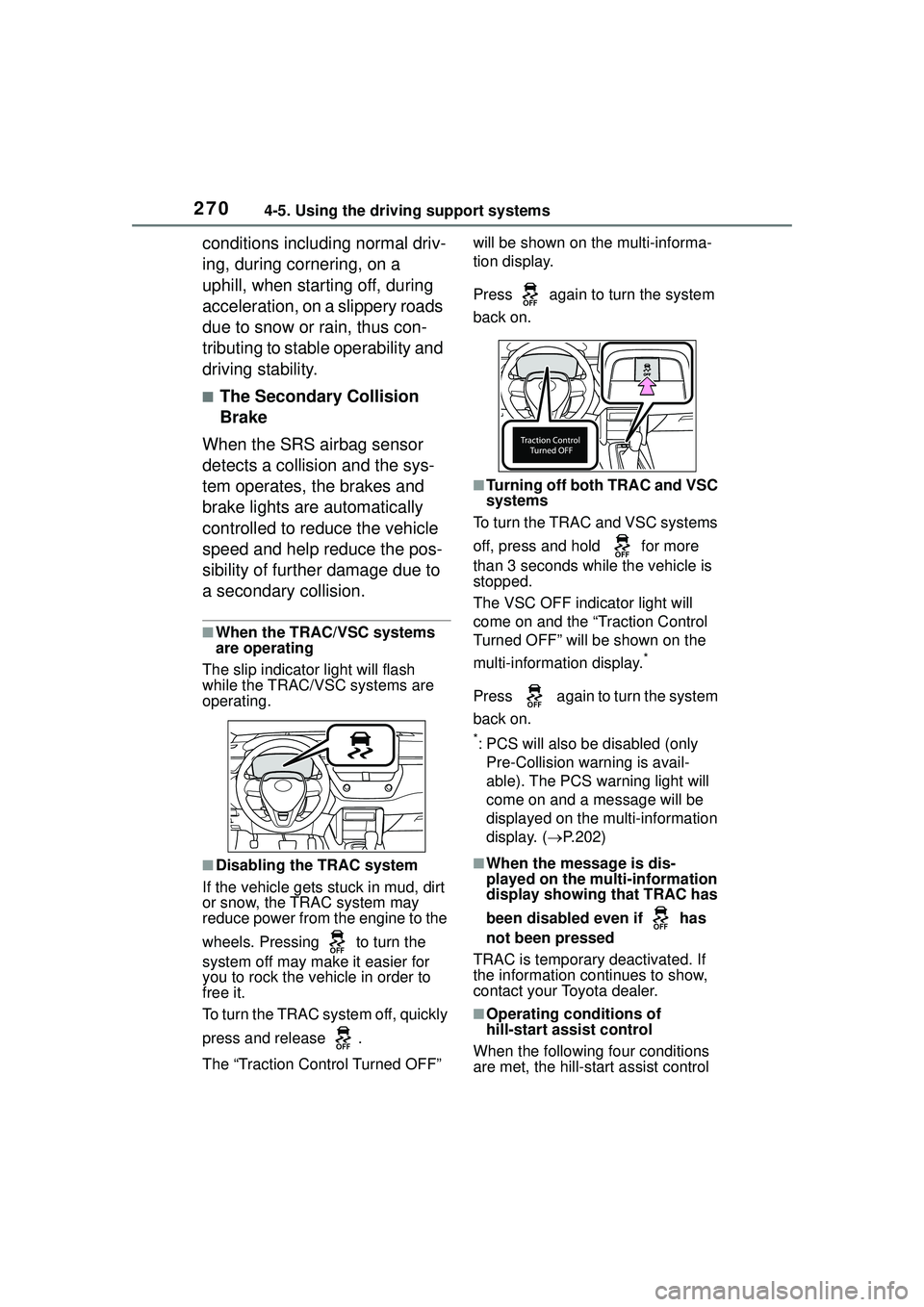
The slip indicator light will flash
while the TRAC/VSC systems are
operating.
■Disabling the TRAC system
If the vehicle gets stuck in mud, dirt
or snow, the TRAC system may
reduce power from the engine to the
wheels. Pressing to turn the
system off may make it easier for
you to rock the vehicle in order to
free it.
To turn the TRAC system off, quickly
press and release .
The “Traction Control Turned OFF” will be shown on the multi-informa-
tion display.
Press again to turn the system
back on.
■Turning off both TRAC and VSC
systems
To turn the TRAC and VSC systems
off, press and hold for more
than 3 seconds while the vehicle is
stopped.
The VSC OFF indicator light will
come on and the “Traction Control
Turned OFF” will be shown on the
multi-information display.
*
Press again to turn the system
back on.
*: PCS will also be disabled (only Pre-Collision warning is avail-
able). The PCS warning light will
come on and a message will be
displayed on the multi-information
display. ( P.202)
■When the message is dis-
played on the mu lti-information
display showing that TRAC has
been disabled even if has
not been pressed
TRAC is temporary deactivated. If
the information continues to show,
contact your Toyota dealer.
■Operating conditions of
hill-start assist control
When the following four conditions
are met, the hill-start assist control
Page 271 of 612
2714-5. Using the driving support systems
4
Driving
will operate:
●The shift lever is in a position
other than P or N (when starting
off forward/backward on an
upward incline)
●The vehicle is stopped
●The accelerator pedal is not
depressed
●The parking brake is not engaged
■Automatic system cancelation
of hill-start assist control
The hill-start assist control will turn
off in any of the following situations:
●The shift lever is shifted to P or N.
●The accelerator pedal is
depressed
●The parking brake is engaged
●2 seconds at maximum elapsed
after the brake pedal is released
■Sounds and vibrations caused
by the ABS, brake assist, VSC,
TRAC and hill-start assist con-
trol systems
●A sound may be heard from the
engine compartment when the
brake pedal is depressed repeat-
edly, when the engine is started or
just after the vehicle begins to
move. This sound does not indi-
cate that a malfunction has
occurred in any of these systems.
●Any of the following conditions
may occur when the above sys-
tems are operating.
None of these indicates that a
malfunction has occurred.
• Vibrations may be felt through the vehicle body and steering.
• A motor sound may be heard also
after the vehicle comes to a stop.
• The brake pedal may pulsate slightly after th e ABS is activated.
• The brake pedal may move down
slightly after th e ABS is activated.
■Active Cornering Assist opera-
tion sounds and vibrations
When the Active Cornering Assist is
operated, operation sounds and vibrations may be generated from
the brake system, but this is not a
malfunction.
■EPS operation sound
When the steering wheel is oper-
ated, a motor sound (whirring
sound) may be heard. This does not
indicate a malfunction.
■Automatic reactivation of TRAC
and VSC systems
After turning the TRAC and VSC
systems off, the systems will be
automatically re-enabled in the fol-
lowing situations:
●When the engine switch is turned
off
●If only the TRAC system is turned
off, the TRAC will turn on when
vehicle speed increases
If both the TRAC and VSC sys-
tems are turned off, automatic
re-enabling will not occur when
vehicle speed increases.
■Operating conditions of Active
Cornering Assist
The system operates when the fol-
lowing occurs.
●TRAC/VSC can operate
●The driver is attempting to accel-
erate while turning
●The system detects that the vehi-
cle is drifting to the outer side
●The brake pedal is released
■Reduced effectiveness of the
EPS system
The effectiveness of the EPS sys-
tem is reduced to prevent the sys-
tem from overheating when there is
frequent steering input over an
extended period of time. The steer-
ing wheel may feel heavy as a
result. Should this occur, refrain
from excessive steering input or
stop the vehicle and turn the engine
off. The EPS syste m should return
to normal within 10 minutes.
Page 274 of 612
2744-6. Driving tips
4-6.Driving tips
Use fluids that are appropriate
to the prevailing outside tem-
peratures.
• Engine oil
• Engine coolant
• Washer fluid
Have a service technician
inspect the condition of the
battery.
Have the vehicle fitted with
four snow tires.
Ensure that all tires are the same
size and brand.
Perform the following according
to the driving conditions:
Do not try to forcibly open a
window or move a wiper that
is frozen. Pour warm water
over the frozen area to melt
the ice. Wipe away the water
immediately to prevent it from
freezing.
To ensure proper operation of
the climate control system
fan, remove any snow that
has accumulated on the air
inlet vents in front of the wind-
shield.
Check for and remove any
Winter driving tips
Carry out the necessary
preparations and inspec-
tions before driving the
vehicle in winter. Always
drive the vehicle in a man-
ner appropriate to the pre-
vailing weather conditions.
Pre-winter preparations
WARNING
■Driving with snow tires
Observe the following precautions
to reduce the risk of accidents.
Failure to do so may result in a
loss of vehicle control and cause
death or serious injury.
●Use tires of the size specified.
●Maintain the recommended
level of air pressure.
●Do not drive in excess of 75
mph (120 km/h), regardless of
the type of snow tires being
used.
●Use snow tires on all, not just
some wheels.
NOTICE
■Driving with tire chains
Do not fit tire chains. Tire chains
may damage the vehicle body
and suspension, and adversely
affect driving performance.
■Repairing or replacing snow
tires
Request repairs or replacement of
snow tires from Toyota dealers or
legitimate tire retailers.
This is because the removal and
attachment of snow tires affects
the operation of the tire pressure
warning valves and transmitters.
Before driving the vehicle
Page 278 of 612
2784-6. Driving tips
NOTICE
■To prevent water damage
Take all necessary safety mea-
sures to ensure that water dam-
age to the engine or other
components does not occur.
●Water entering the engine air
intake will cause severe engine
damage.
●Water entering the continuously
variable transmission will cause
deterioration in shift quality,
locking up of your transmission
accompanied by vibration, and
ultimately damage.
●Water can wash the grease
from wheel bearings, causing
rusting and premature failure,
and may also enter the differen-
tials, transmission and transfer
(AWD models) case, reducing
the gear oil’s lubricating quali-
ties.
■When you drive through
water
If driving through water, such as
when crossing shallow streams,
first check the depth of the water
and the bottom of the riverbed for
firmness. Drive slowly and avoid
deep water.
■Inspection after off-road driv-
ing
●Sand and mud that has accu-
mulated around brake discs
may affect braking efficiency
and may damage brake system
components.
●Always perform a maintenance
inspection after each day of
off-road driving that has taken
you through rough terrain, sand,
mud, or water. For scheduled
maintenance information, refer
to the “Scheduled Maintenance
Guide” or “Owner’s Manual
Supplement”.