USB TOYOTA COROLLA CROSS 2022 User Guide
[x] Cancel search | Manufacturer: TOYOTA, Model Year: 2022, Model line: COROLLA CROSS, Model: TOYOTA COROLLA CROSS 2022Pages: 612, PDF Size: 17.18 MB
Page 328 of 612
3285-5. Using the audio/visual system
3Select the desired audio
source then or to reor-
der.
4 Select “OK”.
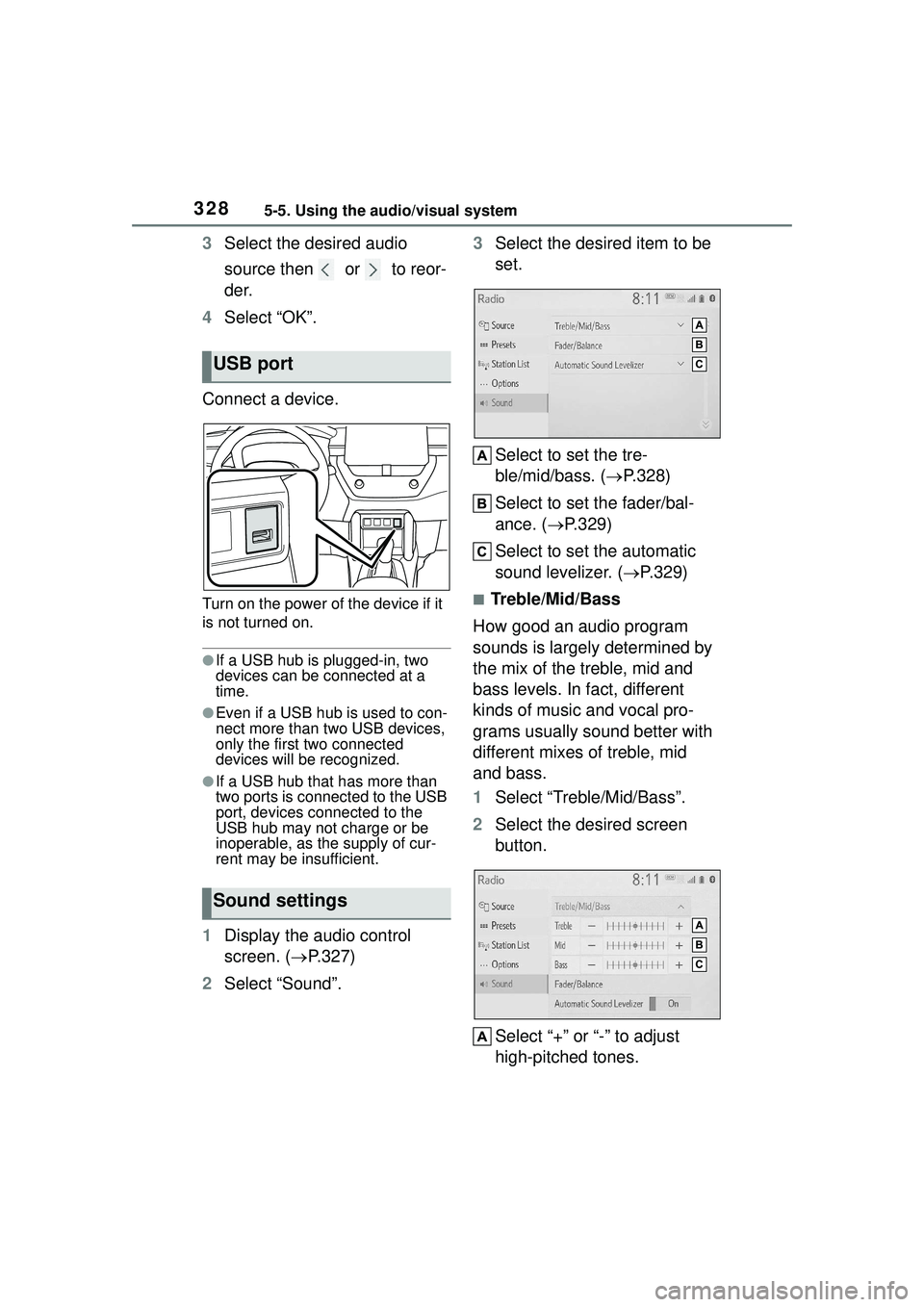
Connect a device.
Turn on the power of the device if it
is not turned on.
●If a USB hub is plugged-in, two
devices can be connected at a
time.
●Even if a USB hub is used to con-
nect more than two USB devices,
only the first two connected
devices will be recognized.
●If a USB hub that has more than
two ports is connected to the USB
port, devices connected to the
USB hub may not charge or be
inoperable, as the supply of cur-
rent may be insufficient.
1 Display the audio control
screen. ( P.327)
2 Select “Sound”. 3
Select the desired item to be
set.
Select to set the tre-
ble/mid/bass. ( P.328)
Select to set the fader/bal-
ance. ( P.329)
Select to set the automatic
sound levelizer. ( P.329)
■Treble/Mid/Bass
How good an audio program
sounds is largely determined by
the mix of the treble, mid and
bass levels. In fact, different
kinds of music and vocal pro-
grams usually sound better with
different mixes of treble, mid
and bass.
1 Select “Treble/Mid/Bass”.
2 Select the desired screen
button.
Select “+” or “-” to adjust
high-pitched tones.
USB port
Sound settings
Page 329 of 612
3295-5. Using the audio/visual system
5
Audio
Select “+” or “-” to adjust
mid-pitched tones.
Select “+” or “-” to adjust
low-pitched tones.
■Fader/Balance
A good balance of the left and
right stereo channels and of the
front and rear sound levels is
also important.
Keep in mind that when listening
to a stereo recording or broad-
cast, changing the right/left bal-
ance will increase the volume of
1 group of sounds while
decreasing the volume of
another.
1 Select “Fader/Balance”.
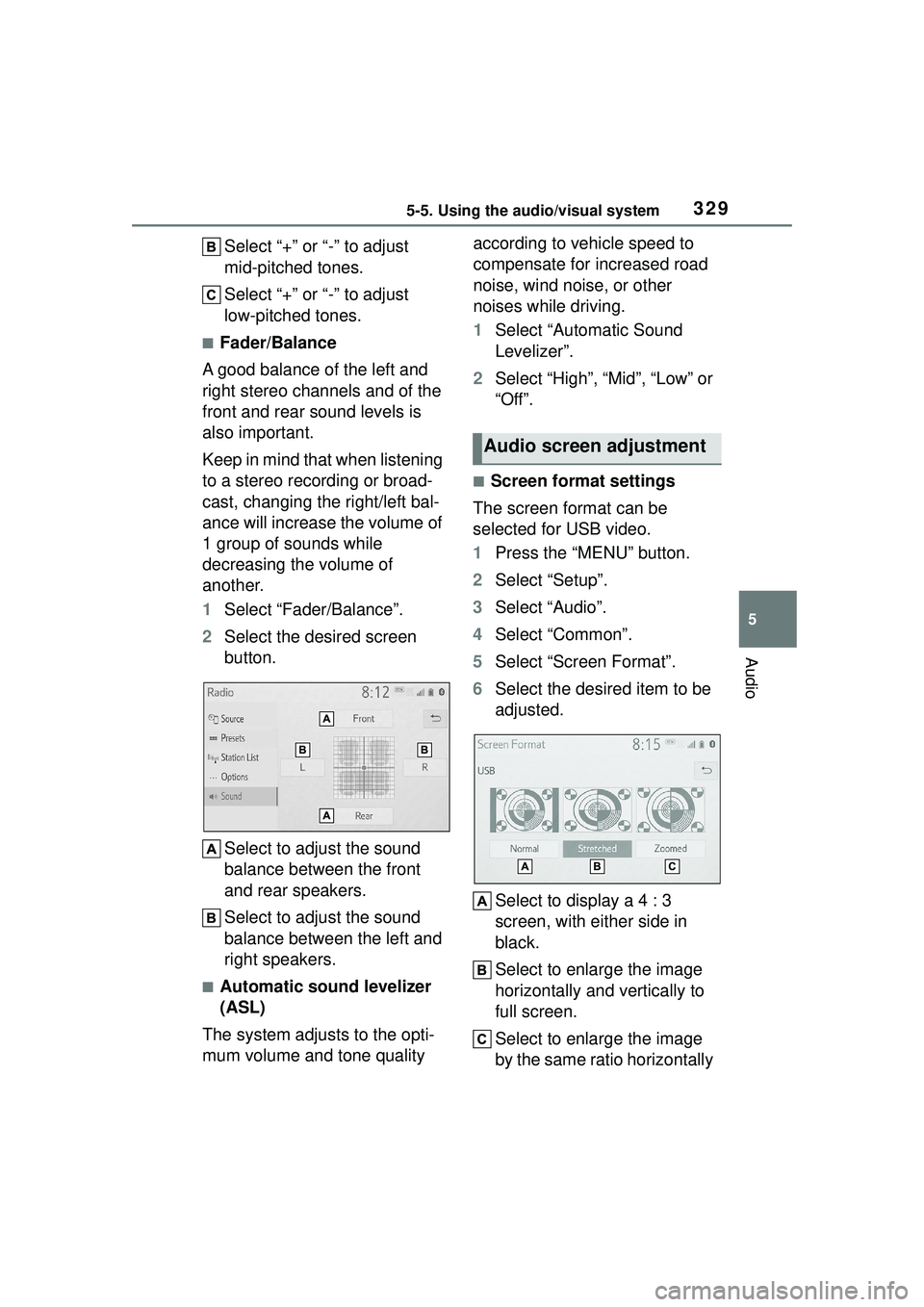
2 Select the desired screen
button.
Select to adjust the sound
balance between the front
and rear speakers.
Select to adjust the sound
balance between the left and
right speakers.
■Automatic sound levelizer
(ASL)
The system adjusts to the opti-
mum volume and tone quality according to vehicle speed to
compensate for increased road
noise, wind noise, or other
noises while driving.
1
Select “Automatic Sound
Levelizer”.
2 Select “High”, “Mid”, “Low” or
“Off”.
■Screen format settings
The screen format can be
selected for USB video.
1 Press the “MENU” button.
2 Select “Setup”.
3 Select “Audio”.
4 Select “Common”.
5 Select “Screen Format”.
6 Select the desired item to be
adjusted.
Select to display a 4 : 3
screen, with either side in
black.
Select to enlarge the image
horizontally and vertically to
full screen.
Select to enlarge the image
by the same ratio horizontally
Audio screen adjustment
Page 337 of 612
3375-7. Media operation
5
Audio
5-7.Media operation
The USB memory operation
screen can be reached by the
following methods: P.327
Connecting a USB memory
( P.328)
When an Apple CarPlay/Android
Auto connection is established,
this function will be unavailable
*.
*: This function is not made avail- able in some countries or areas.
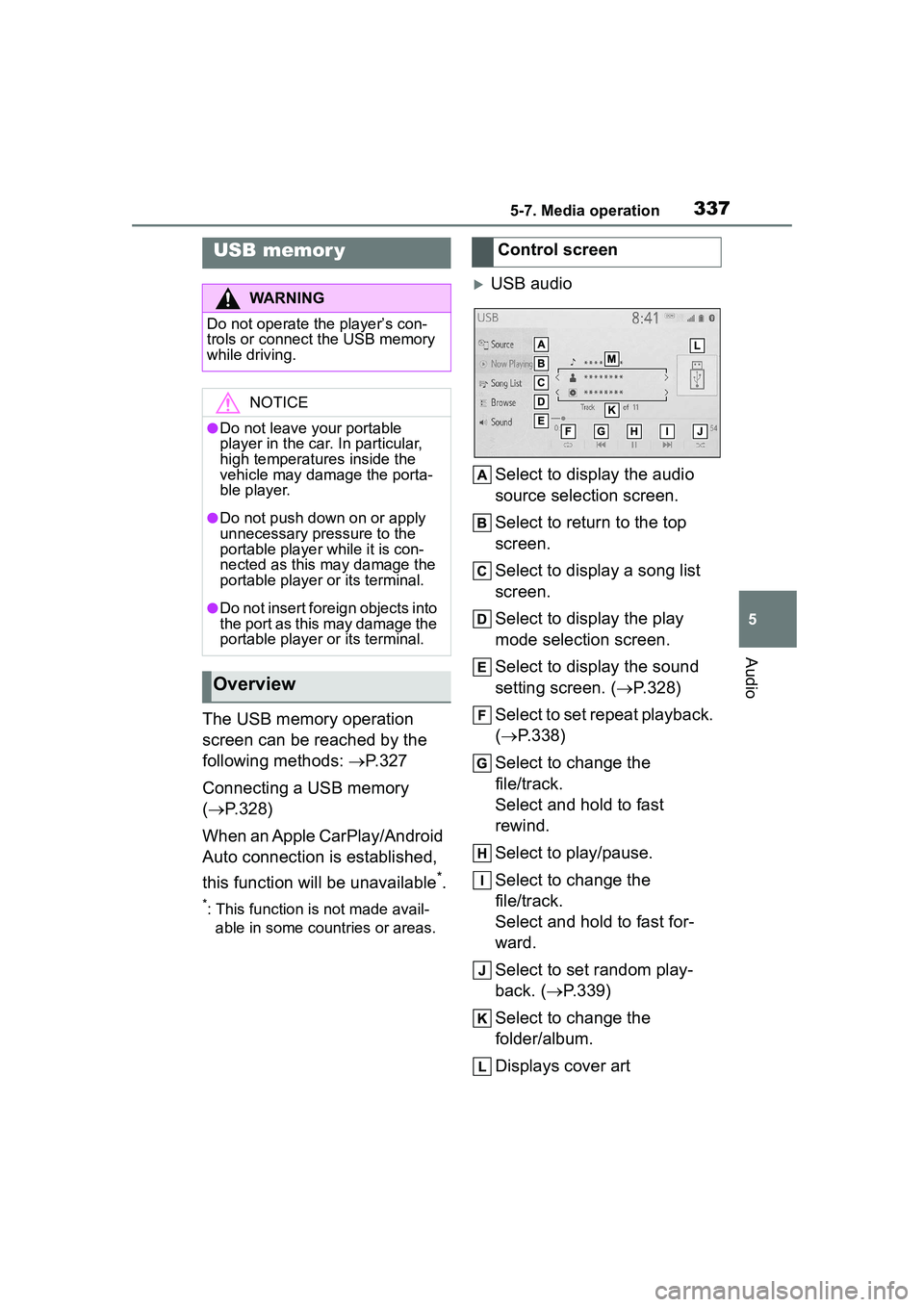
USB audio
Select to display the audio
source selection screen.
Select to return to the top
screen.
Select to display a song list
screen.
Select to display the play
mode selection screen.
Select to display the sound
setting screen. ( P.328)
Select to set repeat playback.
( P.338)
Select to change the
file/track.
Select and hold to fast
rewind.
Select to play/pause.
Select to change the
file/track.
Select and hold to fast for-
ward.
Select to set random play-
back. (P.339)
Select to change the
folder/album.
Displays cover art
USB memor y
WARNING
Do not operate the player’s con-
trols or connect the USB memory
while driving.
NOTICE
●Do not leave your portable
player in the car. In particular,
high temperatures inside the
vehicle may damage the porta-
ble player.
●Do not push down on or apply
unnecessary pressure to the
portable player while it is con-
nected as this may damage the
portable player or its terminal.
●Do not insert foreign objects into
the port as this may damage the
portable player or its terminal.
Overview
Control screen
Page 338 of 612
3385-7. Media operation
Select to change the artist.
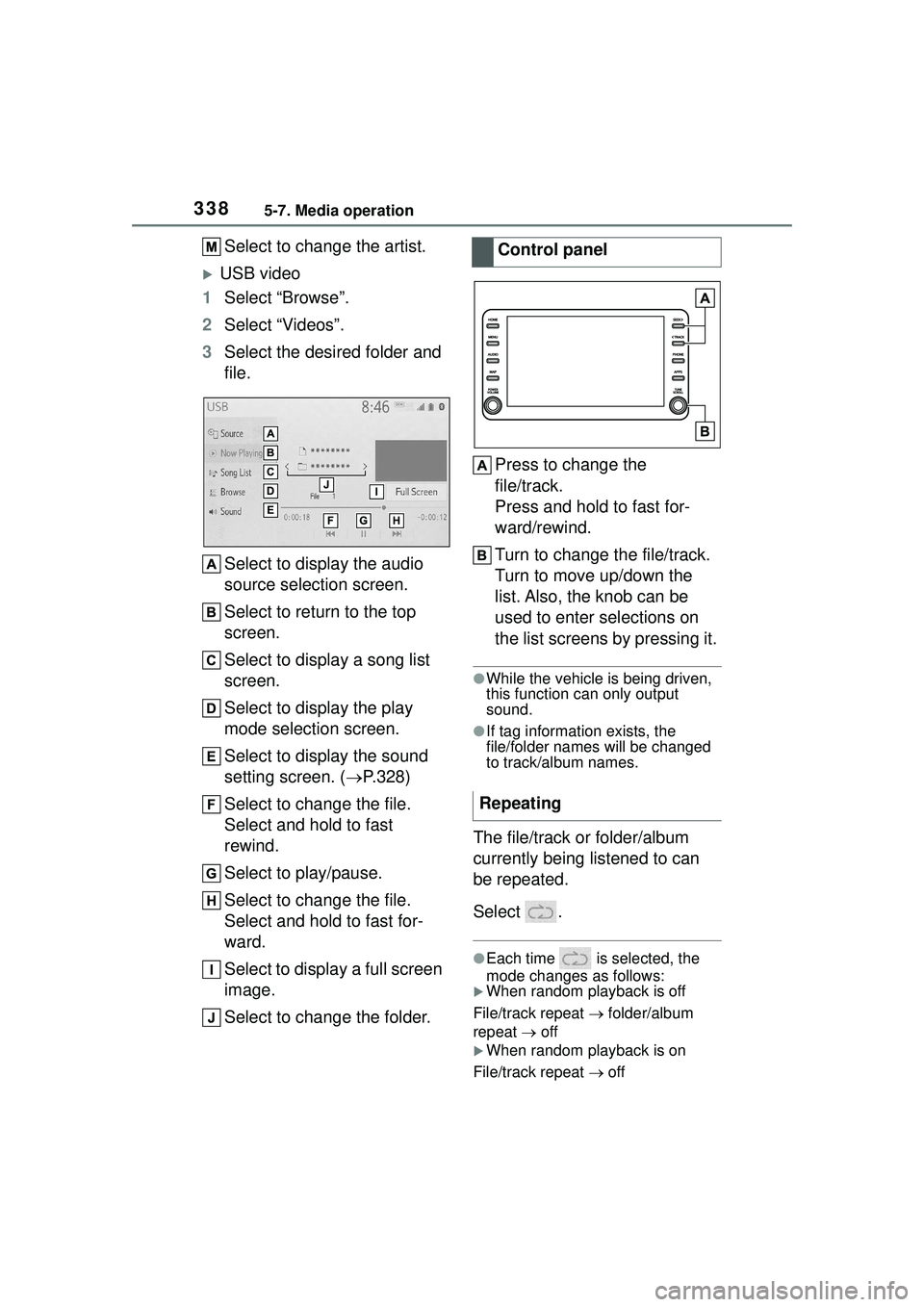
USB video
1 Select “Browse”.
2 Select “Videos”.
3 Select the desired folder and
file.
Select to display the audio
source selection screen.
Select to return to the top
screen.
Select to display a song list
screen.
Select to display the play
mode selection screen.
Select to display the sound
setting screen. ( P.328)
Select to change the file.
Select and hold to fast
rewind.
Select to play/pause.
Select to change the file.
Select and hold to fast for-
ward.
Select to display a full screen
image.
Select to change the folder. Press to change the
file/track.
Press and hold to fast for-
ward/rewind.
Turn to change the file/track.
Turn to move up/down the
list. Also, the knob can be
used to enter selections on
the list screens by pressing it.
●While the vehicle is being driven,
this function can only output
sound.
●If tag information exists, the
file/folder names will be changed
to track/album names.
The file/track or folder/album
currently being listened to can
be repeated.
Select .
●Each time is selected, the
mode changes as follows:
When random playback is off
File/track repeat folder/album
repeat off
When random playback is on
File/track repeat off
Control panel
Repeating
Page 347 of 612
3475-8. Audio/visual remote controls
5
Audio
5-8.Audio/visual remote controls
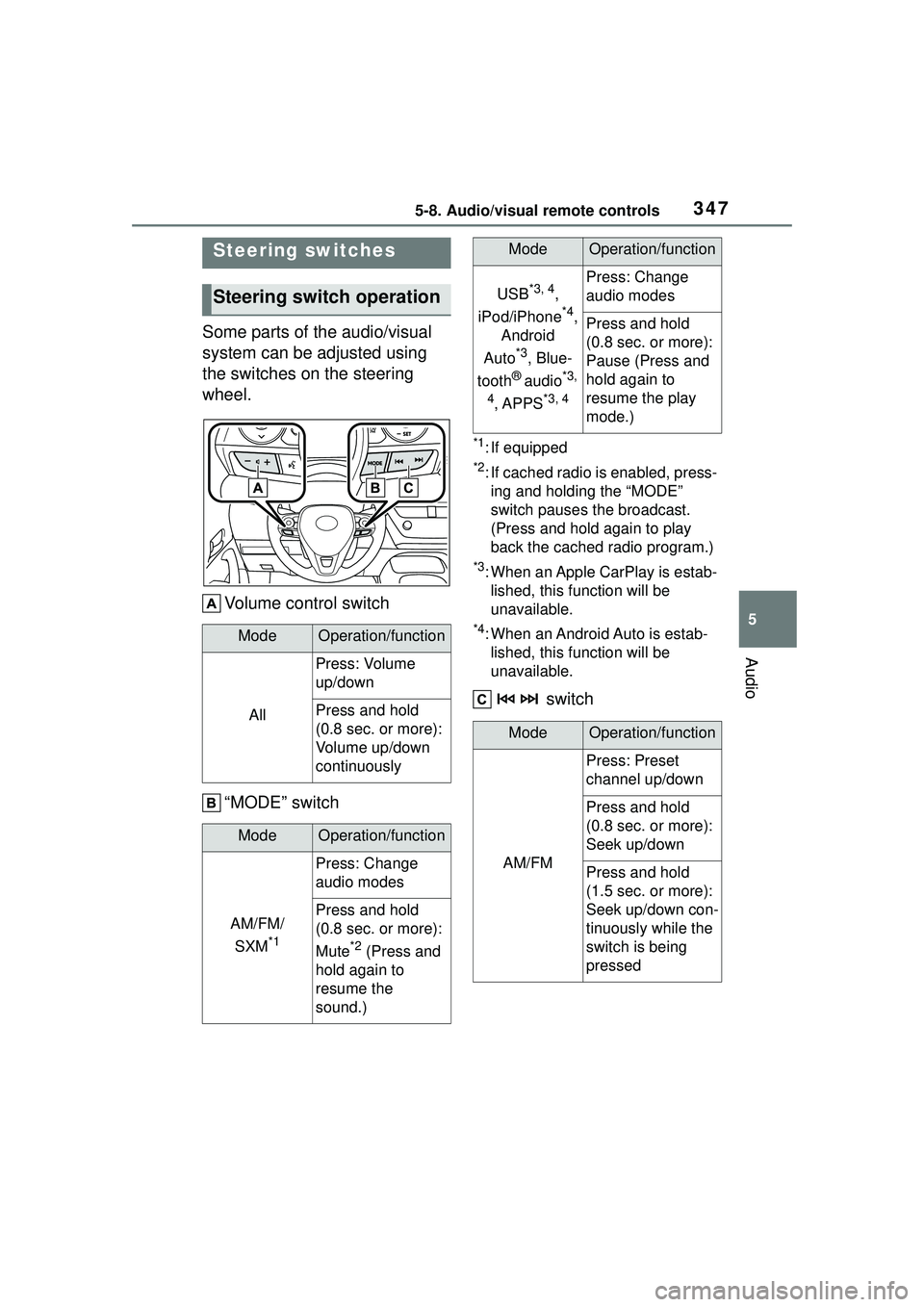
Some parts of the audio/visual
system can be adjusted using
the switches on the steering
wheel.Volume control switch
“MODE” switch
*1: If equipped
*2: If cached radio is enabled, press-ing and holding the “MODE”
switch pauses the broadcast.
(Press and hold again to play
back the cached radio program.)
*3: When an Apple CarPlay is estab-lished, this function will be
unavailable.
*4: When an Android Auto is estab-lished, this function will be
unavailable.
switch
Steering switches
Steering switch operation
ModeOperation/function
All
Press: Volume
up/down
Press and hold
(0.8 sec. or more):
Volume up/down
continuously
ModeOperation/function
AM/FM/
SXM
*1
Press: Change
audio modes
Press and hold
(0.8 sec. or more):
Mute
*2 (Press and
hold again to
resume the
sound.)
USB*3, 4,
iPod/iPhone
*4,
Android
Auto
*3, Blue-
tooth
® audio*3,
4
, APPS*3, 4
Press: Change
audio modes
Press and hold
(0.8 sec. or more):
Pause (Press and
hold again to
resume the play
mode.)
ModeOperation/function
AM/FM
Press: Preset
channel up/down
Press and hold
(0.8 sec. or more):
Seek up/down
Press and hold
(1.5 sec. or more):
Seek up/down con-
tinuously while the
switch is being
pressed
ModeOperation/function
Page 348 of 612
3485-8. Audio/visual remote controls
*1: If equipped
*2: When an Apple CarPlay is estab-lished, this function will be
unavailable.
*3: When an Android Auto is estab-lished, this function will be
unavailable.
In the APPS mode, some operation
may be done on the screen depend
on the selected APPS.
SXM*1
Press: Preset
channel up/down
Press and hold
(0.8 sec. or more):
Seek for stations in
the relevant pro-
gram type/channel
category
Press and hold
(1.5 sec. or more):
Fast channel
up/down
USB*2, 3,
iPod/iPhone
*3,
Bluetooth
®
audio
*2, 3
Press: Track/file
up/down
Press and hold
(0.8 sec. or more):
Fast for-
ward/rewind
Android Auto*2Press: Track
up/down
ModeOperation/function
Page 349 of 612
3495-9. Audio settings
5
Audio
5-9.Audio settings
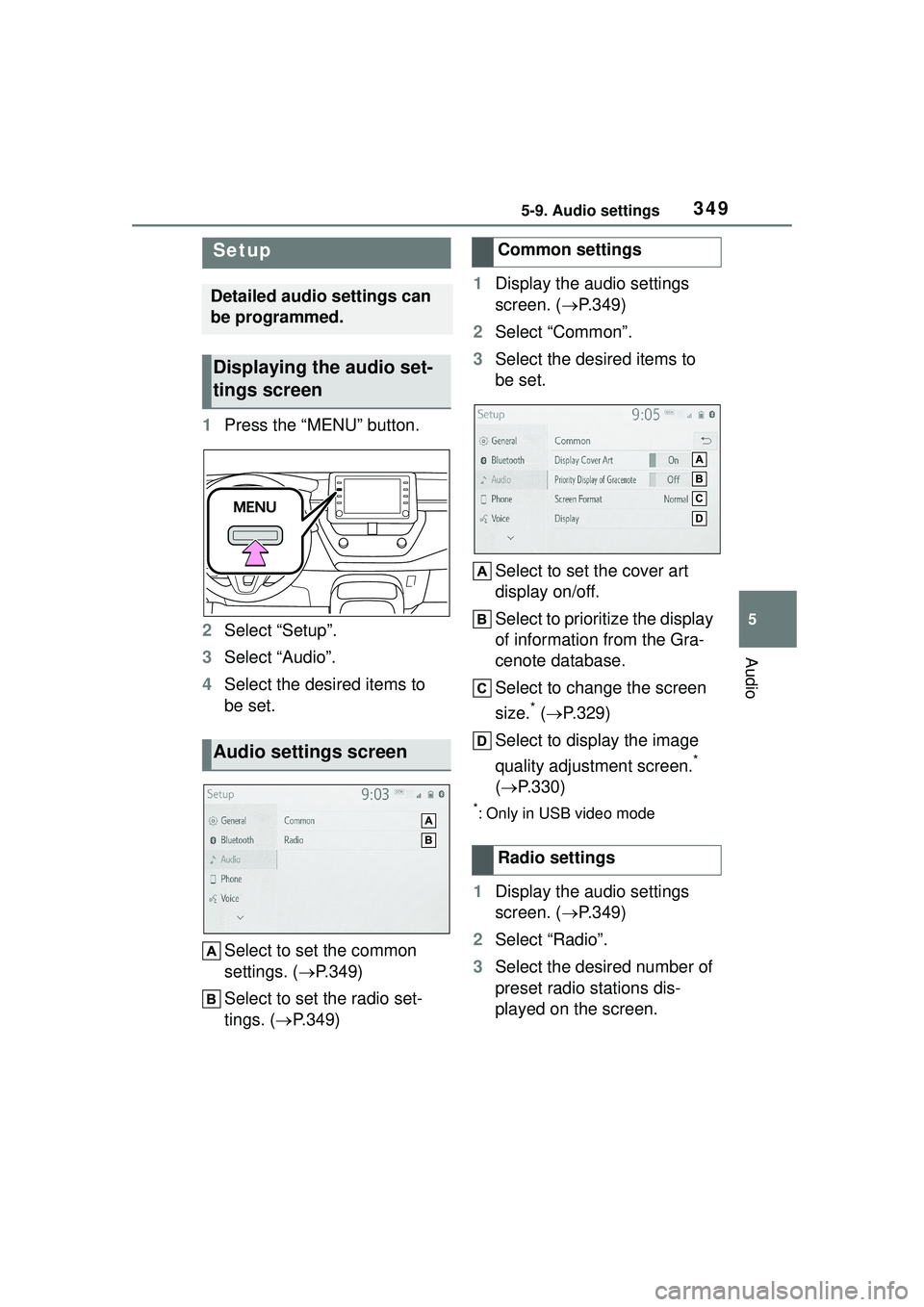
1Press the “MENU” button.
2 Select “Setup”.
3 Select “Audio”.
4 Select the desired items to
be set.
Select to set the common
settings. ( P.349)
Select to set the radio set-
tings. ( P.349) 1
Display the audio settings
screen. ( P.349)
2 Select “Common”.
3 Select the desired items to
be set.
Select to set the cover art
display on/off.
Select to prioritize the display
of information from the Gra-
cenote database.
Select to change the screen
size.
* ( P.329)
Select to display the image
quality adjustment screen.
*
( P.330)
*: Only in USB video mode
1Display the audio settings
screen. ( P.349)
2 Select “Radio”.
3 Select the desired number of
preset radio stations dis-
played on the screen.
Setup
Detailed audio settings can
be programmed.
Displaying the audio set-
tings screen
Audio settings screen
Common settings
Radio settings
Page 351 of 612
3515-10. Tips for operating the audio/visual system
5
Audio
Station interference: When a
reflected signal and a signal
received directly from a radio
station are very nearly the same
frequency, they can interfere
with each other, making it diffi-
cult to hear the broadcast.
Static: AM is easily affected by
external sources of electrical
noise, such as high tension
power lines, lightening or electri-
cal motors. This results in static.
■SiriusXM
Cargo loaded on the roof lug-
gage carrier, especially metal
objects, may adversely affect
the reception of SiriusXM Sat-
ellite Radio.
Alternation or modifications
carried out without appropri-
ate authorization may invali-
date the user’s right to
operate the equipment.
■Compatible models
Made for
• iPhone X
• iPhone 8
• iPhone 8 Plus
• iPhone 7
• iPhone 7 Plus
• iPhone SE
• iPhone 6s
• iPhone 6s Plus
• iPhone 6
• iPhone 6 Plus
• iPhone 5s • iPhone 5c
• iPhone 5
• iPod touch (6th generation)
• iPod touch (5th generation)
●This system only supports audio
playback.
●Depending on difference between
models or software versions etc.,
some models might be incompati-
ble with this system.
This device supports high-reso-
lution sound sources.
The definition of high-resolution
is based on the standards of
groups such as the CTA (Con-
sumer Technology Association).
Supported formats and play-
able media are as follows.
■Supported formats
WAV, FLAC, ALAC, OGG Vorbis
■Playable media
USB memoryiPod
High-resolution sound
source
File information
Compatible USB devices
USB communi-
cation formatsUSB 2.0 HS (480
Mbps)
File formatsFAT 16 /3 2
Correspon-
dence classMass storage
class
Page 352 of 612
3525-10. Tips for operating the audio/visual system
*: USB video only
*1: Only compatible with Windows Media Audio Standard
*2: Sound source of 48kHz or more is down-converted to
48kHz/24bit.
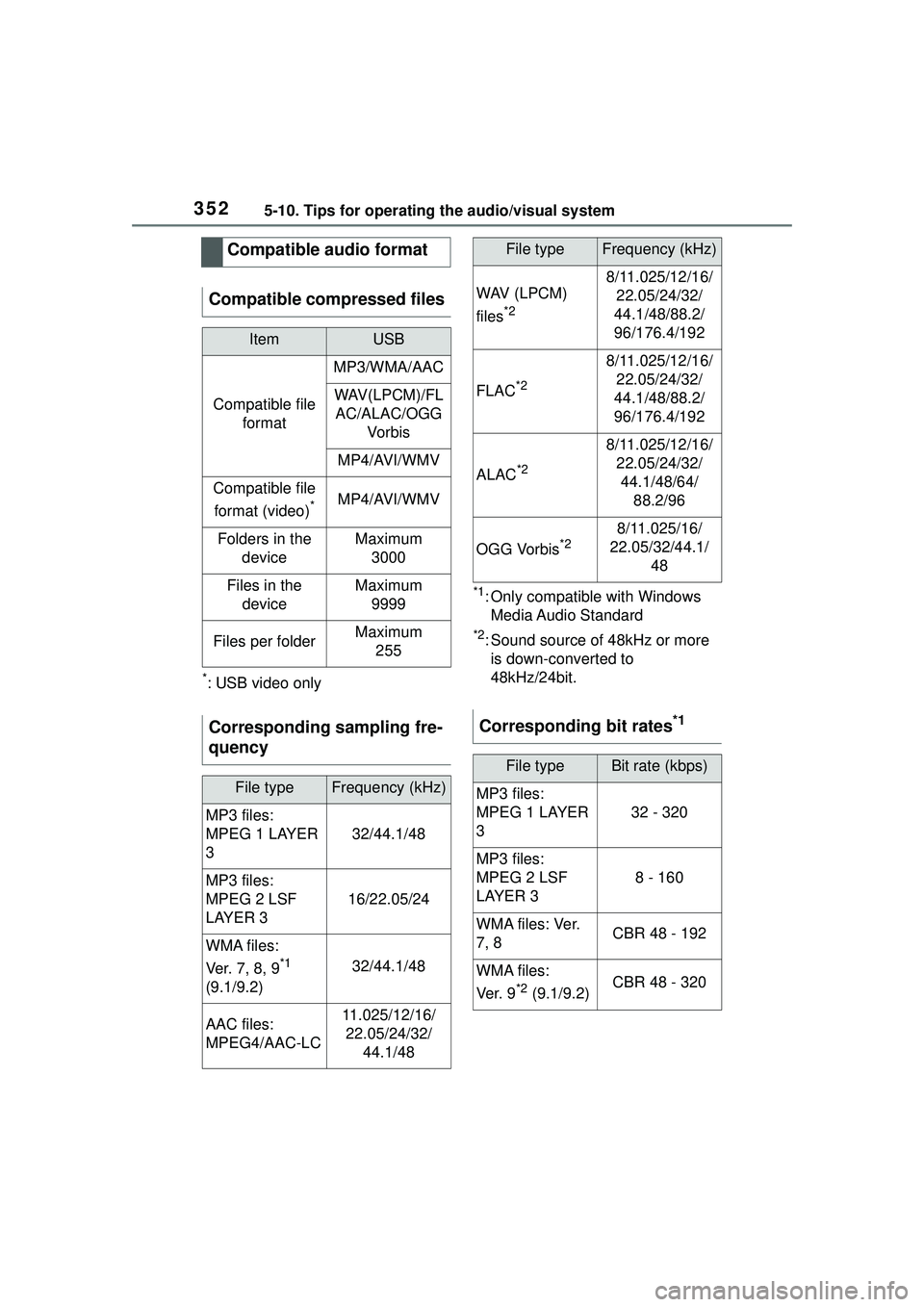
Compatible audio format
Compatible compressed files
ItemUSB
Compatible file format
MP3/WMA/AAC
WAV(LPCM)/FLAC/ALAC/OGG Vo r b is
MP4/AVI/WMV
Compatible file
format (video)
*MP4/AVI/WMV
Folders in the deviceMaximum3000
Files in the deviceMaximum 9999
Files per folderMaximum 255
Corresponding sampling fre-
quency
File typeFrequency (kHz)
MP3 files:
MPEG 1 LAYER
3
32/44.1/48
MP3 files:
MPEG 2 LSF
LAYER 3
16/22.05/24
WMA files:
Ver. 7 , 8, 9
*1
(9.1/9.2)32/44.1/48
AAC files:
MPEG4/AAC-LC11.025/12/16/ 22.05/24/32/ 44.1/48
WAV (LPCM)
files
*2
8/11.025/12/16/22.05/24/32/
44.1/48/88.2/
96/176.4/192
FLAC*2
8/11.025/12/16/ 22.05/24/32/
44.1/48/88.2/
96/176.4/192
ALAC*2
8/11.025/12/16/ 22.05/24/32/44.1/48/64/ 88.2/96
OGG Vorbis*28/11.025/16/
22.05/32/44.1/ 48
Corresponding bit rates*1
File typeBit rate (kbps)
MP3 files:
MPEG 1 LAYER
3
32 - 320
MP3 files:
MPEG 2 LSF
LAYER 3
8 - 160
W M A f i l e s : Ve r.
7, 8CBR 48 - 192
WMA files:
Ve r. 9
*2 (9.1/9.2)CBR 48 - 320
File typeFrequency (kHz)
Page 353 of 612
3535-10. Tips for operating the audio/visual system
5
Audio
*1: Variable Bit Rate (VBR) compati-ble
*2: Only compatible with Windows Media Audio Standard
MP3 (MPEG Audio Layer 3),
WMA (Windows Media Audio)
and AAC (Advanced Audio
Coding) are audio compres-
sion standards.
This system can play
MP3/WMA/AAC files on USB memory.
MP4, WMV and AVI files can
use the following resolutions:
128x96, 160x120, 176x144
(QCIF), 320x240 (QVGA),
352x240 (SIF), 352x288
(CIF), 640x480 (VGA),
720x480 (NTSC), 720x576
(PAL)
When naming an
MP3/WMA/AAC file, add an
appropriate file extension
(.mp3/.wma/.m4a).
This system plays back files
with .mp3/.wma/.m4a file
extensions as
MP3/WMA/AAC files respec-
tively. To prevent noise and
playback errors, use the
appropriate file extension.
MP3 files are compatible with
the ID3 Tag Ver. 1.0, Ver. 1.1,
Ver. 2.2 and Ver. 2.3 formats.
This system cannot display
disc title, track title and artist
name in other formats.
WMA/AAC files can contain a
WMA/AAC tag that is used in
the same way as an ID3 tag.
WMA/AAC tags carry infor-
mation such as track title and
artist name.
The emphasis function is
available only when playing
MP3 files.
This system can play back
AAC files encoded by iTunes.
The sound quality of
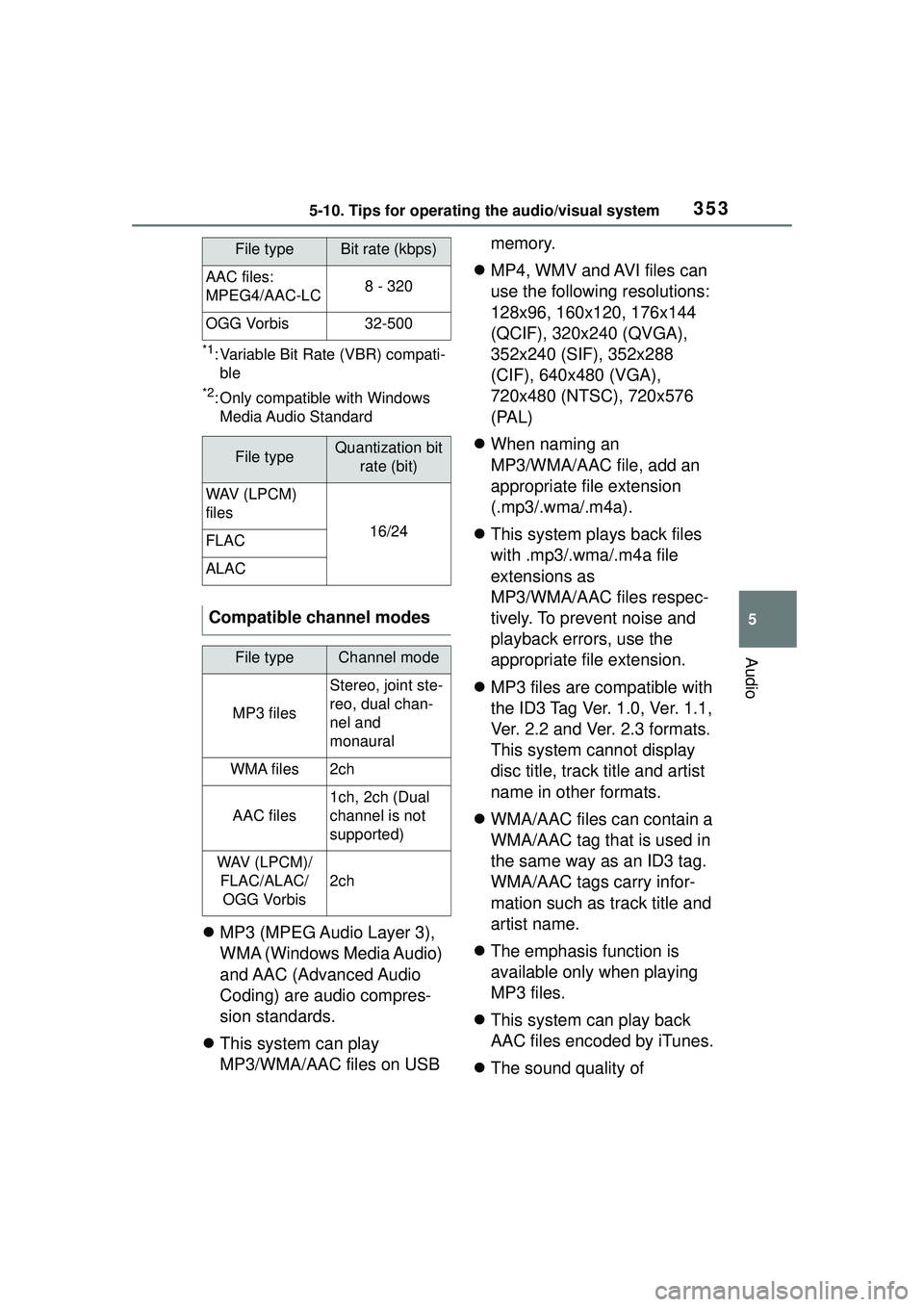
AAC files:
MPEG4/AAC-LC8 - 320
OGG Vorbis32-500
File typeQuantization bit
rate (bit)
WAV (LPCM)
files
16/24FLAC
ALAC
Compatible channel modes
File typeChannel mode
MP3 files
Stereo, joint ste-
reo, dual chan-
nel and
monaural
WMA files2ch
AAC files
1ch, 2ch (Dual
channel is not
supported)
WAV (LPCM)/FLAC/ALAC/OGG Vorbis
2ch
File typeBit rate (kbps)