customized TOYOTA COROLLA CROSS HYBRID 2023 Owners Manual
[x] Cancel search | Manufacturer: TOYOTA, Model Year: 2023, Model line: COROLLA CROSS HYBRID, Model: TOYOTA COROLLA CROSS HYBRID 2023Pages: 516, PDF Size: 15.96 MB
Page 70 of 516
701-4. Hybrid system
■Charging the 12-volt battery
P. 4 3 5
■After the 12-volt battery has dis-
charged or when the terminal
has been removed and installed
during exchange, etc.
The gasoline engine may not stop
even if the vehicle is being driven by
the hybrid battery (traction battery).
If this continues for a few days, con-
tact your Toyota dealer.
■Sounds and vibrations specific
to a hybrid vehicle
There may be no engine sound or
vibration even though the vehicle is
able to move with the “READY” indi-
cator is illuminated. For safety, apply
the parking brake and make sure to
shift the shift lever to P when
parked.
The following sounds or vibrations
may occur when the hybrid system
is operating and are not a malfunc-
tion:
●Motor sounds may be heard from
the engine compartment.
●Sounds may be heard from the
hybrid battery (traction battery)
under the rear seats when the
hybrid system starts or stops.
●Relay operating sounds such as a
snap or soft clank will be emitted
from the hybrid battery (traction
battery), under the rear seats,
when the hybrid system is started
or stopped.
●Sounds from the hybrid system
may be heard when the back door
is open.
●Sounds may be heard from the
transmission when the gasoline
engine starts or stops, when driv-
ing at low speeds, or during idling.
●Engine sounds may be heard
when accelerating sharply.
●Sounds may be heard due to
regenerative braking when the
brake pedal is dep ressed or as
the accelerator pedal is released.
●Vibration may be felt when the
gasoline engine starts or stops.
●Cooling fan sounds may be heard
from the air intake vent on the side
of the lower part of the rear left
seat.
■Maintenance, repair, recycling,
and disposal
Contact your Toyota dealer regard-
ing maintenance, repair, recycling
and disposal. Do n ot dispose of the
vehicle yourself.
■Customization
Some functions can be customized.
( P.463)
When driving with the gasoline
engine stopped, a sound, which
changes in accordance with the
driving speed, will be played in
order to warn people nearby of
the vehicle’s approach. The
sound will stop when the vehicle
speed exceeds approximately
22 mph (35 km/h).
■Vehicle proximity notification
system
In the following ca ses, the vehicle
proximity notification system may be
difficult for surrounding people to
hear.
●In very noisy areas
●In the wind or the rain
Also, as the vehicle proximity notifi-
cation system is installed on the
front of the vehicle, it may be more
difficult to hear fr om the rear of the
vehicle compared to the front.
Acoustic Vehicle Alerting
System
Page 98 of 516
982-1. Instrument cluster
the power switch is turned off, this
suggestion message will not be dis-
played.
■Customization
Some functions can be customized.
( P.463)
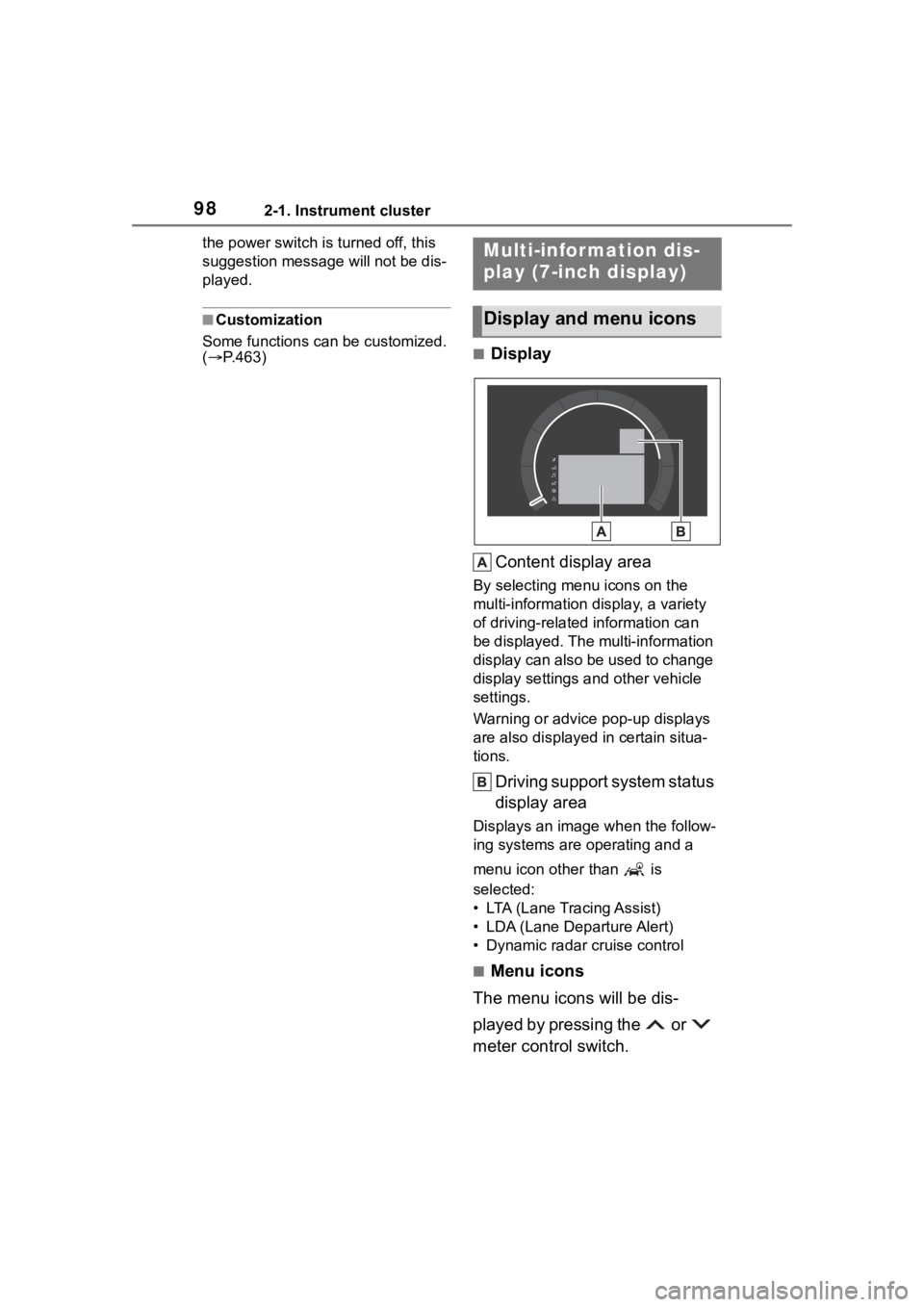
■Display
Content display area
By selecting menu icons on the
multi-information di splay, a variety
of driving-related information can
be displayed. The multi-information
display can also be used to change
display settings and other vehicle
settings.
Warning or advice pop-up displays
are also displayed in certain situa-
tions.
Driving support system status
display area
Displays an image when the follow-
ing systems are operating and a
menu icon other than is
selected:
• LTA (Lane Tracing Assist)
• LDA (Lane Departure Alert)
• Dynamic radar cruise control
■Menu icons
The menu icons will be dis-
played by pressing the or
meter control switch.
Multi-infor mation dis-
play (7-inch display)
Display and menu icons
Page 114 of 516
1143-1. Key information
Opens and closes the power
back door
*2 ( P.123)
Sounds the alarm ( P.114)
*1:This setting must be customized
at your Toyota dealer.
*2: If equipped
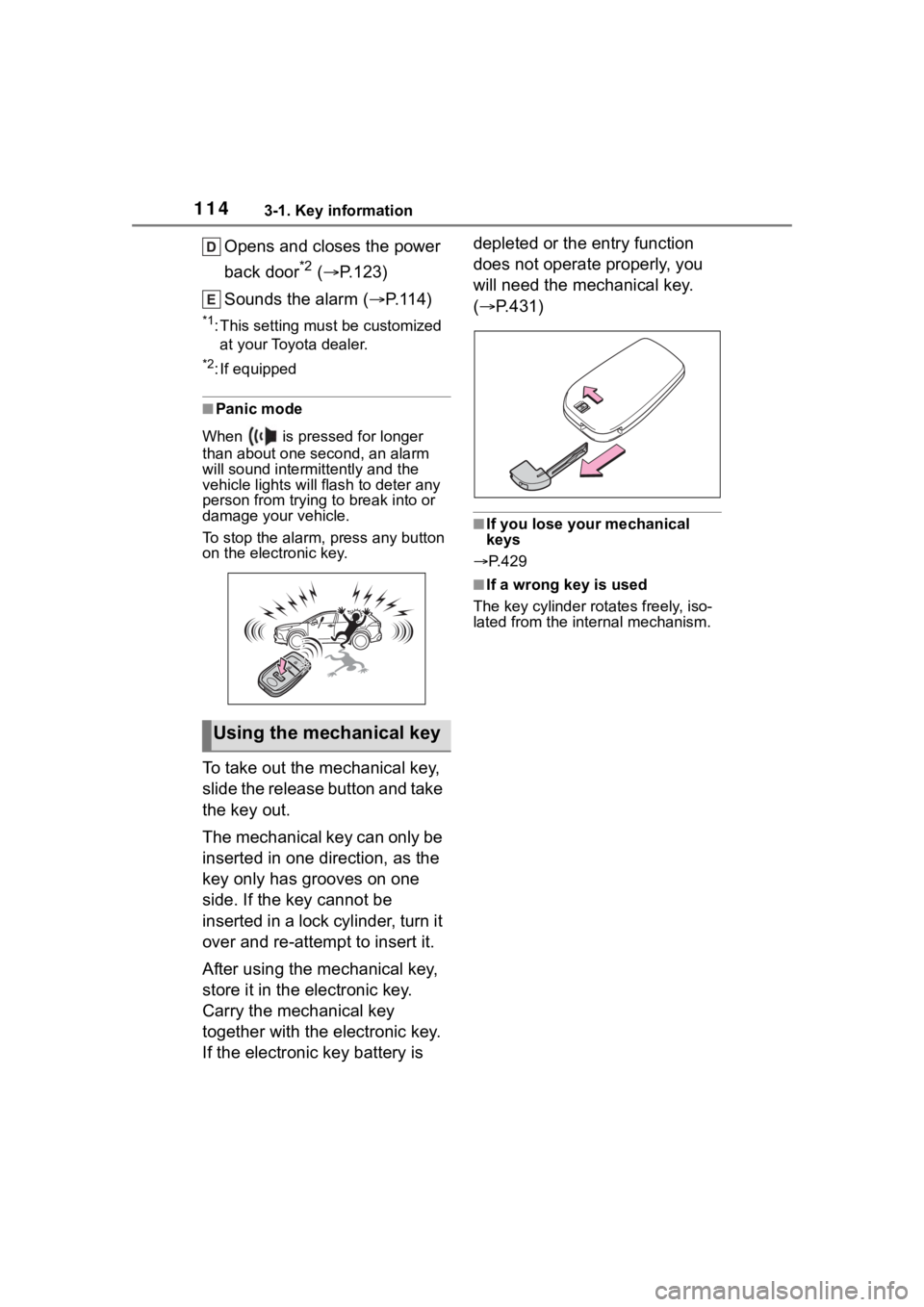
■Panic mode
When is pressed for longer
than about one second, an alarm
will sound intermittently and the
vehicle lights will f lash to deter any
person from trying to break into or
damage your vehicle.
To stop the alarm, press any button
on the electronic key.
To take out the mechanical key,
slide the release button and take
the key out.
The mechanical key can only be
inserted in one direction, as the
key only has grooves on one
side. If the key cannot be
inserted in a lock cylinder, turn it
over and re-attempt to insert it.
After using the mechanical key,
store it in the electronic key.
Carry the mechanical key
together with the electronic key.
If the electronic key battery is depleted or the entry function
does not operate properly, you
will need the mechanical key.
(
P.431)
■If you lose your mechanical
keys
P.429
■If a wrong key is used
The key cylinder rotates freely, iso-
lated from the internal mechanism.
Using the mechanical key
Page 115 of 516
1153-2. Opening, closing and locking the doors
3
Before driving
3-2.Opening, closing and locking the doors
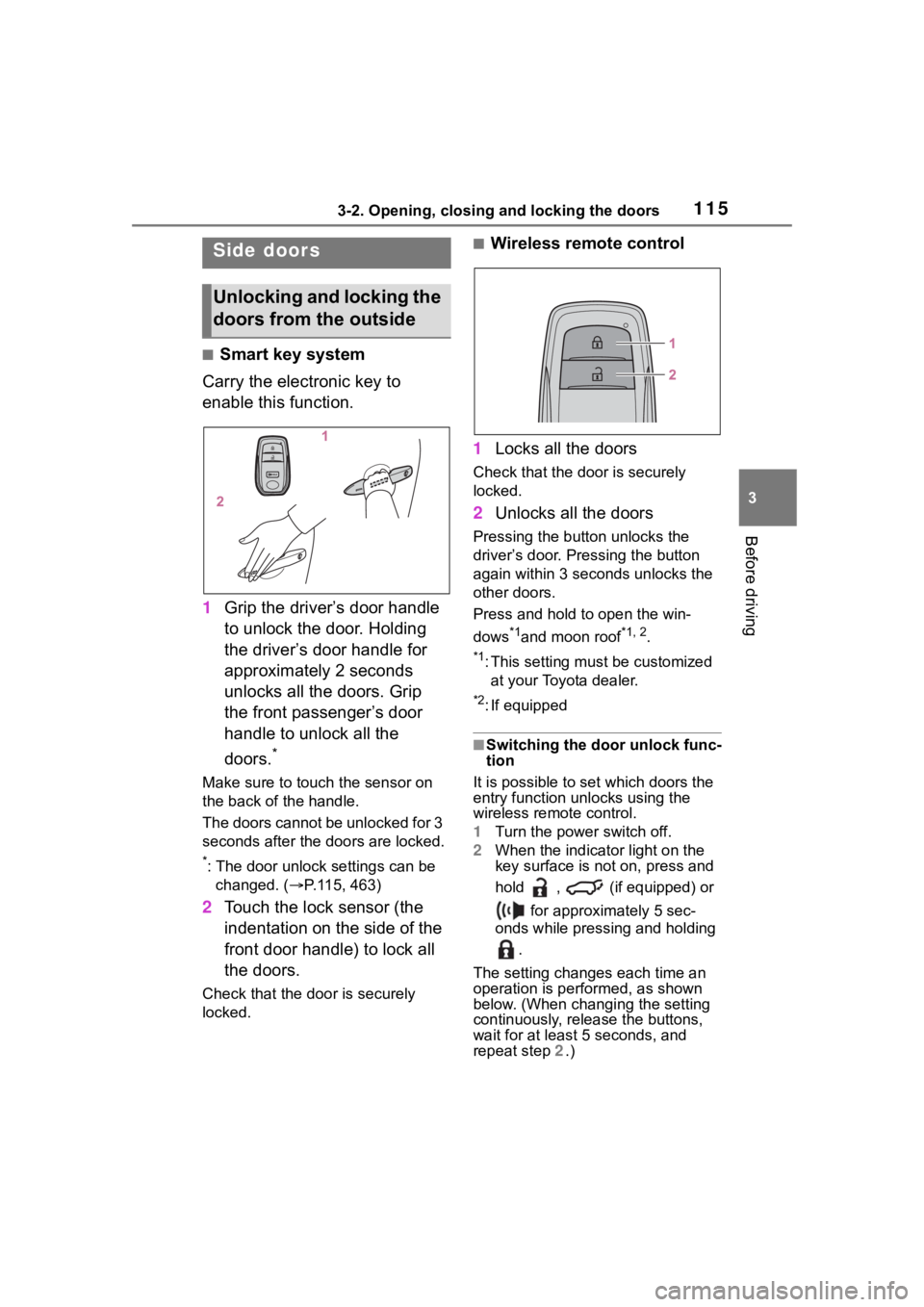
■Smart key system
Carry the electronic key to
enable this function.
1 Grip the driver’s door handle
to unlock the door. Holding
the driver’s door handle for
approximately 2 seconds
unlocks all the doors. Grip
the front passenger’s door
handle to unlock all the
doors.
*
Make sure to touch the sensor on
the back of the handle.
The doors cannot be unlocked for 3
seconds after the doors are locked.
*: The door unlock settings can be
changed. ( P.115, 463)
2 Touch the lock sensor (the
indentation on the side of the
front door handle) to lock all
the doors.
Check that the door is securely
locked.
■Wireless remote control
1 Locks all the doors
Check that the d oor is securely
locked.
2 Unlocks all the doors
Pressing the button unlocks the
driver’s door. Pressing the button
again within 3 seconds unlocks the
other doors.
Press and hold to open the win-
dows
*1and moon roof*1, 2.
*1: This setting must be customized
at your Toyota dealer.
*2: If equipped
■Switching the door unlock func-
tion
It is possible to set which doors the
entry function unlocks using the
wireless remote control.
1 Turn the power switch off.
2 When the indicator light on the
key surface is not on, press and
hold , (if equipped) or
for approximately 5 sec-
onds while pressing and holding
.
The setting changes each time an
operation is per formed, as shown
below. (When changing the setting
continuously, release the buttons,
wait for at least 5 seconds, and
repeat step 2 .)
Side doors
Unlocking and locking the
doors from the outside
Page 117 of 516
1173-2. Opening, closing and locking the doors
3
Before driving
■If the smart key system or the
wireless remote control does
not operate properly
Use the mechanical key to lock and
unlock the doors. ( P.431)
Replace the key battery with a new
one if it is depleted. ( P.382)
■If the 12-volt battery is dis-
charged
The doors cannot be locked and
unlocked using the smart key sys-
tem or wireless remote control. Lock
or unlock the doors using the
mechanical key. ( P.431)
■Rear seat reminder function
In order to remind you not to forget
luggage, etc. in the rear seat, when
the power switch is turned off after
any of the following conditions are
met, a buzzer will sound and a mes-
sage will be displayed on the
multi-information di splay for approx-
imately 6 seconds.
●The hybrid system is started
within approximately 10 minutes
after opening and closing a rear
door.
●A rear door has been opened and
closed after the hybrid system
was started.
However, if a rear door is opened
and then closed within approxi-
mately 2 seconds , the rear seat
reminder function may not operate.
The rear seat rem inder function
determines that luggage, etc. has
been placed in a rear seat based on
opening and closing of a rear door.
Therefore, depending on the situa-
tion, the rear seat reminder function
may not operate and you may still
forget luggage, etc. in the rear seat,
or it may operate unnecessarily.
■Customization
Some functions can be customized.
( P.463)
WARNING
■To prevent an accident
Observe the following precautions
while driving the vehicle.
Failure to do so may result in a
door opening and an occupant
being thrown out o f the vehicle,
resulting in death o r serious injury.
●Ensure that all doors are prop-
erly closed and locked.
●Do not pull the inside door han-
dle while driving.
Be especially careful of the front
doors, as the doors may be
opened even if the inside lock
buttons are in the locked posi-
tion.
●Set the rear door child-protector
locks when children are seated
in the rear seats.
■When opening or closing a
door
Check the surroundings of the
vehicle such as wh ether the vehi-
cle is on an incline, whether there
is enough space for a door to
open and whether a strong wind
is blowing. When opening or clos-
ing the door, hold the door handle
tightly to prepare for any unpre-
dictable movement.
■When using the wireless
remote control and operating
the power windows or moon
roof (if equipped)
Operate the power windows or
moon roof after checking to make
sure that there is no possibility of
any passenger having any of their
body parts caught in the windows
or moon roof. Also, do not allow
children to operate the wireless
remote control. It is possible for
children and other passengers to
get caught in the power windows
or moon roof.
Page 125 of 516
1253-2. Opening, closing and locking the doors
3
Before driving
abled, the power back door will
not operate but can be opened
and closed manually.
●When the power back door is
opening/closing, if the power back
door becomes obstructed, opera-
tion will stop.
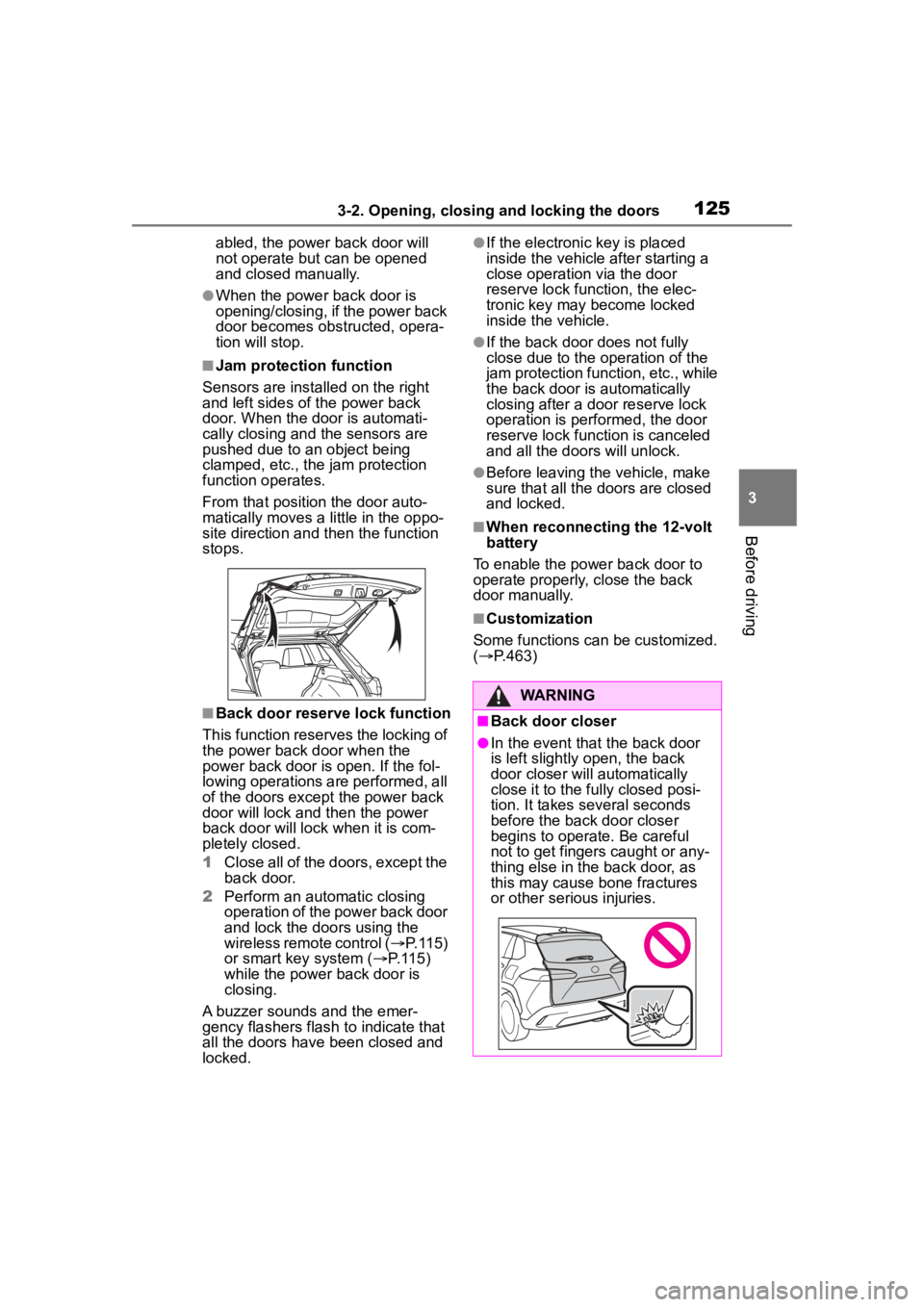
■Jam protection function
Sensors are installed on the right
and left sides of the power back
door. When the door is automati-
cally closing and the sensors are
pushed due to an object being
clamped, etc., the jam protection
function operates.
From that position the door auto-
matically moves a little in the oppo-
site direction and then the function
stops.
■Back door reserve lock function
This function reserves the locking of
the power back door when the
power back door is open. If the fol-
lowing operations are performed, all
of the doors except the power back
door will lock and then the power
back door will lock when it is com-
pletely closed.
1 Close all of the doors, except the
back door.
2 Perform an automatic closing
operation of the power back door
and lock the doors using the
wireless remote control ( P.115)
or smart key system ( P.115)
while the power back door is
closing.
A buzzer sounds and the emer-
gency flashers flash to indicate that
all the doors have been closed and
locked.
●If the electronic key is placed
inside the vehicle after starting a
close operation via the door
reserve lock function, the elec-
tronic key may become locked
inside the vehicle.
●If the back door does not fully
close due to the o peration of the
jam protection function, etc., while
the back door is automatically
closing after a do or reserve lock
operation is performed, the door
reserve lock function is canceled
and all the doors will unlock.
●Before leaving the vehicle, make
sure that all the doors are closed
and locked.
■When reconnecting the 12-volt
battery
To enable the power back door to
operate properly, close the back
door manually.
■Customization
Some functions can be customized.
( P.463)
WARNING
■Back door closer
●In the event that the back door
is left slightly open, the back
door closer will automatically
close it to the fu lly closed posi-
tion. It takes several seconds
before the back door closer
begins to operate. Be careful
not to get fingers caught or any-
thing else in the back door, as
this may cause bone fractures
or other serious injuries.
Page 133 of 516
1333-2. Opening, closing and locking the doors
3
Before driving
accidentally, or the door lock pre-
vention function may not operate.)
■If the smart key system does
not operate properly
●Locking and unlocking the doors:
P. 4 3 1
●Starting the hybrid system:
P. 4 3 2
■Customization
Some functions can be customized.
( P.463)
■If the smart key system has
been deactivated in a custom-
ized setting
●Locking and unlocking the doors:
Use the wireless remote control or
mechanical key. ( P.115, 431)
●Starting the hybrid system and
changing power switch modes:
P. 4 3 2
●Stopping the hybrid system:
P. 1 7 5
WARNING
■Caution regarding interfer-
ence with electronic devices
●People with implantable car-
diac pacemakers, cardiac
resynchronization ther-
apy-pacemakers or implantable
cardioverter defib rillators should
keep away from the smart key
system antennas. ( P.129)
The radio waves may affect the
operation of such devices. If
necessary, the entry function
can be disabled. Ask your Toy-
ota dealer for details, such as
the frequency of radio waves
and timing of the emitted radio
waves. Then, consult your doc-
tor to see if you should disable
the entry function.
●Users of any electrical medical
device other than implantable
cardiac pacemakers, cardiac
resynchronization ther-
apy-pacemakers or implantable
cardioverter defibrillators should
consult the manufacturer of the
device for information about its
operation under the influence of
radio waves.
Radio waves could have unex-
pected effects on the operation
of such medical devices.
Ask your Toyota dealer for details
on disabling the entry function.
Page 144 of 516
1443-5. Opening and closing the windows
5Release the power window
switch for a m oment, resume
pushing the switch in the
one-touch opening direction, and
hold it there for a pproximately 4
seconds or more.
6 Pull and hold the power window
switch in the one-touch closing
direction again. After the door
window is completely closed,
continue holding the switch for a
further 1 second or more.
If you release the switch while the
window is moving, start again from
the beginning.
If the window reverses and cannot
be fully closed or opened, have the
vehicle inspected by your Toyota
dealer.
■Door lock linked window opera-
tion
●The power windows can be
opened and closed using the
mechanical key.
* ( P.431)
●The power windows can be
opened using the wireless remote
control.
* ( P. 1 1 5 )
*: These settings must be custom-
ized at your Toyota dealer.
■Customization
Some functions can be customized.
( P.463)
WARNING
Observe the following precau-
tions. Failure to do so may result
in death or serious injury.
■Closing the windows
●The driver is responsible for all
the power window operations,
including the operation for the
passengers. In order to prevent
accidental operation, especially
by a child, do not let a child
operate the power windows. It is
possible for children and other
passengers to have body parts
caught in the power window.
Also, when ridin g with a child, it
is recommended to use the win-
dow lock switch. (
P.145)
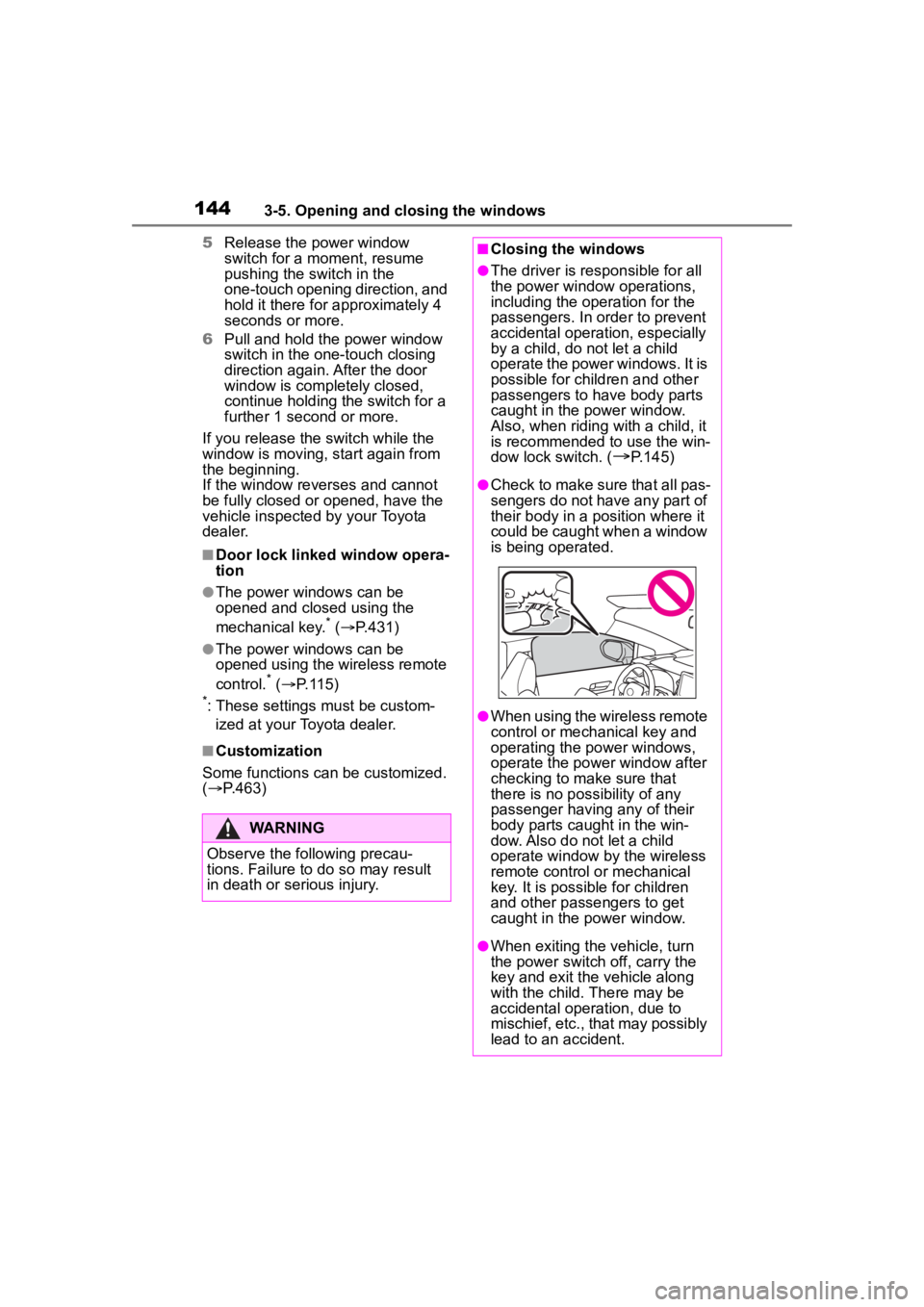
●Check to make sure that all pas-
sengers do not have any part of
their body in a pos ition where it
could be caught when a window
is being operated.
●When using the wireless remote
control or mechanical key and
operating the power windows,
operate the power window after
checking to make sure that
there is no possibility of any
passenger having any of their
body parts caug ht in the win-
dow. Also do not let a child
operate window by the wireless
remote control or mechanical
key. It is possib le for children
and other passengers to get
caught in the power window.
●When exiting the vehicle, turn
the power switch off, carry the
key and exit the vehicle along
with the child. There may be
accidental operation, due to
mischief, etc., that may possibly
lead to an accident.
Page 147 of 516
1473-5. Opening and closing the windows
3
Before driving
2Press and hold the “CLOSE”
switch.*1
The moon roof will close, reopen
and pause for approximately 10 sec-
onds.
*2 Then it will close again, tilt
up and pause for approximately 1
second. Finally, it will tilt down, open
and close.
3 Check to make sure that the
moon roof is completely closed
and then release the switch.
●If the moon roof tilts down but then
tilts back up
1 Stop the vehicle.
2 Press and hold the “UP” switch
*1
until the moon roof moves into
the tilt up position and stops.
3 Release the “UP” switch once
and then press and hold the “UP”
switch again.
*1
The moon roof will pause for
approximately 10 se conds in the tilt
up position.
*2 Then it will adjust
slightly and pause for approximately
1 second. Finally, it will tilt down,
open and close.
4 Check to make sure that the
moon roof is completely closed
and then release the switch.
*1: If the switch is released at the
incorrect time, t he procedure will
have to be performed again from
the beginning.
*2: If the switch is re leased after the
above mentioned 10 second
pause, automatic operation will
be disabled. In that case, press
and hold the “CLOSE” or “UP”
switch, and the mo on roof will tilt
up and pause for approximately 1
second. Then it will tilt down,
open and close. Check to make
sure that the moon roof is com-
pletely closed an d then release
the switch.
If the moon roof do es not fully close even after perfo
rming the above
procedure correctly, have the vehi-
cle inspected by your Toyota dealer.
■Customization
Some functions can be customized.
( P.463)
WARNING
Observe the following precau-
tions.
Failure to do so may cause death
or serious injury.
■Opening the moon roof
●Do not allow any passengers to
put their hands or heads outside
the vehicle while it is moving.
●Do not sit on top of the moon
roof.
■Opening and closing the
moon roof
●The driver is responsible for
moon roof opening and closing
operations.
In order to prevent accidental
operation, especially by a child,
do not let a child operate the
moon roof. It is possible for chil-
dren and other passengers to
have body parts caught in the
moon roof.
Page 175 of 516
1754-2. Driving procedures
4
Driving
using the smart key system. Refer
to P.433 to restart the hybrid sys-
tem.
■If the “READY” indicator does
not come on
In the event that the “READY” indi-
cator does not come on even after
performing the proper procedures
for starting the vehicle, contact your
Toyota dealer immediately.
■If the hybrid system is malfunc-
tioning
P. 7 5
■Electronic key battery depletion
P. 1 1 2
■Conditions affecting operation
P. 1 3 0
■Notes for the entry function
P. 1 3 1
■Electronic key battery
P. 3 8 2
■Operation of the power switch
●If the switch is not pressed shortly
and firmly, the power switch mode
may not change or the hybrid sys-
tem may not start.
●If attempting to re start the hybrid
system immediately after turning
the power switch off, the hybrid
system may not start in some
cases. After turn ing the power
switch off, please wait a few sec-
onds before restarting the hybrid
system.
■Customization
If the smart key system has been
deactivated in a customized setting,
refer to P.431.
1 Stop the vehicle completely.
2 Set the parking brake
( P.186), and shift the shift
lever to P.
Check the parking brake indicator
is illuminated.
Do not press the shift lever button
after shifting the shit position to P.
3 Press the power switch.
The hybrid system will stop, and the
meter display will be extinguished.
WARNING
■When starting the hybrid sys-
tem
Always start the hybrid system
while sitting in the driver’s seat.
Do not depress t he accelerator
pedal while starting the hybrid
system under any circumstances.
Doing so may cause an accident
resulting in death o r serious injury.
NOTICE
■When starting the hybrid sys-
tem
If the hybrid system becomes diffi-
cult to start, have your vehicle
checked by your Toyota dealer
immediately.
■Symptoms indicating a mal-
function with the power
switch
If the power switch seems to be
operating somewhat differently
than usual, such as the switch
sticking slightly, there may be a
malfunction. Contact your Toyota
dealer immediately.
Stopping the hybrid sys-
tem