cruise control TOYOTA COROLLA HATCHBACK 2022 (in English) User Guide
[x] Cancel search | Manufacturer: TOYOTA, Model Year: 2022, Model line: COROLLA HATCHBACK, Model: TOYOTA COROLLA HATCHBACK 2022Pages: 758, PDF Size: 155.26 MB
Page 184 of 758
1824-2. Driving procedures
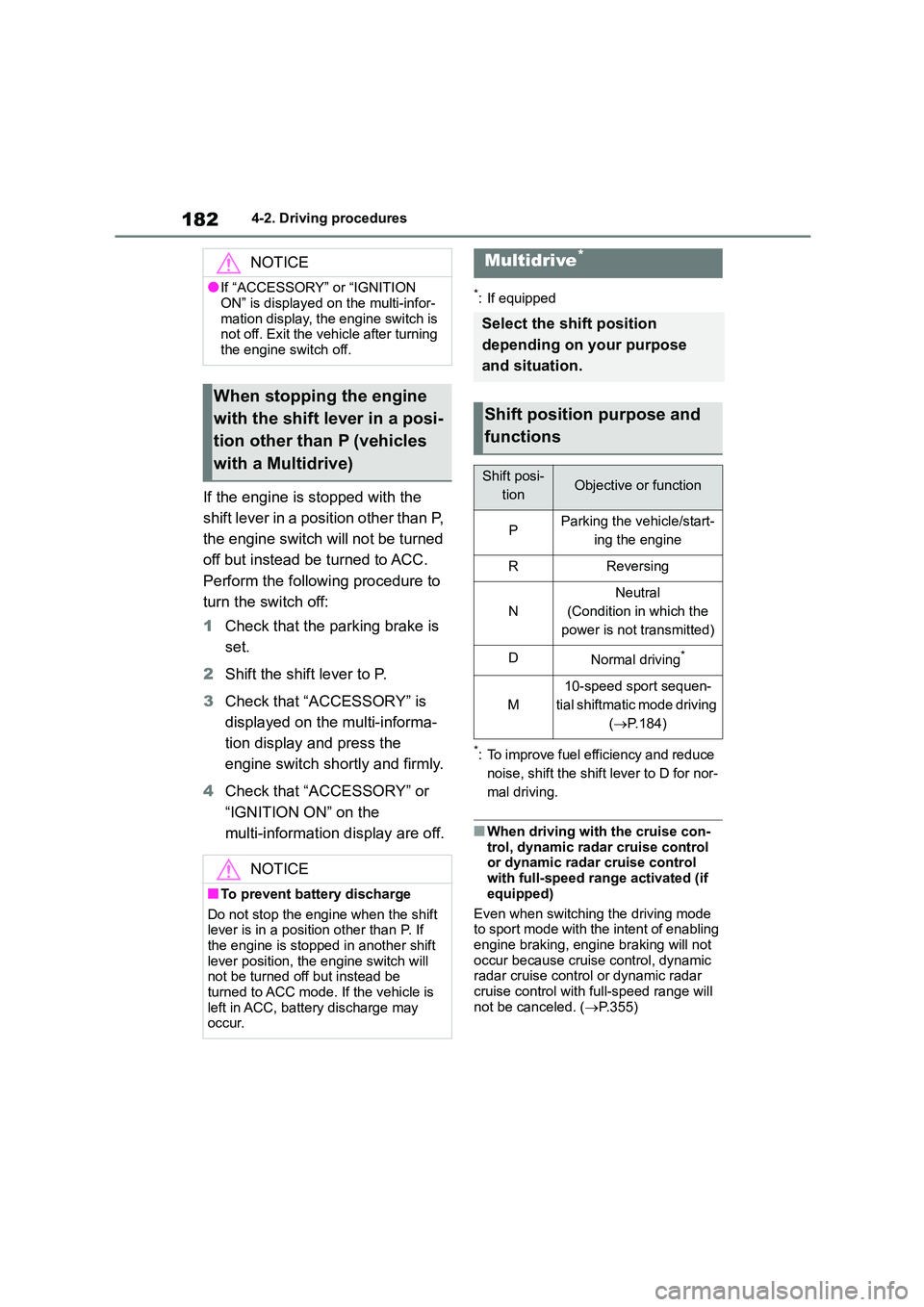
If the engine is stopped with the
shift lever in a position other than P,
the engine switch will not be turned
off but instead be turned to ACC.
Perform the following procedure to
turn the switch off:
1 Check that the parking brake is
set.
2 Shift the shift lever to P.
3 Check that “ACCESSORY” is
displayed on the multi-informa-
tion display and press the
engine switch shortly and firmly.
4 Check that “ACCESSORY” or
“IGNITION ON” on the
multi-information display are off.
*: If equipped
*: To improve fuel efficiency and reduce
noise, shift the shift lever to D for nor-
mal driving.
■When driving with the cruise con-
trol, dynamic radar cruise control or dynamic radar cruise control
with full-speed range activated (if
equipped)
Even when switching the driving mode
to sport mode with the intent of enabling
engine braking, engine braking will not occur because cruise control, dynamic
radar cruise control or dynamic radar
cruise control with full-speed range will not be canceled. ( P.355)
NOTICE
●If “ACCESSORY” or “IGNITION
ON” is displayed on the multi-infor-
mation display, the engine switch is not off. Exit the vehicle after turning
the engine switch off.
When stopping the engine
with the shift lever in a posi-
tion other than P (vehicles
with a Multidrive)
NOTICE
■To prevent battery discharge
Do not stop the engine when the shift lever is in a position other than P. If
the engine is stopped in another shift
lever position, the engine switch will not be turned off but instead be
turned to ACC mode. If the vehicle is
left in ACC, battery discharge may occur.
Multidrive*
Select the shift position
depending on your purpose
and situation.
Shift position purpose and
functions
Shift posi-
tionObjective or function
PParking the vehicle/start-
ing the engine
RReversing
N
Neutral
(Condition in which the
power is not transmitted)
DNormal driving*
M
10-speed sport sequen-
tial shiftmatic mode driving
( P.184)
Page 215 of 758
213
4
4-5. Using the driving support systems
Driving
4-5.Using the driving support systems
*: If equipped
■PCS (Pre-Collision System)
P. 2 2 4
■LTA (Lane Tracing Assist)*
P. 2 3 1
*: If equipped
■LDA (Lane Departure Alert
with steering control)*
P. 2 4 1
*: If equipped
■AHS (Adaptive High-beam
System)*
P. 2 0 1
*: If equipped
■AHB (Automatic High Beam)*
P. 1 9 9
*: If equipped
■RSA (Road Sign Assist)*
P. 2 7 6
*: If equipped
■Dynamic radar cruise control
with full-speed range*
P. 2 4 9
*: If equipped
■Dynamic radar cruise control*
P.260
*: If equipped
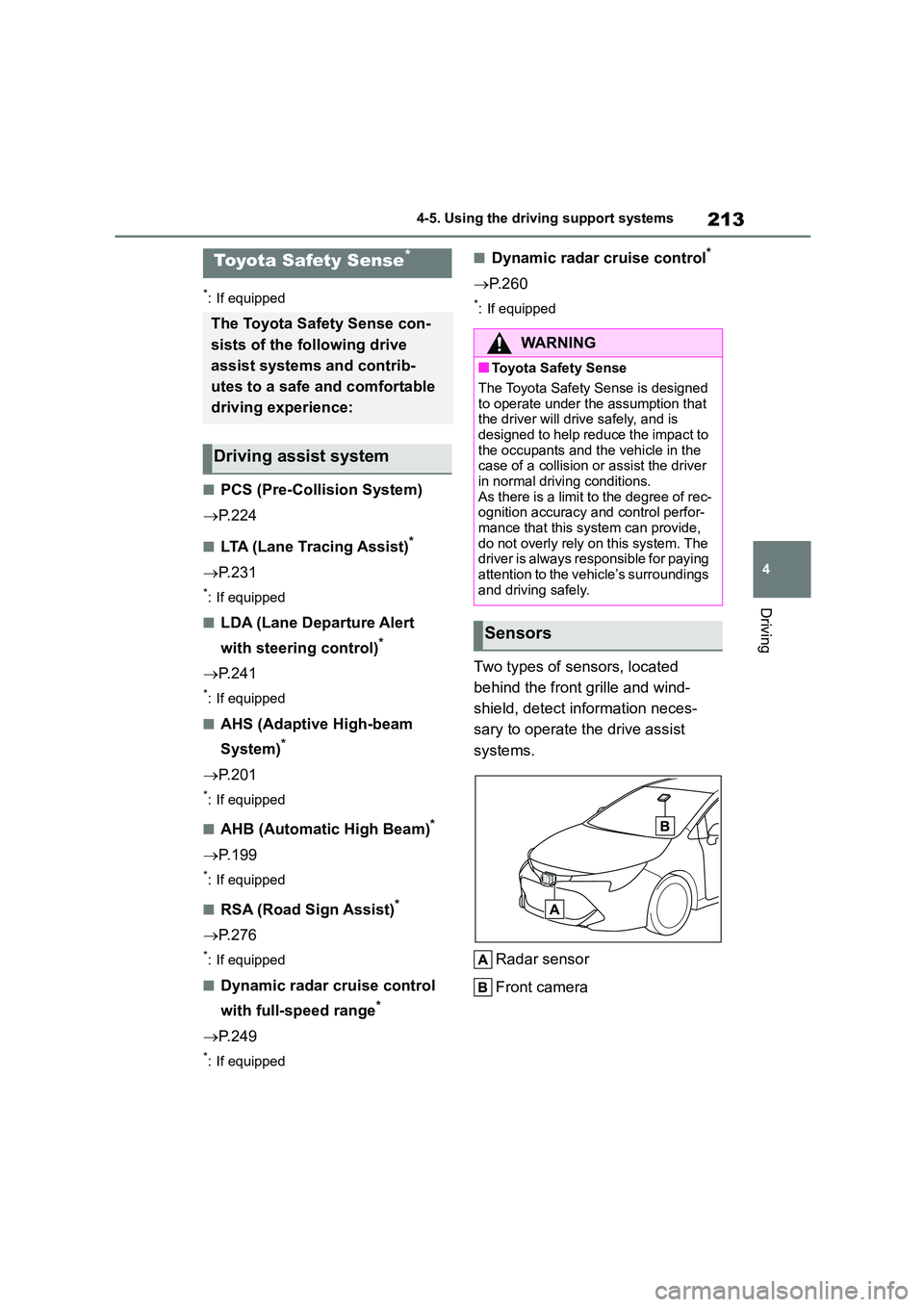
Two types of sensors, located
behind the front grille and wind-
shield, detect in formation neces-
sary to operate the drive assist
systems.
Radar sensor
Front camera
Toyota Safety Sense*
The Toyota Safety Sense con-
sists of the following drive
assist systems and contrib-
utes to a safe and comfortable
driving experience:
Driving assist system
WA R N I N G
■Toyota Safety Sense
The Toyota Safety Sense is designed
to operate under the assumption that
the driver will drive safely, and is designed to help reduce the impact to
the occupants and the vehicle in the
case of a collision or assist the driver in normal driving conditions.
As there is a limit to the degree of rec-
ognition accuracy and control perfor- mance that this system can provide,
do not overly rely on this system. The
driver is always responsible for paying attention to the vehicle’s surroundings
and driving safely.
Sensors
Page 233 of 758
231
4
4-5. Using the driving support systems
Driving
bled.
●The PCS warning light will turn on and
“VSC Turned OFF Pre-Collision Brake
System Unavailable” will be displayed on the multi-information display.*: If equipped
LTA (Lane Tracing
Assist)*
When driving on highways and
freeways with white (yellow)
lane lines, this function alerts
the driver when the vehicle
might depart from its lane or
course* and provides assis-
tance by operating the steering
wheel to keep the vehicle in its
lane or course*. Furthermore,
the system provides steering
assistance when dynamic
radar cruise control with
full-speed range is operating to
keep the vehicle in its lane.
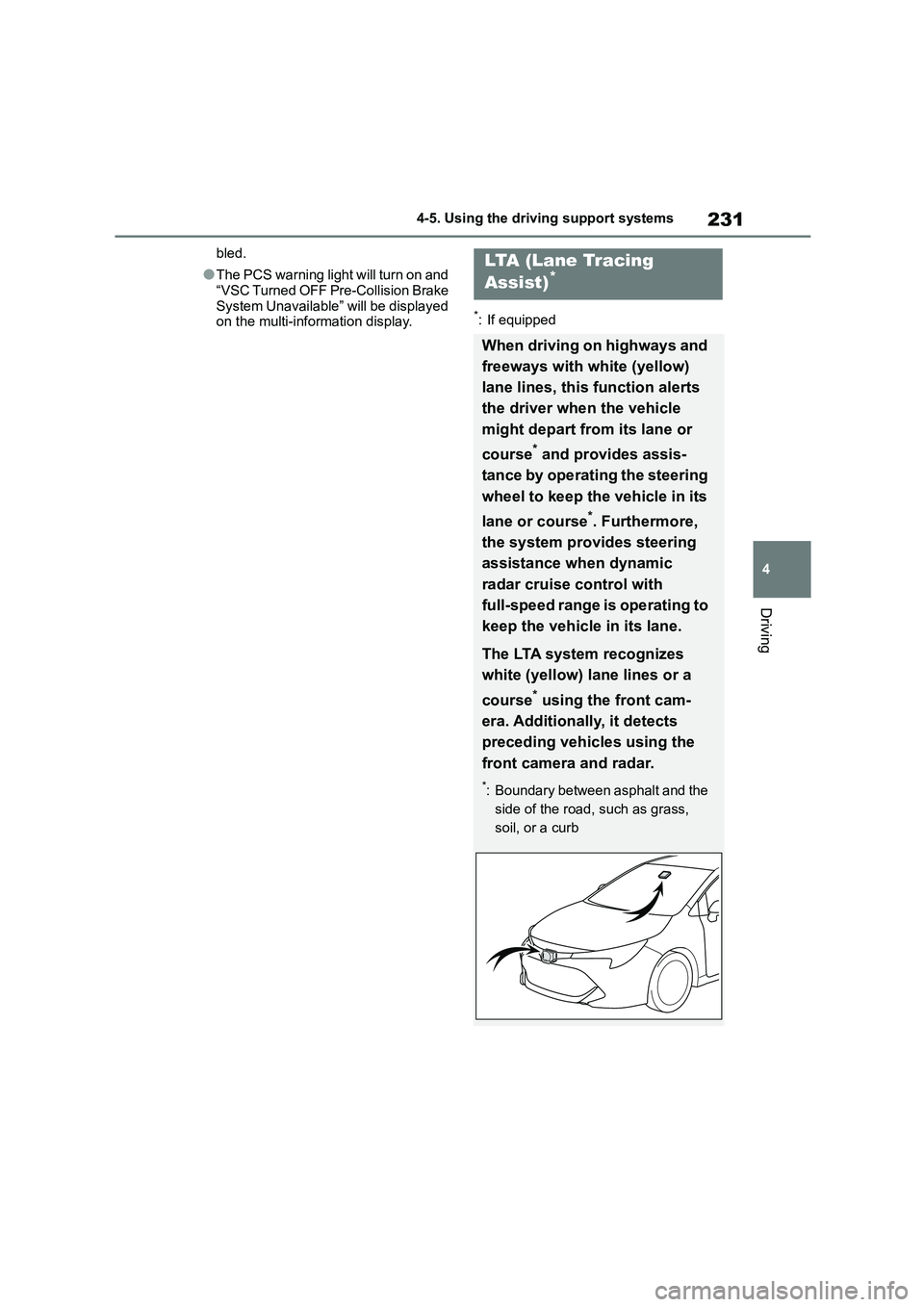
The LTA system recognizes
white (yellow) la ne lines or a
course* using the front cam-
era. Additionally, it detects
preceding vehicles using the
front camera and radar.
*: Boundary between asphalt and the
side of the road, such as grass,
soil, or a curb
Page 238 of 758
2364-5. Using the driving support systems
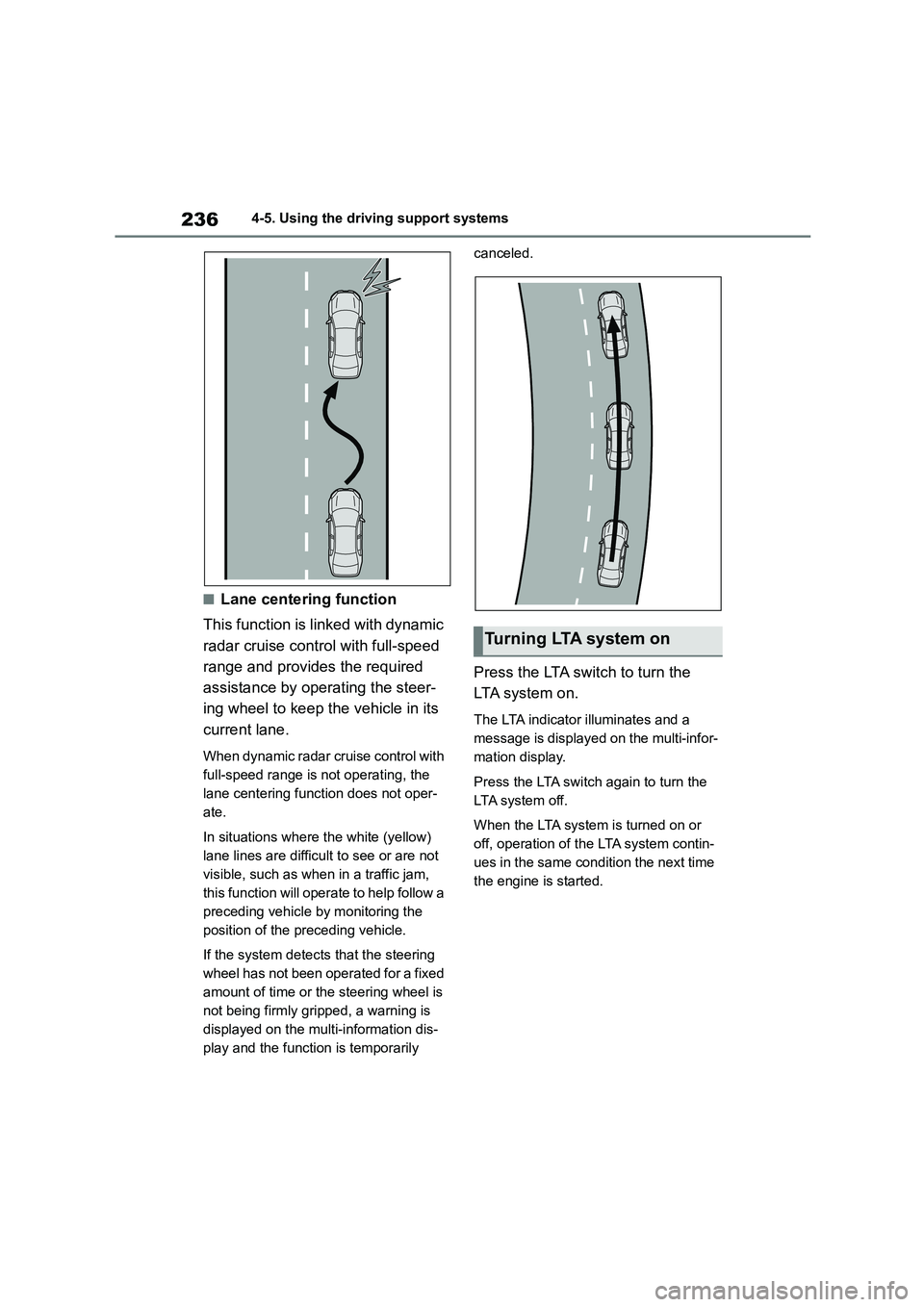
■Lane centering function
This function is linked with dynamic
radar cruise control with full-speed
range and provides the required
assistance by operating the steer-
ing wheel to keep the vehicle in its
current lane.
When dynamic radar cruise control with
full-speed range is not operating, the
lane centering function does not oper-
ate.
In situations where the white (yellow)
lane lines are difficult to see or are not
visible, such as when in a traffic jam,
this function will operate to help follow a
preceding vehicle by monitoring the
position of the preceding vehicle.
If the system detects that the steering
wheel has not been operated for a fixed
amount of time or the steering wheel is
not being firmly gripped, a warning is
displayed on the multi-information dis-
play and the function is temporarily
canceled.
Press the LTA switch to turn the
LTA system on.
The LTA indicator illuminates and a
message is displayed on the multi-infor-
mation display.
Press the LTA switch again to turn the
LTA system off.
When the LTA system is turned on or
off, operation of the LTA system contin-
ues in the same condition the next time
the engine is started.
Turning LTA system on
Page 241 of 758
239
4
4-5. Using the driving support systems
Driving
• Setting for “Sway Warning” in of
the multi-information display is set to “ON”. ( P.577)
• Vehicle speed is approximately 50
km/h (32 mph) or more. • Width of traffic lane is approximately 3
m (9.8 ft.) or more.
• No system malfunctions are detected. ( P.240)
●Lane centering function
This function operates when all of the
following conditions are met.
• LTA is turned on.
• Setting for “Steering Assist” and “Lane
Centre” in of th e multi-information
display are set to “ON” ( P.577)
• This function recognizes white (yel-
low) lane lines or the position of a preceding vehicle (except when the
preceding vehicle is small, such as a
motorcycle). • The dynamic radar cruise control with
full-speed range is operating in vehi-
cle-to-vehicle distance control mode. • Width of traffic lane is approximately 3
to 4 m (10 to 13 ft.).
• Turn signal lever is not operated. • Vehicle is not being driven around a
sharp curve.
• No system malfunctions are detected. ( P.240)
• Vehicle does not accelerate or
decelerate by a fixed amount or more. • Steering wheel is not operated with a
steering force level suitable for chang-
ing lanes.
• ABS, VSC, TRC and PCS are not operating.
• TRC or VSC is not turned off.
• Hands off steering wheel warning is not displayed. ( P.239)
• The vehicle is being driven in the
center of a lane. • Steering assist function is not operat-
ing.
■Temporary cancellation of func-
tions
●When operation conditions are no
longer met, a function may be tempo-
rarily canceled. However, when the
operation conditions are met again, operation of the function is automati-
cally restored. ( P.238)
●If the operation conditions (P.238)
are no longer met while the lane cen-
tering function is operating, the buzzer may sound to indicate that the func-
tion has been temporarily canceled.
■Steering assist function/lane cen-
tering function
●Depending on the vehicle speed, lane
departure situation, road conditions, etc., the driver may not feel the func-
tion is operating or the function may
not operate at all.
●The steering control of the function is
overridden by the driver’s steering wheel operation.
●Do not attempt to test the operation of the steering assist function.
■Lane departure alert function
●The warning buzzer may be difficult to hear due to external noise, audio play-
back, etc.
●If the edge of the course* is not clear
or straight, the lane departure alert
function may not operate.
●Vehicle with BSM: It may not be possi-
ble for the system to determine if there is a danger of a collision with a vehicle
in an adjacent lane.
●Do not attempt to test the operation of
the lane departure alert function.*: Boundary between asphalt and the
side of the road, such as grass, soil,
or a curb
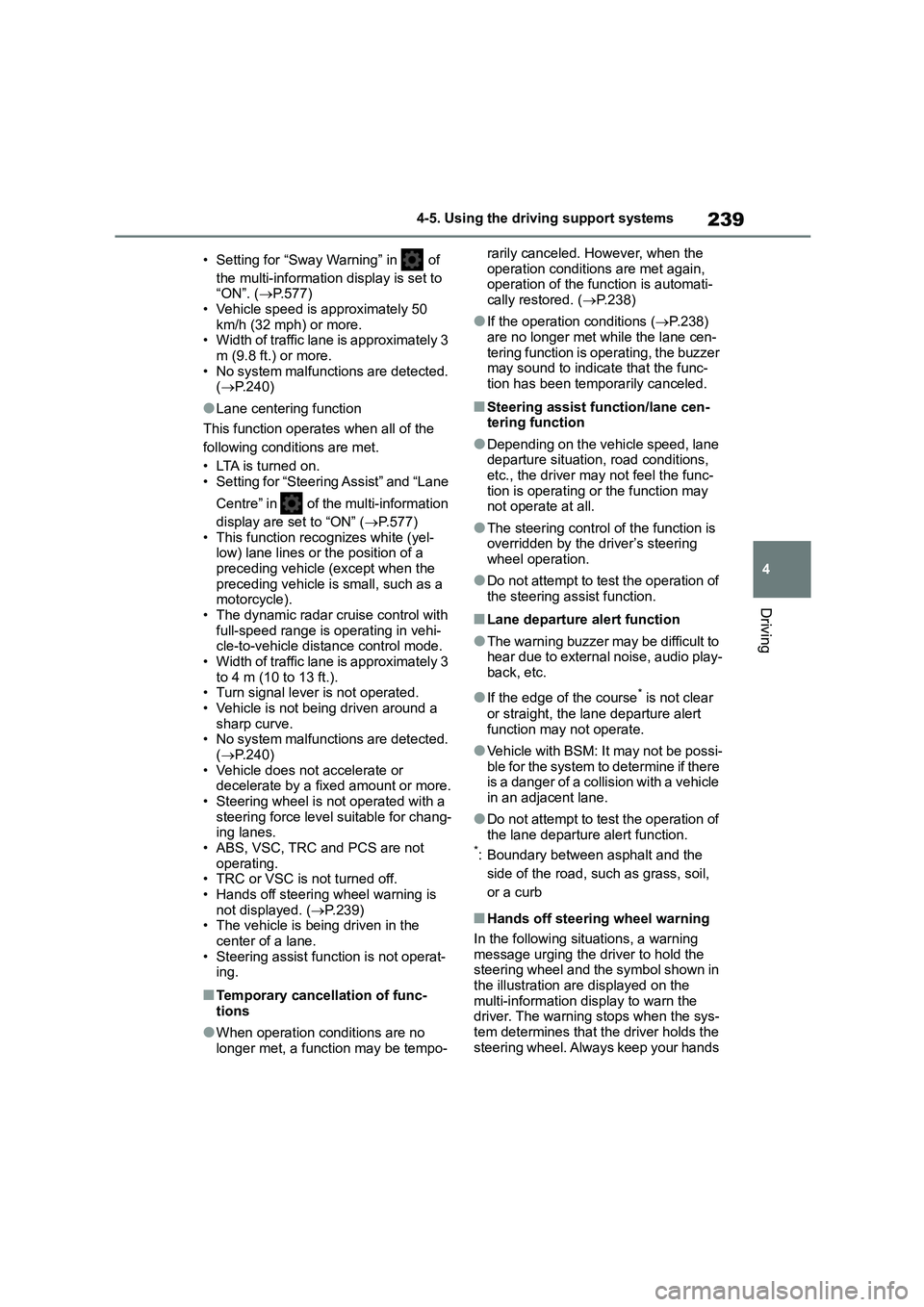
■Hands off steering wheel warning
In the following situations, a warning message urging the driver to hold the
steering wheel and the symbol shown in
the illustration are displayed on the multi-information display to warn the
driver. The warning stops when the sys-
tem determines that the driver holds the steering wheel. Always keep your hands
Page 251 of 758
249
4
4-5. Using the driving support systems
Driving
*: If equipped
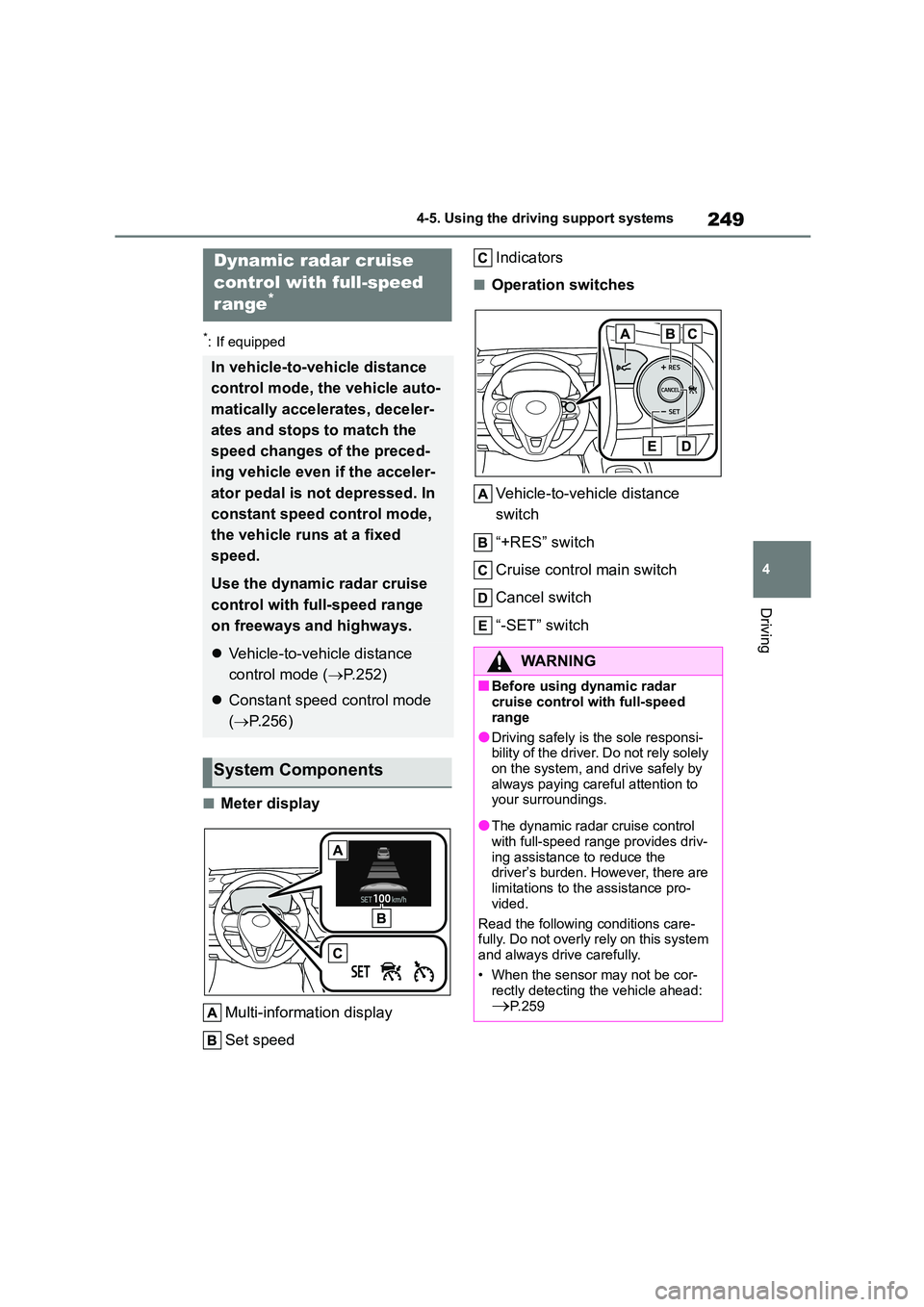
■Meter display
Multi-information display
Set speed
Indicators
■Operation switches
Vehicle-to-vehicle distance
switch
“+RES” switch
Cruise control main switch
Cancel switch
“-SET” switch
Dynamic radar cruise
control with full-speed
range*
In vehicle-to-vehicle distance
control mode, the vehicle auto-
matically accelerates, deceler-
ates and stops to match the
speed changes of the preced-
ing vehicle even if the acceler-
ator pedal is not depressed. In
constant speed control mode,
the vehicle runs at a fixed
speed.
Use the dynamic radar cruise
control with full-speed range
on freeways and highways.
Vehicle-to-vehicle distance
control mode ( P.252)
Constant speed control mode
( P.256)
System Components
WA R N I N G
■Before using dynamic radar
cruise control with full-speed
range
●Driving safely is the sole responsi-
bility of the driver. Do not rely solely
on the system, and drive safely by always paying careful attention to
your surroundings.
●The dynamic radar cruise control
with full-speed range provides driv-
ing assistance to reduce the driver’s burden. However, there are
limitations to the assistance pro-
vided.
Read the following conditions care-
fully. Do not overly rely on this system
and always drive carefully.
• When the sensor may not be cor-
rectly detecting the vehicle ahead:
P.259
Page 252 of 758
2504-5. Using the driving support systems
WA R N I N G
• Conditions under which the vehi-
cle-to-vehicle distance control
mode may not function correctly: P. 2 5 9
●Set the speed appropriately depending on the speed limit, traffic
flow, road conditions, weather con-
ditions, etc. The driver is responsi-
ble for checking the set speed.
●Even when the system is function-
ing normally, the condition of the preceding vehicle as detected by
the system may differ from the con-
dition observed by the driver. Therefore, the driver must always
remain alert, assess the danger of
each situation and drive safely. Relying solely on this system or
assuming the system ensures
safety while driving can lead to an accident, resulting in death or seri-
ous injury.
●Switch the dynamic radar cruise
control with full-speed range setting
to off, using the cruise control main switch when not in use.
■Cautions regarding the driving assist systems
Observe the following precautions, as
there are limitations to the assistance provided by the system . Failure to do
so may cause an accident resulting in
death or serious injury.
●Assisting the driver to measure fol- lowing distance
The dynamic radar cruise control with
full-speed range is only intended to help the driver in determining the fol-
lowing distance between the driver’s
own vehicle and a designated vehicle traveling ahead. It is not a mechanism
that allows careless or inattentive
driving, and it is not a system that can assist the driver in low-visibility condi-
tions.
It is still necessary for driver to pay close attention to the vehicle’s
surroundings.
●Assisting the driver to judge proper
following distance
The dynamic radar cruise control with full-speed range determines whether
the following distance between the
driver’s own vehicle and a designated vehicle traveling ahead is within a set
range. It is not capable of making any
other type of judgement. Therefore, it is absolutely necessary for the driver
to remain vigilant and to determine
whether or not there is a possibility of danger in any given situation.
●Assisting the driver to operate the vehicle
The dynamic radar cruise control with
full-speed range does not include functions which will prevent or avoid
collisions with vehicles ahead of your
vehicle. Therefore, if there is ever any possibility of danger, the driver must
take immediate and direct control of
the vehicle and act appropriately in order to ensure the safety of all
involved.
Page 253 of 758
251
4
4-5. Using the driving support systems
Driving
WA R N I N G
■Situations unsuitable for
dynamic radar cruise control
with full-speed range
Do not use dynamic radar cruise con-
trol with full-speed range in any of the
following situations. Doing so may result in inappropriate speed control
and could cause an accident resulting
in death or serious injury.
●Roads where there are pedestrians,
cyclists, etc.
●In heavy traffic
●On roads with sharp bends
●On winding roads
●On slippery roads, such as those
covered with rain, ice or snow
●On steep downhills, or where there
are sudden changes between sharp
up and down gradients
Vehicle speed may exceed the set
speed when driving down a steep hill.
●At entrances to freeways and high-
ways
●When weather conditions are bad
enough that they may prevent the
sensors from detecting correctly (fog, snow, sandstorm, heavy rain,
etc.)
●When there is rain, snow, etc. on
the front surface of the radar or
front camera
●In traffic conditions that require fre-
quent repeated acceleration and deceleration
●When your vehicle is towing a trailer or during emergency towing
●When an approach warning buzzer is heard often
Page 255 of 758
253
4
4-5. Using the driving support systems
Driving
while driving at 80 km/h (50 mph) or more, the vehicle will accelerate to help to over-
take a passing vehicle.
The system’s identificat ion of what is an overtaking lane may be determined solely
based on the location of the steering wheel in the vehicle (left side driver position
versus right side driver position.) If the v ehicle is driven to a region where the over-
taking lane is on a different side from wher e the vehicle is normally driven, the vehi-
cle may accelerate when the turn signal lever is operated in the opposite direction to
the overtaking lane (e.g., if the driver normally operates the vehicle in a region
where the overtaking lane is to the right but then drives to a region where the over-
taking lane is to the left, the vehicle may accelerate when the right turn signal is acti-
vated).
Example of acceleration
When there are no longer any precedi ng vehicles driving slower than the
set speed
The system accelerates until the set speed is reached. The system then returns to
constant speed cruising.
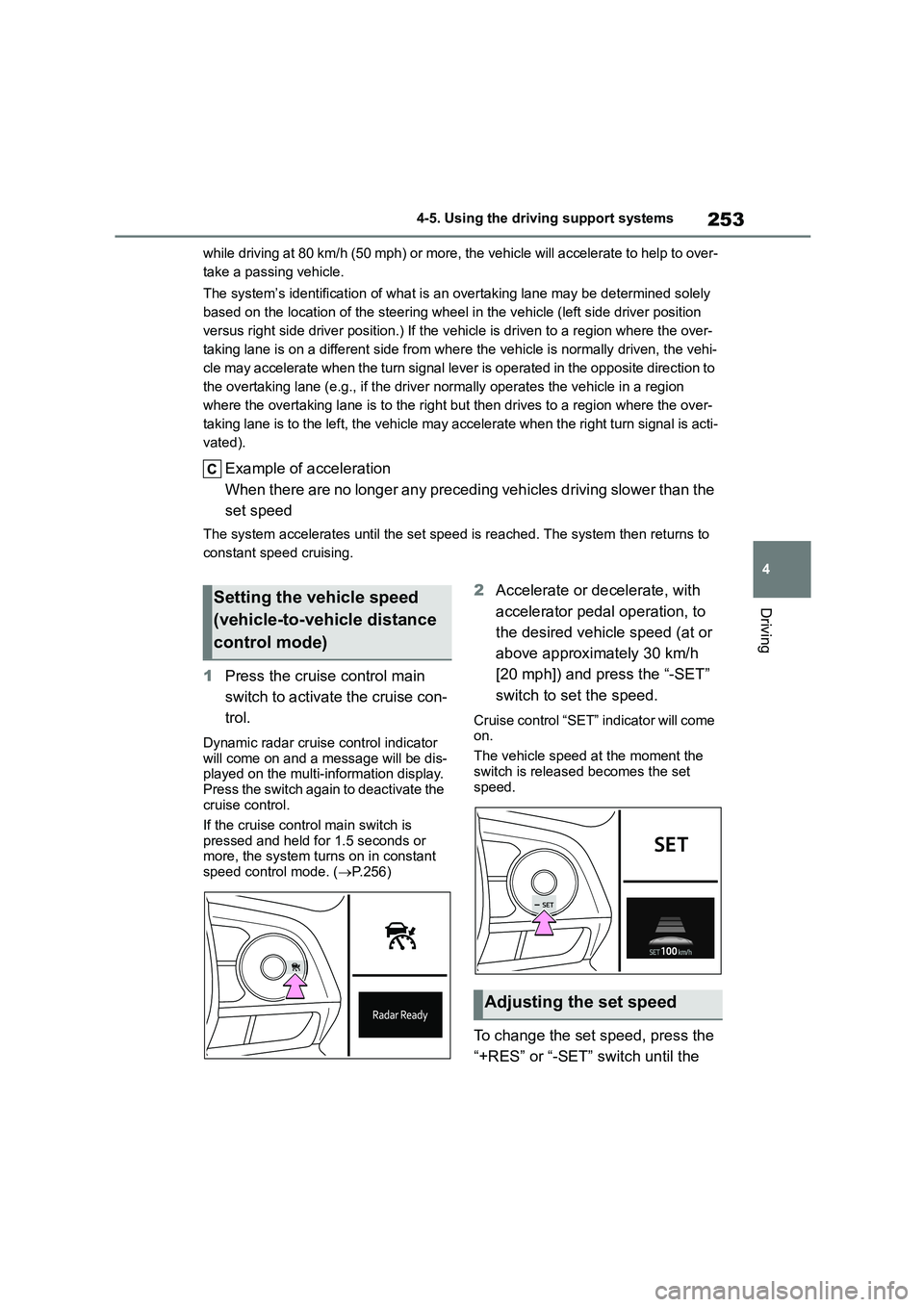
1 Press the cruise control main
switch to activate the cruise con-
trol.
Dynamic radar cruise control indicator will come on and a message will be dis-
played on the multi-information display.
Press the switch again to deactivate the cruise control.
If the cruise control main switch is
pressed and held for 1.5 seconds or more, the system turns on in constant
speed control mode. ( P.256)
2Accelerate or decelerate, with
accelerator pedal operation, to
the desired vehicle speed (at or
above approximately 30 km/h
[20 mph]) and press the “-SET”
switch to set the speed.
Cruise control “SET” indicator will come
on.
The vehicle speed at the moment the
switch is released becomes the set
speed.
To change the set speed, press the
“+RES” or “-SET” switch until the
Setting the vehicle speed
(vehicle-to-vehicle distance
control mode)
Adjusting the set speed
Page 257 of 758
255
4
4-5. Using the driving support systems
Driving
Select a distance from the table
below. Note that the distances
shown correspond to a vehicle
speed of 80 km/h (50 mph). Vehi-
cle-to-vehicle distance
increases/decrea ses in accord-
ance with vehicle speed. When the
vehicle is stopped by system con-
trol, the vehicle stops at a certain
vehicle-to-vehicle distance depend-
ing on the situation.
After the vehicle ahead of you
starts off, press the “+RES” switch.
Your vehicle will also resume fol-
low-up cruising if the accelerator
pedal is depressed after the vehicle
ahead of you starts off.
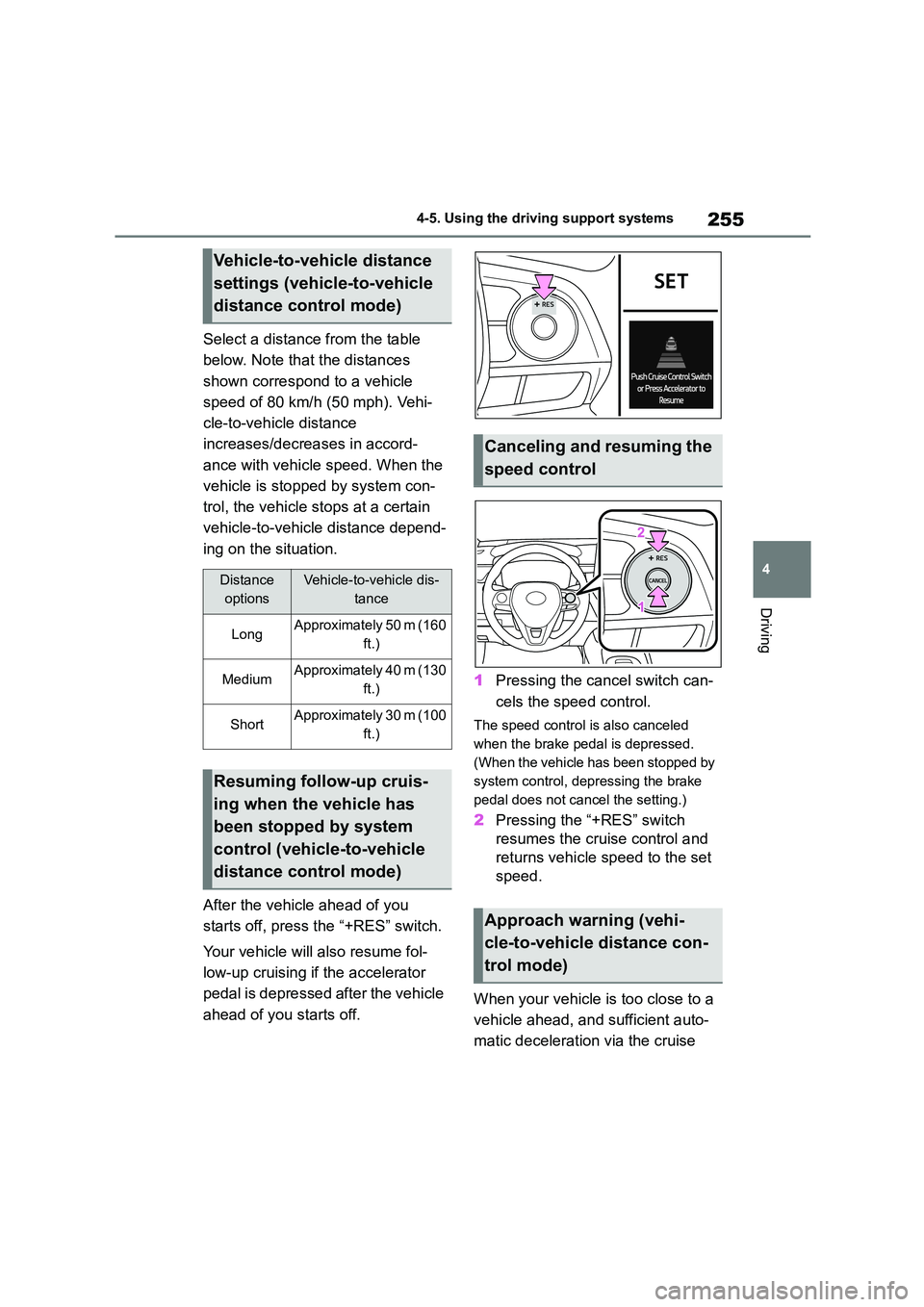
1 Pressing the cancel switch can-
cels the speed control.
The speed control is also canceled
when the brake pedal is depressed.
(When the vehicle has been stopped by
system control, depr essing the brake
pedal does not cancel the setting.)
2 Pressing the “+RES” switch
resumes the cruise control and
returns vehicle speed to the set
speed.
When your vehicle is too close to a
vehicle ahead, and sufficient auto-
matic deceleration via the cruise
Vehicle-to-vehicle distance
settings (vehicle-to-vehicle
distance control mode)
Distance
options
Vehicle-to-vehicle dis-
tance
LongApproximately 50 m (160
ft.)
MediumApproximately 40 m (130
ft.)
ShortApproximately 30 m (100
ft.)
Resuming follow-up cruis-
ing when the vehicle has
been stopped by system
control (vehicle-to-vehicle
distance control mode)
Canceling and resuming the
speed control
Approach warning (vehi-
cle-to-vehicle distance con-
trol mode)