cruise control TOYOTA COROLLA HATCHBACK 2022 Owners Manual (in English)
[x] Cancel search | Manufacturer: TOYOTA, Model Year: 2022, Model line: COROLLA HATCHBACK, Model: TOYOTA COROLLA HATCHBACK 2022Pages: 758, PDF Size: 155.26 MB
Page 5 of 758
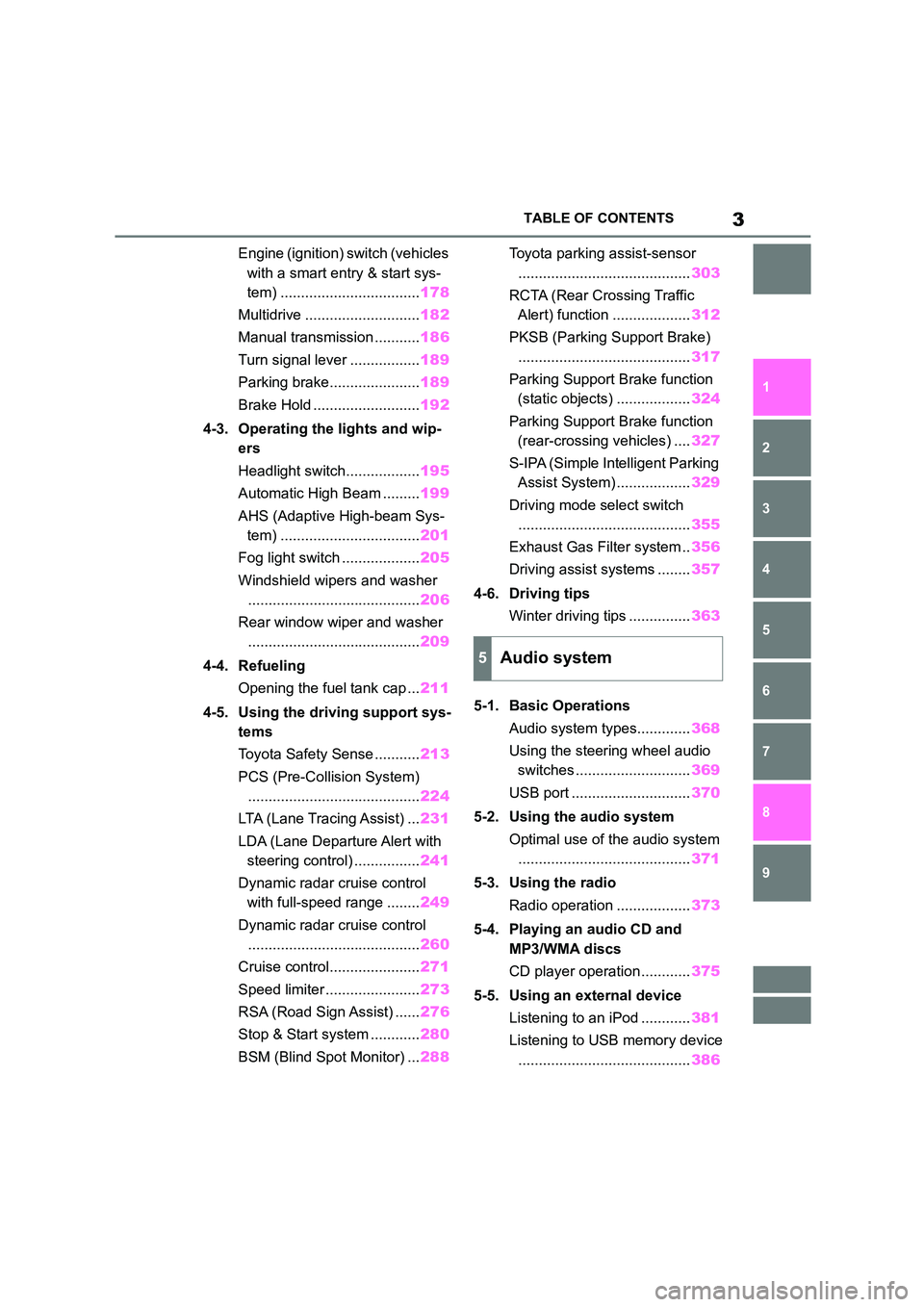
3TABLE OF CONTENTS
1
6
5
4
3
2
9
8
7
Engine (ignition) switch (vehicles
with a smart entry & start sys-
tem) .................................. 178
Multidrive ............................ 182
Manual transmission ........... 186
Turn signal lever ................. 189
Parking brake...................... 189
Brake Hold .......................... 192
4-3. Operating the lights and wip-
ers
Headlight switch.................. 195
Automatic High Beam ......... 199
AHS (Adaptive High-beam Sys-
tem) .................................. 201
Fog light switch ................... 205
Windshield wipers and washer
.......................................... 206
Rear window wiper and washer
.......................................... 209
4-4. Refueling
Opening the fuel tank cap ... 211
4-5. Using the driving support sys-
tems
Toyota Safety Sense ........... 213
PCS (Pre-Collision System)
.......................................... 224
LTA (Lane Tracing Assist) ... 231
LDA (Lane Departure Alert with
steering control) ................ 241
Dynamic radar cruise control
with full-speed range ........ 249
Dynamic radar cruise control
.......................................... 260
Cruise control...................... 271
Speed limiter ....................... 273
RSA (Road Sign Assist) ...... 276
Stop & Start system ............ 280
BSM (Blind Spot Monitor) ... 288
Toyota parking assist-sensor
.......................................... 303
RCTA (Rear Crossing Traffic
Alert) function ................... 312
PKSB (Parking Support Brake)
.......................................... 317
Parking Support Brake function
(static objects) .................. 324
Parking Support Brake function
(rear-crossing vehicles) .... 327
S-IPA (Simple Intelligent Parking
Assist System) .................. 329
Driving mode select switch
.......................................... 355
Exhaust Gas Filter system .. 356
Driving assist systems ........ 357
4-6. Driving tips
Winter driving tips ............... 363
5-1. Basic Operations
Audio system types............. 368
Using the steering wheel audio
switches ............................ 369
USB port ............................. 370
5-2. Using the audio system
Optimal use of the audio system
..........................................371
5-3. Using the radio
Radio operation .................. 373
5-4. Playing an audio CD and
MP3/WMA discs
CD player operation ............ 375
5-5. Using an external device
Listening to an iPod ............ 381
Listening to USB memory device
.......................................... 386
5Audio system
Page 8 of 758
6
Please note that this manual
applies to all models and explains
all equipment, including options.
Therefore, you may find some
explanations for equipment not
installed on your vehicle.
All specifications provided in this
manual are current at the time of
printing. However, because of the
Toyota policy of continual product
improvement, we reserve the right
to make changes at any time with-
out notice.
Depending on specifications, the
vehicle shown in the illustrations
may differ from your vehicle in
terms of equipment.
Both genuine Toyota and a wide
variety of other spare parts and
accessories for Toyota vehicles are
currently available on the market.
Should it be determined that any of
the genuine Toyota parts or acces-
sories supplied with the vehicle
need to be replaced, Toyota recom-
mends that genuine Toyota parts or
accessories, be used to replace
them. Other parts or accessories of
matching quality can also be used.
Toyota cannot accept any liability or
guarantee spare parts and acces-
sories which are not genuine
Toyota products, nor for replace-
ment or installati on involving such
parts. In addition, damage or per-
formance problems resulting from
the use of non-genuine Toyota
spare parts or accessories may not
be covered under warranty.
The installation of an RF-transmit-
ter system in your vehicle could
affect electronic systems such as:
Multiport fuel injection sys-
tem/sequential multiport fuel
injection system
Toyota Safety Sense (if
equipped)
Cruise control system (if
equipped)
Anti-lock brake system
SRS airbag system
Seat belt pretensioner system
Be sure to check with any author-
ized Toyota retailer or Toyota
authorized repairer, or any reliable
repairer for precautionary meas-
ures or special instructions regard-
ing installation of an RF-transmitter
system.
Further information regarding fre-
quency bands, power levels,
antenna positions and installation
provisions for the installation of
For your infor mation
Main Owner’s Manual
Accessories, spare parts
and modification of your
To y o t a
Installation of an RF-trans-
mitter system
Page 20 of 758
18Pictorial index
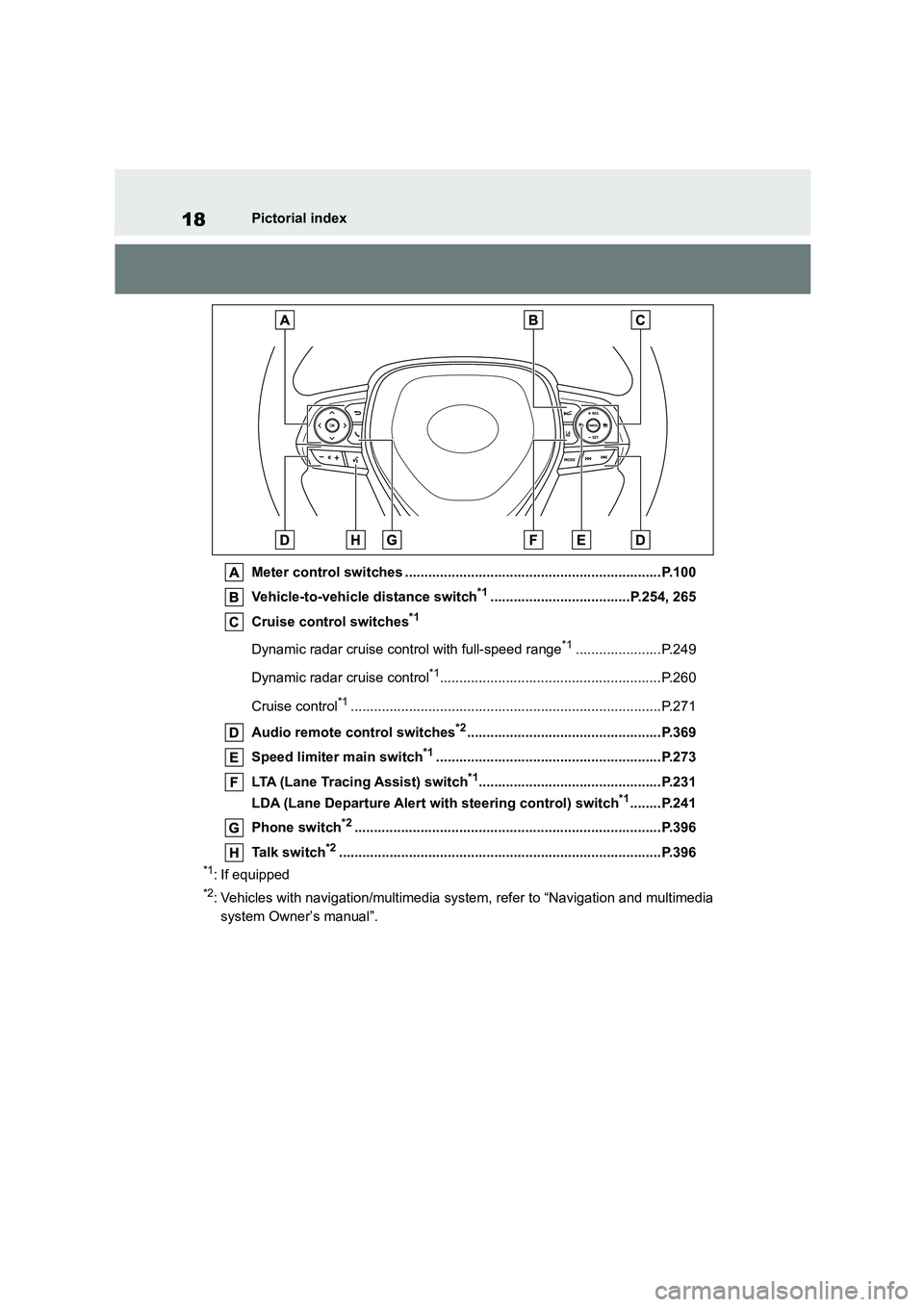
Meter control switches ..................................................................P.100
Vehicle-to-vehicle distance switch*1....................................P.254, 265
Cruise control switches*1
Dynamic radar cruise control with full-speed range*1......................P.249
Dynamic radar cruise control*1.........................................................P.260
Cruise control*1................................................................................P.271
Audio remote control switches*2..................................................P.369
Speed limiter main switch*1..........................................................P.273
LTA (Lane Tracing Assist) switch*1...............................................P.231
LDA (Lane Departure Alert with steering control) switch*1........P.241
Phone switch*2...............................................................................P.396
Talk switch*2...................................................................................P.396
*1: If equipped
*2: Vehicles with navigation/mu ltimedia system, refer to “Navigation and multimedia
system Owner’s manual”.
Page 27 of 758
25Pictorial index
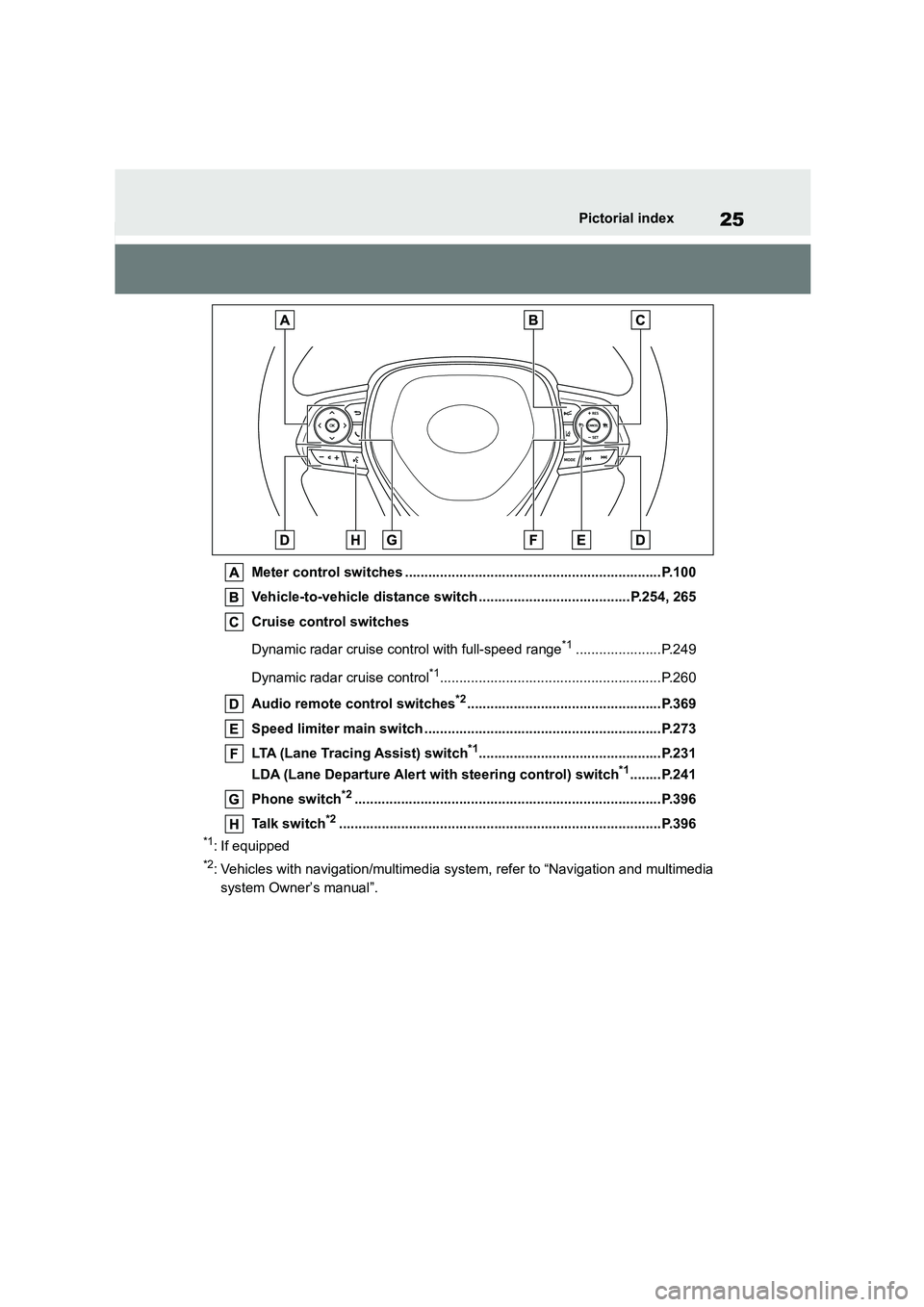
Meter control switches ..................................................................P.100
Vehicle-to-vehicle distance switch .......................................P.254, 265
Cruise control switches
Dynamic radar cruise control with full-speed range*1......................P.249
Dynamic radar cruise control*1.........................................................P.260
Audio remote control switches*2..................................................P.369
Speed limiter main switch .............................................................P.273
LTA (Lane Tracing Assist) switch*1...............................................P.231
LDA (Lane Departure Alert with steering control) switch*1........P.241
Phone switch*2...............................................................................P.396
Talk switch*2...................................................................................P.396
*1: If equipped
*2: Vehicles with navigation/mu ltimedia system, refer to “Navigation and multimedia
system Owner’s manual”.
Page 89 of 758
87
2
2-1. Instrument cluster
Vehicle status information and indicators
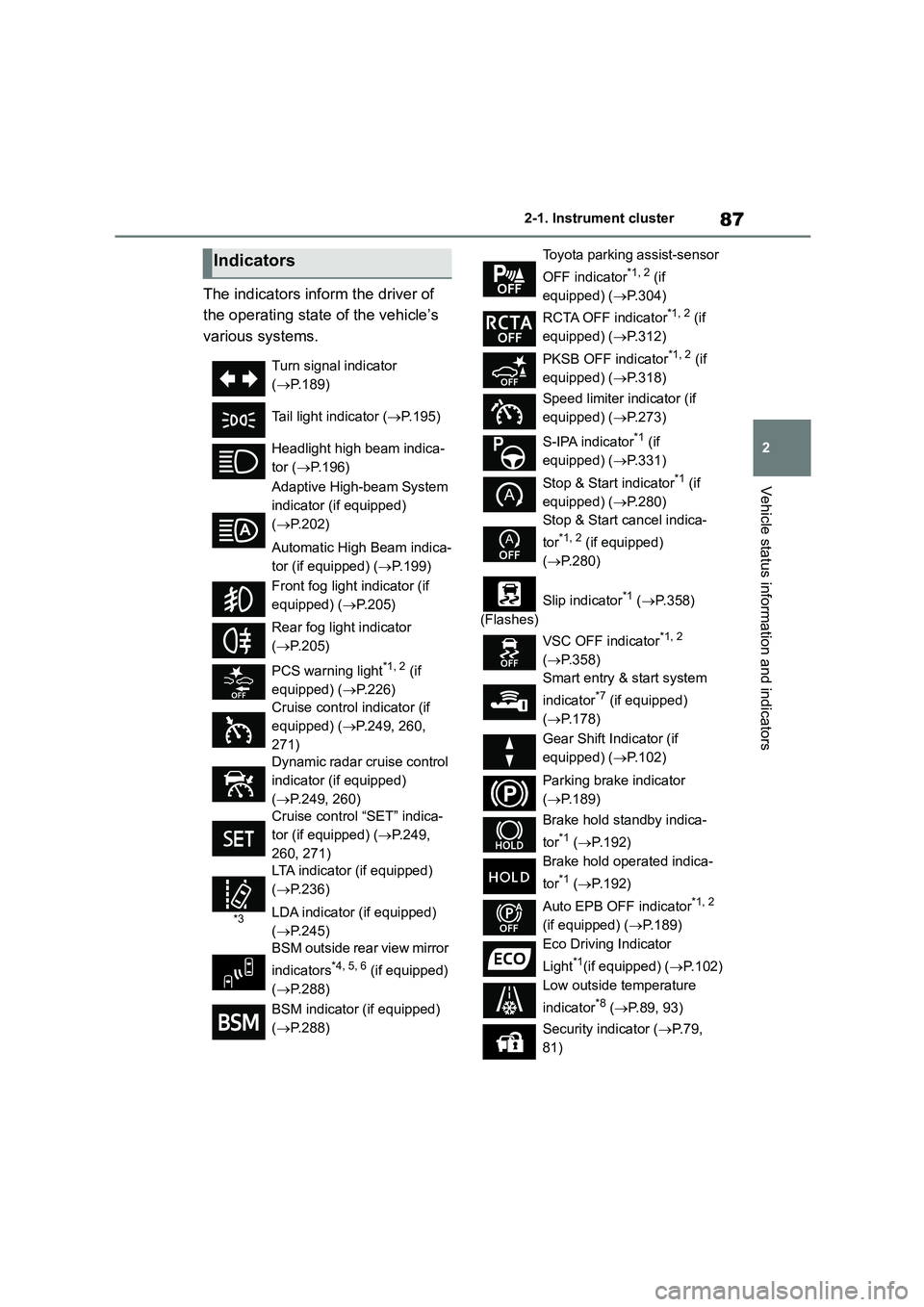
The indicators inform the driver of
the operating state of the vehicle’s
various systems.
Indicators
Turn signal indicator
( P.189)
Tail light indicator ( P.195)
Headlight high beam indica-
tor ( P.196)
Adaptive High-beam System
indicator (if equipped)
( P.202)
Automatic High Beam indica-
tor (if equipped) ( P.199)
Front fog light indicator (if
equipped) ( P.205)
Rear fog light indicator
( P.205)
PCS warning light*1, 2 (if
equipped) ( P.226)
Cruise control indicator (if
equipped) ( P.249, 260,
271)
Dynamic radar cruise control
indicator (if equipped)
( P.249, 260)
Cruise control “SET” indica-
tor (if equipped) ( P.249,
260, 271)
*3
LTA indicator (if equipped)
( P.236)
LDA indicator (if equipped)
( P.245)
BSM outside rear view mirror
indicators*4, 5, 6 (if equipped)
( P.288)
BSM indicator (if equipped)
( P.288)
Toyota parking assist-sensor
OFF indicator*1, 2 (if
equipped) ( P.304)
RCTA OFF indicator*1, 2 (if
equipped) ( P.312)
PKSB OFF indicator*1, 2 (if
equipped) ( P.318)
Speed limiter indicator (if
equipped) ( P.273)
S-IPA indicator*1 (if
equipped) ( P.331)
Stop & Start indicator*1 (if
equipped) ( P.280)
Stop & Start cancel indica-
tor*1, 2 (if equipped)
( P.280)
(Flashes)
Slip indicator*1 ( P.358)
VSC OFF indicator*1, 2
( P.358)
Smart entry & start system
indicator*7 (if equipped)
( P.178)
Gear Shift Indicator (if
equipped) ( P.102)
Parking brake indicator
( P.189)
Brake hold standby indica-
tor*1 ( P.192)
Brake hold operated indica-
tor*1 ( P.192)
Auto EPB OFF indicator*1, 2
(if equipped) ( P.189)
Eco Driving Indicator
Light*1(if equipped) ( P.102)
Low outside temperature
indicator*8 ( P.89, 93)
Security indicator ( P. 7 9 ,
81)
Page 101 of 758
99
2
2-1. Instrument cluster
Vehicle status information and indicators
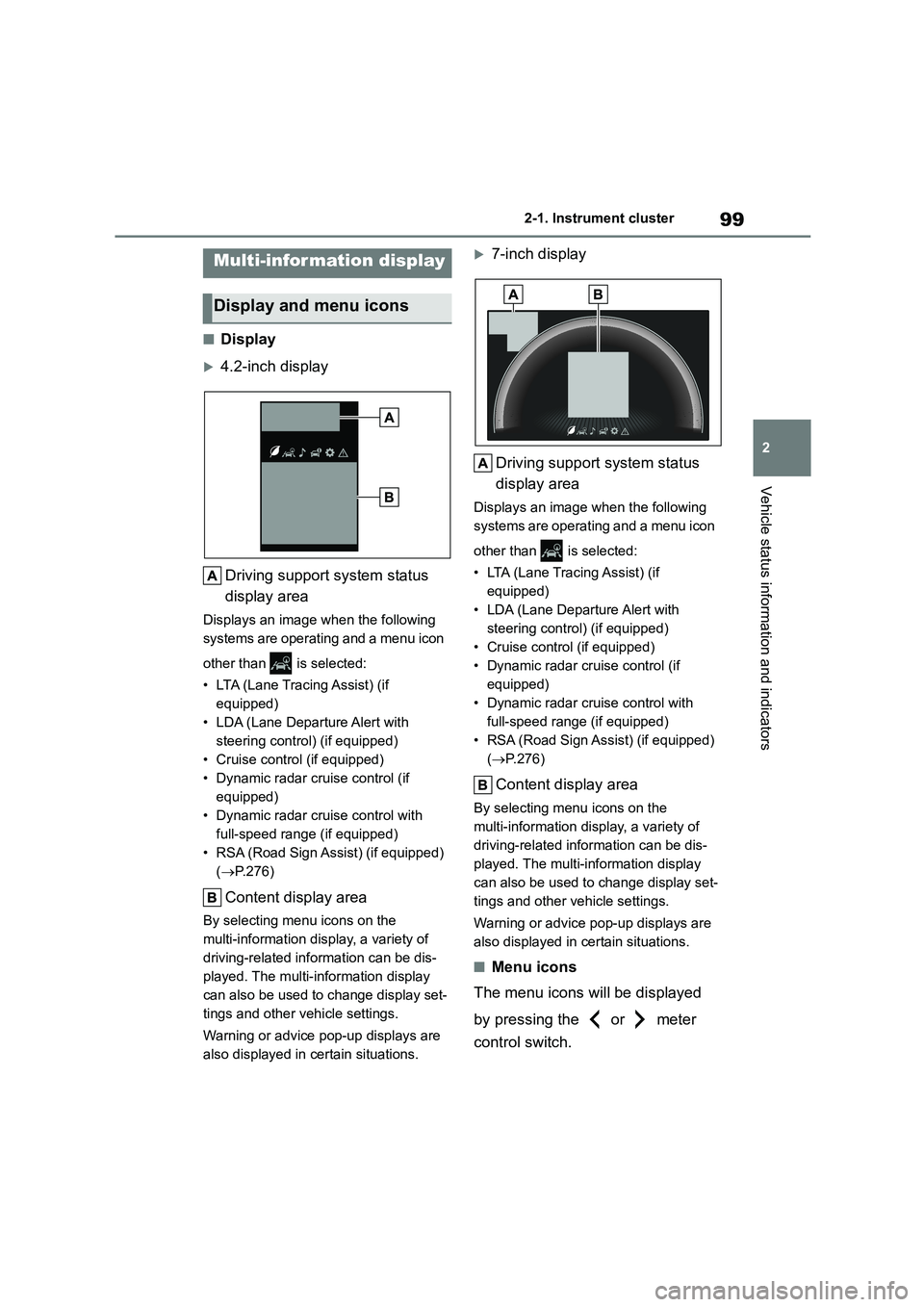
■Display
4.2-inch display
Driving support system status
display area
Displays an image when the following
systems are operating and a menu icon
other than is selected:
• LTA (Lane Tracing Assist) (if
equipped)
• LDA (Lane Departure Alert with
steering control) (if equipped)
• Cruise control (if equipped)
• Dynamic radar cruise control (if
equipped)
• Dynamic radar cruise control with
full-speed range (if equipped)
• RSA (Road Sign Assist) (if equipped)
( P.276)
Content display area
By selecting menu icons on the
multi-information display, a variety of
driving-related information can be dis-
played. The multi-information display
can also be used to change display set-
tings and other vehicle settings.
Warning or advice pop-up displays are
also displayed in certain situations.
7-inch display
Driving support system status
display area
Displays an image when the following
systems are operating and a menu icon
other than is selected:
• LTA (Lane Tracing Assist) (if
equipped)
• LDA (Lane Departure Alert with
steering control) (if equipped)
• Cruise control (if equipped)
• Dynamic radar cruise control (if
equipped)
• Dynamic radar cruise control with
full-speed range (if equipped)
• RSA (Road Sign Assist) (if equipped)
( P.276)
Content display area
By selecting menu icons on the
multi-information display, a variety of
driving-related information can be dis-
played. The multi-information display
can also be used to change display set-
tings and other vehicle settings.
Warning or advice pop-up displays are
also displayed in certain situations.
■Menu icons
The menu icons will be displayed
by pressing the or meter
control switch.
Multi-information display
Display and menu icons
Page 105 of 758
103
2
2-1. Instrument cluster
Vehicle status information and indicators
■Driving support system infor-
mation
Select to display the operational
status of the following systems:
LTA (Lane Tracing Assist) (if
equipped) ( P.231)
LDA (Lane Departure Alert with
steering control) (if equipped)
( P.241)
Cruise control (if equipped)
( P.271)
Dynamic radar cruise control (if
equipped) ( P.260)
Dynamic radar cruise control
with full-speed range (if
equipped) ( P.249)
■Navigation system-linked dis-
play (if equipped)
Select to display the following navi-
gation system-linked information:
Route guidance to destination
Compass display (heading-up
display)
■Route guidance to destination dis-
play
When the route guidance to destination
display is enabled on the head-up dis-
play, it will not be displayed on the multi-information display. ( P.107)
Select to enable selection of an
audio source or track on the meter
using the meter control switches.
This menu icon can be set to be dis-
played/not displayed in .
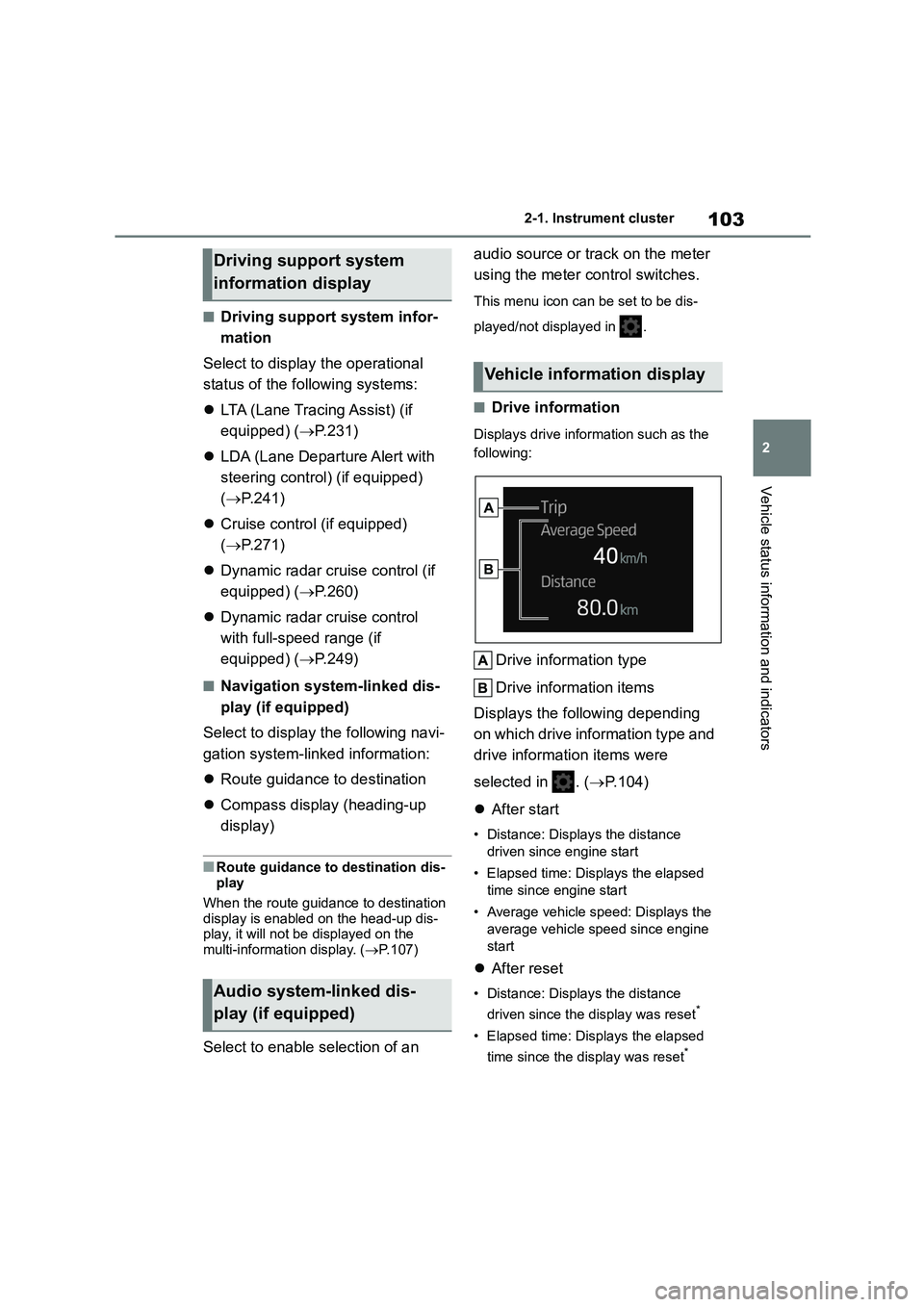
■Drive information
Displays drive information such as the
following:
Drive information type
Drive information items
Displays the following depending
on which drive information type and
drive information items were
selected in . ( P.104)
After start
• Distance: Displays the distance
driven since engine start
• Elapsed time: Displays the elapsed
time since engine start
• Average vehicle speed: Displays the
average vehicle speed since engine
start
After reset
• Distance: Displays the distance
driven since the display was reset*
• Elapsed time: Displays the elapsed
time since the display was reset*
Driving support system
information display
Audio system-linked dis-
play (if equipped)
Vehicle information display
Page 110 of 758
1082-1. Instrument cluster
head-up display.
■Enabling/disabling of the head-up
display
If the head-up display is disabled, it will
remain disabled when the engine switch
is turned off then back to ON.
■Display brightness
The brightness of the head-up display
can be adjusted on of the
multi-information display. Also, it is auto- matically adjusted according to the
ambient brightness.
■Driving support system status
display
Displays the operational status of
the following systems:
Dynamic radar cruise control
with full-speed range (if
equipped) ( P.249)
Dynamic radar cruise control (if
equipped) ( P.260)
LTA (Lane Tracing Assist) (if
equipped) ( P.231)
LDA (Lane Departure Alert with
steering control) (if equipped)
( P.241)
Details of content displayed on the
head-up display may differ from that
displayed on the multi-information dis-
play. For details, refer to the explana-
tion of each system.
■Navigation system-linked dis-
play area (if equipped)
Displays the following items which
are linked to the navigation system:
Street name
Route guidance to destination
Compass (heading-up display)
Pop-up displays for the following
systems will be displayed when
necessary:
■Driving support systems
Displays a warning/sugges-
tion/advice message or the operat-
ing state of a relevant system.
PCS (Pre-Collision System) (if
equipped) ( P.224)
Toyota parking assist-sensor (if
WA R N I N G
■Caution for changing settings of
the head-up display
If the engine is running when chang-
ing the display settings, ensure that
the vehicle is parked in a place with adequate ventilation. In a closed area
such as a garage, exhaust gases
including harmful carbon monoxide (CO) may collect and enter the vehi-
cle. This may lead to death or a seri-
ous health hazard.
NOTICE
■When changing the settings of
the head-up display
To prevent battery discharge, ensure that the engine is running while
changing the settings of the head-up
display.
Driving support system sta-
tus/navigation sys-
tem-linked display area (if
equipped)
Pop-up display
Page 161 of 758
4
159
4
Driving
Driving
.4-1. Before driving
Driving the vehicle ............ 161
Cargo and luggage ........... 168
Trailer towing .................... 170
4-2. Driving procedures
Engine (ignition) switch (vehi-
cles without a smart entry &
start system) ................... 177
Engine (ignition) switch (vehi-
cles with a smart entry & start
system) ........................... 178
Multidrive .......................... 182
Manual transmission ......... 186
Turn signal lever ............... 189
Parking brake ................... 189
Brake Hold ........................ 192
4-3. Operating the lights and wip-
ers
Headlight switch ............... 195
Automatic High Beam ....... 199
AHS (Adaptive High-beam
System) .......................... 201
Fog light switch ................. 205
Windshield wipers and washer
....................................... 206
Rear window wiper and washer
....................................... 209
4-4. Refueling
Opening the fuel tank cap
....................................... 211
4-5. Using the driving support
systems
Toyota Safety Sense......... 213
PCS (Pre-Collision System)
........................................ 224
LTA (Lane Tracing Assist)
........................................ 231
LDA (Lane Departure Alert with
steering control) .............. 241
Dynamic radar cruise control
with full-speed range ...... 249
Dynamic radar cruise control
........................................ 260
Cruise control.................... 271
Speed limiter ..................... 273
RSA (Road Sign Assist) .... 276
Stop & Start system .......... 280
BSM (Blind Spot Monitor)
........................................ 288
Toyota parking assist-sensor
........................................ 303
RCTA (Rear Crossing Traffic
Alert) function ................. 312
PKSB (Parking Support Brake)
........................................ 317
Parking Support Brake function
(static objects) ................ 324
Parking Support Brake function
(rear-crossing vehicles) .. 327
S-IPA (Simple Intelligent Park-
ing Assist System) .......... 329
Driving mode select switch
........................................ 355
Exhaust Gas Filter system
........................................ 356
Driving assist systems ...... 357
Page 178 of 758
1764-1. Before driving
must be in M and select gear step 4
or lower. ( P. 1 8 2 )
Manual transmission
Refrain from driving in 6th gear to
maintain the effectiveness of
engine braking and to maintain
charging system performance.
■If the engine overheats
Towing a loaded trailer up a long,
steep incline in temperatures
exceeding 30°C (85°F) may result
in the engine overheating. If the
engine coolant temperature gauge
indicates that the engine is over-
heating, turn the air conditioning off
immediately, leave the road and
stop the vehicle in a safe place.
( P.560)
■When parking the vehicle
Always place wheel chocks under
the wheels of both the vehicle and
trailer. Firmly set the parking brake
and shift the shift lever to P
(Multidrive) and 1 or R (manual
transmission).
WA R N I N G
Follow all the instructions described in this section. Failure to do so could
cause an accident resulting in death
or serious injury.
■Trailer towing precautions
When towing, make sure that none of the weight limits are exceeded.
( P.171)
■Vehicle speed in towing
Observe the legal maximum speeds
for trailer towing.
■Before descending hills or long declines
Reduce speed and downshift. How-
ever, never downshift suddenly while descending steep or long downhill
grades.
■Operation of the brake pedal
Do not hold the brake pedal
depressed often or for long periods of time. Doing so may result in the brake
overheating or reduce braking effects.
■To avoid accident or injury
●Vehicles with a compact spare tire:
Do not tow a trailer when the com- pact spare tire is installed on your
vehicle.
●Vehicles with the emergency tire
puncture repair kit: Do not tow a
trailer when the tire installed is repaired with the emergency tire
puncture repair kit.
●Do not use the following systems
when trailer towing.
• Cruise control (if equipped)
• Dynamic radar cruise control (if
equipped)
• Dynamic radar cruise control with
full-speed range (if equipped)
NOTICE
■Do not directly splice trailer lights
Directly splicing trailer lights may
damage your vehicle’s electrical sys- tem and cause a malfunction.