park assist TOYOTA COROLLA HATCHBACK 2022 (in English) User Guide
[x] Cancel search | Manufacturer: TOYOTA, Model Year: 2022, Model line: COROLLA HATCHBACK, Model: TOYOTA COROLLA HATCHBACK 2022Pages: 758, PDF Size: 155.26 MB
Page 305 of 758
303
4
4-5. Using the driving support systems
Driving
• When an accessory (such as a bicycle
carrier) is installed to the rear of the vehicle
• When there is a significant difference
in height between your vehicle and the vehicle that enters the detection
area
• Immediately after the Blind Spot Moni- tor is turned on
●Instances of the Blind Spot Monitor unnecessarily detecting a vehicle
and/or object may increase in the fol-
lowing situations: • When the sensor is misaligned due to
a strong impact to the sensor or its
surrounding area • When the distance between your vehi-
cle and a guardrail, wall, etc. that
enters the detection area is short • When driving up and down consecu-
tive steep inclines, such as hills, dips
in the road, etc. • When vehicle lanes are narrow, or
when driving on the edge of a lane,
and a vehicle traveling in a lane other than the adjacent lanes enters the
detection area
• When driving on roads with sharp bends, consecutive curves, or uneven
surfaces
• When the tires are slipping or spinning • When the distance between your vehi-
cle and a following vehicle is short
• When an accessory (such as a bicycle carrier) is installed to the rear of the
vehicle
*: If equipped
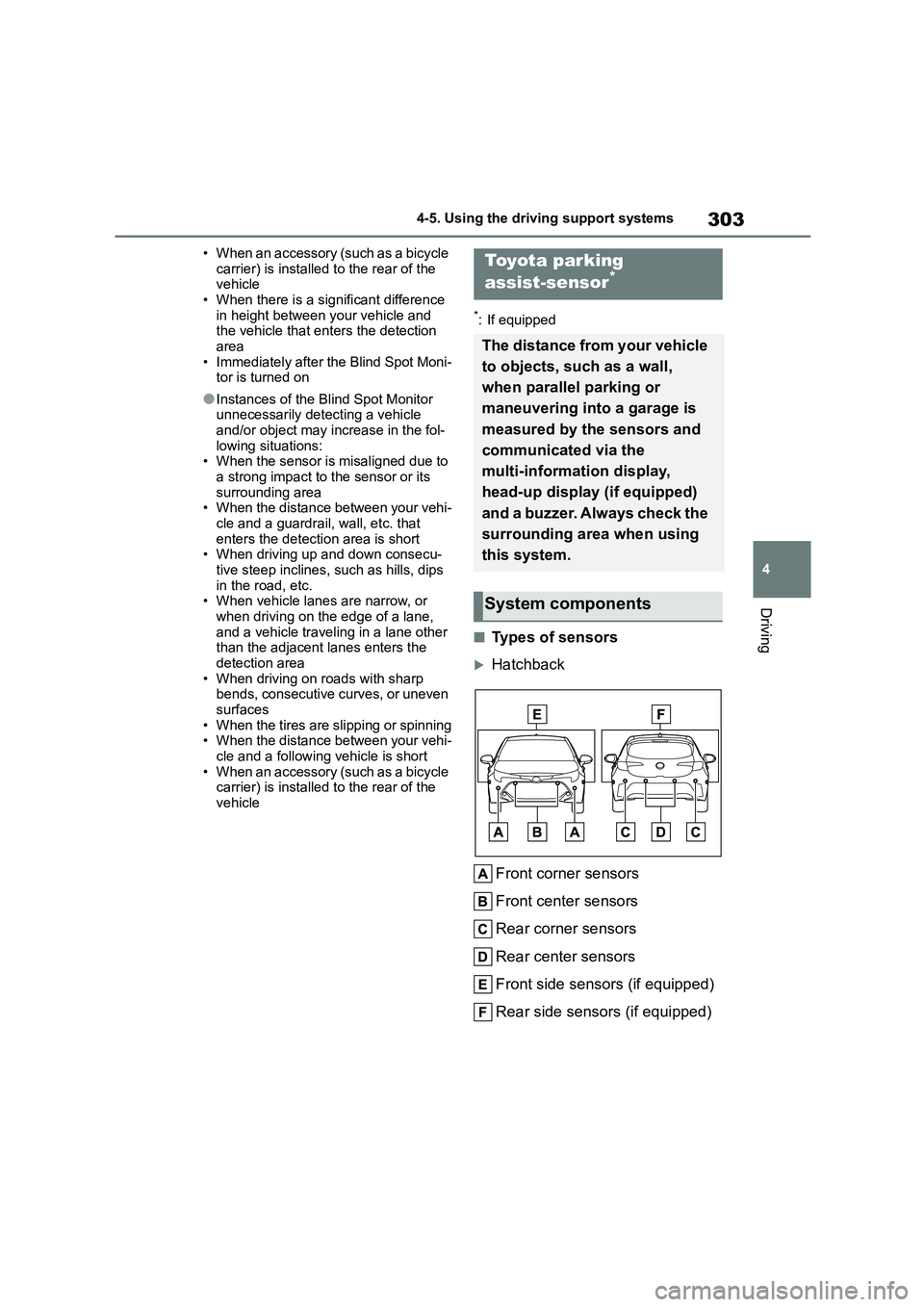
■Types of sensors
Hatchback
Front corner sensors
Front center sensors
Rear corner sensors
Rear center sensors
Front side sensors (if equipped)
Rear side sensors (if equipped)
Toyota parking
assist-sensor*
The distance from your vehicle
to objects, such as a wall,
when parallel parking or
maneuvering into a garage is
measured by the sensors and
communicated via the
multi-information display,
head-up display (if equipped)
and a buzzer. Always check the
surrounding area when using
this system.
System components
Page 306 of 758
3044-5. Using the driving support systems
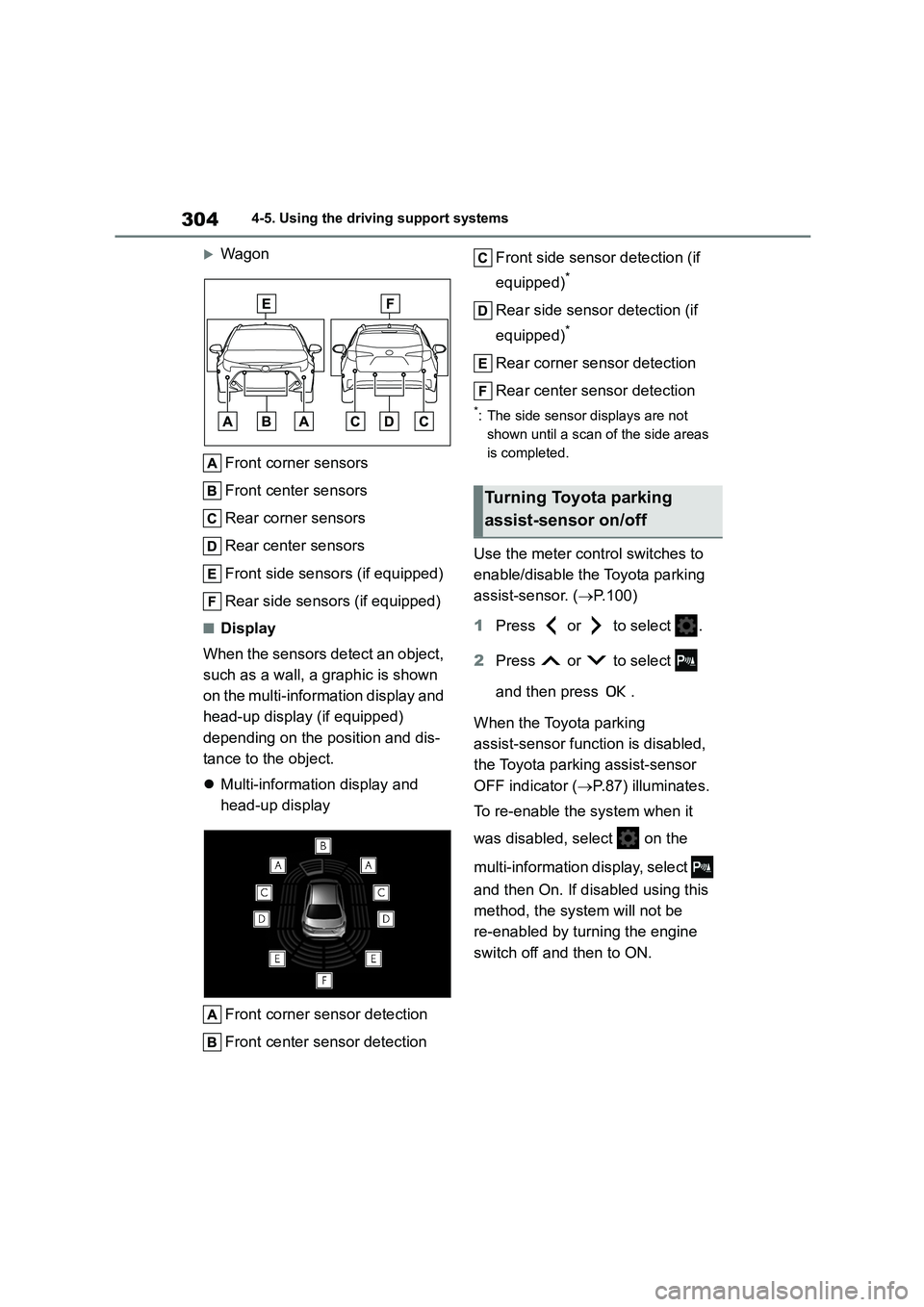
Wagon
Front corner sensors
Front center sensors
Rear corner sensors
Rear center sensors
Front side sensors (if equipped)
Rear side sensors (if equipped)
■Display
When the sensors detect an object,
such as a wall, a graphic is shown
on the multi-information display and
head-up display (if equipped)
depending on the position and dis-
tance to the object.
Multi-information display and
head-up display
Front corner sensor detection
Front center sensor detection
Front side sensor detection (if
equipped)*
Rear side sensor detection (if
equipped)*
Rear corner sensor detection
Rear center sensor detection
*: The side sensor displays are not
shown until a scan of the side areas
is completed.
Use the meter control switches to
enable/disable the Toyota parking
assist-sensor. ( P.100)
1 Press or to select .
2 Press or to select
and then press .
When the Toyota parking
assist-sensor function is disabled,
the Toyota parking assist-sensor
OFF indicator ( P.87) illuminates.
To re-enable the system when it
was disabled, select on the
multi-information di splay, select
and then On. If disabled using this
method, the sy stem will not be
re-enabled by turning the engine
switch off and then to ON.
Turning Toyota parking
assist-sensor on/off
Page 308 of 758
3064-5. Using the driving support systems
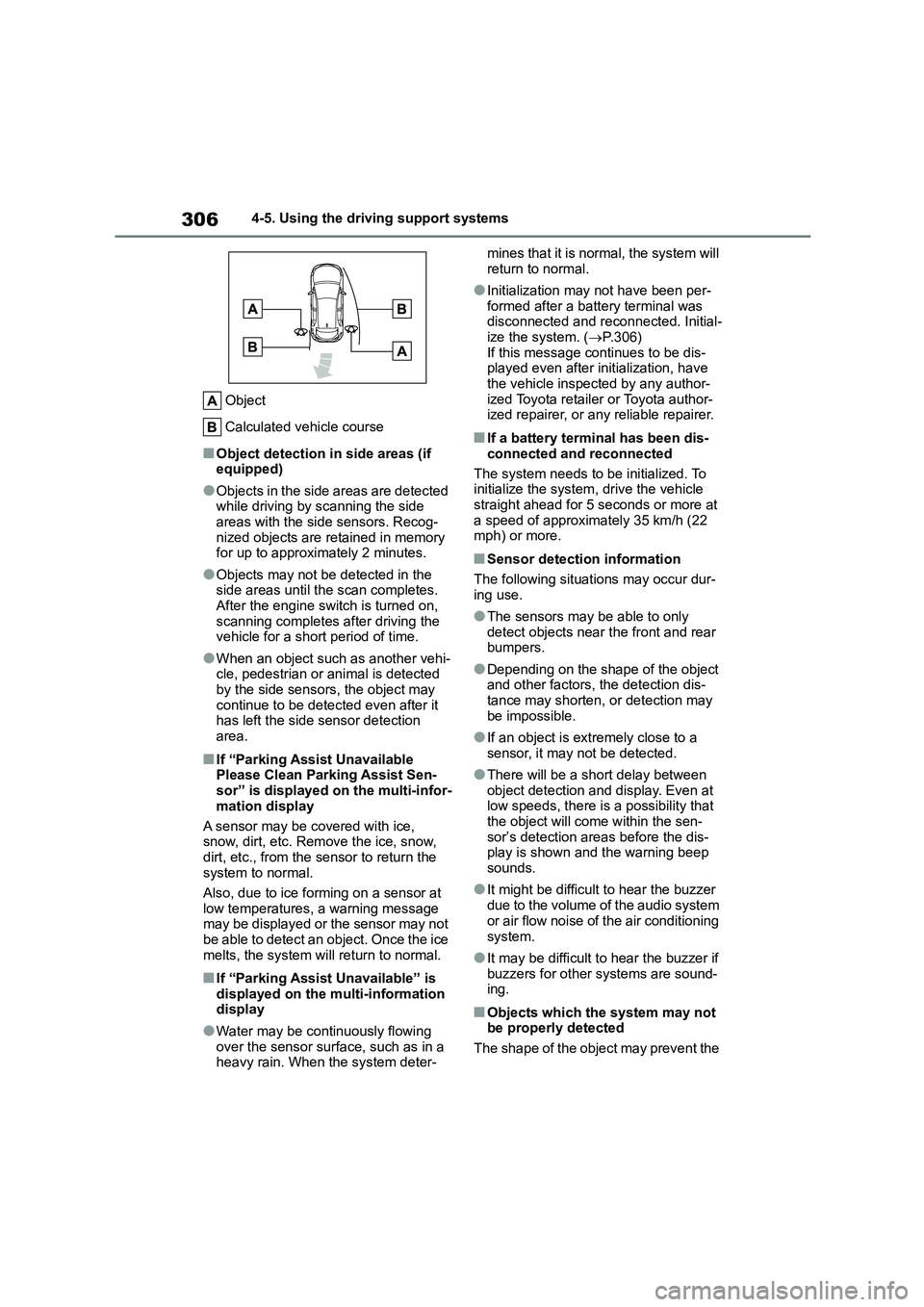
Object
Calculated vehicle course
■Object detection in side areas (if equipped)
●Objects in the side areas are detected while driving by scanning the side
areas with the side sensors. Recog-
nized objects are retained in memory for up to approximately 2 minutes.
●Objects may not be detected in the side areas until the scan completes.
After the engine switch is turned on,
scanning completes after driving the vehicle for a short period of time.
●When an object such as another vehi-cle, pedestrian or animal is detected
by the side sensors, the object may
continue to be detected even after it has left the side sensor detection
area.
■If “Parking Assist Unavailable
Please Clean Parking Assist Sen- sor” is displayed on the multi-infor-
mation display
A sensor may be covered with ice, snow, dirt, etc. Remove the ice, snow,
dirt, etc., from the sensor to return the
system to normal.
Also, due to ice forming on a sensor at
low temperatures, a warning message
may be displayed or the sensor may not be able to detect an object. Once the ice
melts, the system will return to normal.
■If “Parking Assist Unavailable” is
displayed on the multi-information display
●Water may be continuously flowing
over the sensor surface, such as in a heavy rain. When the system deter-
mines that it is normal, the system will
return to normal.
●Initialization may not have been per-
formed after a battery terminal was disconnected and reconnected. Initial-
ize the system. ( P.306)
If this message continues to be dis- played even after initialization, have
the vehicle inspected by any author-
ized Toyota retailer or Toyota author- ized repairer, or any reliable repairer.
■If a battery terminal has been dis-
connected and reconnected
The system needs to be initialized. To initialize the system, drive the vehicle
straight ahead for 5 seconds or more at
a speed of approximately 35 km/h (22 mph) or more.
■Sensor detection information
The following situations may occur dur-
ing use.
●The sensors may be able to only
detect objects near the front and rear bumpers.
●Depending on the shape of the object and other factors, the detection dis-
tance may shorten, or detection may
be impossible.
●If an object is extremely close to a
sensor, it may not be detected.
●There will be a short delay between
object detection and display. Even at low speeds, there is a possibility that
the object will come within the sen-
sor’s detection areas before the dis- play is shown and the warning beep
sounds.
●It might be difficult to hear the buzzer
due to the volume of the audio system
or air flow noise of the air conditioning
system.
●It may be difficult to hear the buzzer if
buzzers for other systems are sound- ing.
■Objects which the system may not
be properly detected
The shape of the object may prevent the
Page 313 of 758
311
4
4-5. Using the driving support systems
Driving
When the vehicle comes within
approximately 30 cm (1.0 ft.) of
the object, the buzzer sounds
continuously.
When 2 or more objects are
detected simultaneously, the
buzzer sounds for the nearest
object. If one or more objects
come within approximately 30
cm (1.0 ft.) of the vehicle, the
buzzer will repeat a long tone,
followed by fast beeps.
Automatic buzzer mute function:
After a buzzer begins sounding,
if the distance between the vehi-
cle and the detected object does
not become shorter, the buzzer
will be muted automatically.
(However, if the distance
between the vehicle and object is
30 cm (1.0 ft.) or less, this func-
tion will not operate.)
■Adjusting the buzzer volume
The buzzer volume can be adjusted
on the multi-information display.
The volume of buzzers for the
Toyota parking assist-sensor and
RCTA function (if equipped) will be
adjusted simultaneously.
Use the meter control switches to
change settings. ( P.100)
1 Press or to select .
2 Press or to select
and then press and hold .
3 Select the volume and then
press .
Each time the switch is pressed, the
volume level will change between 1, 2,
and 3.
■Muting a buzzer
A mute button will be displayed on
the multi-information display when
an object is detected. To mute the
buzzer, press .
The buzzers for the Toyota parking
assist-sensor and RCTA function (if
equipped) will be muted simultane-
ously.
Mute will be canceled automatically
in the following situations:
When the shift lever is changed.
When the vehicle speed exceeds
a certain speed.
When the operating function is
temporarily canceled.
When the operating function is
disabled manually.
When the engine switch is turned
off.
Page 316 of 758
3144-5. Using the driving support systems
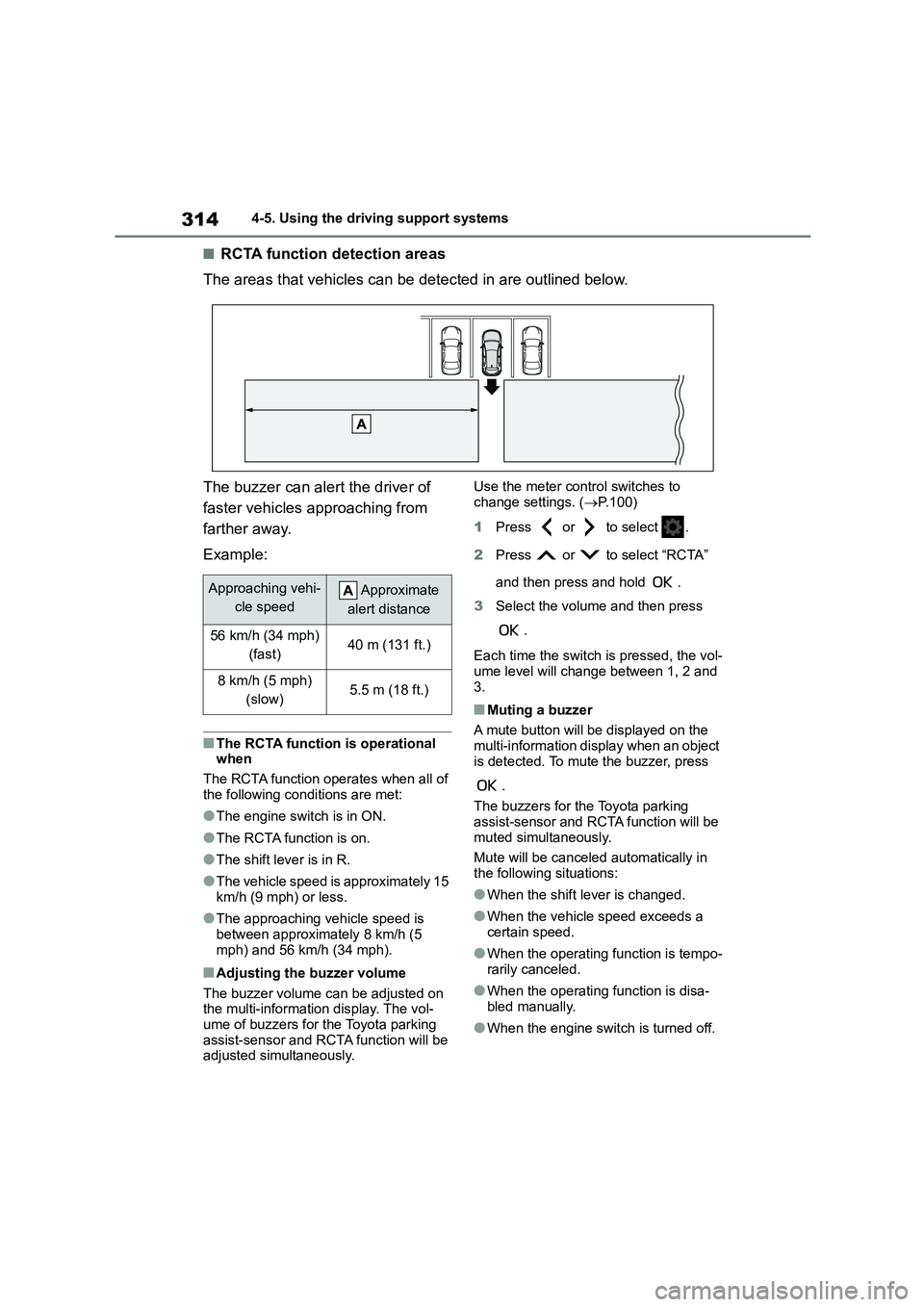
■RCTA function detection areas
The areas that vehicles can be detected in are outlined below.
The buzzer can alert the driver of
faster vehicles approaching from
farther away.
Example:
■The RCTA function is operational
when
The RCTA function operates when all of
the following conditions are met:
●The engine switch is in ON.
●The RCTA function is on.
●The shift lever is in R.
●The vehicle speed is approximately 15
km/h (9 mph) or less.
●The approaching vehicle speed is
between approximately 8 km/h (5
mph) and 56 km/h (34 mph).
■Adjusting the buzzer volume
The buzzer volume can be adjusted on the multi-information display. The vol-
ume of buzzers for the Toyota parking
assist-sensor and RCTA function will be adjusted simultaneously.
Use the meter control switches to change settings. ( P.100)
1 Press or to select .
2 Press or to select “RCTA”
and then press and hold .
3 Select the volume and then press
.
Each time the switch is pressed, the vol-
ume level will change between 1, 2 and
3.
■Muting a buzzer
A mute button will be displayed on the
multi-information display when an object
is detected. To mute the buzzer, press
.
The buzzers for the Toyota parking
assist-sensor and RCTA function will be muted simultaneously.
Mute will be canceled automatically in
the following situations:
●When the shift lever is changed.
●When the vehicle speed exceeds a
certain speed.
●When the operating function is tempo-
rarily canceled.
●When the operating function is disa-
bled manually.
●When the engine switch is turned off.
Approaching vehi-
cle speed
Approximate
alert distance
56 km/h (34 mph)
(fast)40 m (131 ft.)
8 km/h (5 mph)
(slow)5.5 m (18 ft.)
Page 324 of 758
3224-5. Using the driving support systems
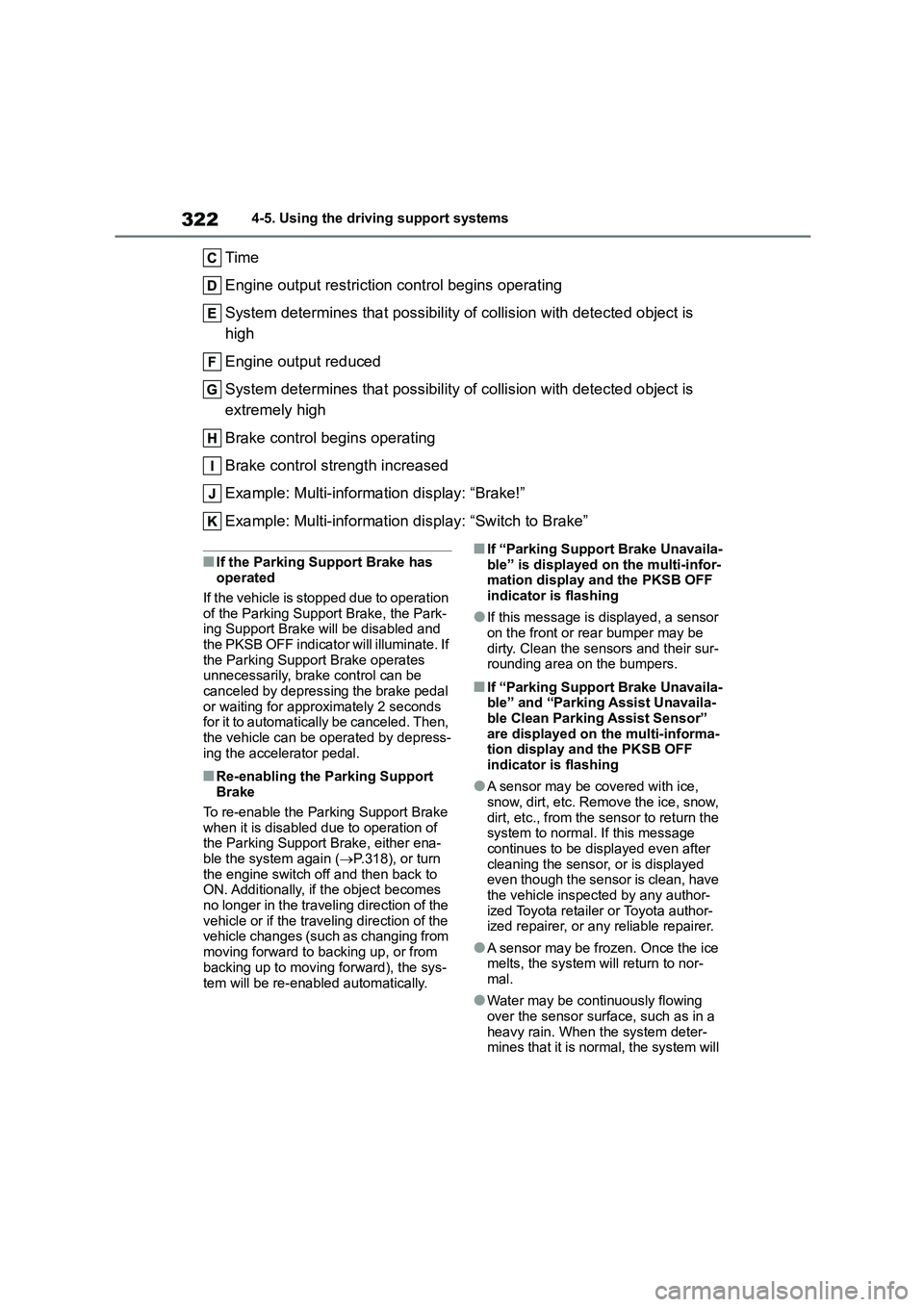
Time
Engine output restriction control begins operating
System determines that possibility of collision with detected object is
high
Engine output reduced
System determines that possibility of collision with detected object is
extremely high
Brake control begins operating
Brake control strength increased
Example: Multi-informat ion display: “Brake!”
Example: Multi-information di splay: “Switch to Brake”
■If the Parking Support Brake has operated
If the vehicle is stopped due to operation
of the Parking Support Brake, the Park- ing Support Brake will be disabled and
the PKSB OFF indicator will illuminate. If
the Parking Support Brake operates unnecessarily, brake control can be
canceled by depressing the brake pedal
or waiting for approximately 2 seconds for it to automatically be canceled. Then,
the vehicle can be operated by depress-
ing the accelerator pedal.
■Re-enabling the Parking Support Brake
To re-enable the Parking Support Brake
when it is disabled due to operation of the Parking Support Brake, either ena-
ble the system again ( P.318), or turn
the engine switch off and then back to ON. Additionally, if the object becomes
no longer in the traveling direction of the
vehicle or if the traveling direction of the vehicle changes (such as changing from
moving forward to backing up, or from
backing up to moving forward), the sys-
tem will be re-enabled automatically.
■If “Parking Support Brake Unavaila-
ble” is displayed on the multi-infor- mation display and the PKSB OFF
indicator is flashing
●If this message is displayed, a sensor
on the front or rear bumper may be
dirty. Clean the sensors and their sur- rounding area on the bumpers.
■If “Parking Support Brake Unavaila-
ble” and “Parking Assist Unavaila-
ble Clean Parking Assist Sensor” are displayed on the multi-informa-
tion display and the PKSB OFF
indicator is flashing
●A sensor may be covered with ice,
snow, dirt, etc. Remove the ice, snow, dirt, etc., from the sensor to return the
system to normal. If this message
continues to be displayed even after cleaning the sensor, or is displayed
even though the sensor is clean, have
the vehicle inspected by any author- ized Toyota retailer or Toyota author-
ized repairer, or any reliable repairer.
●A sensor may be frozen. Once the ice
melts, the system will return to nor-
mal.
●Water may be continuously flowing
over the sensor surface, such as in a heavy rain. When the system deter-
mines that it is normal, the system will
Page 328 of 758
3264-5. Using the driving support systems
■The Parking Support Brake func- tion (static object) will operate
when
The function will operate when the PKSB OFF indicator is not illuminated or
flashing ( P.85, 87) and all of the fol-
lowing conditions are met:
●Engine output restriction control
• The Parking Support Brake is ena- bled.
• The vehicle speed is approximately 15
km/h (9 mph) or less. • There is a static object in the traveling
direction of the vehicle and approxi-
mately 2 to 4 m (6 to 13 ft.) away. • The Parking Support Brake deter-
mines that a stronger-than-normal
brake operation is necessary to avoid a collision.
●Brake control• Engine output restriction control is
operating
• The Parking Support Brake deter- mines that an immediate brake opera-
tion is necessary to avoid a collision.
■The Parking Support Brake func-
tion (static objects) will stop oper- ating when
The function will stop operating if any of
the following conditions are met:
●Engine output restriction control
• The Parking Support Brake is disa-
bled. • The system determines that the colli-
sion has become avoidable with nor-
mal brake operation. • The static object is no longer approxi-
mately 2 to 4 m (6 to 13 ft.) away from
the vehicle or in the traveling direction of the vehicle.
●Brake control• The Parking Support Brake is disa-
bled.
• Approximately 2 seconds have elapsed since the vehicle was
stopped by brake control.
• The brake pedal is depressed after the vehicle is stopped by brake con-
trol.
• The static object is no longer approxi-
mately 2 to 4 m (6 to 13 ft.) away from the vehicle or in the traveling direction
of the vehicle.
■Detection range of the Parking Sup-
port Brake function (static objects)
The detection range of the Parking Sup-
port Brake function (static objects) dif-
fers from the detection range of the Toyota parking assist-sensor. ( P.308)
Therefore, even if the Toyota parking
assist-sensor detects an object and pro- vides a warning, the Parking Support
Brake function (static objects) may not
start operating.
■Situations in which the system may not operate properly
P. 3 0 7
■Situations in which the system may
operate even if there is no possibil- ity of a collision
P. 3 0 7
Page 331 of 758
329
4
4-5. Using the driving support systems
Driving
*: If equipped
■Function summary
The Simple Inte lligent Parking
Assist System automatically oper-
ates the steering wheel to provide
support when backing into an area
near a target parking spot, and
when departing from a parallel
parking spot. (Shift lever operations
and speed adjustment when mov-
ing forward or backing up are not
performed automatically.)
The Simple Intelligent Parking
Assist System does not park the
vehicle automatically. It is a sys-
tem that provides support when
pulling out of a perpendicular or
parallel parking spot.
The Simple Intelligent Parking
Assist System provides steering
wheel operation assistance to
guide the vehicle toward the
selected intended parking spot.
The selected intended parking
spot may not always be reacha-
ble, depending on road and vehi-
cle conditions at the time of
parking, and the distance to the
intended parking spot.
■Linking with the PKSB (Park-
ing Support Brake) system (if
equipped)
While the Simple Intelligent Parking
Assist System is operating, if the
system detects an obstacle that
could result in a collision, the emer-
gency brakes operate, regardless
of whether the PKSB (Parking Sup-
port Brake) system is on or off.
( P. 3 3 0 )
S-IPA (Simple Intelligent
Parking Assist System)*
Simple Intelligent Parking
Assist System
WA R N I N G
■When using the Simple Intelli-
gent Parking Assist System
●When backing up or proceeding for- ward, be sure to directly confirm the
safety of the area to the front or
rear, and the area around the vehi- cle, and slowly back up or proceed
forward while adjusting the vehicle
speed by depressing the brake pedal.
●If it seems the vehicle may make contact with a pedestrian, another
vehicle or any other obstacles, stop
the vehicle by depressing the brake pedal, and then press the S-IPA
switch ( P.331) to turn the system
off.
Page 332 of 758
3304-5. Using the driving support systems
■PKSB (Parking Support Brake) sys-
tem while the Simple Intelligent
Parking Assist System is operating
While the Simple Intelligent Parking
Assist System is ope rating, if the system
detects an obstacle that could result in a collision, engine output suppression
control and brake control of the PKSB
(Parking Support Brake) system are operated, regardless of whether the
PKSB (Parking Support Brake) system
is on or off. ( P.318)
●After the PKSB (Parking Support
Brake) system operates, operation of the Simple Intelligent Parking Assist
System is temporarily stopped, and
operation of the PKSB (Parking Sup- port Brake) system is indicated on the
multi-information display. ( P.319)
●When operation of the Simple Intelli-
gent Parking Assist System is stopped
3 times by operation of the PKSB
(Parking Support Brake) system, the Simple Intelligent Parking Assist Sys-
tem is canceled.
●Once the Simple Intelligent Parking
Assist System becomes available
after the PKSB (Parking Support Brake) system is operated, a mes-
sage prompting you to shift is dis-
played on the multi-information display. Operation of the Simple Intel-
ligent Parking Assist System can be
resumed by shifting according to the
prompt on the multi-information dis- play and pressing the S-IPA switch
( P.331) again.
■Shifting while the Simple Intelligent
Parking Assist System is operating
If the system determi nes that the drivers
intends to move forward or in reverse,
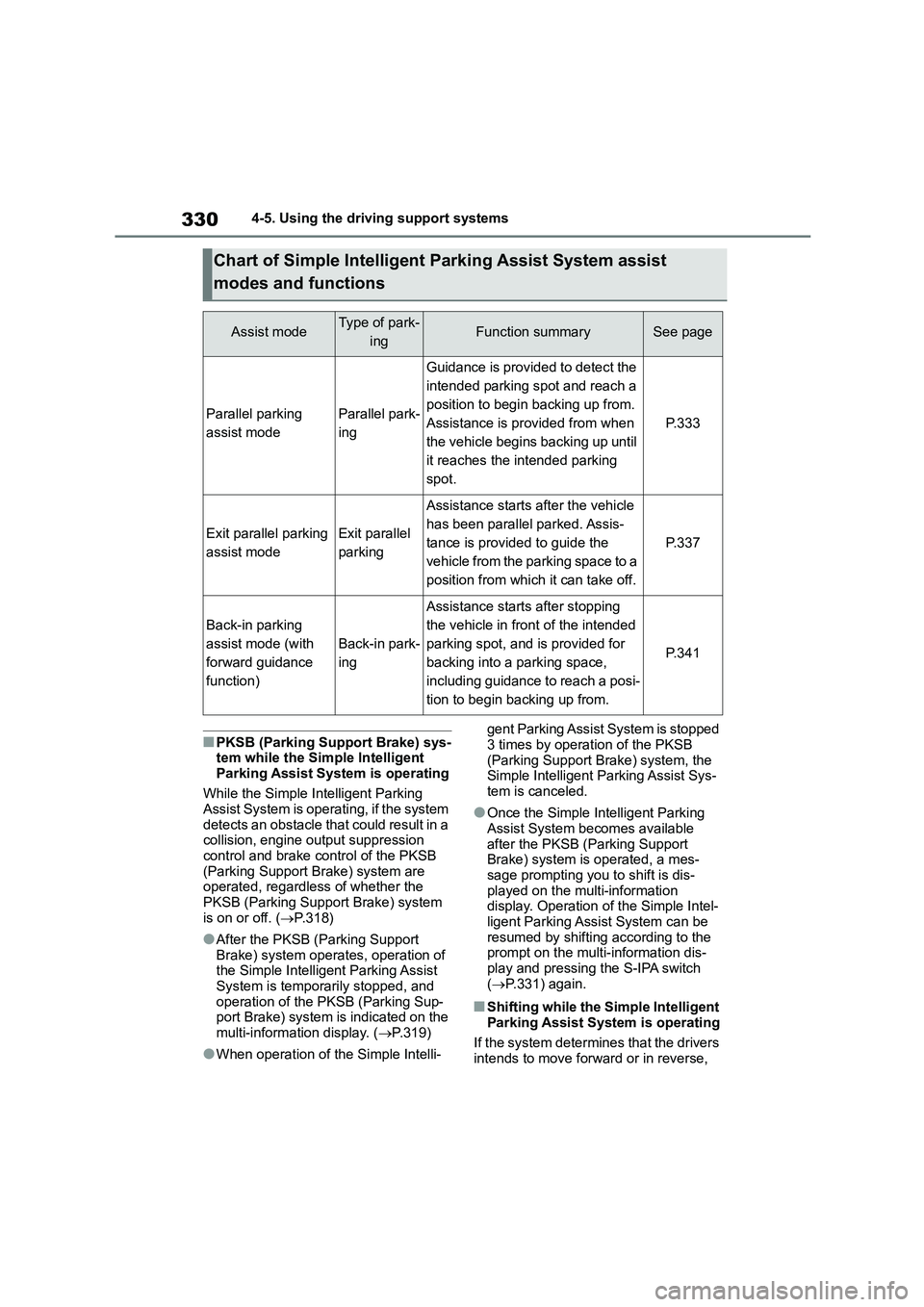
Chart of Simple Intelligent Parking Assist System assist
modes and functions
Assist modeType of park-
ingFunction summarySee page
Parallel parking
assist mode
Parallel park-
ing
Guidance is provided to detect the
intended parking spot and reach a
position to begin backing up from.
Assistance is provided from when
the vehicle begins backing up until
it reaches the intended parking
spot.
P. 3 3 3
Exit parallel parking
assist mode
Exit parallel
parking
Assistance starts after the vehicle
has been parallel parked. Assis-
tance is provided to guide the
vehicle from the parking space to a
position from which it can take off.
P. 3 3 7
Back-in parking
assist mode (with
forward guidance
function)
Back-in park-
ing
Assistance starts after stopping
the vehicle in front of the intended
parking spot, and is provided for
backing into a parking space,
including guidance to reach a posi-
tion to begin backing up from.
P. 3 4 1
Page 333 of 758
331
4
4-5. Using the driving support systems
Driving
assistance continues even if the drivers
shifted before being prompted to do so by the system. However, because driver
operation differs from the guidance pro-
vided by the system, the number of turn- ing maneuvers may increase.
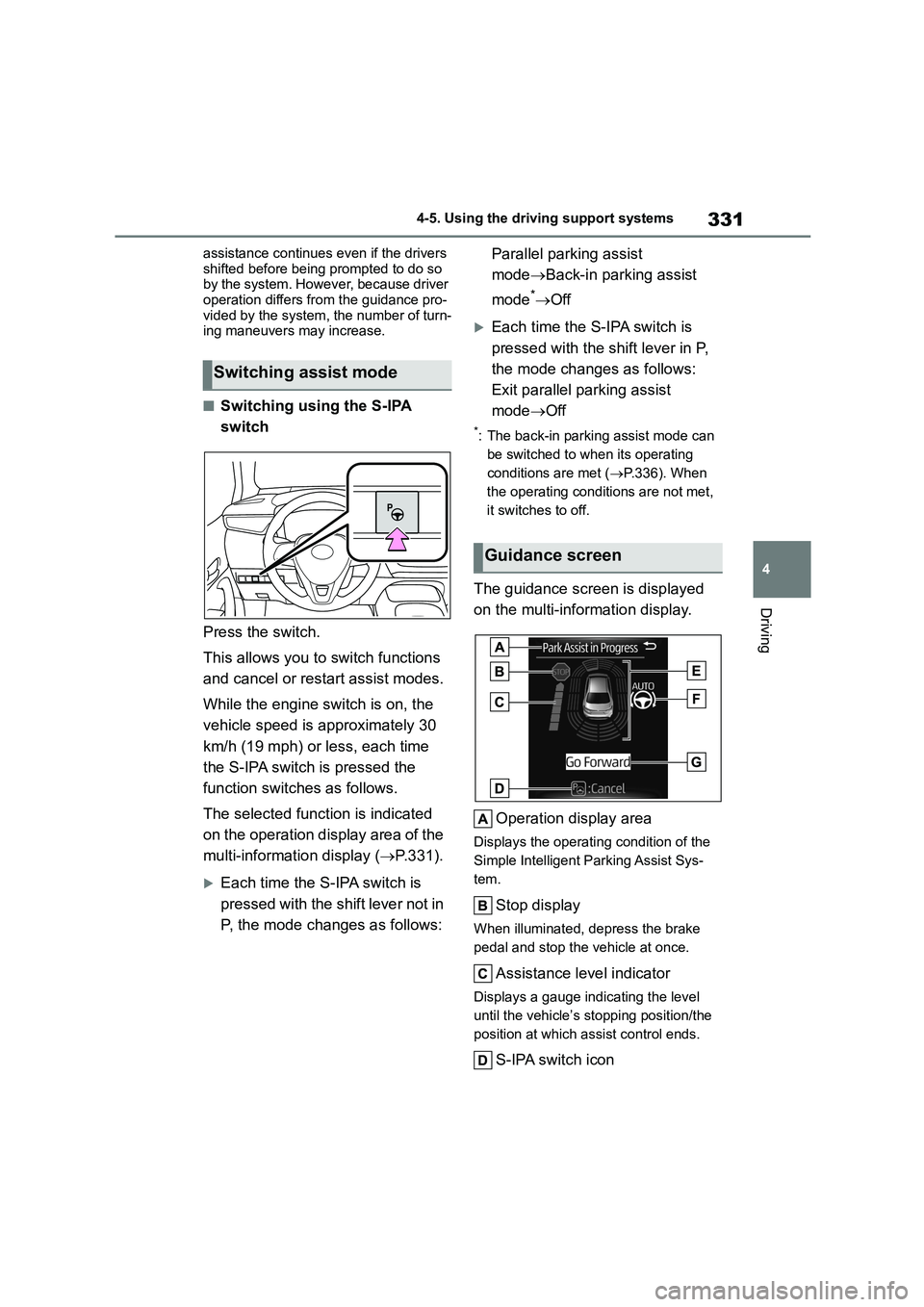
■Switching using the S-IPA
switch
Press the switch.
This allows you to switch functions
and cancel or restart assist modes.
While the engine switch is on, the
vehicle speed is approximately 30
km/h (19 mph) or less, each time
the S-IPA switch is pressed the
function switches as follows.
The selected function is indicated
on the operation display area of the
multi-information display ( P.331).
Each time the S-IPA switch is
pressed with the sh ift lever not in
P, the mode changes as follows:
Parallel parking assist
mode Back-in parking assist
mode* Off
Each time the S-IPA switch is
pressed with the shift lever in P,
the mode changes as follows:
Exit parallel parking assist
mode Off
*: The back-in parking assist mode can
be switched to when its operating
conditions are met ( P.336). When
the operating conditions are not met,
it switches to off.
The guidance screen is displayed
on the multi-information display.
Operation display area
Displays the operating condition of the
Simple Intelligent Parking Assist Sys-
tem.
Stop display
When illuminated, depress the brake
pedal and stop the vehicle at once.
Assistance level indicator
Displays a gauge indicating the level
until the vehicle’s stopping position/the
position at which assist control ends.
S-IPA switch icon
Switching assist mode
Guidance screen