lights TOYOTA COROLLA HATCHBACK 2023 User Guide
[x] Cancel search | Manufacturer: TOYOTA, Model Year: 2023, Model line: COROLLA HATCHBACK, Model: TOYOTA COROLLA HATCHBACK 2023Pages: 436, PDF Size: 8.72 MB
Page 67 of 436
67
2
2
Vehicle status information and indicators
Vehicle status informationand indicators
.2-1. Instrument cluster
Warning lights and indica-tors ............................... 68
Gauges and meters (4.2-inch display) .......... 72
Gauges and meters (7-inch display) ......................... 75
Multi-information display (4.2-inch display) .......... 77
Multi-information display (7-inch display) ............. 83
Fuel consumption informa- tion ............................... 88
Page 68 of 436
682-1. Instrument cluster
2-1.Instrument cluster
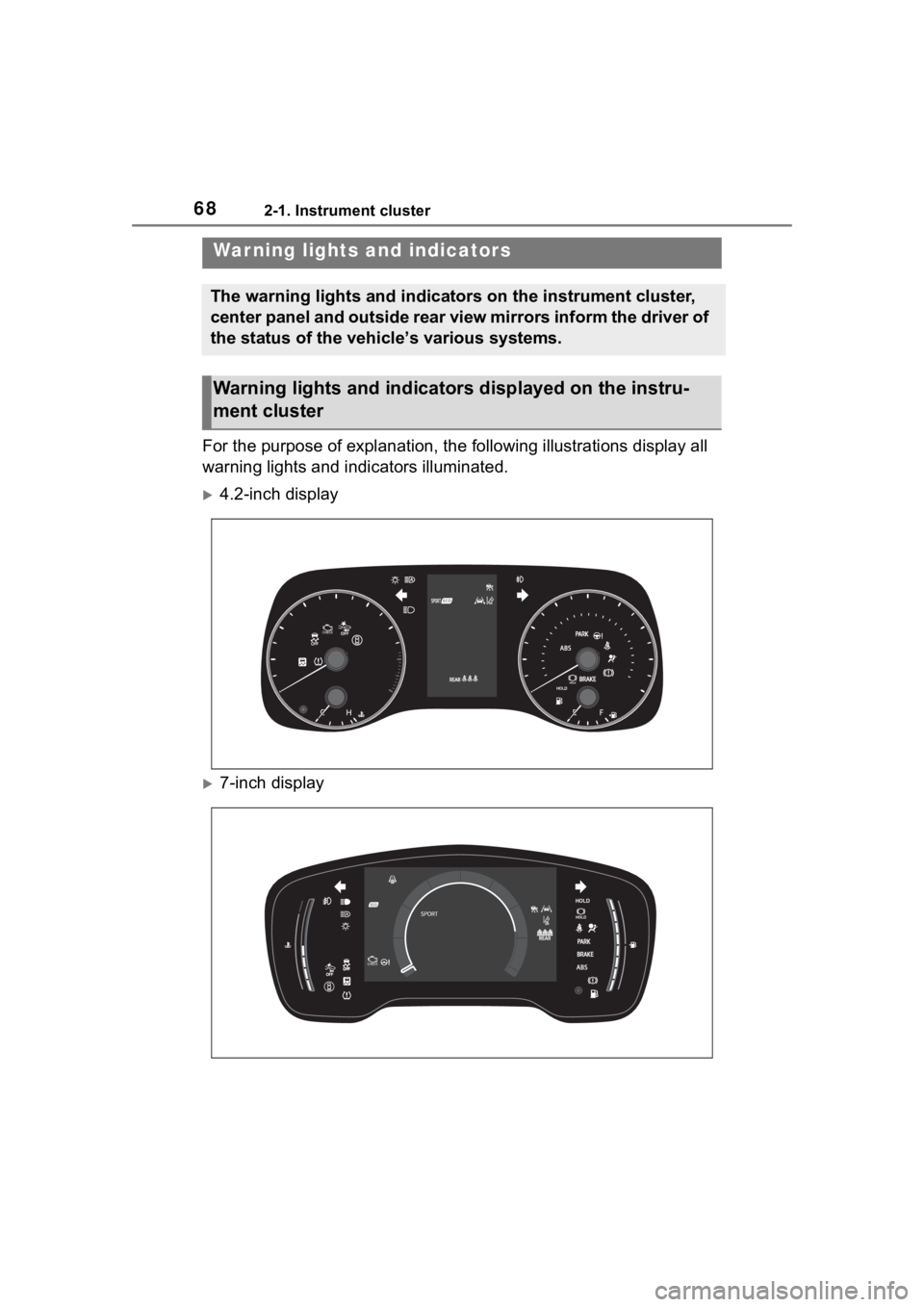
For the purpose of explanation, the following illustrations display all
warning lights and indicators illuminated.
4.2-inch display
7-inch display
War ning lights and indicators
The warning lights and indicators on the instrument cluster,
center panel and outside rear view mirrors inform the driver of
the status of the vehicle’s various systems.
Warning lights and indicators displayed on the instru-
ment cluster
Page 69 of 436
692-1. Instrument cluster
2
Vehicle status information and indicators
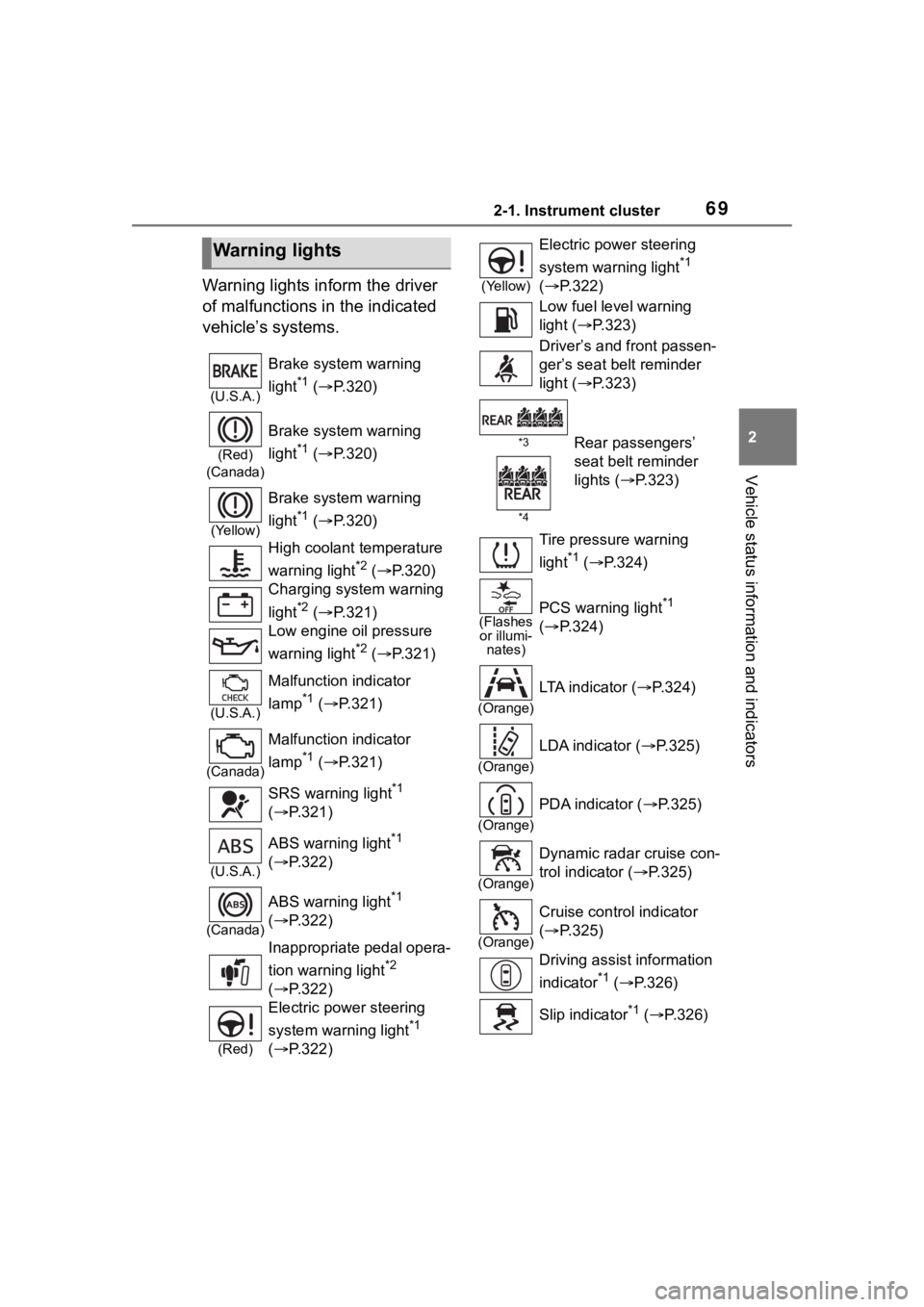
Warning lights inform the driver
of malfunctions in the indicated
vehicle’s systems.
Warning lights
(U.S.A.)
Brake system warning
light
*1 ( P.320)
(Red)
(Canada)
Brake system warning
light
*1 ( P.320)
(Yellow)
Brake system warning
light
*1 ( P.320)
High coolant temperature
warning light
*2 ( P.320)
Charging system warning
light
*2 ( P.321)
Low engine oil pressure
warning light
*2 ( P.321)
(U.S.A.)
Malfunction indicator
lamp
*1 ( P.321)
(Canada)
Malfunction indicator
lamp
*1 ( P.321)
SRS warning light
*1
( P.321)
(U.S.A.)
ABS warning light*1
( P.322)
(Canada)
ABS warning light*1
( P.322)
Inappropriate pedal opera-
tion warning light
*2
( P.322)
(Red)
Electric power steering
system warning light
*1
( P.322)
(Yellow)
Electric power steering
system warning light
*1
( P.322)
Low fuel level warning
light ( P.323)
Driver’s and front passen-
ger’s seat belt reminder
light ( P.323)
*3
*4Rear passengers’
seat belt reminder
lights ( P.323)
Tire pressure warning
light
*1 ( P.324)
(Flashes
or illumi- nates)PCS warning light*1
( P.324)
(Orange)
LTA indicator ( P.324)
(Orange)
LDA indicator ( P.325)
(Orange)
PDA indicator (P.325)
(Orange)
Dynamic radar cruise con-
trol indicator ( P.325)
(Orange)
Cruise control indicator
( P.325)
Driving assist information
indicator
*1 ( P.326)
Slip indicator
*1 ( P.326)
Page 70 of 436
702-1. Instrument cluster
*1: These lights come on when the engine switch is turned to ON to
indicate that a system check is
being performed. They will turn
off after the engine is started, or
after a few seconds. There may
be a malfunction in a system if
the lights do not come on, or turn
off. Have the vehicle inspected
by your Toyota dealer.
*2: This light illuminates on the multi-information display.
*3: 4.2-inch display.
*4: 7-inch display.
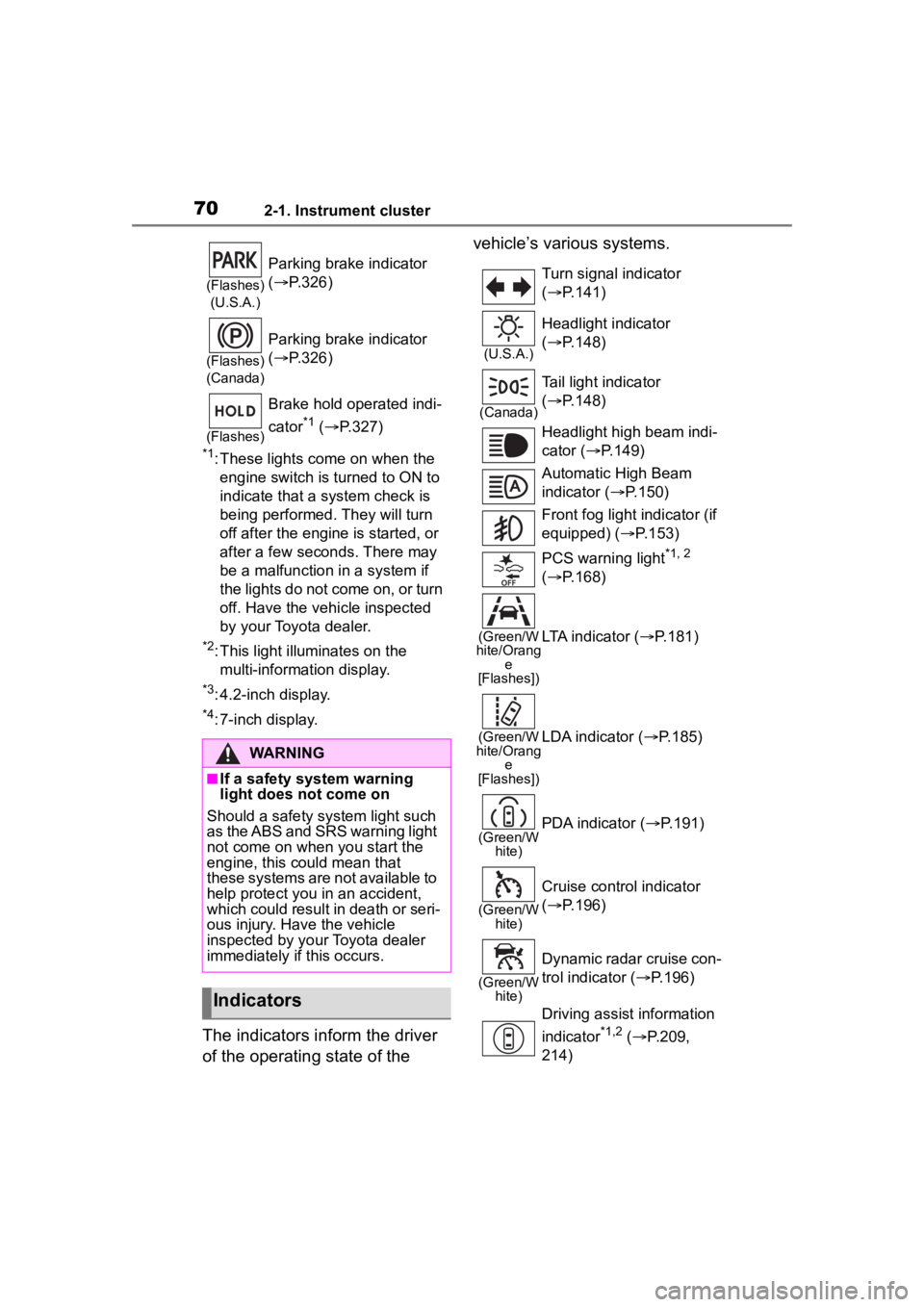
The indicators inform the driver
of the operating state of the vehicle’s various systems.
(Flashes)
(U.S.A.)
Parking brake indicator
( P.326)
(Flashes)
(Canada)
Parking brake indicator
( P.326)
(Flashes)
Brake hold operated indi-
cator
*1 ( P.327)
WARNING
■If a safety system warning
light does not come on
Should a safety system light such
as the ABS and SRS warning light
not come on when you start the
engine, this could mean that
these systems are not available to
help protect you in an accident,
which could result in death or seri-
ous injury. Have the vehicle
inspected by your Toyota dealer
immediately if this occurs.
Indicators
Turn signal indicator
( P.141)
(U.S.A.)
Headlight indicator
( P.148)
(Canada)
Tail light indicator
( P.148)
Headlight high beam indi-
cator ( P.149)
Automatic High Beam
indicator ( P.150)
Front fog light indicator (if
equipped) ( P.153)
PCS warning light
*1, 2
( P.168)
(Green/W
hite/Orang e
[Flashes])LTA indicator ( P.181)
(Green/W
hite/Orang e
[Flashes])LDA indicator ( P.185)
(Green/W
hite)PDA indicator ( P.191)
(Green/W
hite)
Cruise control indicator
( P.196)
(Green/W
hite)
Dynamic radar cruise con-
trol indicator ( P.196)
Driving assist information
indicator
*1,2 ( P.209,
214)
Page 71 of 436
712-1. Instrument cluster
2
Vehicle status information and indicators
*1: These lights come on when the engine switch is turned to ON to
indicate that a system check is
being performed. They will turn
off after the engine is started, or
after a few seconds. There may
be a malfunction in a system if
the lights do not come on, or turn off. Have the vehicle inspected
by your Toyota dealer.
*2: This light comes on when the
system is turned off.
*3: This light illuminates on the out-side rear view mirrors.
*4: This light illuminates on the multi-information display.
*5: When the outside temperature is approximately 37°F (3°C) or
lower, this indicator will flash for
approximately 10 seconds, then
stay on.
*6: This light illuminates on the cen-ter panel.
*7: This light illuminates on the over-head console.
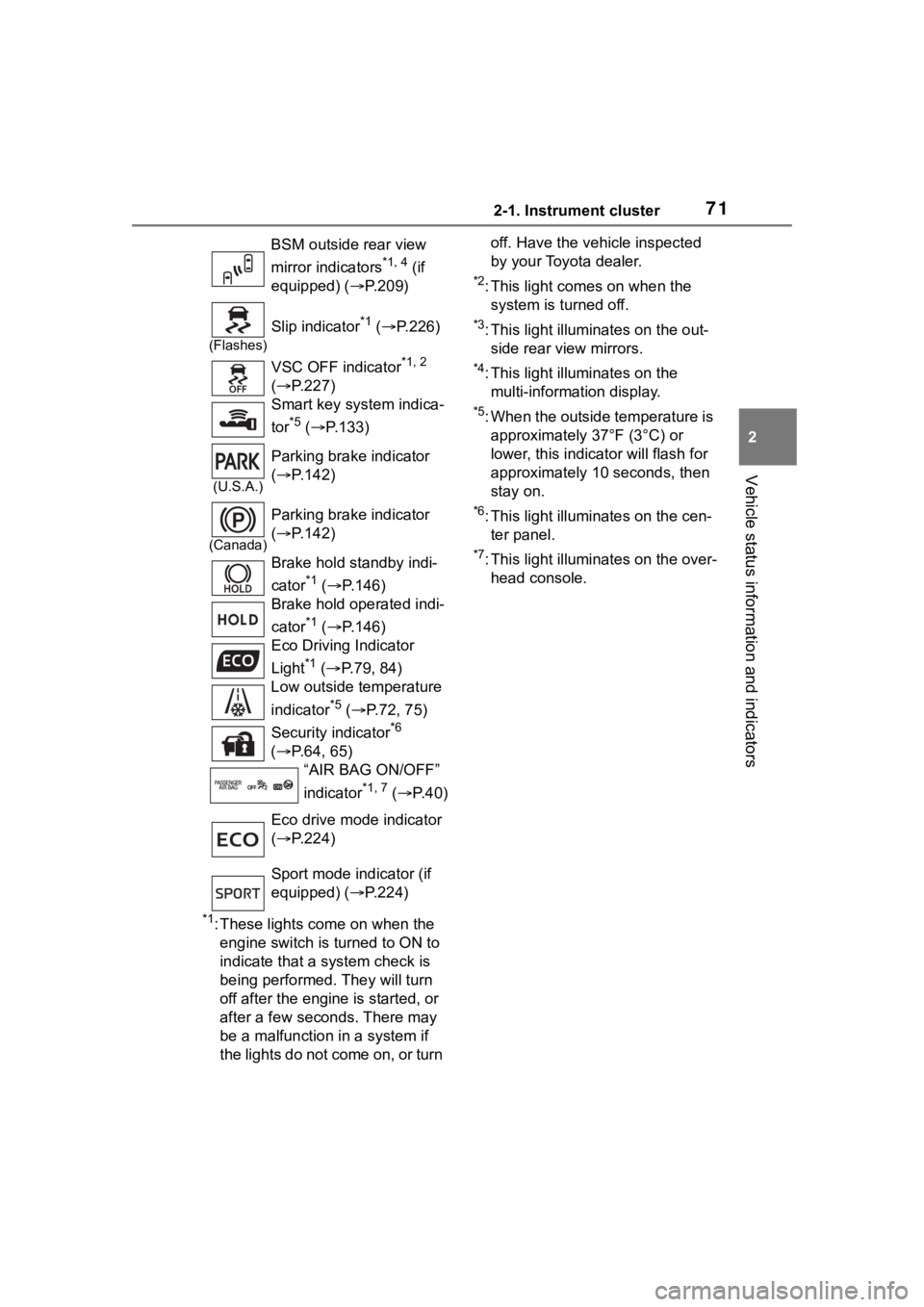
BSM outside rear view
mirror indicators
*1, 4 (if
equipped) ( P.209)
(Flashes)
Slip indicator*1 ( P.226)
VSC OFF indicator
*1, 2
( P.227)
Smart key system indica-
tor
*5 ( P.133)
(U.S.A.)
Parking brake indicator
( P.142)
(Canada)
Parking brake indicator
( P.142)
Brake hold standby indi-
cator
*1 ( P.146)
Brake hold operated indi-
cator
*1 ( P.146)
Eco Driving Indicator
Light
*1 ( P.79, 84)
Low outside temperature
indicator
*5 ( P.72, 75)
Security indicator
*6
( P.64, 65)
“AIR BAG ON/OFF”
indicator
*1, 7 ( P. 4 0 )
Eco drive mode indicator
( P.224)
Sport mode indicator (if
equipped) ( P.224)
Page 74 of 436
742-1. Instrument cluster
different distances independently.
To reset, display the desired trip
meter and press and hold the dis-
play change button.
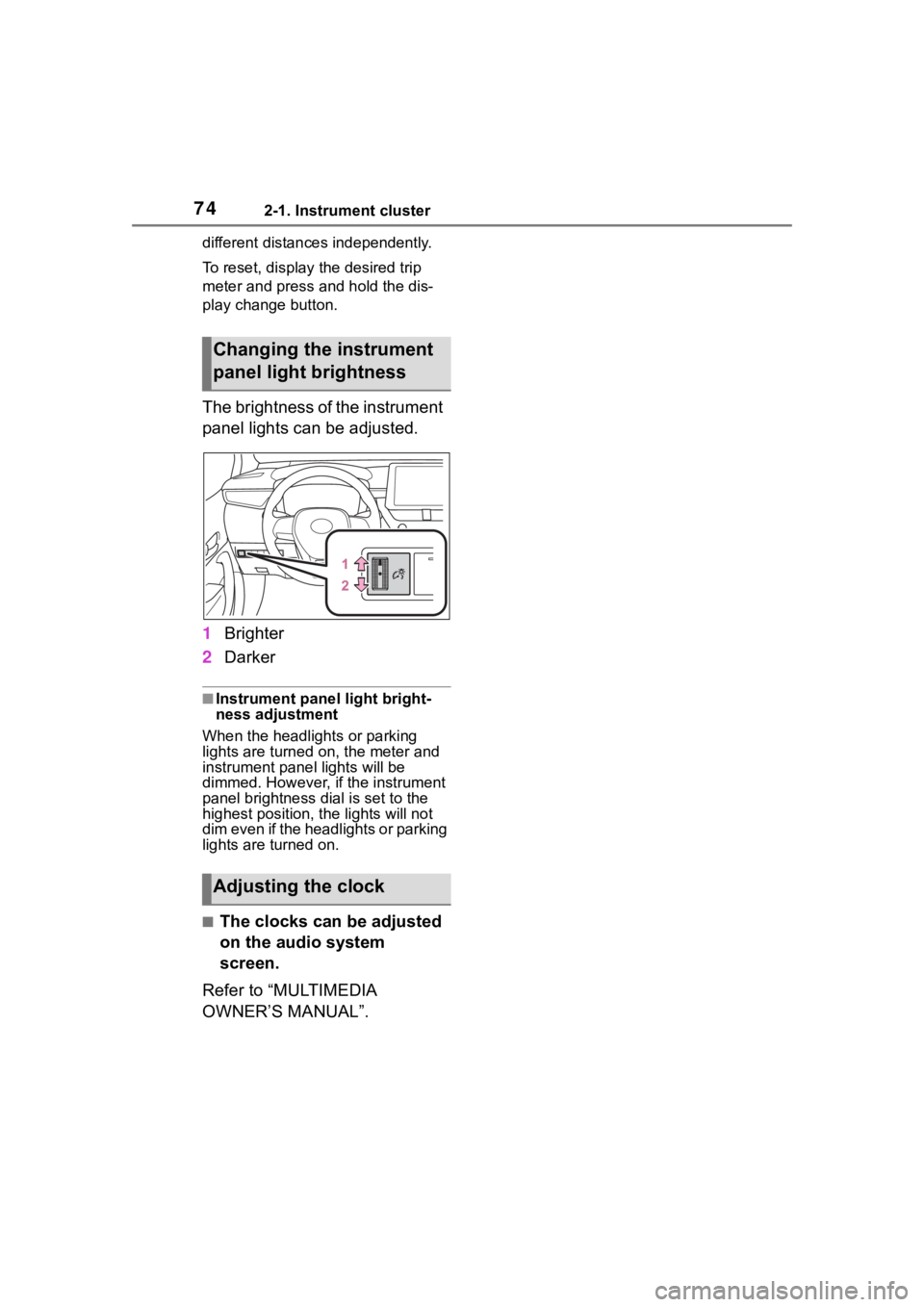
The brightness of the instrument
panel lights can be adjusted.
1Brighter
2 Darker
■Instrument panel light bright-
ness adjustment
When the headlights or parking
lights are turned on, the meter and
instrument panel lights will be
dimmed. However, if the instrument
panel brightness dial is set to the
highest position, the lights will not
dim even if the headlights or parking
lights are turned on.
■The clocks can be adjusted
on the audio system
screen.
Refer to “MULTIMEDIA
OWNER’S MANUAL”.
Changing the instrument
panel light brightness
Adjusting the clock
Page 77 of 436
772-1. Instrument cluster
2
Vehicle status information and indicators
can be used to record and display
different distances independently.
To reset, display the desired trip
meter and press and hold the dis-
play change button.
The brightness of the instrument
panel lights can be adjusted.
1Brighter
2 Darker
■Instrument panel light bright-
ness adjustment
When the headlights or parking
lights are turned on, the meter and
instrument panel lights will be
dimmed. However, if the instrument
panel brightness dial is set to the
highest position, the lights will not
dim even if the headlights or parking
lights are turned on.
■The clocks can be adjusted
on the audio system
screen.
Refer to “MULTIMEDIA
OWNER’S MANUAL”.
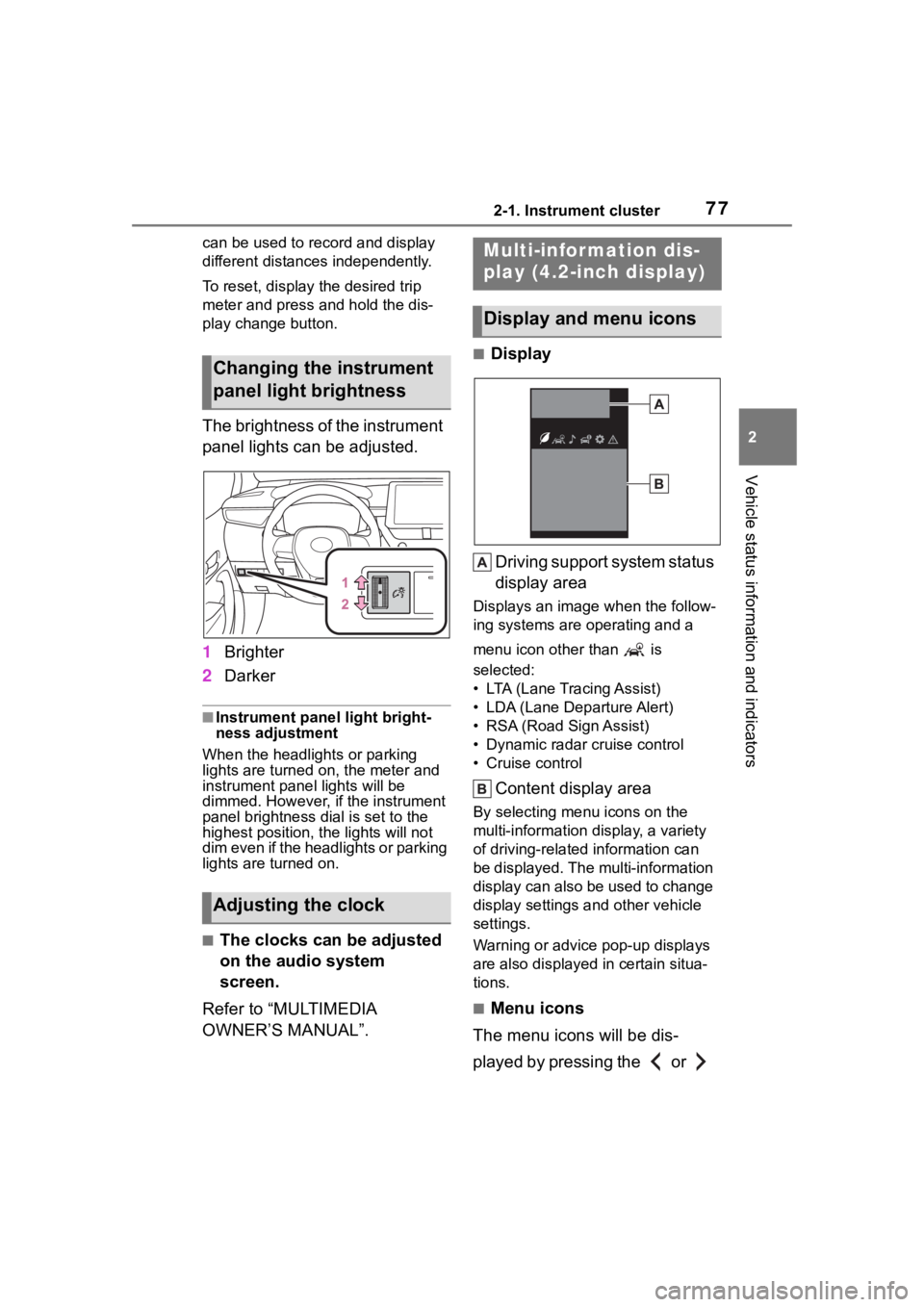
■Display
Driving support system status
display area
Displays an image when the follow-
ing systems are operating and a
menu icon other than is
selected:
• LTA (Lane Tracing Assist)
• LDA (Lane Departure Alert)
• RSA (Road Sign Assist)
• Dynamic radar cruise control
• Cruise control
Content display area
By selecting menu icons on the
multi-information di splay, a variety
of driving-related information can
be displayed. The multi-information
display can also be used to change
display settings and other vehicle
settings.
Warning or advice pop-up displays
are also displayed in certain situa-
tions.
■Menu icons
The menu icons will be dis-
played by pressing the or
Changing the instrument
panel light brightness
Adjusting the clock
Multi-infor mation dis-
play (4.2-inch display)
Display and menu icons
Page 94 of 436
943-1. Key information
will sound intermittently and the
vehicle lights will flash to deter any
person from trying to break into or
damage your vehicle.
To stop the alarm, press any button
on the wireless re mote control.
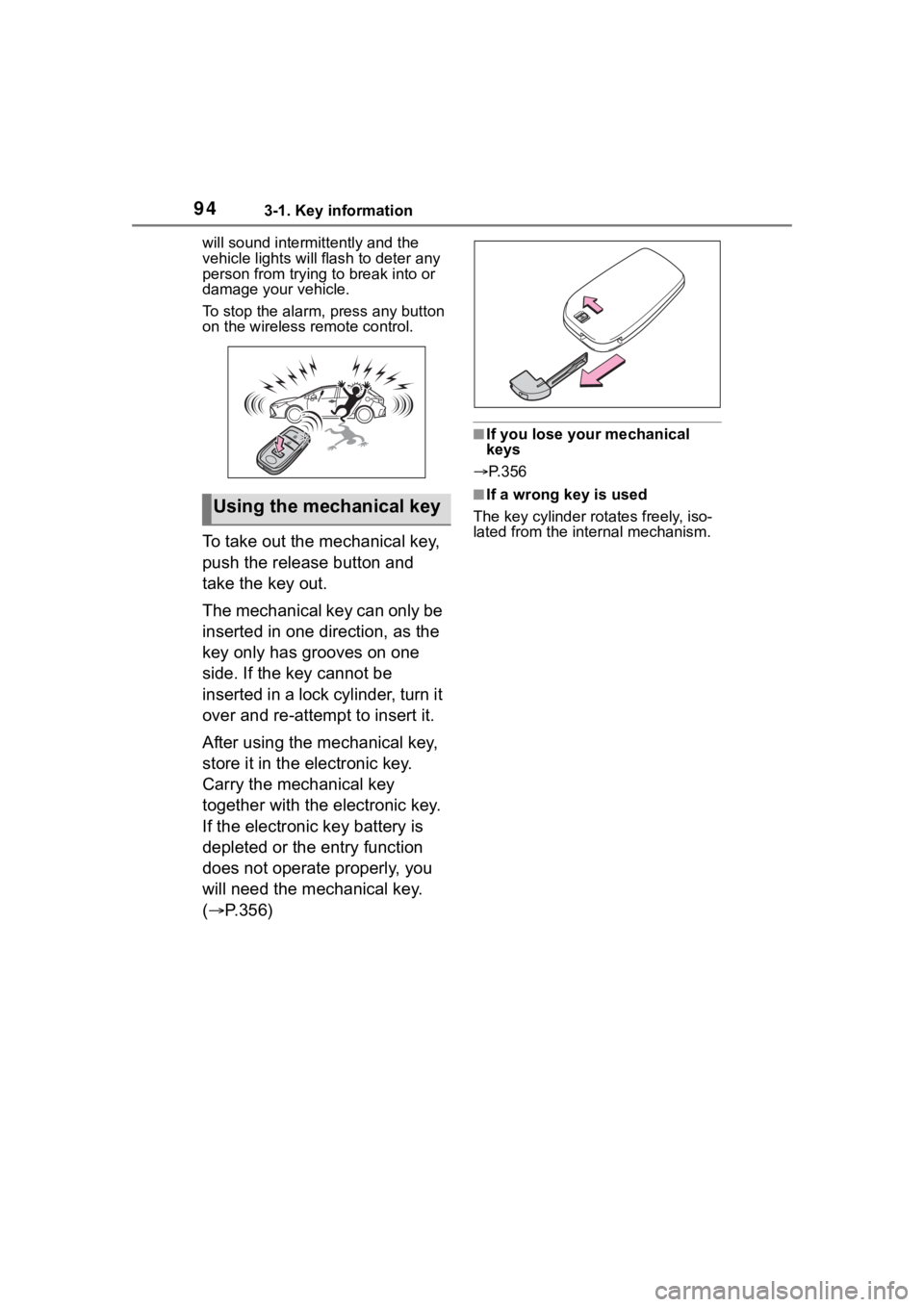
To take out the mechanical key,
push the release button and
take the key out.
The mechanical key can only be
inserted in one direction, as the
key only has grooves on one
side. If the key cannot be
inserted in a lock cylinder, turn it
over and re-attempt to insert it.
After using the mechanical key,
store it in the electronic key.
Carry the mechanical key
together with the electronic key.
If the electronic key battery is
depleted or the entry function
does not operate properly, you
will need the mechanical key.
(P.356)
■If you lose your mechanical
keys
P.356
■If a wrong key is used
The key cylinder rotates freely, iso-
lated from the internal mechanism.Using the mechanical key
Page 114 of 436
1143-4. Adjusting the steering wheel and mirrors
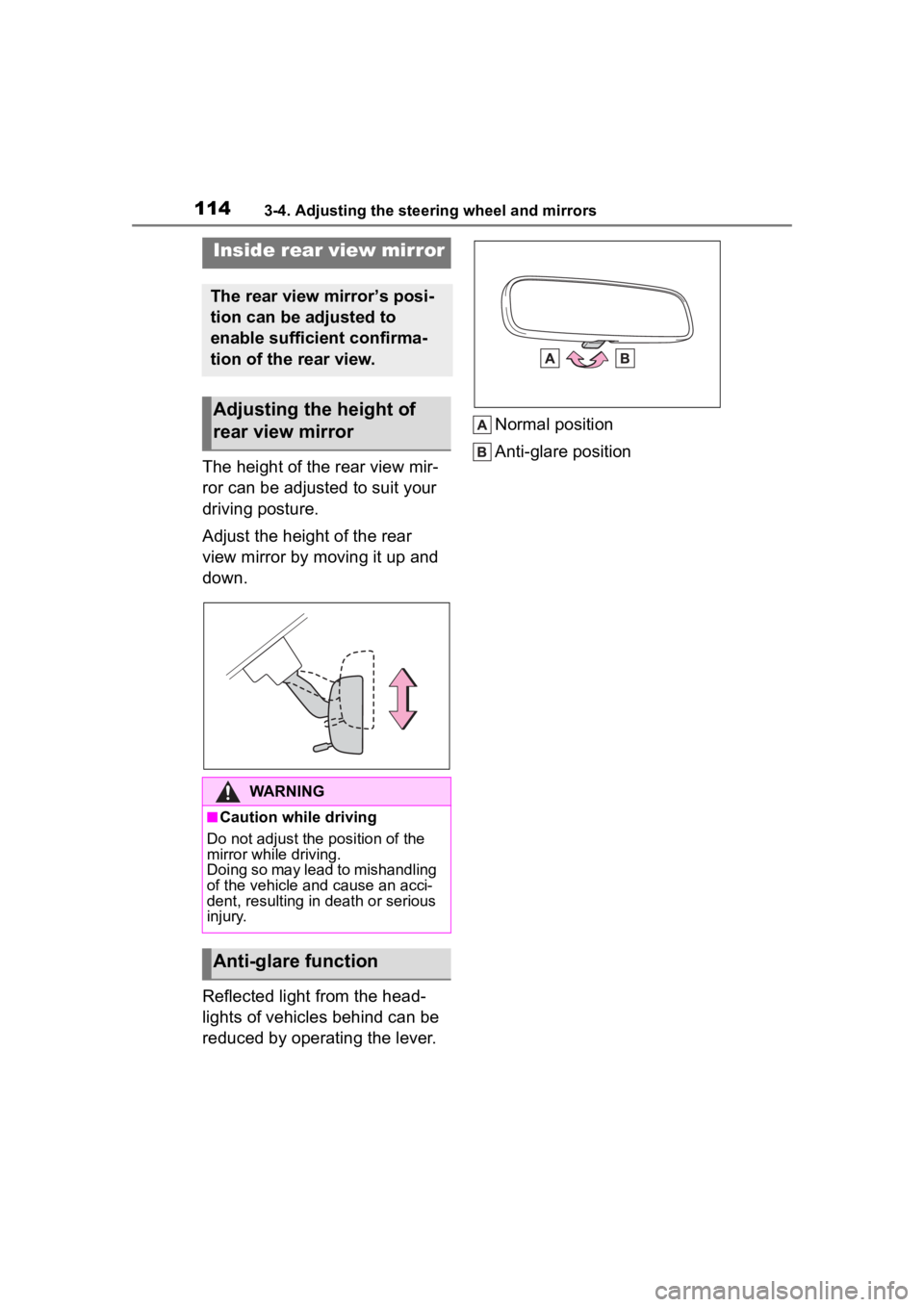
The height of the rear view mir-
ror can be adjusted to suit your
driving posture.
Adjust the height of the rear
view mirror by moving it up and
down.
Reflected light from the head-
lights of vehicles behind can be
reduced by operating the lever.Normal position
Anti-glare position
Inside rear view mirror
The rear view mirror’s posi-
tion can be adjusted to
enable sufficient confirma-
tion of the rear view.
Adjusting the height of
rear view mirror
WARNING
■Caution while driving
Do not adjust the position of the
mirror while driving.
Doing so may lead to mishandling
of the vehicle and cause an acci-
dent, resulting in death or serious
injury.
Anti-glare function
Page 121 of 436
121
4
4
Driving
Driving
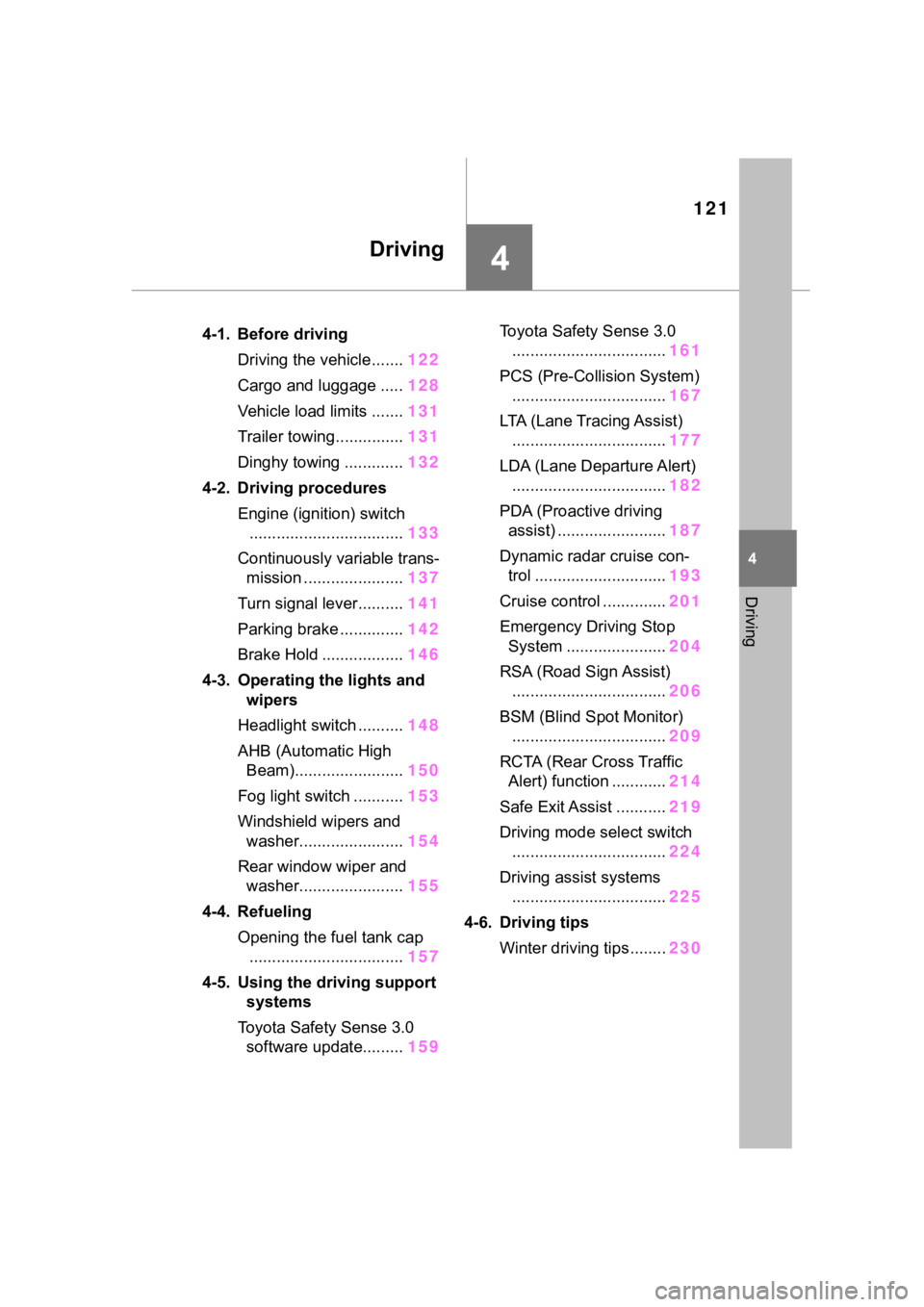
.4-1. Before drivingDriving the vehicle....... 122
Cargo and luggage ..... 128
Vehicle load limits ....... 131
Trailer towing............... 131
Dinghy towing ............. 132
4-2. Driving procedures Engine (ignition) switch.................................. 133
Continuously variable trans- mission ...................... 137
Turn signal lever.......... 141
Parking brake .............. 142
Brake Hold .................. 146
4-3. Operating the lights and wipers
Headlight switch .......... 148
AHB (Automatic High Beam)........................ 150
Fog light switch ........... 153
Windshield wipers and washer....................... 154
Rear window wiper and washer....................... 155
4-4. Refueling Opening the fuel tank cap.................................. 157
4-5. Using the driving support
systems
Toyota Safety Sense 3.0 software update......... 159Toyota Safety Sense 3.0
.................................. 161
PCS (Pre-Collision System) .................................. 167
LTA (Lane Tracing Assist) .................................. 177
LDA (Lane Departure Alert) .................................. 182
PDA (Proactive driving assist) ........................ 187
Dynamic radar cruise con- trol ............................. 193
Cruise control .............. 201
Emergency Driving Stop System ...................... 204
RSA (Road Sign Assist) .................................. 206
BSM (Blind Spot Monitor) .................................. 209
RCTA (Rear Cross Traffic Alert) function ............ 214
Safe Exit Assist ........... 219
Driving mode select switch .................................. 224
Driving assist systems .................................. 225
4-6. Driving tips Winter driving tips........ 230