fuel consumption TOYOTA COROLLA HYBRID 2020 Accessories, Audio & Navigation (in English)
[x] Cancel search | Manufacturer: TOYOTA, Model Year: 2020, Model line: COROLLA HYBRID, Model: TOYOTA COROLLA HYBRID 2020Pages: 250, PDF Size: 8.94 MB
Page 14 of 250
141-1. Basic function
COROLLA_COROLLA
HV(TMMMS)_Navi_(U)
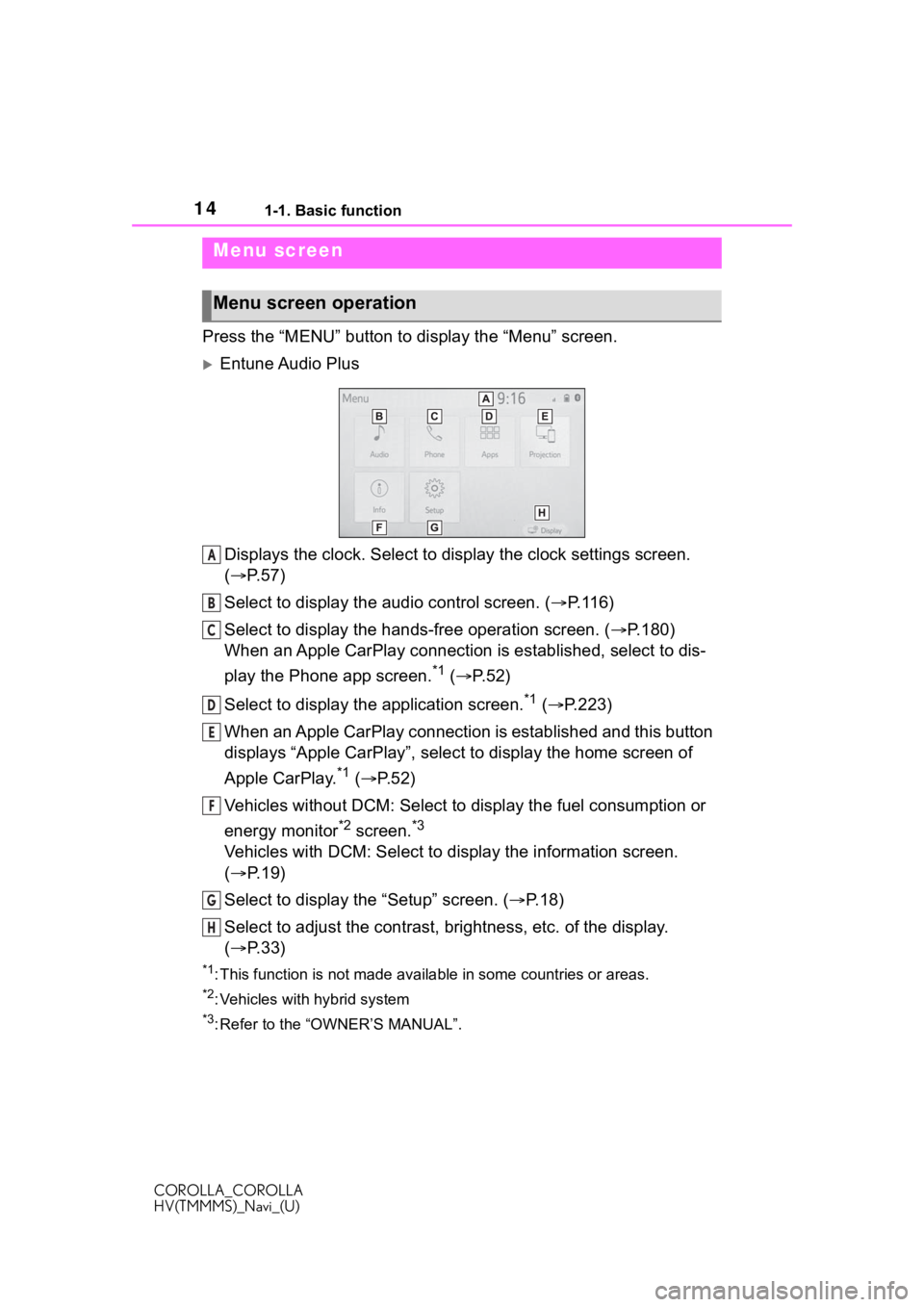
Press the “MENU” button to display the “Menu” screen.
Entune Audio Plus
Displays the clock. Select to display the clock settings screen.
( P. 5 7 )
Select to display the audio control screen. ( P.116)
Select to display the hands-free operation screen. ( P.180)
When an Apple CarPlay connection is established, select to dis-
play the Phone app screen.
*1 ( P.52)
Select to display the application screen.
*1 ( P.223)
When an Apple CarPlay connection is established and this button
displays “Apple CarPlay”, select to display the home screen of
Apple CarPlay.
*1 ( P. 5 2 )
Vehicles without DCM: Select to d isplay the fuel consumption or
energy monitor
*2 screen.*3
Vehicles with DCM: Select to display the information screen.
( P. 1 9 )
Select to display the “Setup” screen. ( P.18)
Select to adjust the contrast, brightness, etc. of the display.
( P. 3 3 )
*1: This function is not made available in some countries or areas .
*2: Vehicles with hybrid system
*3: Refer to the “OWNER’S MANUAL”.
Menu screen
Menu screen operation
A
B
C
D
E
F
G
H
Page 19 of 250
191-1. Basic function
COROLLA_COROLLA
HV(TMMMS)_Navi_(U)
1
Quick guide
Select to set Bluetooth®
device and Bluetooth
® sys-
tem settings. ( P. 4 0 )
Select to set audio settings.
( P.142)
Select to set the phone
sound, contacts, message
settings, etc. ( P.196)
Select to set the voice set-
tings. ( P.60)
Select to set vehicle informa-
tion such as vehicle customi-
zation. ( P.61)
Select to set memory points
(home, favorites entries,
areas to avoid), or naviga-
tion details. ( P. 9 7 )
Select to set Wi-Fi
® connec-
tion settings.
*1, 2 ( P.48)
Select to set Toyota Entune
App Suite Connect settings.
*2
( P.228)
Select to set traffic informa-
tion settings.
*2 ( P.105)
Select to set data services
settings.
*2 ( P.168)
*1: Vehicles with DCM
*2: This function is not made avail-
able in some countries or areas.
*: Entune Audio Plus with DCM/Entune Premium Audio only
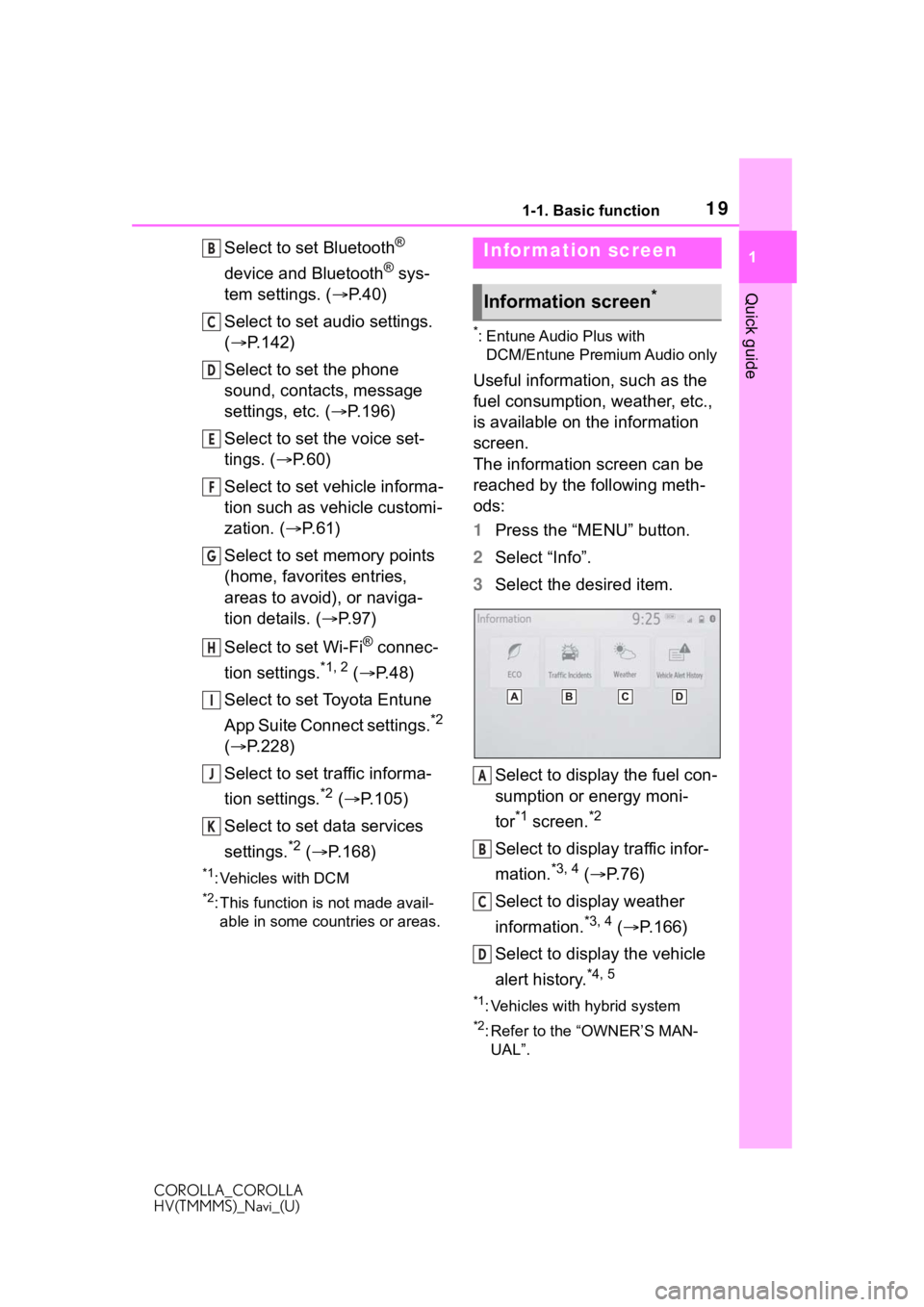
Useful information, such as the
fuel consumption, weather, etc.,
is available on the information
screen.
The information screen can be
reached by the following meth-
ods:
1 Press the “MENU” button.
2 Select “Info”.
3 Select the desired item.
Select to display the fuel con-
sumption or energy moni-
tor
*1 screen.*2
Select to display traffic infor-
mation.
*3, 4 ( P.76)
Select to display weather
information.
*3, 4 ( P.166)
Select to display the vehicle
alert history.
*4, 5
*1: Vehicles with hybrid system
*2: Refer to the “OWNER’S MAN- UAL”.
B
C
D
E
F
G
H
I
J
K
Infor mation screen
Information screen*
A
B
C
D
Page 56 of 250
562-3. Other settings
COROLLA_COROLLA
HV(TMMMS)_Navi_(U)
2-3.Other settings
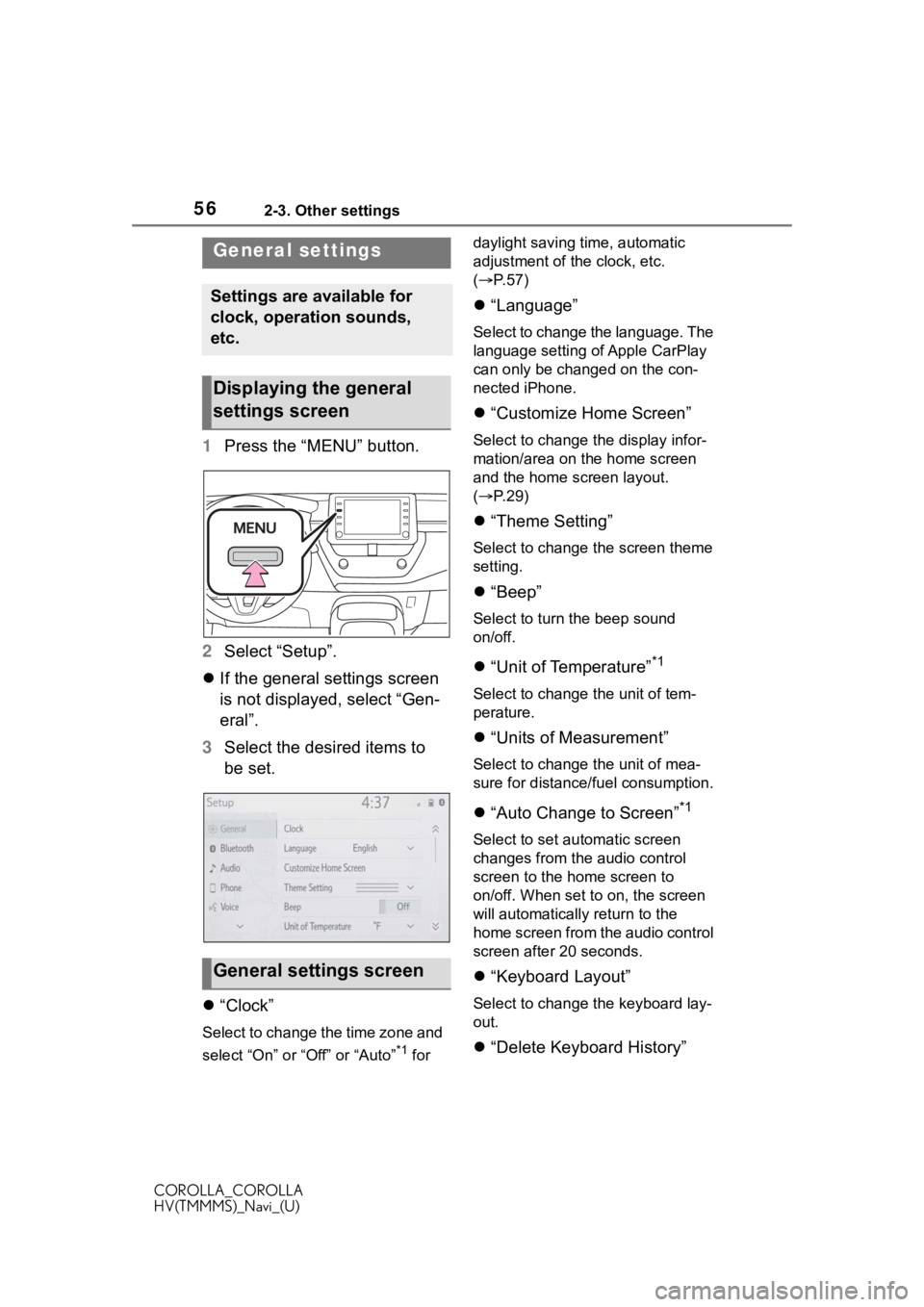
1Press the “MENU” button.
2 Select “Setup”.
If the general settings screen
is not displayed, select “Gen-
eral”.
3 Select the desired items to
be set.
“Clock”
Select to change the time zone and
select “On” or “Off” or “Auto”
*1 for daylight saving time, automatic
adjustment of the clock, etc.
(
P. 5 7 )
“Language”
Select to change the language. The
language setting of Apple CarPlay
can only be chan ged on the con-
nected iPhone.
“Customize Home Screen”
Select to change the display infor-
mation/area on the home screen
and the home screen layout.
( P. 2 9 )
“Theme Setting”
Select to change the screen theme
setting.
“Beep”
Select to turn the beep sound
on/off.
“Unit of Temperature”*1
Select to change the unit of tem-
perature.
“Units of Measurement”
Select to change the unit of mea-
sure for distance/fuel consumption.
“Auto Change to Screen”*1
Select to set automatic screen
changes from the audio control
screen to the home screen to
on/off. When set to on, the screen
will automatically r eturn to the
home screen from the audio control
screen after 20 seconds.
“Keyboard Layout”
Select to change the keyboard lay-
out.
“Delete Keyboard History”
General settings
Settings are available for
clock, operation sounds,
etc.
Displaying the general
settings screen
General settings screen
Page 236 of 250
236Alphabetical Index
COROLLA_COROLLA
HV(TMMMS)_Navi_(U)
W
Weather ................................... 166
Weather button (Information screen) .................................... 19
Wi-Fi
® Hotspot .......................... 47
Connecting a device to the in-vehicle access point ......... 47
Operating hints ....................... 50
Wi-Fi
® button (Setup screen) .. 18
For more information about the following items, see
the “OWNER’S MANUAL”.
· Energy monitor (COROLLA
HYBRID)
· Fuel consumption
· Vehicle customization set-
tings