instrument panel TOYOTA COROLLA HYBRID 2020 Accessories, Audio & Navigation (in English)
[x] Cancel search | Manufacturer: TOYOTA, Model Year: 2020, Model line: COROLLA HYBRID, Model: TOYOTA COROLLA HYBRID 2020Pages: 250, PDF Size: 8.94 MB
Page 17 of 250
171-1. Basic function
COROLLA_COROLLA
HV(TMMMS)_Navi_(U)
1
Quick guide
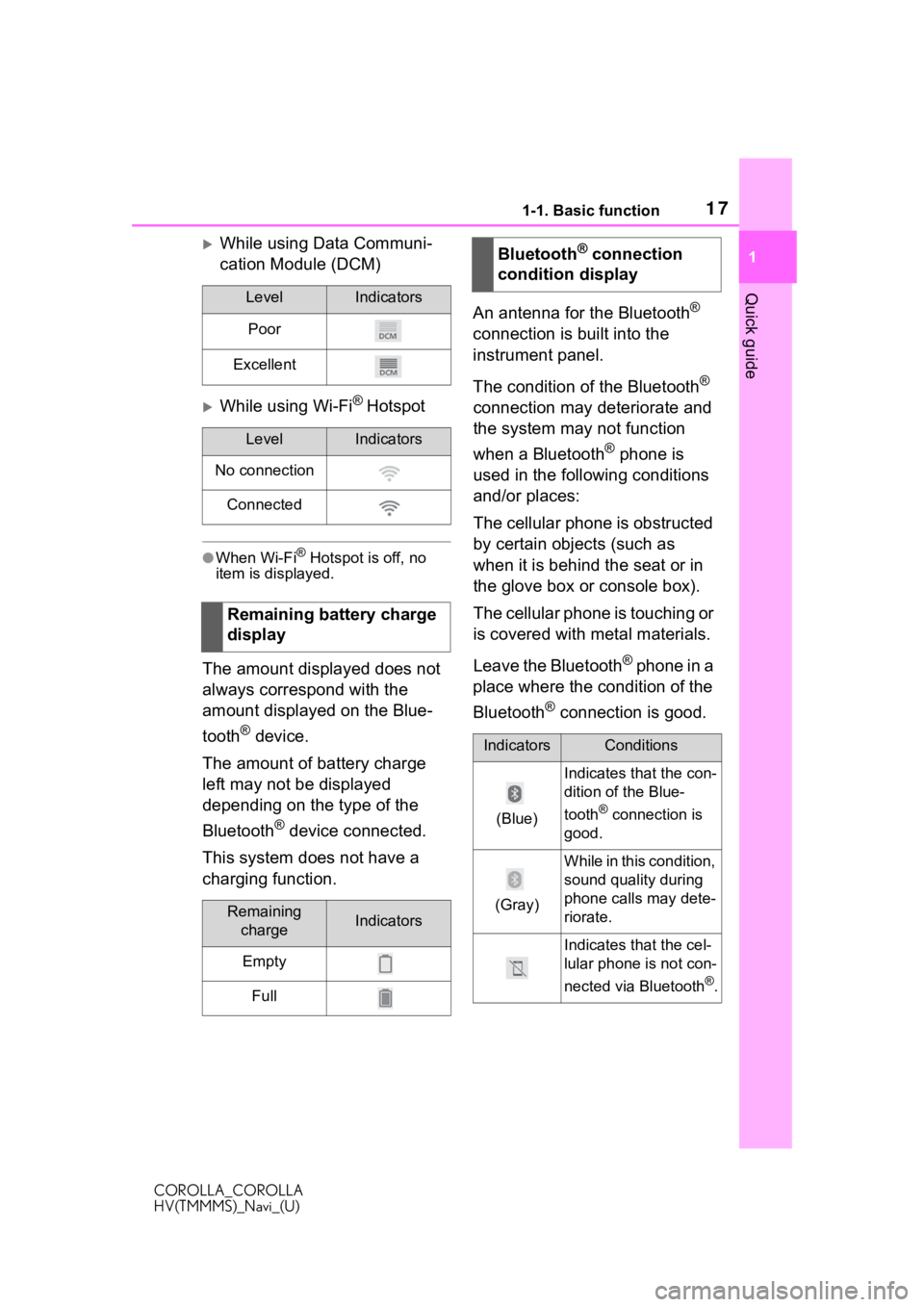
While using Data Communi-
cation Module (DCM)
While using Wi-Fi® Hotspot
●When Wi-Fi® Hotspot is off, no
item is displayed.
The amount displayed does not
always correspond with the
amount displayed on the Blue-
tooth
® device.
The amount of battery charge
left may not be displayed
depending on the type of the
Bluetooth
® device connected.
This system does not have a
charging function. An antenna for the Bluetooth
®
connection is built into the
instrument panel.
The condition of the Bluetooth
®
connection may deteriorate and
the system may not function
when a Bluetooth
® phone is
used in the following conditions
and/or places:
The cellular phone is obstructed
by certain objects (such as
when it is behind the seat or in
the glove box or console box).
The cellular phone is touching or
is covered with metal materials.
Leave the Bluetooth
® phone in a
place where the condition of the
Bluetooth
® connection is good.
LevelIndicators
Poor
Excellent
LevelIndicators
No connection
Connected
Remaining battery charge
display
Remaining chargeIndicators
Empty
Full
Bluetooth® connection
condition display
IndicatorsConditions
(Blue)
Indicates that the con-
dition of the Blue-
tooth
® connection is
good.
(Gray)
While in this condition,
sound quality during
phone calls may dete-
riorate.
Indicates that the cel-
lular phone is not con-
nected via Bluetooth
®.
Page 36 of 250
362-2. Connectivity settings
COROLLA_COROLLA
HV(TMMMS)_Navi_(U)
2-2.Connectivity settings
■Registering from the sys-
tem
1 Turn the Bluetooth
® connec-
tion setting of your cellular
phone on.
This function is not available
when Bluetooth
® connection
setting of your cellular phone
is set to off. 2
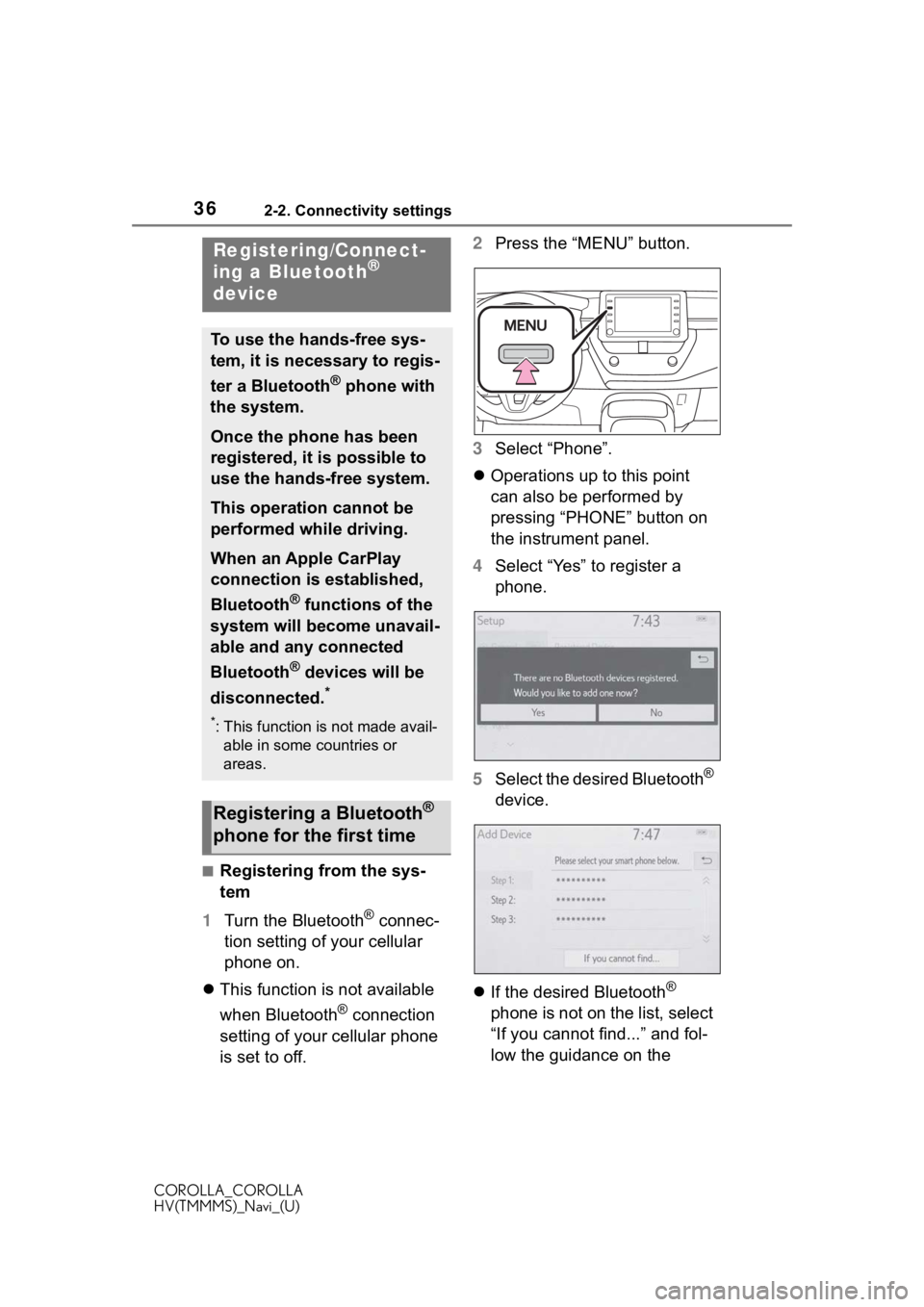
Press the “MENU” button.
3 Select “Phone”.
Operations up to this point
can also be performed by
pressing “PHONE” button on
the instrument panel.
4 Select “Yes” to register a
phone.
5 Select the desired Bluetooth
®
device.
If the desired Bluetooth
®
phone is not on the list, select
“If you cannot find...” and fol-
low the guidance on the
Registering/Connect-
ing a Bluetooth®
device
To use the hands-free sys-
tem, it is necessary to regis-
ter a Bluetooth
® phone with
the system.
Once the phone has been
registered, it is possible to
use the hands-free system.
This operation cannot be
performed while driving.
When an Apple CarPlay
connection is established,
Bluetooth
® functions of the
system will become unavail-
able and any connected
Bluetooth
® devices will be
disconnected.
*
*: This function is not made avail- able in some countries or
areas.
Registering a Bluetooth®
phone for the first time
Page 111 of 250
1113-5. Tips for the navigation system
COROLLA_COROLLA
HV(TMMMS)_Navi_(U)
3
Navigation system
3-5.Tips for the navigation system
The Global Positioning System
(GPS) developed and operated
by the U.S. Department of
Defense provides an accurate
current position, normally using
4 or more satellites, and in some
case 3 satellites. The GPS sys-
tem has a certain level of inac-
curacy. While the navigation
system compensates for this
most of the time, occasional
positioning errors of up to 300 ft.
(100 m) can and should be
expected. Generally, position
errors will be corrected within a
few seconds.
When the vehicle is not receiv-
ing signals from satellites, the
unreceived GPS mark appears
on the map screen. When the
vehicle is receiving the signals,
the unreceived GPS mark does not appear on the map screen.
The GPS signal may be physi-
cally obstructed, leading to inac-
curate vehicle position on the
map screen. Tunnels, tall build-
ings, trucks, or even the place-
ment of objects on the
instrument panel may obstruct
the GPS signals.
The GPS satellites may not
send signals due to repairs or
improvements being made to
them.
Even when the navigation sys-
tem is receiving clear GPS sig-
nals, the vehicle position may
not be shown accurately or inap-
propriate route guidance may
occur in some cases.
Accurate current position may
not be shown in the following
cases:
• When driving on a small angled
Y-shaped road.
• When driving on a winding road.
• When driving on a slippery road such as in sand, gravel, snow,
etc.
GPS (Global Position-
ing System)
This navigation system cal-
culates the current position
using satellite signals, vari-
ous vehicle signals, map
data, etc. However, an accu-
rate position may not be
shown depending on satel-
lite conditions, road config-
uration, vehicle condition or
other circumstances.
Limitations of the naviga-
tion system
NOTICE
●The installation of window tint-
ing may obstruct the GPS sig-
nals. Most window tinting
contains some metallic content
that will interf ere with GPS sig-
nal reception of the antenna in
the instrument panel. We advise
against the use of window tint-
ing on vehicles equipped with
navigation systems.
Page 130 of 250
1304-2. Radio operation
COROLLA_COROLLA
HV(TMMMS)_Navi_(U)
1Display the audio source
selection screen. ( P.117)
2 Select the desired application
screen button.
The internet radio application
screen is displayed.
Perform operations accord-
ing to the displayed applica-
tion screen.
For the instrument panel
operation method: P. 1 1 7
●If a compatible phone is already
registered, it will be connected
automatically.
●Other applications can be acti-
vated while listening to internet
radio.
●Some parts of applications can be
adjusted using the switches on the
steering wheel.
●For additional information, refer to
http://www.toyota.com/Entune/ or
call
1-800-331-4331 in the United
States,
http://www.toyota.ca/entune
or call
1-888-869-6828 in Canada, and
http://www.toyo tapr.com/entune
o r call
1-877-855-8377 in Puerto Rico.
Internet radio
One of Toyota Entune App
Suite Connect features is
the ability to listen to inter-
net radio. In order to use
this service, a compatible
phone and the system
needs to be set up. For
details:
P.223
Listening to internet radio