roof TOYOTA COROLLA HYBRID 2020 Accessories, Audio & Navigation (in English)
[x] Cancel search | Manufacturer: TOYOTA, Model Year: 2020, Model line: COROLLA HYBRID, Model: TOYOTA COROLLA HYBRID 2020Pages: 250, PDF Size: 8.94 MB
Page 112 of 250

1123-5. Tips for the navigation system
COROLLA_COROLLA
HV(TMMMS)_Navi_(U)• When driving on a long straight
road.
• When freeway and surface streets run in parallel.
• After moving by ferry or vehicle carrier.
• When a long route is searched during high speed driving.
• When driving without setting the current position calibration cor-
rectly.
• After repeating a change of direc- tion by going forward and back-
ward, or turning on a turntable in
a parking lot.
• When leaving a covered parking lot or parking garage.
• When a roof carrier is installed.
• When driving with tire chains installed.
• When the tires are worn.
• After replacing a tire or tires.
• When using tires that are smaller or larger than the factory specifi-
cations.
• When the tire pressure in any of the 4 tires is not correct.
If the vehicle cannot receive
GPS signals, the current posi-
tion can be adjusted manu-
ally. For information on setting
the current position calibra-
tion: P. 1 0 4
Inappropriate route guidance
may occur in the following
cases:
• When turning at an intersection
off the designated route guid-
ance. • If you set more than 1 destination
but skip any of them, auto reroute
will display a rout e returning to
the destination on the previous
route.
• When turning at an intersection for which there is no route guid-
ance.
• When passing through an inter- section for which there is no route
guidance.
• During auto rer oute, the route
guidance may not be available for
the next turn to t he right or left.
• During high speed driving, it may take a long time fo r auto reroute
to operate. In auto reroute, a
detour route may be shown.
• After auto reroute, the route may not be changed.
• If an unnecessary U-turn is shown or announced.
• If a location has multiple names
and the system announces 1 or
more of them.
• When a route cannot be searched.
• If the route to your destination includes gravel, unpaved roads or
alleys, the route guidance may
not be shown.
• Your destination point might be shown on the opposite side of the
street.
• When a portion of the route has regulations prohibiting the entry
of the vehicle that vary by time,
season or other reasons.
• The road and map data stored in the navigation system may not be
complete or may not be the latest
Page 145 of 250
1454-6. Tips for operating the audio/visual system
COROLLA_COROLLA
HV(TMMMS)_Navi_(U)
4
Audio/visual system
Station interference: When a
reflected signal and a signal
received directly from a radio
station are very nearly the same
frequency, they can interfere
with each other, making it diffi-
cult to hear the broadcast.
Static: AM is easily affected by
external sources of electrical
noise, such as high tension
power lines, lightening or electri-
cal motors. This results in static.
■SiriusXM
Cargo loaded on the roof lug-
gage carrier, especially metal
objects, may adversely affect
the reception of SiriusXM Sat-
ellite Radio.
Alternation or modifications
carried out without appropri-
ate authorization may invali-
date the user’s right to
operate the equipment.
■Certification
Use of the Made for Apple
badge means that an acces-
sory has been designed to
connect specifically to the
Apple product(s) identified in
the badge, and has been cer-
tified by the developer to meet
Apple performance stan-
dards. Apple is not responsi-
ble for the operation of this
device or its compliance with
safety and regulatory stan-
dards. Please note that the
use of this accessory with an
Apple product may affect
wireless performance.
iPhone
®, iPod®, iPod clas-
sic
®, iPod nano®, iPod
touch
®, and Lightning are
trademarks of Apple Inc., reg-
istered in the U.S. and other
countries.
■Compatible models
The following iPod nano, iPod
touch and iPhone devices can
be used with this system.
Made for
• iPhone 7
• iPhone 7 Plus
• iPhone SE
• iPhone 6s
iPod
Page 154 of 250
1545-1. Voice command system operation
COROLLA_COROLLA
HV(TMMMS)_Navi_(U)
5-1.Voice command system operation
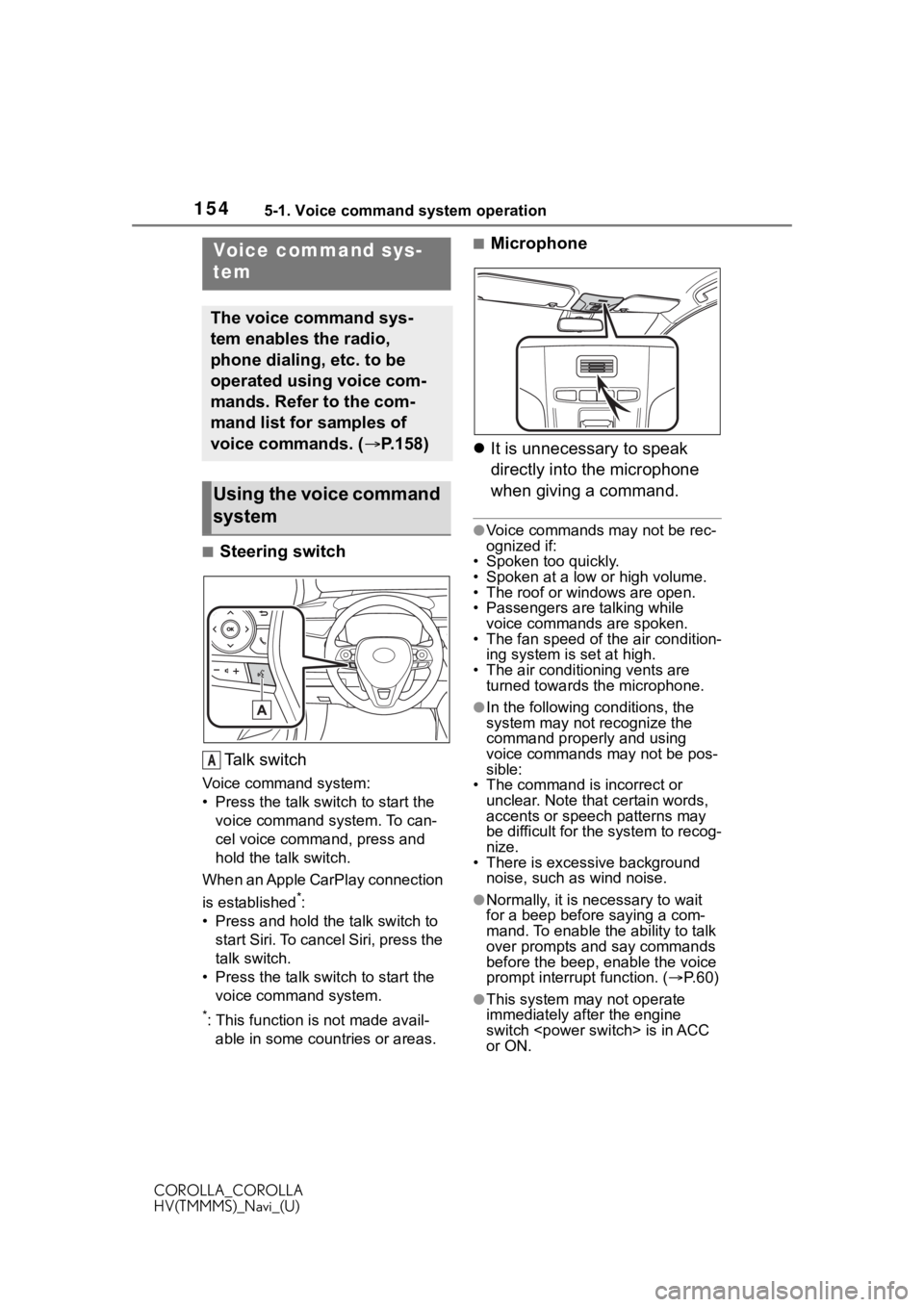
■Steering switchTa l k s w i t c h
Voice command system:
• Press the talk switch to start the voice command system. To can-
cel voice command, press and
hold the talk switch.
When an Apple CarPlay connection
is established
*:
• Press and hold the talk switch to start Siri. To cancel Siri, press the
talk switch.
• Press the talk switch to start the voice command system.
*: This function is not made avail-able in some countries or areas.
■Microphone
It is unnecessary to speak
directly into the microphone
when giving a command.
●Voice commands may not be rec-
ognized if:
• Spoken too quickly.
• Spoken at a low or high volume.
• The roof or windows are open.
• Passengers are talking while
voice commands are spoken.
• The fan speed of the air condition- ing system is set at high.
• The air conditioning vents are turned towards the microphone.
●In the following c onditions, the
system may not recognize the
command properly and using
voice commands may not be pos-
sible:
• The command is incorrect or
unclear. Note that certain words,
accents or speech patterns may
be difficult for the system to recog-
nize.
• There is excessive background noise, such as wind noise.
●Normally, it is necessary to wait
for a beep before saying a com-
mand. To enable th e ability to talk
over prompts and say commands
before the beep, enable the voice
prompt interrupt function. ( P. 6 0 )
●This system may not operate
immediately after the engine
switch
or ON.
Voice command sys-
tem
The voice command sys-
tem enables the radio,
phone dialing, etc. to be
operated using voice com-
mands. Refer to the com-
mand list for samples of
voice commands. ( P.158)
Using the voice command
system
A
Page 164 of 250
1645-2. Mobile Assistant operation
COROLLA_COROLLA
HV(TMMMS)_Navi_(U)
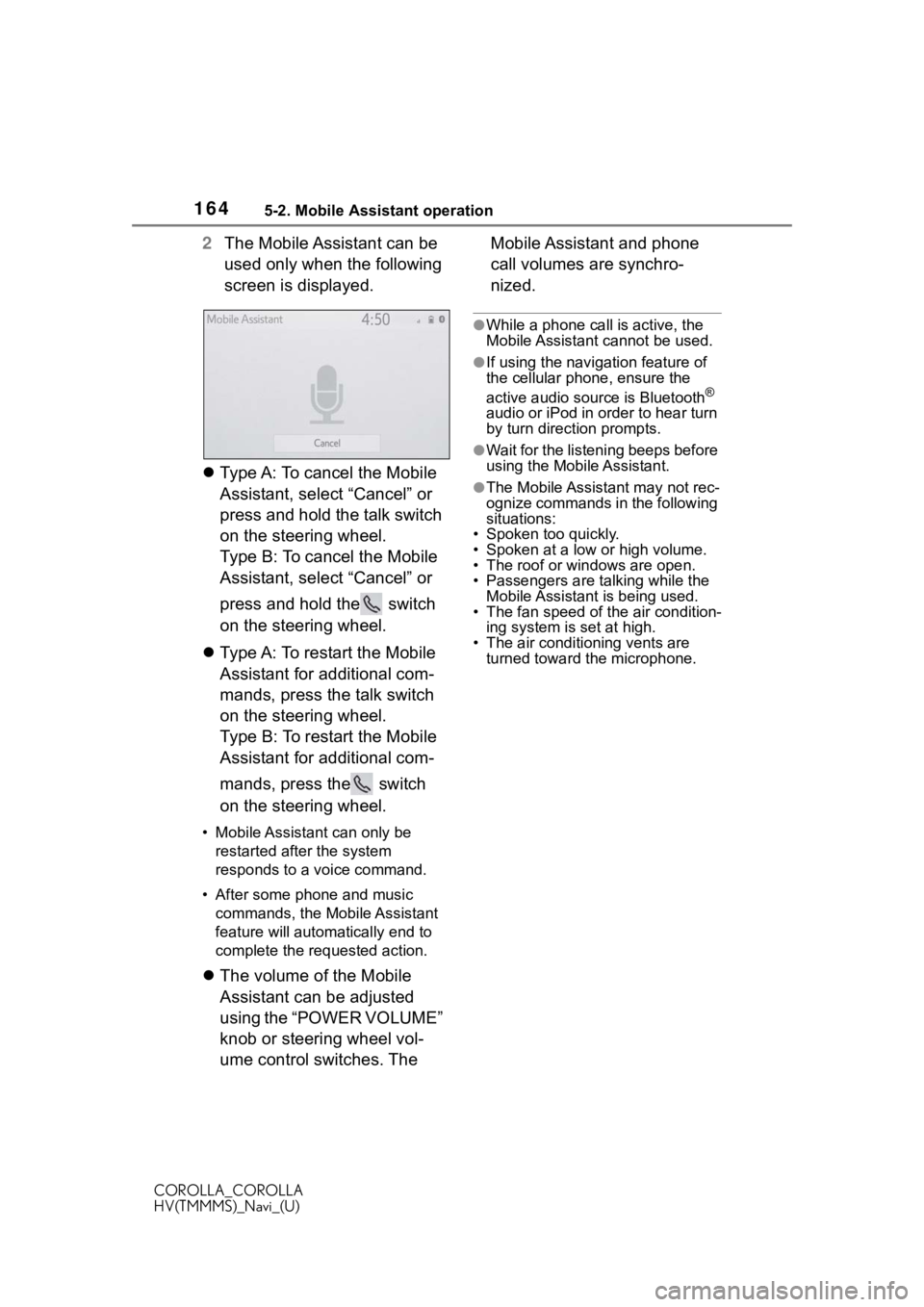
2The Mobile Assistant can be
used only when the following
screen is displayed.
Type A: To cancel the Mobile
Assistant, select “Cancel” or
press and hold the talk switch
on the steering wheel.
Type B: To cancel the Mobile
Assistant, select “Cancel” or
press and hold the switch
on the steering wheel.
Type A: To restart the Mobile
Assistant for additional com-
mands, press the talk switch
on the steering wheel.
Type B: To restart the Mobile
Assistant for additional com-
mands, press the switch
on the steering wheel.
• Mobile Assistant can only be
restarted after the system
responds to a voice command.
• After some phone and music commands, the Mobile Assistant
feature will automatically end to
complete the re quested action.
The volume of the Mobile
Assistant can be adjusted
using the “POWER VOLUME”
knob or steering wheel vol-
ume control switches. The Mobile Assistant and phone
call volumes are synchro-
nized.
●While a phone call is active, the
Mobile Assistant cannot be used.
●If using the navigation feature of
the cellular phone, ensure the
active audio source is Bluetooth
®
audio or iPod in order to hear turn
by turn direction prompts.
●Wait for the listening beeps before
using the Mobile Assistant.
●The Mobile Assistant may not rec-
ognize commands in the following
situations:
• Spoken too quickly.
• Spoken at a low or high volume.
• The roof or windows are open.
• Passengers are talking while the Mobile Assistant is being used.
• The fan speed of the air condition-
ing system is set at high.
• The air conditioning vents are turned toward the microphone.
Page 173 of 250
1737-1. Rear view monitor system
COROLLA_COROLLA
HV(TMMMS)_Navi_(U)
7
Peripheral monitoring system
The distance guide lines and
the vehicle width guide lines
may not actually be parallel
with the dividing lines of the
parking space, even when they appear to be so. Be sure
to check visually.
The distances between the
vehicle width guide lines and
the left and right dividing lines
of the parking space may not
be equal, even when they
appear to be so. Be sure to
check visually.
The distance guide lines give
a distance guide for flat road
surfaces. In any of the follow-
ing situations, there is a mar-
gin of error between the fixed
guide lines on the screen and
the actual distance/course on
the road.
■When the ground behind
the vehicle slopes up
sharply
The distance guide lines will
appear to be closer to the vehi-
cle than the actual distance.
Because of this, objects will
appear to be farther away than
they actually are. In the same
way, there will be a margin of
error between the guide lines
and the actual distance/course
on the road.
NOTICE
• As the camera has a water proof construction, do not
detach, disassemble or modify
it. This may cause incorrect
operation.
• When cleaning the camera lens, flush the camera with a large
quantity of water and wipe it
with a soft and wet cloth.
Strongly rubbing the camera
lens may cause the camera lens
to be scratched and unable to
transmit a clear image.
• Do not allow organic solvent, car wax, window cleaner or a
glass coating to adhere to the
camera. If this happens, wipe it
off as soon as possible.
• If the temperature changes rap- idly, such as when hot water is
poured on the vehicle in cold
weather, the system may not
operate normally.
• When washing the vehicle, do not apply intensive bursts of
water to the camera or camera
area. Doing so may result in the
camera malfunctioning.
●Do not expose the camera to
strong impact as this could
cause a malfunction. If this hap-
pens, have the vehicle
inspected by your Toyota dealer
as soon as possible.
Differences between the
screen and the actual
road
Page 183 of 250
1838-1. Phone operation (Hands-free system for cellular phones)
COROLLA_COROLLA
HV(TMMMS)_Navi_(U)
8
Phone
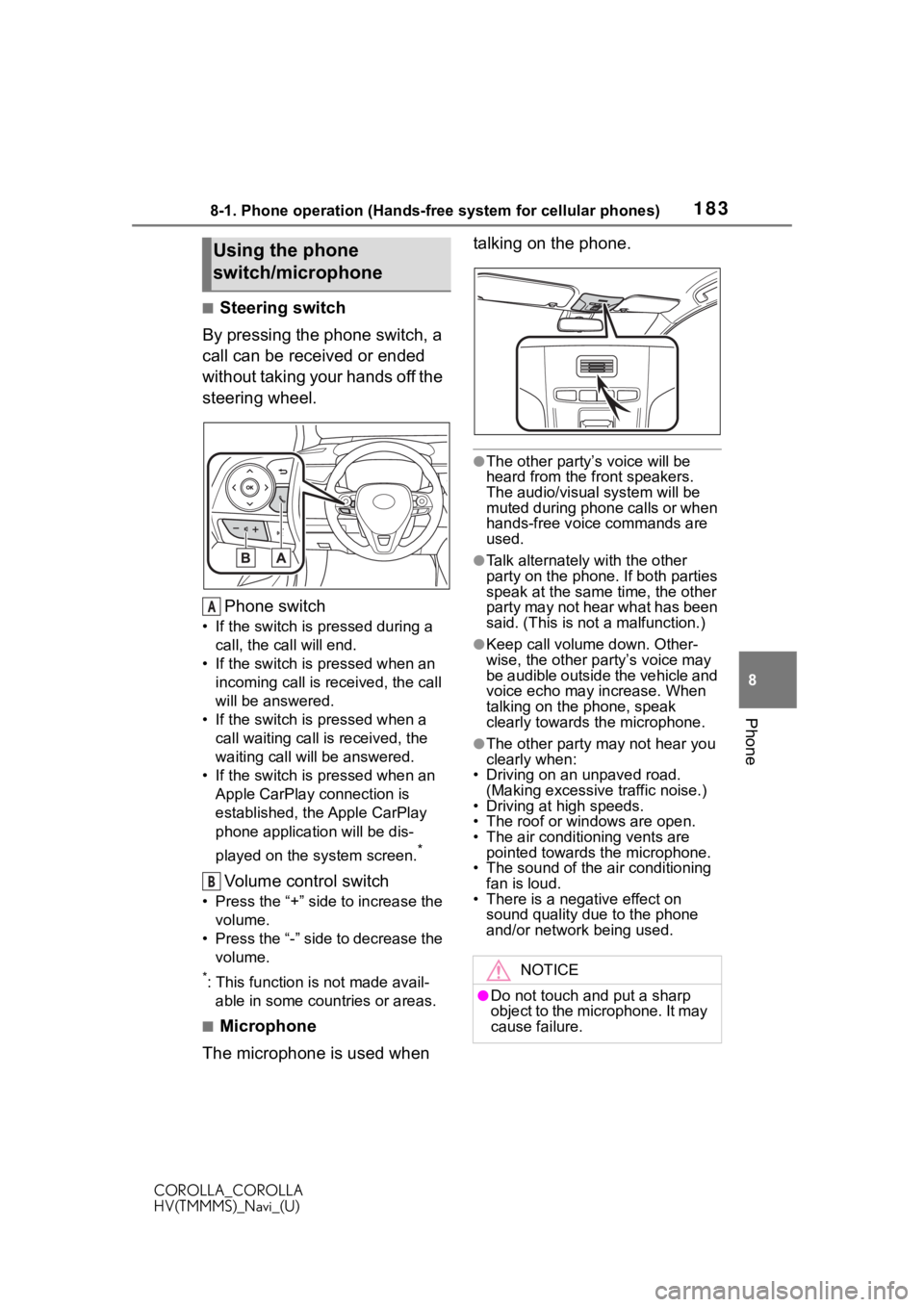
■Steering switch
By pressing the phone switch, a
call can be received or ended
without taking your hands off the
steering wheel.
Phone switch
• If the switch is pressed during a call, the call will end.
• If the switch is pressed when an incoming call is r eceived, the call
will be answered.
• If the switch is pressed when a call waiting call is received, the
waiting call will be answered.
• If the switch is pressed when an Apple CarPlay connection is
established, the Apple CarPlay
phone application will be dis-
played on the system screen.
*
Volume control switch
• Press the “+” side to increase the volume.
• Press the “-” side to decrease the volume.
*: This function is not made avail-able in some countries or areas.
■Microphone
The microphone is used when talking on the phone.
●The other party’s voice will be
heard from the front speakers.
The audio/vis
ual system will be
muted during phone calls or when
hands-free voice commands are
used.
●Talk alternately with the other
party on the phone. If both parties
speak at the same time, the other
party may not hear what has been
said. (This is not a malfunction.)
●Keep call volume down. Other-
wise, the other party’s voice may
be audible outside the vehicle and
voice echo may increase. When
talking on the phone, speak
clearly towards the microphone.
●The other party may not hear you
clearly when:
• Driving on an unpaved road.
(Making excessive traffic noise.)
• Driving at high speeds.
• The roof or windows are open.
• The air conditioning vents are pointed towards the microphone.
• The sound of the air conditioning fan is loud.
• There is a negative effect on
sound quality due to the phone
and/or network being used.
Using the phone
switch/microphone
A
B
NOTICE
●Do not touch and put a sharp
object to the microphone. It may
cause failure.