mirror TOYOTA COROLLA HYBRID 2020 (in English) Owner's Manual
[x] Cancel search | Manufacturer: TOYOTA, Model Year: 2020, Model line: COROLLA HYBRID, Model: TOYOTA COROLLA HYBRID 2020Pages: 556, PDF Size: 19.28 MB
Page 209 of 556
2094-5. Using the driving support systems
COROLLA HV_U
4
Driving
Vehicles that are traveling in areas that are not visible using the
outside rear view mirrors (the blind spots)
Vehicles that are approaching r apidly from behind in areas that
are not visible using the outside rear view mirrors (the blind spots)
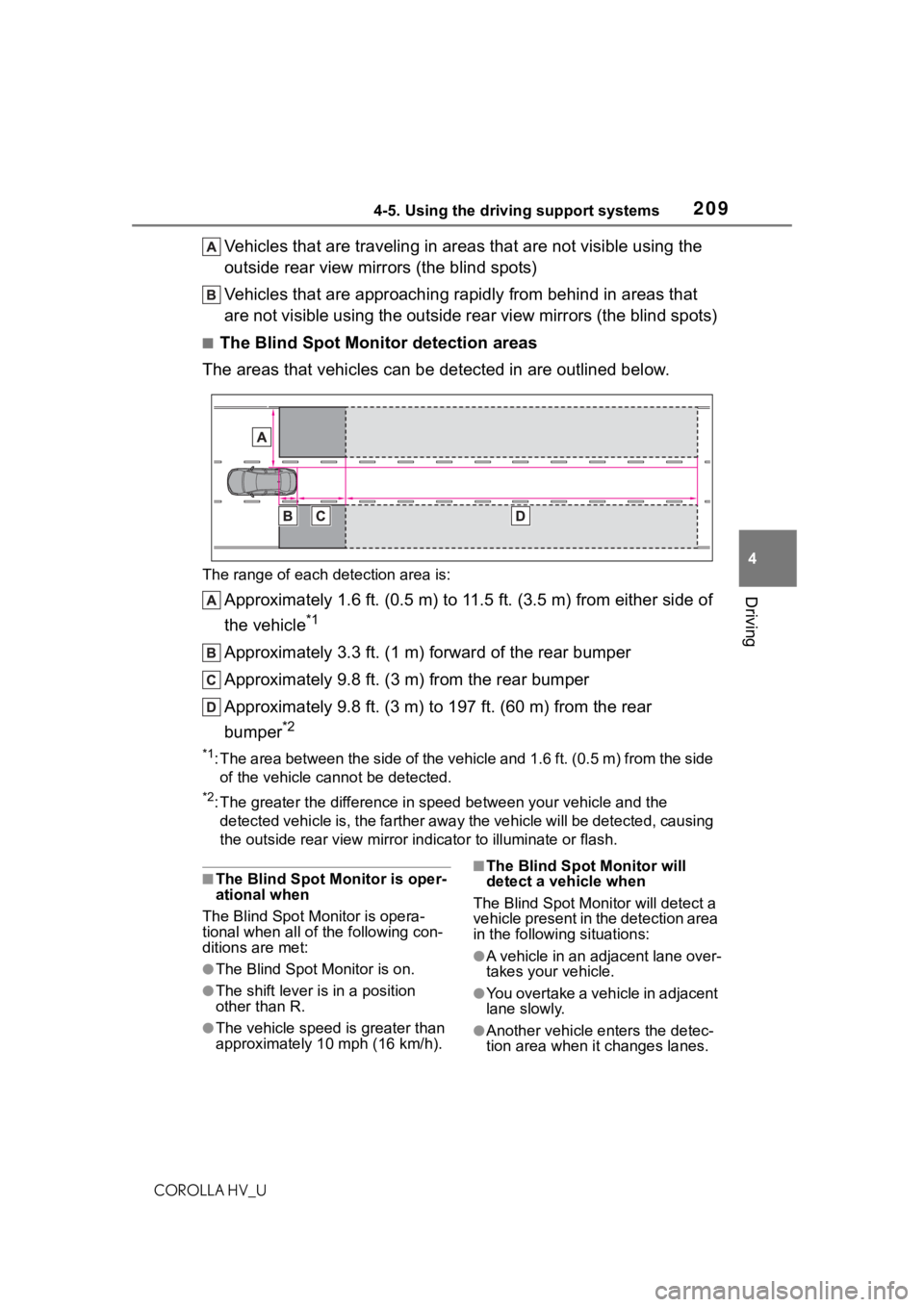
■The Blind Spot Monitor detection areas
The areas that vehicles can be detected in are outlined below.
The range of each detection area is:
Approximately 1.6 ft. (0.5 m) to 11.5 ft. (3.5 m) from either s ide of
the vehicle
*1
Approximately 3.3 ft. (1 m) forward of the rear bumper
Approximately 9.8 ft. (3 m) from the rear bumper
Approximately 9.8 ft. (3 m) to 197 ft. (60 m) from the rear
bumper
*2
*1: The area between the side of the vehicle and 1.6 ft. (0.5 m) f rom the side
of the vehicle cannot be detected.
*2: The greater the difference in speed between your vehicle and t he
detected vehicle is, the farthe r away the vehicle will be detec ted, causing
the outside r ear view mirror indicato r to illuminate or flash.
■The Blind Spot Monitor is oper-
ational when
The Blind Spot Monitor is opera-
tional when all of the following con-
ditions are met:
●The Blind Spot Monitor is on.
●The shift lever is in a position
other than R.
●The vehicle speed is greater than
approximately 10 mph (16 km/h).
■The Blind Spot Monitor will
detect a vehicle when
The Blind Spot Mon itor will detect a
vehicle present in the detection area
in the following situations:
●A vehicle in an adjacent lane over-
takes your vehicle.
●You overtake a vehicle in adjacent
lane slowly.
●Another vehicle enters the detec-
tion area when it changes lanes.
Page 218 of 556
2184-5. Using the driving support systems
COROLLA HV_U
WA R N I N G
■When using the rear view
monitor system
The rear view monitor system is a
supplemental device intended to
assist the driver when backing up.
When backing up, be sure to visu-
ally check all around the vehicle
both directly and using the mirrors
before proceeding. Observe the
following precautions to avoid an
accident that could result in death
or serious injuries.
●Never depend on t he rear view
monitor system entirely when
backing up. The image and the
position of the guide lines dis-
played on the screen may differ
from the actual state. Use cau-
tion, just as you would when
backing up any vehicle.
●Be sure to back up slowly,
depressing the brake pedal to
control vehicle speed.
●The instructions given are only
guide lines. When and how
much to turn the steering wheel
will vary according to traffic con-
ditions, road surface condi-
tions, vehicle condition, etc.
when parking. It is necessary to
be fully aware o f this before
using the rear view monitor sys-
tem.
●When parking, be sure to check
that the par king space will
accommodate your vehicle
before maneuveri ng into it.
●Do not use the rear view moni-
tor system in the following
cases:
• On icy or slick road surfaces, or in snow
• When using tire chains or emer- gency tires
• When the trunk is not closed completely
• On roads that are not flat or straight, such as curves or
slopes
●In low temperatures, the screen
may darken or the image may
become faint. The image could
distort when the vehicle is mov-
ing, or you may become unable
to see the image on the screen.
Be sure to visually check all
around the vehicle both directly
and using the mirrors before
proceeding.
●If the tire sizes are changed, the
position of the fixed guide lines
displayed on the screen may
change.
●The camera uses a special lens.
The distances between objects
and pedestrians that appear in
the image displayed on the
screen will differ from the actual
distances. ( P.213)
NOTICE
■How to use the camera
●The rear view monitor system
may not operate properly in the
following cases.
• If the back of the vehicle is hit, the position and mounting angle
of the camera may change.
• As the camera has a water proof construction, do not
detach, disassemble or modify
it. This may cause incorrect
operation.
Page 358 of 556
3586-1. Using the air conditioning system and defogger
COROLLA HV_U
6-1.Using the air conditioning system and defogger
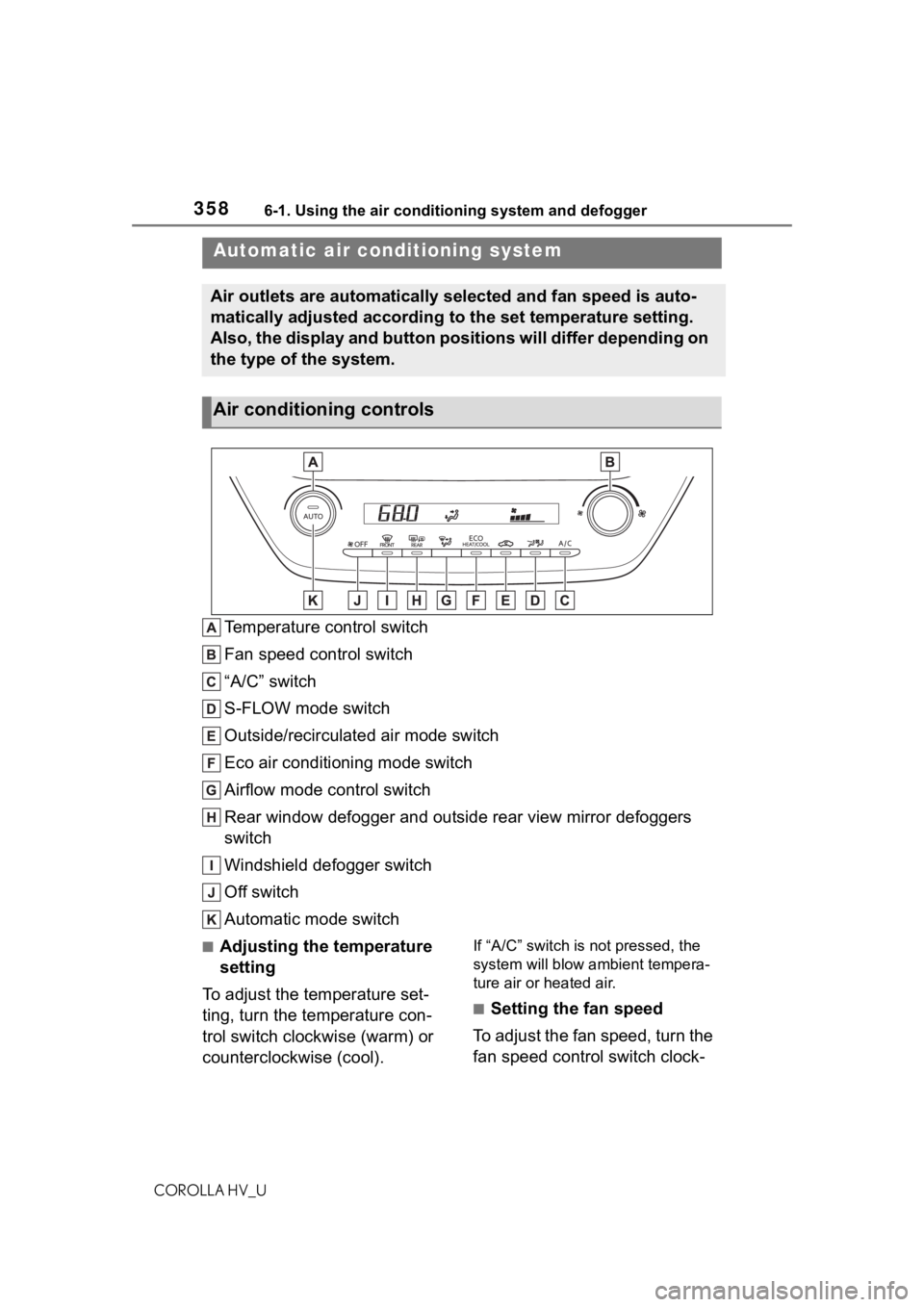
Temperature control switch
Fan speed control switch
“A/C” switch
S-FLOW mode switch
Outside/recirculated air mode switch
Eco air conditioning mode switch
Airflow mode control switch
Rear window defogger and outside rear view mirror defoggers
switch
Windshield defogger switch
Off switch
Automatic mode switch
■Adjusting the temperature
setting
To adjust the temperature set-
ting, turn the temperature con-
trol switch clockwise (warm) or
counterclockwise (cool).If “A/C” switch is not pressed, the
system will blow ambient tempera-
ture air or heated air.
■Setting the fan speed
To adjust the fan speed, turn the
fan speed control switch clock-
Automatic air conditioning system
Air outlets are automatically selected and fan speed is auto-
matically adjusted according to the set temperature setting.
Also, the display and button positions will differ depending on
the type of the system.
Air conditioning controls
Page 359 of 556
3596-1. Using the air conditioning system and defogger
COROLLA HV_U
6
Interior features
wise (increase) or counterclock-
wise (decrease).
Pressing the off switch to turns off
the fan.
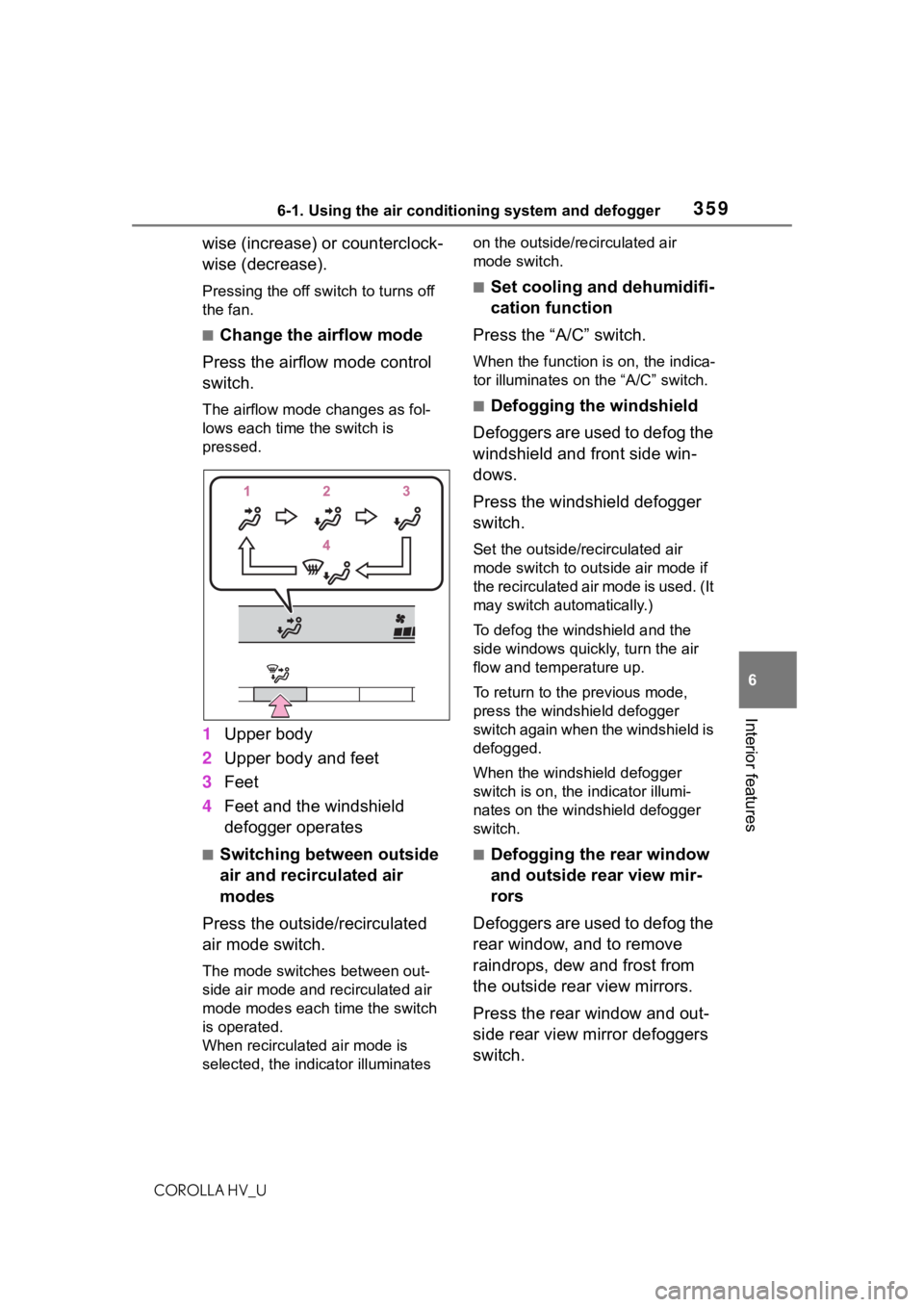
■Change the airflow mode
Press the airflow mode control
switch.
The airflow mode changes as fol-
lows each time the switch is
pressed.
1 Upper body
2 Upper body and feet
3 Feet
4 Feet and the windshield
defogger operates
■Switching between outside
air and recirculated air
modes
Press the outside/recirculated
air mode switch.
The mode switches between out-
side air mode and recirculated air
mode modes each time the switch
is operated.
When recirculated air mode is
selected, the indicator illuminates on the outside/recirculated air
mode switch.
■Set cooling and dehumidifi-
cation function
Press the “A/C” switch.
When the function is on, the indica-
tor illuminates on the “A/C” switch.
■Defogging the windshield
Defoggers are used to defog the
windshield and front side win-
dows.
Press the windshield defogger
switch.
Set the outside/recirculated air
mode switch to outside air mode if
the recirculated air mode is used. (It
may switch automatically.)
To defog the windshield and the
side windows quickly, turn the air
flow and temperature up.
To return to the previous mode,
press the windshield defogger
switch again when the windshield is
defogged.
When the windshield defogger
switch is on, the indicator illumi-
nates on the windshield defogger
switch.
■Defogging the rear window
and outside rear view mir-
rors
Defoggers are used to defog the
rear window, and to remove
raindrops, dew and frost from
the outside rear view mirrors.
Press the rear window and out-
side rear view mirror defoggers
switch.
Page 360 of 556
3606-1. Using the air conditioning system and defogger
COROLLA HV_UThe defoggers will
automatically
turn off after a while.
When the rear window and outside
rear view mirror defoggers switch is
on, the indicator illuminates on the
rear window and ou tside rear view
mirror defoggers switch.
■Eco air conditioning mode
The air conditioning is controlled
with low fuel consumption priori-
tized such as reducing fan
speed, etc.
Press the eco air conditioning
mode switch.
When the eco air conditioning
mode is on, the indicator illumi-
nates on the eco air conditioning
mode switch.
■When the outside temperature
exceeds 75°F (24°C) and the air
conditioning system is on
●In order to reduce the air condi-
tioning power consumption, the air
conditioning system may switch to
recirculated air mode automati-
cally. This may also reduce fuel
consumption.
●Recirculated air mode is selected
as a default mode when the power
switch is turned to ON.
●It is possible to switch to outside
air mode at any time by pressing
the outside air mode switch.
■Fogging up of the windows
●The windows will easily fog up
when the humidity in the vehicle is
high. Turning “A /C” on will dehu-
midify the air from the outlets and
defog the windshield effectively.
●If you turn “A/C” o ff, the windows
may fog up more easily.
●The windows may fog up if the
recirculated air mode is used.
■Outside/recirculated air mode
●When driving on du sty roads such
as tunnels or in heavy traffic, set
the outside/recirculated air mode
switch to the recirculated air
mode. This is effective in prevent-
ing outside air from entering the
vehicle interior. During cooling
operation, setting the recirculated
air mode will also cool the vehicle
interior effectively.
●Outside/recirculated air mode may
automatically switch depending on
the temperature setting or the
inside temperature.
■Eco air conditioning mode
When Eco drive mode is selected
using the driving mode select
switch, eco air conditioning mode
turns on.
When a drive mode other than Eco
drive mode is sele cted, eco air con-
ditioning mode may turn off.
■Operation of the air condition-
ing system in Eco drive mode
●In Eco drive mode, the air condi-
tioning system is controlled as fol-
lows to prioritize fuel efficiency:
• Engine speed and compressor operation controlled to restrict
heating/cooling capacity
• Fan speed restri cted when auto-
matic mode is selected
●To improve air conditioning perfor-
mance, perform the following
operations:
• Turn off eco air conditioning mode ( P.360)
• Adjust the fan speed
• Turn off Eco drive mode ( P.219)
■When the outside temperature
falls to nearly 32°F (0°C)
The dehumidification function may
not operate even when “A/C” switch
is pressed.
■Ventilation and air conditioning
odors
●To let fresh air in, set the air condi-
tioning system to the outside air
Page 361 of 556
3616-1. Using the air conditioning system and defogger
COROLLA HV_U
6
Interior features
mode.
●During use, various odors from
inside and outside the vehicle may
enter into and a ccumulate in the
air conditioning system. This may
then cause odor to be emitted
from the vents.
●To reduce potential odors from
occurring:
• It is recommended that the air
conditioning system be set to out-
side air mode prior to turning the
vehicle off.
• The start timing of the blower may
be delayed for a short period of
time immediately after the air con-
ditioning system is started in auto-
matic mode.
●When parking, the system auto-
matically switches to outside air
mode to encourage better air cir-
culation throughout the vehicle,
helping to reduce odors that occur
when starting the vehicle.
■Air conditioning filter
P. 4 2 6
■Air conditioning system refrig-
erant
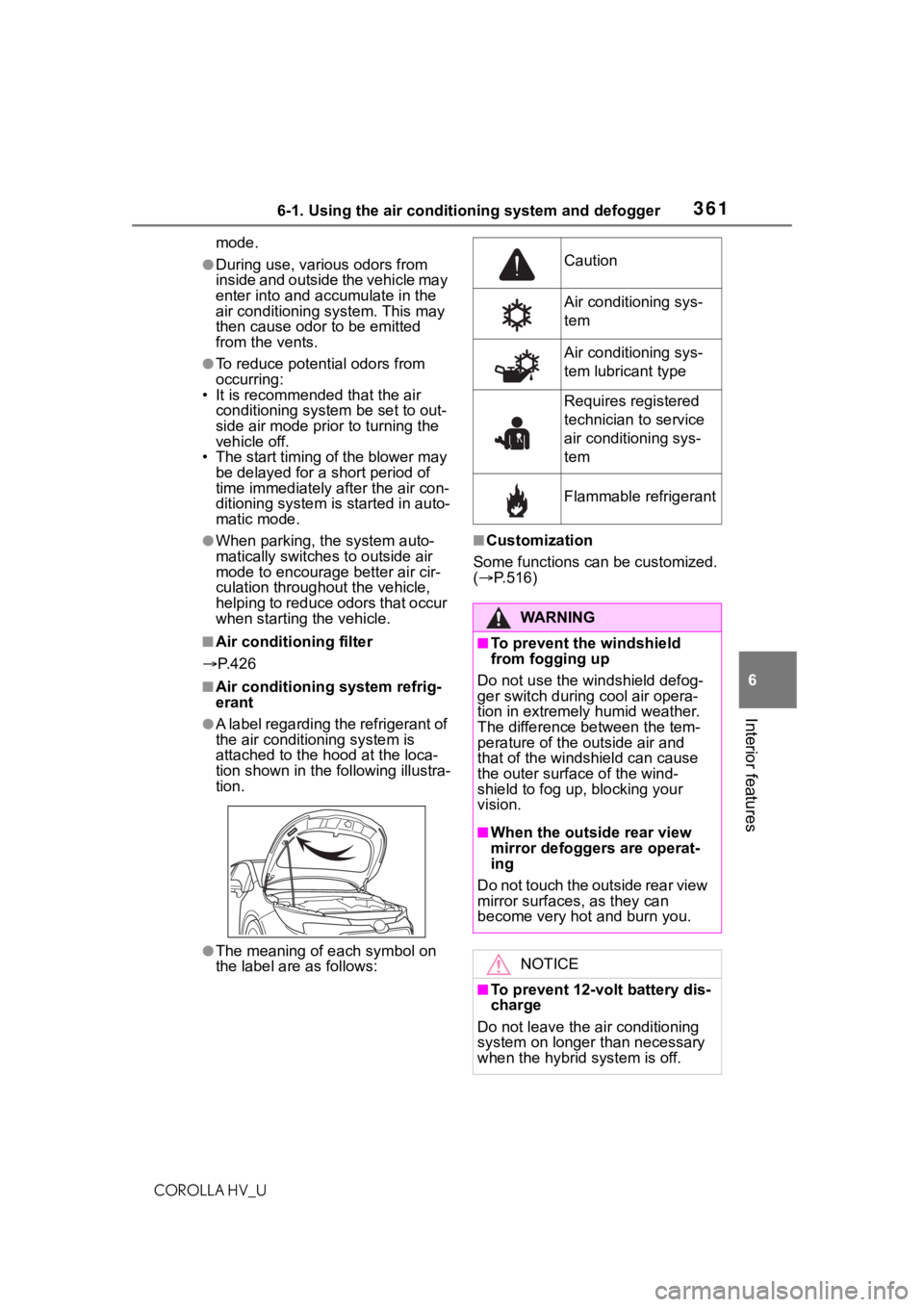
●A label regarding the refrigerant of
the air conditioning system is
attached to the ho od at the loca-
tion shown in the f ollowing illustra-
tion.
●The meaning of each symbol on
the label are as follows:
■Customization
Some functions can be customized.
( P.516)
Caution
Air conditioning sys-
tem
Air conditioning sys-
tem lubricant type
Requires registered
technician to service
air conditioning sys-
tem
Flammable refrigerant
WA R N I N G
■To prevent the windshield
from fogging up
Do not use the windshield defog-
ger switch during cool air opera-
tion in extremely humid weather.
The difference between the tem-
perature of the outside air and
that of the windshield can cause
the outer surface of the wind-
shield to fog up, blocking your
vision.
■When the outside rear view
mirror defoggers are operat-
ing
D o n o t t o u c h t h e o u t s i d e r e a r v i e w
mirror surfaces, as they can
become very hot and burn you.
NOTICE
■To prevent 12-volt battery dis-
charge
Do not leave the air conditioning
system on longer than necessary
when the hybrid system is off.
Page 385 of 556
3856-4. Other interior features
COROLLA HV_U
6
Interior features
Garage door opener motors
manufactured after 1995 may
be equipped with rolling code
protection. If this is the case,
you may need a stepladder or
other sturdy, safe device to
reach the “Learn” or “Smart”
button on the garage door
opener motor.
■Programming HomeLink®
Steps 1 through 3 must be per-
formed within 60 seconds, oth-
erwise the indicator light will
stop flashing and programming
will not be able to be completed.
1 Press and release the Home-
Link
® button you want to pro-
gram and check that the
HomeLink
® indicator light
flashes (orange).
2 Point the remote control
transmitter for the device at
the rear view mirror, 1 to 3 in.
(25 to 75 mm) from the
HomeLink
® buttons.
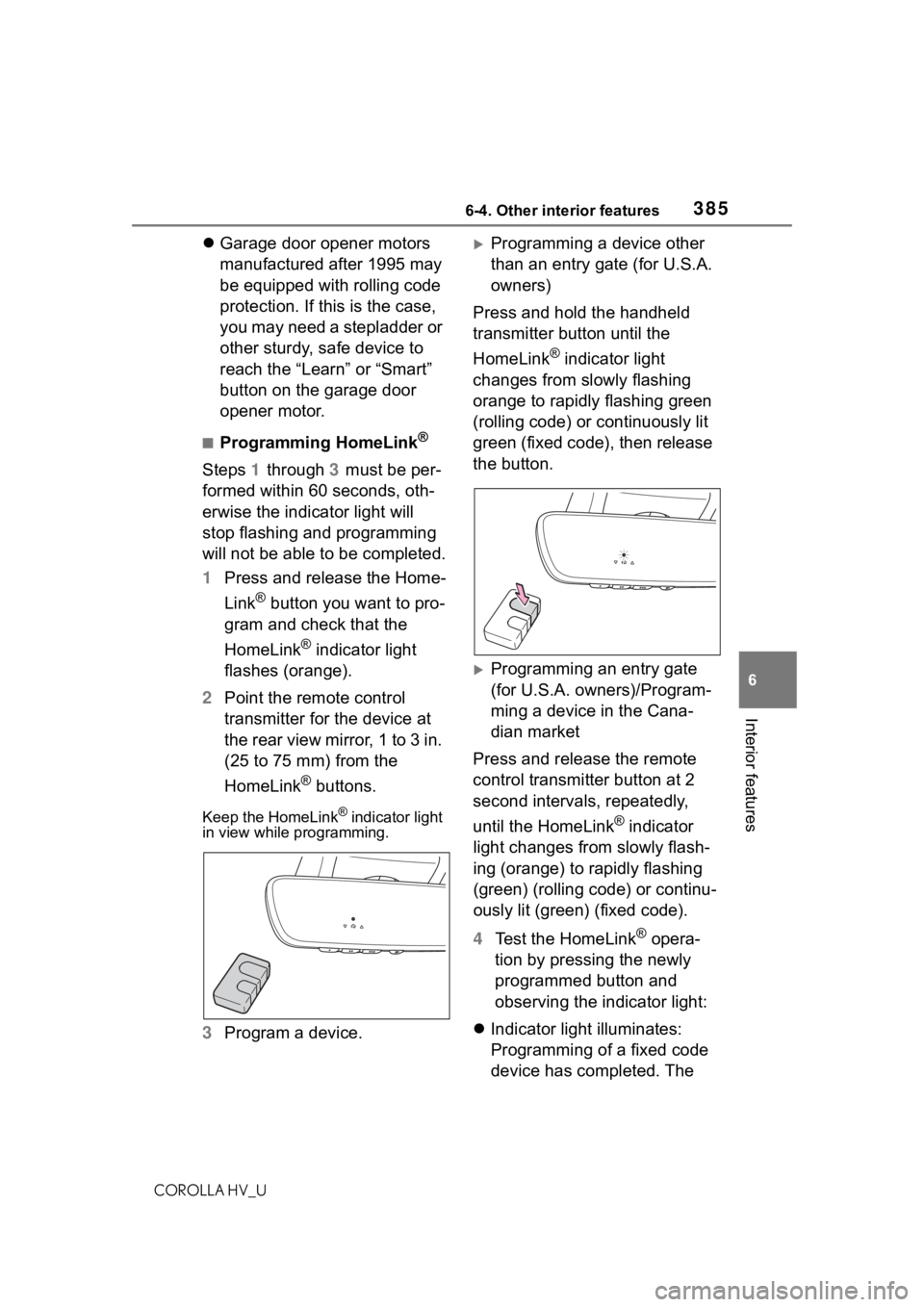
Keep the HomeLink® indicator light
in view while programming.
3 Program a device.
Programming a device other
than an entry gate (for U.S.A.
owners)
Press and hold the handheld
transmitter button until the
HomeLink
® indicator light
changes from slowly flashing
orange to rapidly flashing green
(rolling code) or continuously lit
green (fixed code), then release
the button.
Programming an entry gate
(for U.S.A. owners)/Program-
ming a device in the Cana-
dian market
Press and release the remote
control transmitter button at 2
second intervals, repeatedly,
until the HomeLink
® indicator
light changes from slowly flash-
ing (orange) to rapidly flashing
(green) (rolling code) or continu-
ously lit (green) (fixed code).
4 Test the HomeLink
® opera-
tion by pressing the newly
programmed button and
observing the indicator light:
Indicator light illuminates:
Programming of a fixed code
device has completed. The
Page 392 of 556
3927-1. Maintenance and care
COROLLA HV_U
7-1.Maintenance and care
Working from top to bottom,
liberally apply water to the
vehicle body, wheel wells and
underside of the vehicle to
remove any dirt and dust.
Wash the vehicle body using
a sponge or soft cloth, such
as a chamois.
For hard-to-remove marks,
use car wash soap and rinse
thoroughly with water.
Wipe away any water.
Wax the vehicle when the
waterproof coating deterio-
rates.
If water does not bead on a clean
surface, apply wax when the vehi-
cle body is cool.
■Automatic car washes
●Fold the mirrors before washing
the vehicle. Start washing from the
front of the vehicle. Make sure to
extend the mirrors before driving.
●Brushes used in automatic car
washes may scratch the vehicle
surface and harm your vehicle’s
paint.
■High pressure car washes
As water may ent er the cabin, do not bring the nozzle tip near the
gaps around the doors or perimeter
of the windows, or spray these
areas continuously.
■When using a car wash
If the door handle becomes wet
while the electronic key is within the
effective range, the door may lock
and unlock repeatedly. In that case,
follow the following correction pro-
cedures to wash the vehicle:
●Place the key in a position 6 ft. (2
m) or more separate from the
vehicle while the vehicle is being
washed. (Take care to ensure that
the key is not stolen.)
●Set the electronic key to bat-
tery-saving mode to disable the
smart key system. ( P.112)
■Aluminum wheels
●Remove any dirt immediately by
using a neutral detergent.
●Wash detergent off with water
immediately after use.
●To protect the paint from damage,
make sure to obs erve the follow-
ing precautions.
• Do not use acidic, alkaline or abrasive detergent
• Do not use hard brushes
• Do not use detergent on the wheels when they are hot, such
as after driving or parking in hot
weather
■Bumpers
Do not scrub with abrasive cleaners.
Cleaning and protect-
ing the vehicle exte-
rior
Perform cleaning in a man-
ner appropriate to each
component and its material.
Cleaning instructions
WA R N I N G
■When washing the vehicle
Do not apply water to the inside of
the engine compartment. Doing
so may cause the electrical com-
ponents, etc. to catch fire.
Page 522 of 556
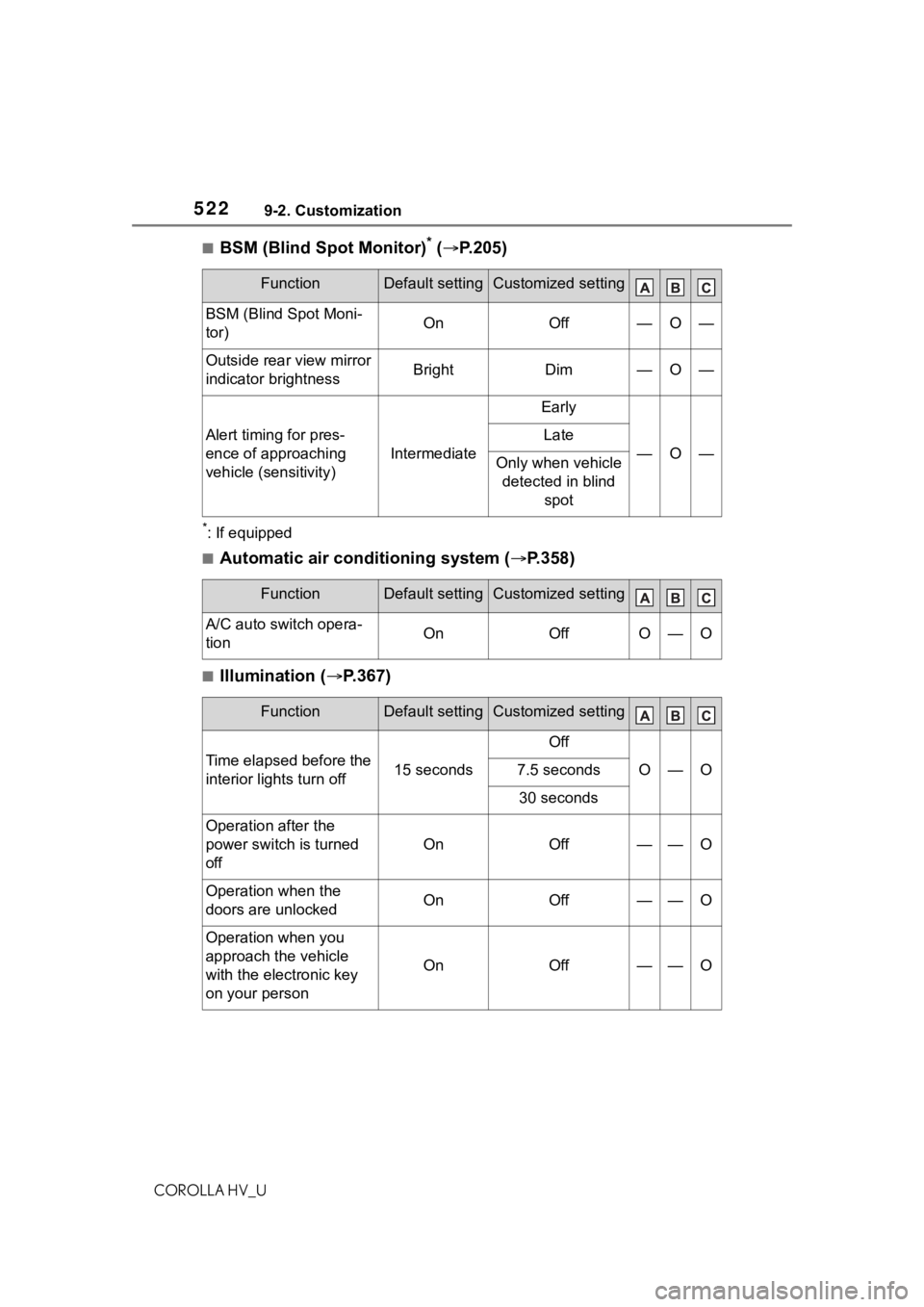
5229-2. Customization
COROLLA HV_U
■BSM (Blind Spot Monitor)* ( P.205)
*: If equipped
■Automatic air conditioning system ( P.358)
■Illumination ( P.367)
FunctionDefault settingCustomized setting
BSM (Blind Spot Moni-
tor)OnOff—O—
Outside rear view mirror
indicator brightnessBrightDim—O—
Alert timing for pres-
ence of approaching
vehicle (sensitivity)
Intermediate
Early
—O—
Late
Only when vehicle
detected in blind spot
FunctionDefault settingCustomized setting
A/C auto switch opera-
tionOnOffO—O
FunctionDefault settingCustomized setting
Time elapsed before the
interior lights turn off15 seconds
Off
O—O7.5 seconds
30 seconds
Operation after the
power switch is turned
off
OnOff——O
Operation when the
doors are unlockedOnOff——O
Operation when you
approach the vehicle
with the electronic key
on your person
OnOff——O
Page 541 of 556

5411-1. What to do if... (Troubleshooting)
COROLLA HV_U541Alphabetical Index
Heated steering wheel and seat
heater precautions ............. 365
How your child should wear the seat belt................................ 28
Power window lock switch.... 129
Power window precautions .. 128
Rear door child-protectors.... 108
Removed electronic key battery precautions......................... 432
Seat belt extender precautions ............................................. 28
Seat belt precautions ............. 46
Trunk precautions................. 109
Child-protectors ..................... 108
Cleaning Aluminum wheels ................. 392
Exterior ................................. 392
Interior .................................. 394
Radar sensor........................ 169
Seat belts ............................. 394
Clock ........................... 84, 87, 269
Coat hooks .............................. 382
Command list ......................... 311
Condenser .............................. 409
Console box ............................ 371
Cooling system ...................... 408 Engine overheating .............. 489
Hybrid system overheating... 490
Cruise control Dynamic radar cruise control with full-speed range .......... 192
Cup holders ............................ 370
Current fuel consumption ....... 90
Curtain shield airbags ............. 31
Customizable features ........... 516
D
Daytime running light system158
DCM ................................. 349, 350
Defogger Outside rear view mirrors ..... 359
Rear window ........................ 359 Windshield ............................359
Dimensions .............................496
Dinghy towing .........................142
Display Dynamic radar cruise control with full-speed range ..........192
Energy monitor .......................95
LTA (Lane-Tracing Assist) .....187
Multi-information display.........89
Warning message.................459
Display change button .............86
Do-it-yourself maintenance ...398
Door lock Doors ....................................105
Smart key system ................. 111
Wireless remote control........103
Doors Automatic door locking and unlocking system ................108
Door glasses ........................127
Door lock ..............................105
Open door warning buzzer .106, 108
Outside rear view mirrors .....125
Rear door child-protectors ....108
Side doors ............................105
Drive distance ...........................93
Drive information ......................93
Drive-start control ..................133
Driving Break-in tips .........................133
Correct driving posture ...........25
Driving mode select switch ...219
Hybrid vehicle dri ving tips .....226
Procedures ...........................132
Winter drive tips....................228
Driving information display .....90
Driving range ............................90
Driving support system informa- tion display..............................93