radio antenna TOYOTA COROLLA HYBRID 2020 Owners Manual (in English)
[x] Cancel search | Manufacturer: TOYOTA, Model Year: 2020, Model line: COROLLA HYBRID, Model: TOYOTA COROLLA HYBRID 2020Pages: 556, PDF Size: 19.28 MB
Page 111 of 556
1113-2. Opening, closing and locking the doors
COROLLA HV_U
3
Before driving
with you when leaving the vehicle.
●If the electronic key is put in the
trunk with all the doors locked, the
key may not be detected depend-
ing on the location of the key and
the surrounding radio wave condi-
tions. In this case, the key con-
finement prevention function
cannot be activate d, causing the
doors to lock when the trunk is
closed. Make sure to check where
the key is before closing the trunk.
●The key confinement prevention
function cannot be activated if any
one of the doors is unlocked. In
this case, open the trunk using the
trunk opener.
■Internal trunk release lever
The trunk lid can be opened by pull-
ing up the glow-in -the-dark lever
located on the inside of the trunk lid.
The lever will conti nue to glow for
some time after the trunk lid is
closed.
■If the smart key system or the
wireless remote control does
not operate properly
Replace the key battery with a new
one if it is depleted. ( P.431)
■Open door warning buzzer
P. 1 0 8
■Customization
Some functions can be customized.
( P.516)
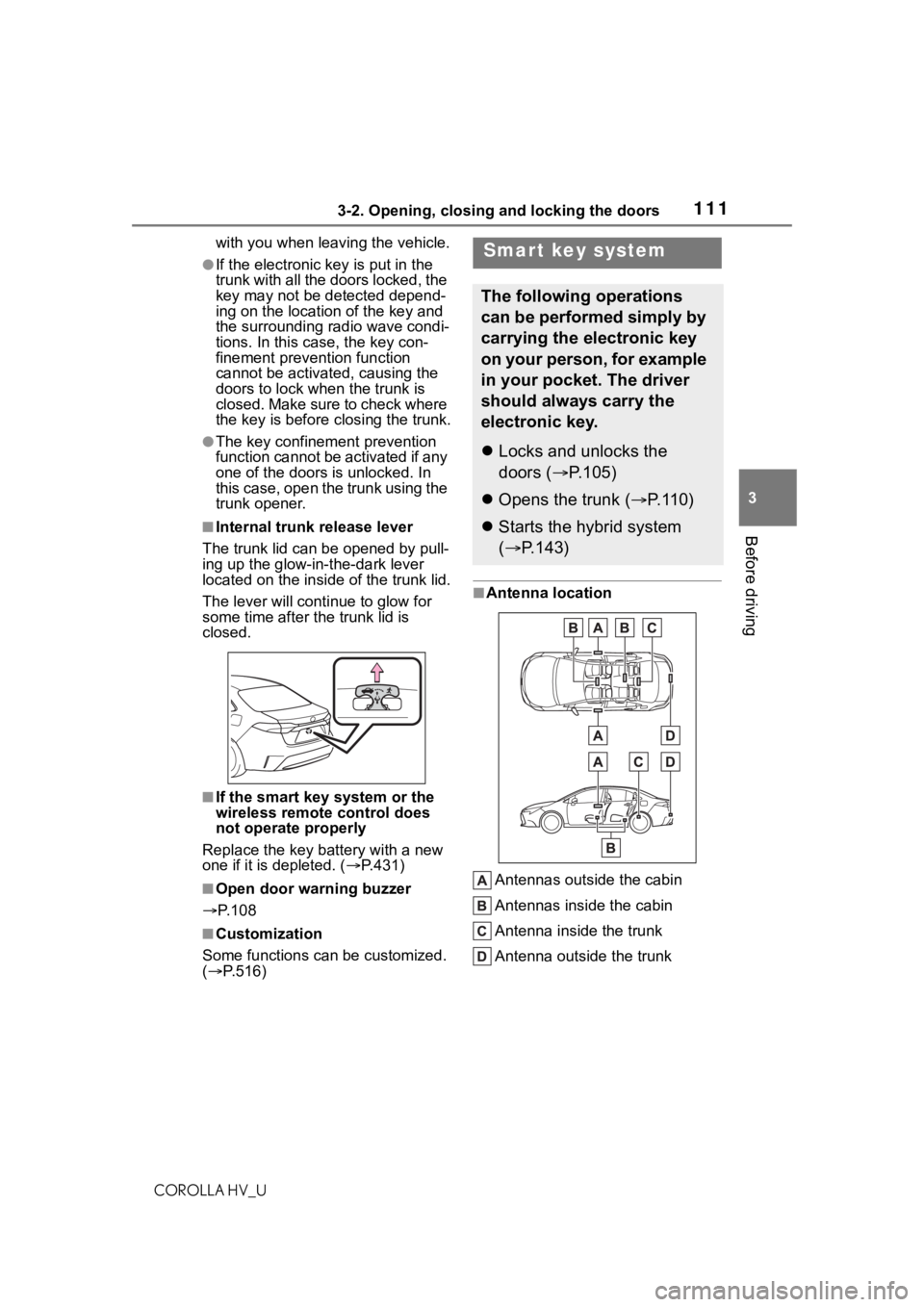
■Antenna location
Antennas outside the cabin
Antennas inside the cabin
Antenna inside the trunk
Antenna outside the trunk
Smart key system
The following operations
can be performed simply by
carrying the electronic key
on your person, for example
in your pocket. The driver
should always carry the
electronic key.
Locks and unlocks the
doors ( P.105)
Opens the trunk ( P. 1 1 0 )
Starts the hybrid system
( P.143)
Page 114 of 556

1143-2. Opening, closing and locking the doors
COROLLA HV_Urefer to P.484.
■Note for the entry function
●Even when the electronic key is
within the effective range (detec-
tion areas), the system may not
operate properly in the following
cases:
• The electronic key is too close to the window or outside door han-
dle, near the ground, or in a high
place when the doors are locked
or unlocked.
• The electronic key is near the ground or in a high place, or too
close to the center of the rear
bumper when the trunk is opened.
• The electronic key is on the instru- ment panel, rear package tray or
floor, or in the door pockets or
glove box when the hybrid system
is started or po wer switch modes
are changed.
●Do not leave the electronic key on
top of the instrument panel or near
the door pockets when exiting the
vehicle. Depending on the radio
wave reception conditions, it may
be detected by the antenna out-
side the cabin and the door will
become lockable from the outside,
possibly trapping the electronic
key inside the vehicle.
●As long as the electronic key is
within the effective range, the
doors may be locked or unlocked
by anyone. However, only the
doors detecting the electronic key
can be used to unl ock the vehicle.
●Even if the electronic key is not
inside the vehicle, it may be possi-
ble to start the hybrid system if the
electronic key is near the window.
●The doors may unlock or lock if a
large amount of water splashes on
the door handle, such as in the
rain or in a car wash when the
electronic key is within the effec-
tive range. (The doors will auto-
matically be locked after
approximately 60 seconds if the
doors are not opened and closed.)
●If the wireless remote control is
used to lock the doors when the
electronic key is near the vehicle,
there is a possib ility that the door
may not be unlocked by the entry
function. (Use the wireless remote
control to unlock the doors.)
●Touching the door lock or unlock
sensor while wearing gloves may
prevent lock or unlock operation.
●When the lock operation is per-
formed using the lock sensor, rec-
ognition signals will be shown up
to two consecutive times. After
this, no recognition signals will be
given.
●If the door handle becomes wet
while the electronic key is within
the effective range, the door may
lock and unlock repeatedly. In that
case, follow the following correc-
tion procedures to wash the vehi-
cle:
• Place the electronic key in a loca-
tion 6 ft. (2 m) or more away from
the vehicle. (Take care to ensure
that the key is not stolen.)
• Set the electronic key to bat- tery-saving mode to disable the
smart key system. ( P.113)
●If the electronic key is inside the
vehicle and a door handle
becomes wet during a car wash, a
message may be shown on the
multi-information display and a
buzzer will sound outside the vehi-
cle. To turn off the alarm, lock all
the doors.
●The lock sensor may not work
properly if it comes into contact
with ice, snow, m ud, etc. Clean
the lock sensor and attempt to
operate it again.
●A sudden handle operation or a
handle operation immediately
after entering the effective range
may prevent the doors from being
unlocked. Touch the door unlock
sensor and check that the doors
are unlocked befo re pulling the
door handle again.
Page 117 of 556
1173-2. Opening, closing and locking the doors
COROLLA HV_U
3
Before driving
WA R N I N G
■Caution regarding interfer-
ence with electronic devices
●People with implantable car-
diac pacemakers, cardiac
resynchronization ther-
apy-pacemakers or implantable
cardioverter defib rillators should
keep away from the smart key
system antennas. ( P. 1 1 1 )
The radio waves may affect the
operation of such devices. If
necessary, the entry function
can be disabled. Ask your Toy-
ota dealer for details, such as
the frequency of radio waves
and timing of the emitted radio
waves. Then, consult your doc-
tor to see if you should disable
the entry function.
●Users of any electrical medical
device other than implantable
cardiac pacemakers, cardiac
resynchronization ther-
apy-pacemakers or implantable
cardioverter defibrillators should
consult the manufacturer of the
device for information about its
operation under the influence of
radio waves.
Radio waves could have unex-
pected effects on the operation
of such medical devices.
Ask your Toyota dealer for details
on disabling the entry function.
Page 263 of 556
2635-3. Connectivity settings
COROLLA HV_U
5
Entune audio
the Wi-Fi® Hotspot function, the
communication speed may
decrease.
●If the vehicle is near a radio
antenna, radio station or other
source of strong radio waves and
electrical noise, communication
may be slow or impossible.
The condition of Wi-Fi® connec-
tion appears on the right upper
side of the screen. ( P.236)
Communication standards
IEEE 802.11b
IEEE 802.11g
IEEE 802.11n (2.4GHz)
Security
WPA™
WPA2™
• WPA™ and WPA2™ are trade-
marks of Wi-Fi Alliance
®.
WA R N I N G
●Use Wi-Fi® devices only when
safe and legal to do so.
●Your audio unit is fitted with
Wi-Fi® antennas. People with
implantable cardiac pacemak-
ers, cardiac resynchronization
therapy-pacemakers or implant-
able cardioverter defibrillators
should maintain a reasonable
distance between themselves
and the Wi-Fi
® antennas.
The radio waves may affect the
operation of such devices.
●Before using Wi-Fi® devices,
users of any electrical medical
device other than implantable
cardiac pacemakers, cardiac
resynchronization ther-
apy-pacemakers or implantable
cardioverter defib rillators should
consult the manufacturer of the
device for information about its
operation under the influence of
radio waves.
Radio waves could have unex-
pected effects on the operation
of such medical devices.
Conditions displayed with
Wi-Fi
® icon
Specifications
Page 289 of 556
2895-7. Media operation
COROLLA HV_U
5
Entune audio
The Bluetooth® audio operation
screen can be reached by the
following methods: P. 2 7 5
Connecting a Bluetooth
® audio
device ( P.290)
Depending on the type of porta-
ble player connected, some
functions may not be available and/or the screen may look dif-
ferently than shown in this man-
ual.
When an Apple CarPlay con-
nection is established, Blue-
tooth
® audio will be suspended
and become unavailable
*.
*: This function is not made avail- able in some countries or areas.
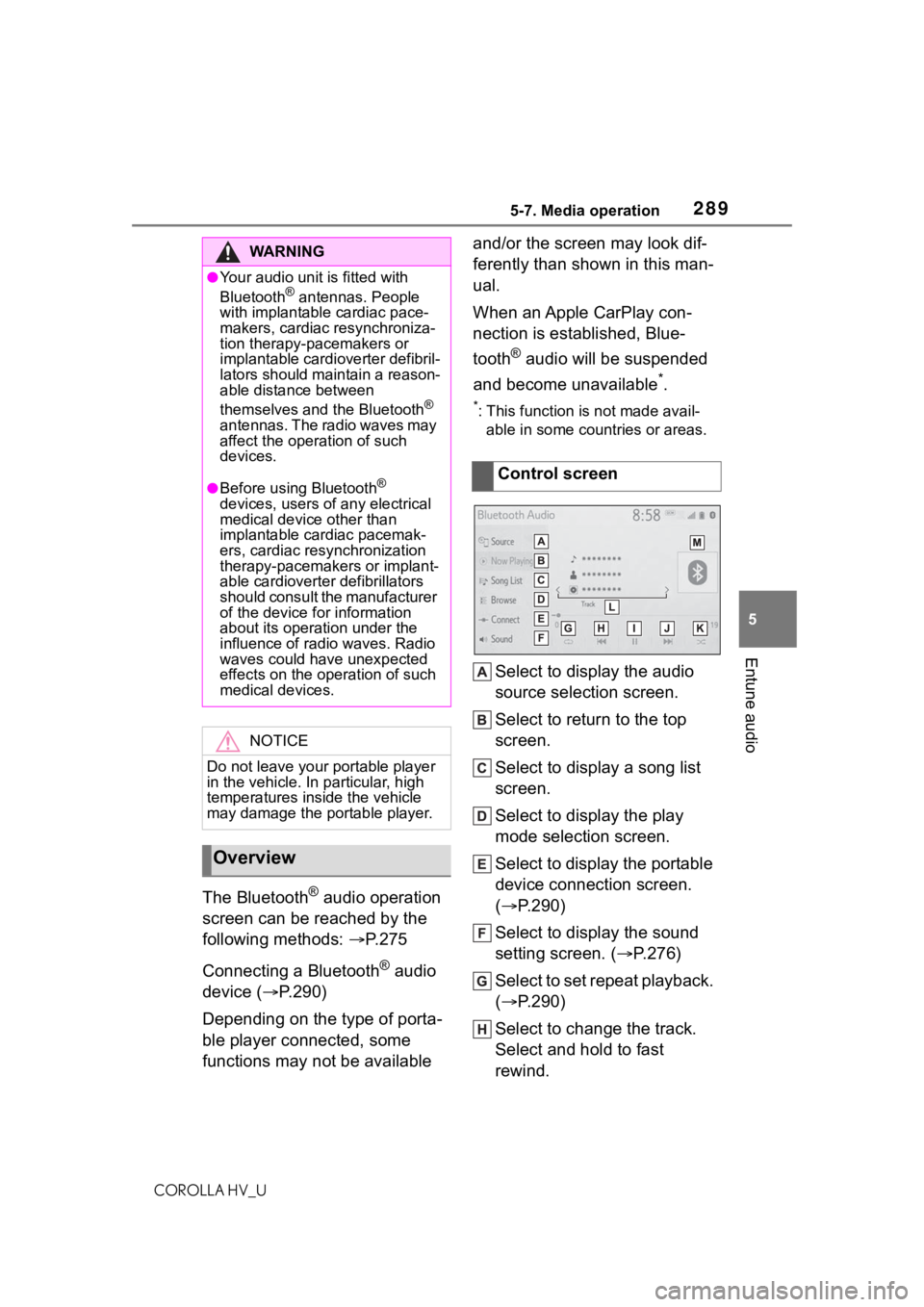
Select to display the audio
source selection screen.
Select to return to the top
screen.
Select to display a song list
screen.
Select to display the play
mode selection screen.
Select to display the portable
device connection screen.
( P.290)
Select to display the sound
setting screen. ( P.276)
Select to set repeat playback.
( P.290)
Select to change the track.
Select and hold to fast
rewind.
WA R N I N G
●Your audio unit is fitted with
Bluetooth® antennas. People
with implantable cardiac pace-
makers, cardiac resynchroniza-
tion therapy-pacemakers or
implantable cardioverter defibril-
lators should maintain a reason-
able distance between
themselves and the Bluetooth
®
antennas. The radio waves may
affect the operation of such
devices.
●Before using Bluetooth®
devices, users of any electrical
medical device other than
implantable cardiac pacemak-
ers, cardiac resynchronization
therapy-pacemakers or implant-
able cardioverter defibrillators
should consult the manufacturer
of the device for information
about its operation under the
influence of radio waves. Radio
waves could have unexpected
effects on the operation of such
medical devices.
NOTICE
Do not leave your portable player
in the vehicle. In particular, high
temperatures inside the vehicle
may damage the portable player.
Overview
Control screen
Page 296 of 556
2965-10. Tips for operating the audio/visual system
COROLLA HV_U
5-10.Tips for operating the audio/visual system
The use of a cellular phone inside or
near the vehicle may cause a noise
from the speakers of the
audio/visual system which you are
listening to. However, this does not
indicate a malfunction.
Usually, a problem with radio
reception does not mean there
is a problem with the radio it
is just the normal result of condi-
tions outside the vehicle.
For example, nearby buildings
and terrain can interfere with FM
reception. Power lines or phone
wires can interfere with AM sig-
nals. And of course, radio sig-
nals have a limited range. The
farther the vehicle is from a sta-
tion, the weaker i ts signal will
be. In addition, reception condi-
tions change constantly as the
vehicle moves.
Here are some common recep-
tion problems that may not indi-
cate a problem with the radio as
described.
■FM
Fading and drifting stations:
Generally, the effective range of FM is about 25 miles (40 km).
Once outside this range, you
may notice fading and drifting,
which increase with the distance
from the radio transmitter. They
are often accompanied by dis-
tortion.
Multi-path: FM signals are
reflective, making it possible for
2 signals to reach the vehicle’s
antenna at the same time. If this
happens, the signals will cancel
each other out, causing a
momentary flutter or loss of
reception.
Static and fluttering: These
occur when signals are blocked
by buildings, trees or other large
objects. Increasing the bass
level may reduce static and flut-
tering.
Station swapping: If the FM sig-
nal being listened to is inter-
rupted or weakened, and there
is another strong station nearby
on the FM band, the radio may
tune in the second station until
the original signal can be picked
up again.
■AM
Fading: AM broadcasts are
reflected by the upper atmo-
sphere especially at night.
These reflected signals can
interfere with those received
directly from the radio station,
causing the radio station to
sound alternately strong and
weak.
Operating infor mation
NOTICE
To avoid damage to the
audio/visual system:
Be careful not to spill beverages
over the audio/visual system.
Radio
Page 319 of 556
3195-13. Phone operation (Hands-free system for cellular phones)
COROLLA HV_U
5
Entune audio
To use the hands-free system
for cellular phones, it is neces-
sary to register a cellular phone
with the system. ( P.248)
■Connecting a Bluetooth®
device
Registering an additional
device
1 Display the phone top
screen. ( P.317)
2 Select “Select Device”.
3 Select “Add Device”.
When another Bluetooth® device is
connected, a confirmation screen
will be displayed. To disconnect the
Bluetooth
® device, select “Yes”.
4 Follow the steps in “Register-
ing a Bluetooth
® phone for
the first time” from step 5.
( P.248)
Selecting a registered device
1 Display the phone top
screen. ( P.317)
2 Select “Select Device”.
3 Select the desired device to
be connected.
4 Check that a confirmation
screen is displayed when the
connection is complete.
If an error message is displayed,
follow the guidance on the screen
to try again.
■Bluetooth® phone condition
display
The condition of the Bluetooth
®
phone appears on the upper
right side of the screen.
( P.237)
WA R N I N G
●Your audio unit is fitted with
Bluetooth® antennas. People
with implantable cardiac pace-
makers, cardiac resynchroniza-
tion therapy-pacemakers or
implantable cardioverter defibril-
lators should maintain a reason-
able distance between
themselves and the Bluetooth
®
antennas. The radio waves may
affect the operation of such
devices.
●Before using Bluetooth®
devices, users of any electrical
medical device other than
implantable cardiac pacemak-
ers, cardiac resynchronization
therapy-pacemakers or implant-
able cardioverter defibrillators
should consult the manufacturer
of the device for information
about its operation under the
influence of radio waves. Radio
waves could have unexpected
effects on the operation of such
medical devices.
NOTICE
Do not leave your cellular phone
in the vehicle. The temperature
inside may rise to a level that
could damage the phone.
Registering/Connecting a
Bluetooth® phone
Page 539 of 556

5391-1. What to do if... (Troubleshooting)
COROLLA HV_U539Alphabetical Index
Alphabetical Index
A
A/C Air conditioning filter ............. 426
Automatic air conditioning sys-tem ..................................... 358
ABS (Anti-lock Brake System) ............................................... 220Warning light ........................ 452
ACA (Active Cornering Assist) ............................................... 221
Active Cornering Assist (ACA) ............................................... 221
Air conditioning filter ............. 426
Air conditioning system Air conditioning filter ............. 426
Automatic air conditioning sys-tem ..................................... 358
Airbags Airbag operating conditions.... 33
Airbag precautions for your child............................................. 36
Correct driving posture ........... 25
Curtain shield airbag operating conditions ............................. 34
Curtain shield airbag precautions ............................................. 36
Front passenger occupant clas- sification system ................... 40
General airbag precautions .... 36
Locations of airbags ............... 31
Modification and disposal of air- bags ..................................... 39
Side airbag operating conditions ............................................. 34
Side airbag precautions ......... 36
Side and curtain shield airbags operating conditions ............. 34
Side and curtain shield airbags precautions........................... 36
SRS airbags ........................... 31
SRS warning light................. 452 Alarm
Alarm ......................................77
Warning buzzer ....................450
AM ............................................279
Anchor brackets ... ..............49, 59
Antennas (smart key system) 111
Anti-lock Brake System (ABS) ...............................................220Warning light.........................452
Apple CarPlay .................264, 265
Approach warning ..................198
Apps button (Menu screen) ...235
Armrest ......... ......................... ..382
Assist grips .............................382
Audio .......................................274 Audio source ........................275
Operating information ...........296
Reordering the audio source 275
Screen adjustment ...............277
Some basics .........................275
Sound settings......................276
Turning the sys tem on and off
...........................................275
USB/AUX port ......................276
Voice command system .......278
AUDIO button ..........................233
Audio button (Menu screen) ..235
Audio settings.........................295 Common settings .................295
Radio settings.......................295
Audio source...........................275
Audio system-linked display ...93
Automatic air conditioning sys- tem .........................................358
Automatic High Beam ............160
Automatic light control system ...............................................159
AUX ..........................................291
Average fuel economy .............90
Average vehicle speed .............93