engine TOYOTA COROLLA HYBRID 2023 User Guide
[x] Cancel search | Manufacturer: TOYOTA, Model Year: 2023, Model line: COROLLA HYBRID, Model: TOYOTA COROLLA HYBRID 2023Pages: 496, PDF Size: 10.13 MB
Page 96 of 496
962-1. Instrument cluster
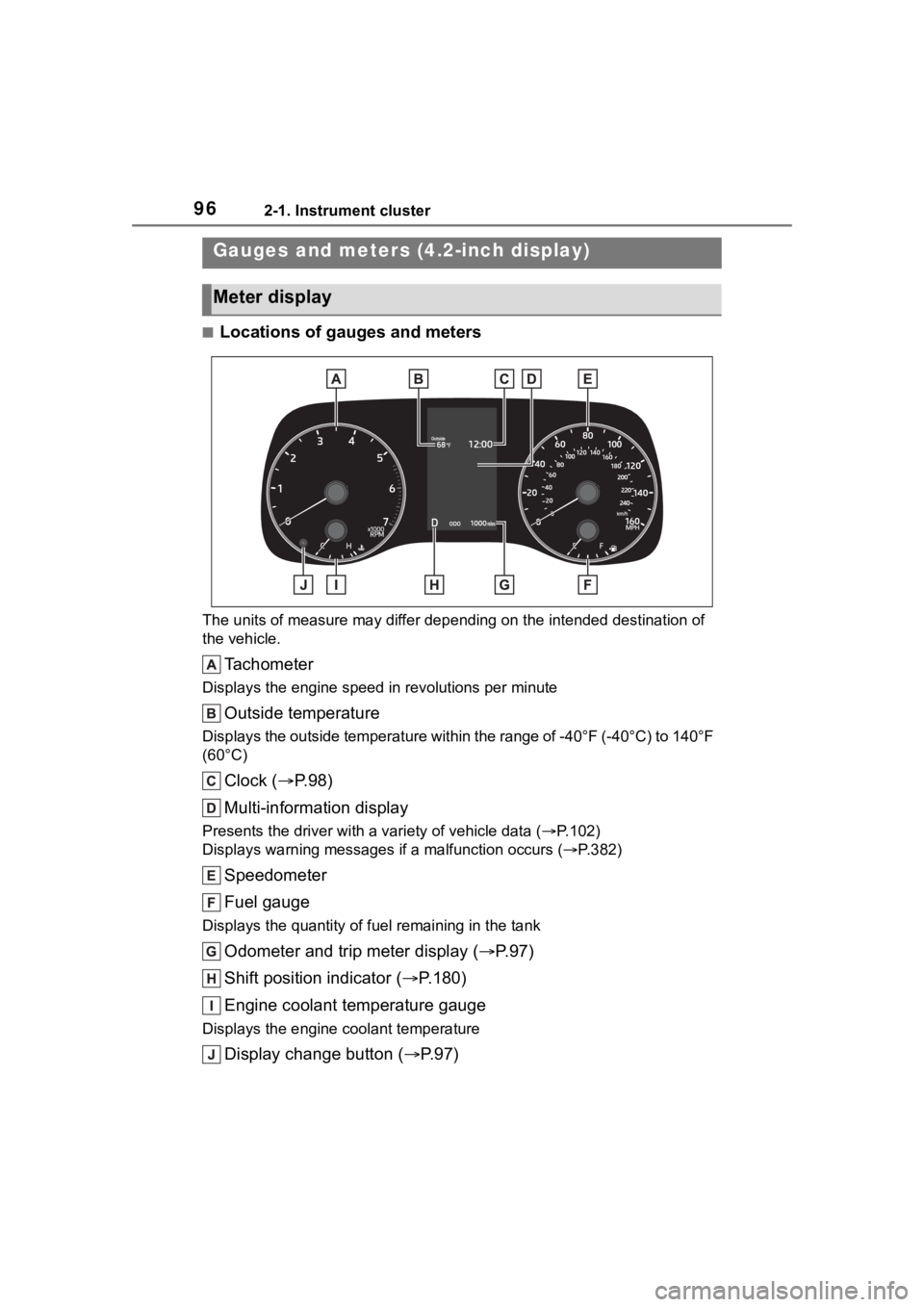
■Locations of gauges and meters
The units of measure may differ depending on the intended destination of
the vehicle.
Tachometer
Displays the engine speed in revolutions per minute
Outside temperature
Displays the outside temperature within the range of -40°F (-40 °C) to 140°F
(60°C)
Clock ( P. 9 8 )
Multi-information display
Presents the driver with a variety of vehicle data (P.102)
Displays warning messages if a malfunction occurs (P.382)
Speedometer
Fuel gauge
Displays the quantity of fu el remaining in the tank
Odometer and trip meter display ( P.97)
Shift position indicator ( P.180)
Engine coolant temperature gauge
Displays the engine c oolant temperature
Display change button ( P.97)
Gauges and meters (4.2-inch display)
Meter display
Page 97 of 496
972-1. Instrument cluster
2
Vehicle status information and indicators
■Engine speed
On hybrid electric vehicles, engine
speed is precisely controlled in
order to help improve fuel efficiency
and reduce exhaust emissions etc.
There are times when the engine
speed that is displayed may differ
even when vehicle operation and
driving conditions are the same.
■Outside temperature display
●In the following si tuations, the cor-
rect outside tempe rature may not
be displayed, or the display may
take longer than normal to
change:
• When stopped, or driving at low
speeds (less than 12 mph [20
km/h])
• When the outside temperature
has changed suddenly (at the
entrance/exit of a garage, tunnel,
etc.)
●When “--” or “E” is displayed, the
system may be malfunctioning.
Take your vehicle to your Toyota
dealer.
■Liquid crystal display
P. 1 0 3
■Customization
The gauges and meters can be cus-
tomized in of the multi-informa-
tion display. ( P.442)
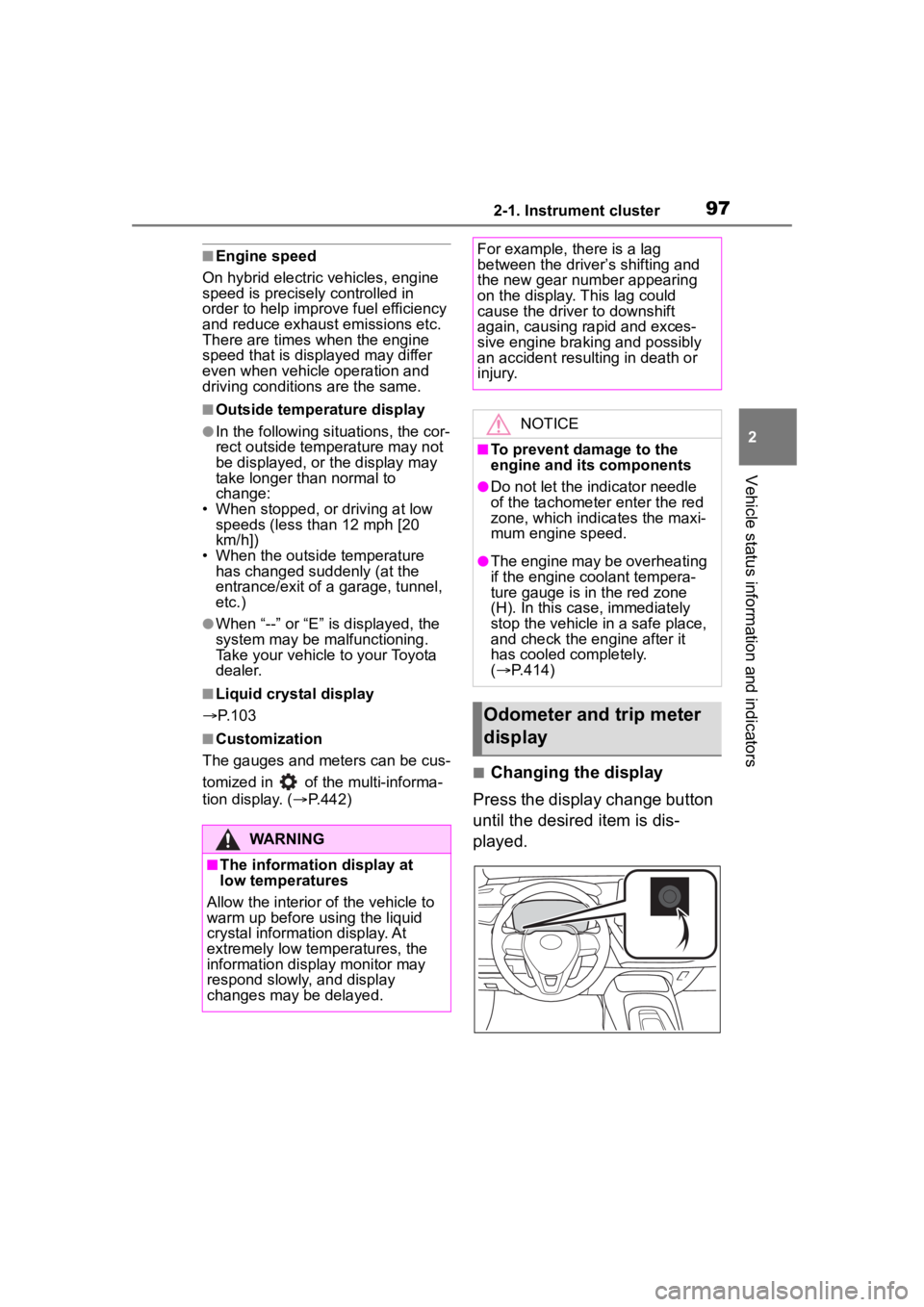
■Changing the display
Press the display change button
until the desired item is dis-
played.
WARNING
■The information display at
low temperatures
Allow the interior of the vehicle to
warm up before u sing the liquid
crystal informat ion display. At
extremely low temperatures, the
information display monitor may
respond slowly, and display
changes may be delayed.
For example, there is a lag
between the driver’s shifting and
the new gear number appearing
on the display. This lag could
cause the driver to downshift
again, causing rapid and exces-
sive engine braking and possibly
an accident resulting in death or
injury.
NOTICE
■To prevent damage to the
engine and its components
●Do not let the indicator needle
of the tachometer enter the red
zone, which indicates the maxi-
mum engine speed.
●The engine may be overheating
if the engine coolant tempera-
ture gauge is in the red zone
(H). In this case, immediately
stop the vehicle in a safe place,
and check the engine after it
has cooled completely.
( P.414)
Odometer and trip meter
display
Page 99 of 496
992-1. Instrument cluster
2
Vehicle status information and indicators
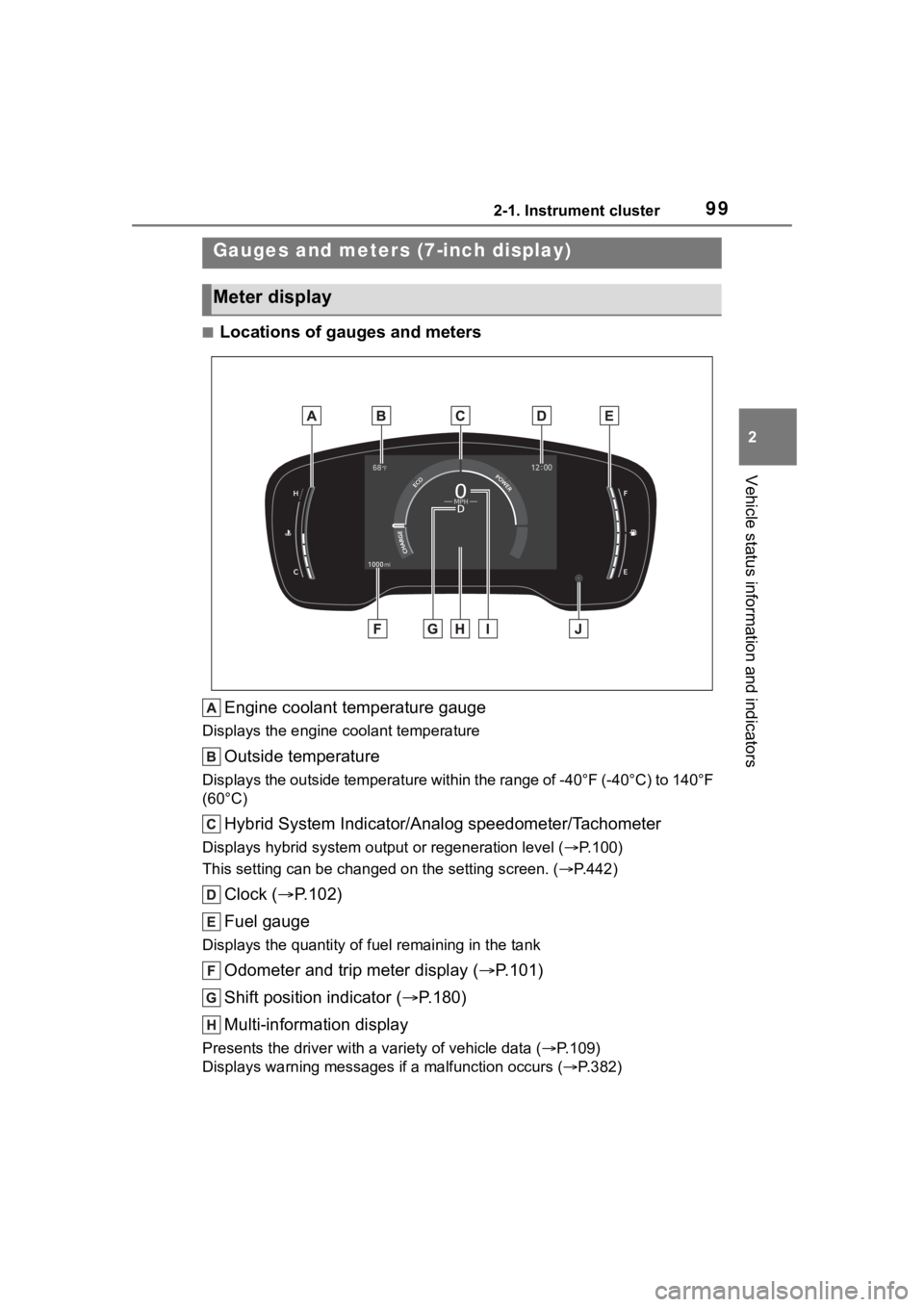
■Locations of gauges and metersEngine coolant temperature gauge
Displays the engine c oolant temperature
Outside temperature
Displays the outside temperature within the range of -40°F (-40 °C) to 140°F
(60°C)
Hybrid System Indicator/Analog speedometer/Tachometer
Displays hybrid system output or regeneration level ( P.100)
This setting can be changed on the setting screen. ( P.442)
Clock ( P.102)
Fuel gauge
Displays the quantity of fu el remaining in the tank
Odometer and trip meter display ( P.101)
Shift position indicator ( P.180)
Multi-information display
Presents the driver with a variety of vehicle data (P.109)
Displays warning messages if a malfunction occurs (P.382)
Gauges and meters (7-inch display)
Meter display
Page 100 of 496
1002-1. Instrument cluster
Digital speedometer
Display change button (P.101)
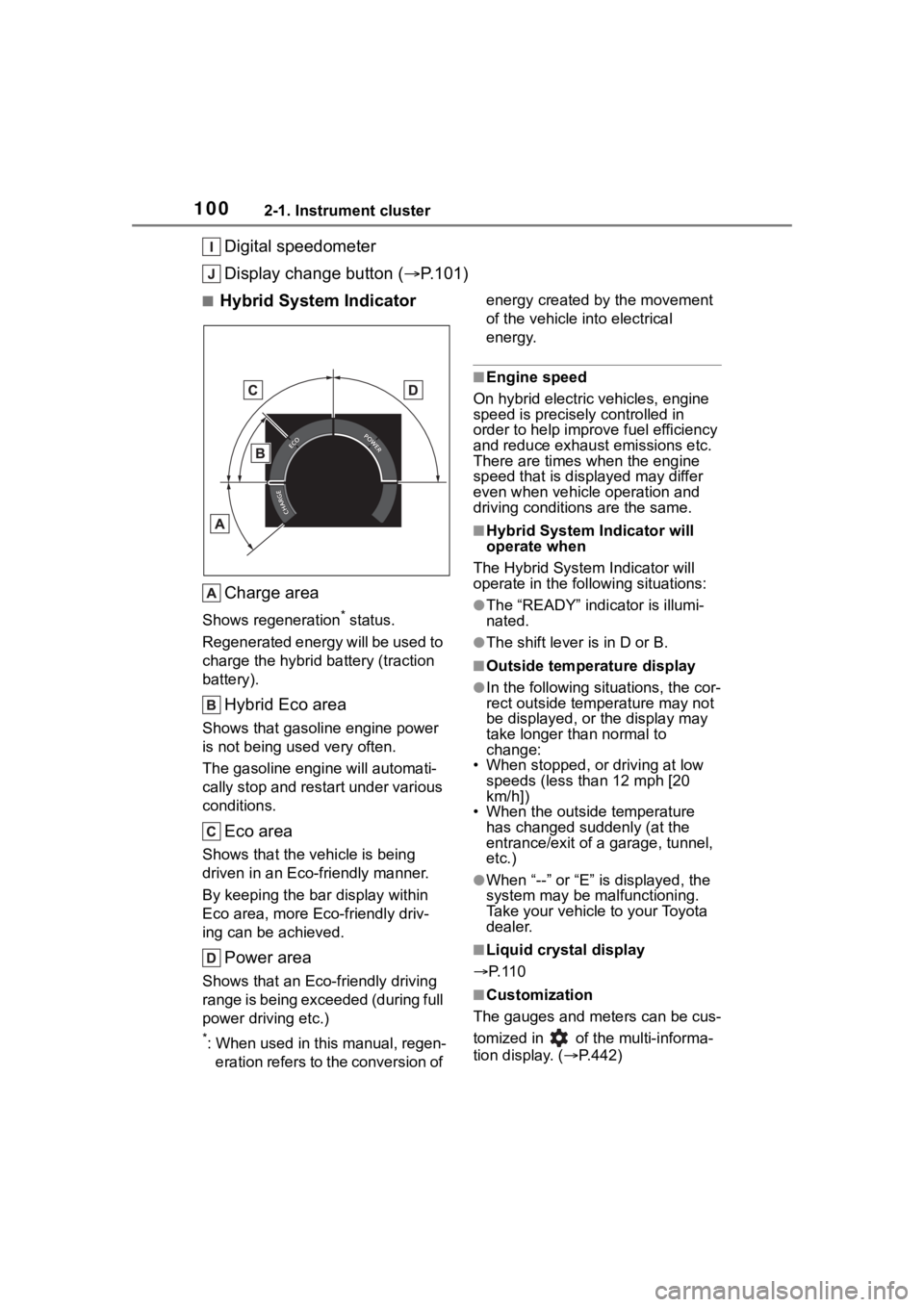
■Hybrid System Indicator
Charge area
Shows regeneration* status.
Regenerated energy will be used to
charge the hybrid battery (traction
battery).
Hybrid Eco area
Shows that gasoline engine power
is not being used very often.
The gasoline engine will automati-
cally stop and restart under various
conditions.
Eco area
Shows that the vehicle is being
driven in an Eco-friendly manner.
By keeping the bar display within
Eco area, more Eco-friendly driv-
ing can be achieved.
Power area
Shows that an Eco-friendly driving
range is being exceeded (during full
power driving etc.)
*: When used in this manual, regen- eration refers to the conversion of energy created by the movement
of the vehicle into electrical
energy.
■Engine speed
On hybrid electric vehicles, engine
speed is precisely controlled in
order to help improve fuel efficiency
and reduce exhaust emissions etc.
There are times when the engine
speed that is displayed may differ
even when vehicle operation and
driving conditions are the same.
■Hybrid System Indicator will
operate when
The Hybrid System Indicator will
operate in the following situations:
●The “READY” indicator is illumi-
nated.
●The shift lever is in D or B.
■Outside temperature display
●In the following sit uations, the cor-
rect outside temperature may not
be displayed, or the display may
take longer than normal to
change:
• When stopped, or driving at low
speeds (less than 12 mph [20
km/h])
• When the outside temperature
has changed suddenly (at the
entrance/exit of a garage, tunnel,
etc.)
●When “--” or “E” i s displayed, the
system may be malfunctioning.
Take your vehicle to your Toyota
dealer.
■Liquid crystal display
P. 1 1 0
■Customization
The gauges and meters can be cus-
tomized in of t he multi-informa-
tion display. ( P.442)
Page 101 of 496
1012-1. Instrument cluster
2
Vehicle status information and indicators
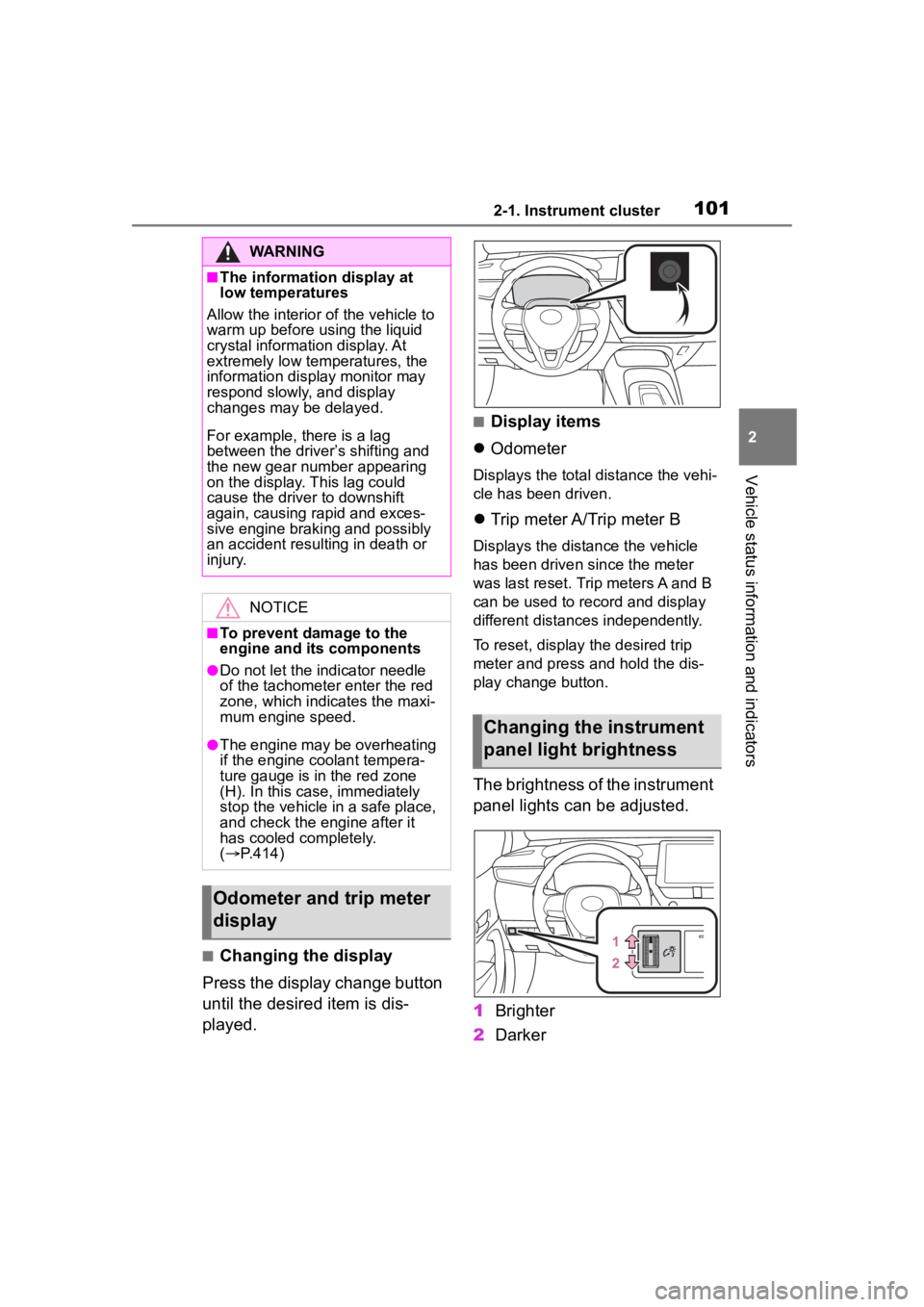
■Changing the display
Press the display change button
until the desired item is dis-
played.
■Display items
Odometer
Displays the total distance the vehi-
cle has been driven.
Trip meter A/Trip meter B
Displays the distance the vehicle
has been driven since the meter
was last reset. Trip meters A and B
can be used to record and display
different distances independently.
To reset, display the desired trip
meter and press and hold the dis-
play change button.
The brightness of the instrument
panel lights can be adjusted.
1 Brighter
2 Darker
WARNING
■The information display at
low temperatures
Allow the interior of the vehicle to
warm up before u sing the liquid
crystal informat ion display. At
extremely low temperatures, the
information display monitor may
respond slowly, and display
changes may be delayed.
For example, there is a lag
between the driver’s shifting and
the new gear number appearing
on the display. This lag could
cause the driver to downshift
again, causing rapid and exces-
sive engine braking and possibly
an accident resulting in death or
injury.
NOTICE
■To prevent damage to the
engine and its components
●Do not let the i ndicator needle
of the tachomete r enter the red
zone, which indicates the maxi-
mum engine speed.
●The engine may be overheating
if the engine coolant tempera-
ture gauge is in the red zone
(H). In this case, immediately
stop the vehicle in a safe place,
and check the engine after it
has cooled completely.
( P.414)
Odometer and trip meter
display
Changing the instrument
panel light brightness
Page 105 of 496
1052-1. Instrument cluster
2
Vehicle status information and indicators
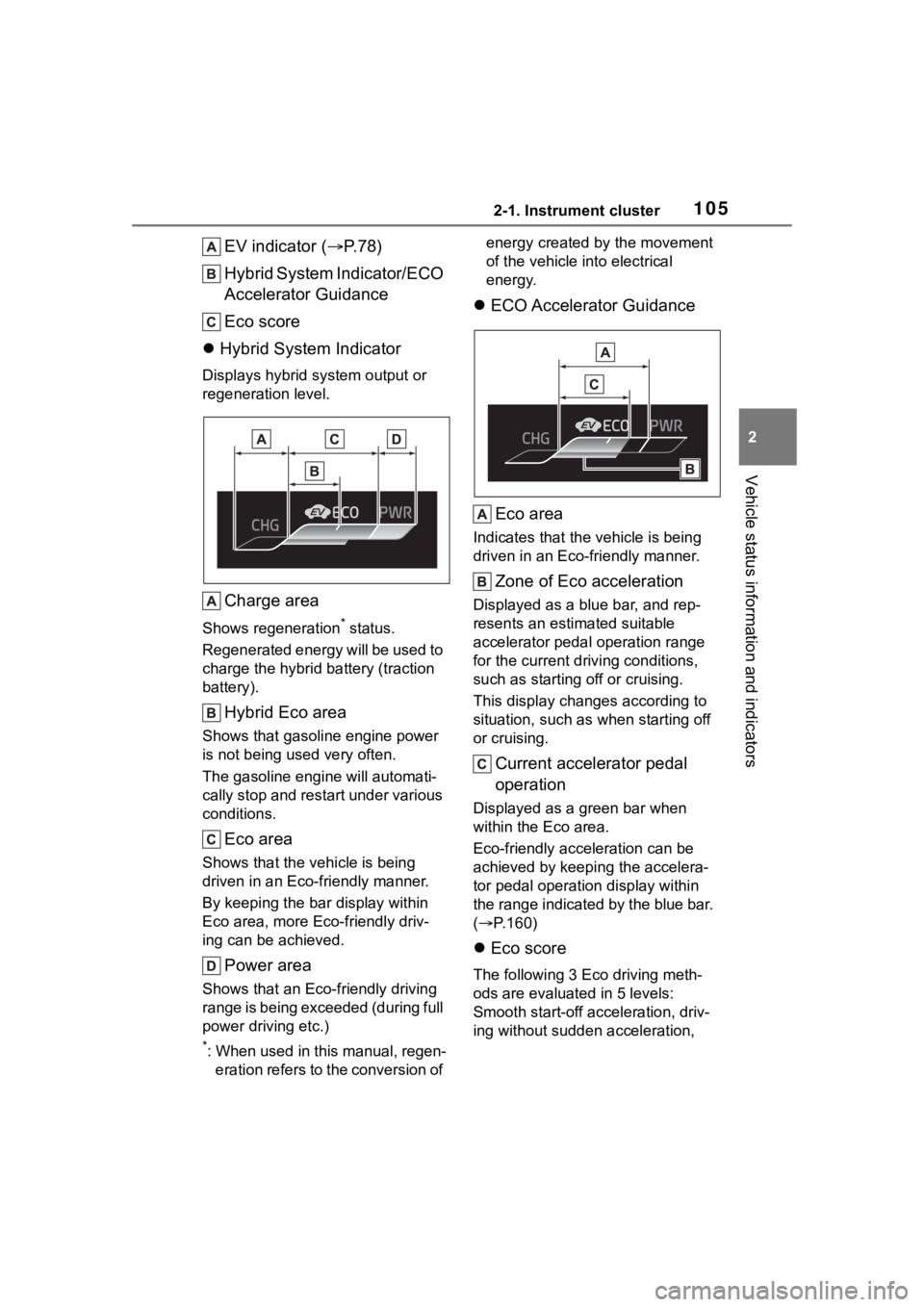
EV indicator (P.78)
Hybrid System Indicator/ECO
Accelerator Guidance
Eco score
Hybrid System Indicator
Displays hybrid system output or
regeneration level.
Charge area
Shows regeneration* status.
Regenerated energy will be used to
charge the hybrid battery (traction
battery).
Hybrid Eco area
Shows that gasoline engine power
is not being used very often.
The gasoline engine will automati-
cally stop and restart under various
conditions.
Eco area
Shows that the vehicle is being
driven in an Eco-friendly manner.
By keeping the bar display within
Eco area, more Eco-friendly driv-
ing can be achieved.
Power area
Shows that an Eco-friendly driving
range is being exceeded (during full
power driving etc.)
*: When used in this manual, regen- eration refers to the conversion of energy created by the movement
of the vehicle into electrical
energy.
ECO Accelerator Guidance
Eco area
Indicates that the vehicle is being
driven in an Eco-friendly manner.
Zone of Eco acceleration
Displayed as a blue bar, and rep-
resents an estimated suitable
accelerator pedal operation range
for the current driving conditions,
such as starting off or cruising.
This display changes according to
situation, such as when starting off
or cruising.
Current accelerator pedal
operation
Displayed as a green bar when
within the Eco area.
Eco-friendly acceleration can be
achieved by keeping the accelera-
tor pedal operation display within
the range indicated by the blue bar.
( P.160)
Eco score
The following 3 Ec o driving meth-
ods are evaluated in 5 levels:
Smooth start-off acceleration, driv-
ing without sudden acceleration,
Page 116 of 496
1162-1. Instrument cluster
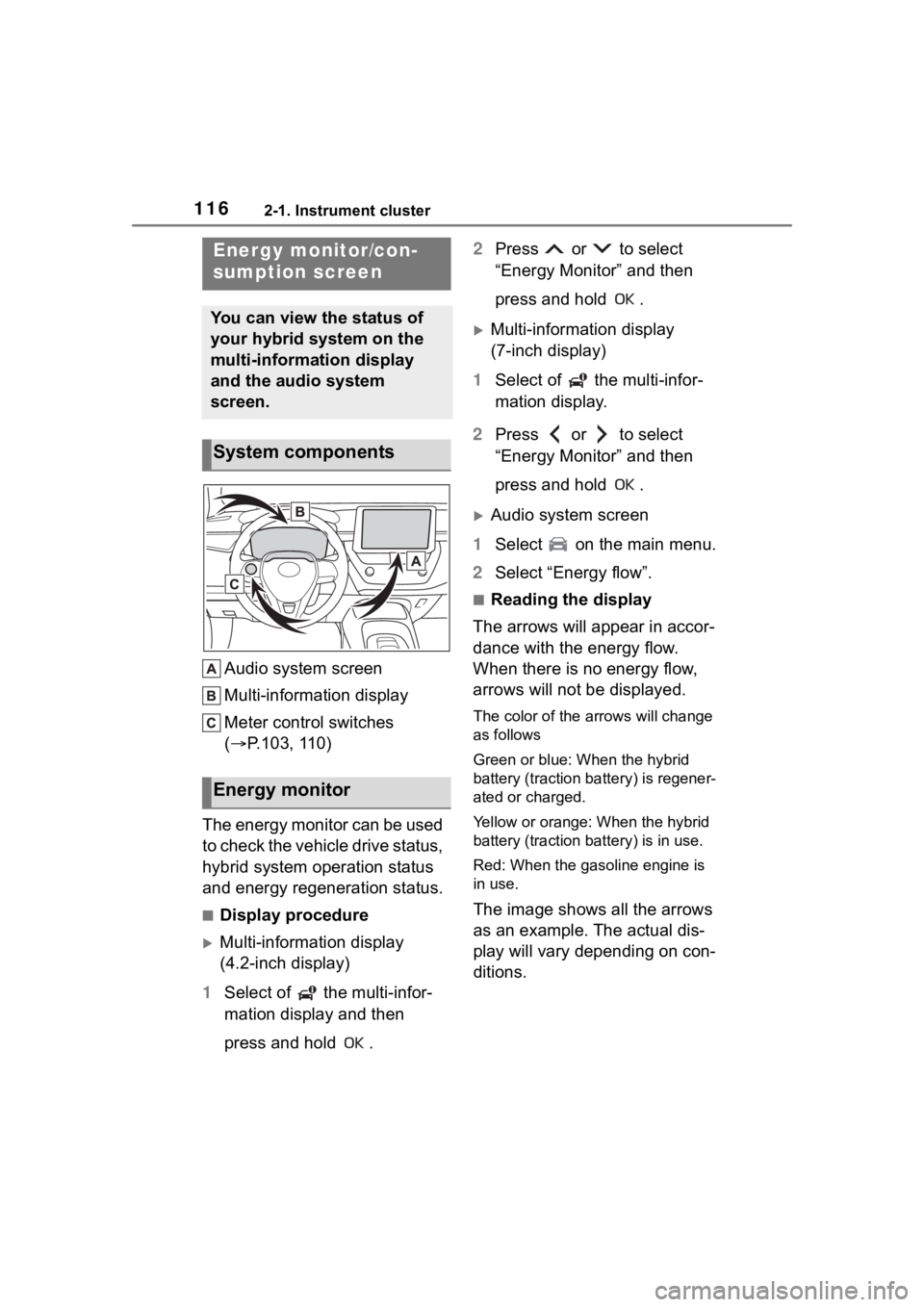
Audio system screen
Multi-information display
Meter control switches
(P.103, 110)
The energy monitor can be used
to check the vehicle drive status,
hybrid system operation status
and energy regeneration status.
■Display procedure
Multi-information display
(4.2-inch display)
1 Select of the multi-infor-
mation display and then
press and hold . 2
Press or to select
“Energy Monitor” and then
press and hold .
Multi-information display
(7-inch display)
1 Select of the multi-infor-
mation display.
2 Press or to select
“Energy Monitor” and then
press and hold .
Audio system screen
1 Select on the main menu.
2 Select “Energy flow”.
■Reading the display
The arrows will appear in accor-
dance with the energy flow.
When there is no energy flow,
arrows will not be displayed.
The color of the arrows will change
as follows
Green or blue: When the hybrid
battery (traction battery) is regener-
ated or charged.
Yellow or orange: When the hybrid
battery (traction battery) is in use.
Red: When the gasoline engine is
in use.
The image shows all the arrows
as an example. The actual dis-
play will vary depending on con-
ditions.
Energy monitor/con-
sumption screen
You can view the status of
your hybrid system on the
multi-information display
and the audio system
screen.
System components
Energy monitor
Page 117 of 496
1172-1. Instrument cluster
2
Vehicle status information and indicators
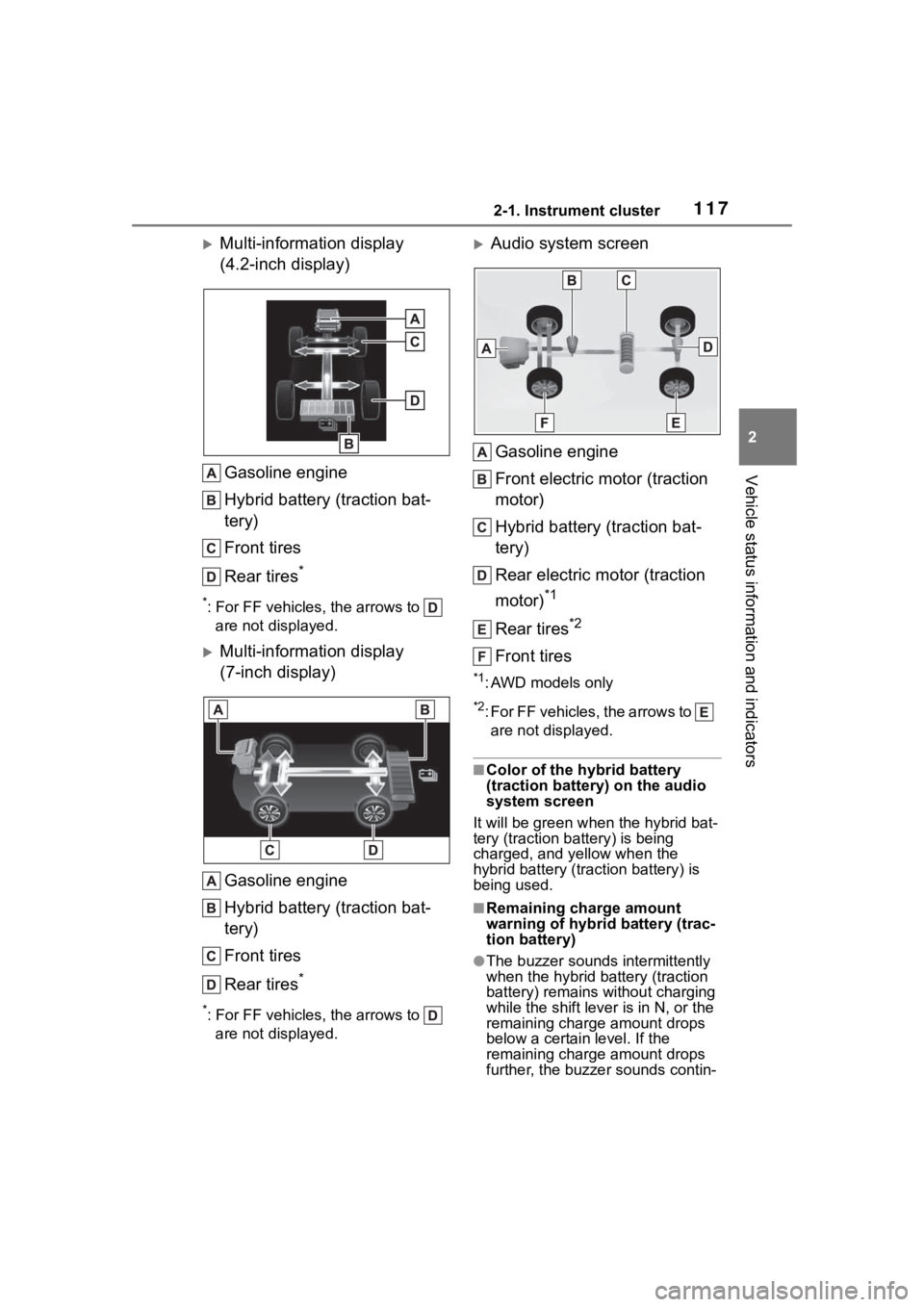
Multi-information display
(4.2-inch display)Gasoline engine
Hybrid battery (traction bat-
tery)
Front tires
Rear tires
*
*: For FF vehicles, the arrows to are not displayed.
Multi-information display
(7-inch display)
Gasoline engine
Hybrid battery (traction bat-
tery)
Front tires
Rear tires
*
*: For FF vehicles, the arrows to are not displayed.
Audio system screen
Gasoline engine
Front electric motor (traction
motor)
Hybrid battery (traction bat-
tery)
Rear electric motor (traction
motor)
*1
Rear tires*2
Front tires
*1: AWD models only
*2: For FF vehicles, the arrows to are not displayed.
■Color of the hybrid battery
(traction battery) on the audio
system screen
It will be gre en when the hybrid bat-
tery (traction battery) is being
charged, and yellow when the
hybrid battery (traction battery) is
being used.
■Remaining charge amount
warning of hybri d battery (trac-
tion battery)
●The buzzer sounds intermittently
when the hybrid battery (traction
battery) remains without charging
while the shift lever is in N, or the
remaining charge amount drops
below a certain level. If the
remaining charge amount drops
further, the buzzer sounds contin-
Page 162 of 496
1624-1. Before driving
WARNING
●After driving through a puddle,
lightly depress the brake pedal
to make sure that the brakes
are functioning properly. Wet
brake pads may prevent the
brakes from functioning prop-
erly. If the brakes on only one
side are wet and not functioning
properly, steering control may
be affected.
■When shifting the shift lever
●Do not let the vehicle roll back-
ward while a forward driving
position is selected, or roll for-
ward while the shift lever is in R.
Doing so may result in an acci-
dent or damage to the vehicle.
●Do not shift the shift lever to P
while the vehicle is moving.
Doing so can damage the trans-
mission and may result in a loss
of vehicle control.
●Do not shift the shift lever to R
while the vehicle is moving for-
ward.
Doing so can damage the trans-
mission and may result in a loss
of vehicle control.
●Do not shift the shift lever to a
driving position while the vehicle
is moving backward.
Doing so can damage the trans-
mission and may result in a loss
of vehicle control.
●Moving the shift lever to N while
the vehicle is moving will disen-
gage the hybrid system. Engine
braking is not available with the
hybrid system disengaged.
●Be careful not to shift the shift
lever with the accelerator pedal
depressed. Shifting the shift
lever to any positions other than
P or N may lead to unexpected
rapid acceleration of the vehicle
that may cause an accident and
result in death or serious injury.
■If you hear a squealing or
scraping noise (brake pad
wear indicators)
Have the brake pads checked and
replaced by your Toyota dealer as
soon as possible.
Rotor damage may result if the
pads are not replaced when
needed.
It is dangerous to drive the vehicle
when the wear limits of the brake
pads and/or those of the brake
discs are exceeded.
■When the vehicle is stopped
●Do not depress the accelerator
pedal unnecessarily.
If the shift lever is any position
other than P or N, the vehicle
may accelerate suddenly and
unexpectedly, causing an acci-
dent.
●In order to prevent accidents
due to the vehic le rolling away,
always keep depressing the
brake pedal while stopped with
the “READY” indicator is illumi-
nated, and apply the parking
brake as necessary.
●If the vehicle is stopped on an
incline, in order to prevent acci-
dents caused by the vehicle roll-
ing forward or backward, always
depress the brake pedal and
securely apply the parking
brake as needed.
Page 163 of 496
1634-1. Before driving
4
Driving
WARNING
●Avoid revving or racing the
engine.
Running the engine at high
speed while the vehicle is
stopped may cause the exhaust
system to overheat, which could
result in a fire if combustible
material is nearby.
■When the vehicle is parked
●Do not leave glasses, cigarette
lighters, spray cans, or soft
drink cans in the vehicle when it
is in the sun.
Doing so may result in the fol-
lowing:
• Gas may leak from a cigarette lighter or spray can, and may
lead to a fire.
• The temperature inside the vehicle may cause the plastic
lenses and plastic material of
glasses to deform or crack.
• Soft drink cans may fracture, causing the contents to spray
over the interior of the vehicle,
and may also caus e a short cir-
cuit in the vehicle’s electrical
components.
●Do not leave cigarette lighters in
the vehicle. If a cigarette lighter
is in a place such as the glove
box or on the floor, it may be lit
accidentally when luggage is
loaded or the seat is adjusted,
causing a fire.
●Do not attach adhesive discs to
the windshield or windows. Do
not place containers such as air
fresheners on the instrument
panel or dashboard. Adhesive
discs or containers may act as
lenses, causing a fire in the
vehicle.
●Do not leave a door or window
open if the curved glass is
coated with a metallized film
such as a silver-colored one.
Reflected sunlight may cause
the glass to act a s a lens, caus-
ing a fire.
●Always apply the parking brake,
shift the shift lever to P, stop the
hybrid system and lock the vehi-
cle.
Do not leave the vehicle unat-
tended while the “READY” indi-
cator is illuminated.
If the vehicle is parked with the
shift lever in P but the parking
brake is not set, the vehicle may
start to move, possibly leading
to an accident.
●Do not touch the exhaust pipes
while the “READY” indicator is
illuminated or immediately after
turning the hybrid system off.
Doing so may cause burns.
■When taking a nap in the vehi-
cle
Always turn the hybrid system off.
Otherwise, if you accidentally
move the shift lever or depress
the accelerator pedal, this could
cause an accident or fire due to
hybrid system overheating. Addi-
tionally, if the vehicle is parked in
a poorly ventilated area, exhaust
gases may collect and enter the
vehicle, leading to death or a seri-
ous health hazard.
■When braking
●When the brakes are wet, drive
more cautiously.
Braking distance increases
when the brakes are wet, and
this may cause one side of the
vehicle to brake d ifferently than
the other side. Also, the parking
brake may not securely hold the
vehicle.