engine TOYOTA COROLLA HYBRID 2023 Service Manual
[x] Cancel search | Manufacturer: TOYOTA, Model Year: 2023, Model line: COROLLA HYBRID, Model: TOYOTA COROLLA HYBRID 2023Pages: 496, PDF Size: 10.13 MB
Page 315 of 496
3156-3. Do-it-yourself maintenance
6
Maintenance and care
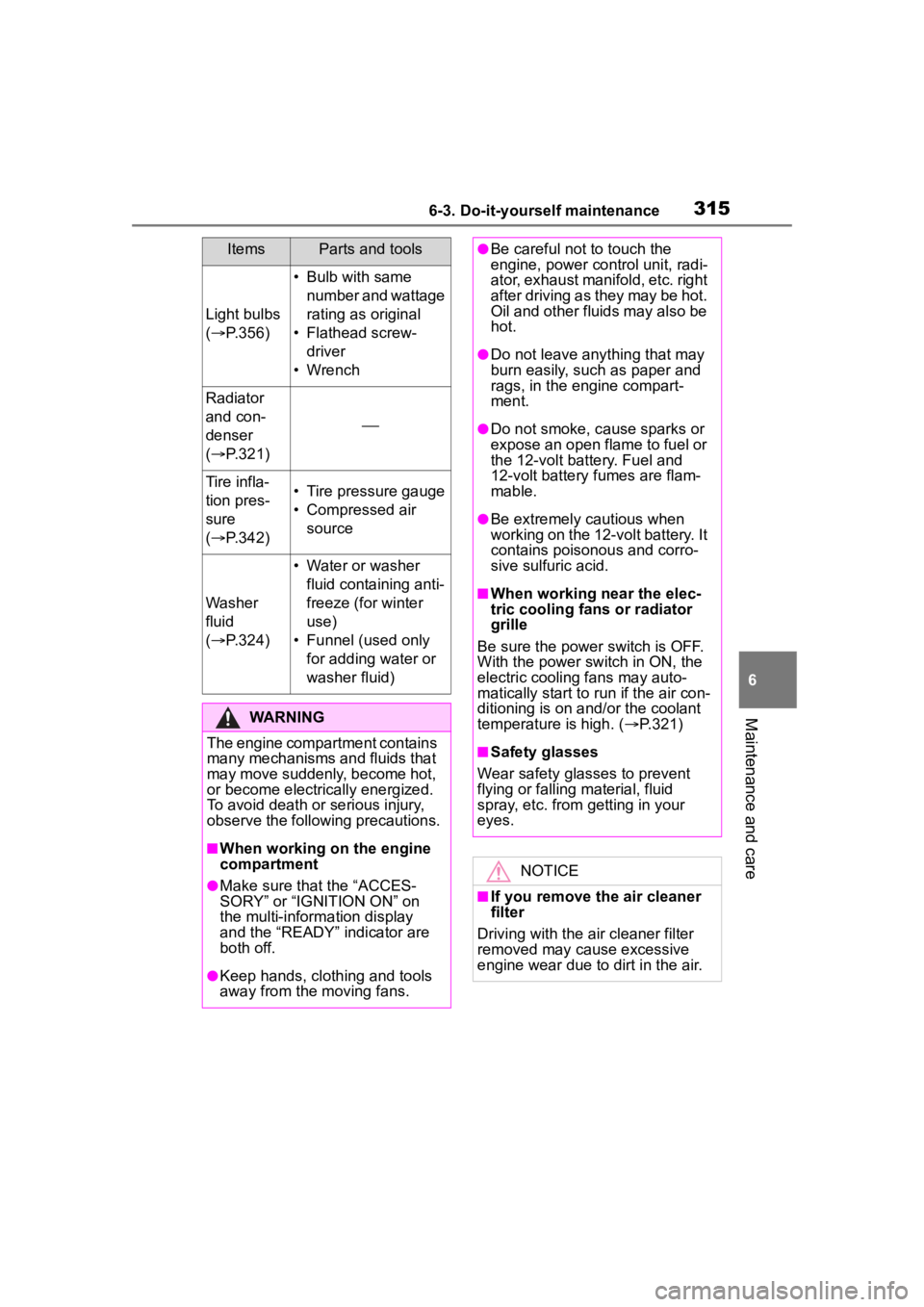
Light bulbs
( P.356)
• Bulb with same
number and wattage
rating as original
• Flathead screw- driver
• Wrench
Radiator
and con-
denser
( P.321)
Tire infla-
tion pres-
sure
( P.342)• Tire pressure gauge
• Compressed air
source
Washer
fluid
( P.324)
• Water or washer
fluid containing anti-
freeze (for winter
use)
• Funnel (used only for adding water or
washer fluid)
WARNING
The engine compartment contains
many mechanisms and fluids that
may move suddenly, become hot,
or become electrically energized.
To avoid death or serious injury,
observe the following precautions.
■When working on the engine
compartment
●Make sure that the “ACCES-
SORY” or “IGNITION ON” on
the multi-inform ation display
and the “READY” indicator are
both off.
●Keep hands, clothing and tools
away from the moving fans.
ItemsParts and tools●Be careful not to touch the
engine, power control unit, radi-
ator, exhaust manifold, etc. right
after driving as they may be hot.
Oil and other fluids may also be
hot.
●Do not leave anything that may
burn easily, such as paper and
rags, in the engine compart-
ment.
●Do not smoke, cause sparks or
expose an open flame to fuel or
the 12-volt battery. Fuel and
12-volt battery fumes are flam-
mable.
●Be extremely cautious when
working on the 12-volt battery. It
contains poisonous and corro-
sive sulfuric acid.
■When working near the elec-
tric cooling fans or radiator
grille
Be sure the power switch is OFF.
With the power switch in ON, the
electric cooling fans may auto-
matically start to r un if the air con-
ditioning is on an d/or the coolant
temperature is high. ( P.321)
■Safety glasses
Wear safety glasses to prevent
flying or falling material, fluid
spray, etc. from getting in your
eyes.
NOTICE
■If you remove the air cleaner
filter
Driving with the air cleaner filter
removed may cause excessive
engine wear due to dirt in the air.
Page 318 of 496
3186-3. Do-it-yourself maintenance
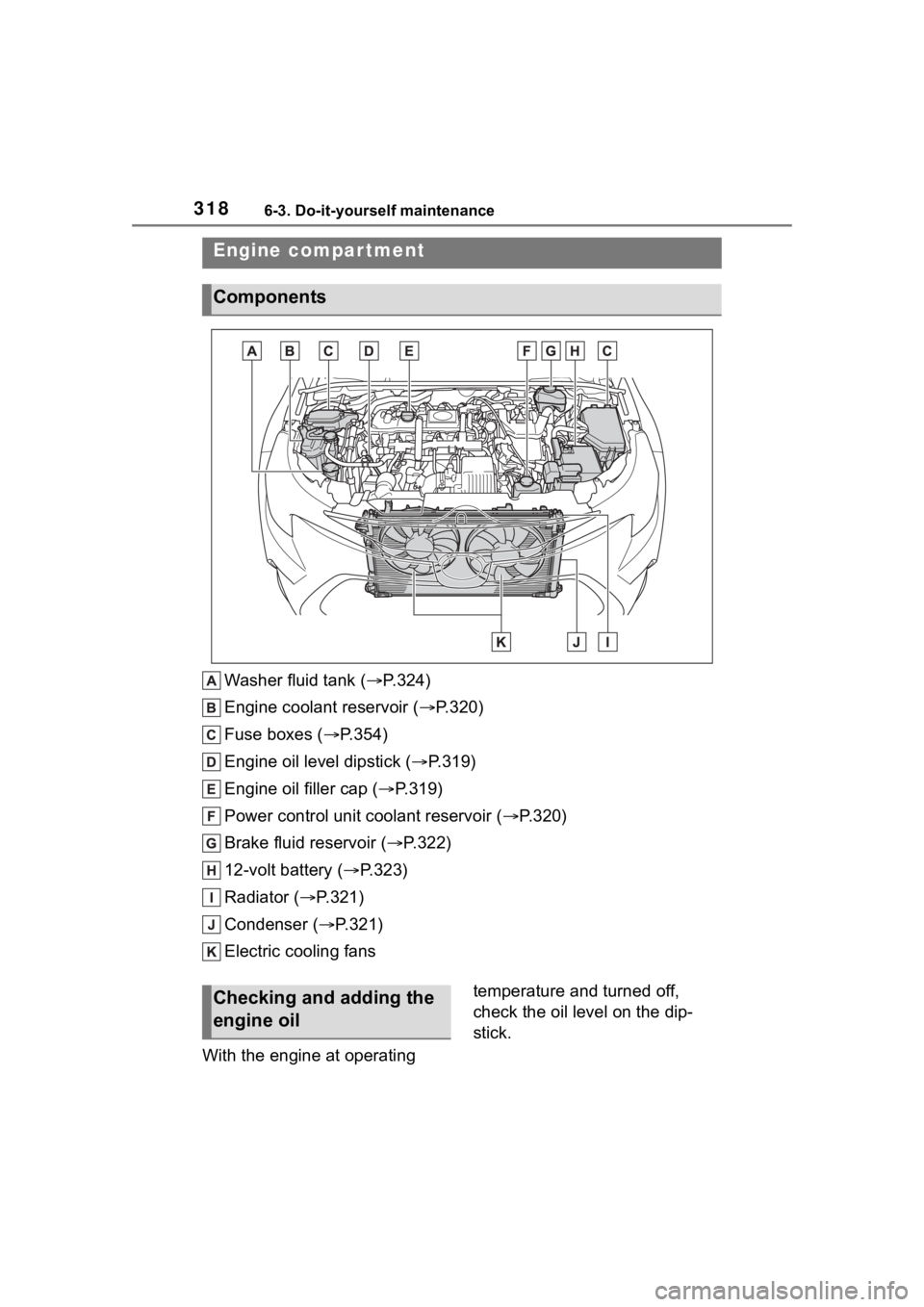
Washer fluid tank ( P.324)
Engine coolant reservoir ( P.320)
Fuse boxes ( P.354)
Engine oil level dipstick ( P.319)
Engine oil filler cap ( P.319)
Power control unit coolant reservoir ( P.320)
Brake fluid reservoir ( P.322)
12-volt battery ( P.323)
Radiator ( P.321)
Condenser ( P.321)
Electric cooling fans
With the engine at operating temperature and turned off,
check the oil level on the dip-
stick.
Engine compar tment
Components
Checking and adding the
engine oil
Page 319 of 496
3196-3. Do-it-yourself maintenance
6
Maintenance and care
■Checking the engine oil
1 Park the vehicle on level
ground. After warming up the
engine and turning off the
hybrid system, wait more
than 5 minutes for the oil to
drain back into the bottom of
the engine.
2 Holding a rag under the end,
pull the dipstick out.
3 Wipe the dipstick clean.
4 Reinsert the dipstick fully.
5 Holding a rag under the end,
pull the dipstick out and
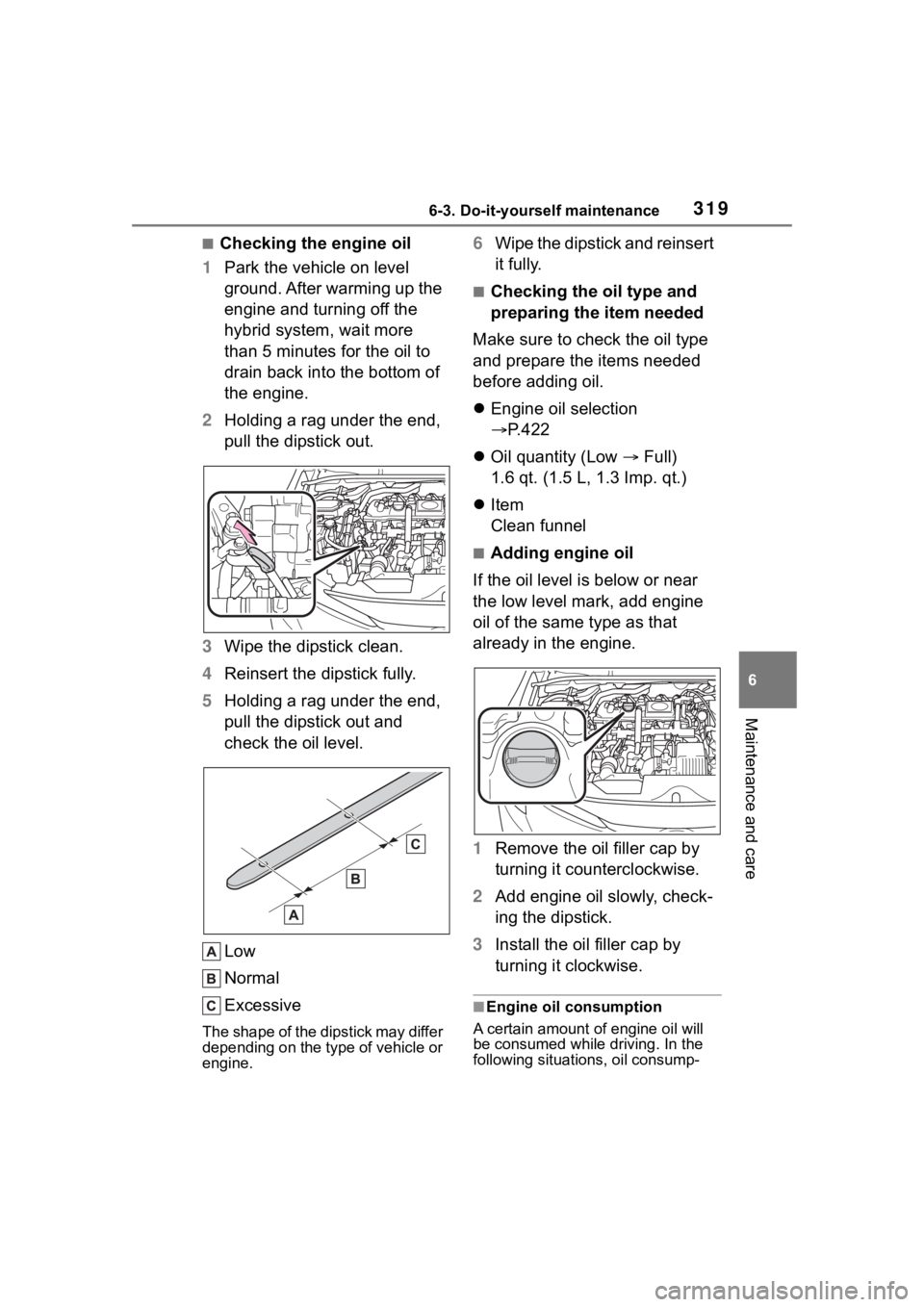
check the oil level.
Low
Normal
Excessive
The shape of the dipstick may differ
depending on the type of vehicle or
engine.
6Wipe the dipstick and reinsert
it fully.
■Checking the oil type and
preparing the item needed
Make sure to check the oil type
and prepare the items needed
before adding oil.
Engine oil selection
P.422
Oil quantity (Low Full)
1.6 qt. (1.5 L, 1.3 Imp. qt.)
Item
Clean funnel
■Adding engine oil
If the oil level is below or near
the low level mark, add engine
oil of the same type as that
already in the engine.
1 Remove the oil filler cap by
turning it counterclockwise.
2 Add engine oil slowly, check-
ing the dipstick.
3 Install the oil filler cap by
turning it clockwise.
■Engine oil consumption
A certain amount of engine oil will
be consumed while driving. In the
following situatio ns, oil consump-
Page 320 of 496
3206-3. Do-it-yourself maintenance
tion may increase, and engine oil
may need to be ref illed in between
oil maintenance intervals.
●When the engine is new, for
example directly after purchasing
the vehicle or after replacing the
engine
●If low quality oil or oil of an inap-
propriate viscosity is used
●When driving at high engine
speeds or with a heavy load, or
when driving while accelerating or
decelerating frequently
●When leaving the engine idling for
a long time, or wh en driving fre-
quently through heavy traffic
■Engine coolant reservoir
The coolant level is satisfactory
if it is between the “MAX” and
“MIN” lines on the reservoir
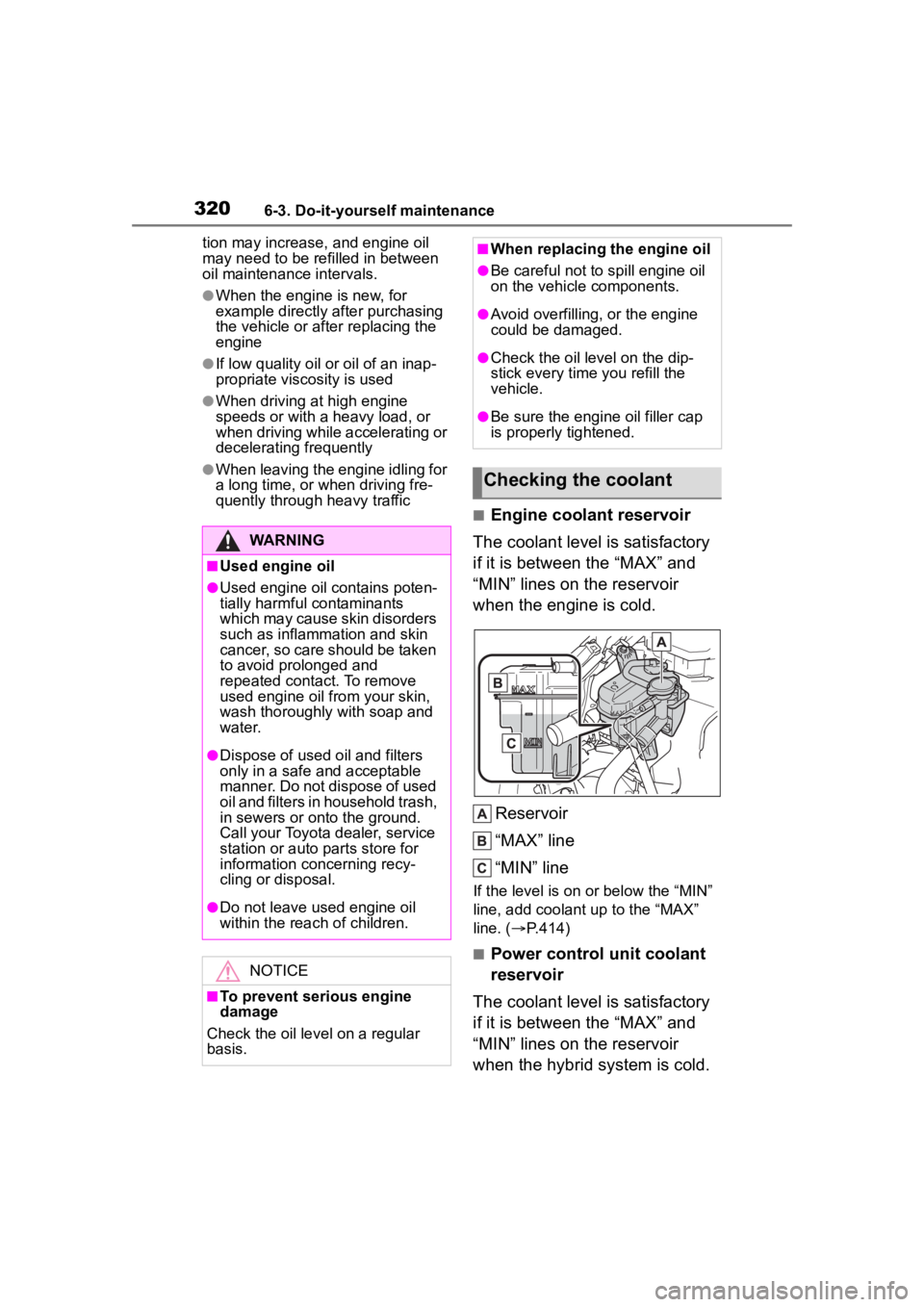
when the engine is cold.
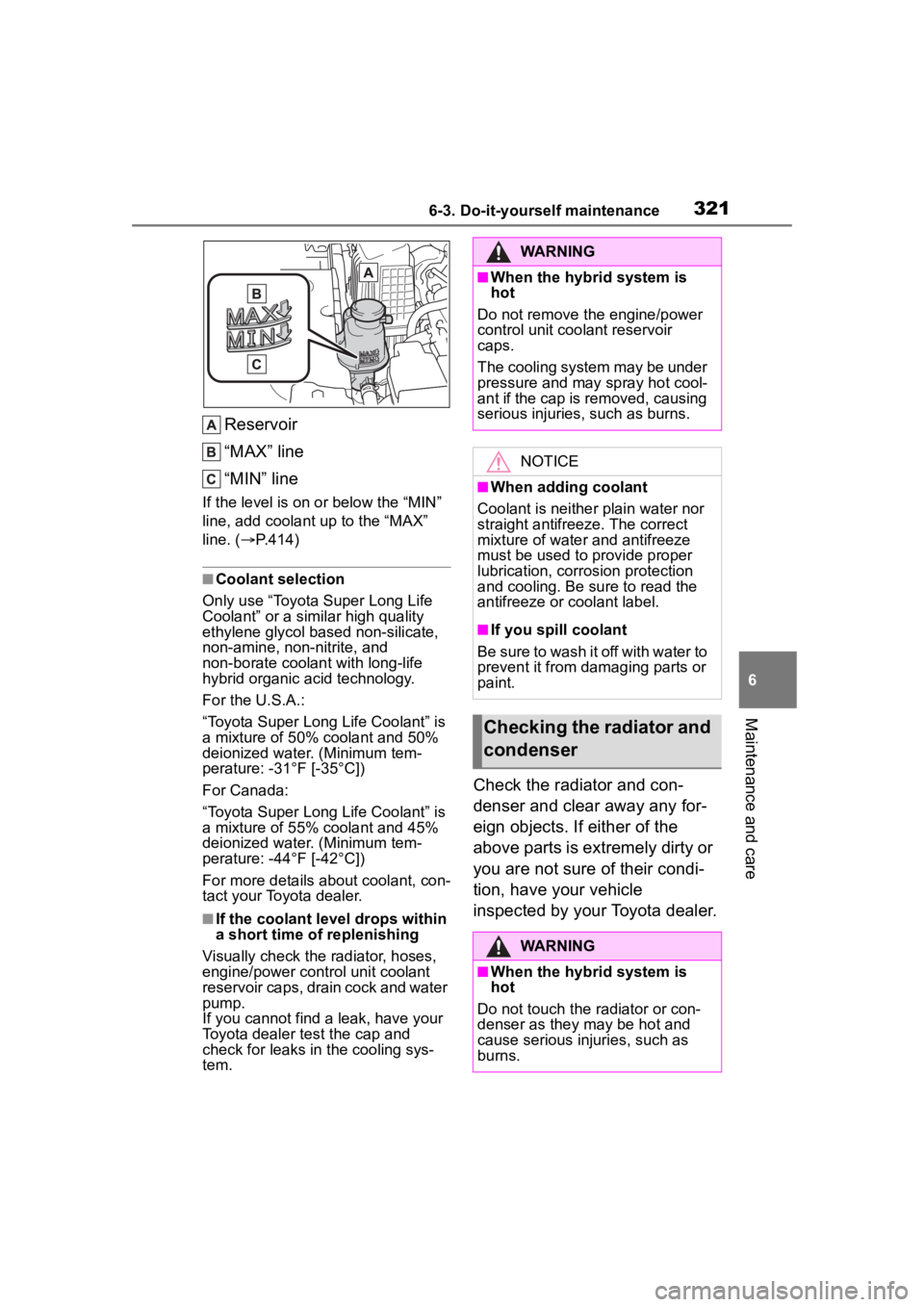
Reservoir
“MAX” line
“MIN” line
If the level is on or below the “MIN”
line, add coolant up to the “MAX”
line. ( P.414)
■Power control unit coolant
reservoir
The coolant level is satisfactory
if it is between the “MAX” and
“MIN” lines on the reservoir
when the hybrid system is cold.
WARNING
■Used engine oil
●Used engine oil contains poten-
tially harmful contaminants
which may cause skin disorders
such as inflammation and skin
cancer, so care should be taken
to avoid prolonged and
repeated contact. To remove
used engine oil from your skin,
wash thoroughly with soap and
water.
●Dispose of used oil and filters
only in a safe an d acceptable
manner. Do not dispose of used
oil and filters in household trash,
in sewers or onto the ground.
Call your Toyota dealer, service
station or auto parts store for
information concerning recy-
cling or disposal.
●Do not leave used engine oil
within the rea ch of children.
NOTICE
■To prevent serious engine
damage
Check the oil level on a regular
basis.
■When replacing the engine oil
●Be careful not to spill engine oil
on the vehicle components.
●Avoid overfilling, or the engine
could be damaged.
●Check the oil level on the dip-
stick every time you refill the
vehicle.
●Be sure the engine oil filler cap
is properly tightened.
Checking the coolant
Page 321 of 496
3216-3. Do-it-yourself maintenance
6
Maintenance and care
Reservoir
“MAX” line
“MIN” line
If the level is on or below the “MIN”
line, add coolant up to the “MAX”
line. (P.414)
■Coolant selection
Only use “Toyota Super Long Life
Coolant” or a similar high quality
ethylene glycol based non-silicate,
non-amine, non-nitrite, and
non-borate coolant with long-life
hybrid organic acid technology.
For the U.S.A.:
“Toyota Super Long Life Coolant” is
a mixture of 50% coolant and 50%
deionized water. (Minimum tem-
perature: -31°F [-35°C])
For Canada:
“Toyota Super Long Life Coolant” is
a mixture of 55% coolant and 45%
deionized water. (Minimum tem-
perature: -44°F [-42°C])
For more details about coolant, con-
tact your Toyota dealer.
■If the coolant level drops within
a short time of replenishing
Visually check the radiator, hoses,
engine/power control unit coolant
reservoir caps, drain cock and water
pump.
If you cannot find a leak, have your
Toyota dealer test the cap and
check for leaks in the cooling sys-
tem.
Check the radiator and con-
denser and clear away any for-
eign objects. If either of the
above parts is extremely dirty or
you are not sure of their condi-
tion, have your vehicle
inspected by your Toyota dealer.
WARNING
■When the hybrid system is
hot
Do not remove the engine/power
control unit coolant reservoir
caps.
The cooling system may be under
pressure and may spray hot cool-
ant if the cap is removed, causing
serious injuries, such as burns.
NOTICE
■When adding coolant
Coolant is neither plain water nor
straight antifreeze. The correct
mixture of water and antifreeze
must be used to provide proper
lubrication, corrosion protection
and cooling. Be sure to read the
antifreeze or coolant label.
■If you spill coolant
Be sure to wash it off with water to
prevent it from damaging parts or
paint.
Checking the radiator and
condenser
WARNING
■When the hybrid system is
hot
Do not touch the radiator or con-
denser as they may be hot and
cause serious injuries, such as
burns.
Page 325 of 496
3256-3. Do-it-yourself maintenance
6
Maintenance and care
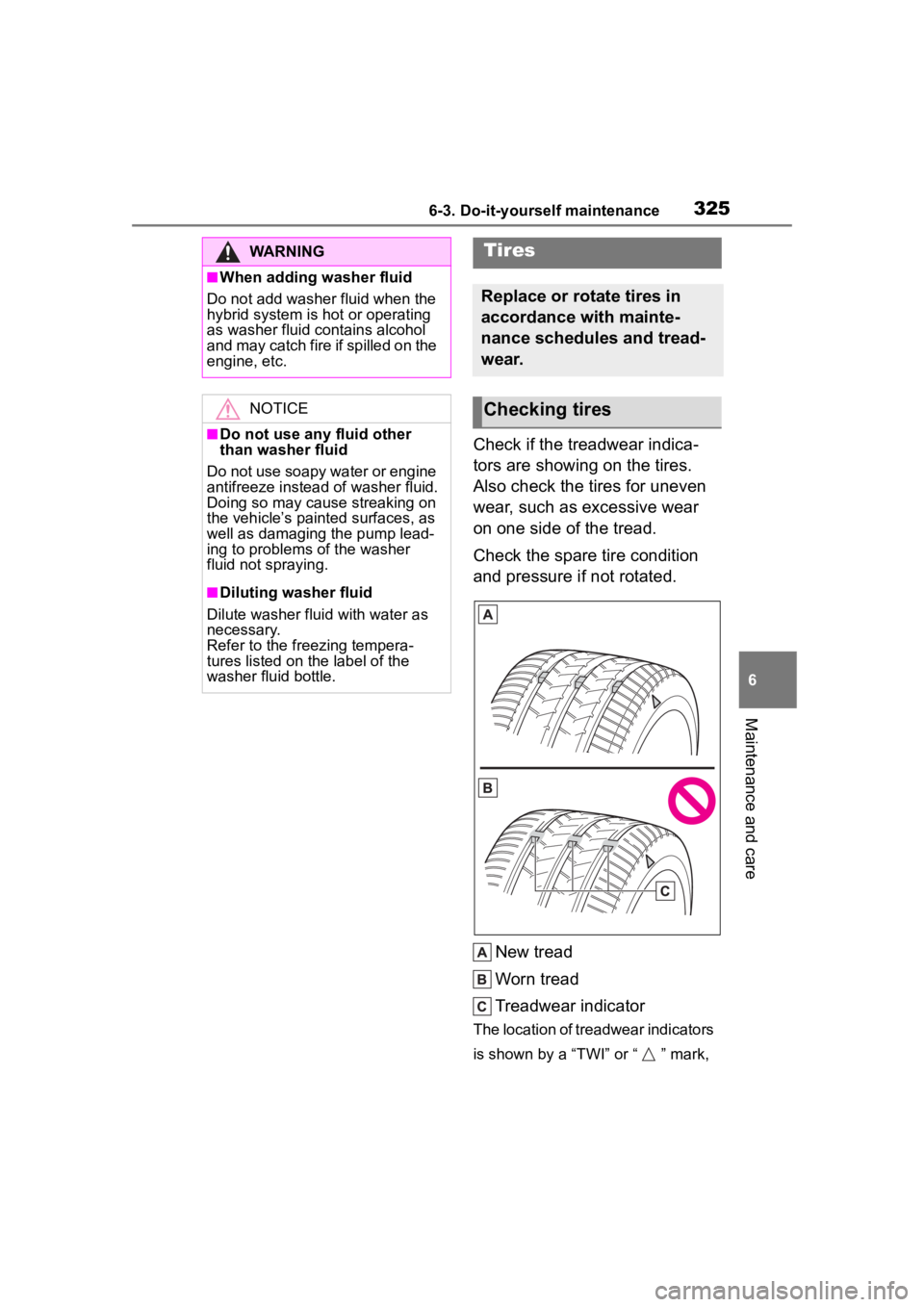
Check if the treadwear indica-
tors are showing on the tires.
Also check the tires for uneven
wear, such as excessive wear
on one side of the tread.
Check the spare tire condition
and pressure if not rotated.New tread
Worn tread
Treadwear indicator
The location of treadwear indicators
is shown by a “TWI” or “ ” mark,
WARNING
■When adding washer fluid
Do not add washer fluid when the
hybrid system is hot or operating
as washer fluid contains alcohol
and may catch fire if spilled on the
engine, etc.
NOTICE
■Do not use any fluid other
than washer fluid
Do not use soapy water or engine
antifreeze instead of washer fluid.
Doing so may cause streaking on
the vehicle’s painted surfaces, as
well as damaging the pump lead-
ing to problems of the washer
fluid not spraying.
■Diluting washer fluid
Dilute washer fluid with water as
necessary.
Refer to the freezing tempera-
tures listed on the label of the
washer fluid bottle.
Tires
Replace or rotate tires in
accordance with mainte-
nance schedules and tread-
wear.
Checking tires
Page 331 of 496
3316-3. Do-it-yourself maintenance
6
Maintenance and care
It is necessary to register the
position of each wheel after per-
forming a tire rotation.
Wheel position registration can
be performed by oneself. Wheel
position registration is per-
formed by driving forward with
moderate left and right turns.
However, depending on the driv-
ing conditions and driving envi-
ronment, registration may take
some time to complete.
4.2-inch display
1 Park the vehicle in a safe
place and turn the engine
switch off, wait for approxi-
mately 20 minutes or more,
and then start the hybrid sys-
tem.
The wheel position registration pro-
cedure cannot be performed while
the vehicle is moving.
2Select of the multi-infor-
mation display and then
press .
3 Press or to select
“Vehicle Settings” and then
press and hold .
4 Press or to select
“TPWS setting” and then
press .
5 Press or to select
“Tire Rotation” and then
press .
6 Select “OK” and then press
.
A message indicating that wheel
position registration is being per-
formed will be disp layed on the
multi-information display. “---” will
be displayed for the tire inflation
pressure of each tire and wheel
position registr ation will begin.
7Drive straight (with occa-
sional left and right turns) at
approximately 25 mph (40
km/h) or more for approxi-
mately 10 to 30 minutes.
When wheel position registration is
complete, a mess age indicating
that registration has been com-
pleted and the inflation pressure of
each tire will be displayed on the
multi-information display.
Even if it is not possible to drive
continuously at approximately 25
mph (40 km/h) or more, registration
can be completed by driving for a
long time. However, if registration
does not complete after driving for
1 hour or more, par k the vehicle in
NOTICE
■To avoid damage to the tire
pressure warning valves and
transmitters
When a tire is repaired with liquid
sealants, the tire pressure warn-
ing valve and transmitter may not
operate properly. If a liquid seal-
ant is used, contact your Toyota
dealer or other qualified service
shop as soon as possible. Make
sure to replace the tire pressure
warning valve and transmitter
when replaci ng the tire. (P.330)
Registration of the posi-
tion of each wheel after
performing a tire rotation
Page 332 of 496

3326-3. Do-it-yourself maintenance
a safe place and leave it with the
engine switch in ON for approxi-
mately 15 minute s or more, and
then perform the dr iving procedure
again.
7-inch display
1 Park the vehicle in a safe
place and turn the engine
switch off, wait for approxi-
mately 20 minutes or more,
and then start the hybrid sys-
tem.
The wheel position registration pro-
cedure cannot be performed while
the vehicle is moving.
2 Select of the multi-infor-
mation display and then
press .
3 Press or to select
“Vehicle Settings” and then
press and hold .
4 Press or to select
“TPWS setting” and then
press .
5 Press or to select
“Tire Rotation” and then
press .
6 Select “OK” and then press
.
A message indicating that wheel
position registrati on is being per-
formed will be displayed on the
multi-information display. “---” will
be displayed for th e tire inflation
pressure of each tire and wheel
position registration will begin.
7 Drive straight (with occa-
sional left and right turns) at
approximately 25 mph (40
km/h) or more for approxi-
mately 10 to 30 minutes.
When wheel position registration is
complete, a mess age indicating
that registration has been com-
pleted and the inflation pressure of
each tire will be displayed on the
multi-information display.
Even if it is not possible to drive
continuously at approximately 25
mph (40 km/h) or more, registration
can be completed by driving for a
long time. However, if registration
does not complete after driving for
1 hour or more, par k the vehicle in
a safe place and leave it with the
engine switch in ON for approxi-
mately 15 minutes or more, and
then perform the driving procedure
again.
■When performing wheel posi-
tion registration
●Normally, wheel position registra-
tion can be completed within
approximately 30 minutes.
●Wheel position registration is per-
formed while driving at a vehicle
speed of approxi mately 25 mph
(40 km/h) or more.
■Wheel position re gistration pro-
cedure
●If the power switch is turned off
while registering the wheel posi-
tion, the next time the power
switch is turned to ON, the wheel
position registrat ion will resume
and it will not be necessary to
restart the procedure.
●While the position of each wheel is
being determined and the inflation
pressures are not being dis-
played, if the inflation pressure of
a tire drops, th e tire pressure
warning light will come on.
Page 337 of 496
3376-3. Do-it-yourself maintenance
6
Maintenance and care
yourself, but depending on
the driving conditions and
driving environment, registra-
tion may take some time to
complete.
When using a wheel set
which all of the ID codes have
already been registered, the
wheel set can be changed in
a short amount of time.
Before performing ID code reg-
istration, make sure that no
wheels with tire pressure warn-
ing valve and transmitters
installed are near the vehicle.
4.2-inch display
1 Park the vehicle in a safe
place and turn the engine
switch off, wait for approxi-
mately 20 minutes or more,
and then start the hybrid sys-
tem.
The ID code registration procedure
cannot be performed while the
vehicle is moving.
2Select of the multi-infor-
mation display and then
press .
3 Press or to select
“Vehicle Settings” and then
press and hold .
4 Press or to select
“TPWS setting” and then
press . 5
Press or to select
“Tire Set Switching” and then
press .
6 Press or to select
“Register New Valve / ID” and
then press .
7 Press or to select
“Tire Set 1” or “Tire Set 2”.
Then press .
ID codes will be regi stered to the
displayed wheel set.
If ID codes have already been reg-
istered for that wheel set, the tire
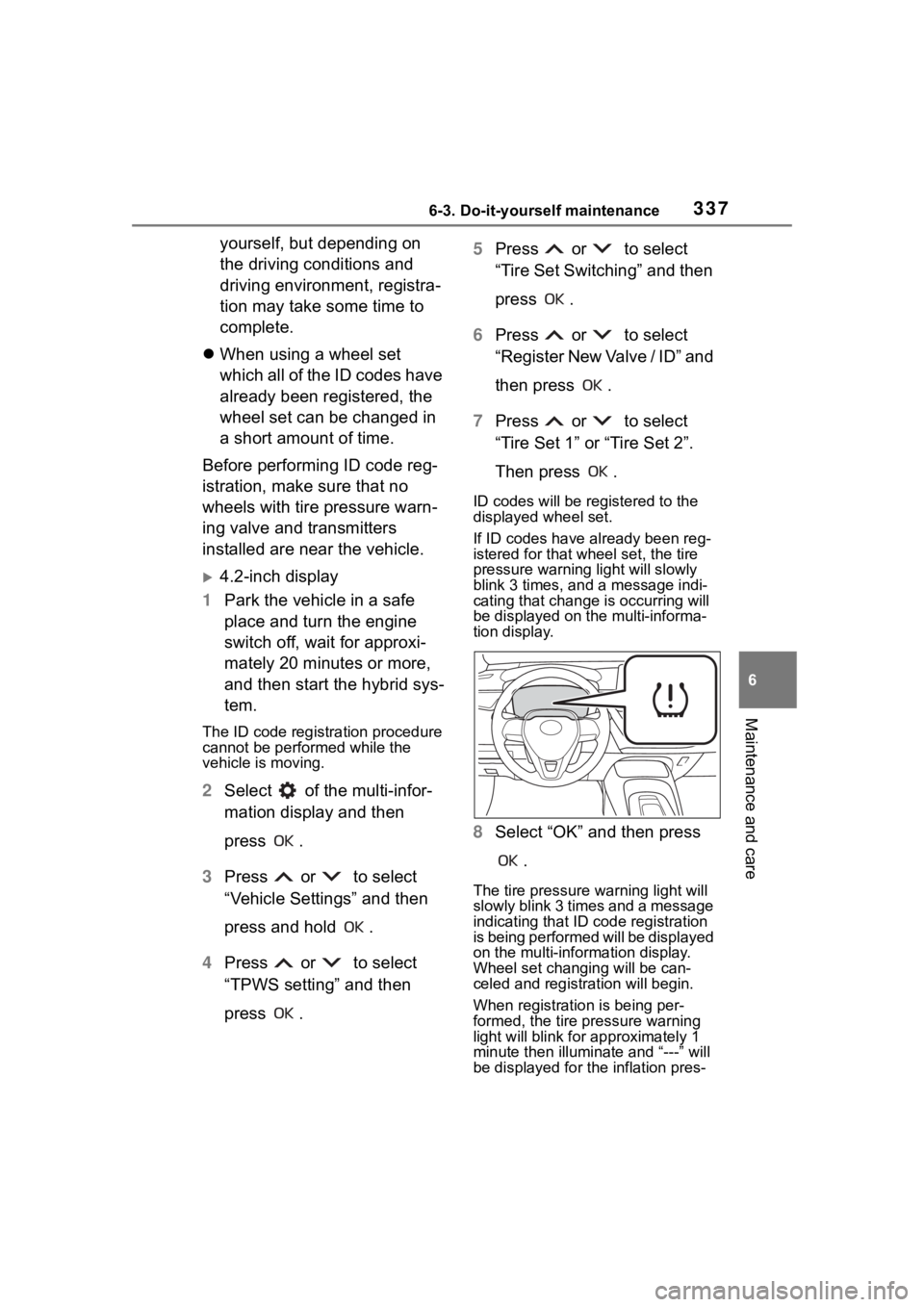
pressure warning light will slowly
blink 3 times, and a message indi-
cating that change is occurring will
be displayed on the multi-informa-
tion display.
8 Select “OK” and then press
.
The tire pressure warning light will
slowly blink 3 times and a message
indicating that ID code registration
is being performed will be displayed
on the multi-information display.
Wheel set changing will be can-
celed and registration will begin.
When registration is being per-
formed, the tire pressure warning
light will blink for approximately 1
minute then illumina te and “---” will
be displayed for the inflation pres-
Page 338 of 496

3386-3. Do-it-yourself maintenance
sure of each tire on the multi-infor-
mation display.
9Drive straight (with occa-
sional left and right turns) at
approximately 25 mph (40
km/h) or more for approxi-
mately 10 to 30 minutes.
When registration is complete, the
tire pressure warni ng light will turn
off and a message indicating that
registration has been completed
will be displayed on the multi-infor-
mation display.
Registration may take longer than
normal to complete if the vehicle
speed cannot be maintained at
approximately 25 mph (40 km/h) or
more. If registration cannot be com-
pleted after driving for 1 hour or
more, perform the registration pro-
cedure again from the beginning.
10 If the tire inflation pressure of
the wheel set installed differs
from that of the previous set,
it will be necessary to per-
form the tire inflation pres-
sure setting procedure of the
tire pressure warning system.
If the specified tire inflation pres-
sure is the same, i t will not be nec-
essary to perform the tire inflation
pressure setting procedure.
7-inch display
1 Park the vehicle in a safe
place and turn the engine
switch off, wait for approxi-
mately 20 minutes or more,
and then start the hybrid sys-
tem.
The ID code registration procedure
cannot be performed while the
vehicle is moving.
2Select of the multi-infor-
mation display and then
press .
3 Press or to select
“Vehicle Settings” and then
press and hold .
4 Press or to select
“TPWS setting” and then
press .
5 Press or to select
“Tire Set Switching” and then
press .
6 Press or to select
“Register New Valve / ID” and
then press .
7 Press or to select
“Tire Set 1” or “Tire Set 2”.
Then press .
ID codes will be regi stered to the
displayed wheel set.
If ID codes have already been reg-
istered for that wheel set, the tire
pressure warning light will slowly
blink 3 times, and a message indi-
cating that change is occurring will
be displayed on the multi-informa-
tion display.