door lock TOYOTA COROLLA HYBRID 2023 Owner's Manual
[x] Cancel search | Manufacturer: TOYOTA, Model Year: 2023, Model line: COROLLA HYBRID, Model: TOYOTA COROLLA HYBRID 2023Pages: 496, PDF Size: 10.13 MB
Page 138 of 496

1383-2. Opening, closing and locking the doors
●Near a TV tower, electric power
plant, gas station, radio station,
large display, airpo rt or other facil-
ity that generates strong radio
waves or electrical noise
●When carrying a portable radio,
cellular phone, cordless phone or
other wireless communication
device
●When the electronic key is in con-
tact with, or is covered by the fol-
lowing metallic objects
• Cards to which al uminum foil is
attached
• Cigarette boxes that have alumi- num foil inside
• Metallic wallets or bags
• Coins
• Hand warmers made of metal
• Media such as CDs and DVDs
●When other wireless keys (that
emit radio waves) are being used
nearby
●When carrying the electronic key
together with the following devices
that emit radio waves
• Another vehicle’s electronic key or a wireless key that emits radio
waves
• Personal computers or personal digital assistants (PDAs)
• Digital audio players
• Portable game systems
●If window tint with a metallic con-
tent or metallic objects are
attached to the rear window
●When the electronic key is placed
near a battery charger or elec-
tronic devices
●When the vehicle is parked in a
pay parking spot where radio
waves are emitted
If the doors cannot be
locked/unlocked using the smart key
system, lock/unlock the doors by
performing any of the following:
●Bring the electronic key close to
either front door handle and oper-
ate the entry function.
●Operate the wireless remote con- trol.
If the doors cannot be
locked/unlocked using the above
methods, use the mechanical key.
( P.408)
If the hybrid system cannot be
started using the smart key system,
refer to P.409.
■Note for the entry function
●Even when the electronic key is
within the effective range (detec-
tion areas), the system may not
operate properly in the following
cases:
• The electronic key is too close to the window or outside door han-
dle, near the ground, or in a high
place when the doors are locked
or unlocked.
• The electronic key is near the ground or in a high place, or too
close to the center of the rear
bumper when the trunk is opened.
• The electronic key is on the instru- ment panel, rear package tray or
floor, or in the door pockets or
glove box when the hybrid system
is started or power switch modes
are changed.
●Do not leave the electronic key on
top of the instrument panel or near
the door pockets when exiting the
vehicle. Depending on the radio
wave reception conditions, it may
be detected by the antenna out-
side the cabin and the door will
become lockable from the outside,
possibly trapping the electronic
key inside the vehicle.
●As long as the electronic key is
within the effective range, the
doors may be locked or unlocked
by anyone. However, only the
doors detecting the electronic key
can be used to unlock the vehicle.
●Even if the electro nic key is not
inside the vehicle, it may be possi-
ble to start the hybrid system if the
electronic key is near the window.
●The doors may unlock or lock if a
large amount of water splashes on
Page 139 of 496

1393-2. Opening, closing and locking the doors
3
Before driving
the door handle, such as in the
rain or in a car wash when the
electronic key is within the effec-
tive range. (The doors will auto-
matically be locked after
approximately 60 seconds if the
doors are not opened and closed.)
●If the wireless remote control is
used to lock the doors when the
electronic key is near the vehicle,
there is a possib ility that the door
may not be unlocke d by the entry
function. (Use the wireless remote
control to unloc k the doors.)
●If the doors have been locked
from outside of the vehicle and are
then not unlocked using the wire-
less remote contr ol or smart key
system, the hybri d system cannot
be started using the smart key
system. (However, if the doors
have been locked from inside the
vehicle, the hybrid system can be
started using the smart key sys-
tem.)
If it is necessary to start the hybrid
system, it can be started using the
procedure in “If the electronic key
dose not operate properly”
( P.409).
●Touching the door lock or unlock
sensor while wearing gloves may
prevent lock or unlock operation.
●When the lock op eration is per-
formed using the lock sensor, rec-
ognition signals will be shown up
to two consecutive times. After
this, no recogniti on signals will be
given.
●If the door handle becomes wet
while the electronic key is within
the effective ran ge, the door may
lock and unlock repeatedly. In that
case, follow the fo llowing correc-
tion procedures to wash the vehi-
cle:
• Place the electronic key in a loca-
tion 6 ft. (2 m) or more away from
the vehicle. (Take care to ensure
that the key is not stolen.)
• Set the electronic key to bat- tery-saving mode to disable the smart key system. (
P.137)
●If the electronic key is inside the
vehicle and a door handle
becomes wet during a car wash, a
message may be shown on the
multi-information display and a
buzzer will sound outside the vehi-
cle. To turn off the alarm, lock all
the doors.
●The lock sensor may not work
properly if it comes into contact
with ice, snow, m ud, etc. Clean
the lock sensor and attempt to
operate it again.
●A sudden handle operation or a
handle operation immediately
after entering the effective range
may prevent the doors from being
unlocked. Touch the door unlock
sensor and check that the doors
are unlocked befo re pulling the
door handle again.
●If there is another electronic key in
the detection area, it may take
slightly longer to unlock the doors
after the door handle is gripped.
■When the vehicle is not driven
for extended periods
●To prevent theft of the vehicle, do
not leave the electronic key within
6 ft. (2 m) of the vehicle.
●The smart key system can be
deactivated in advance. ( P.442)
●Setting the electronic key to bat-
tery-saving mode helps to reduce
key battery depletion. ( P.137)
■To operate the system properly
●Make sure to carry the electronic
key when operating the system.
Do not get the electronic key too
close to the vehicle when operat-
ing the system from the outside of
the vehicle.
Depending on the position and hold-
ing condition of the electronic key,
the key may not be detected cor-
rectly and the system may not oper-
Page 140 of 496
1403-2. Opening, closing and locking the doors
ate properly. (The alarm may go off
accidentally, or the door lock pre-
vention function may not operate.)
●Do not leave the electronic key
inside the trunk.
The key confinement prevention
function may not operate, depend-
ing on the location of the key (the
inside edge of the trunk), condi-
tions (inside a met al bag, close to
metallic objects) and the radio
waves in the surrounding area.
( P.135)
■If the smart key system does
not operate properly
●Locking and unlocking the doors:
P. 4 0 8
●Starting the hybrid system:
P. 4 0 9
■Customization
Some functions can be customized.
( P.442)
■If the smart key system has
been deactivated in a custom-
ized setting
●Locking and unlocking the doors:
Use the wireless remote control or
mechanical key. ( P.127, 408)
●Starting the hybrid system and
changing power switch modes:
P. 4 0 9
●Stopping the hybrid system:
P. 1 7 4
WARNING
■Caution regarding interfer-
ence with electronic devices
●People with implantable car-
diac pacemakers, cardiac
resynchronization ther-
apy-pacemakers or implantable
cardioverter defibrillators should
keep away from the smart key
system antennas. ( P.136)
The radio waves may affect the
operation of such devices. If
necessary, the entry function
can be disabled. Ask your Toy-
ota dealer for details, such as
the frequency of radio waves
and timing of the emitted radio
waves. Then, consult your doc-
tor to see if you should disable
the entry function.
●Users of any electrical medical
device other than implantable
cardiac pacemakers, cardiac
resynchronization ther-
apy-pacemakers or implantable
cardioverter defibrillators should
consult the manufacturer of the
device for information about its
operation under the influence of
radio waves.
Radio waves could have unex-
pected effects on the operation
of such medical devices.
Ask your Toyota dealer for details
on disabling the entry function.
Page 151 of 496
1513-5. Opening and closing the windows
3
Before driving
5Release the power window
switch for a m oment, resume
pushing the switch in the
one-touch opening direction, and
hold it there for a pproximately 4
seconds or more.
6 Pull and hold the power window
switch in the one-touch closing
direction again. After the door
window is completely closed,
continue holding the switch for a
further 1 second or more.
If you release the switch while the
window is moving, start again from
the beginning.
If the window reverses and cannot
be fully closed or opened, have the
vehicle inspected by your Toyota
dealer.
■Door lock linked window opera-
tion
●Vehicles without a smart key sys-
tem: The power windows can be
opened and closed using the key.
*
( P.128)
Vehicles with a smart key system:
The power windows can be
opened and closed using the
mechanical key.
* ( P.408)
●The power windows can be
opened using the wireless remote
control.
* ( P.127)*: These settings must be custom-
ized at your Toyota dealer.
■Customization
Some functions can be customized.
( P.442)
WARNING
Observe the following precau-
tions. Failure to do so may result
in death or serious injury.
■Closing the windows
●The driver is responsible for all
the power window operations,
including the operation for the
passengers. In order to prevent
accidental operation, especially
by a child, do not let a child
operate the power windows. It is
possible for children and other
passengers to have body parts
caught in the power window.
Also, when ridin g with a child, it
is recommended to use the win-
dow lock switch. (
P.152)
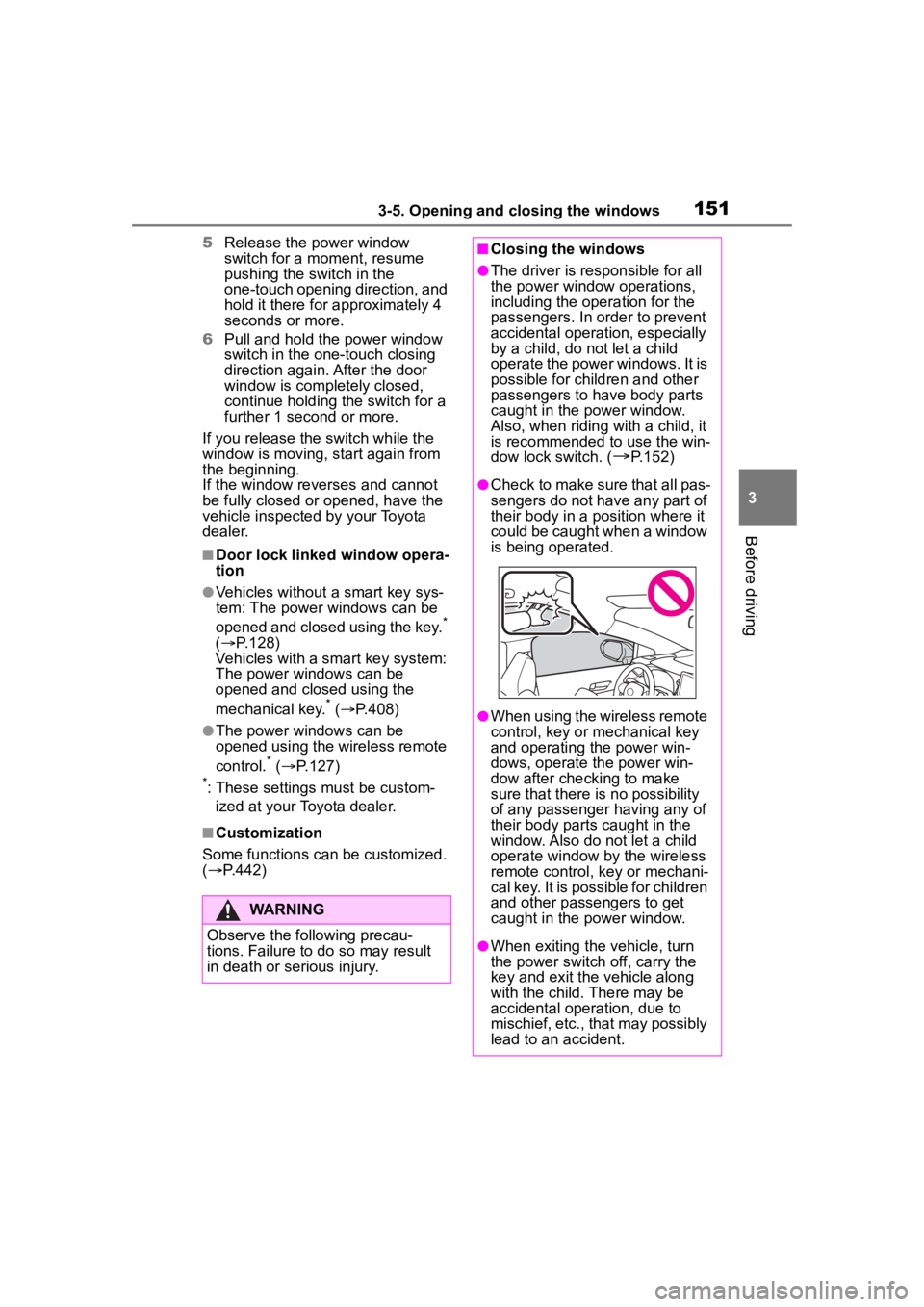
●Check to make sure that all pas-
sengers do not have any part of
their body in a pos ition where it
could be caught when a window
is being operated.
●When using the wireless remote
control, key or mechanical key
and operating the power win-
dows, operate the power win-
dow after checking to make
sure that there is no possibility
of any passenger having any of
their body parts caught in the
window. Also do not let a child
operate window by the wireless
remote control, key or mechani-
cal key. It is possible for children
and other passengers to get
caught in the power window.
●When exiting the vehicle, turn
the power switch off, carry the
key and exit the vehicle along
with the child. There may be
accidental operation, due to
mischief, etc., that may possibly
lead to an accident.
Page 153 of 496
1533-5. Opening and closing the windows
3
Before driving
*: If equipped
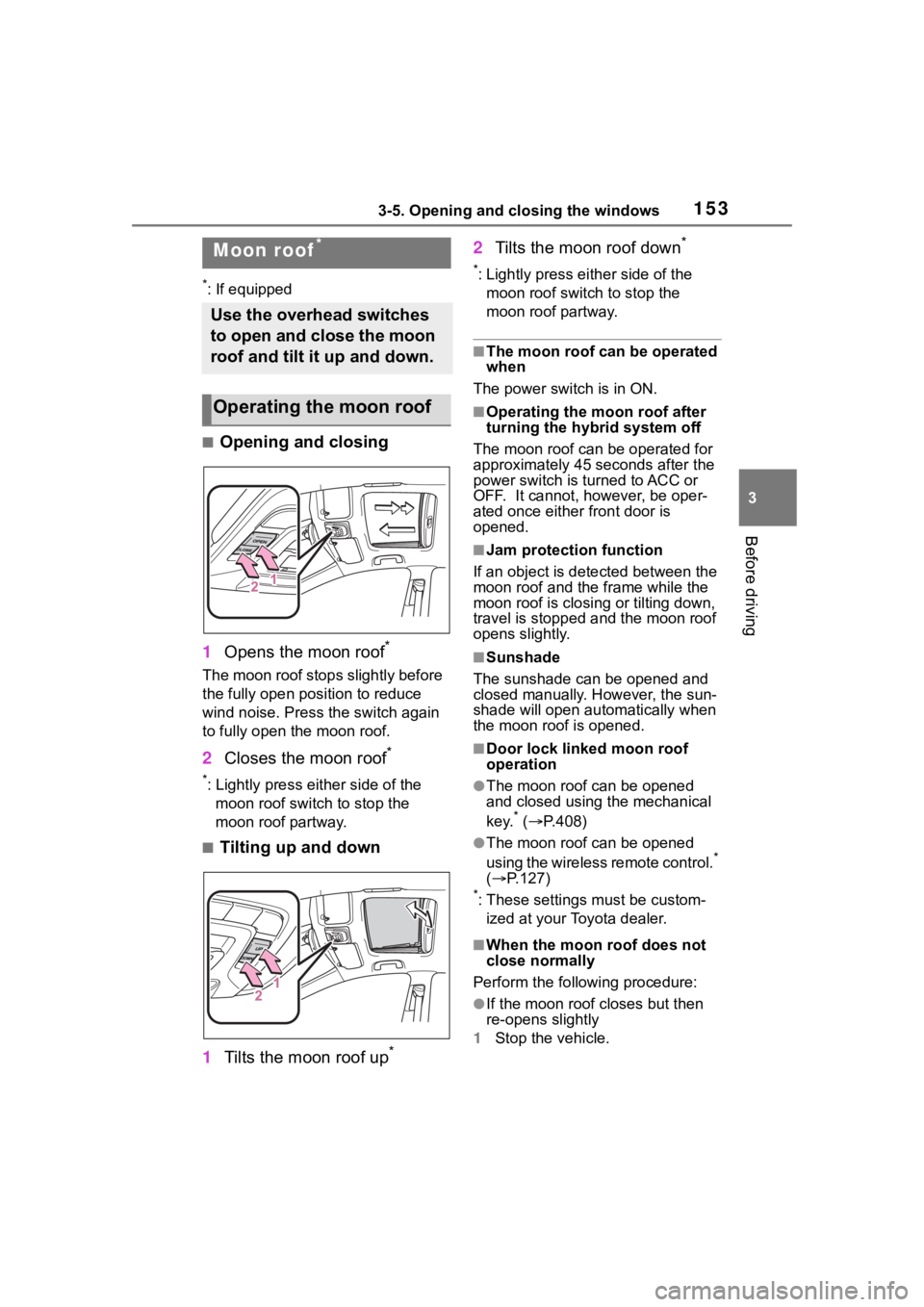
■Opening and closing
1 Opens the moon roof
*
The moon roof stops slightly before
the fully open position to reduce
wind noise. Press the switch again
to fully open the moon roof.
2Closes the moon roof*
*: Lightly press either side of the
moon roof switch to stop the
moon roof partway.
■Tilting up and down
1 Tilts the moon roof up
*
2Tilts the moon roof down*
*: Lightly press e ither side of the
moon roof switch to stop the
moon roof partway.
■The moon roof can be operated
when
The power switch is in ON.
■Operating the moon roof after
turning the hybrid system off
The moon roof can be operated for
approximately 45 s econds after the
power switch is turned to ACC or
OFF. It cannot, however, be oper-
ated once either front door is
opened.
■Jam protection function
If an object is dete cted between the
moon roof and the frame while the
moon roof is closing or tilting down,
travel is stopped and the moon roof
opens slightly.
■Sunshade
The sunshade can be opened and
closed manually. However, the sun-
shade will open aut omatically when
the moon roof is opened.
■Door lock linked moon roof
operation
●The moon roof can be opened
and closed using the mechanical
key.
* ( P.408)
●The moon roof can be opened
using the wireless remote control.*
( P.127)
*: These settings must be custom-
ized at your Toyota dealer.
■When the moon roof does not
close normally
Perform the following procedure:
●If the moon roof closes but then
re-opens slightly
1 Stop the vehicle.
Moon roof*
Use the overhead switches
to open and close the moon
roof and tilt it up and down.
Operating the moon roof
Page 159 of 496
1594-1. Before driving
4
Driving
4-1.Before driving
■Starting the hybrid system
P.170, 172
■Driving
1 With the brake pedal
depressed, shift the shift
lever to D. ( P.180)
2 Release the parking brake.
( P.183)
If the parking brake is in automatic
mode, the parkin g brake will be
released automatically. ( P.184)
3 Gradually release the brake
pedal and gently depress the
accelerator pedal to acceler-
ate the vehicle.
■Stopping
1 With the shift lever in D,
depress the brake pedal.
2 If necessary, set the parking
brake. ( P.183)
If the vehicle is to be stopped for an
extended period of time, shift the
shift lever to P. ( P.180)
■Parking the vehicle
1 With the shift lever in D,
depress the brake pedal to
stop the vehicle completely.
2 Set the parking brake
( P.183), and shift the shift
lever to P. ( P.180)
Make sure the park ing brake indi-
cator light is on.
3 Vehicles without a smart key
system: Turn the power
switch to OFF to stop the
hybrid system.
Vehicles with a smart key
system: Press the power
switch to stop the hybrid sys-
tem.
4 Slowly release the brake
pedal.
5 Lock the door, making sure
that you have the key on your
person.
If parking on a hill, block the wheels
as needed.
■Starting off on a steep
uphill
1 Make sure that the parking
brake is set and shift the shift
lever to D.
Hill-start assist cont rol will operate.
( P.266)
2 Gently depress the accelera-
tor pedal.
3 Release the parking brake.
■For fuel-efficient driving
Keep in mind that hybrid vehicles
are similar to conventional vehicles,
and it is necessary to refrain from
activities such as sudden accelera-
tion. ( P.271)
■Driving in the rain
●Drive carefully whe n it is raining,
because visibility will be reduced,
the windows may become
fogged-up, and the road will be
slippery.
●Drive carefully whe n it starts to
Driving the vehicle
The following procedures
should be observed to
ensure safe driving:
Driving procedure
Page 163 of 496
1634-1. Before driving
4
Driving
WARNING
●Avoid revving or racing the
engine.
Running the engine at high
speed while the vehicle is
stopped may cause the exhaust
system to overheat, which could
result in a fire if combustible
material is nearby.
■When the vehicle is parked
●Do not leave glasses, cigarette
lighters, spray cans, or soft
drink cans in the vehicle when it
is in the sun.
Doing so may result in the fol-
lowing:
• Gas may leak from a cigarette lighter or spray can, and may
lead to a fire.
• The temperature inside the vehicle may cause the plastic
lenses and plastic material of
glasses to deform or crack.
• Soft drink cans may fracture, causing the contents to spray
over the interior of the vehicle,
and may also caus e a short cir-
cuit in the vehicle’s electrical
components.
●Do not leave cigarette lighters in
the vehicle. If a cigarette lighter
is in a place such as the glove
box or on the floor, it may be lit
accidentally when luggage is
loaded or the seat is adjusted,
causing a fire.
●Do not attach adhesive discs to
the windshield or windows. Do
not place containers such as air
fresheners on the instrument
panel or dashboard. Adhesive
discs or containers may act as
lenses, causing a fire in the
vehicle.
●Do not leave a door or window
open if the curved glass is
coated with a metallized film
such as a silver-colored one.
Reflected sunlight may cause
the glass to act a s a lens, caus-
ing a fire.
●Always apply the parking brake,
shift the shift lever to P, stop the
hybrid system and lock the vehi-
cle.
Do not leave the vehicle unat-
tended while the “READY” indi-
cator is illuminated.
If the vehicle is parked with the
shift lever in P but the parking
brake is not set, the vehicle may
start to move, possibly leading
to an accident.
●Do not touch the exhaust pipes
while the “READY” indicator is
illuminated or immediately after
turning the hybrid system off.
Doing so may cause burns.
■When taking a nap in the vehi-
cle
Always turn the hybrid system off.
Otherwise, if you accidentally
move the shift lever or depress
the accelerator pedal, this could
cause an accident or fire due to
hybrid system overheating. Addi-
tionally, if the vehicle is parked in
a poorly ventilated area, exhaust
gases may collect and enter the
vehicle, leading to death or a seri-
ous health hazard.
■When braking
●When the brakes are wet, drive
more cautiously.
Braking distance increases
when the brakes are wet, and
this may cause one side of the
vehicle to brake d ifferently than
the other side. Also, the parking
brake may not securely hold the
vehicle.
Page 171 of 496
1714-2. Driving procedures
4
Driving
cator does not come on even after
performing the proper procedures
for starting the vehicle, contact your
Toyota dealer immediately.
■If the hybrid system is malfunc-
tioning
P. 8 6
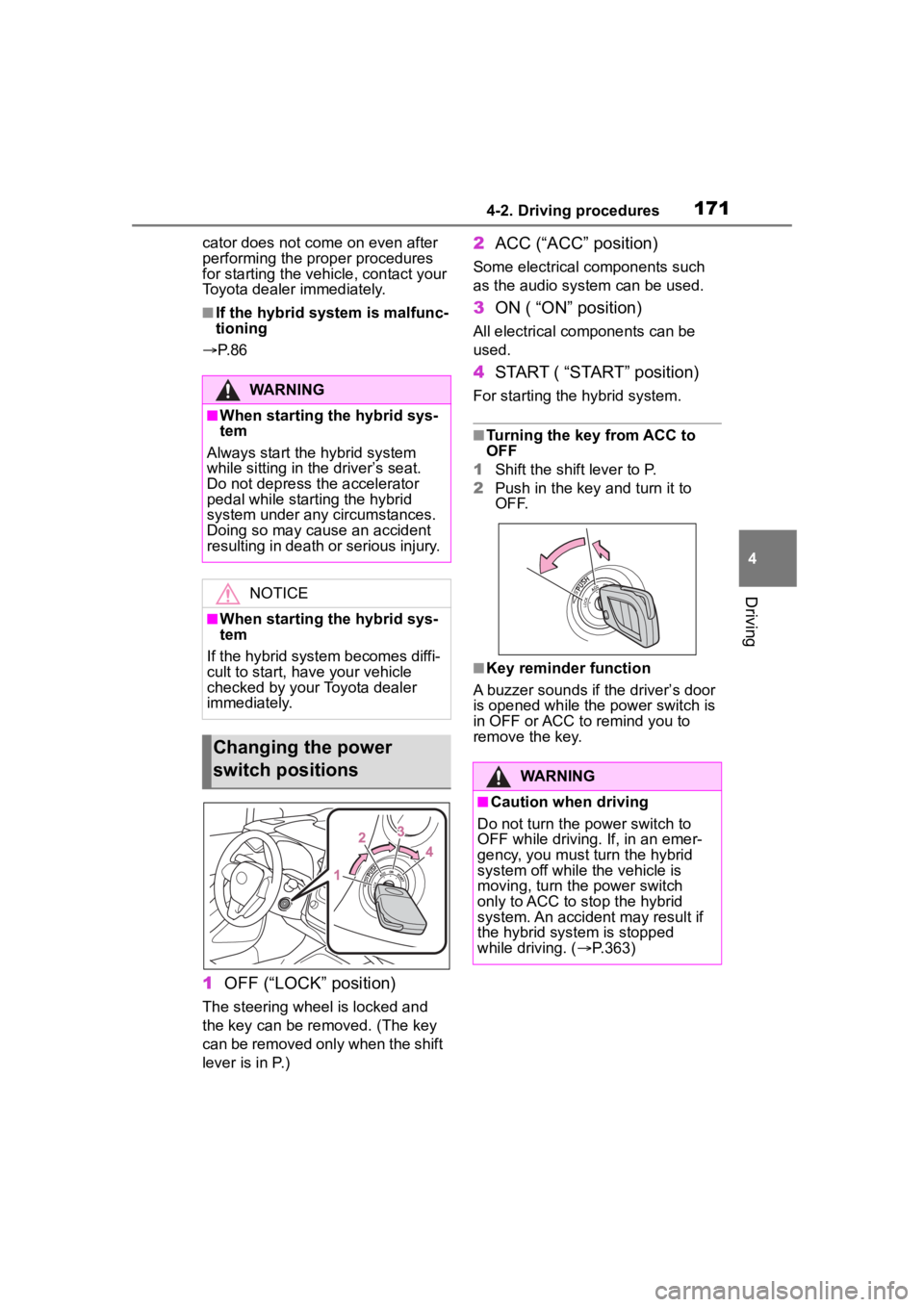
1 OFF (“LOCK” position)
The steering wheel is locked and
the key can be rem oved. (The key
can be removed only when the shift
lever is in P.)
2 ACC (“ACC” position)
Some electrical components such
as the audio sys tem can be used.
3ON ( “ON” position)
All electrical components can be
used.
4START ( “START” position)
For starting the hybrid system.
■Turning the key from ACC to
OFF
1 Shift the shift lever to P.
2 Push in the key and turn it to
OFF.
■Key reminder function
A buzzer sounds if the driver’s door
is opened while the power switch is
in OFF or ACC to remind you to
remove the key.
WARNING
■When starting the hybrid sys-
tem
Always start the hybrid system
while sitting in the driver’s seat.
Do not depress the accelerator
pedal while starting the hybrid
system under any circumstances.
Doing so may cause an accident
resulting in death or serious injury.
NOTICE
■When starting the hybrid sys-
tem
If the hybrid system becomes diffi-
cult to start, have your vehicle
checked by your Toyota dealer
immediately.
Changing the power
switch positions
WARNING
■Caution when driving
Do not turn the power switch to
OFF while driving. If, in an emer-
gency, you must turn the hybrid
system off while the vehicle is
moving, turn the power switch
only to ACC to stop the hybrid
system. An accident may result if
the hybrid system is stopped
while driving. ( P.363)
Page 175 of 496
1754-2. Driving procedures
4
Driving
than P.
●After the vehicle is parked, if the
door is locked with the door lock
switch (P.131) from the inside or
the mechanical key ( P.408) from
the outside, the automatic hybrid
system shut off fea ture will be dis-
abled. The timer for the automatic
hybrid system shu t off feature will
be re-enabled if the driver’s door
is opened.
WARNING
■Stopping the hybrid system
in an emergency
●If you want to stop the hybrid
system in an emergency while
driving the vehicle, press and
hold the power switch for more
than 2 seconds, or press it
briefly 3 times or more in suc-
cession. (
P.363)
However, do not touch the
power switch while driving
except in an emergency. Turn-
ing the hybrid system off while
driving will not cause loss of
steering or braking control, how-
ever, power assist to the steer-
ing will be lost. This will make it
more difficult to steer smoothly,
so you should pull over and stop
the vehicle as soon as it is safe
to do so.
●If the power switch is operated
while the vehicle is running, a
warning message will be shown
on the multi-info rmation display
and a buzzer sounds.
●To restart the hybrid system
after performing an emergency
shutdown, shift the shift lever to
N and then press the power
switch.
■When parking
Exhaust gases include harmful
carbon monoxide (CO), which is
colorless and odorless. Observe
the following precautions.
Failure to do so may cause
exhaust gases to enter the vehicle
and may lead to an accident
caused by light-headedness, or
may lead to death or a serious
health hazard.
●If the vehicle is in a poorly venti-
lated area or a closed area,
such as a garage, stop the
hybrid system.
●Do not leave the vehicle with
the hybrid system operating for
a long time. If such a situation
cannot be avoided, park the
vehicle in an open space and
ensure that exhaust fumes do
not enter the vehicle interior.
●Do not leave the hybrid system
operating in an area with snow
build-up, or where it is snowing.
If snowbanks build up around
the vehicle while the hybrid sys-
tem is operating, exhaust gases
may collect and enter the vehi-
cle.
Page 185 of 496
1854-2. Driving procedures
4
Driving
If the parking brake is not released
when the accelerator pedal is
depressed, release the parking
brake manually.
When the shift lever is shifted from
P, the parking brake will be released
automatically.
■Parking brake automatic lock
function
The parking brake will be set auto-
matically under the following condi-
tions:
●The brake pedal is not depressed
●The driver’s door is open
●The driver’s seat belt is not fas-
tened
●The shift lever is in a position
other than P or N
●The malfunction indicator lamp
and brake system warning light
are not illuminated
■If “Parking Brake Temporarily
Unavailable” i s displayed on
the multi-information display
If the parking brake is operated
repeatedly over a short period of
time, the system may restrict opera-
tion to prevent overheating. If this
happens, refrain from operating the
parking brake. Nor mal operation will
return after about 1 minute.
■If “Parking Brake Unavailable”
is displayed on the multi-infor-
mation display
Operate the parking brake switch. If
the message does not disappear
after operating the switch several
times, the system may be malfunc-
tioning. Have the vehicle inspected
by your Toyota dealer.
■Parking brake operation sound
When the parking brake operates, a
motor sound (whirring sound) may
be heard. This does not indicate a
malfunction.
■Parking brake indicator light
●Depending on the engine switch position/mode, the parking brake
indicator light will turn on and stay
on as described below:
ON: Comes on until the parking
brake is released.
Not in ON: Stays
on for approxi-
mately 15 seconds.
●When the power switch is turned
off with the parking brake set, the
parking brake i ndicator light will
stay on for about 15 seconds. This
does not indicate a malfunction.
■When the parking brake switch
malfunctions
Automatic mode (automatic brake
setting and releas ing) will be turned
on automatically.
■Parking the vehicle
P.159
■Parking brake engaged warning
buzzer
A buzzer will sound if the vehicle is
driven with the parking brake
engaged. “Parking Brake ON” is dis-
played on the multi-information dis-
play (with the vehicle reaching a
speed of 3 mph [5 km/h]).
■If the brake system warning
light comes on
P.372
■Usage in winter time
P.273
WARNING
■When parking the vehicle
Do not leave a child in the vehicle
alone. The parking brake may be
released unintentionally by a child
and there is the danger of the
vehicle moving that may lead to
an accident resulting in death or
serious injury.