door lock TOYOTA COROLLA HYBRID 2023 Service Manual
[x] Cancel search | Manufacturer: TOYOTA, Model Year: 2023, Model line: COROLLA HYBRID, Model: TOYOTA COROLLA HYBRID 2023Pages: 496, PDF Size: 10.13 MB
Page 410 of 496
4107-2. Steps to take in an emergency
If you have a set of jumper (or
booster) cables and a second
vehicle with a 12-volt battery,
you can jump start your vehicle
by following the steps below.
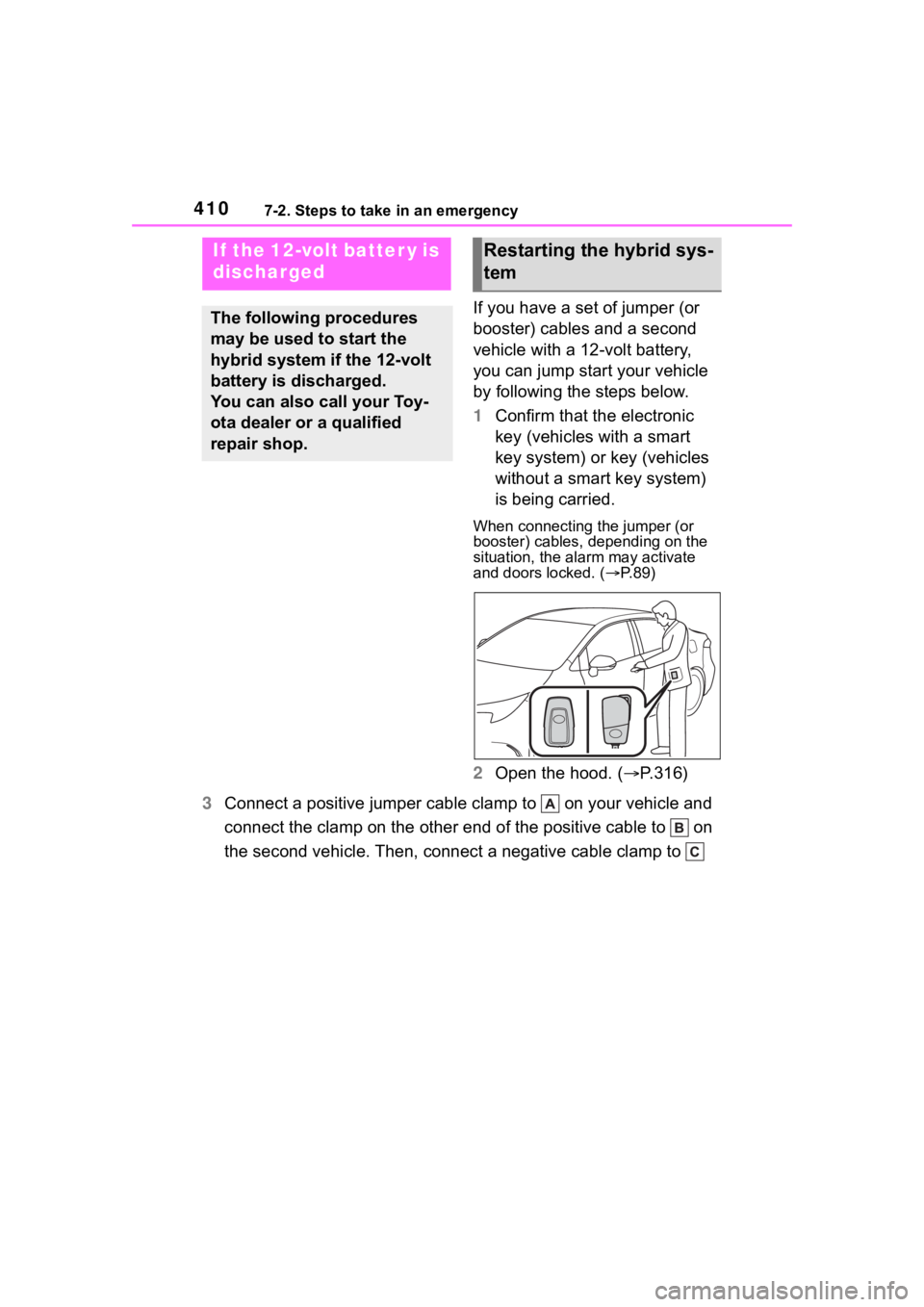
1Confirm that the electronic
key (vehicles with a smart
key system) or key (vehicles
without a smart key system)
is being carried.
When connecting the jumper (or
booster) cables, depending on the
situation, the alarm may activate
and doors locked. ( P. 8 9 )
2 Open the hood. ( P.316)
3 Connect a positive jumper cable clamp to on your vehicle and
connect the clamp on the other end of the positive cable to on
the second vehicle. Then, connect a negative cable clamp to
If the 12-volt batter y is
discharged
The following procedures
may be used to start the
hybrid system if the 12-volt
battery is discharged.
You can also call your Toy-
ota dealer or a qualified
repair shop.
Restarting the hybrid sys-
tem
Page 412 of 496
4127-2. Steps to take in an emergency
■To prevent 12-volt battery dis-
charge
●Turn off the headlights and the
audio system while the hybrid sys-
tem is off.
●Turn off any unnecessary electri-
cal components when the vehicle
is running at a low speed for an
extended period, such as in heavy
traffic.
■When the 12-volt battery is
removed or discharged
●Information stored in the ECU is
cleared. When the 12-volt battery
is depleted, have the vehicle
inspected at you r Toyota dealer.
●Some systems may require initial-
ization. (P.452)
■When removing the 12-volt bat-
tery terminals
When the 12-volt battery terminals
are removed, the information stored
in the ECU is cleared. Before
removing the 12-volt battery termi-
nals, contact your Toyota dealer.
■Charging the 1 2-volt battery
The electricity stor ed in the 12-volt
battery will discharge gradually even
when the vehicle is not in use, due
to natural discharge and the drain-
ing effects of certain electrical appli-
ances. If the vehicle is left for a long
time, the 12-volt battery may dis-
charge, and the hybrid system may
be unable to start. (The 12-volt bat-
tery recharges aut omatically while
the hybrid system is operating.)
■When recharging or replacing
the 12-volt battery (vehicles
with a smart key system)
●In some cases, it may not be pos-
sible to unlock the doors using the
smart key system when the
12-volt battery is discharged. Use
the wireless remote control or the
mechanical key to lock or unlock
the doors.
●The hybrid system may not start
on the first att empt after the 12-volt battery has recharged but
will start normally after the second
attempt. This is not a malfunction.
●The power switch mode is memo-
rized by the vehicle. When the
12-volt battery is reconnected, the
system will return to the mode it
was in before the 12-volt battery
was discharged. Before discon-
necting the 12-volt battery, turn
the power switch off.
If you are unsure what mode the
power switch was in before the
12-volt battery discharged, be
especially careful when recon-
necting the 12-volt battery.
■When replacing t
he 12-volt bat-
tery
●Use a 12-volt battery that con-
forms to European regulations.
●Use a 12-volt battery that the case
size is same as the previous one
(LN1), 20 hour rate capacity
(20HR) is equivalent (45Ah) or
greater, and per formance rating
(CCA) is equivalent (295A) or
greater.
• If the sizes differ, the 12-volt bat-
tery cannot be properly secured.
• If the 20 hour rate capacity is low,
even if the time p eriod where the
vehicle is not used is a short time,
the 12-volt battery may discharge
and the hybrid system may not be
able to start.
●For details, cons ult your Toyota
dealer.
WARNING
■When removing the 12-volt
battery terminals
Always remove the negative (-)
terminal first. If the positive (+) ter-
minal contacts any metal in the
surrounding area when the posi-
tive (+) terminal is removed, a
spark may occur, leading to a fire
in addition to ele ctrical shocks
and death or serious injury.
Page 444 of 496
4448-2. Customization
*1: For details about each function: P. 1 0 8
*2: The default setting varies according to country.
*3: 7-inch display
*4: If equipped
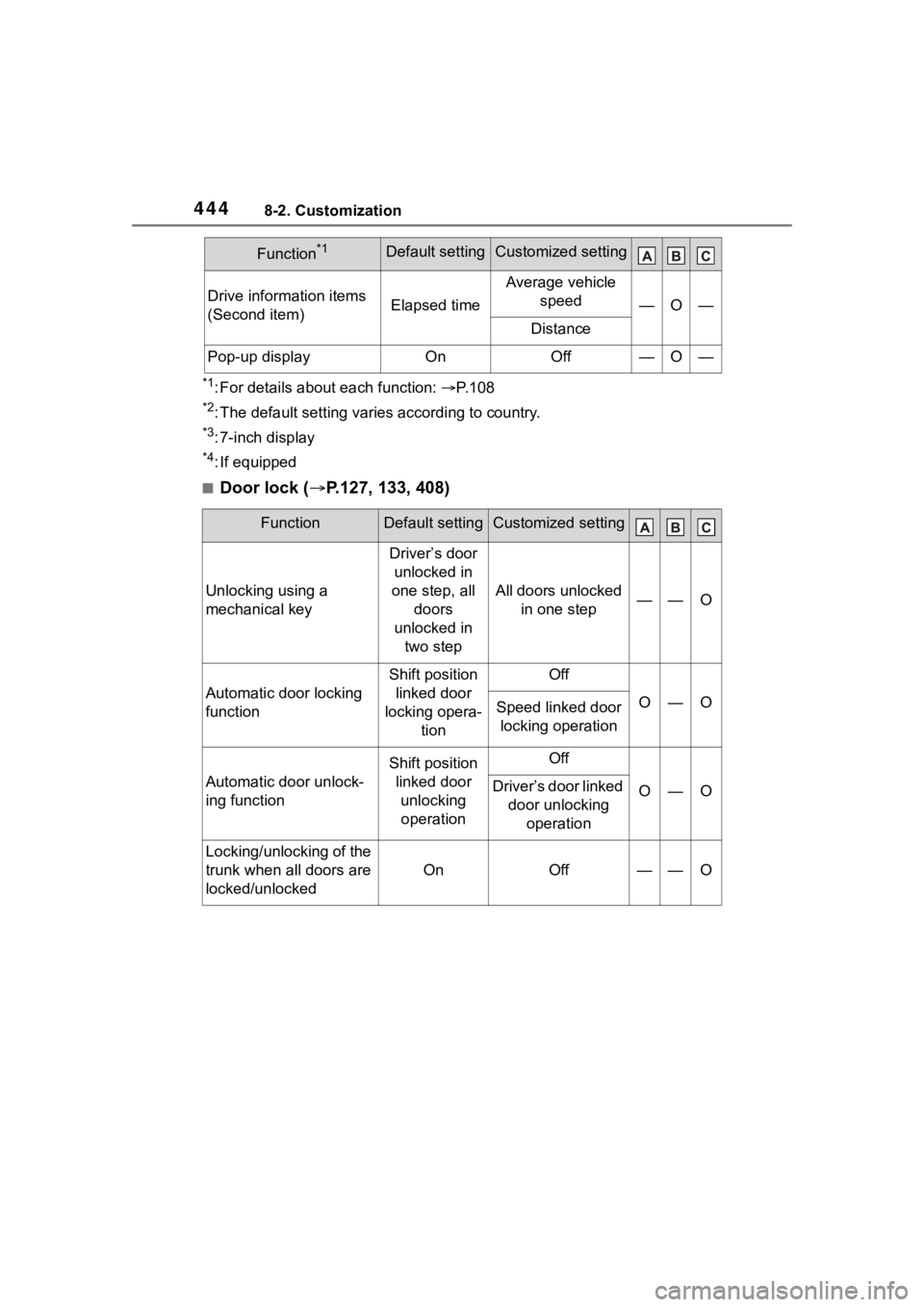
■Door lock ( P.127, 133, 408)
Drive information items
(Second item)Elapsed time
Average vehicle
speed
—O—
Distance
Pop-up displayOnOff—O—
FunctionDefault settingCustomized setting
Unlocking using a
mechanical key
Driver’s door unlocked in
one step, all doors
unlocked in two step
All doors unlocked in one step——O
Automatic door locking
function
Shift position linked door
locking opera- tionOff
O—OSpeed linked door locking operation
Automatic door unlock-
ing function
Shift position linked door unlocking operationOff
O—ODriver’s door linked door unlocking operation
Locking/unlocking of the
trunk when all doors are
locked/unlocked
OnOff——O
Function*1Default settingCustomized setting
Page 445 of 496
4458-2. Customization
8
Vehicle specifications
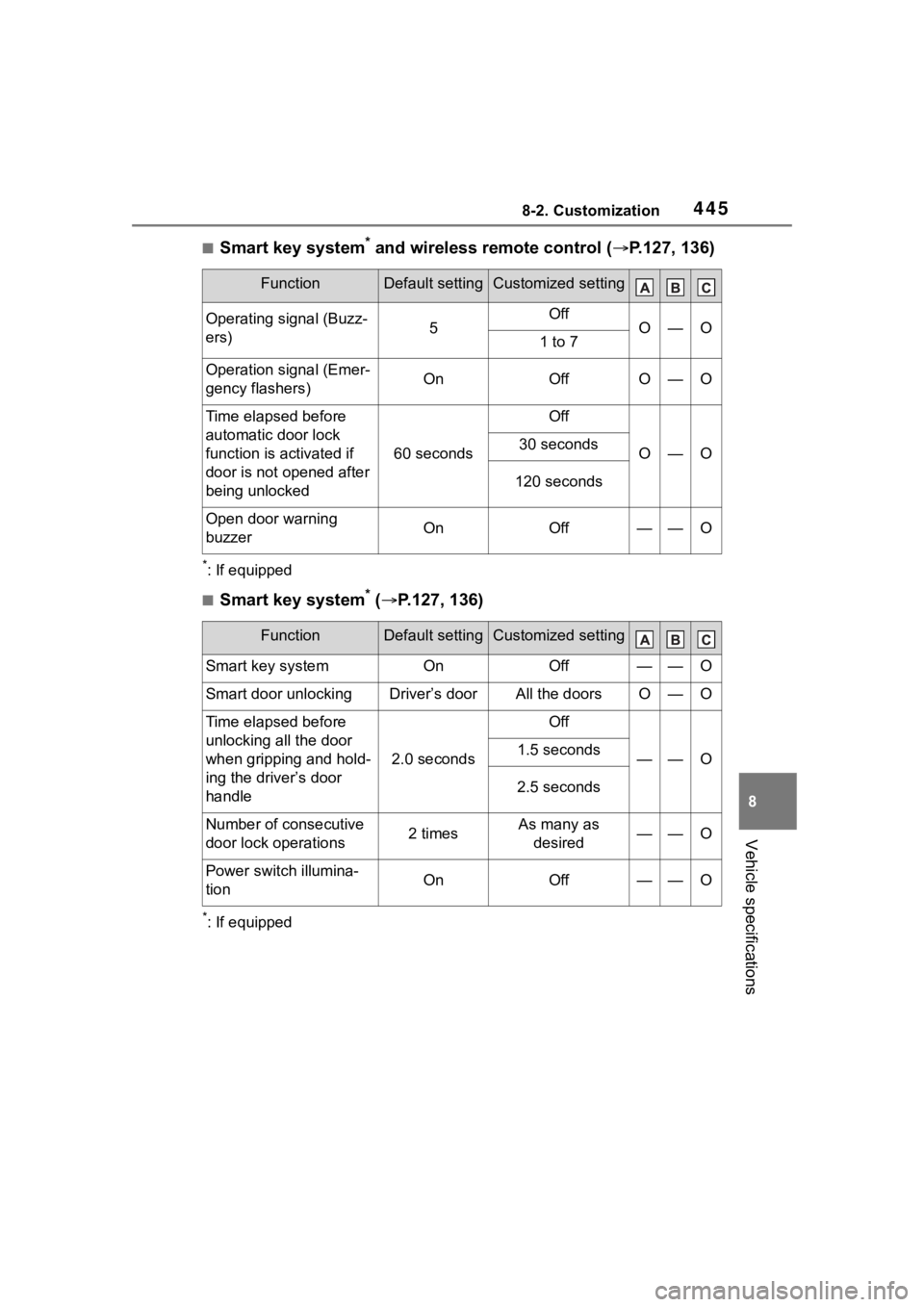
■Smart key system* and wireless remote control (P.127, 136)
*: If equipped
■Smart key system* ( P.127, 136)
*: If equipped
FunctionDefault settingCustomized setting
Operating signal (Buzz-
ers)5OffO—O1 to 7
Operation signal (Emer-
gency flashers)OnOffO—O
Time elapsed before
automatic door lock
function is activated if
door is not opened after
being unlocked
60 seconds
Off
O—O30 seconds
120 seconds
Open door warning
buzzerOnOff——O
FunctionDefault settingCustomized setting
Smart key systemOnOff——O
Smart door unlockingDriver’s doorAll the doorsO—O
Time elapsed before
unlocking all the door
when gripping and hold-
ing the driver’s door
handle
2.0 seconds
Off
——O1.5 seconds
2.5 seconds
Number of consecutive
door lock operations2 timesAs many as
desired——O
Power switch illumina-
tionOnOff——O
Page 446 of 496
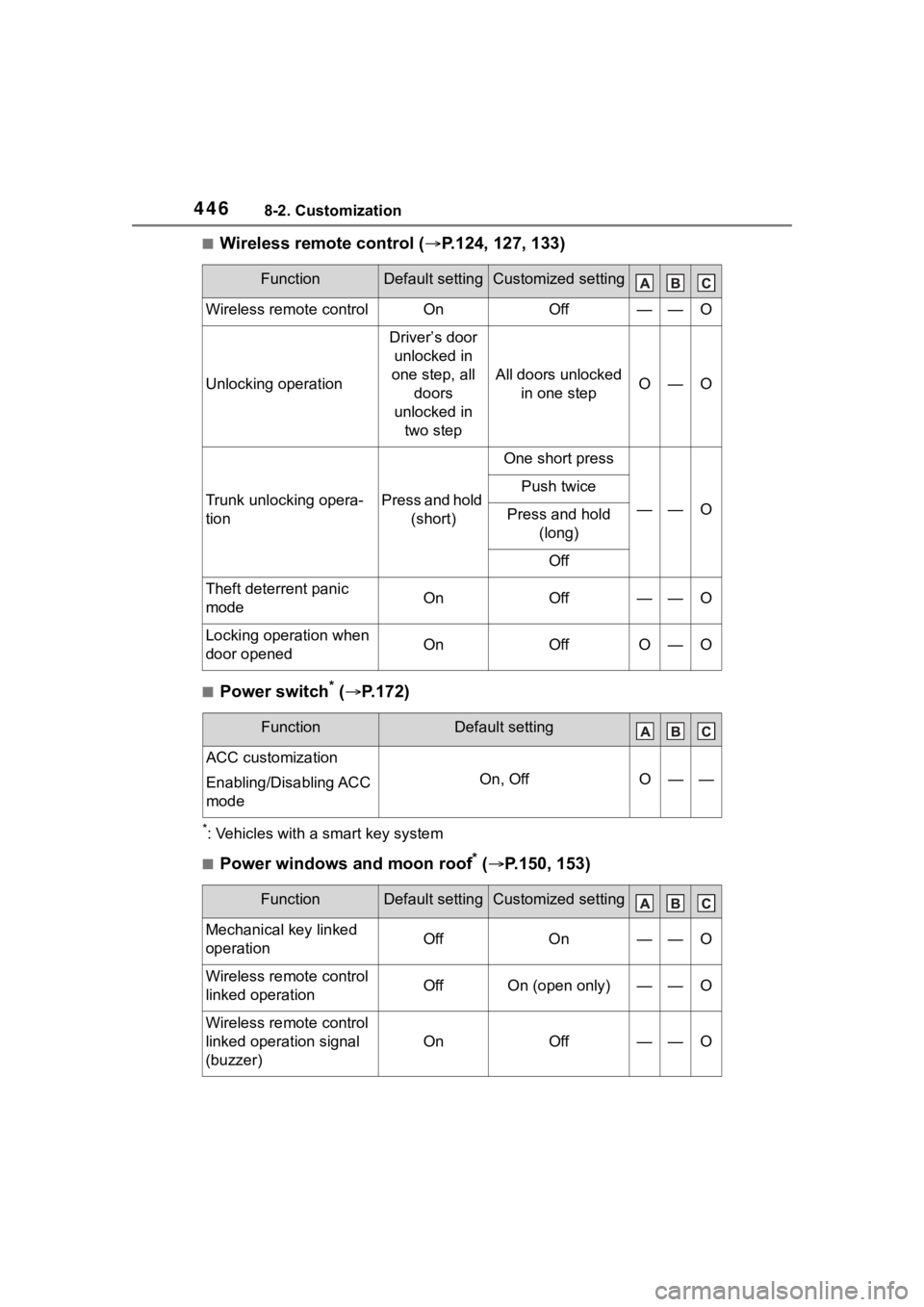
4468-2. Customization
■Wireless remote control (P.124, 127, 133)
■Power switch* ( P.172)
*: Vehicles with a smart key system
■Power windows and moon roof* ( P.150, 153)
FunctionDefault settingCustomized setting
Wireless remote controlOnOff——O
Unlocking operation
Driver’s door
unlocked in
one step, all doors
unlocked in two step
All doors unlocked in one stepO—O
Trunk unlocking opera-
tionPress and hold (short)
One short press
——O
Push twice
Press and hold (long)
Off
Theft deterrent panic
modeOnOff——O
Locking operation when
door openedOnOffO—O
FunctionDefault setting
ACC customization
Enabling/Disabling ACC
mode
On, OffO——
FunctionDefault settingCustomized setting
Mechanical key linked
operationOffOn——O
Wireless remote control
linked operationOffOn (open only)——O
Wireless remote control
linked operation signal
(buzzer)
OnOff——O
Page 450 of 496
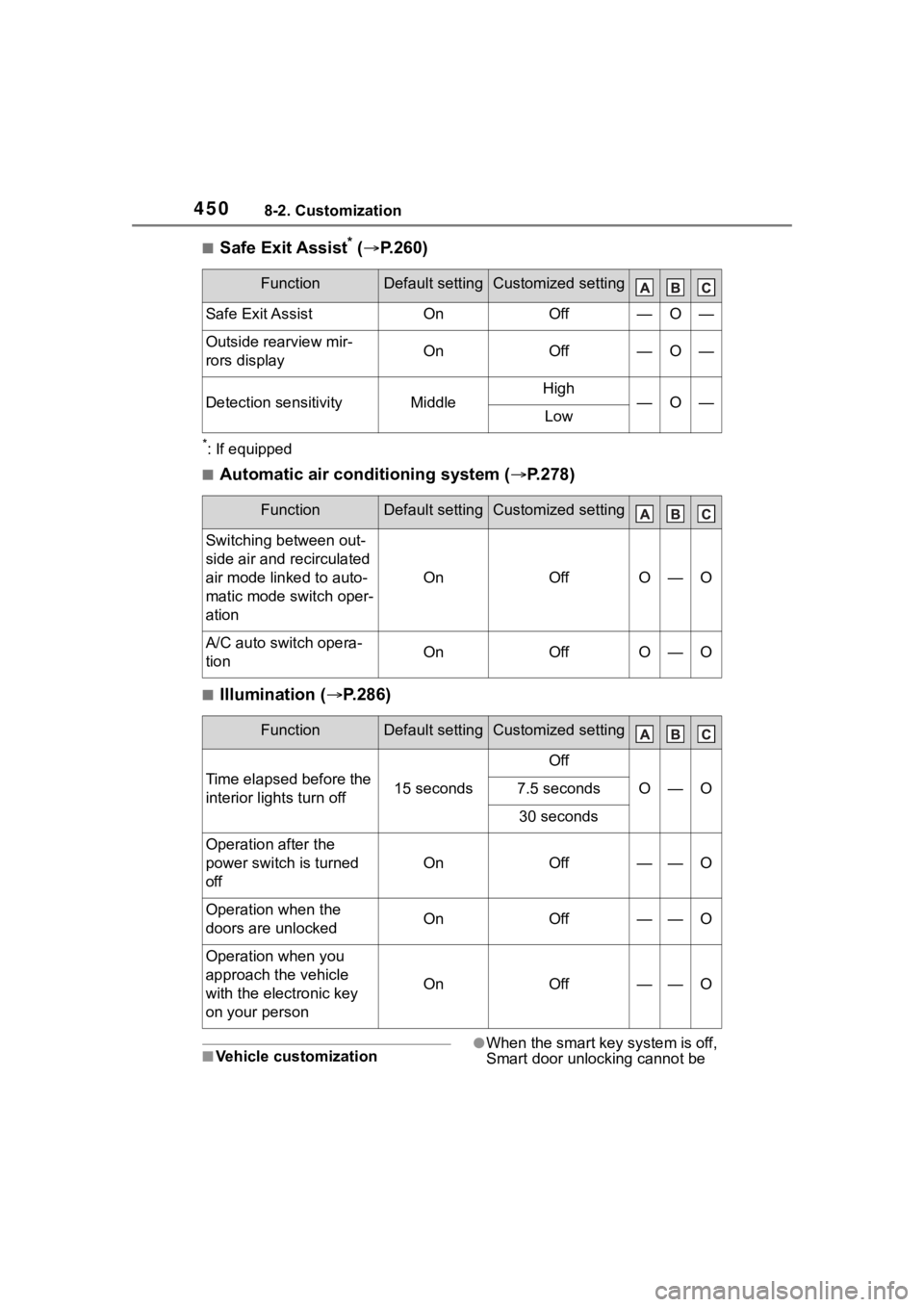
4508-2. Customization
■Safe Exit Assist* ( P.260)
*: If equipped
■Automatic air conditioning system ( P.278)
■Illumination ( P.286)
■Vehicle customization●When the smart key system is off,
Smart door unlocking cannot be
FunctionDefault settingCustomized setting
Safe Exit AssistOnOff—O—
Outside rearview mir-
rors displayOnOff—O—
Detection sensitivityMiddleHigh—O—Low
FunctionDefault settingCustomized setting
Switching between out-
side air and recirculated
air mode linked to auto-
matic mode switch oper-
ation
OnOffO—O
A/C auto switch opera-
tionOnOffO—O
FunctionDefault settingCustomized setting
Time elapsed before the
interior lights turn off15 seconds
Off
O—O7.5 seconds
30 seconds
Operation after the
power switch is turned
off
OnOff——O
Operation when the
doors are unlockedOnOff——O
Operation when you
approach the vehicle
with the electronic key
on your person
OnOff——O
Page 451 of 496

4518-2. Customization
8
Vehicle specifications
customized.
●When the doors remain closed
after unlocking the doors and the
automatic door lock function is
activated, the signals will be gen-
erated in accordance with the
operation signal (buzzer) and the
operation signal (emergency
flashers) settings.
■In the following situations, cus-
tomize mode in which the set-
tings can be changed through
the multi-information display
will automatically be turned off
●The power switch is turned off.
●The vehicle begins to move while
the customize mode screen is dis-
played.
Page 464 of 496
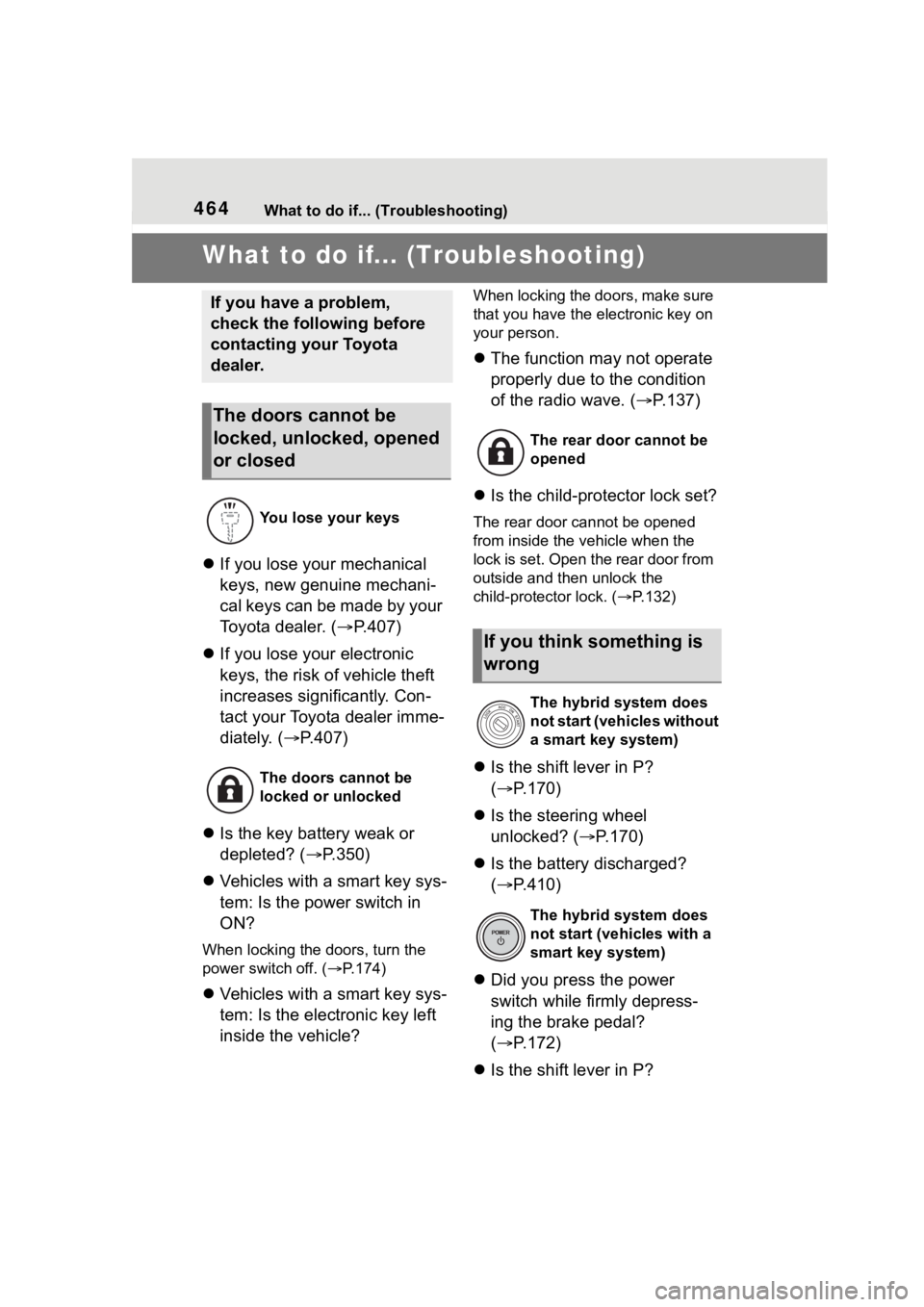
464What to do if... (Troubleshooting)
1-1.What to do if... (Troubleshooting)What to do if... (Troubleshooting)
If you lose your mechanical
keys, new genuine mechani-
cal keys can be made by your
Toyota dealer. ( P.407)
If you lose your electronic
keys, the risk of vehicle theft
increases significantly. Con-
tact your Toyota dealer imme-
diately. ( P.407)
Is the key battery weak or
depleted? ( P.350)
Vehicles with a smart key sys-
tem: Is the power switch in
ON?
When locking the doors, turn the
power switch off. ( P.174)
Vehicles with a smart key sys-
tem: Is the electronic key left
inside the vehicle?
When locking the doors, make sure
that you have the electronic key on
your person.
The function may not operate
properly due to the condition
of the radio wave. ( P.137)
Is the child-protector lock set?
The rear door cannot be opened
from inside the vehicle when the
lock is set. Open the rear door from
outside and then unlock the
child-protector lock. ( P.132)
Is the shift lever in P?
( P.170)
Is the steering wheel
unlocked? ( P.170)
Is the battery discharged?
( P.410)
Did you press the power
switch while firmly depress-
ing the brake pedal?
( P.172)
Is the shift lever in P?
If you have a problem,
check the following before
contacting your Toyota
dealer.
The doors cannot be
locked, unlocked, opened
or closed
You lose your keys
The doors cannot be
locked or unlocked
The rear door cannot be
opened
If you think something is
wrong
The hybrid system does
not start (vehicles without
a smart key system)
The hybrid system does
not start (vehicles with a
smart key system)
Page 465 of 496
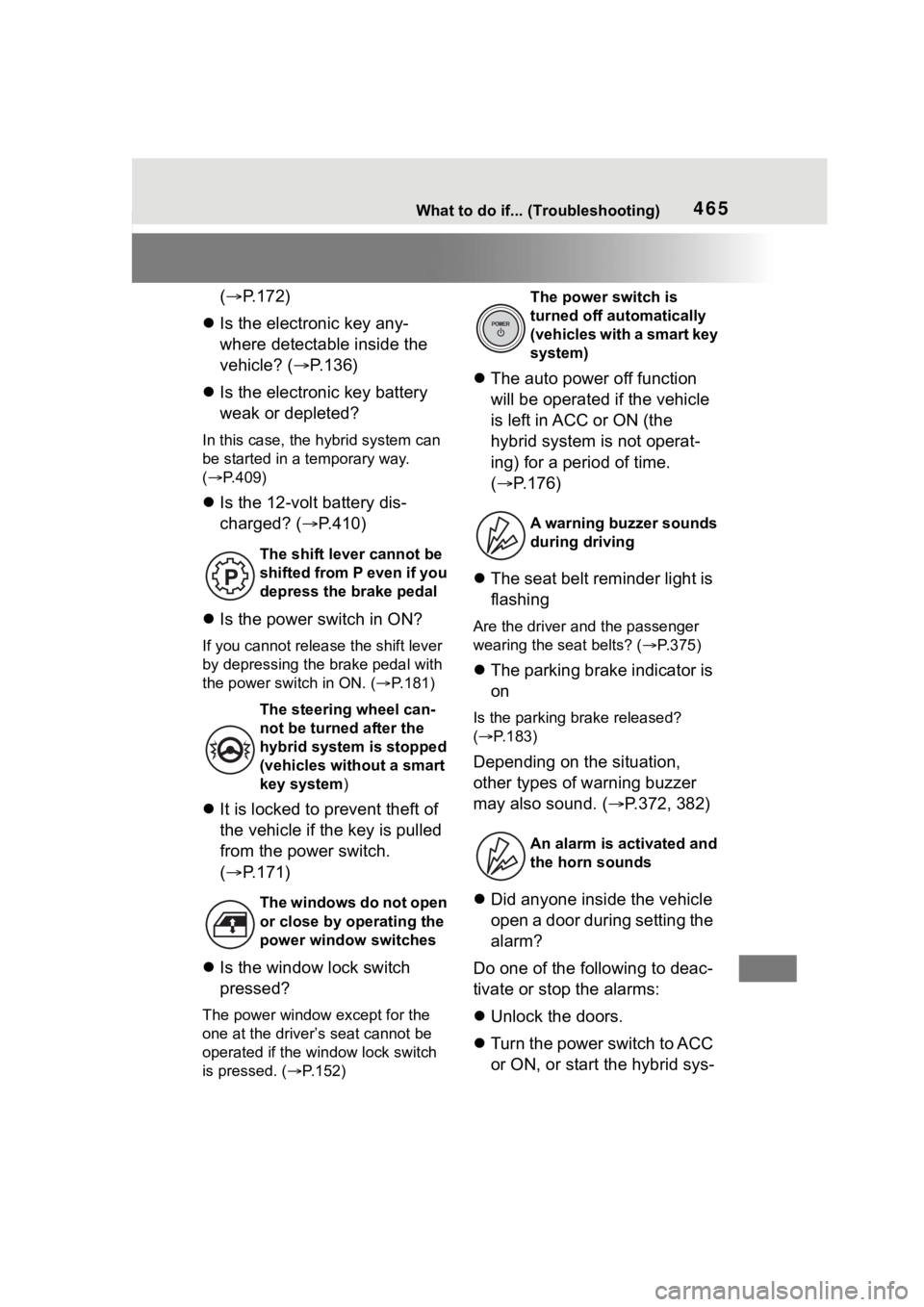
465What to do if... (Troubleshooting)
(P.172)
Is the electronic key any-
where detectable inside the
vehicle? ( P.136)
Is the electronic key battery
weak or depleted?
In this case, the hybrid system can
be started in a temporary way.
( P.409)
Is the 12-volt battery dis-
charged? ( P.410)
Is the power switch in ON?
If you cannot release the shift lever
by depressing the brake pedal with
the power switch in ON. ( P.181)
It is locked to prevent theft of
the vehicle if the key is pulled
from the power switch.
( P.171)
Is the window lock switch
pressed?
The power window except for the
one at the driver’s seat cannot be
operated if the win dow lock switch
is pressed. ( P.152)
The auto power off function
will be operated if the vehicle
is left in ACC or ON (the
hybrid system is not operat-
ing) for a period of time.
( P.176)
The seat belt reminder light is
flashing
Are the driver and the passenger
wearing the seat belts? ( P.375)
The parking brake indicator is
on
Is the parking br ake released?
( P.183)
Depending on the situation,
other types of warning buzzer
may also sound. ( P.372, 382)
Did anyone inside the vehicle
open a door during setting the
alarm?
Do one of the following to deac-
tivate or stop the alarms:
Unlock the doors.
Turn the power switch to ACC
or ON, or start the hybrid sys-
The shift lever cannot be
shifted from P even if you
depress the brake pedal
The steering wheel can-
not be turned after the
hybrid system is stopped
(vehicles without a smart
key system )
The windows do not open
or close by operating the
power window switches
The power switch is
turned off aut omatically
( v e h i c l e s w i t h a s m a r t k e y
system)
A warning buzzer sounds
during driving
An alarm is activated and
the horn sounds
Page 468 of 496

468Alphabetical Index
Brake assist ............................ 266
Break-in tips ........................... 160
Brightness control Instrument panel light control98, 101
Meter light control ................. 101
BSM (Blind Spot Monitor) ...... 249
C
Care Exterior ................................. 302
Interior .................................. 305
Seat belts ............................. 305
Wheels and wheel ornaments........................................... 302
Cargo capacity ....................... 168
Chains ..................................... 274
Child restraint system Fixed with a LATCH system ... 64
Fixed with a seat belt ............. 60
Front passenger occupant clas-sification system ................... 41
Points to remember ................ 48
Riding with children ................ 47
Types of child restraint system installation met hod ............... 50
Using an anchor bracket ........ 68
Child safety 12-volt battery precautions . 323, 413
Airbag precautions ................. 36
Child restraint system............. 50
Heated steering wheel and seat
heater precautions ............. 284
How your child should wear the seat belt................................ 28
Moon roof precau tions ......... 154
Power window lock switch.... 152
Power window precautions .. 151
Rear door child-protectors.... 132
Seat belt extender precautions ............................................. 28 Seat belt precautions..............47
Trunk precautions .................133
Child-protectors......................132
Cleaning Exterior .................................302
Interior ..................................305
Seat belts .............................305
Wheels and wheel ornaments...........................................302
Clock ......................96, 98, 99, 102
Coat hooks ..............................299
Condenser ............. ..................321
Console box ............................290
Cooling system .......................320 Engine overheating ..............414
Hybrid system overheating ...415
Cruise control .........................244
Cup holders.............................289
Current fuel consumption....104, 11 0
Curtain shield airbags ..............31
Customizable featu res ...........442
D
Daytime running light system189
Defogger
Outside rear view mirrors .....280
Rear window.........................280
Windshield ............................279
Differential Rear differential oil................424
Dimensions .............................420
Dinghy towing .........................169
Display Cruise control .......................245
Dynamic radar cruise control 239
Energy monitor ..................... 116
Multi-information display.....102,
109
RCTA ....................................254
Warning message.................382
Display change button .....97, 101