remote control TOYOTA COROLLA HYBRID 2023 Owners Manual
[x] Cancel search | Manufacturer: TOYOTA, Model Year: 2023, Model line: COROLLA HYBRID, Model: TOYOTA COROLLA HYBRID 2023Pages: 496, PDF Size: 10.13 MB
Page 4 of 496
4TABLE OF CONTENTS
Air conditioning filter ...........346
Cleaning the hybrid battery (trac- tion battery) air intake vents......................................... 347
Wireless remote control/elec- tronic key battery.............. 350
Checking and replacing fuses ......................................... 354
Light bulbs .......................... 356
7-1. Essential information Emergency flashers ........... 362
If your vehicle has to be stopped in an emergency .............. 363
If the vehicle is submerged or water on the road is rising......................................... 364
7-2. Steps to take in an emergency If your vehicle needs to be towed......................................... 366
If you think something is wrong ......................................... 370
If a warning light turns on or a warning buzzer sounds .... 372
If a warning message is dis- played .............................. 382
If you have a flat tire (vehicles without spare tire) ............ 387
If you have a flat tire (vehicles with a spare tire) .............. 398
If the hybrid system will not start ......................................... 406
If you lose your keys .......... 407
If the electronic key does not operate properly ............... 408
If the 12-volt battery is dis- charged ............................ 410
If your vehicle overheats .... 414
If the vehicle becomes stuck ......................................... 4178-1. Specifications
Maintenance data (fuel, oil level, etc.) .................................. 420
Fuel information ................. 429
Tire information .................. 431
8-2. Customization Customizable features ....... 442
8-3. Initialization Items to initialize ................ 452
9-1. For owners Reporting safety defects for U.S. owners ............................. 454
Reporting safety defects for Canadian owners ............. 454
Seat belt instructions for Cana- dian owners (in French) ... 455
SRS airbag instructions for Canadian owners (in French)......................................... 456
What to do if... (Troubleshooting) ......................................... 464
Alphabetical Index.............. 467
7When trouble arises
8Vehicle specifications
9For owners
Index
Page 9 of 496
9
EDR data with the type of per-
sonally identifying data rou-
tinely acquired during a crash
investigation.
To read data recorded by an
EDR, special equipment is
required, and access to the
vehicle or the EDR is needed. In
addition to the vehicle manufac-
turer, other parties, such as law
enforcement, that have the spe-
cial equipment, can read the
information if they have access
to the vehicle or the EDR.
Disclosure of the EDR data
Toyota will not disclose the data
recorded in an EDR to a third party
except when:
• An agreement from the vehicle’s
owner (or the less ee for a leased
vehicle) is obtained
• In response to an official request by the police, a court of law or a
government agency
• For use by Toyota in a lawsuit
However, if necessary, Toyota may:
• Use the data for research on vehicle safety performance
• Disclose the data to a third party for research purposes without
disclosing information about the
specific vehicle or vehicle owner
The SRS airbag and seat belt
pretensioner devices in your
Toyota contain explosive chemi-
cals. If the vehicle is scrapped
with the airbags and seat belt pretensioners left as they are,
this may cause an accident such
as fire. Be sure to have the sys-
tems of the SRS airbag and seat
belt pretensioner removed and
disposed of by a qualified ser-
vice shop or by your Toyota
dealer before you scrap your
vehicle.
Special handling may apply, See
www.dtsc.ca.gov/
hazardouswaste/perchlorate.
Your vehicle has components
that may contain perchlorate.
These components may include
the airbags, seat belt preten-
sioners, wireless remote control
batteries, and the batteries in
the tire pressure warning valve
and transmitters.
The word “QR Code” is regis-
tered trademark of DENSO
WAVE INCORPORATED in
Japan and other countries.
Scrapping of your Toyota
Perchlorate Material
“QR Code”
Page 18 of 496
18Pictorial index
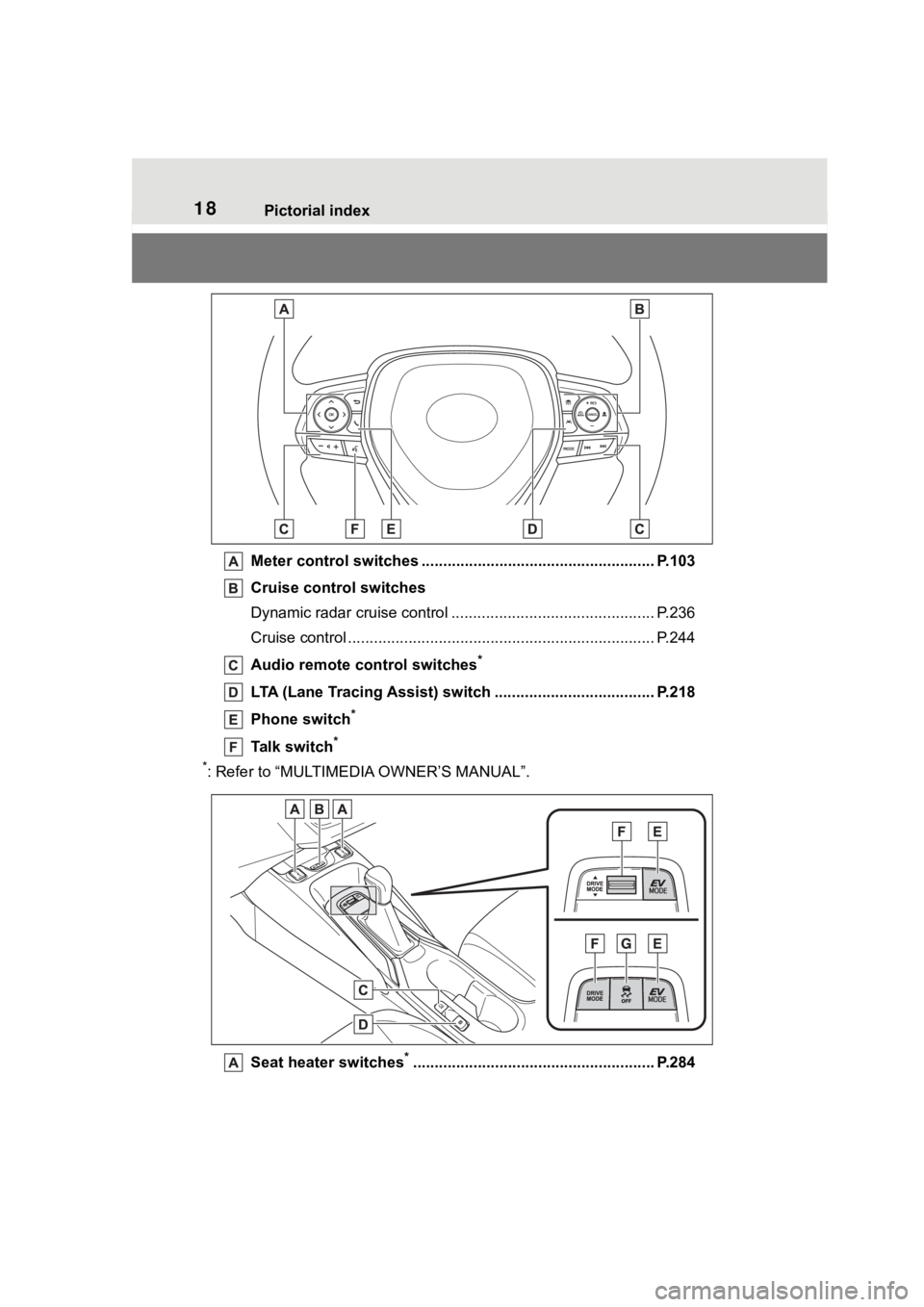
Meter control switches ...................................................... P.103
Cruise control switches
Dynamic radar cruise control ................................... ............ P.236
Cruise control ................................................. ...................... P.244
Audio remote control switches
*
LTA (Lane Tracing Assist) switch ............................... ...... P.218
Phone switch
*
Talk switch*
*
: Refer to “MULTIMEDI A OWNER’S MANUAL”.
Seat heater switches
*........................................................ P.284
Page 88 of 496
881-5. Theft deterrent system
■Items to check before lock-
ing the vehicle
To prevent unexpected trigger-
ing of the alarm and vehicle
theft, make sure of the following:
Nobody is in the vehicle.
The windows and moon roof
(if equipped) are closed
before the alarm is set.
No valuables or other per-
sonal items are left in the
vehicle.
■Setting
Close the doors, trunk and
hood, and lock all the doors. The system will set automati-
cally after 30 seconds.
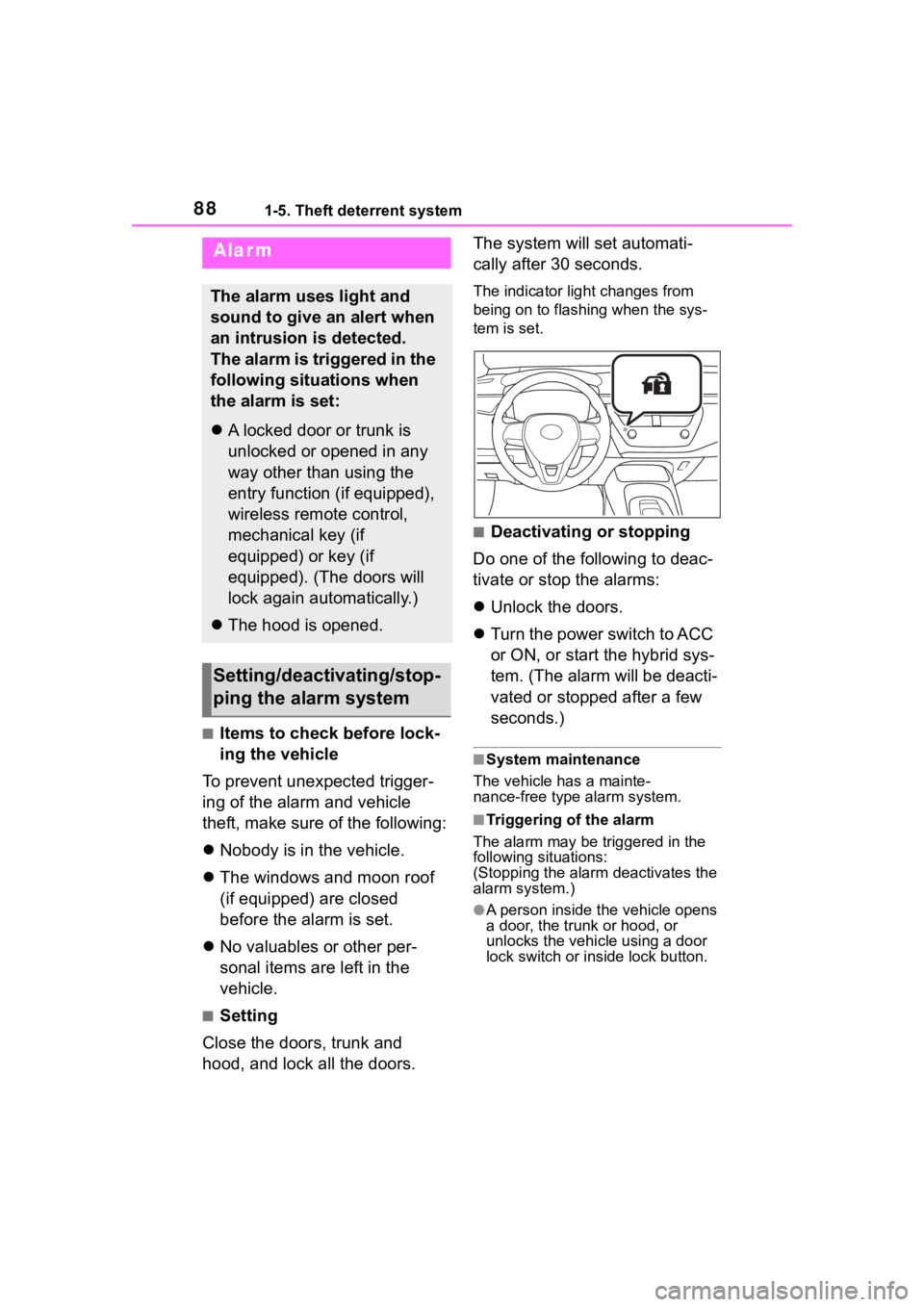
The indicator light changes from
being on to flashing when the sys-
tem is set.
■Deactivating or stopping
Do one of the following to deac-
tivate or stop the alarms:
Unlock the doors.
Turn the power switch to ACC
or ON, or start the hybrid sys-
tem. (The alarm will be deacti-
vated or stopped after a few
seconds.)
■System maintenance
The vehicle has a mainte-
nance-free type alarm system.
■Triggering of the alarm
The alarm may be triggered in the
following situations:
(Stopping the alarm deactivates the
alarm system.)
●A person inside the vehicle opens
a door, the trunk or hood, or
unlocks the vehicle using a door
lock switch or insi de lock button.
Alarm
The alarm uses light and
sound to give an alert when
an intrusion is detected.
The alarm is triggered in the
following situations when
the alarm is set:
A locked door or trunk is
unlocked or opened in any
way other than using the
entry function (if equipped),
wireless remote control,
mechanical key (if
equipped) or key (if
equipped). (The doors will
lock again automatically.)
The hood is opened.
Setting/deactivating/stop-
ping the alarm system
Page 122 of 496
1223-1. Key information
3-1.Key information
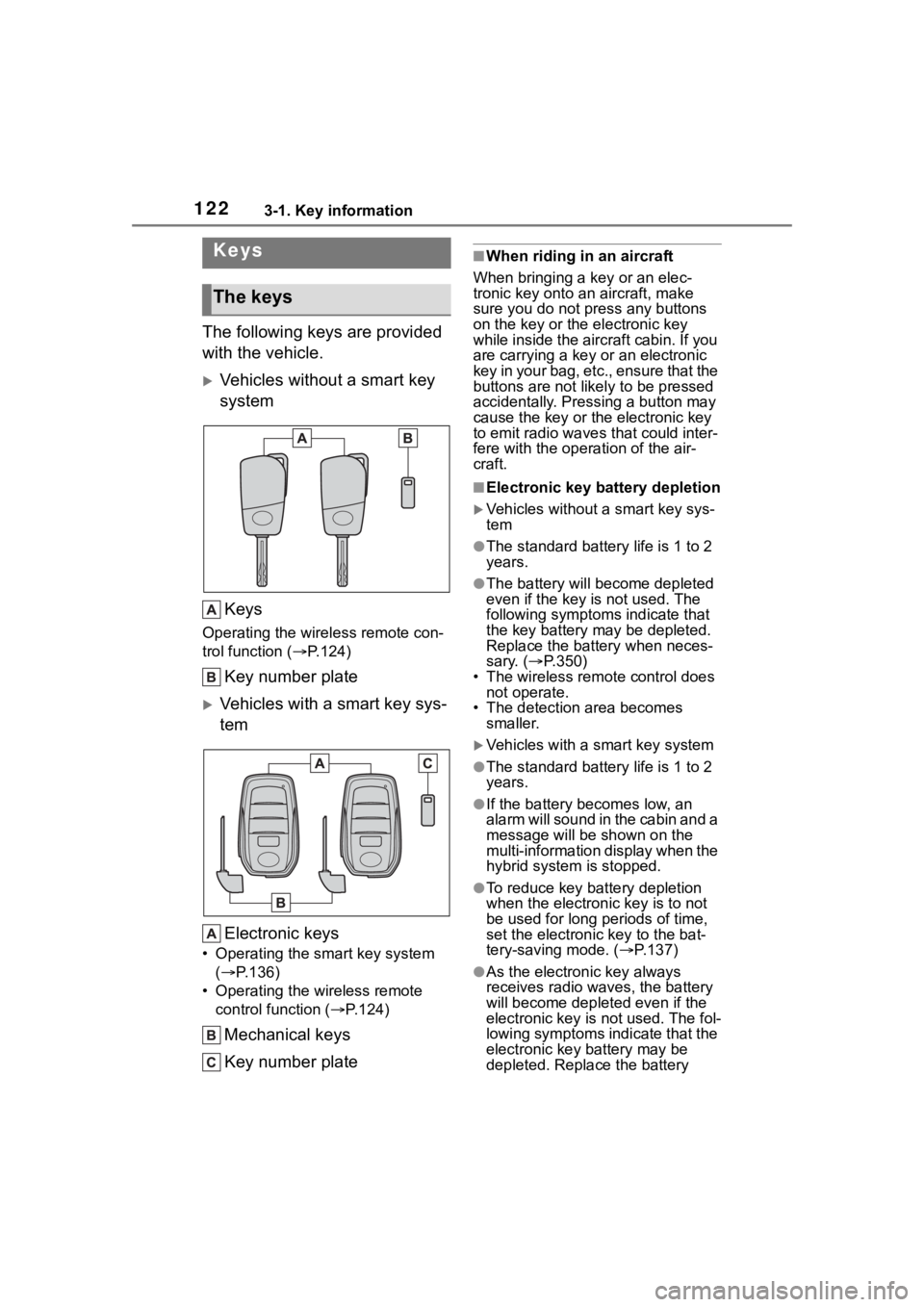
The following keys are provided
with the vehicle.
Vehicles without a smart key
systemKeys
Operating the wireless remote con-
trol function ( P.124)
Key number plate
Vehicles with a smart key sys-
tem
Electronic keys
• Operating the smart key system ( P.136)
• Operating the wireless remote control function ( P.124)
Mechanical keys
Key number plate
■When riding in an aircraft
When bringing a key or an elec-
tronic key onto an aircraft, make
sure you do not press any buttons
on the key or the electronic key
while inside the airc raft cabin. If you
are carrying a key or an electronic
key in your bag, etc., ensure that the
buttons are not likely to be pressed
accidentally. Pressing a button may
cause the key or the electronic key
to emit radio waves that could inter-
fere with the operation of the air-
craft.
■Electronic key battery depletion
Vehicles without a smart key sys-
tem
●The standard battery life is 1 to 2
years.
●The battery will be come depleted
even if the key is not used. The
following symptoms indicate that
the key battery may be depleted.
Replace the battery when neces-
sary. ( P.350)
• The wireless remote control does
not operate.
• The detection area becomes smaller.
Vehicles with a smart key system
●The standard battery life is 1 to 2
years.
●If the battery bec omes low, an
alarm will sound in the cabin and a
message will be shown on the
multi-information display when the
hybrid system is stopped.
●To reduce key battery depletion
when the electronic key is to not
be used for long periods of time,
set the electronic key to the bat-
tery-saving mode. ( P.137)
●As the electronic key always
receives radio waves, the battery
will become depleted even if the
electronic key is not used. The fol-
lowing symptoms indicate that the
electronic key battery may be
depleted. Replace the battery
Keys
The keys
Page 123 of 496
1233-1. Key information
3
Before driving
when necessary. (P.350)
• The smart key system or the wire- less remote control does not oper-
ate.
• The detection area becomes smaller.
• The LED indicator on the key sur- face does not turn on.
●To avoid serious deterioration, do
not leave the electronic key within
3 ft. (1 m) of the following electri-
cal appliances t hat produce a
magnetic field:
• TVs
• Personal computers
• Cellular phones, cordless phones and battery chargers
• Recharging cellular phones or cordless phones
• Table lamps
• Induction cookers
●If the electronic key is near the
vehicle for longer than necessary,
even if the smart key system is not
operated, the key battery may
become depleted faster than nor-
mal.
■Replacing the battery
P. 3 5 0
■The electronic key function is
suspended when (vehicles with
a smart key system)
The electronic key function may be
suspended when the electronic key
is kept unmoved in a same location
for a certain period, such as it is left
on a same place. Th is is to reduce
battery consumption. The function
will be restored automatically when
the electronic key is moved, such as
it is picked up.
■If “A New Key has been Regis-
tered Contact Your Dealer for
Details” is shown on the
multi-information display (vehi-
cles with a smart key system)
This message will be displayed
each time the driver’s door is
opened when the doors are
unlocked from the outside for approximately 10 days after a new
electronic key has been registered.
If this message is displayed but you
have not had a new
electronic key
registered, ask your Toyota dealer to
check if an unknown electronic key
(other than those in your posses-
sion) has been registered.
NOTICE
■To prevent key damage
●Do not drop the keys, subject
them to strong shocks or bend
them.
●Do not expose the keys to high
temperatures for long periods of
time.
●Do not get the keys wet or wash
them in an ultrasonic washer
etc.
●Vehicles with a smart key sys-
tem: Do not att ach metallic or
magnetic materials to the keys
or place the keys close to such
materials.
●Do not disassemble the keys.
●Do not attach a s ticker or any-
thing else to the surface of the
key.
●Vehicles with a smart key sys-
tem: Do not place the keys near
objects that produce magnetic
fields, such as TVs, audio sys-
tems and induction cookers.
●Vehicles with a smart key sys-
tem: Do not place the keys near
medical electrical equipment
such as low-frequency therapy
equipment or microwave ther-
apy equipment, and do not
receive medical attention with
the keys on your person.
Page 124 of 496
1243-1. Key information
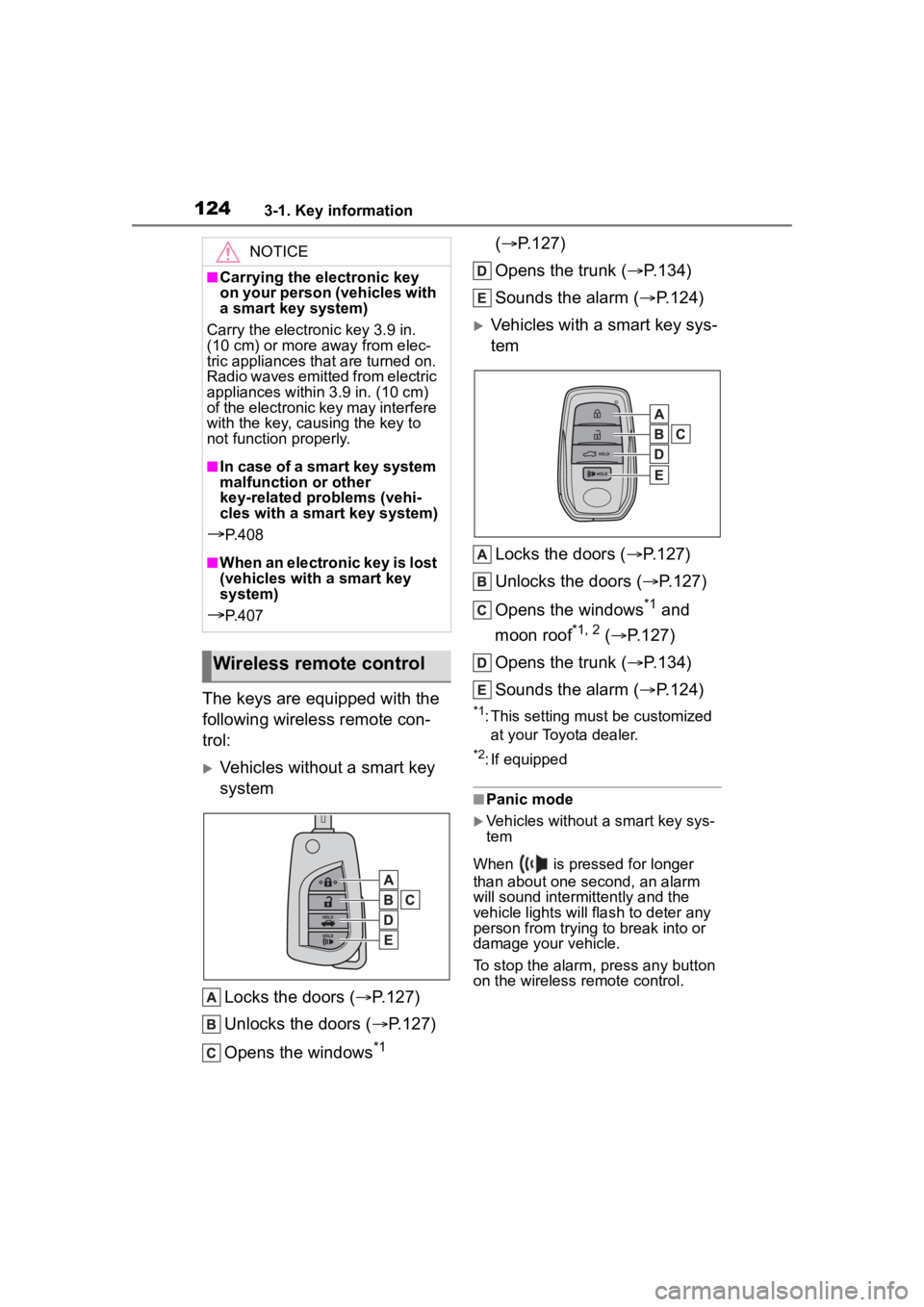
The keys are equipped with the
following wireless remote con-
trol:
Vehicles without a smart key
systemLocks the doors ( P.127)
Unlocks the doors ( P.127)
Opens the windows
*1 (
P.127)
Opens the trunk ( P.134)
Sounds the alarm ( P.124)
Vehicles with a smart key sys-
tem
Locks the doors ( P.127)
Unlocks the doors ( P.127)
Opens the windows
*1 and
moon roof
*1, 2 ( P.127)
Opens the trunk ( P.134)
Sounds the alarm ( P.124)
*1: This setting must be customized
at your Toyota dealer.
*2: If equipped
■Panic mode
Vehicles without a smart key sys-
tem
When is pressed for longer
than about one second, an alarm
will sound intermittently and the
vehicle lights will flash to deter any
person from trying to break into or
damage your vehicle.
To stop the alarm, press any button
on the wireless remote control.
NOTICE
■Carrying the electronic key
on your person (vehicles with
a smart key system)
Carry the electronic key 3.9 in.
(10 cm) or more away from elec-
tric appliances that are turned on.
Radio waves emitted from electric
appliances within 3.9 in. (10 cm)
of the electronic key may interfere
with the key, causing the key to
not function properly.
■In case of a smart key system
malfunction or other
key-related problems (vehi-
cles with a smart key system)
P. 4 0 8
■When an electronic key is lost
(vehicles with a smart key
system)
P. 4 0 7
Wireless remote control
Page 125 of 496
1253-1. Key information
3
Before driving
Vehicles with a smart key system
When is pressed for longer
than about one second, an alarm
will sound intermittently and the
vehicle lights will f lash to deter any
person from trying to break into or
damage your vehicle.
To stop the alarm, press any button
on the electronic key.
■Conditions affect ing the opera-
tion of the smart key system or
wireless remo te control
Vehicles without a smart key sys-
tem
The wireless remote control function
may not operate normally in the fol-
lowing situations:
●When the wireless key battery is
depleted
●Near a TV tower, electric power
plant, gas station , radio station,
large display, airpo rt or other facil-
ity that generates strong radio
waves or electrical noise
●When carrying a portable radio,
cellular phone or other wireless
communication devices
●When the wireles s key is in con-
tact with, or is covered by a metal-
lic object
●When a wireless key (that emits radio waves) is being used nearby
●If window tint wit
h a metallic con-
tent or metallic objects are
attached to the rear window
Vehicles with a smart key system
P.137
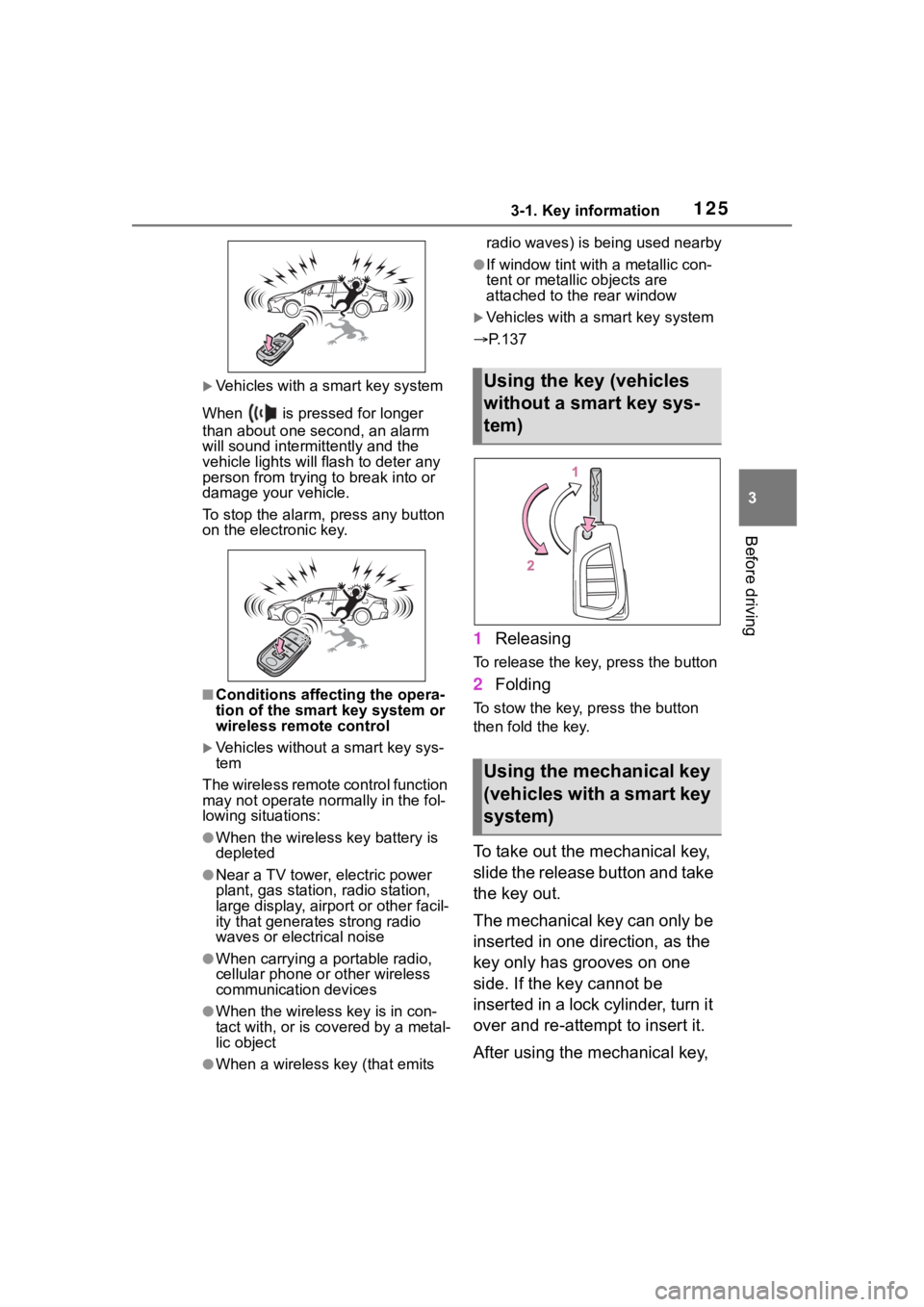
1 Releasing
To release the key, press the button
2Folding
To stow the key, press the button
then fold the key.
To take out the mechanical key,
slide the release button and take
the key out.
The mechanical key can only be
inserted in one direction, as the
key only has grooves on one
side. If the key cannot be
inserted in a lock cylinder, turn it
over and re-attempt to insert it.
After using the mechanical key,
Using the key (vehicles
without a smart key sys-
tem)
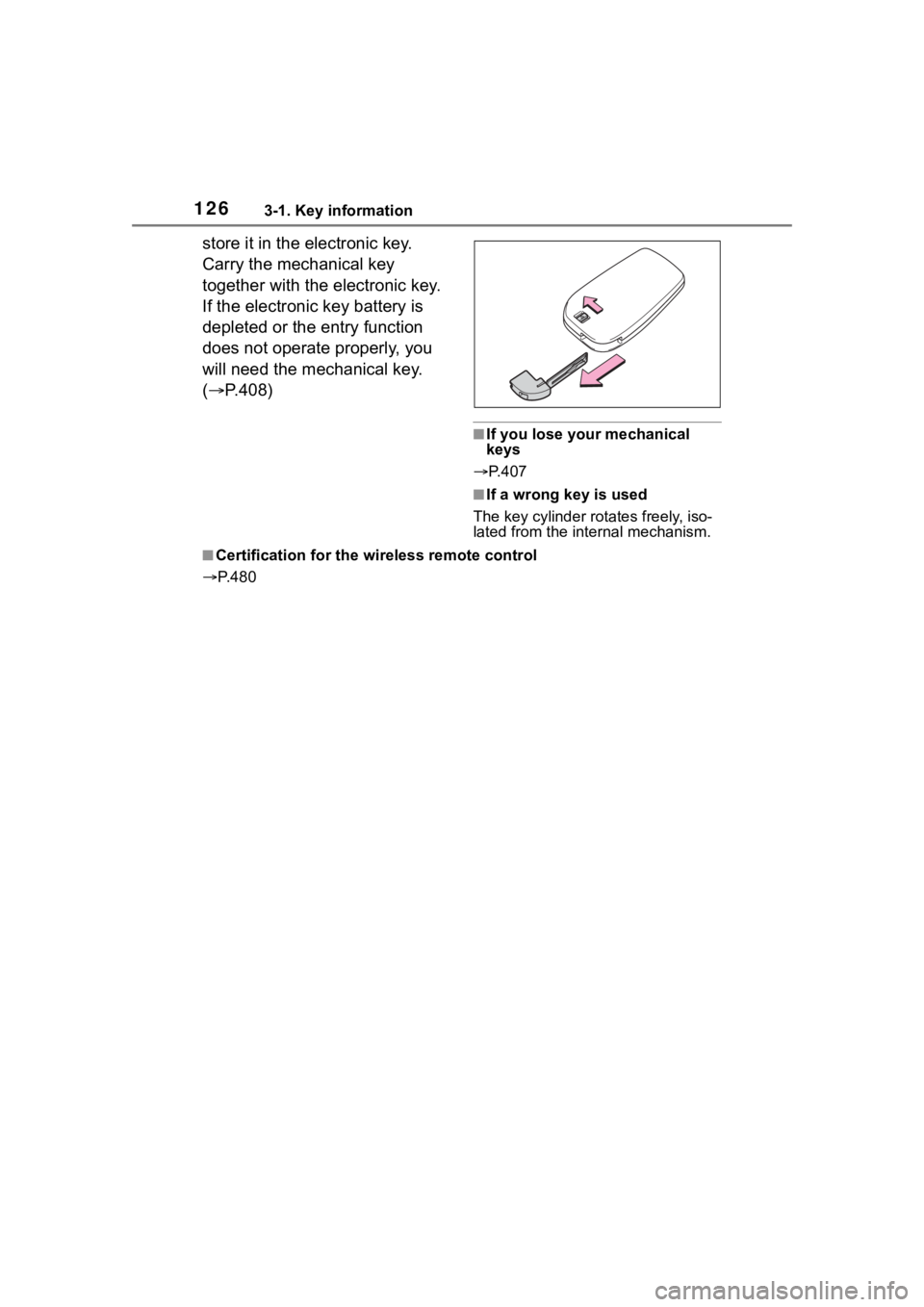
Using the mechanical key
(vehicles with a smart key
system)
Page 126 of 496
1263-1. Key information
store it in the electronic key.
Carry the mechanical key
together with the electronic key.
If the electronic key battery is
depleted or the entry function
does not operate properly, you
will need the mechanical key.
(P.408)
■If you lose your mechanical
keys
P.407
■If a wrong key is used
The key cylinder rotates freely, iso-
lated from the internal mechanism.
■Certification for the wireless remote control
P. 4 8 0
Page 127 of 496
1273-2. Opening, closing and locking the doors
3
Before driving
3-2.Opening, closing and locking the doors
■Smart key system (if
equipped)
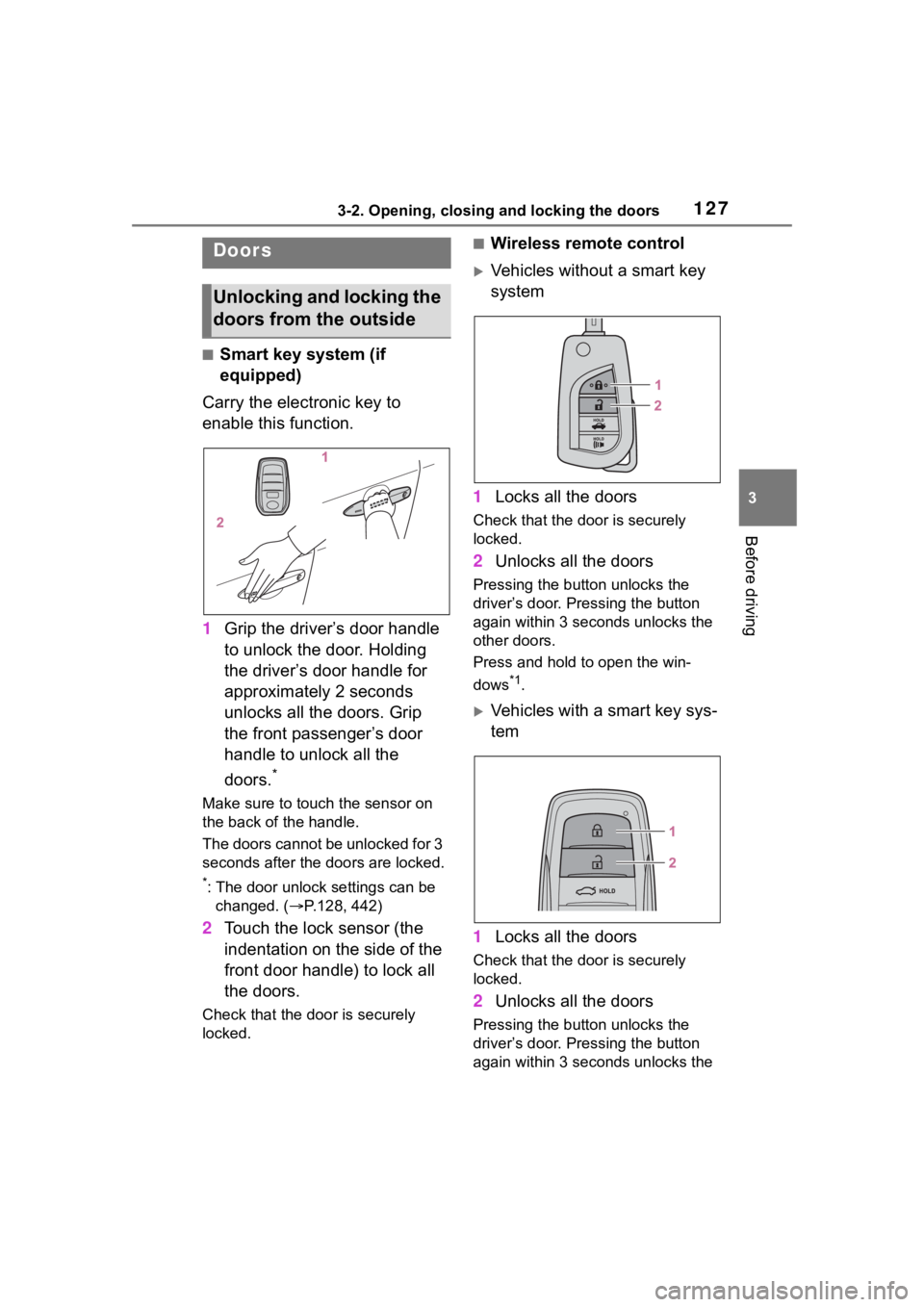
Carry the electronic key to
enable this function.
1 Grip the driver’s door handle
to unlock the door. Holding
the driver’s door handle for
approximately 2 seconds
unlocks all the doors. Grip
the front passenger’s door
handle to unlock all the
doors.
*
Make sure to touch the sensor on
the back of the handle.
The doors cannot be unlocked for 3
seconds after the doors are locked.
*: The door unlock settings can be
changed. ( P.128, 442)
2 Touch the lock sensor (the
indentation on the side of the
front door handle) to lock all
the doors.
Check that the door is securely
locked.
■Wireless remote control
Vehicles without a smart key
system
1 Locks all the doors
Check that the d oor is securely
locked.
2 Unlocks all the doors
Pressing the button unlocks the
driver’s door. Pressing the button
again within 3 seconds unlocks the
other doors.
Press and hold to open the win-
dows
*1.
Vehicles with a smart key sys-
tem
1 Locks all the doors
Check that the d oor is securely
locked.
2 Unlocks all the doors
Pressing the button unlocks the
driver’s door. Pressing the button
again within 3 seconds unlocks the
Doors
Unlocking and locking the
doors from the outside